Structured Document Extraction
Version 1No published result

Prompt-driven schema extraction for invoices and bank statements, with strong row-level capture and a few derived-field caveats.
Strong extraction, but check derived fields.
Unstract handled the two business PDFs well at the schema and row level: it filled the requested nested fields, preserved the full 51-row bank transaction array, and extracted the invoice totals and cross-page line items cleanly. The weak spots were a wrong bank-statement transaction count summary and an unreliable invoice day-of-week mask, so downstream users should verify calculated and fixed-width fields before relying on them.
Explore Unstract in our public benchmarks.
No published result
Our detailed analysis of Unstract — features, performance, and real-world testing.
Feature tested: Custom Schema Population
Result: Partial
Verdict: Strong
Expected behavior: Populates user-defined nested JSON schemas from uploaded PDFs, including bank-statement metadata, account holder details, balances, transaction summaries, and invoice metadata such as station and account details. The evidence on cards 0 and 2 shows the tool filling structured fields from bank statements and invoices into schema-shaped outputs.
Test case: PDF document → Text/code file
Input type: PDF document
Input used: Input artifact (PDF document): Bank Statement PDF — Bank Statement PDF.pdf
Observed output: Output artifact (Text/code file): Returned all 51 transaction rows with correct deposit/withdrawal classification and running balances; the summary.total_transactions value was 43 instead of 51. — unstract_bank_statement_output.json
Input artifact: Input artifact (PDF document): Bank Statement PDF — Bank Statement PDF.pdf
Output artifact: Output artifact (Text/code file): Returned all 51 transaction rows with correct deposit/withdrawal classification and running balances; the summary.total_transactions value was 43 instead of 51. — unstract_bank_statement_output.json
What changed: PDF document transformed into Text/code file
Test case: PDF document → Text/code file
Input type: PDF document
Input used: Input artifact (PDF document): Invoice PDF — Invoice PDF.pdf
Observed output: Output artifact (Text/code file): Captured line 8 across the page break without duplication and matched the invoice totals exactly; the day_of_week field was not reproduced reliably. — unstract_invoice_output.json
Input artifact: Input artifact (PDF document): Invoice PDF — Invoice PDF.pdf
Output artifact: Output artifact (Text/code file): Captured line 8 across the page break without duplication and matched the invoice totals exactly; the day_of_week field was not reproduced reliably. — unstract_invoice_output.json
What changed: PDF document transformed into Text/code file
Why it matters / Conclusion: Strong at populating nested document schemas; check derived summary or mask-style fields before downstream use.
Populates user-defined nested JSON schemas from uploaded PDFs, including bank-statement metadata, account holder details, balances, transaction summaries, and invoice metadata such as station and account details. The evidence on cards 0 and 2 shows the tool filling structured fields from bank statements and invoices into schema-shaped outputs.
Feature tested: Multi-Page Table and Line-Item Extraction
Result: Partial
Verdict: Strong with caveats
Expected behavior: Preserves repeating table rows and invoice line items across long documents and page breaks, including statement transactions with running balances and invoice line items that continue onto the next page. The evidence on card 1 focuses on continuity of row-level data rather than schema population.
Test case: PDF document → Text/code file
Input type: PDF document
Input used: Input artifact (PDF document): Input — Bank Statement PDF.pdf
Observed output: Output artifact (Text/code file): The transaction array preserves all 51 rows from the 4-page statement, with correct deposit/withdrawal classification and running balances. — unstract_bank_statement_output.json
Input artifact: Input artifact (PDF document): Input — Bank Statement PDF.pdf
Output artifact: Output artifact (Text/code file): The transaction array preserves all 51 rows from the 4-page statement, with correct deposit/withdrawal classification and running balances. — unstract_bank_statement_output.json
What changed: PDF document transformed into Text/code file
Test case: PDF document → Text/code file
Input type: PDF document
Input used: Input artifact (PDF document): Input — Invoice PDF.pdf
Observed output: Output artifact (Text/code file): Line 8 was captured once across the page break without duplication or data loss, while the financial totals remained correct. — unstract_invoice_output.json
Input artifact: Input artifact (PDF document): Input — Invoice PDF.pdf
Output artifact: Output artifact (Text/code file): Line 8 was captured once across the page break without duplication or data loss, while the financial totals remained correct. — unstract_invoice_output.json
What changed: PDF document transformed into Text/code file
Why it matters / Conclusion: Reliable for row-level capture and page-break continuity; the main issues were summary counts and text-formatting noise, not missing rows.
Preserves repeating table rows and invoice line items across long documents and page breaks, including statement transactions with running balances and invoice line items that continue onto the next page. The evidence on card 1 focuses on continuity of row-level data rather than schema population.
Feature tested: Field-Level Accuracy vs. Source Document
Result: Passed
Verdict: Works Well
Expected behavior: Every extracted value was manually cross-checked against the original bank statement and invoice PDFs — entity data, balances, individual transactions, and the invoice's financial summary — verified line-by-line rather than trusting the tool's output at face value.
Test case: PDF document → Image
Input type: PDF document
Input used: Input artifact (PDF document): Input — Bank Statement PDF.pdf
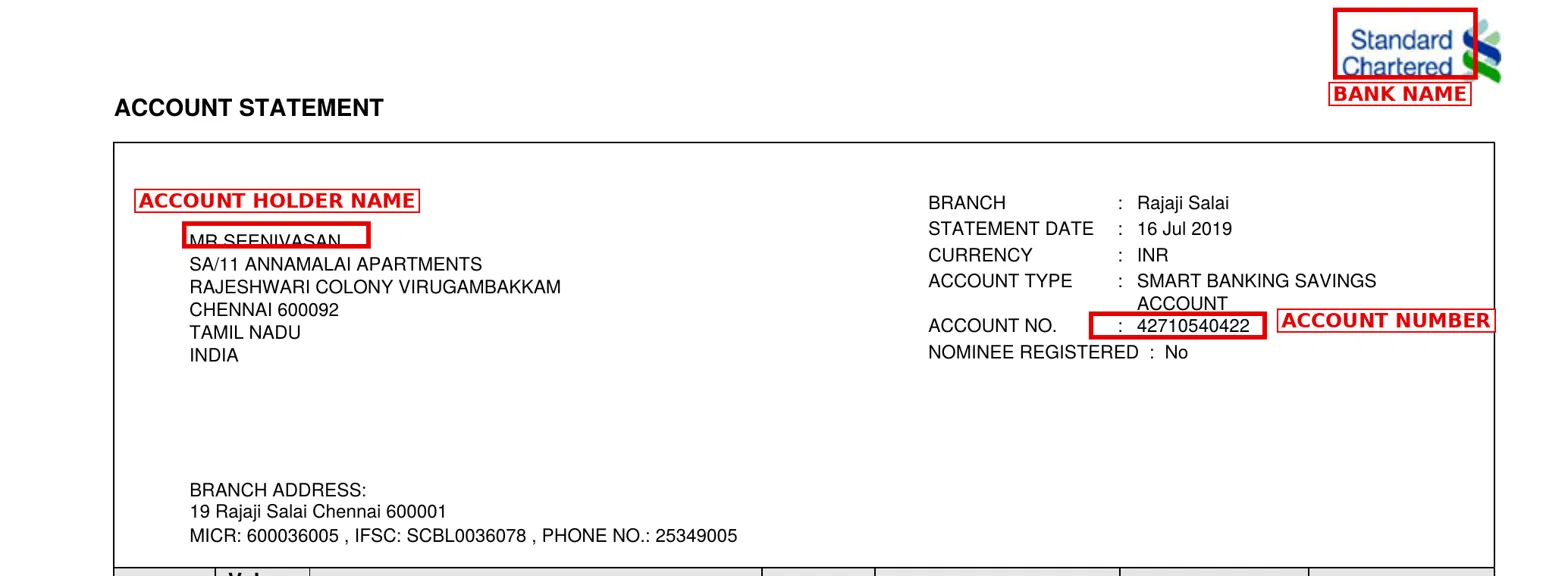
Observed output: Output artifact (Image): Bank name, account holder name, and account number extracted correctly, matching the source header exactly. — bank_statement_ss1_metadata_account.png
Input artifact: Input artifact (PDF document): Input — Bank Statement PDF.pdf
Output artifact: Output artifact (Image): Bank name, account holder name, and account number extracted correctly, matching the source header exactly. — bank_statement_ss1_metadata_account.png
What changed: PDF document transformed into Image
Test case: PDF document → Image
Input type: PDF document
Input used: Input artifact (PDF document): Input — Bank Statement PDF.pdf
Observed output: Output artifact (Image): Opening balance (16 Jun) and closing balance (16 Jul) match the source PDF's BALANCE FORWARD and TOTAL rows exactly. — bank_statement_ss2_opening_closing_balance.png
Input artifact: Input artifact (PDF document): Input — Bank Statement PDF.pdf
Output artifact: Output artifact (Image): Opening balance (16 Jun) and closing balance (16 Jul) match the source PDF's BALANCE FORWARD and TOTAL rows exactly. — bank_statement_ss2_opening_closing_balance.png
What changed: PDF document transformed into Image
Test case: PDF document → Image
Input type: PDF document
Input used: Input artifact (PDF document): Input — Bank Statement PDF.pdf
Observed output: Output artifact (Image): The large NEFT deposit (₹67,148) is correctly classified and its running balance matches the source. — bank_statement_ss3_neft_transaction.png
Input artifact: Input artifact (PDF document): Input — Bank Statement PDF.pdf
Output artifact: Output artifact (Image): The large NEFT deposit (₹67,148) is correctly classified and its running balance matches the source. — bank_statement_ss3_neft_transaction.png
What changed: PDF document transformed into Image
Test case: PDF document → Image
Input type: PDF document
Input used: Input artifact (PDF document): Input — Bank Statement PDF.pdf
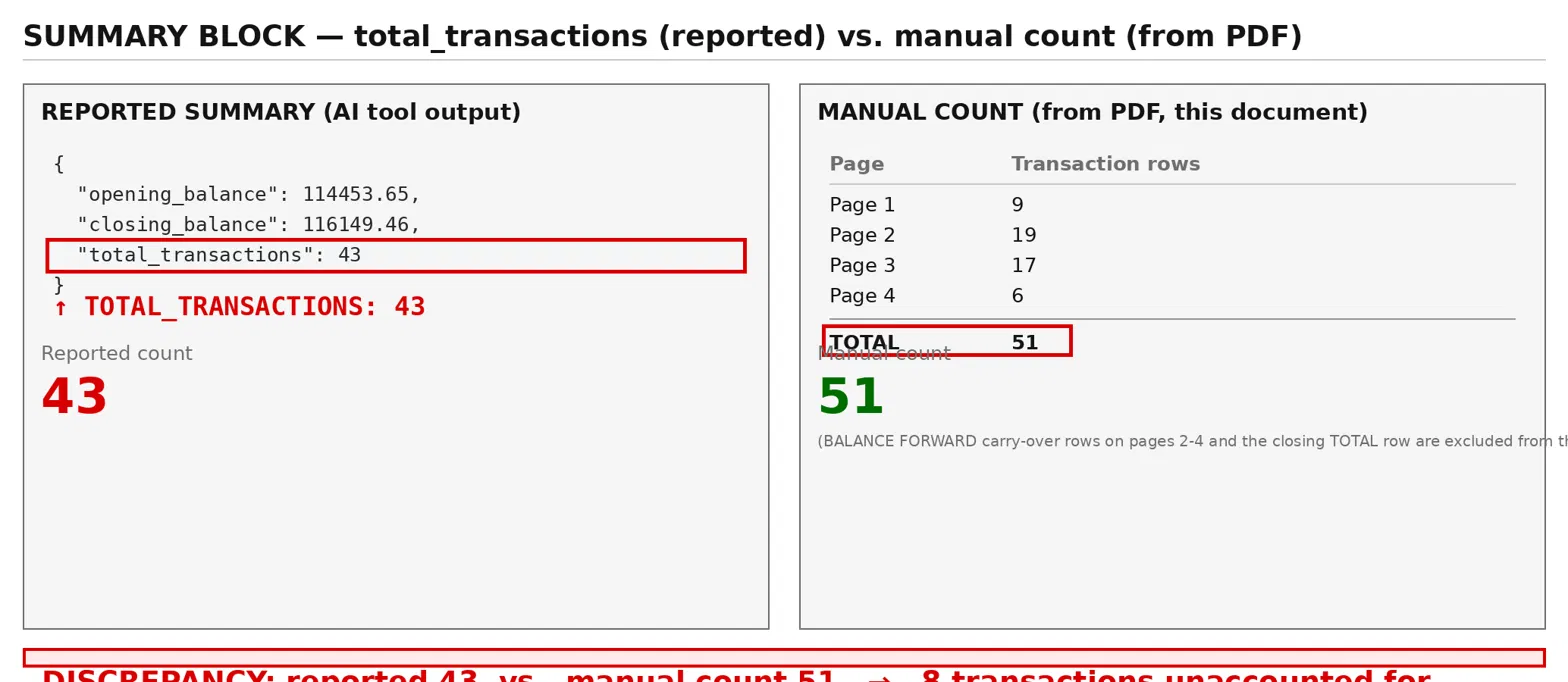
Observed output: Output artifact (Image): The summary's total_transactions field reports 43, but the array actually contains all 51 transactions — manually counted against the source PDF across all 4 pages. — bank_statement_ss4_total_transactions_discrepancy.png
Input artifact: Input artifact (PDF document): Input — Bank Statement PDF.pdf
Output artifact: Output artifact (Image): The summary's total_transactions field reports 43, but the array actually contains all 51 transactions — manually counted against the source PDF across all 4 pages. — bank_statement_ss4_total_transactions_discrepancy.png
What changed: PDF document transformed into Image
Test case: PDF document → Image
Input type: PDF document
Input used: Input artifact (PDF document): Input — Invoice.pdf
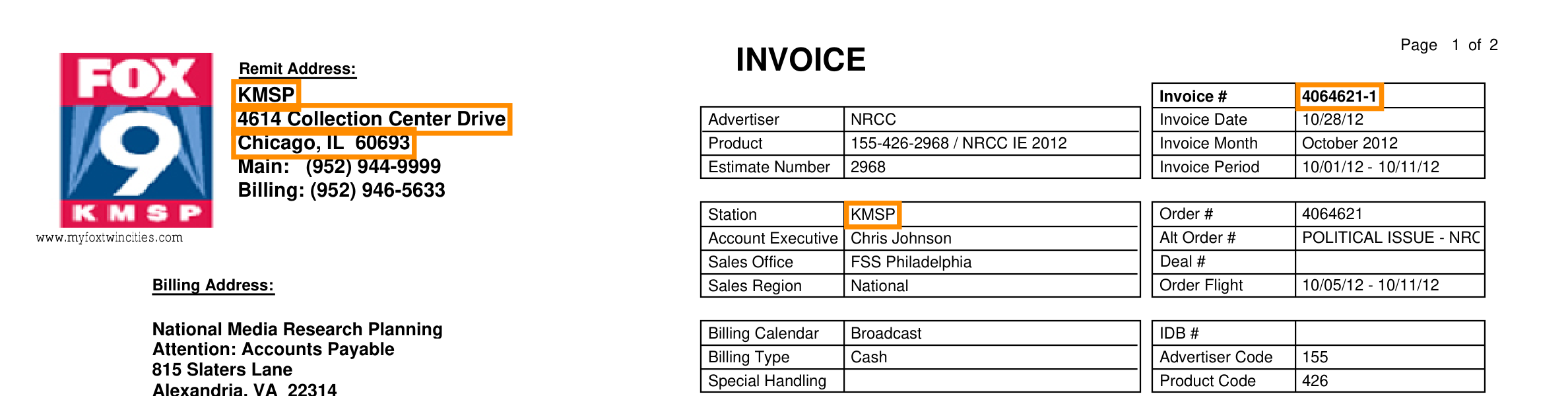
Observed output: Output artifact (Image): Invoice number and station (KMSP) details extracted correctly from the header tables. — invoice_ss1_metadata_station.png
Input artifact: Input artifact (PDF document): Input — Invoice.pdf
Output artifact: Output artifact (Image): Invoice number and station (KMSP) details extracted correctly from the header tables. — invoice_ss1_metadata_station.png
What changed: PDF document transformed into Image
Test case: PDF document → Image
Input type: PDF document
Input used: Input artifact (PDF document): Input — Invoice.pdf
Observed output: Output artifact (Image): Line 8, the NFL broadcast spanning the page break, was captured in full with the correct $8,500.00 rate. — invoice_ss2_line8_rate.png
Input artifact: Input artifact (PDF document): Input — Invoice.pdf
Output artifact: Output artifact (Image): Line 8, the NFL broadcast spanning the page break, was captured in full with the correct $8,500.00 rate. — invoice_ss2_line8_rate.png
What changed: PDF document transformed into Image
Test case: PDF document → Image
Input type: PDF document
Input used: Input artifact (PDF document): Input — Invoice.pdf
Observed output: Output artifact (Image): Gross total, agency commission, and net amount due all match the invoice's printed totals exactly. — invoice_ss3_summary.png
Input artifact: Input artifact (PDF document): Input — Invoice.pdf
Output artifact: Output artifact (Image): Gross total, agency commission, and net amount due all match the invoice's printed totals exactly. — invoice_ss3_summary.png
What changed: PDF document transformed into Image
Why it matters / Conclusion: Manual verification against the source PDFs confirmed core financial figures reconcile exactly on both documents, but surfaced two real discrepancies: the bank statement's summary total_transactions field (43) undercounts the actual 51 rows present in the array, and the invoice's day_of_week field doesn't reliably reproduce the source's 7-character scheduling mask.
Every extracted value was manually cross-checked against the original bank statement and invoice PDFs — entity data, balances, individual transactions, and the invoice's financial summary — verified line-by-line rather than trusting the tool's output at face value.




Independent rankings where Unstract was tested and rated.
How the embed badge will look on your site

Copy this code to your website source
Discover more AI tools like Unstract to enhance your workflow.
If you are looking to build a custom invoice extraction, bank statement parsing, or document extraction system for your business or internal workflow, email us at contact@futuresmart.ai.
Found something inaccurate or missing? We try to keep our AI research accurate and useful. If you found outdated information, an issue, or have a suggestion, email us at collaborate@aidemos.com.