Structured Document Extraction
Version 1No published result

Schema-first PDF extraction for finance documents that returns nested JSON with minimal setup.
Strong fit for schema-based document extraction
Retab accepted direct PDF uploads, let the tester paste custom JSON schemas, and returned copyable nested JSON for both a bank statement and an invoice with no manual intervention. It was especially strong at reconstructing line items and typed financial fields, but the bank summary count was off, one invoice field kept its source label text, and schema key order wasn't preserved.
Explore Retab in our public benchmarks.
No published result
Our detailed analysis of Retab — features, performance, and real-world testing.
Feature tested: Schema-Driven PDF Extraction
Result: Passed
Expected behavior: Retab accepts direct PDF uploads and a custom JSON schema, then returns nested structured JSON instead of flat OCR text. In the bank statement and invoice tests, it preserved the expected section hierarchy in the extracted output.
Test case: PDF document → Text/code file
Input type: PDF document
Input used: Input artifact (PDF document): Source bank statement used in the extraction test. — Bank Statement PDF.pdf
Observed output: Output artifact (Text/code file): Structured bank statement JSON with nested statement data, transactions, summary, rewards, and disclaimers; the summary count later needed validation. — retab-bank-statement-output.json
Input artifact: Input artifact (PDF document): Source bank statement used in the extraction test. — Bank Statement PDF.pdf
Output artifact: Output artifact (Text/code file): Structured bank statement JSON with nested statement data, transactions, summary, rewards, and disclaimers; the summary count later needed validation. — retab-bank-statement-output.json
What changed: PDF document transformed into Text/code file
Test case: PDF document → Text/code file
Input type: PDF document
Input used: Input artifact (PDF document): Source invoice used in the extraction test. — Invoice PDF.pdf
Observed output: Output artifact (Text/code file): Structured invoice JSON with nested invoice metadata, advertiser, billing, line items, and summary fields. — retab-invoice-output.json
Input artifact: Input artifact (PDF document): Source invoice used in the extraction test. — Invoice PDF.pdf
Output artifact: Output artifact (Text/code file): Structured invoice JSON with nested invoice metadata, advertiser, billing, line items, and summary fields. — retab-invoice-output.json
What changed: PDF document transformed into Text/code file
Why it matters / Conclusion: This was the core strength of the tool: zero-friction PDF intake plus schema-matched JSON output on both financial document types.
Retab accepts direct PDF uploads and a custom JSON schema, then returns nested structured JSON instead of flat OCR text. In the bank statement and invoice tests, it preserved the expected section hierarchy in the extracted output.
Feature tested: Row-Level Table Reconstruction
Result: Passed
Expected behavior: Retab turns dense document tables into structured row arrays. On the bank statement it produced a transactions array, and on the invoice it extracted eight line items with scheduling, rate, and campaign identifier fields intact.
Test case: PDF document → Text/code file
Input type: PDF document
Input used: Input artifact (PDF document): Source bank statement used to test transaction-row reconstruction. — Bank Statement PDF.pdf
Observed output: Output artifact (Text/code file): The bank statement output included a transactions array with 51 extracted rows. — retab-bank-statement-output.json
Input artifact: Input artifact (PDF document): Source bank statement used to test transaction-row reconstruction. — Bank Statement PDF.pdf
Output artifact: Output artifact (Text/code file): The bank statement output included a transactions array with 51 extracted rows. — retab-bank-statement-output.json
What changed: PDF document transformed into Text/code file
Test case: PDF document → Text/code file
Input type: PDF document
Input used: Input artifact (PDF document): Source invoice used to test line-item reconstruction. — Invoice PDF.pdf
Observed output: Output artifact (Text/code file): The JSON tree view shows the line_items array expanded into numbered entries, matching the report’s eight extracted line items. — retab-invoice-output.json
Input artifact: Input artifact (PDF document): Source invoice used to test line-item reconstruction. — Invoice PDF.pdf
Output artifact: Output artifact (Text/code file): The JSON tree view shows the line_items array expanded into numbered entries, matching the report’s eight extracted line items. — retab-invoice-output.json
What changed: PDF document transformed into Text/code file
Why it matters / Conclusion: The row extraction itself was complete in both samples, but the bank statement’s summary aggregation did not reconcile cleanly against the expected transaction count.
Retab turns dense document tables into structured row arrays. On the bank statement it produced a transactions array, and on the invoice it extracted eight line items with scheduling, rate, and campaign identifier fields intact.
Feature tested: Financial Field Normalization and Classification
Result: Passed
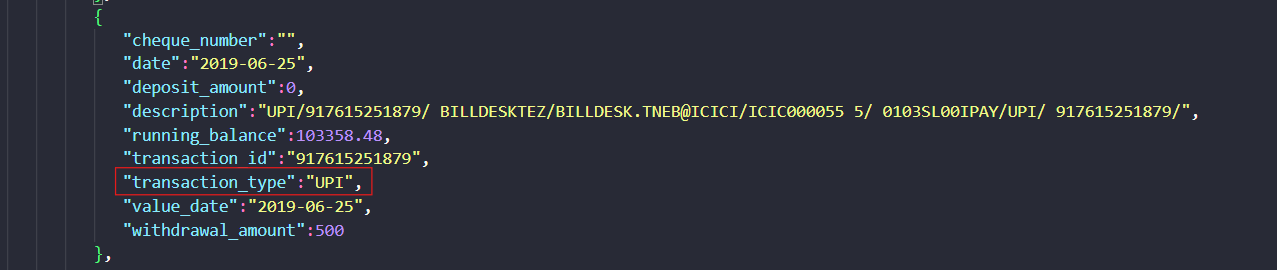
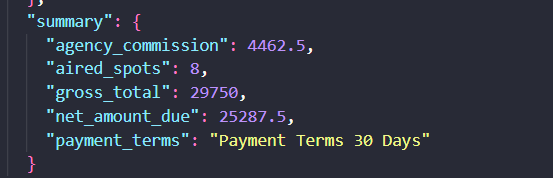
Expected behavior: Retab normalizes finance-specific fields into machine-readable values such as dates, amounts, totals, payment terms, and transaction types. In the bank statement it classified a row as UPI, and in the invoice summary it surfaced gross total, commission, and net amount due.
Test case: PDF document → Image
Input type: PDF document
Input used: Input artifact (PDF document): Source bank statement used to test transaction-type classification. — Bank Statement PDF.pdf
Observed output: Output artifact (Image): The extracted transaction row was classified as transaction_type UPI and preserved the debit amount, value date, and running balance fields. — retab-bank-statement-extracted-transaction-type.png
Input artifact: Input artifact (PDF document): Source bank statement used to test transaction-type classification. — Bank Statement PDF.pdf
Output artifact: Output artifact (Image): The extracted transaction row was classified as transaction_type UPI and preserved the debit amount, value date, and running balance fields. — retab-bank-statement-extracted-transaction-type.png
What changed: PDF document transformed into Image
Test case: PDF document → Image
Input type: PDF document
Input used: Input artifact (PDF document): Source invoice used to test summary-field normalization. — Invoice PDF.pdf
Observed output: Output artifact (Image): The invoice summary returned agency_commission, aired_spots, gross_total, net_amount_due, and payment_terms as structured fields. — retab-invoice-summary.png
Input artifact: Input artifact (PDF document): Source invoice used to test summary-field normalization. — Invoice PDF.pdf
Output artifact: Output artifact (Image): The invoice summary returned agency_commission, aired_spots, gross_total, net_amount_due, and payment_terms as structured fields. — retab-invoice-summary.png
What changed: PDF document transformed into Image
Why it matters / Conclusion: Normalization was solid for the core numeric and date fields, but validation is still needed for the bank transaction-count summary and the invoice payment_terms cleanup.
Retab normalizes finance-specific fields into machine-readable values such as dates, amounts, totals, payment terms, and transaction types. In the bank statement it classified a row as UPI, and in the invoice summary it surfaced gross total, commission, and net amount due.
Credit-based plans were listed in the research notes.
Pricing was reported from the evaluation and was not independently tested.
Independent rankings where Retab was tested and rated.
How the embed badge will look on your site

Copy this code to your website source
Discover more AI tools like Retab to enhance your workflow.
If you are looking to build a custom document extraction, PDF parsing, or structured data extraction system for your business or internal workflow, email us at contact@futuresmart.ai.
Found something inaccurate or missing? We try to keep our AI research accurate and useful. If you found outdated information, an issue, or have a suggestion, email us at collaborate@aidemos.com.