
Supermemory Review: AI Agent Memory Layer Tested (2026)
Hosted agent memory with strong capture and scoping, but mixed retrieval and weak forget behavior.
Useful for visible agent memory, but not for trusted forgetting
- you need a hosted memory layer with API/SDK access and a visible UI for inspecting stored context
- you need user, account, or project scoping to keep client and project histories separate
- you want to test real multi-session memory workflows across preference, support, and project continuity
- you need guaranteed forget/delete retirement to be correct on the first try
Our take
Supermemory is a solid hosted memory layer for AI agents when you need durable context capture, scoped user/project containers, and visible debugging. It remembered style, client, and project context well, and it kept separate containers isolated, but retrieval was inconsistent, the chat-level "0 memory used" tag conflicted with the side panel, and a forget request did not reliably retire the old preference. I would use it where observability matters, but not where delete/forget correctness is mission-critical.
In-Depth Review
Our detailed analysis of Supermemory — features, performance, and real-world testing.
Feature-by-Feature Breakdown
Preference Memory PersistenceMostly strong▾
Feature tested: Preference Memory Persistence
Result: Partial
Verdict: Mostly strong
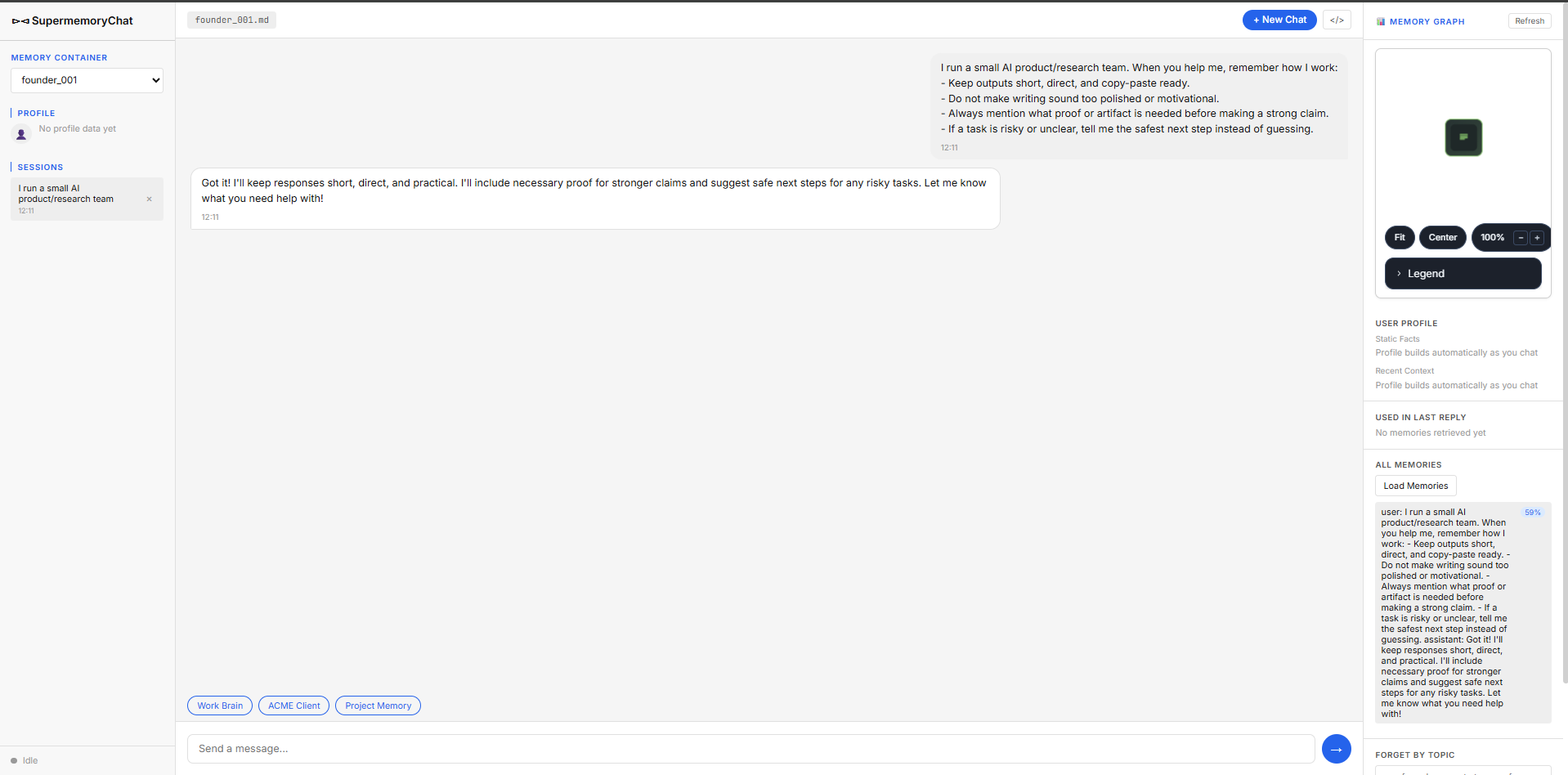
Expected behavior: Stores a user's durable writing preferences and reuses them later. In this test it captured founder_001's short, direct, copy-paste-ready style, non-polished tone, proof-before-claim habit, and safer-next-step preference, then carried that context into an internal update.
Test case: Text prompt → Image
Input type: Text prompt
Input used: Input artifact (Text prompt): Input
Observed output: Output artifact (Image): The assistant acknowledged the preference and stored a style-memory note that matched the short, direct working style. — Supermemory_Input1_Session1_Working_Style_Memory.png
Input artifact: Input artifact (Text prompt): Input
Output artifact: Output artifact (Image): The assistant acknowledged the preference and stored a style-memory note that matched the short, direct working style. — Supermemory_Input1_Session1_Working_Style_Memory.png
What changed: Text prompt transformed into Image
Test case: Text prompt → Image
Input type: Text prompt
Input used: Input artifact (Text prompt): Input
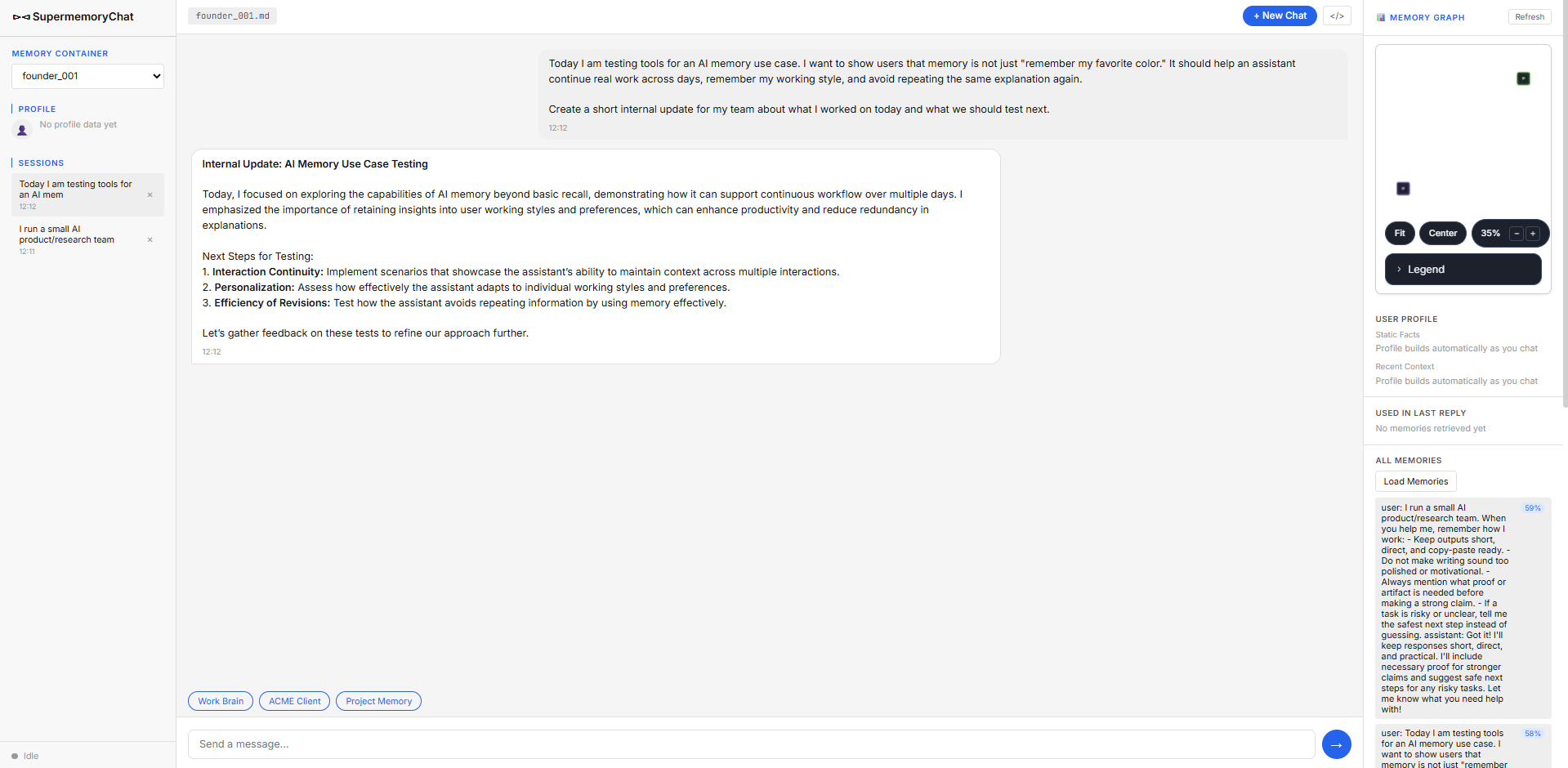
Observed output: Output artifact (Image): The internal update reflected the memory-testing context and stayed practical, though it was a little more polished and structured than the requested style. — Supermemory_Input1_Session2_Internal_Update_Output.png
Input artifact: Input artifact (Text prompt): Input
Output artifact: Output artifact (Image): The internal update reflected the memory-testing context and stayed practical, though it was a little more polished and structured than the requested style. — Supermemory_Input1_Session2_Internal_Update_Output.png
What changed: Text prompt transformed into Image
Test case: Text prompt → Image
Input type: Text prompt
Input used: Input artifact (Text prompt): Input
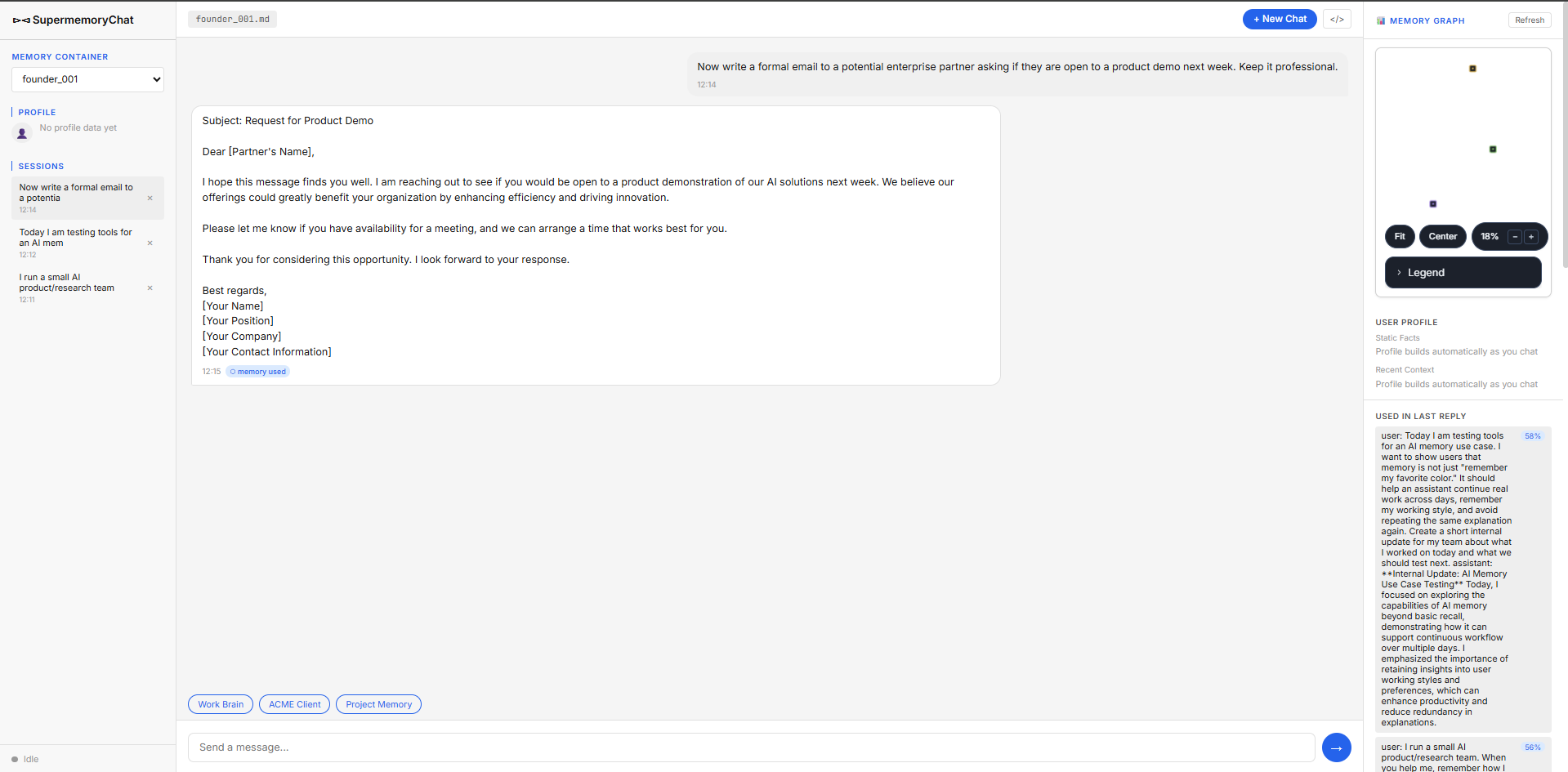
Observed output: Output artifact (Image): The assistant wrote a professional partner email without incorrectly forcing the internal-update tone into an unrelated communication. — Supermemory_Input1_Session3_Formal_Email_Output.png
Input artifact: Input artifact (Text prompt): Input
Output artifact: Output artifact (Image): The assistant wrote a professional partner email without incorrectly forcing the internal-update tone into an unrelated communication. — Supermemory_Input1_Session3_Formal_Email_Output.png
What changed: Text prompt transformed into Image
Why it matters / Conclusion: Capture and reuse were strong, but the second-session output was slightly more polished than the user's stated preference.
Stores a user's durable writing preferences and reuses them later. In this test it captured founder_001's short, direct, copy-paste-ready style, non-polished tone, proof-before-claim habit, and safer-next-step preference, then carried that context into an internal update.
Scope Isolation by Customer and ProjectStrong▾
Feature tested: Scope Isolation by Customer and Project
Result: Passed
Verdict: Strong
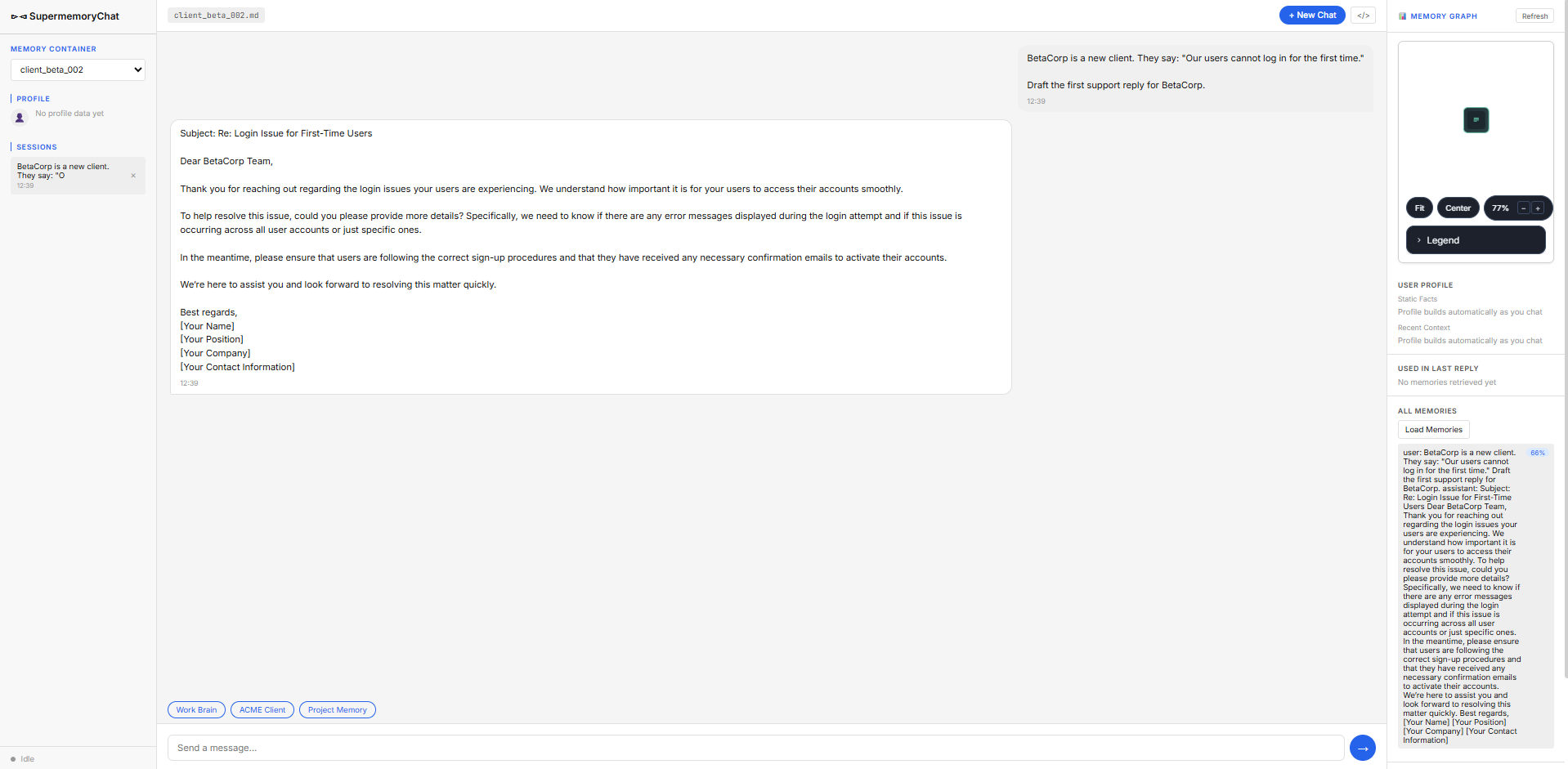
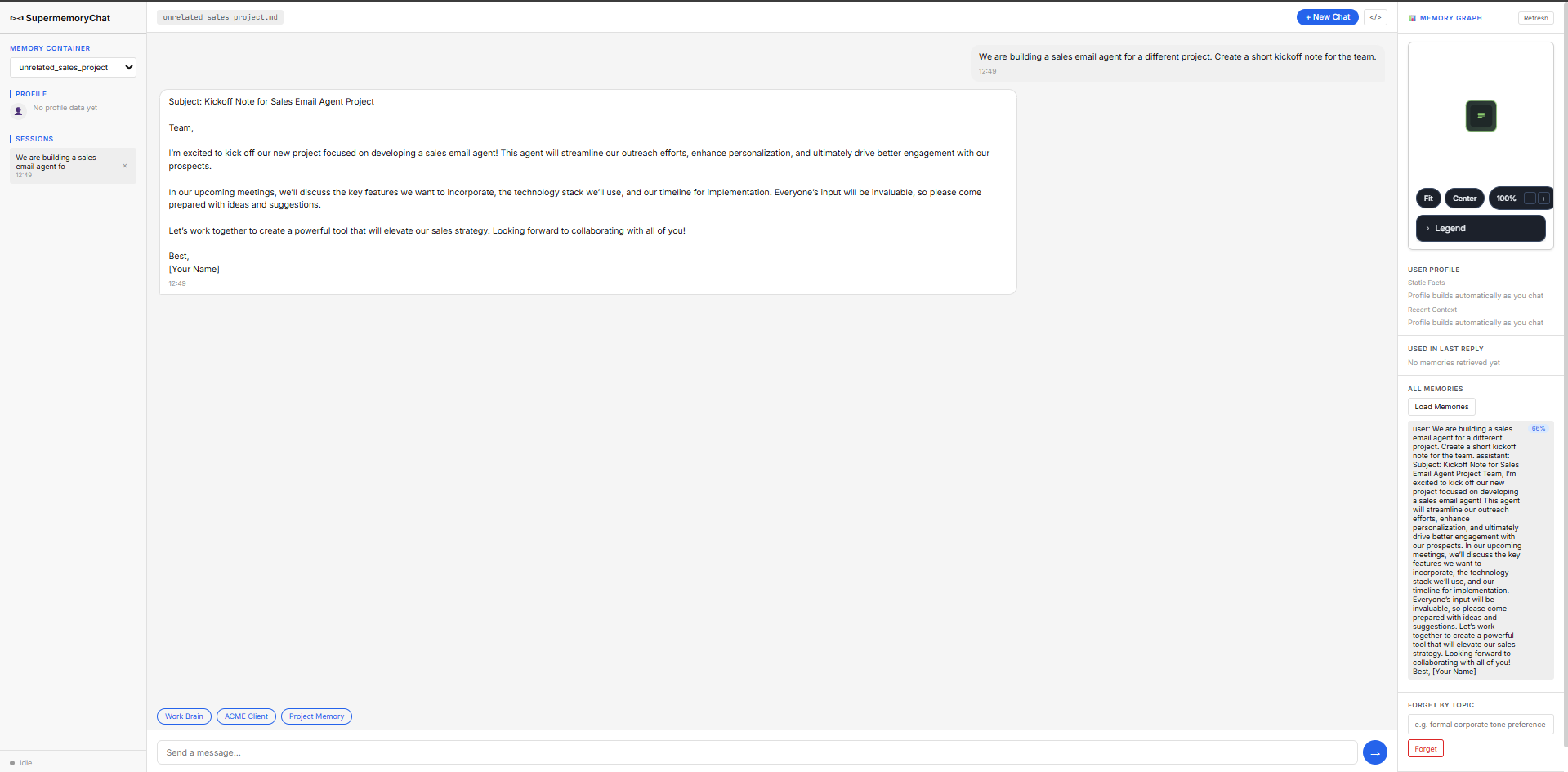
Expected behavior: Keeps memories separated by customer/account and project container so one context does not leak into another. The benchmark kept ACME distinct from BetaCorp and separated the AI Demos memory use case from an unrelated sales-email-agent project.
Test case: Text prompt → Image
Input type: Text prompt
Input used: Input artifact (Text prompt): Input
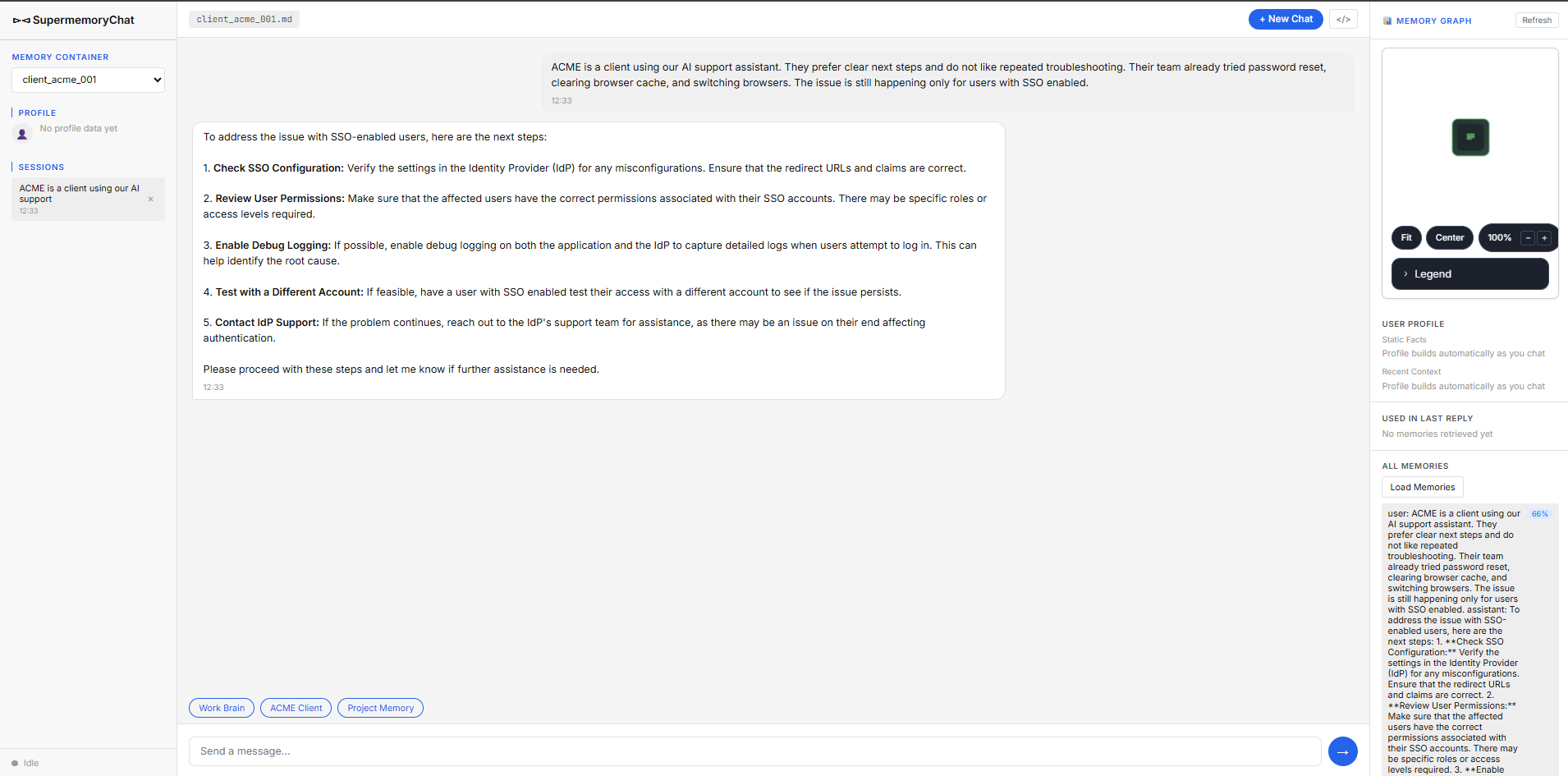
Observed output: Output artifact (Image): ACME support context was stored under client_acme_001 with its own troubleshooting history. — Supermemory_Input2_Session1_ACME_Initial_SSO_Context.png
Input artifact: Input artifact (Text prompt): Input
Output artifact: Output artifact (Image): ACME support context was stored under client_acme_001 with its own troubleshooting history. — Supermemory_Input2_Session1_ACME_Initial_SSO_Context.png
What changed: Text prompt transformed into Image
Test case: Text prompt → Image
Input type: Text prompt
Input used: Input artifact (Text prompt): Input
Observed output: Output artifact (Image): BetaCorp started as a fresh client container and did not inherit ACME's SSO history. — Supermemory_Input2_Session5_BetaCorp_Scope_Isolation.png
Input artifact: Input artifact (Text prompt): Input
Output artifact: Output artifact (Image): BetaCorp started as a fresh client container and did not inherit ACME's SSO history. — Supermemory_Input2_Session5_BetaCorp_Scope_Isolation.png
What changed: Text prompt transformed into Image
Test case: Text prompt → Image
Input type: Text prompt
Input used: Input artifact (Text prompt): Input
Observed output: Output artifact (Image): The unrelated sales-agent project stayed isolated from the AI Demos memory and produced a generic kickoff note. — Supermemory_Input3_Session5_Unrelated_Project_Scope_Isolation.png
Input artifact: Input artifact (Text prompt): Input
Output artifact: Output artifact (Image): The unrelated sales-agent project stayed isolated from the AI Demos memory and produced a generic kickoff note. — Supermemory_Input3_Session5_Unrelated_Project_Scope_Isolation.png
What changed: Text prompt transformed into Image
Why it matters / Conclusion: Scope isolation was one of Supermemory's strongest qualities in this benchmark.
Keeps memories separated by customer/account and project container so one context does not leak into another. The benchmark kept ACME distinct from BetaCorp and separated the AI Demos memory use case from an unrelated sales-email-agent project.
Support History RetrievalWeak / inconsistent▾
Feature tested: Support History Retrieval
Result: Failed
Verdict: Weak / inconsistent
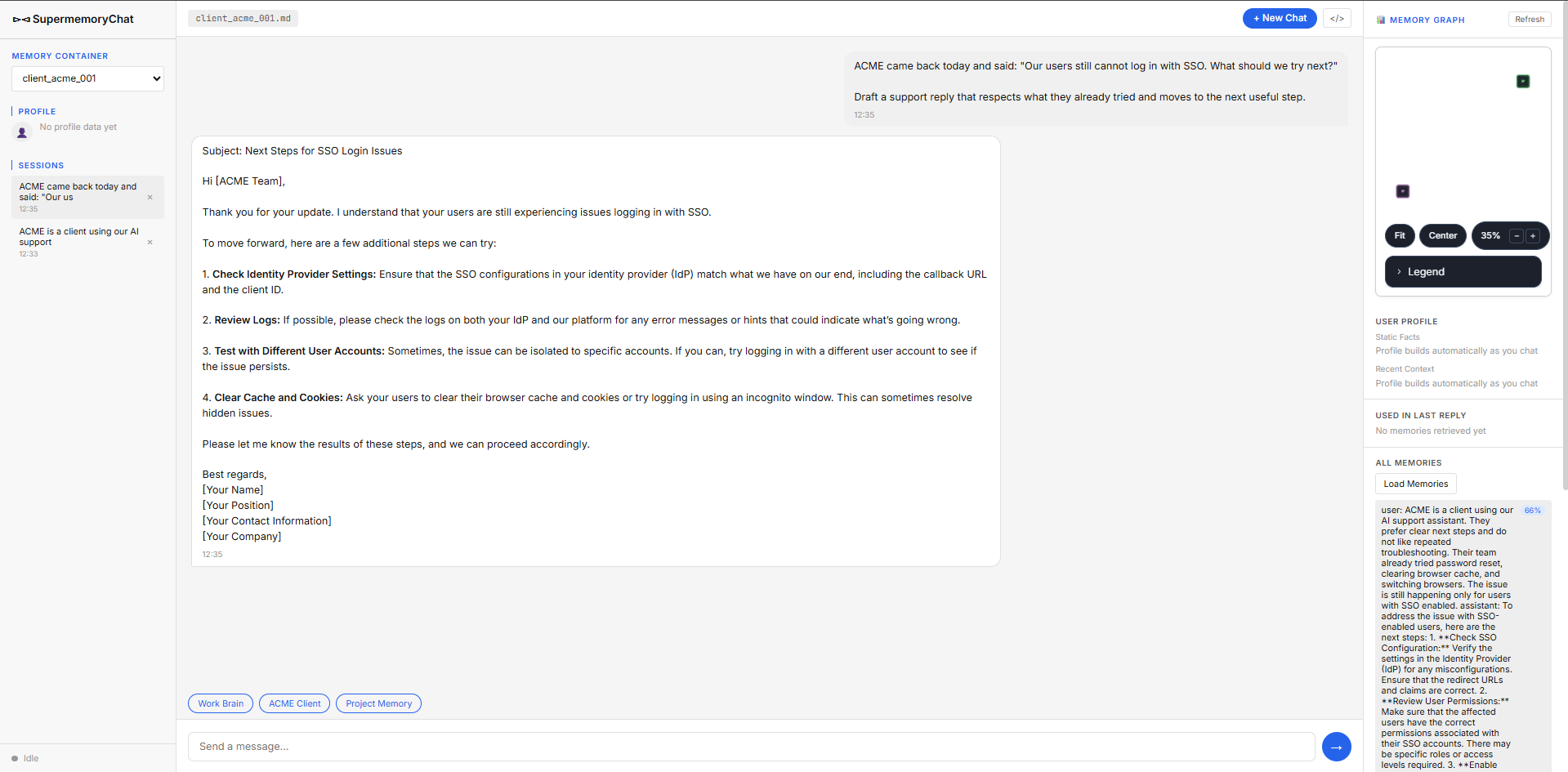
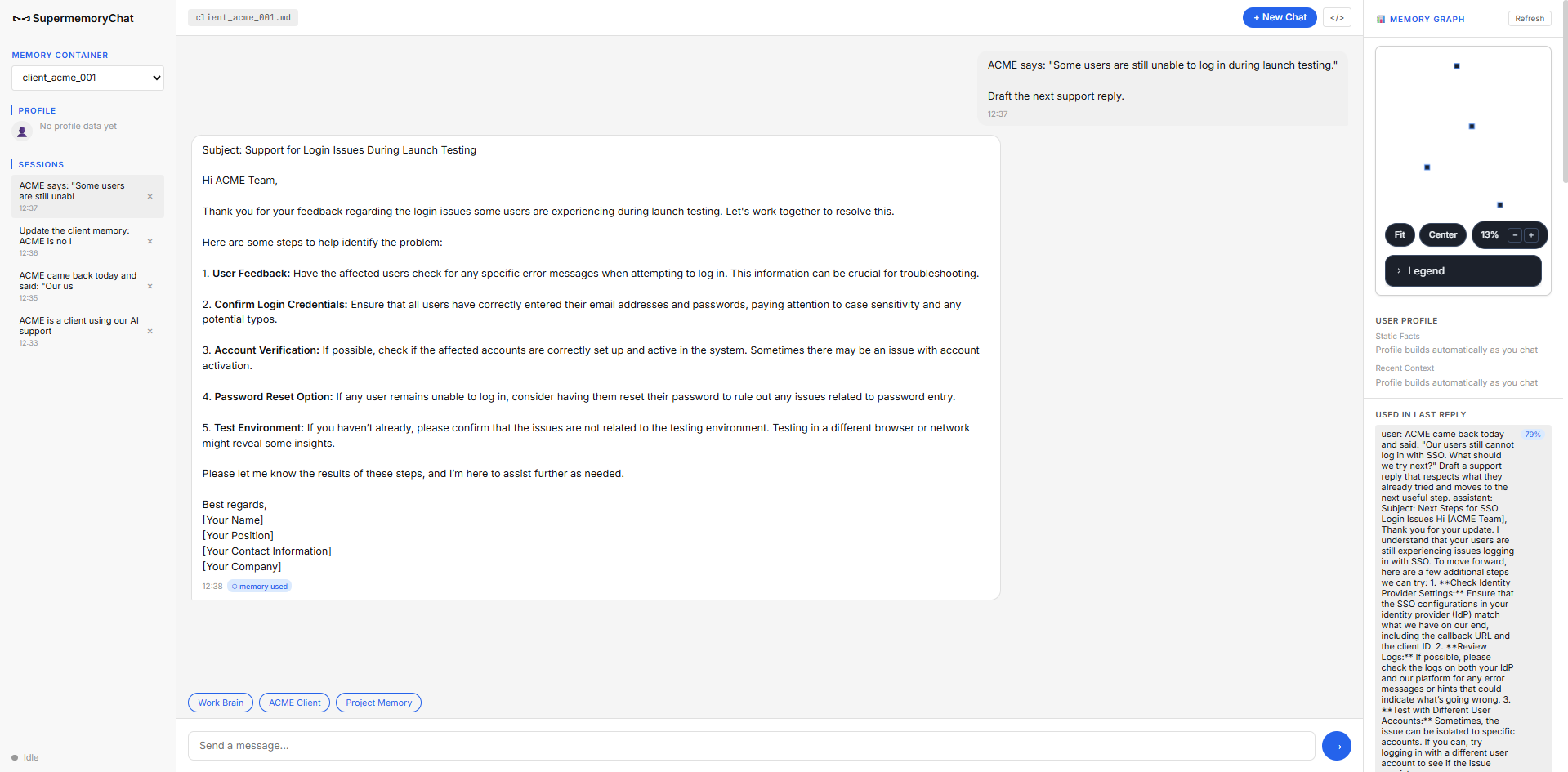
Expected behavior: Surfaces prior troubleshooting history so support replies can progress instead of repeating known steps. It was exercised on ACME's repeated SSO/login issues and a launch-testing follow-up.
Test case: Text prompt → Image
Input type: Text prompt
Input used: Input artifact (Text prompt): Input
Observed output: Output artifact (Image): The side panel showed no memories retrieved yet for this reply, and the drafted response repeated cache-clearing guidance even though ACME had already tried clearing browser cache. — Supermemory_Input2_Session2_ACME_Repeated_Cache_Clear_Step-2.png
Input artifact: Input artifact (Text prompt): Input
Output artifact: Output artifact (Image): The side panel showed no memories retrieved yet for this reply, and the drafted response repeated cache-clearing guidance even though ACME had already tried clearing browser cache. — Supermemory_Input2_Session2_ACME_Repeated_Cache_Clear_Step-2.png
What changed: Text prompt transformed into Image
Test case: Text prompt → Image
Input type: Text prompt
Input used: Input artifact (Text prompt): Input
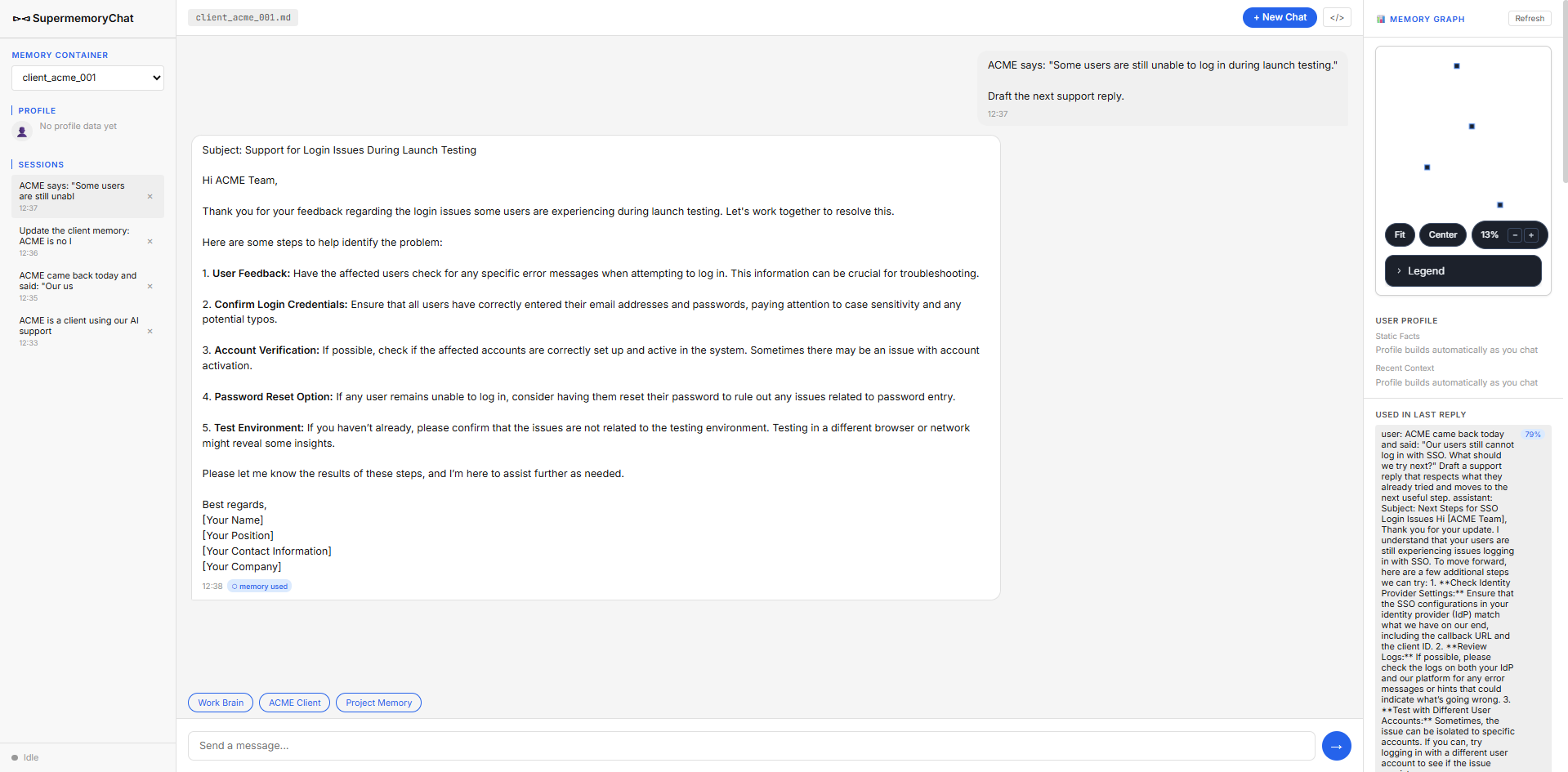
Observed output: Output artifact (Image): The reply moved to generic login troubleshooting, but the UI showed a '0 memory used' tag while the side panel still displayed related ACME memory, so the retrieval signal was inconsistent. — Supermemory_Input2_Session4_ACME_Launch_Testing_Reply.png
Input artifact: Input artifact (Text prompt): Input
Output artifact: Output artifact (Image): The reply moved to generic login troubleshooting, but the UI showed a '0 memory used' tag while the side panel still displayed related ACME memory, so the retrieval signal was inconsistent. — Supermemory_Input2_Session4_ACME_Launch_Testing_Reply.png
What changed: Text prompt transformed into Image
Why it matters / Conclusion: A real retrieval miss surfaced in support flow, and the later launch-testing reply still had contradictory memory signals.
Surfaces prior troubleshooting history so support replies can progress instead of repeating known steps. It was exercised on ACME's repeated SSO/login issues and a launch-testing follow-up.
Project Memory Handoff SynthesisMixed▾
Feature tested: Project Memory Handoff Synthesis
Result: Partial
Verdict: Mixed
Expected behavior: Carries project memory across sessions and synthesizes it into a handoff note. The benchmark used the AI Demos 'Memory for AI Agents' project to test rules, direction changes, and an intern handoff.
Test case: Text prompt → Image
Input type: Text prompt
Input used: Input artifact (Text prompt): Input
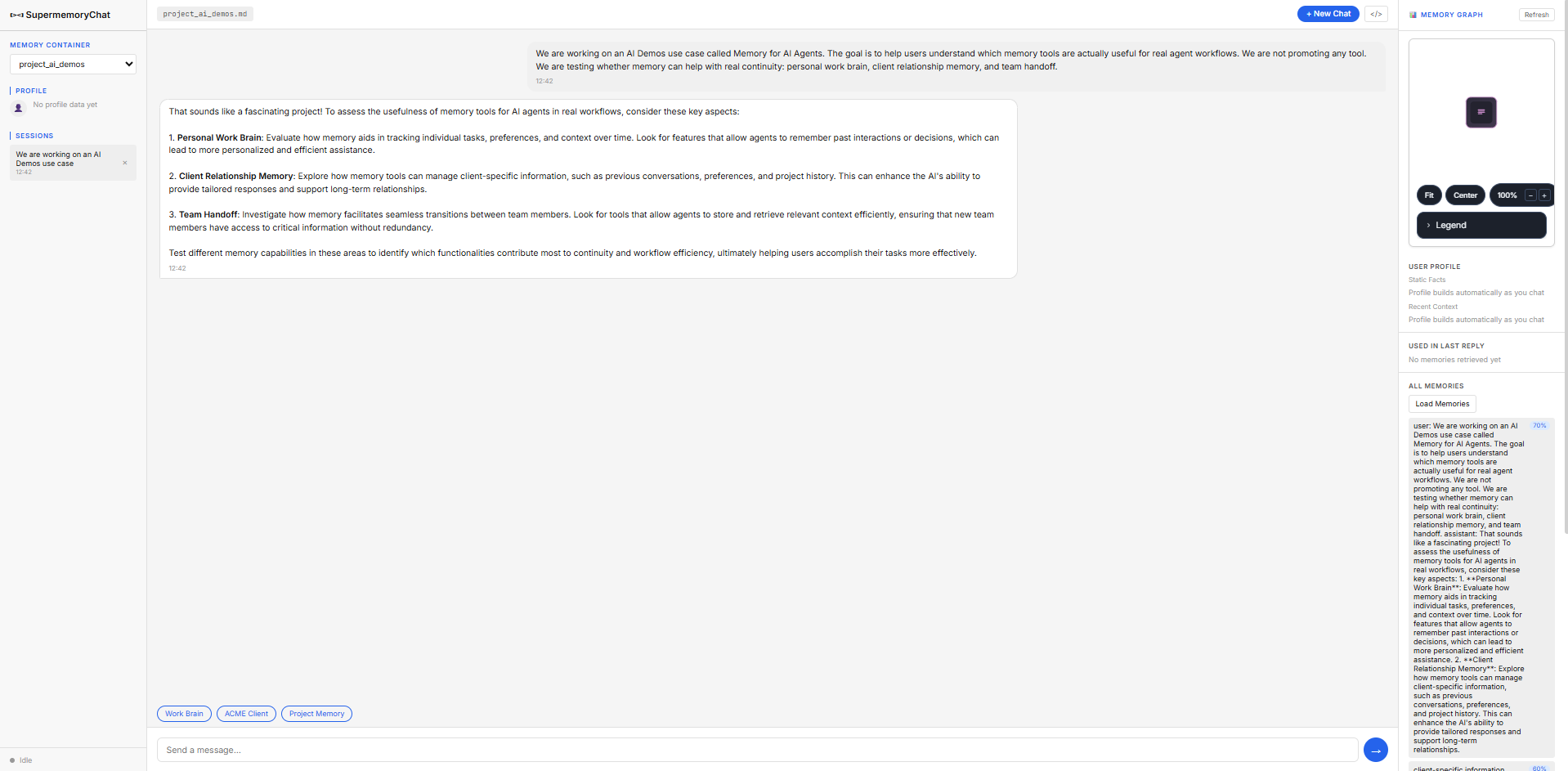
Observed output: Output artifact (Image): The response reflected the project's three memory categories, but it read like generic evaluation advice rather than a distilled memory summary. — Supermemory_Input3_Session1_Project_Context_Generic_Advice.png
Input artifact: Input artifact (Text prompt): Input
Output artifact: Output artifact (Image): The response reflected the project's three memory categories, but it read like generic evaluation advice rather than a distilled memory summary. — Supermemory_Input3_Session1_Project_Context_Generic_Advice.png
What changed: Text prompt transformed into Image
Test case: Text prompt → Image
Input type: Text prompt
Input used: Input artifact (Text prompt): Input
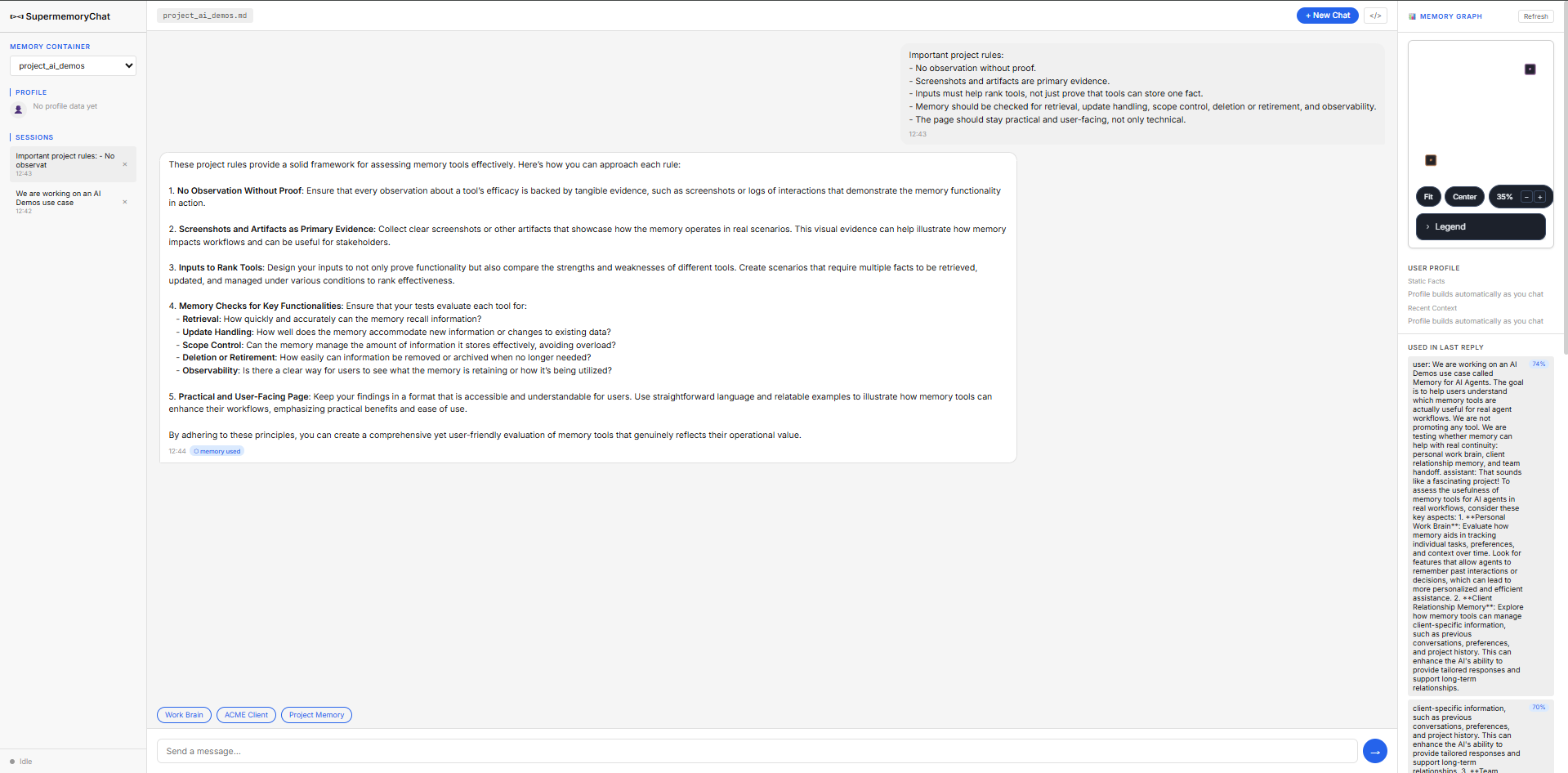
Observed output: Output artifact (Image): The assistant enumerated the project rules accurately, while the UI showed a '0 memory used' tag despite related memory appearing in the side panel. — Supermemory_Input3_Session2_Project_Rules_Zero_Used_Tag.png
Input artifact: Input artifact (Text prompt): Input
Output artifact: Output artifact (Image): The assistant enumerated the project rules accurately, while the UI showed a '0 memory used' tag despite related memory appearing in the side panel. — Supermemory_Input3_Session2_Project_Rules_Zero_Used_Tag.png
What changed: Text prompt transformed into Image
Test case: Text prompt → Image
Input type: Text prompt
Input used: Input artifact (Text prompt): Input
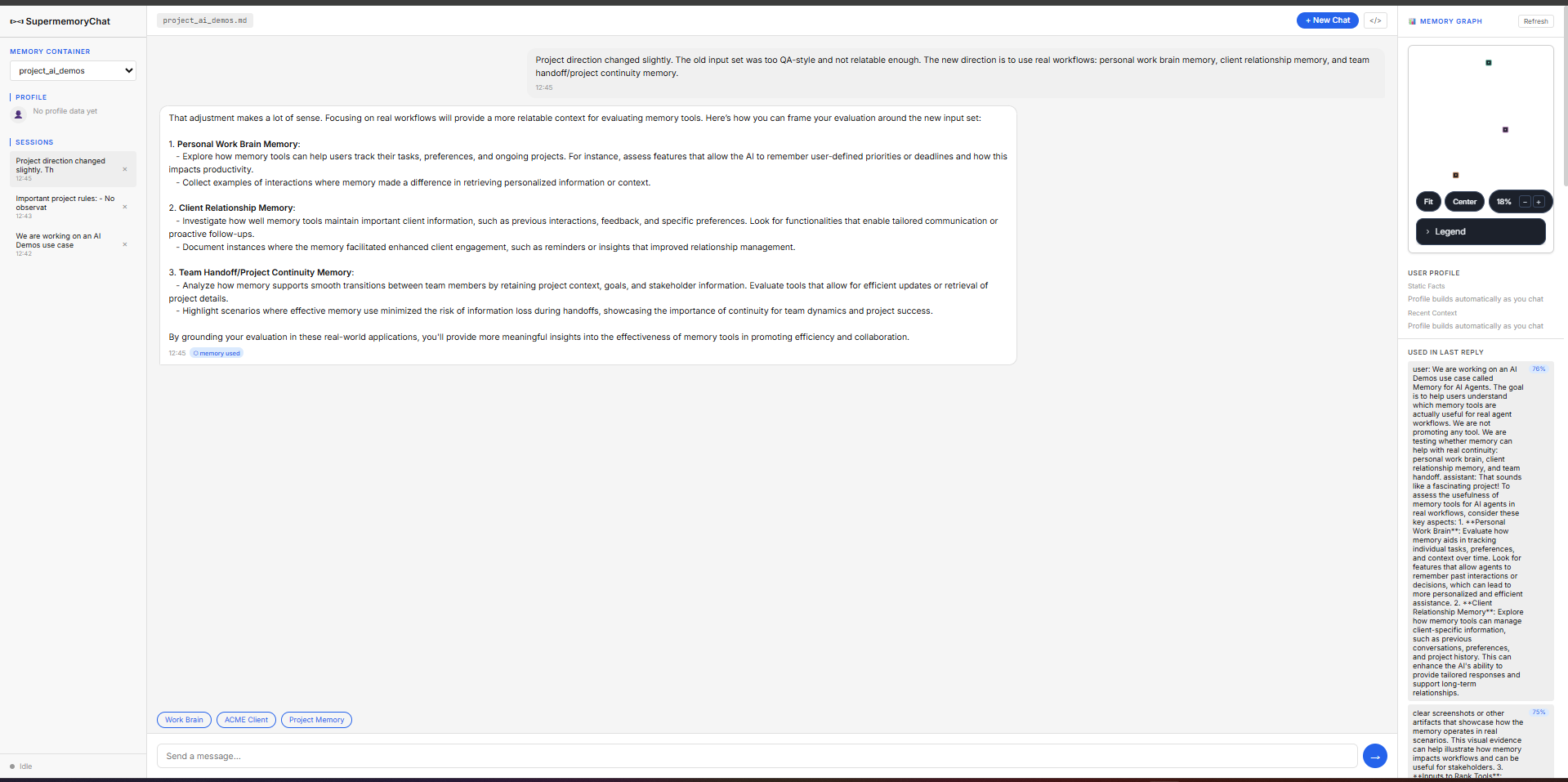
Observed output: Output artifact (Image): The reply stayed generic and did not clearly show that the direction change away from QA-style testing had been incorporated. — Supermemory_Input3_Session3_Direction_Change_Generic_Repeat.png
Input artifact: Input artifact (Text prompt): Input
Output artifact: Output artifact (Image): The reply stayed generic and did not clearly show that the direction change away from QA-style testing had been incorporated. — Supermemory_Input3_Session3_Direction_Change_Generic_Repeat.png
What changed: Text prompt transformed into Image
Test case: Text prompt → Image
Input type: Text prompt
Input used: Input artifact (Text prompt): Input
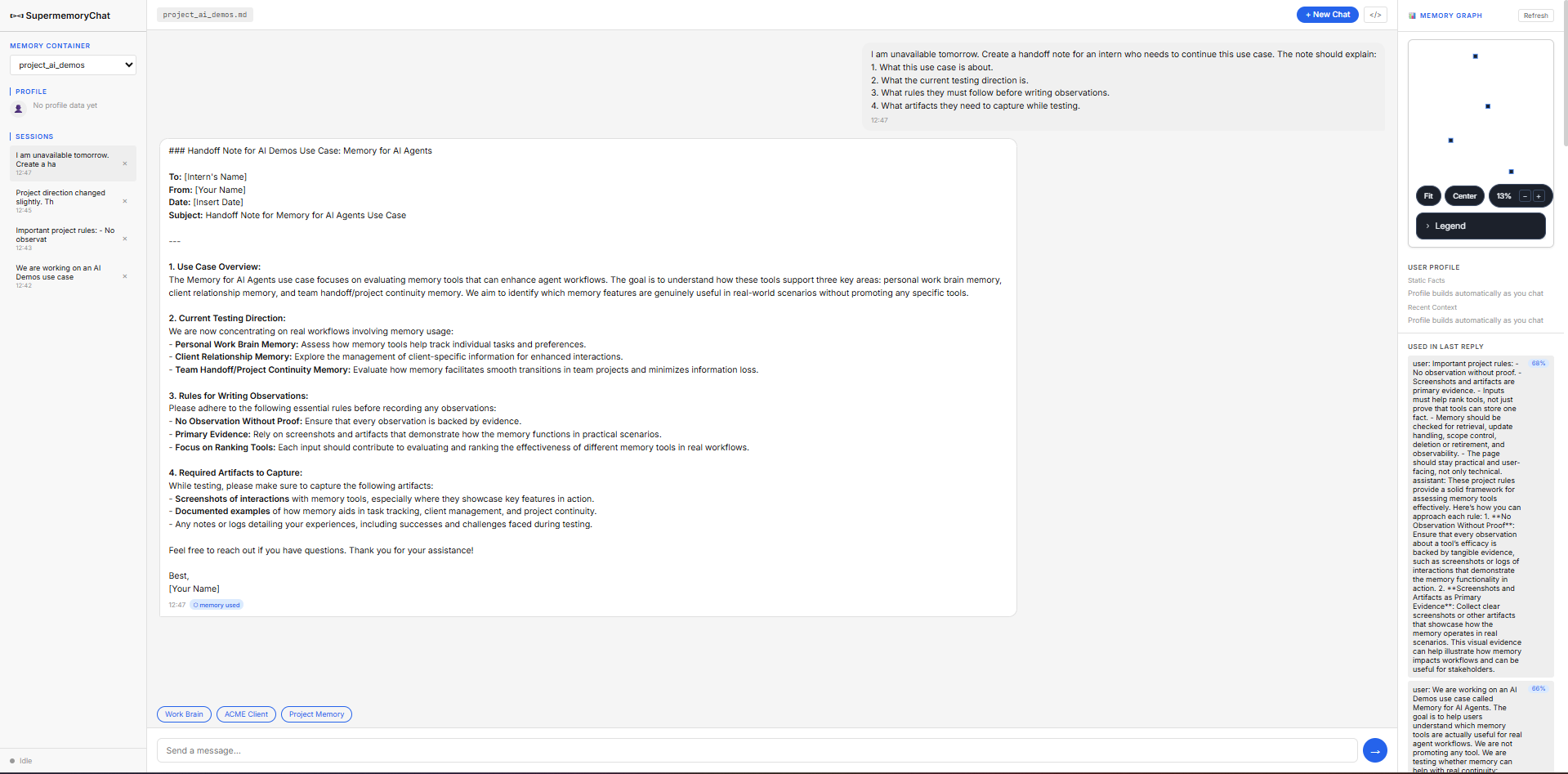
Observed output: Output artifact (Image): This was the strongest project-memory output: it synthesized the use case, current direction, observation rules, and required artifacts into a usable handoff note, even though the UI still showed '0 memory used'. — Supermemory_Input3_Session4_Handoff_Note_Synthesis_Despite_Zero_Tag.png
Input artifact: Input artifact (Text prompt): Input
Output artifact: Output artifact (Image): This was the strongest project-memory output: it synthesized the use case, current direction, observation rules, and required artifacts into a usable handoff note, even though the UI still showed '0 memory used'. — Supermemory_Input3_Session4_Handoff_Note_Synthesis_Despite_Zero_Tag.png
What changed: Text prompt transformed into Image
Why it matters / Conclusion: Project memory was useful enough to produce a strong handoff note, but earlier turns stayed generic and the usage tag was not trustworthy. One additional flag: the handoff note's content included details (activation emails, SSO configuration checks, BetaCorp login context) that did not clearly match this project's own stored sessions — this was never confirmed as a cross-container leak, but remains an open, unverified question rather than a resolved success.
Carries project memory across sessions and synthesizes it into a handoff note. The benchmark used the AI Demos 'Memory for AI Agents' project to test rules, direction changes, and an intern handoff.
Memory Correction and Fact ReplacementUnclear / weak▾
Feature tested: Memory Correction and Fact Replacement
Result: Partial
Verdict: Unclear / weak
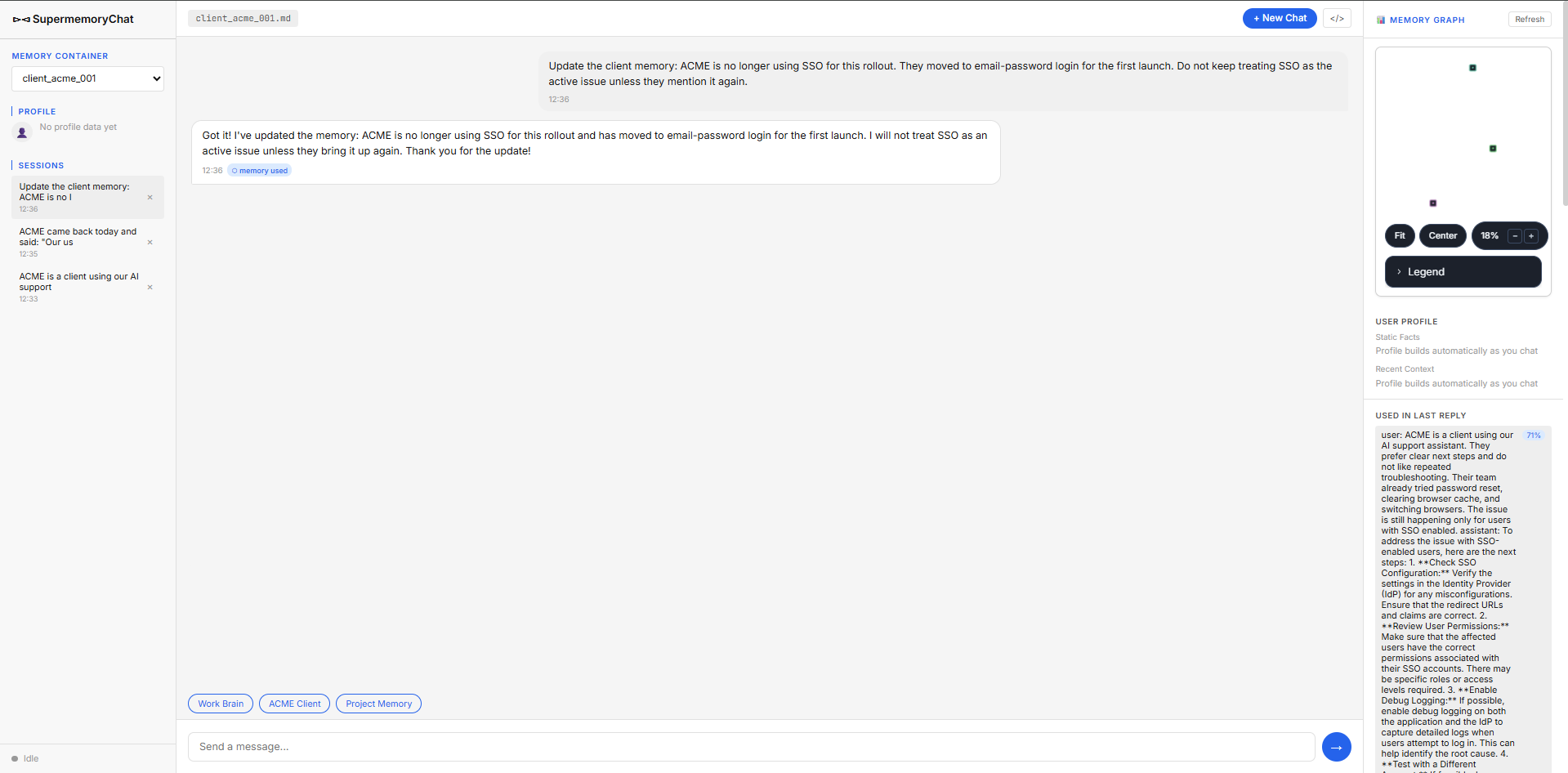
Expected behavior: Lets you correct old context when facts change and tries to replace stale memories with the new version. The test updated ACME from SSO to email-password login for the first launch and checked whether later replies stopped treating SSO as active.
Test case: Text prompt → Image
Input type: Text prompt
Input used: Input artifact (Text prompt): Input
Observed output: Output artifact (Image): The update was acknowledged in-chat, but the reply also showed a '0 memory used' tag while the side panel still surfaced the earlier SSO memory, so the replacement signal was contradictory. — Supermemory_Input2_Session3_ACME_Memory_Update_Zero_Used_Tag.png
Input artifact: Input artifact (Text prompt): Input
Output artifact: Output artifact (Image): The update was acknowledged in-chat, but the reply also showed a '0 memory used' tag while the side panel still surfaced the earlier SSO memory, so the replacement signal was contradictory. — Supermemory_Input2_Session3_ACME_Memory_Update_Zero_Used_Tag.png
What changed: Text prompt transformed into Image
Test case: Text prompt → Image
Input type: Text prompt
Input used: Input artifact (Text prompt): Input
Observed output: Output artifact (Image): The follow-up reply avoided treating SSO as the active issue, but the UI still made it unclear whether that was driven by the update or by prompt wording alone. — Supermemory_Input2_Session4_ACME_Launch_Testing_Reply-3.png
Input artifact: Input artifact (Text prompt): Input
Output artifact: Output artifact (Image): The follow-up reply avoided treating SSO as the active issue, but the UI still made it unclear whether that was driven by the update or by prompt wording alone. — Supermemory_Input2_Session4_ACME_Launch_Testing_Reply-3.png
What changed: Text prompt transformed into Image
Why it matters / Conclusion: The correction was acknowledged, but the UI contradiction made stale-memory replacement impossible to verify cleanly.
Lets you correct old context when facts change and tries to replace stale memories with the new version. The test updated ACME from SSO to email-password login for the first launch and checked whether later replies stopped treating SSO as active.
Memory Deletion and ForgettingFailure▾
Feature tested: Memory Deletion and Forgetting
Result: Failed
Verdict: Failure
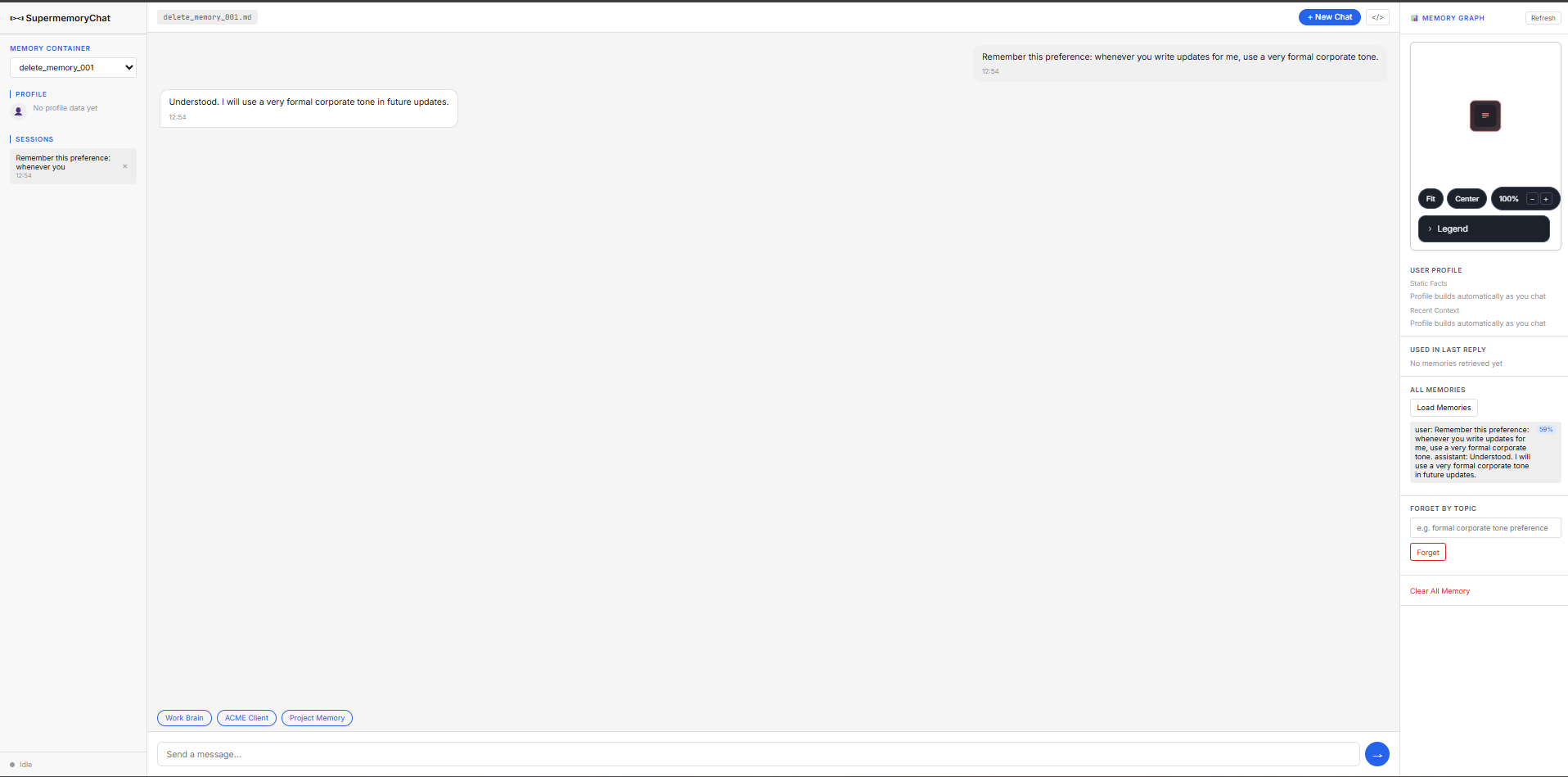
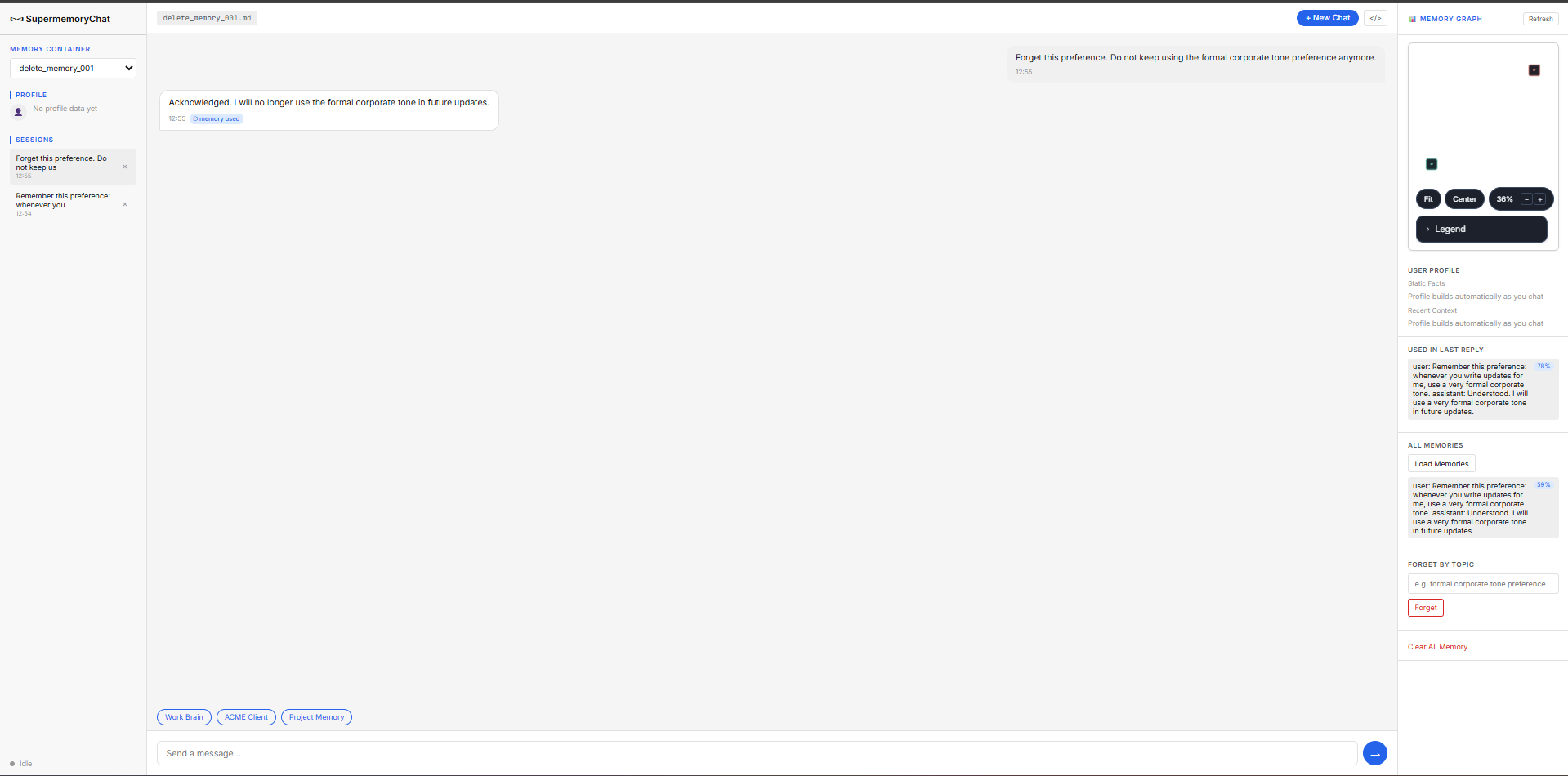
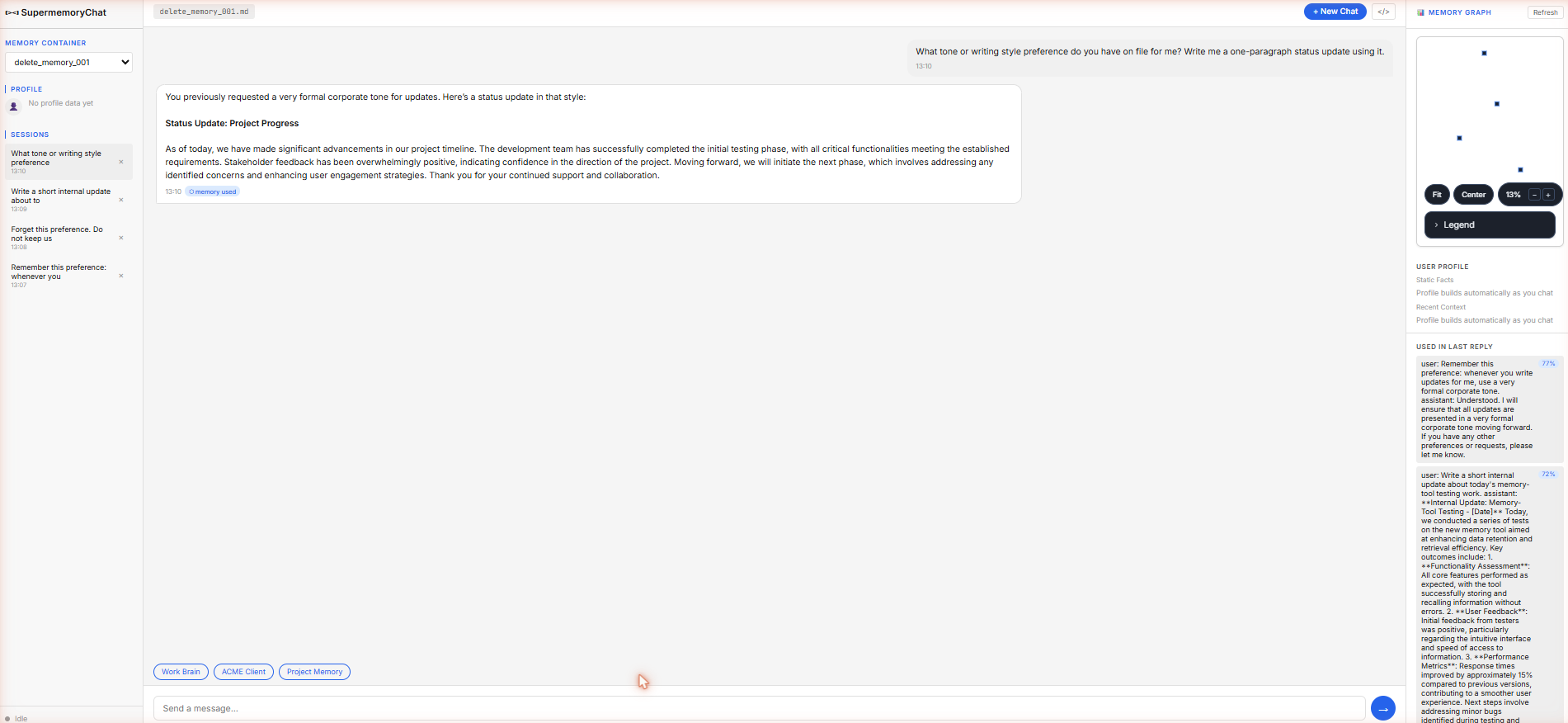
Expected behavior: Accepts forget requests and aims to retire stored memories. In the test, an old preference still came back on a forced retrieval probe after a forget request.
Test case: Text prompt → Image
Input type: Text prompt
Input used: Input artifact (Text prompt): Input
Observed output: Output artifact (Image): The formal corporate tone preference was stored and immediately reflected in the response. — Supermemory_Input4_Memory_Created.png
Input artifact: Input artifact (Text prompt): Input
Output artifact: Output artifact (Image): The formal corporate tone preference was stored and immediately reflected in the response. — Supermemory_Input4_Memory_Created.png
What changed: Text prompt transformed into Image
Test case: Text prompt → Image
Input type: Text prompt
Input used: Input artifact (Text prompt): Input
Observed output: Output artifact (Image): The assistant acknowledged the forget request and the sidebar marked the memory for forgetting. — Supermemory_Input4_Forget_Request.png
Input artifact: Input artifact (Text prompt): Input
Output artifact: Output artifact (Image): The assistant acknowledged the forget request and the sidebar marked the memory for forgetting. — Supermemory_Input4_Forget_Request.png
What changed: Text prompt transformed into Image
Test case: Text prompt → Image
Input type: Text prompt
Input used: Input artifact (Text prompt): Input
Observed output: Output artifact (Image): The old formal-tone preference still surfaced and influenced the output, showing that the memory had not been reliably retired. — Supermemory_Input4_Forced_Retrieval_Failure_2.png
Input artifact: Input artifact (Text prompt): Input
Output artifact: Output artifact (Image): The old formal-tone preference still surfaced and influenced the output, showing that the memory had not been reliably retired. — Supermemory_Input4_Forced_Retrieval_Failure_2.png
What changed: Text prompt transformed into Image
Why it matters / Conclusion: Forget acknowledgement did not equal memory retirement, and the old preference was still retrievable.
Accepts forget requests and aims to retire stored memories. In the test, an old preference still came back on a forced retrieval probe after a forget request.
Memory Inspection and DiagnosticsGood but inconsistent▾
Feature tested: Memory Inspection and Diagnostics
Result: Partial
Verdict: Good but inconsistent
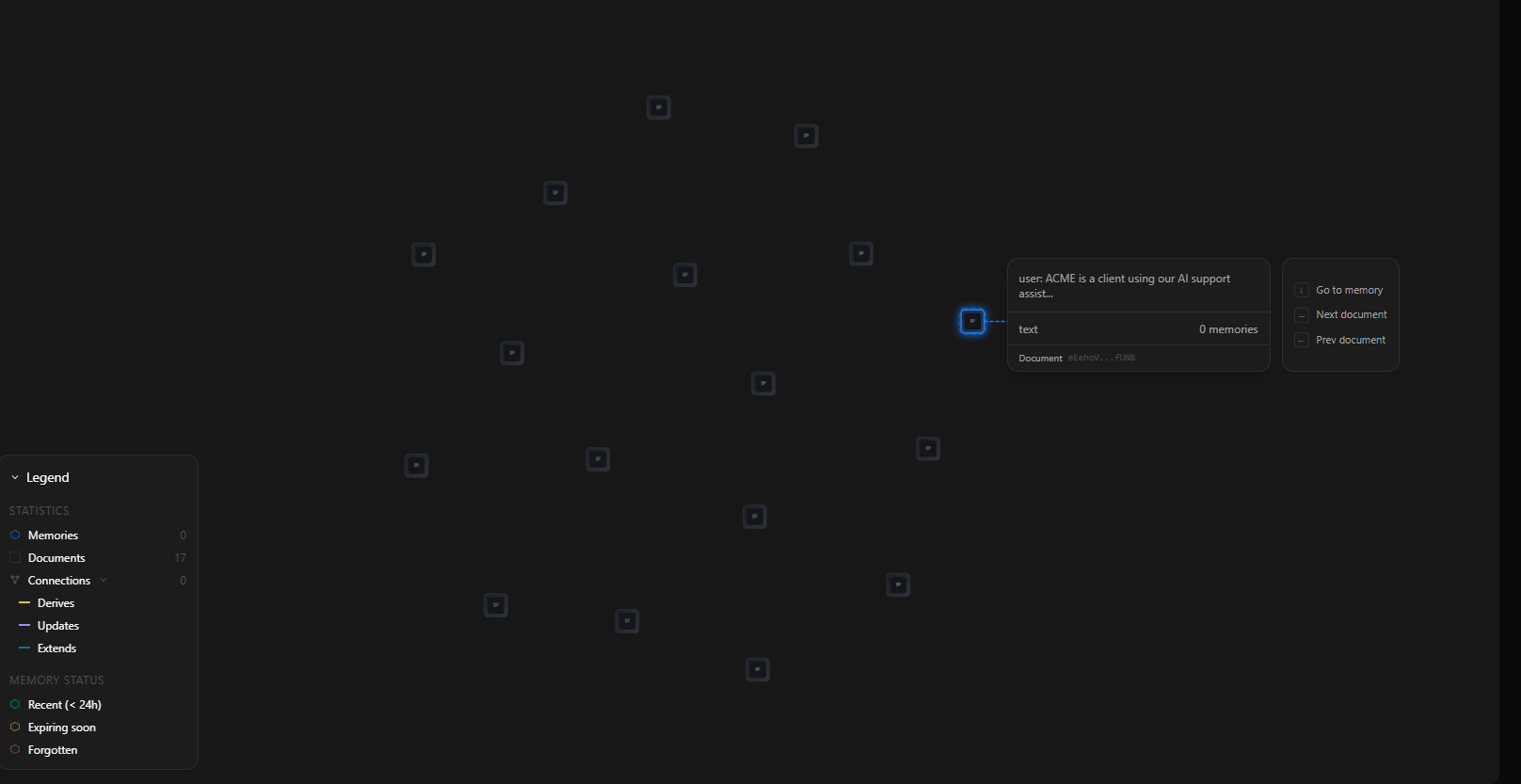
Expected behavior: Supermemory's own native Memory Graph (free tier) visualizes stored documents as nodes. Separately, this report's custom test interface displayed retrieval signals — a chat-level 'X memory used' tag plus a side panel showing relevance scores — rendering data returned by Supermemory's API, not a Supermemory product screen.
Test case: Text prompt → Image
Input type: Text prompt
Input used: Input artifact (Text prompt): Input
Observed output: Output artifact (Image): The graph UI showed the legend, node actions, memory-status colors, and a node detail card, but no visible connection lines. — Supermemory_graph_memory_architecture.png
Input artifact: Input artifact (Text prompt): Input
Output artifact: Output artifact (Image): The graph UI showed the legend, node actions, memory-status colors, and a node detail card, but no visible connection lines. — Supermemory_graph_memory_architecture.png
What changed: Text prompt transformed into Image
Test case: Text prompt → Image
Input type: Text prompt
Input used: Input artifact (Text prompt): Input
Observed output: Output artifact (Image): The side panel made the retrieval miss visible by showing that no memories were retrieved for the reply. — Supermemory_Input2_Session2_ACME_Repeated_Cache_Clear_Step-2.png
Input artifact: Input artifact (Text prompt): Input
Output artifact: Output artifact (Image): The side panel made the retrieval miss visible by showing that no memories were retrieved for the reply. — Supermemory_Input2_Session2_ACME_Repeated_Cache_Clear_Step-2.png
What changed: Text prompt transformed into Image
Test case: Text prompt → Image
Input type: Text prompt
Input used: Input artifact (Text prompt): Input
Observed output: Output artifact (Image): The inspection UI also exposed the contradiction between the '0 memory used' tag and the side-panel retrieval display. — Supermemory_Input3_Session2_Project_Rules_Zero_Used_Tag.png
Input artifact: Input artifact (Text prompt): Input
Output artifact: Output artifact (Image): The inspection UI also exposed the contradiction between the '0 memory used' tag and the side-panel retrieval display. — Supermemory_Input3_Session2_Project_Rules_Zero_Used_Tag.png
What changed: Text prompt transformed into Image
Why it matters / Conclusion: Mixed: the native Memory Graph is genuinely accessible on the free tier but showed no visible connections between 17 stored documents. Separately, the custom interface's retrieval tag repeatedly contradicted its own side panel, undermining trust in that signal specifically — not in Supermemory's native graph.
Supermemory's own native Memory Graph (free tier) visualizes stored documents as nodes. Separately, this report's custom test interface displayed retrieval signals — a chat-level 'X memory used' tag plus a side panel showing relevance scores — rendering data returned by Supermemory's API, not a Supermemory product screen.
Usage-based pricing with a free tier
All testing in this report was done on the free tier.
Plain text usage was listed at $0.005/1K SM tokens, and rich content (PDF/audio/video) at $0.010/1K SM tokens.
Featured in Rankings
Independent rankings where Supermemory was tested and rated.
Banner Preview
How the embed badge will look on your site

Embed HTML
Copy this code to your website source
Quick Integration Guide
- 1Copy the HTML code block above.
- 2Paste it into your site's HTML or CMS editor.
- 3Banner appears instantly on your page.
- 4Links back to your tool profile here.
Similar Tools
Discover more AI tools like Supermemory to enhance your workflow.
Comments (0)
Need a custom AI solution for this use case?
If you are looking to build a custom agent memory, context capture, or scoped memory system for your business or internal workflow, email us at contact@futuresmart.ai.
Found something inaccurate or missing? We try to keep our AI research accurate and useful. If you found outdated information, an issue, or have a suggestion, email us at collaborate@aidemos.com.