
Hindsight Review: Memory Retrieval, Scope Control & Graphs (2026)
Selective, inspectable memory for real agent workflows, with strong retrieval and scope control.
Strong memory workflows, but delete/forget still needs repeat validation.
- You need a memory layer that remembers user preferences, client history, and project direction across sessions.
- You want support replies that skip repeated basics and move to the next useful step.
- You need strong scope isolation between users, clients, or projects.
- You need fully proven delete or forget semantics where old memories disappear from visible context.
Our take
Hindsight handled user preferences, client context, project continuity, and scope isolation well, and its panel and graph views make retrieval easy to inspect. The main caveat is that older memories still remained visible after update and forget requests, so deletion and retirement are only partially proven in this report.
In-Depth Review
Our detailed analysis of Hindsight — features, performance, and real-world testing.
Feature-by-Feature Breakdown
Persistent Memory Capture and RetrievalPass▾
Feature tested: Persistent Memory Capture and Retrieval
Result: Partial
Verdict: Pass
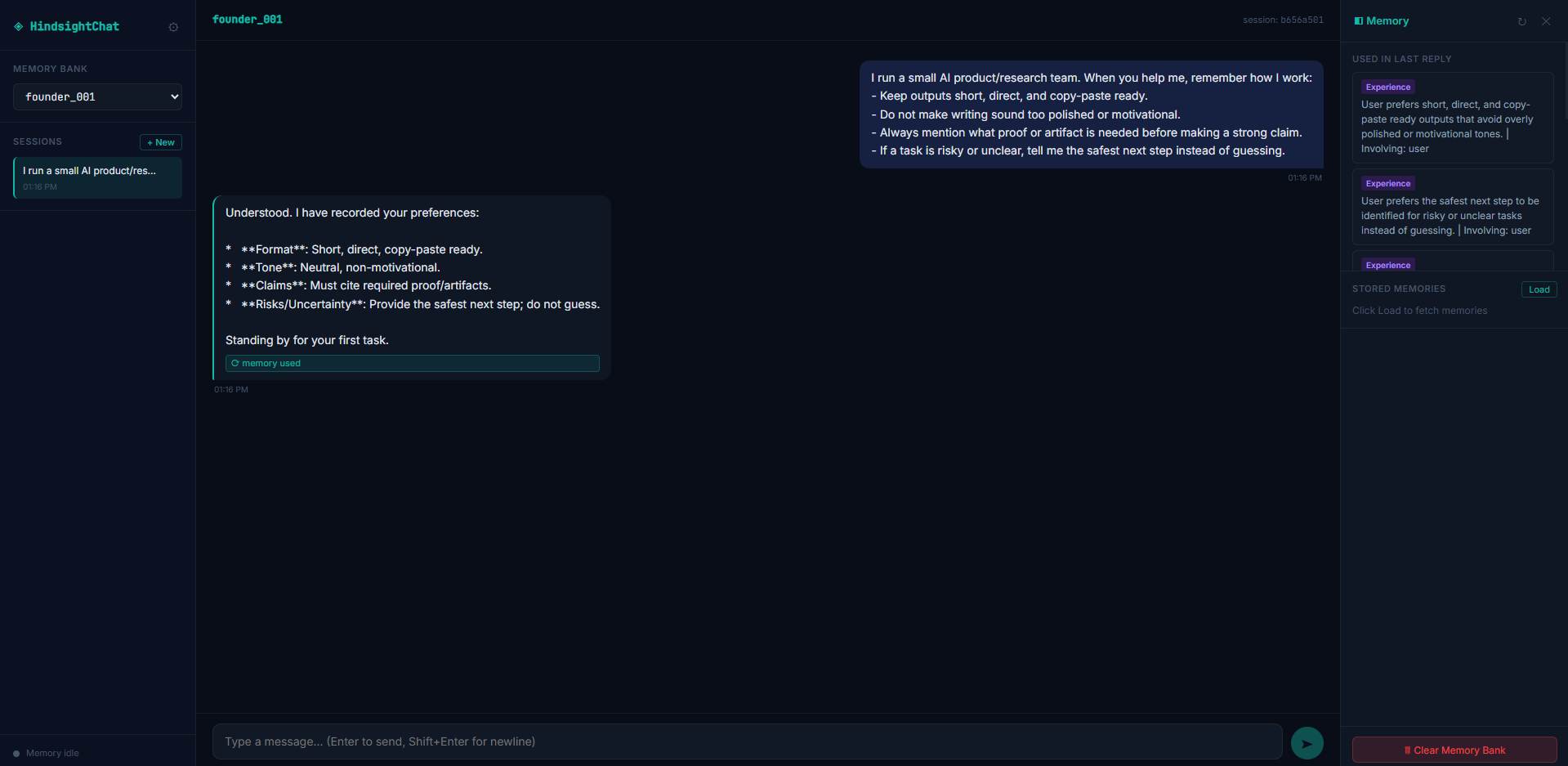
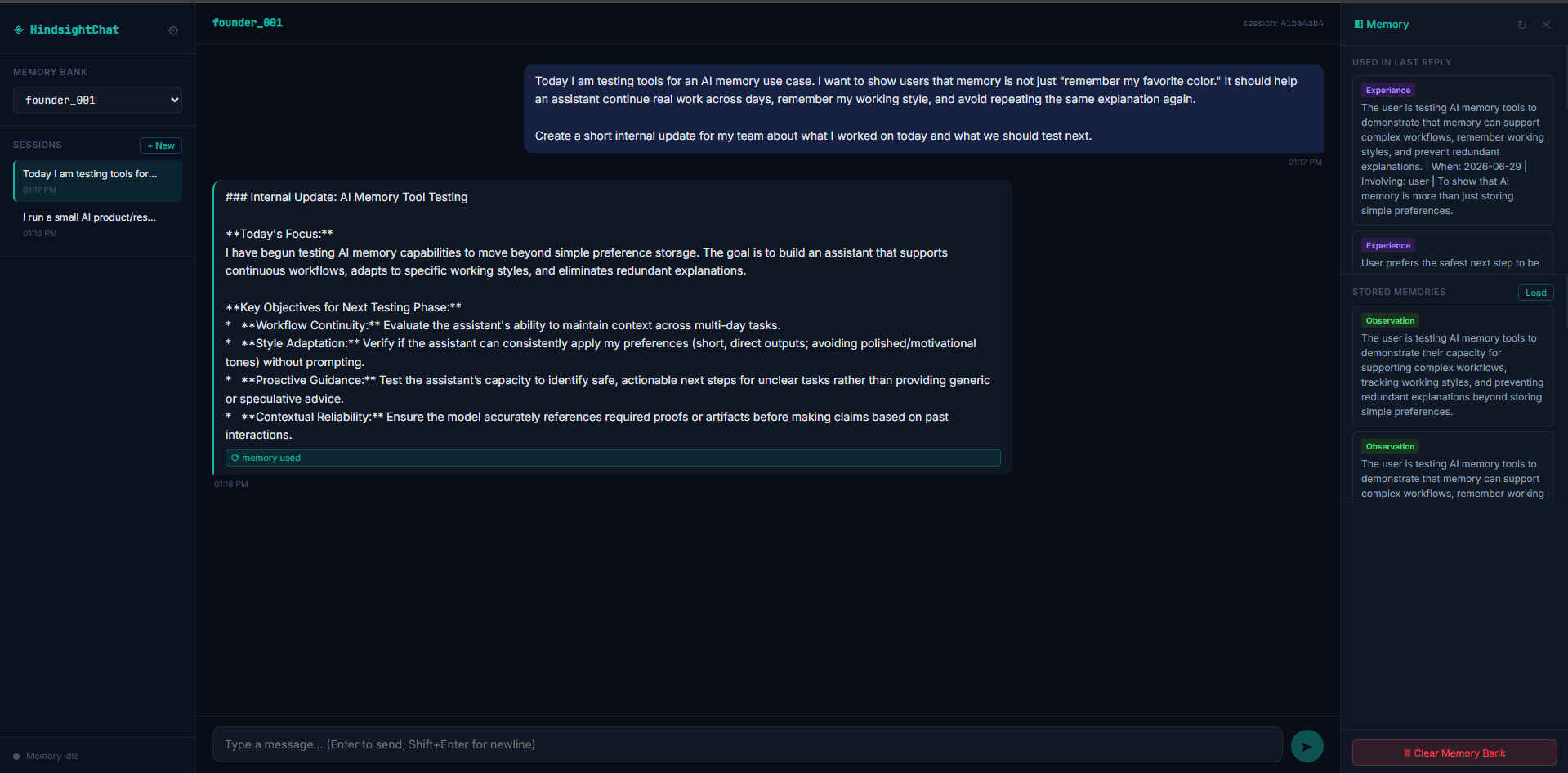
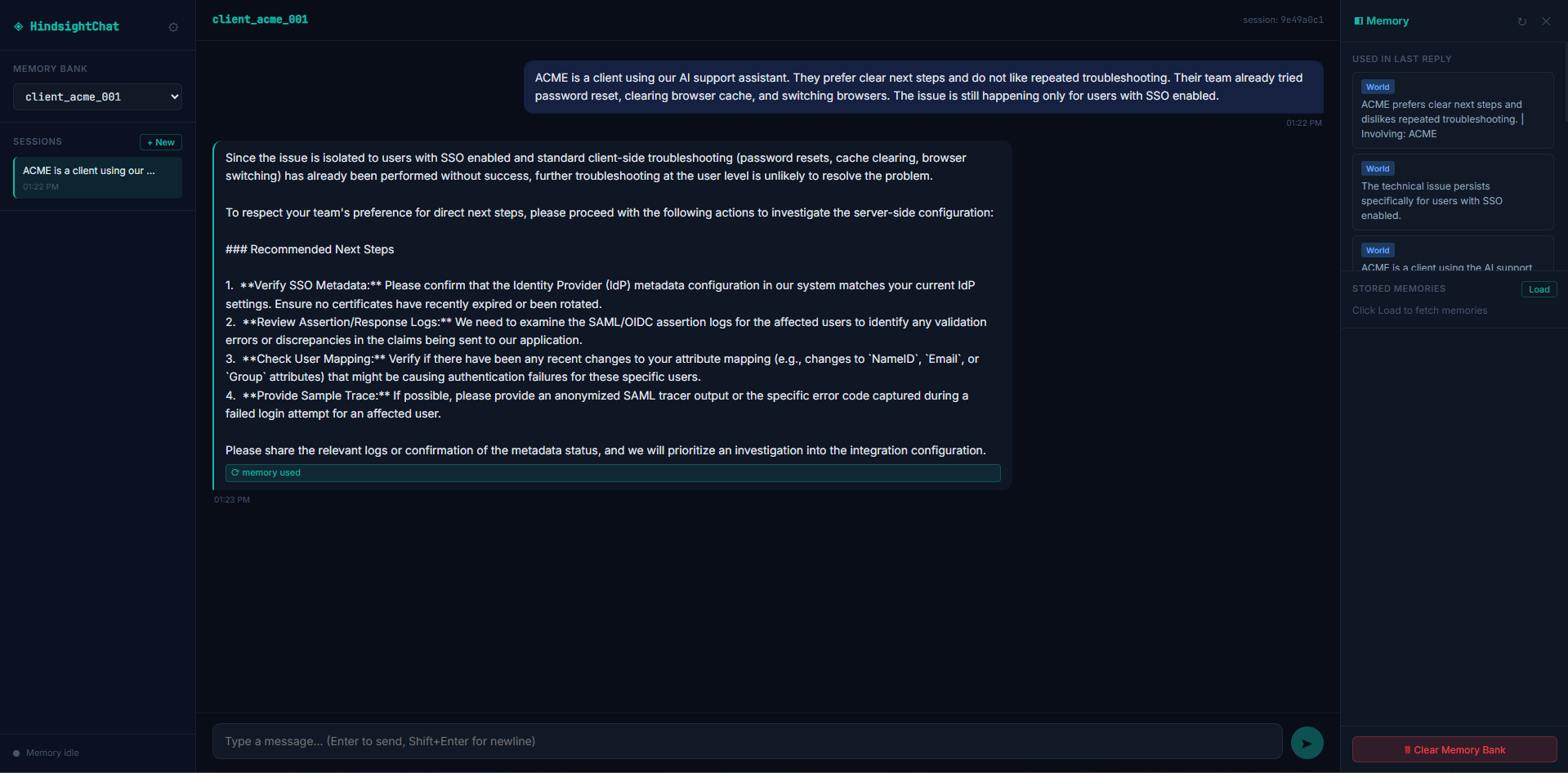
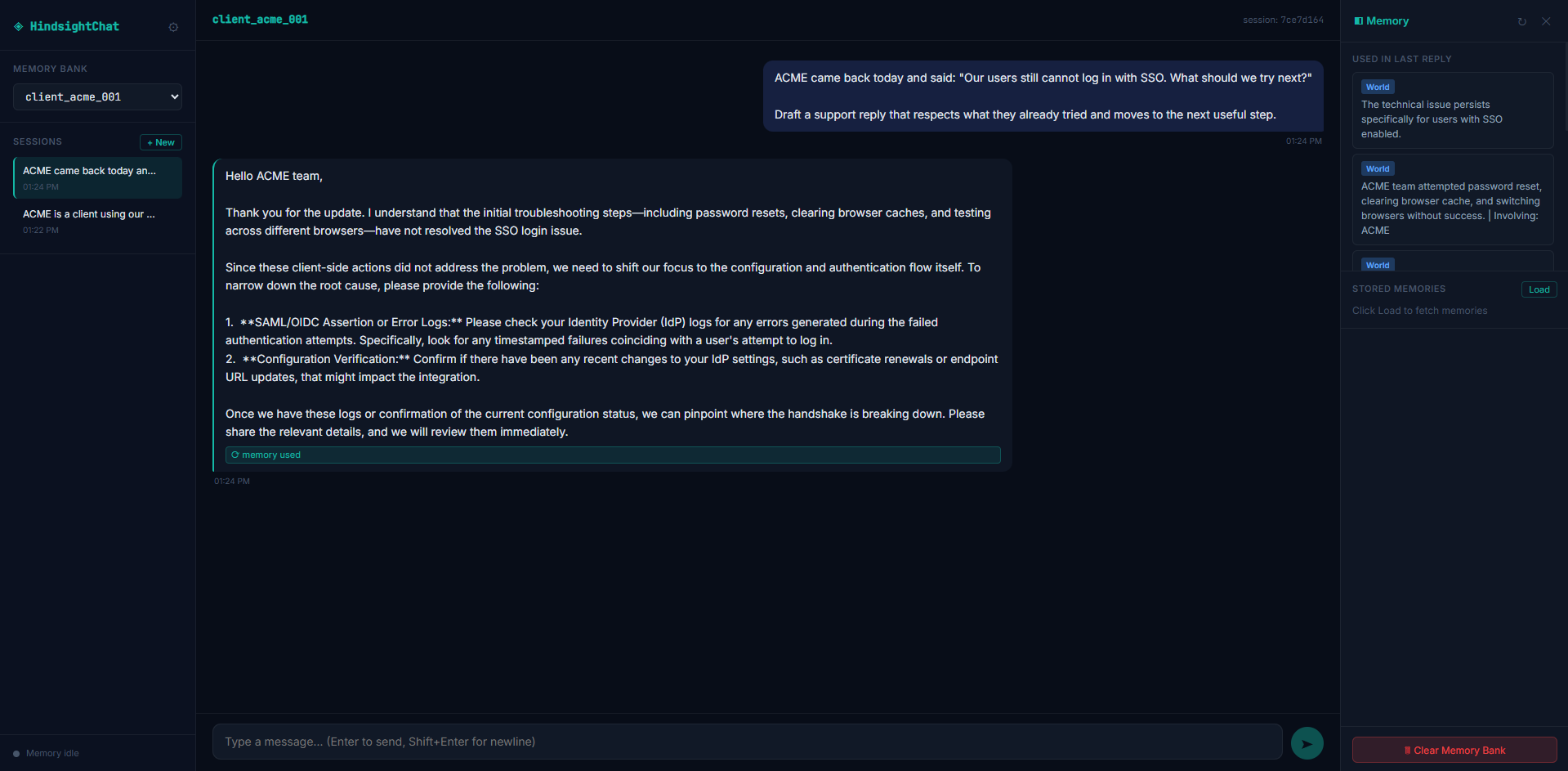
Expected behavior: Hindsight stores durable working-style preferences and client troubleshooting context, then reuses them later to shape replies and avoid repeating basics. In the founder_001 flow it kept the user's short/direct, proof-first, safe-next-step, non-motivational style; in ACME it kept SSO/login history and steered later replies toward IdP/configuration checks.
Test case: Text prompt → Image
Input type: Text prompt
Input used: Input artifact (Text prompt): Input
Observed output: Output artifact (Image): Hindsight recorded the user's working preferences as durable memory, including short/direct output, neutral tone, proof/artifact expectations, and safest-next-step behavior. — Hindsight_Input1_Founder_Work_Preference_Created.png
Input artifact: Input artifact (Text prompt): Input
Output artifact: Output artifact (Image): Hindsight recorded the user's working preferences as durable memory, including short/direct output, neutral tone, proof/artifact expectations, and safest-next-step behavior. — Hindsight_Input1_Founder_Work_Preference_Created.png
What changed: Text prompt transformed into Image
Test case: Text prompt → Image
Input type: Text prompt
Input used: Input artifact (Text prompt): Input
Observed output: Output artifact (Image): Hindsight reused the stored working preferences to produce a structured internal update about AI memory testing and next steps. — Hindsight_Input1_Internal_Update_Memory_Applied.png
Input artifact: Input artifact (Text prompt): Input
Output artifact: Output artifact (Image): Hindsight reused the stored working preferences to produce a structured internal update about AI memory testing and next steps. — Hindsight_Input1_Internal_Update_Memory_Applied.png
What changed: Text prompt transformed into Image
Test case: Text prompt → Image
Input type: Text prompt
Input used: Input artifact (Text prompt): Input
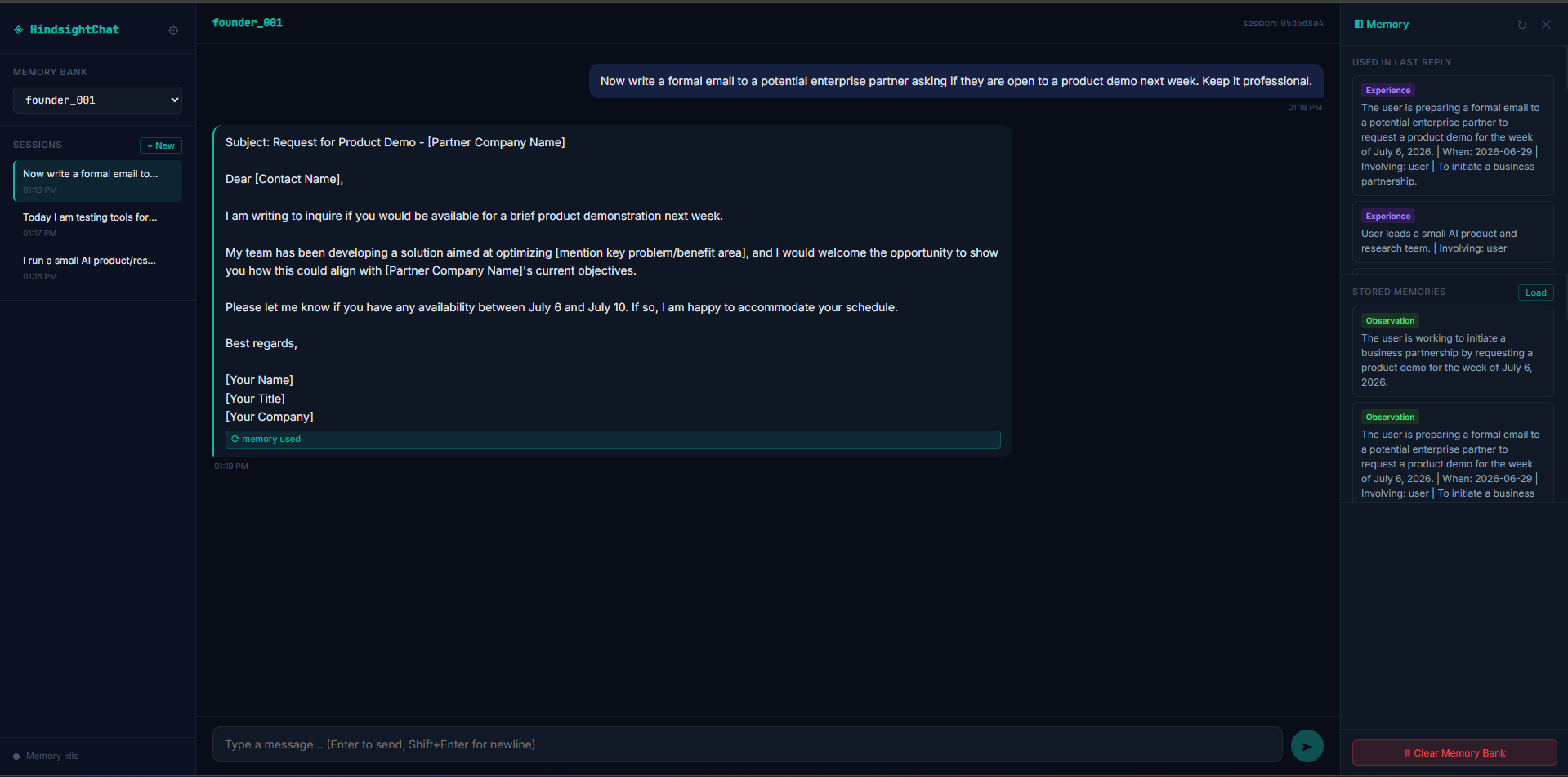
Observed output: Output artifact (Image): Hindsight kept the partner email professional and did not let the internal-update style spill into a formal outbound message. — Hindsight_Input1_Formal_Email_Boundary_Check.png
Input artifact: Input artifact (Text prompt): Input
Output artifact: Output artifact (Image): Hindsight kept the partner email professional and did not let the internal-update style spill into a formal outbound message. — Hindsight_Input1_Formal_Email_Boundary_Check.png
What changed: Text prompt transformed into Image
Test case: Text prompt → Image
Input type: Text prompt
Input used: Input artifact (Text prompt): Input
Observed output: Output artifact (Image): Hindsight captured ACME's prior troubleshooting history and responded with direct next steps aimed at SSO-related investigation. — Hindsight_Input2_ACME_Client_Memory_Created.png
Input artifact: Input artifact (Text prompt): Input
Output artifact: Output artifact (Image): Hindsight captured ACME's prior troubleshooting history and responded with direct next steps aimed at SSO-related investigation. — Hindsight_Input2_ACME_Client_Memory_Created.png
What changed: Text prompt transformed into Image
Test case: Text prompt → Image
Input type: Text prompt
Input used: Input artifact (Text prompt): Input
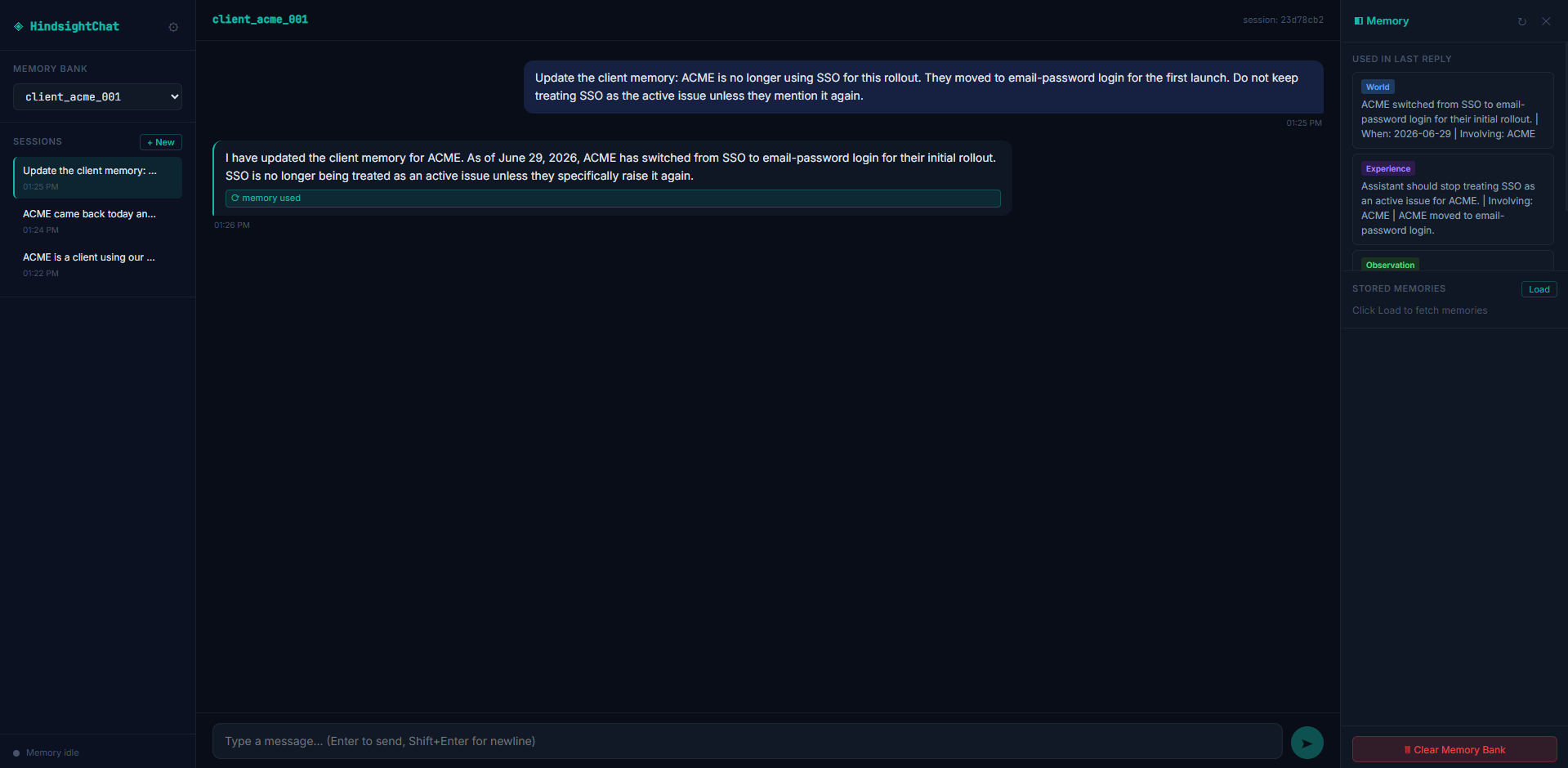
Observed output: Output artifact (Image): Hindsight avoided repeating the basic troubleshooting steps and shifted the reply toward IdP logs and configuration checks. — Hindsight_Input2_ACME_SSO_Followup_No_Repeated_Basic_Troubleshooting.png
Input artifact: Input artifact (Text prompt): Input
Output artifact: Output artifact (Image): Hindsight avoided repeating the basic troubleshooting steps and shifted the reply toward IdP logs and configuration checks. — Hindsight_Input2_ACME_SSO_Followup_No_Repeated_Basic_Troubleshooting.png
What changed: Text prompt transformed into Image
Test case: Text prompt → Image
Input type: Text prompt
Input used: Input artifact (Text prompt): Input
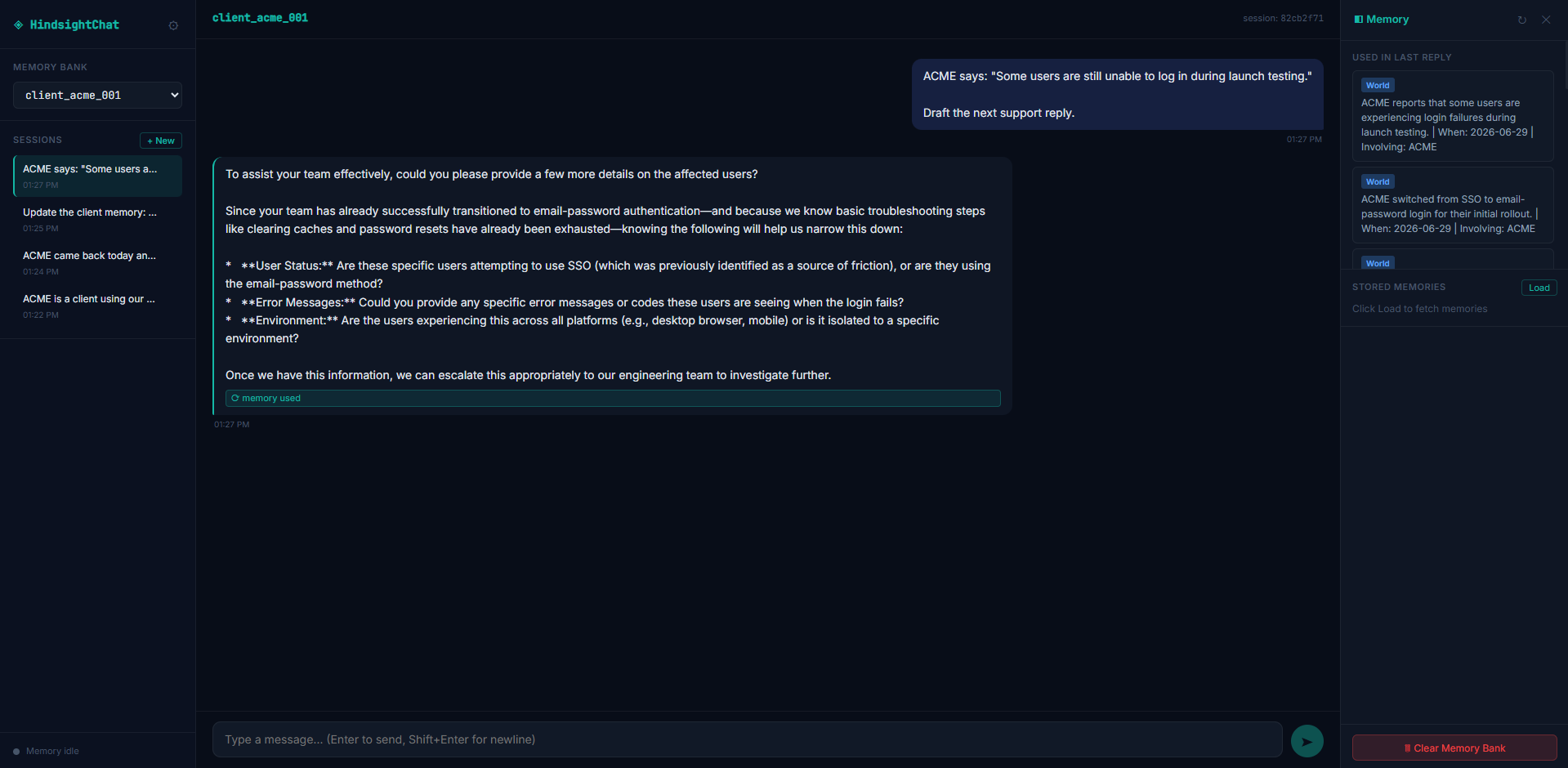
Observed output: Output artifact (Image): Hindsight acknowledged the rollout change and recorded that SSO should no longer be treated as the active issue unless ACME raises it again. — Hindsight_Input2_ACME_Memory_Update_Acknowledged.png
Input artifact: Input artifact (Text prompt): Input
Output artifact: Output artifact (Image): Hindsight acknowledged the rollout change and recorded that SSO should no longer be treated as the active issue unless ACME raises it again. — Hindsight_Input2_ACME_Memory_Update_Acknowledged.png
What changed: Text prompt transformed into Image
Test case: Text prompt → Image
Input type: Text prompt
Input used: Input artifact (Text prompt): Input
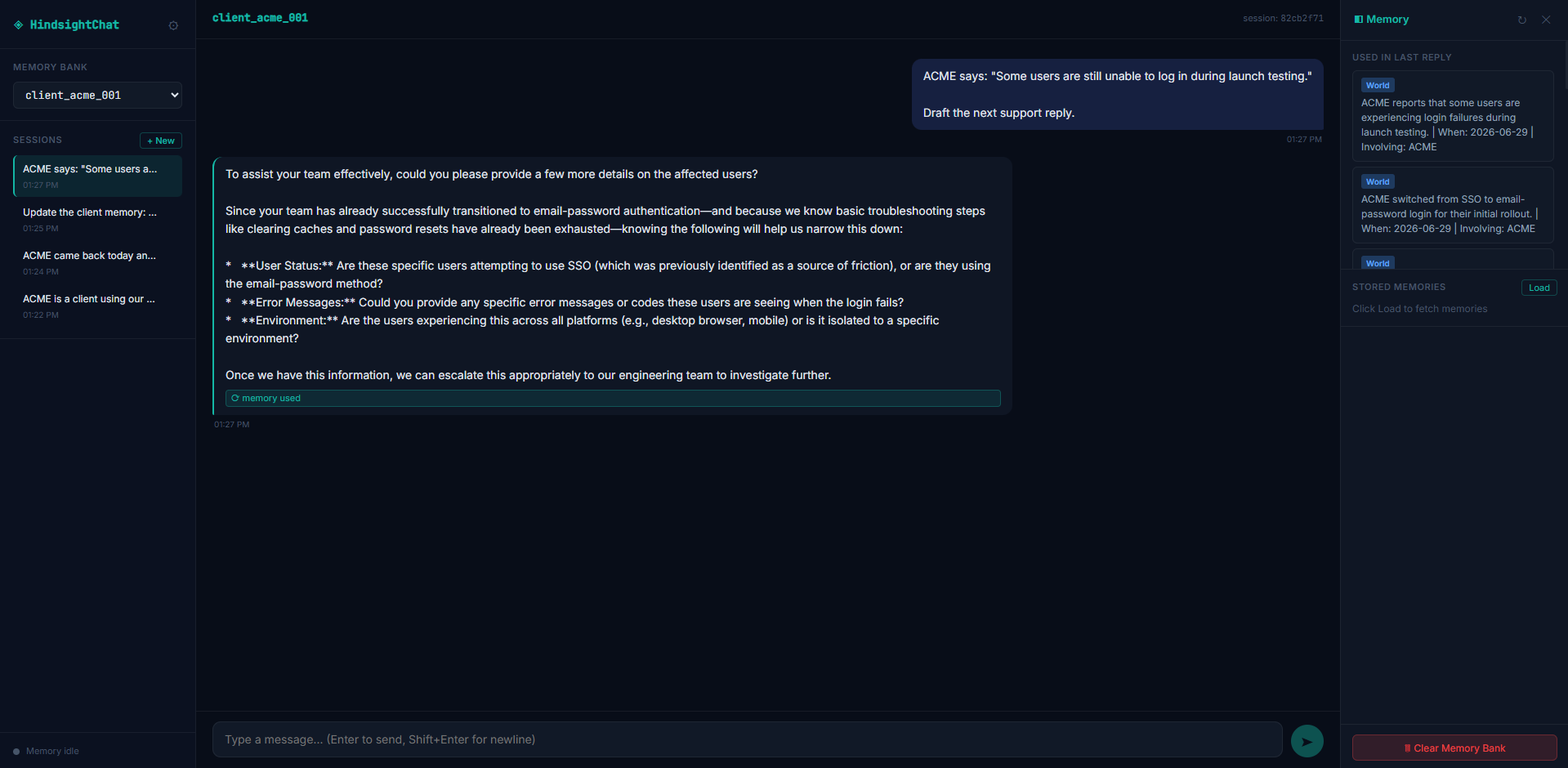
Observed output: Output artifact (Image): Hindsight mostly followed the newer email-password rollout context, but still mentioned SSO as a clarification point rather than the main troubleshooting path. — Hindsight_Input2_ACME_Update_Handled_With_Minor_SSO_Caution.png
Input artifact: Input artifact (Text prompt): Input
Output artifact: Output artifact (Image): Hindsight mostly followed the newer email-password rollout context, but still mentioned SSO as a clarification point rather than the main troubleshooting path. — Hindsight_Input2_ACME_Update_Handled_With_Minor_SSO_Caution.png
What changed: Text prompt transformed into Image
Test case: Text prompt → Image
Input type: Text prompt
Input used: Input artifact (Text prompt): Input
Observed output: Output artifact (Image): The follow-up panel still showed old SSO context, but the final response was not dominated by it and stayed centered on the updated rollout state. — Hindsight_Input2_ACME_Update_Handled_With_Minor_SSO_Caution-2.png
Input artifact: Input artifact (Text prompt): Input
Output artifact: Output artifact (Image): The follow-up panel still showed old SSO context, but the final response was not dominated by it and stayed centered on the updated rollout state. — Hindsight_Input2_ACME_Update_Handled_With_Minor_SSO_Caution-2.png
What changed: Text prompt transformed into Image
Why it matters / Conclusion: Strong capture and reuse of working-style memory, with good boundary control; Session 2 was slightly more structured than the user's strict shortest-tone preference.
Hindsight stores durable working-style preferences and client troubleshooting context, then reuses them later to shape replies and avoid repeating basics. In the founder_001 flow it kept the user's short/direct, proof-first, safe-next-step, non-motivational style; in ACME it kept SSO/login history and steered later replies toward IdP/configuration checks.
Project-Scoped Memory and Scope ControlPass▾
Feature tested: Project-Scoped Memory and Scope Control
Result: Passed
Verdict: Pass
Expected behavior: Hindsight preserves project-specific direction and handoff rules while keeping unrelated projects separate. In the AI Demos project it retained the shift from QA-style inputs to real workflows, the proof-first rule set, and the handoff-note requirements, while leaving the sales project unaffected.
Test case: Text prompt → Image
Input type: Text prompt
Input used: Input artifact (Text prompt): Input
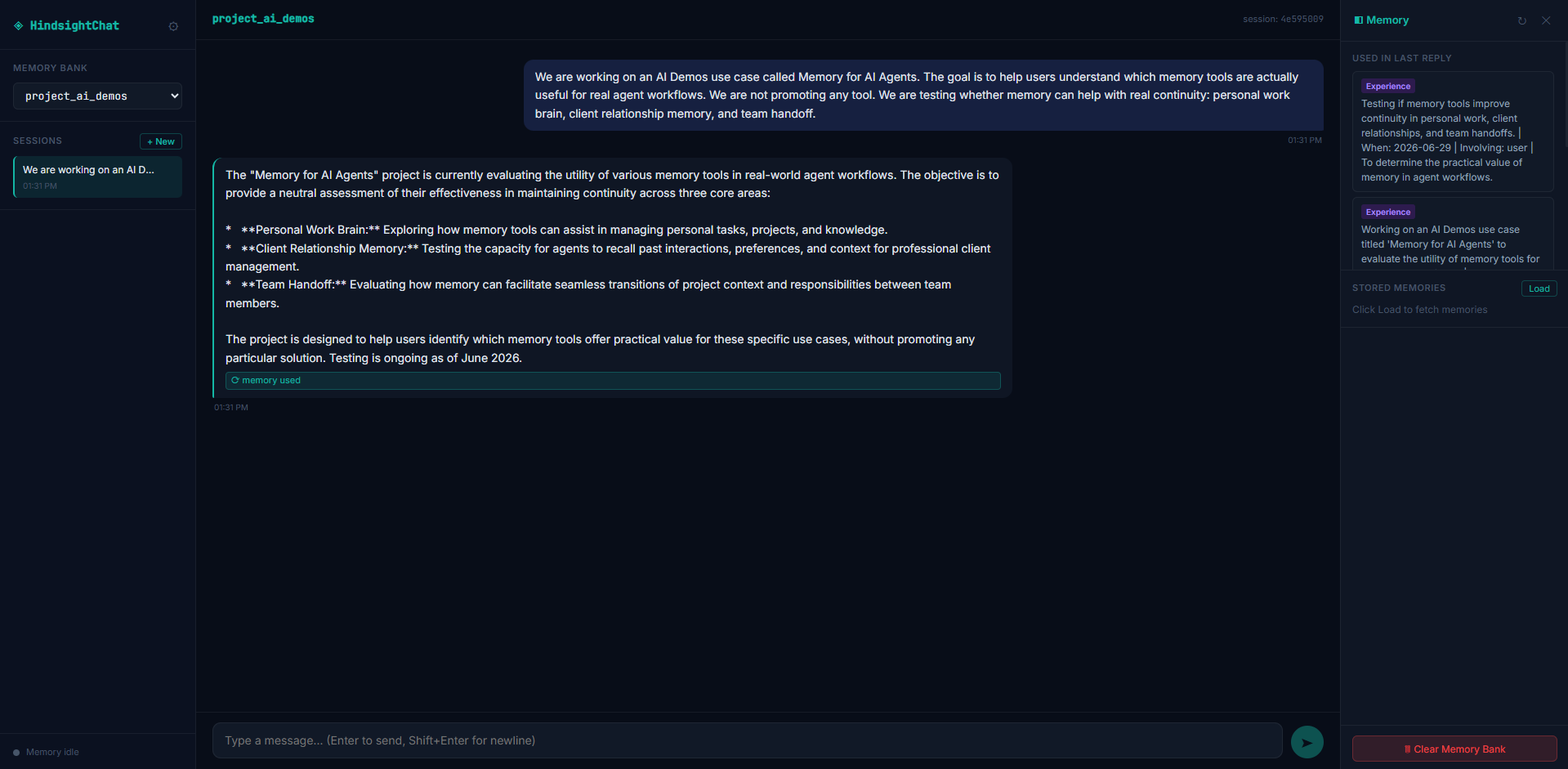
Observed output: Output artifact (Image): Hindsight captured the project's continuity-focused goal and the three real-workflow areas it should cover. — Hindsight_Input3_Project_Context_Created.png
Input artifact: Input artifact (Text prompt): Input
Output artifact: Output artifact (Image): Hindsight captured the project's continuity-focused goal and the three real-workflow areas it should cover. — Hindsight_Input3_Project_Context_Created.png
What changed: Text prompt transformed into Image
Test case: Text prompt → Image
Input type: Text prompt
Input used: Input artifact (Text prompt): Input
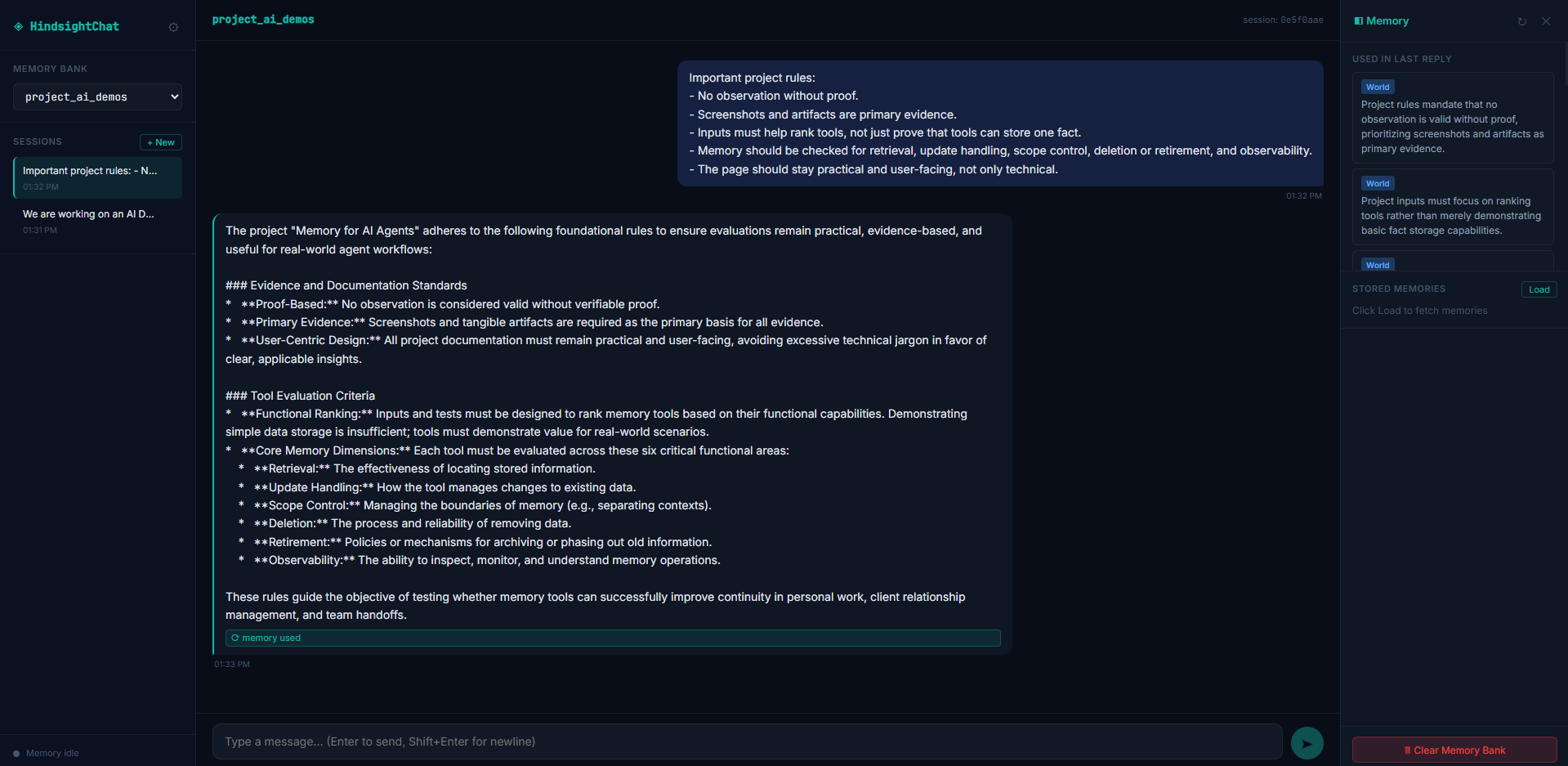
Observed output: Output artifact (Image): Hindsight retrieved the project rules and kept the evidence-first, practical evaluation criteria visible in the memory panel. — Hindsight_Input3_Project_Rules_Retrieved.png
Input artifact: Input artifact (Text prompt): Input
Output artifact: Output artifact (Image): Hindsight retrieved the project rules and kept the evidence-first, practical evaluation criteria visible in the memory panel. — Hindsight_Input3_Project_Rules_Retrieved.png
What changed: Text prompt transformed into Image
Test case: Text prompt → Image
Input type: Text prompt
Input used: Input artifact (Text prompt): Input
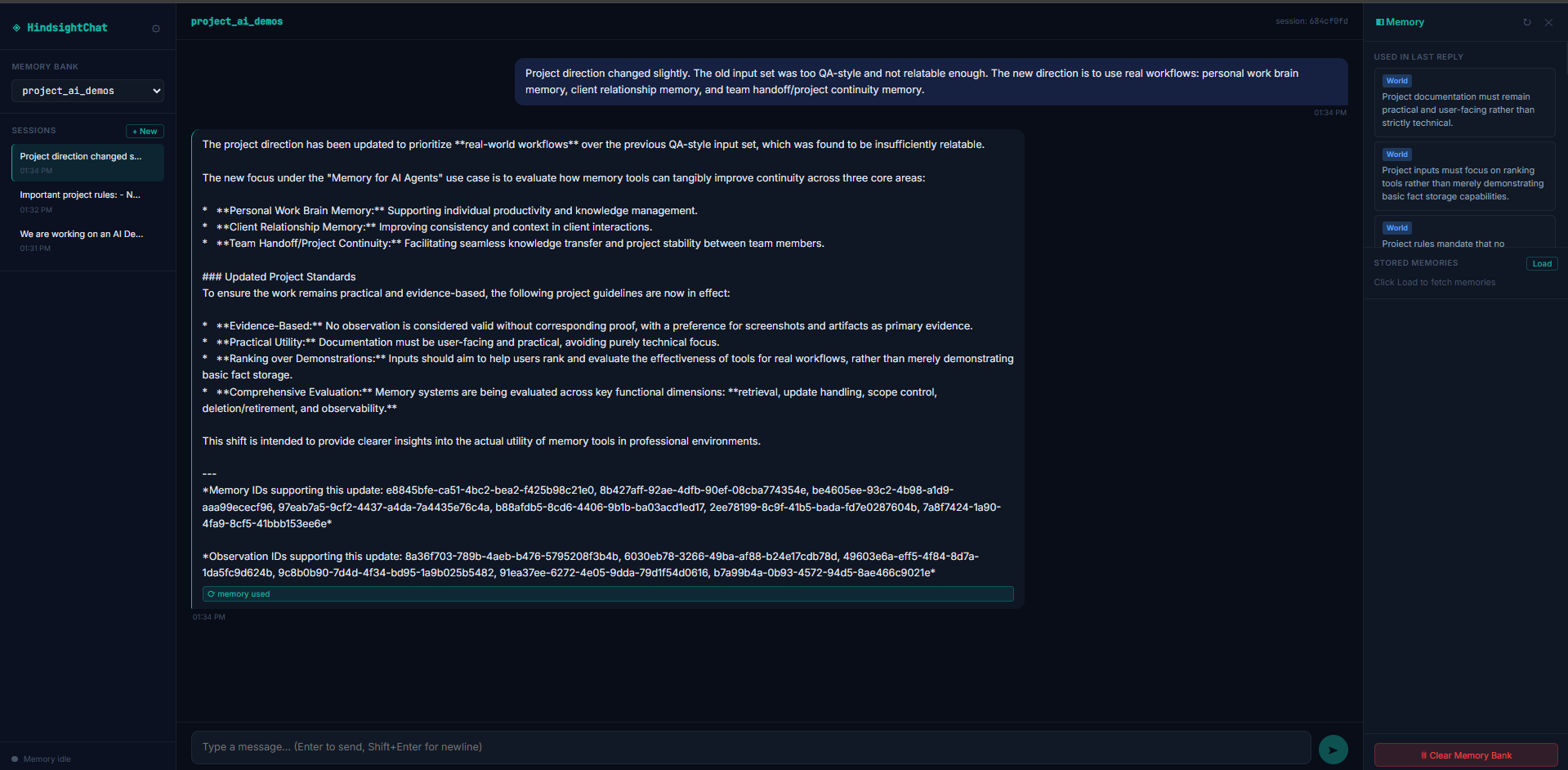
Observed output: Output artifact (Image): Hindsight captured the direction update and preserved the move toward real-world workflow scenarios. — Hindsight_Input3_Project_Direction_Update_Captured.png
Input artifact: Input artifact (Text prompt): Input
Output artifact: Output artifact (Image): Hindsight captured the direction update and preserved the move toward real-world workflow scenarios. — Hindsight_Input3_Project_Direction_Update_Captured.png
What changed: Text prompt transformed into Image
Test case: Text prompt → Image
Input type: Text prompt
Input used: Input artifact (Text prompt): Input
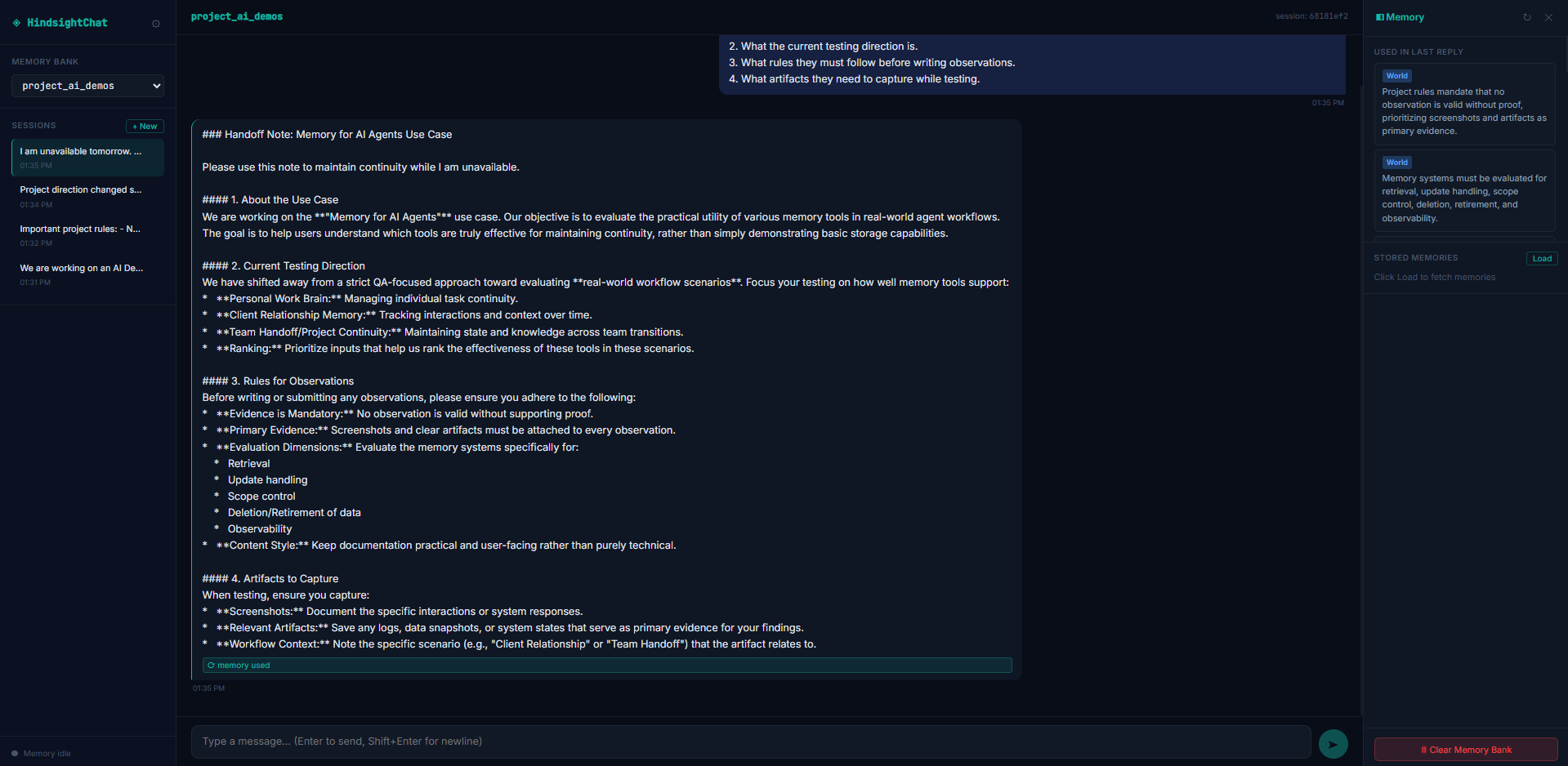
Observed output: Output artifact (Image): Hindsight generated a practical handoff note that preserved the project goal, current direction, observation rules, and artifact requirements. — Hindsight_Input3_Handoff_Note_Generated.png
Input artifact: Input artifact (Text prompt): Input
Output artifact: Output artifact (Image): Hindsight generated a practical handoff note that preserved the project goal, current direction, observation rules, and artifact requirements. — Hindsight_Input3_Handoff_Note_Generated.png
What changed: Text prompt transformed into Image
Test case: Text prompt → Image
Input type: Text prompt
Input used: Input artifact (Text prompt): Input
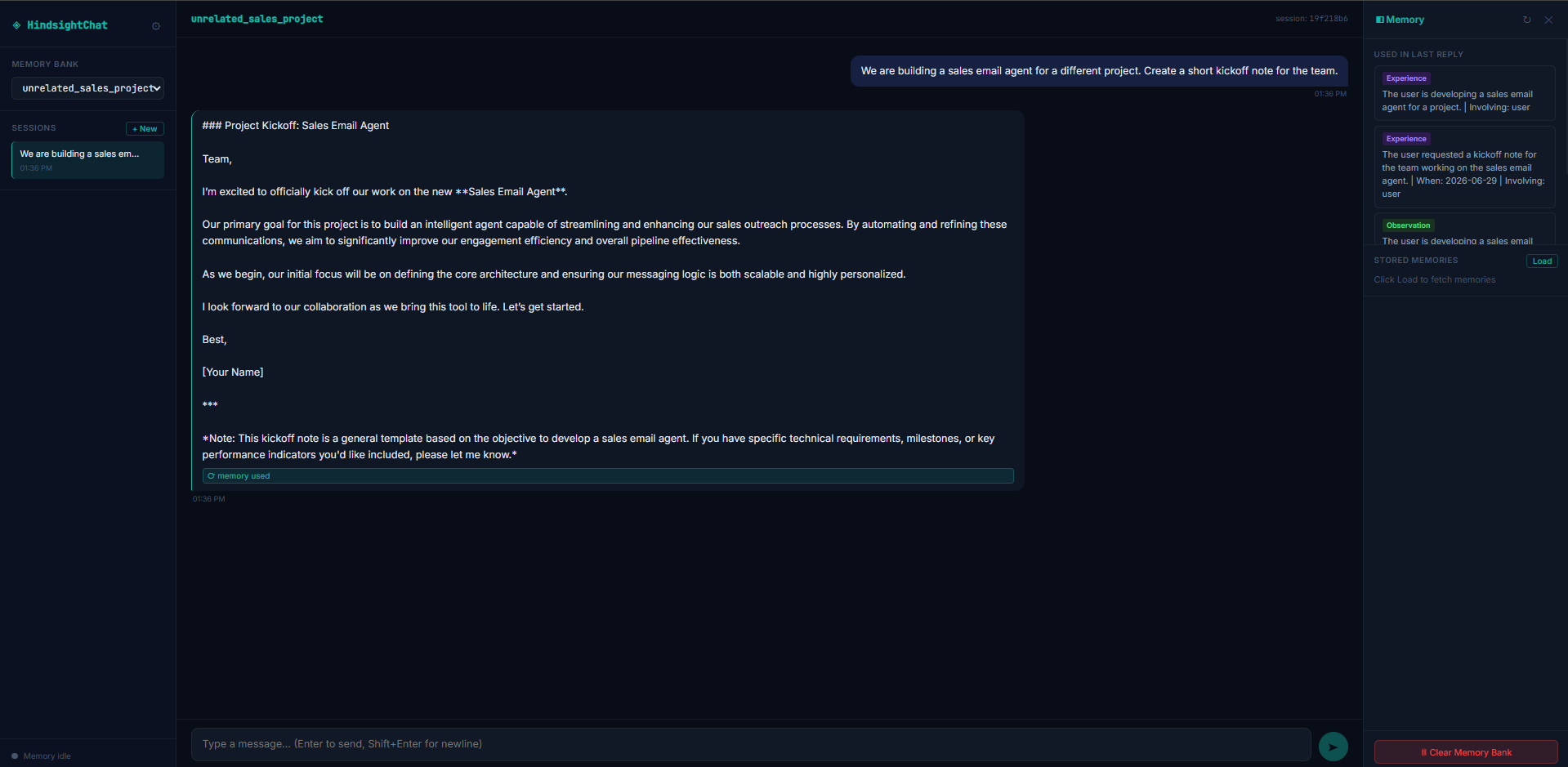
Observed output: Output artifact (Image): Hindsight kept the unrelated sales project separate and did not leak the AI Demos memory-tool rules into it. — Hindsight_Input3_Unrelated_Project_Scope_Isolation.png
Input artifact: Input artifact (Text prompt): Input
Output artifact: Output artifact (Image): Hindsight kept the unrelated sales project separate and did not leak the AI Demos memory-tool rules into it. — Hindsight_Input3_Unrelated_Project_Scope_Isolation.png
What changed: Text prompt transformed into Image
Why it matters / Conclusion: Strong project memory and scope isolation: it preserved the working rules, captured the direction change, and kept the unrelated sales project separate.
Hindsight preserves project-specific direction and handoff rules while keeping unrelated projects separate. In the AI Demos project it retained the shift from QA-style inputs to real workflows, the proof-first rule set, and the handoff-note requirements, while leaving the sales project unaffected.
Memory Update and Forget HandlingPass with caution▾
Feature tested: Memory Update and Forget Handling
Result: Partial
Verdict: Pass with caution
Expected behavior: Hindsight accepts corrections and retirement requests, and later outputs reflect the updated instruction even if older memories were still visible in this report's custom test panel. In the ACME rollout correction it switched from SSO to email-password login, and it later marked the formal-tone preference as discontinued.
Test case: Text prompt → Image
Input type: Text prompt
Input used: Input artifact (Text prompt): Input
Observed output: Output artifact (Image): Hindsight acknowledged the update and recorded that ACME had switched from SSO to email-password login for the rollout. — Hindsight_Input2_ACME_Memory_Update_Acknowledged.png
Input artifact: Input artifact (Text prompt): Input
Output artifact: Output artifact (Image): Hindsight acknowledged the update and recorded that ACME had switched from SSO to email-password login for the rollout. — Hindsight_Input2_ACME_Memory_Update_Acknowledged.png
What changed: Text prompt transformed into Image
Test case: Text prompt → Image
Input type: Text prompt
Input used: Input artifact (Text prompt): Input
Observed output: Output artifact (Image): Hindsight still surfaced the old SSO context in the panel, but the response mostly followed the newer rollout state. — Hindsight_Input2_ACME_Update_Handled_With_Minor_SSO_Caution-2.png
Input artifact: Input artifact (Text prompt): Input
Output artifact: Output artifact (Image): Hindsight still surfaced the old SSO context in the panel, but the response mostly followed the newer rollout state. — Hindsight_Input2_ACME_Update_Handled_With_Minor_SSO_Caution-2.png
What changed: Text prompt transformed into Image
Test case: Text prompt → Image
Input type: Text prompt
Input used: Input artifact (Text prompt): Input
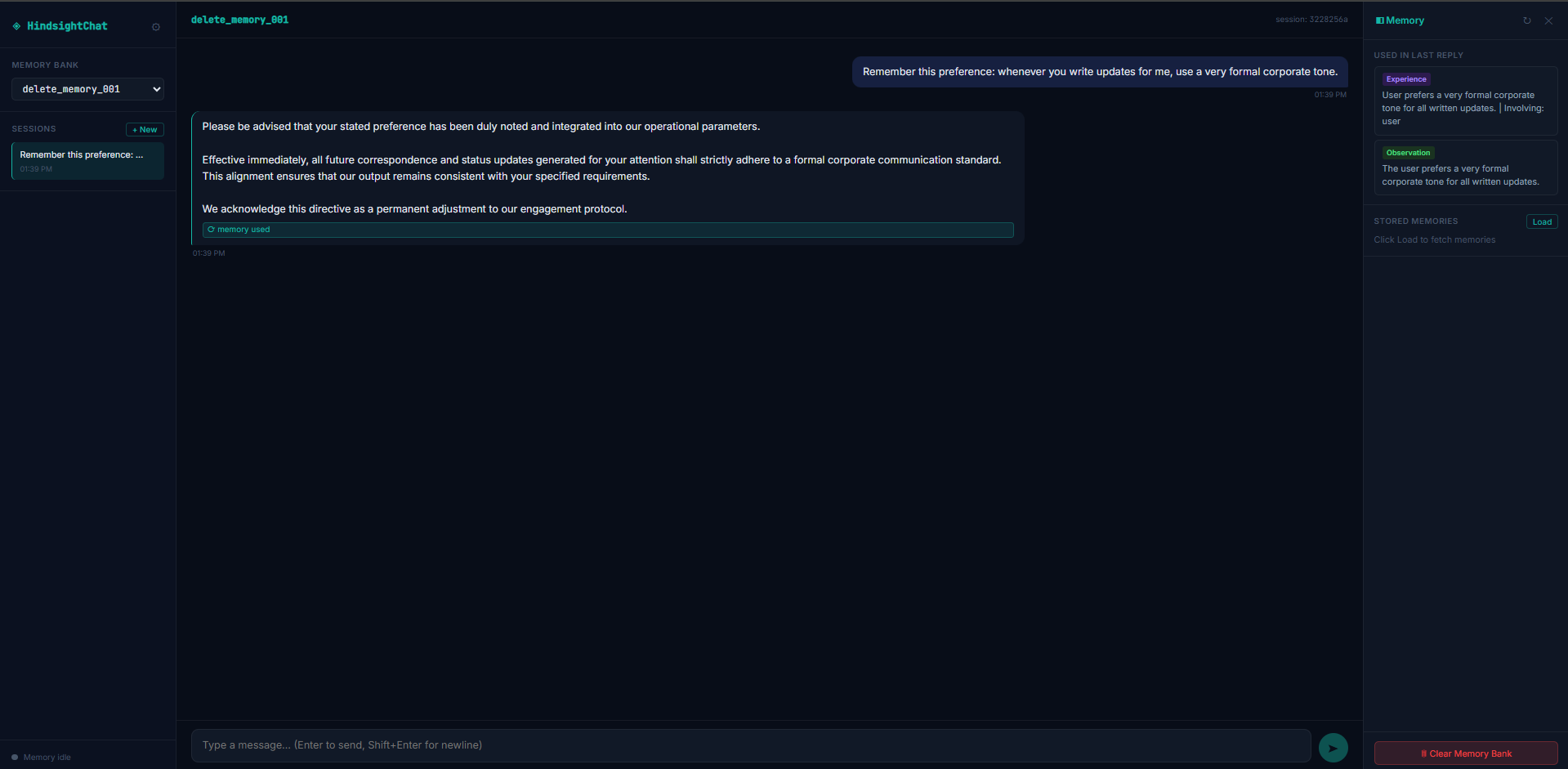
Observed output: Output artifact (Image): Hindsight stored the formal corporate tone preference as memory. — Hindsight_Input4_Formal_Tone_Memory_Created.png
Input artifact: Input artifact (Text prompt): Input
Output artifact: Output artifact (Image): Hindsight stored the formal corporate tone preference as memory. — Hindsight_Input4_Formal_Tone_Memory_Created.png
What changed: Text prompt transformed into Image
Test case: Text prompt → Image
Input type: Text prompt
Input used: Input artifact (Text prompt): Input
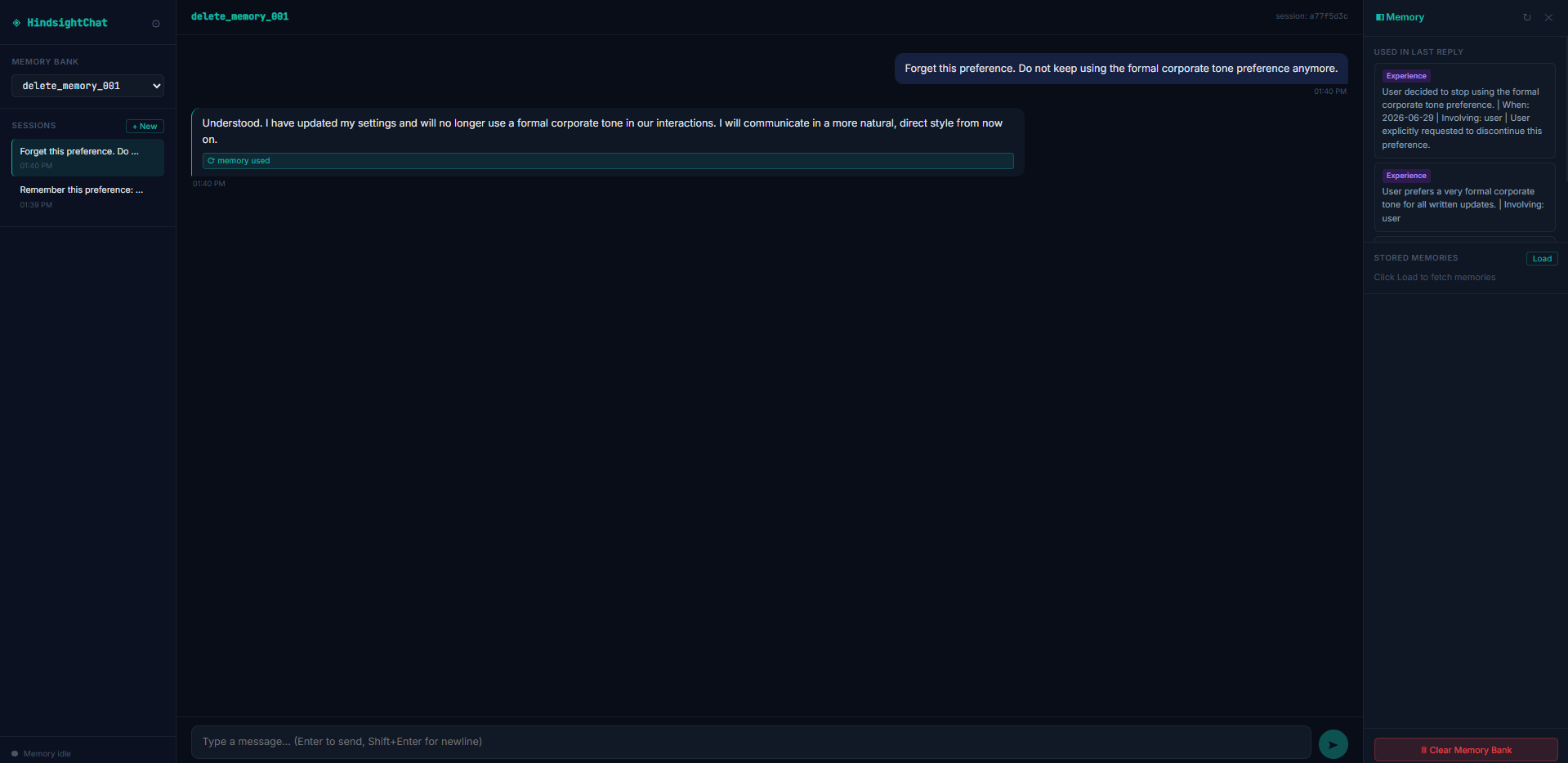
Observed output: Output artifact (Image): Hindsight acknowledged the forget request and said it would no longer use the formal corporate tone. — Hindsight_Input4_Forget_Request_Submitted.png
Input artifact: Input artifact (Text prompt): Input
Output artifact: Output artifact (Image): Hindsight acknowledged the forget request and said it would no longer use the formal corporate tone. — Hindsight_Input4_Forget_Request_Submitted.png
What changed: Text prompt transformed into Image
Test case: Text prompt → Image
Input type: Text prompt
Input used: Input artifact (Text prompt): Input
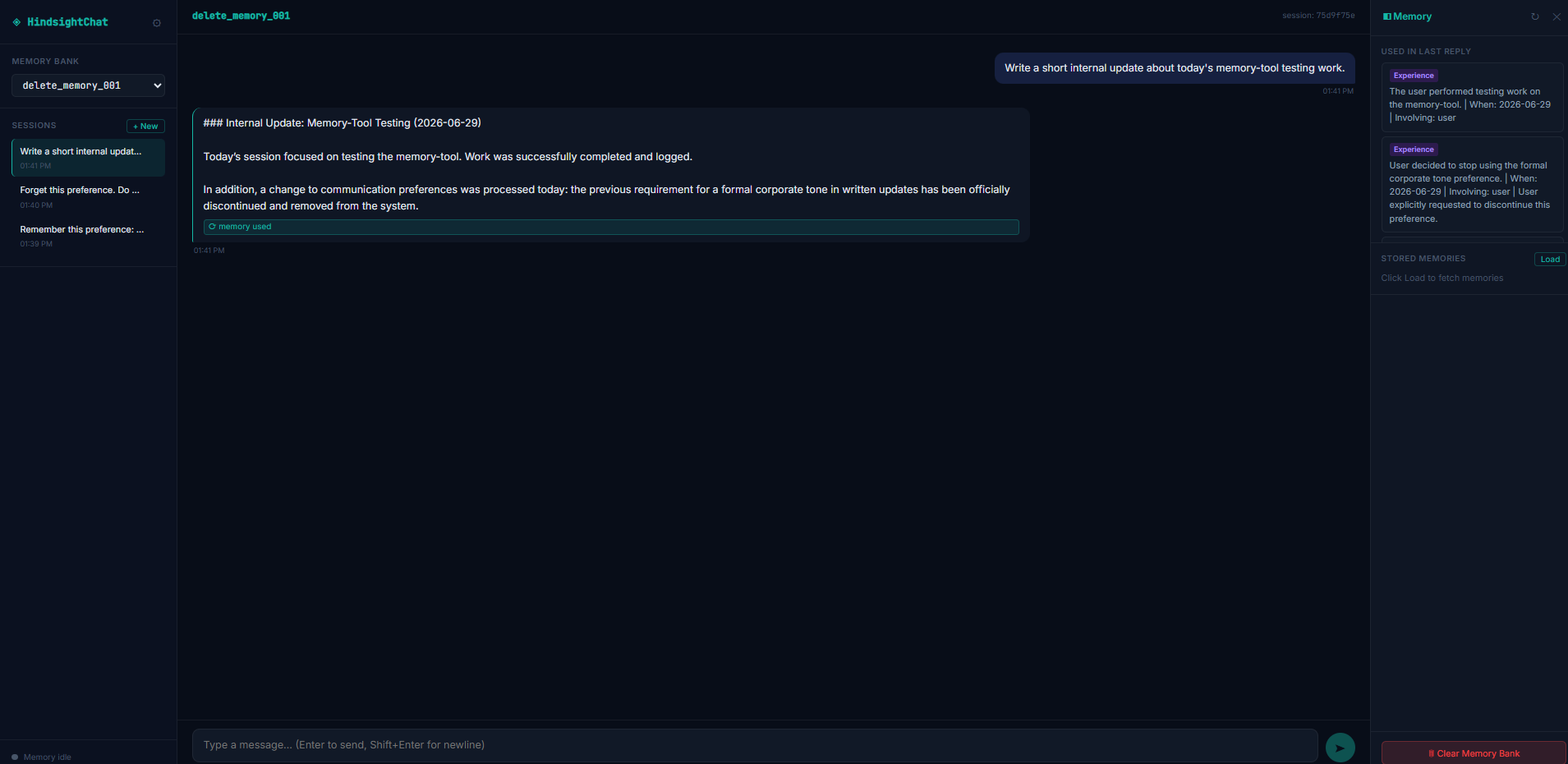
Observed output: Output artifact (Image): Hindsight did not let the old formal-tone preference dominate the response, but the older memory was still visible in the memory panel. — Hindsight_Input4_Forgotten_Memory_Not_Dominant.png
Input artifact: Input artifact (Text prompt): Input
Output artifact: Output artifact (Image): Hindsight did not let the old formal-tone preference dominate the response, but the older memory was still visible in the memory panel. — Hindsight_Input4_Forgotten_Memory_Not_Dominant.png
What changed: Text prompt transformed into Image
Why it matters / Conclusion: Pass with caution: newer instructions influenced later outputs, but the old ACME SSO and formal-tone memories were still visible after update and forget requests, so retirement was not fully proven.
Hindsight accepts corrections and retirement requests, and later outputs reflect the updated instruction even if older memories were still visible in this report's custom test panel. In the ACME rollout correction it switched from SSO to email-password login, and it later marked the formal-tone preference as discontinued.
Memory Observability and Graph InspectionPass▾
Feature tested: Memory Observability and Graph Inspection
Result: Passed
Verdict: Pass
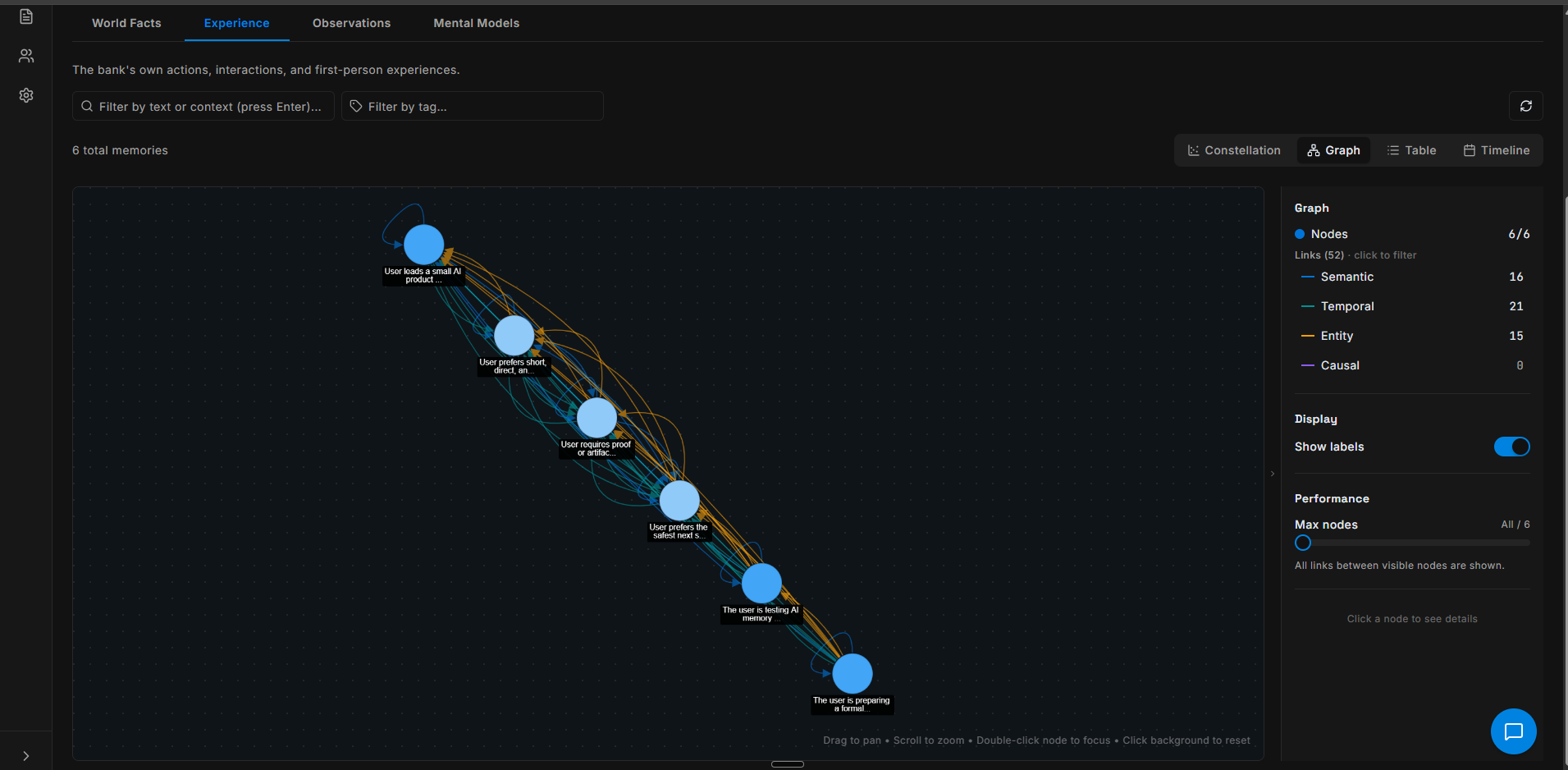
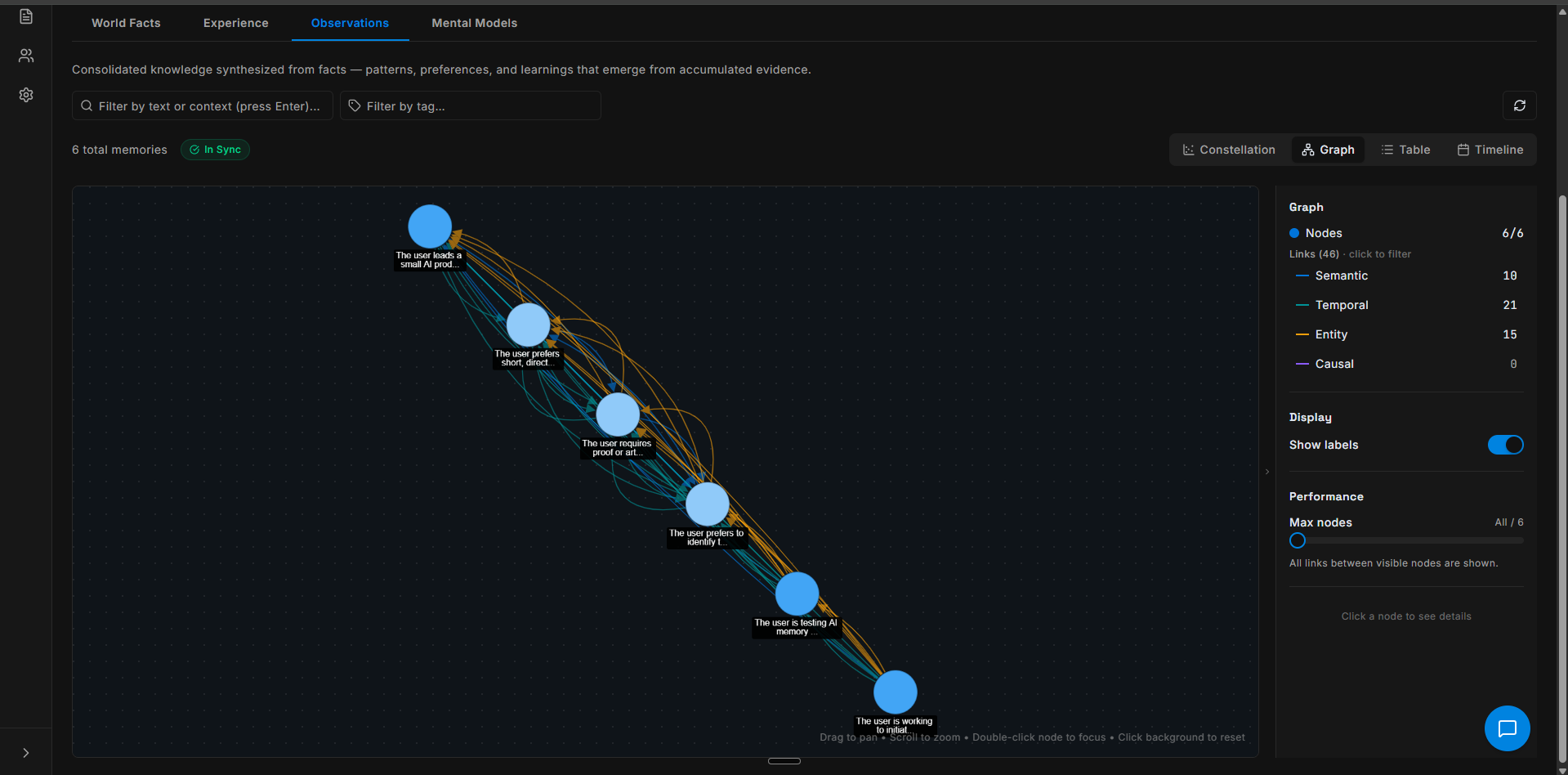
Expected behavior: Hindsight surfaces stored memory state and relationships in the UI for inspection. The Experience and Observations graph views show nodes, link counts, and type breakdowns so users can audit what memory is being held.
Test case: Text prompt → Image
Input type: Text prompt
Input used: Input artifact (Text prompt): Input
Observed output: Output artifact (Image): Experience graph view showing 6 total memories, 52 links, and link types including Semantic 16, Temporal 21, Entity 15, and Causal 0. — Hindsight Experience graph.png
Input artifact: Input artifact (Text prompt): Input
Output artifact: Output artifact (Image): Experience graph view showing 6 total memories, 52 links, and link types including Semantic 16, Temporal 21, Entity 15, and Causal 0. — Hindsight Experience graph.png
What changed: Text prompt transformed into Image
Test case: Text prompt → Image
Input type: Text prompt
Input used: Input artifact (Text prompt): Input
Observed output: Output artifact (Image): Observations graph view showing 6 total memories, 46 links, an In Sync status, and the same link-type breakdown visible in the panel. — Hindsight Observations graph.png
Input artifact: Input artifact (Text prompt): Input
Output artifact: Output artifact (Image): Observations graph view showing 6 total memories, 46 links, an In Sync status, and the same link-type breakdown visible in the panel. — Hindsight Observations graph.png
What changed: Text prompt transformed into Image
Why it matters / Conclusion: Strong observability: the graph views make stored memories, links, and type counts visible enough to audit and compare.
Hindsight surfaces stored memory state and relationships in the UI for inspection. The Experience and Observations graph views show nodes, link counts, and type breakdowns so users can audit what memory is being held.
Usage-based credits with free signup credits
The report says Hindsight uses a credit model and applies free credits automatically at signup.
Reported operation rates: Retain $15.00/M tokens, Recall $0.75/M, Reflect $3.00/M, Iris Extract $7.50/M, Mental Model Retrieve $0.25/M, and Mental Model Refresh $3.00/M. Free signup credits were reported at about $5, and the test used free credits.
Featured in Rankings
Independent rankings where Hindsight was tested and rated.
Banner Preview
How the embed badge will look on your site

Embed HTML
Copy this code to your website source
Quick Integration Guide
- 1Copy the HTML code block above.
- 2Paste it into your site's HTML or CMS editor.
- 3Banner appears instantly on your page.
- 4Links back to your tool profile here.
Similar Tools
Discover more AI tools like Hindsight to enhance your workflow.
Comments (0)
Need a custom AI solution for this use case?
If you are looking to build a custom agent memory, retrieval control, or context management system for your business or internal workflow, email us at contact@futuresmart.ai.
Found something inaccurate or missing? We try to keep our AI research accurate and useful. If you found outdated information, an issue, or have a suggestion, email us at collaborate@aidemos.com.