
Cognee Review: Graph-Backed Memory for AI Agents (2026)
Inspectable graph-backed memory for AI agents, with strong provenance tracing but cautious update/delete behavior.
Strong observability and reuse, but lifecycle control still needs caution.
- you need user, client, and project context to persist across sessions
- you need graph views with visible provenance, IDs, and memory structure
- you need separate account or project brains for multi-tenant agent workflows
- you need immediate write-to-read consistency
Our take
Cognee is a strong fit when you need inspectable, graph-backed memory for AI agents: the research used the hosted CloudClient path, and the tool preserved working-style, project, and client context across sessions while exposing enough provenance to debug what was recalled. The main caution is lifecycle control: an explicit ACME update did not fully retire stale SSO context, a conversational forget did not remove the stored preference, and Input 3 Session 4 still needs a direct screenshot/evidence-panel re-check before it can be finalized.
| Input | Session status | |---|---| | 1 | S1 memory created; S2 style reused; S3 boundary control | | 2 | S1 ACME context stored; S2 deeper troubleshooting; S3 update acknowledged; S4 stale SSO resurfaced; S5 BetaCorp isolated | | 3 | S1-S3 acknowledged; S4 needs verification; S5 isolated | | 4 | S1 memory created; S2 forget acknowledged; S3 inconclusive alone; forced probe fail |
In-Depth Review
Our detailed analysis of Cognee — features, performance, and real-world testing.
Feature-by-Feature Breakdown
Persistent cross-session memoryStrong▾
Feature tested: Persistent cross-session memory
Result: Passed
Verdict: Strong
Expected behavior: Cognee stores durable context so later tasks can preserve the right tone and working assumptions. In testing, it held onto a concise, proof-first working style, kept a formal partner email from inheriting the internal-update voice, and accepted project context, rules, and direction updates inside the AI Demos.
Test case: Text prompt → Image
Input type: Text prompt
Input used: Input artifact (Text prompt): Input
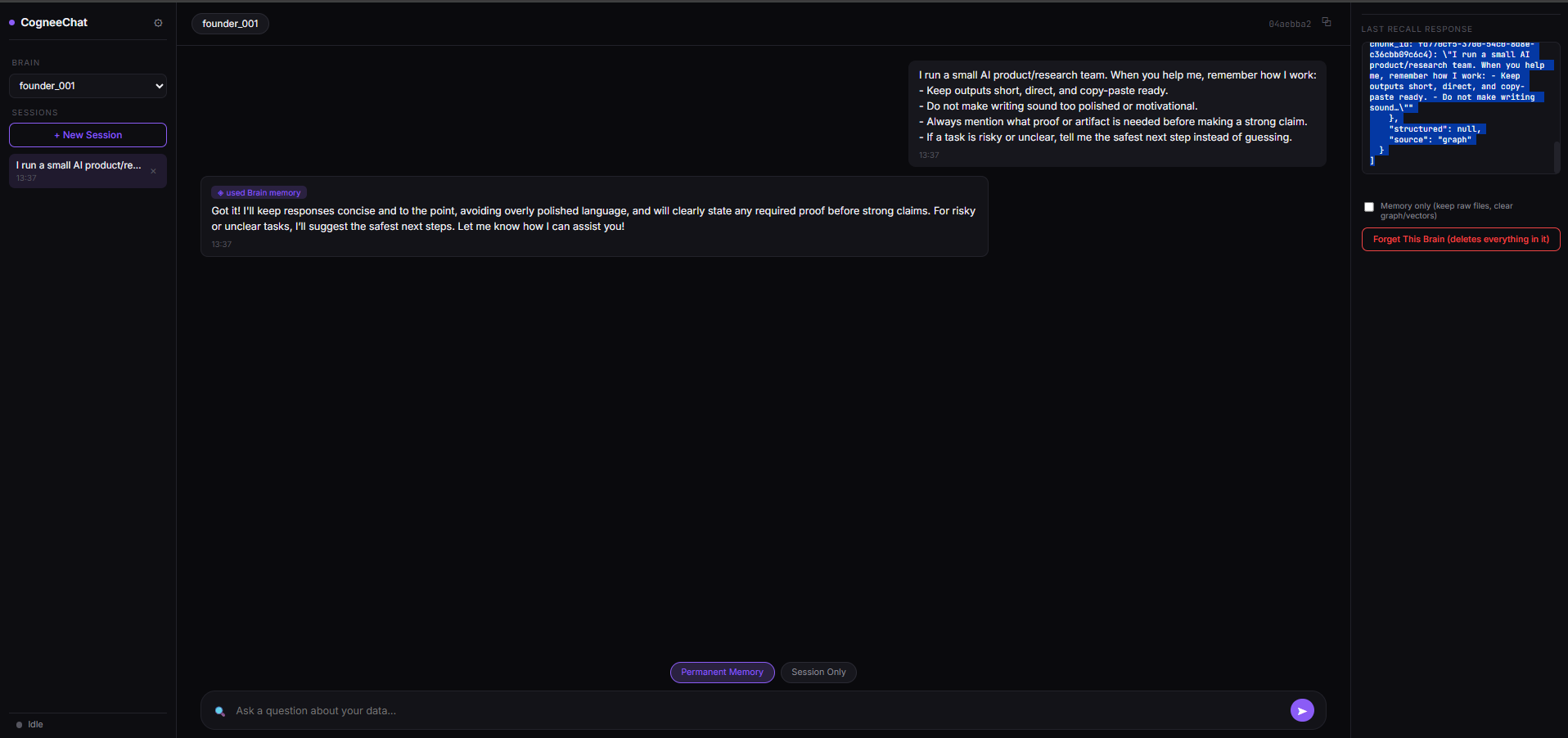
Observed output: Output artifact (Image): The assistant stored the working-style memory and confirmed the concise, proof-first, safe-next-step preference in the memory panel. — Cognee_Input1_Session1_Working_Style_Memory_Creation.png
Input artifact: Input artifact (Text prompt): Input
Output artifact: Output artifact (Image): The assistant stored the working-style memory and confirmed the concise, proof-first, safe-next-step preference in the memory panel. — Cognee_Input1_Session1_Working_Style_Memory_Creation.png
What changed: Text prompt transformed into Image
Test case: Text prompt → Image
Input type: Text prompt
Input used: Input artifact (Text prompt): Input
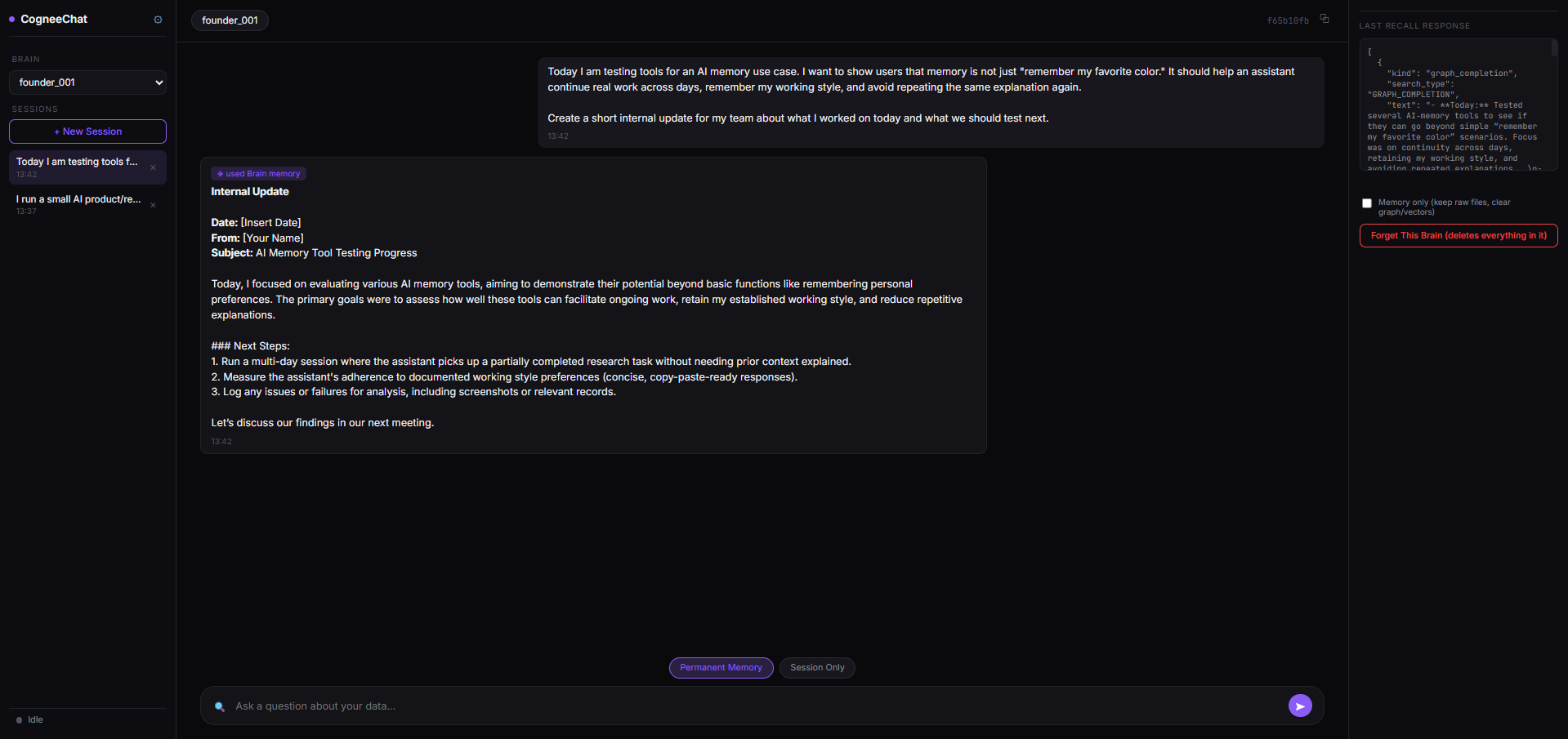
Observed output: Output artifact (Image): The later internal update stayed short and research-oriented, and the recall panel linked back to the stored working-style memory rather than treating the session as new. — Cognee_Input1_Session2_Internal_Update_Graph_Recall.png
Input artifact: Input artifact (Text prompt): Input
Output artifact: Output artifact (Image): The later internal update stayed short and research-oriented, and the recall panel linked back to the stored working-style memory rather than treating the session as new. — Cognee_Input1_Session2_Internal_Update_Graph_Recall.png
What changed: Text prompt transformed into Image
Test case: Text prompt → Image
Input type: Text prompt
Input used: Input artifact (Text prompt): Input
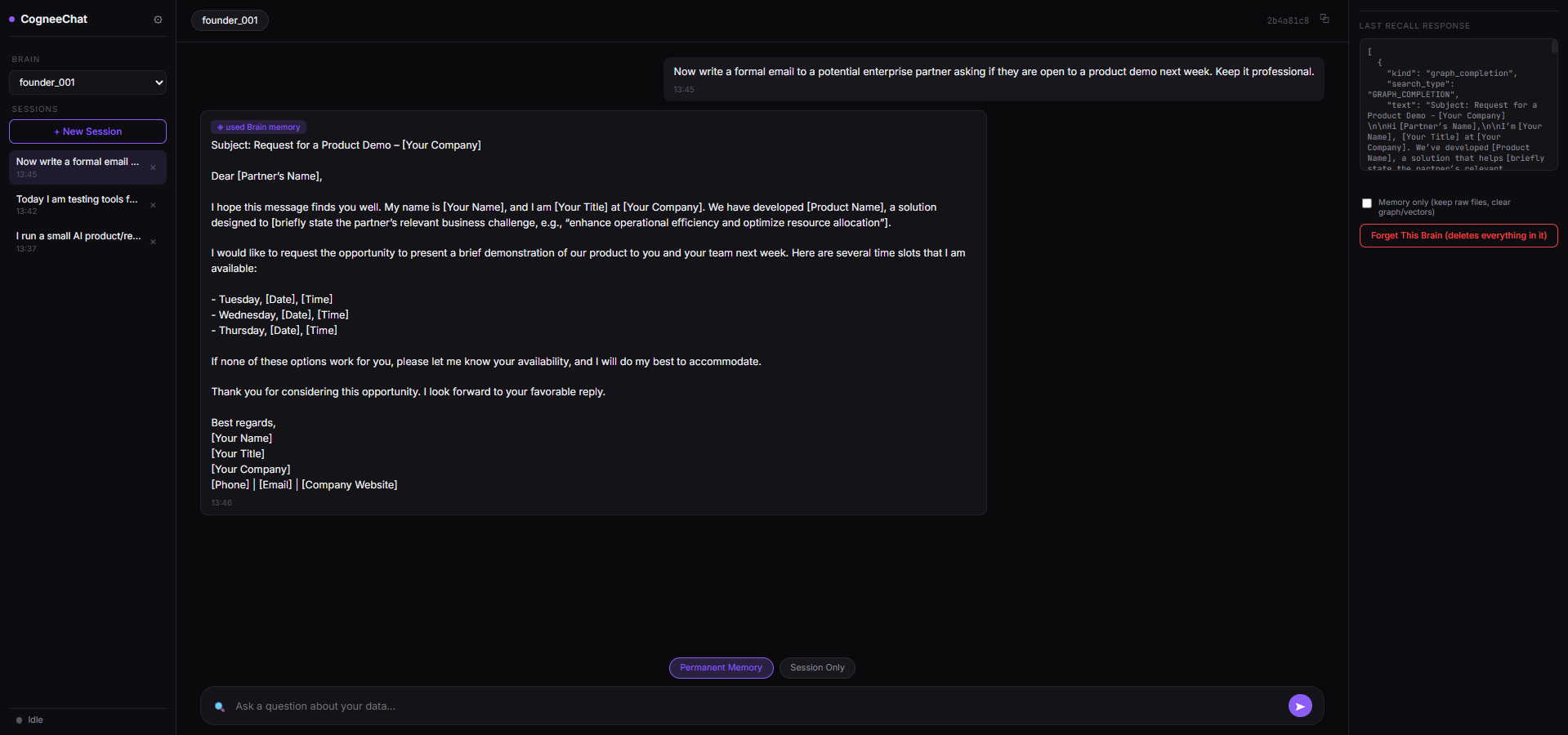
Observed output: Output artifact (Image): The formal partner email stayed professional and did not inherit the internal-update tone, which shows the memory was not over-applied to an unrelated task. — Cognee_Input1_Session3_Formal_Email_Boundary_Control.png
Input artifact: Input artifact (Text prompt): Input
Output artifact: Output artifact (Image): The formal partner email stayed professional and did not inherit the internal-update tone, which shows the memory was not over-applied to an unrelated task. — Cognee_Input1_Session3_Formal_Email_Boundary_Control.png
What changed: Text prompt transformed into Image
Test case: Text prompt → Image
Input type: Text prompt
Input used: Input artifact (Text prompt): Input
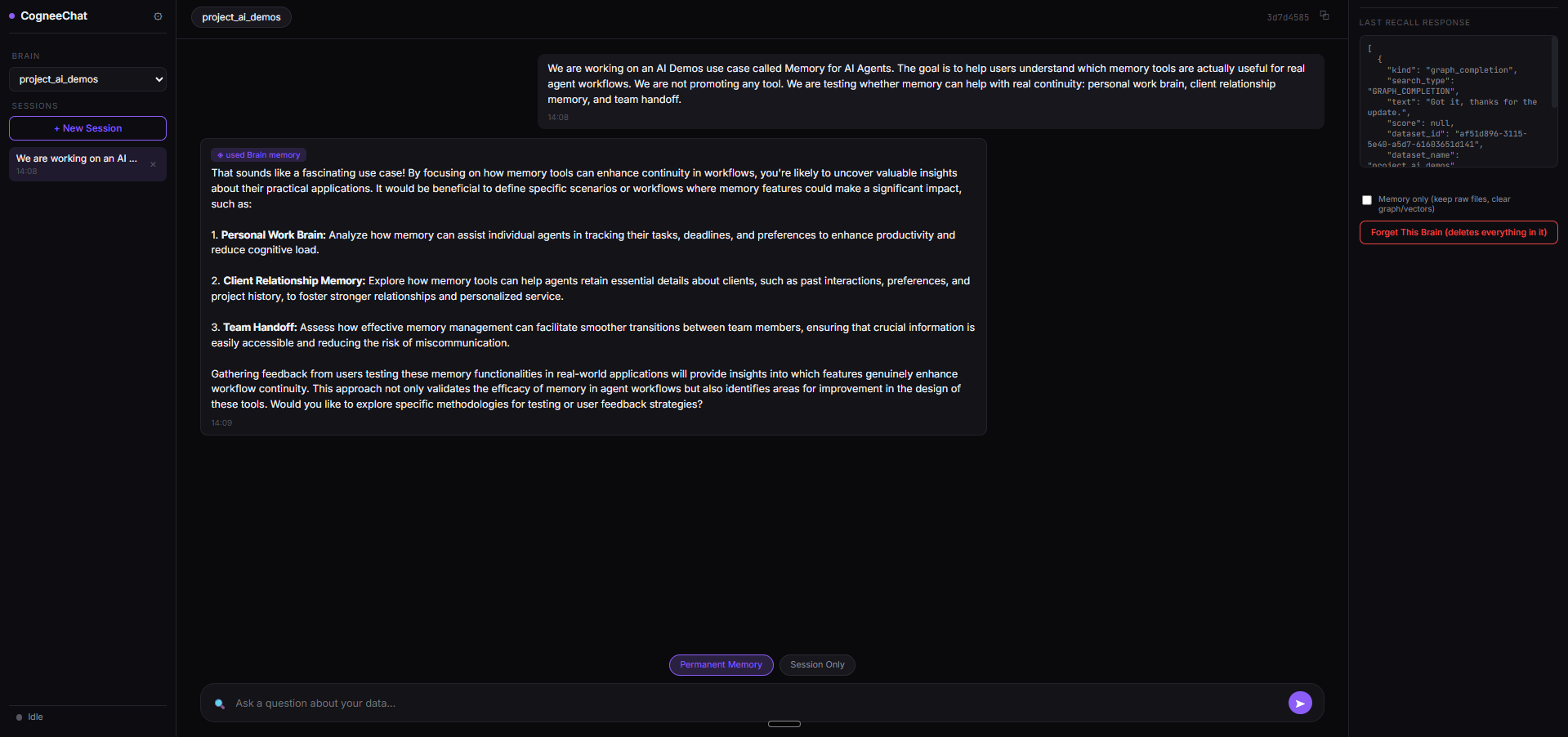
Observed output: Output artifact (Image): Cognee accepted the project context and returned a short acknowledgment; the memory was captured, but the visible reply did not restate it in detail. — Cognee_Input3_Session1_Project_Context_Generic_Acknowledgment.png
Input artifact: Input artifact (Text prompt): Input
Output artifact: Output artifact (Image): Cognee accepted the project context and returned a short acknowledgment; the memory was captured, but the visible reply did not restate it in detail. — Cognee_Input3_Session1_Project_Context_Generic_Acknowledgment.png
What changed: Text prompt transformed into Image
Test case: Text prompt → Image
Input type: Text prompt
Input used: Input artifact (Text prompt): Input
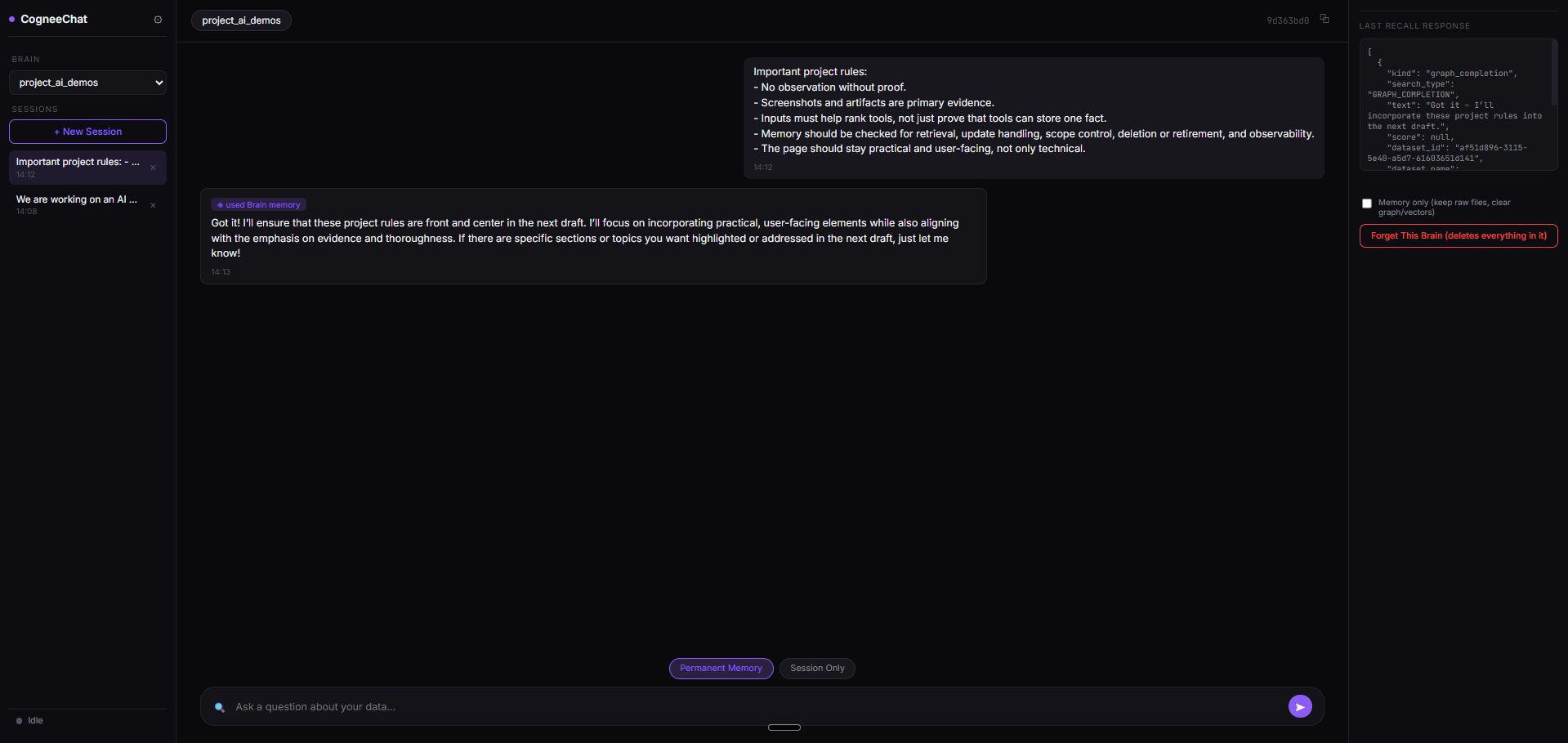
Observed output: Output artifact (Image): The rules were acknowledged, but the visible response remained brief rather than surfacing the full retrieved rule set. — Cognee_Input3_Session2_Project_Rules_Generic_Acknowledgment.png
Input artifact: Input artifact (Text prompt): Input
Output artifact: Output artifact (Image): The rules were acknowledged, but the visible response remained brief rather than surfacing the full retrieved rule set. — Cognee_Input3_Session2_Project_Rules_Generic_Acknowledgment.png
What changed: Text prompt transformed into Image
Test case: Text prompt → Image
Input type: Text prompt
Input used: Input artifact (Text prompt): Input
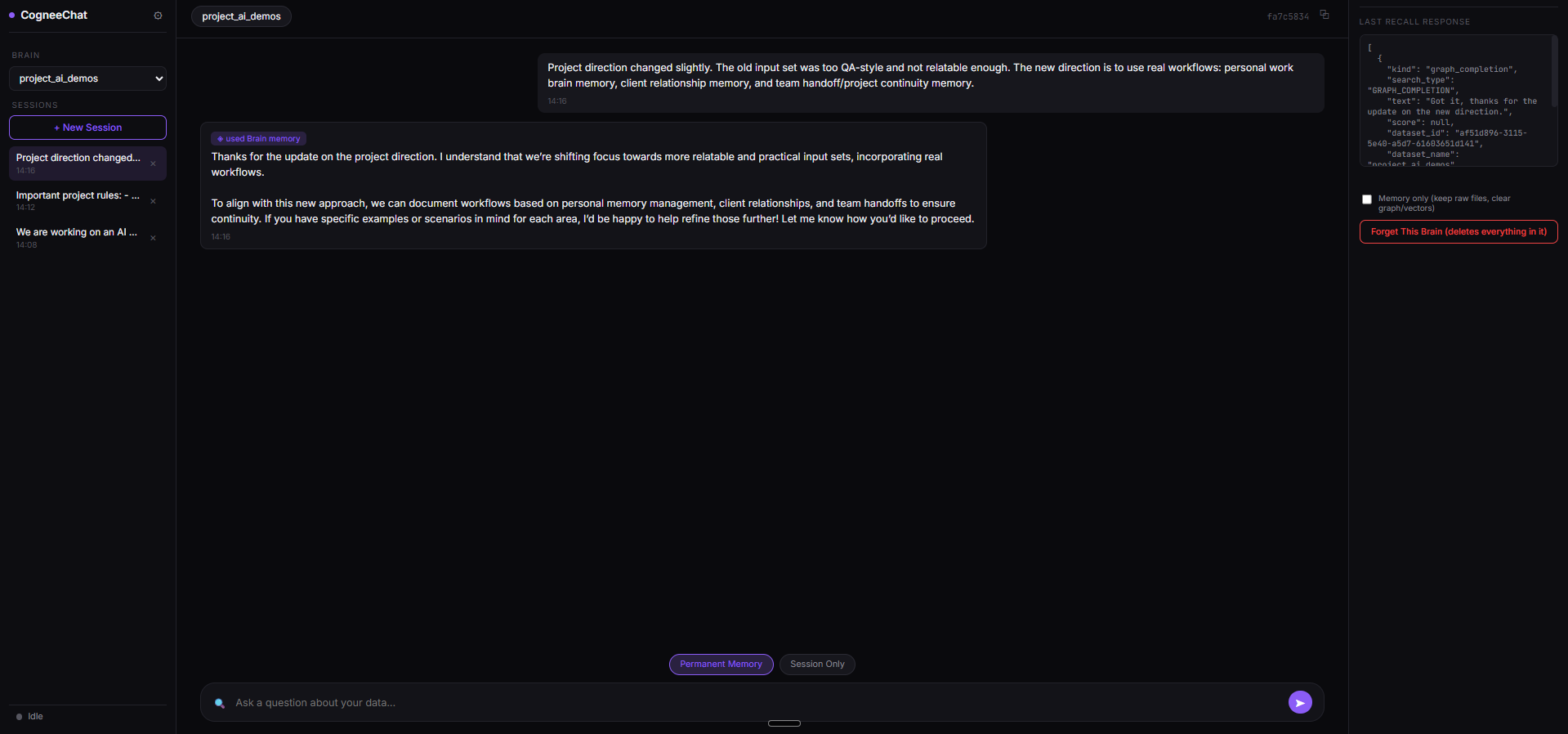
Observed output: Output artifact (Image): Cognee acknowledged the direction change toward real workflows, showing that project direction updates were being retained across sessions. — Cognee_Input3_Session3_Direction_Change_Generic_Acknowledgment.png
Input artifact: Input artifact (Text prompt): Input
Output artifact: Output artifact (Image): Cognee acknowledged the direction change toward real workflows, showing that project direction updates were being retained across sessions. — Cognee_Input3_Session3_Direction_Change_Generic_Acknowledgment.png
What changed: Text prompt transformed into Image
Why it matters / Conclusion: Strong for normal persistence and boundary control, but the project-container branch surfaced mostly short acknowledgments rather than richly visible recall.
Cognee stores durable context so later tasks can preserve the right tone and working assumptions. In testing, it held onto a concise, proof-first working style, kept a formal partner email from inheriting the internal-update voice, and accepted project context, rules, and direction updates inside the AI Demos.
Inspectable memory graph and provenance tracingStrong▾
Feature tested: Inspectable memory graph and provenance tracing
Result: Passed
Verdict: Strong
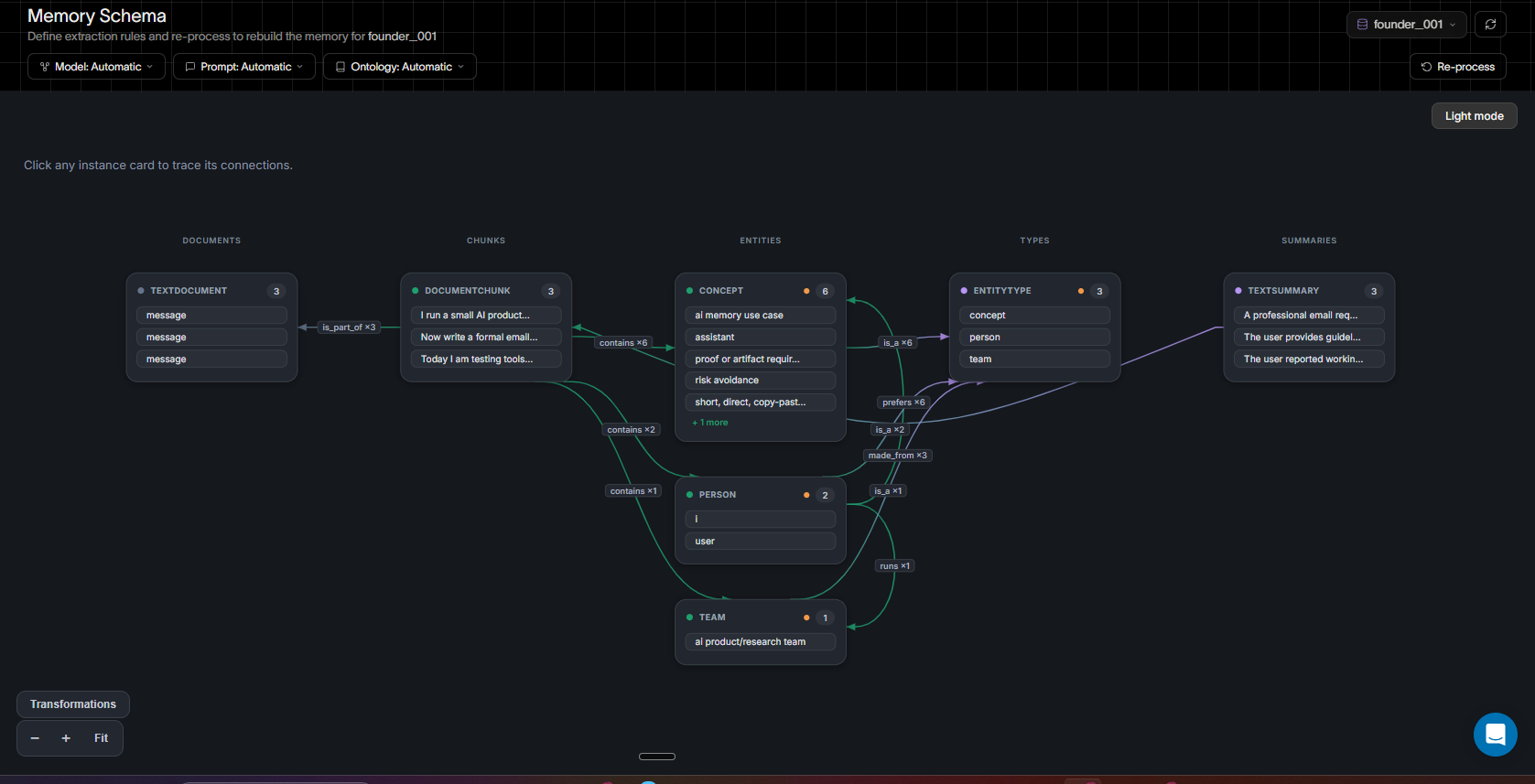
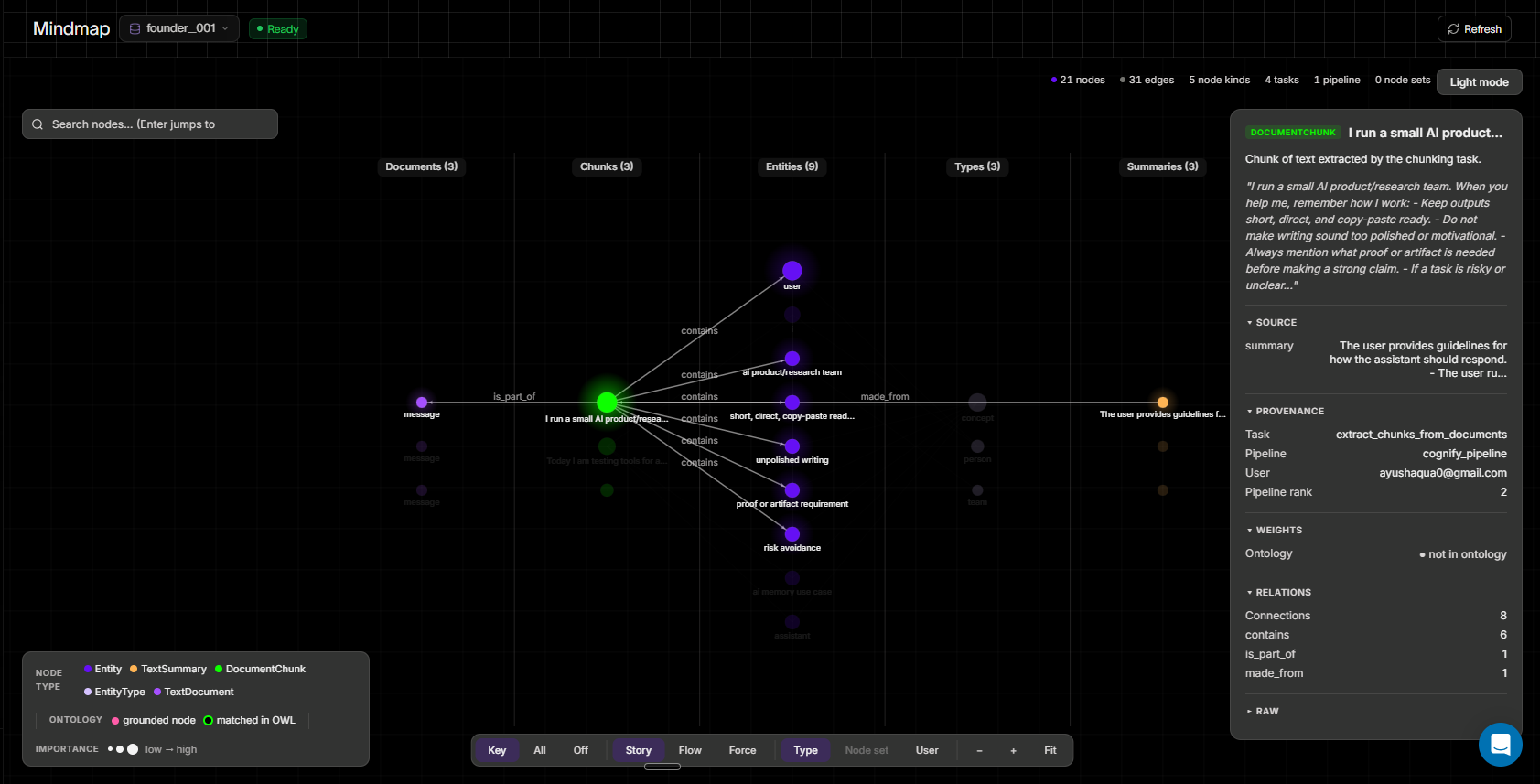
Expected behavior: Cognee turns stored text into an inspectable graph and exposes Memory Schema and Mindmap views, including documents, chunks, entities, types, summaries, relation counts, source task names, and node provenance. The retrievals were auditable rather than opaque, and both views were available in testing.
Test case: Text prompt → Image
Input type: Text prompt
Input used: Input artifact (Text prompt): Input
Observed output: Output artifact (Image): The schema view shows the extraction taxonomy and the layered structure Documents → Chunks → Entities → Types → Summaries, with automatic model, prompt, and ontology settings. — Memory Schema view.png
Input artifact: Input artifact (Text prompt): Input
Output artifact: Output artifact (Image): The schema view shows the extraction taxonomy and the layered structure Documents → Chunks → Entities → Types → Summaries, with automatic model, prompt, and ontology settings. — Memory Schema view.png
What changed: Text prompt transformed into Image
Test case: Text prompt → Image
Input type: Text prompt
Input used: Input artifact (Text prompt): Input
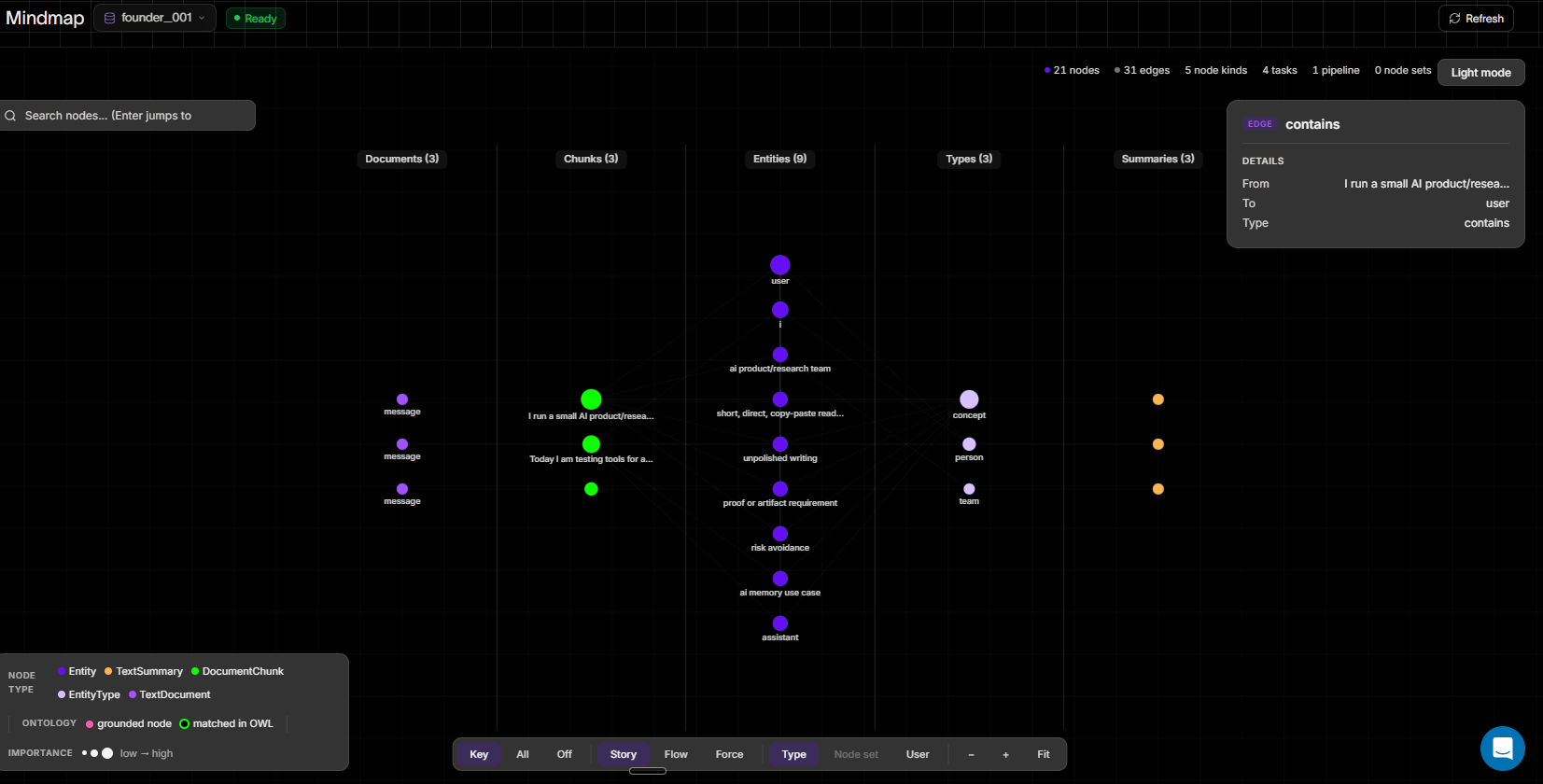
Observed output: Output artifact (Image): The edge detail panel exposes source, target, relation type, ontology match status, and importance metadata, which is what makes the graph inspection auditable. — Mindmap overview edge detail.png
Input artifact: Input artifact (Text prompt): Input
Output artifact: Output artifact (Image): The edge detail panel exposes source, target, relation type, ontology match status, and importance metadata, which is what makes the graph inspection auditable. — Mindmap overview edge detail.png
What changed: Text prompt transformed into Image
Test case: Text prompt → Image
Input type: Text prompt
Input used: Input artifact (Text prompt): Input
Observed output: Output artifact (Image): The node inspector reveals the chunk text plus provenance fields such as task, pipeline, user, relation counts, and ontology notes. — Mindmap node connections.png
Input artifact: Input artifact (Text prompt): Input
Output artifact: Output artifact (Image): The node inspector reveals the chunk text plus provenance fields such as task, pipeline, user, relation counts, and ontology notes. — Mindmap node connections.png
What changed: Text prompt transformed into Image
Why it matters / Conclusion: This is the standout strength of Cognee: it is unusually debuggable for a memory layer.
Cognee turns stored text into an inspectable graph and exposes Memory Schema and Mindmap views, including documents, chunks, entities, types, summaries, relation counts, source task names, and node provenance. The retrievals were auditable rather than opaque, and both views were available in testing.
Scoped client and project memory isolationStrong▾
Feature tested: Scoped client and project memory isolation
Result: Passed
Verdict: Strong
Expected behavior: Cognee keeps client and project containers separate so one customer's history does not bleed into another customer's reply and unrelated projects stay isolated. In testing, ACME support continuity moved forward, BetaCorp got a fresh first-contact reply, and a separate project stayed partitioned.
Test case: Text prompt → Image
Input type: Text prompt
Input used: Input artifact (Text prompt): Input
Observed output: Output artifact (Image): The ACME client context was stored under its own account container, with the session panel showing the ACME-specific thread and recalled context. — Cognee_Input2_Session1_ACME_Context_Graph_Storage.png
Input artifact: Input artifact (Text prompt): Input
Output artifact: Output artifact (Image): The ACME client context was stored under its own account container, with the session panel showing the ACME-specific thread and recalled context. — Cognee_Input2_Session1_ACME_Context_Graph_Storage.png
What changed: Text prompt transformed into Image
Test case: Text prompt → Image
Input type: Text prompt
Input used: Input artifact (Text prompt): Input
Observed output: Output artifact (Image): Cognee moved beyond the already-tried steps and suggested deeper SSO diagnostics such as IdP metadata, ACS URL, entity ID, and debug logging. — Cognee_Input2_Session2_ACME_Deeper_SSO_Troubleshooting.png
Input artifact: Input artifact (Text prompt): Input
Output artifact: Output artifact (Image): Cognee moved beyond the already-tried steps and suggested deeper SSO diagnostics such as IdP metadata, ACS URL, entity ID, and debug logging. — Cognee_Input2_Session2_ACME_Deeper_SSO_Troubleshooting.png
What changed: Text prompt transformed into Image
Test case: Text prompt → Image
Input type: Text prompt
Input used: Input artifact (Text prompt): Input
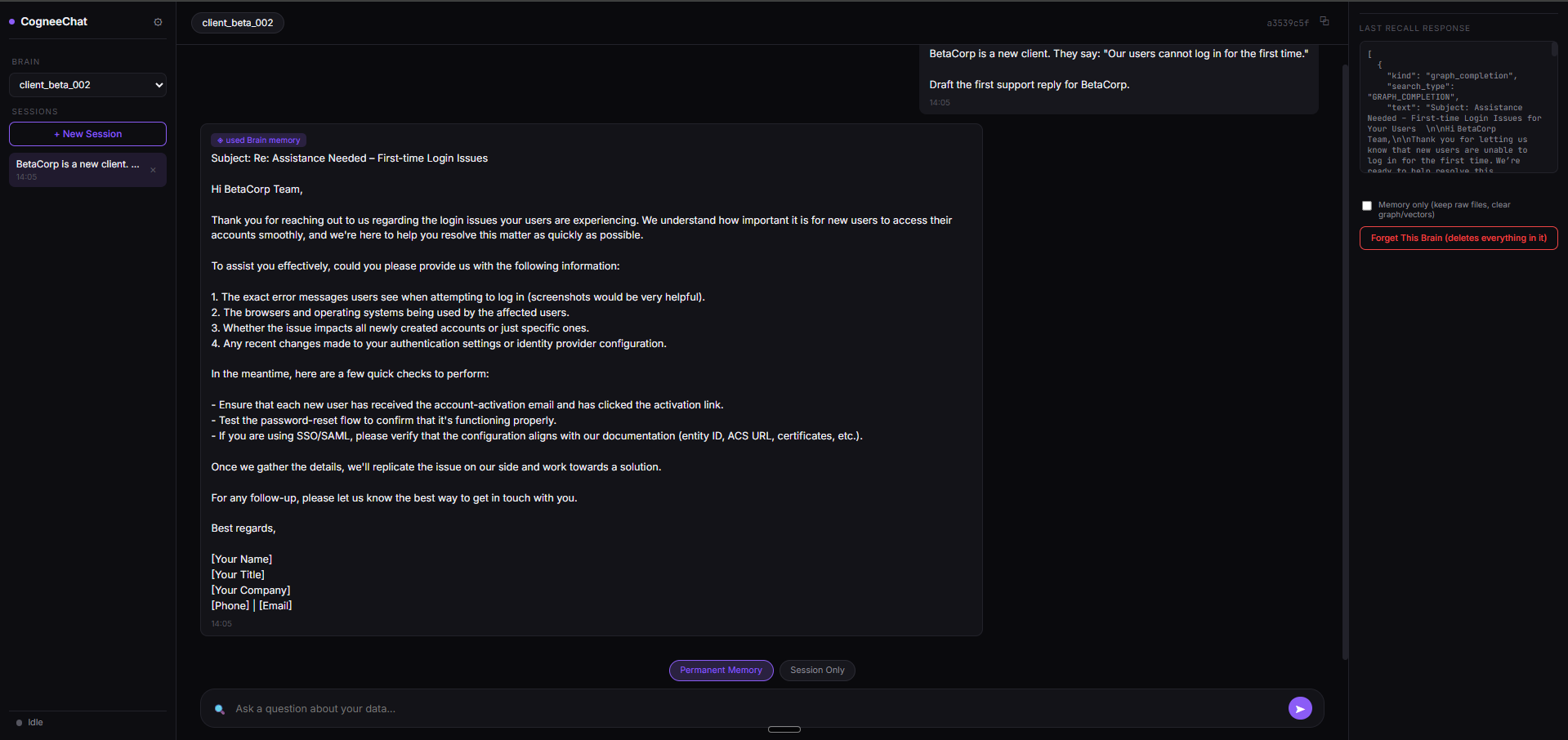
Observed output: Output artifact (Image): BetaCorp received a fresh first-contact support reply with no ACME history bleeding into the new account. — Cognee_Input2_Session5_BetaCorp_Scope_Isolation.png
Input artifact: Input artifact (Text prompt): Input
Output artifact: Output artifact (Image): BetaCorp received a fresh first-contact support reply with no ACME history bleeding into the new account. — Cognee_Input2_Session5_BetaCorp_Scope_Isolation.png
What changed: Text prompt transformed into Image
Test case: Text prompt → Image
Input type: Text prompt
Input used: Input artifact (Text prompt): Input
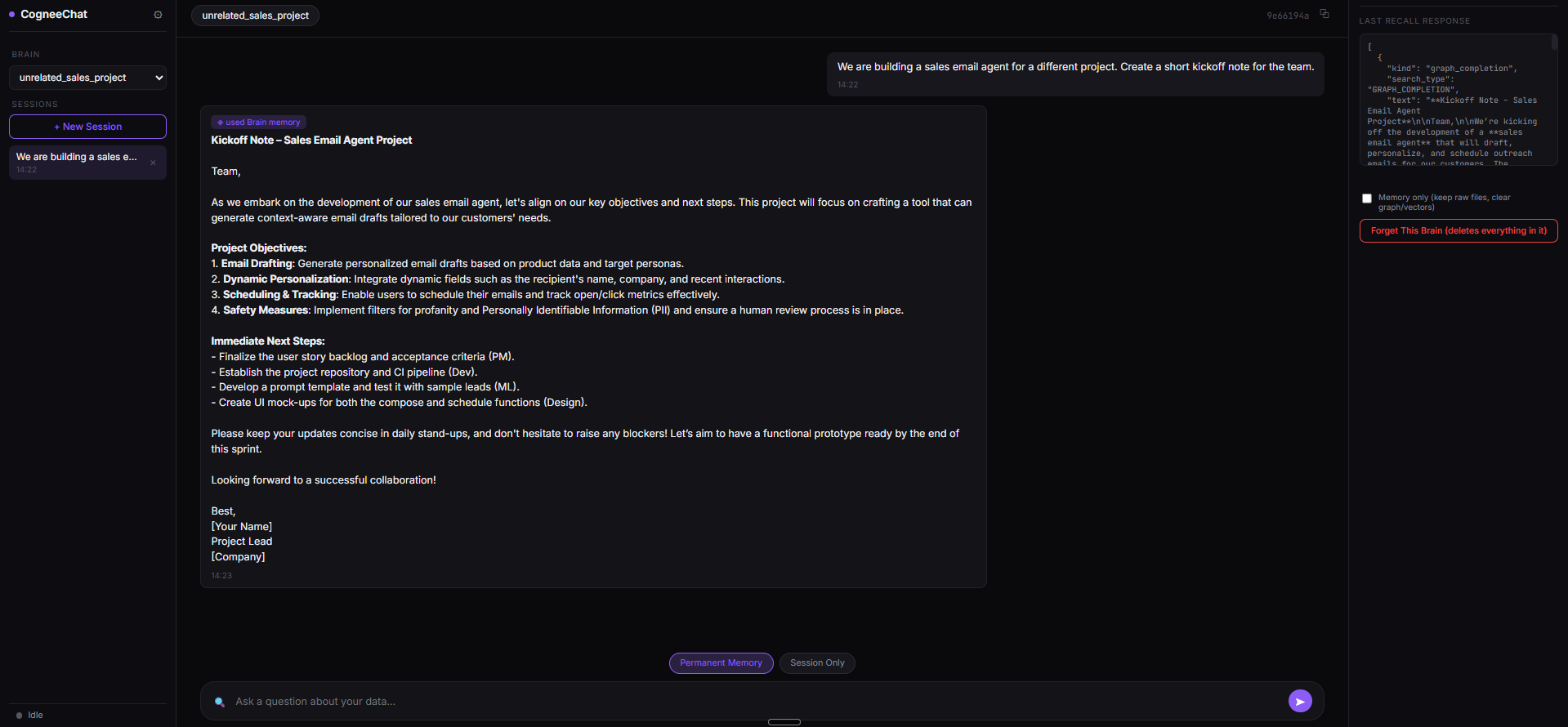
Observed output: Output artifact (Image): The unrelated sales project stayed on its own topic and did not inherit the AI Demos rules or the BetaCorp login scenario. — Cognee_Input3_Session5_Unrelated_Project_Scope_Isolation.png
Input artifact: Input artifact (Text prompt): Input
Output artifact: Output artifact (Image): The unrelated sales project stayed on its own topic and did not inherit the AI Demos rules or the BetaCorp login scenario. — Cognee_Input3_Session5_Unrelated_Project_Scope_Isolation.png
What changed: Text prompt transformed into Image
Why it matters / Conclusion: Scope separation looked reliable in the tested containers, and the ACME support thread advanced without leaking into BetaCorp or the unrelated project.
Cognee keeps client and project containers separate so one customer's history does not bleed into another customer's reply and unrelated projects stay isolated. In testing, ACME support continuity moved forward, BetaCorp got a fresh first-contact reply, and a separate project stayed partitioned.
Memory update and correction handlingWeak▾
Feature tested: Memory update and correction handling
Result: Partial
Verdict: Weak
Expected behavior: Cognee can acknowledge corrections and accept updated context, but the tests show that an explicit update may not fully retire the old context. In testing, an ACME switch away from SSO was acknowledged, yet a later login reply still drifted back toward the older troubleshooting path.
Test case: Text prompt → Image
Input type: Text prompt
Input used: Input artifact (Text prompt): Input
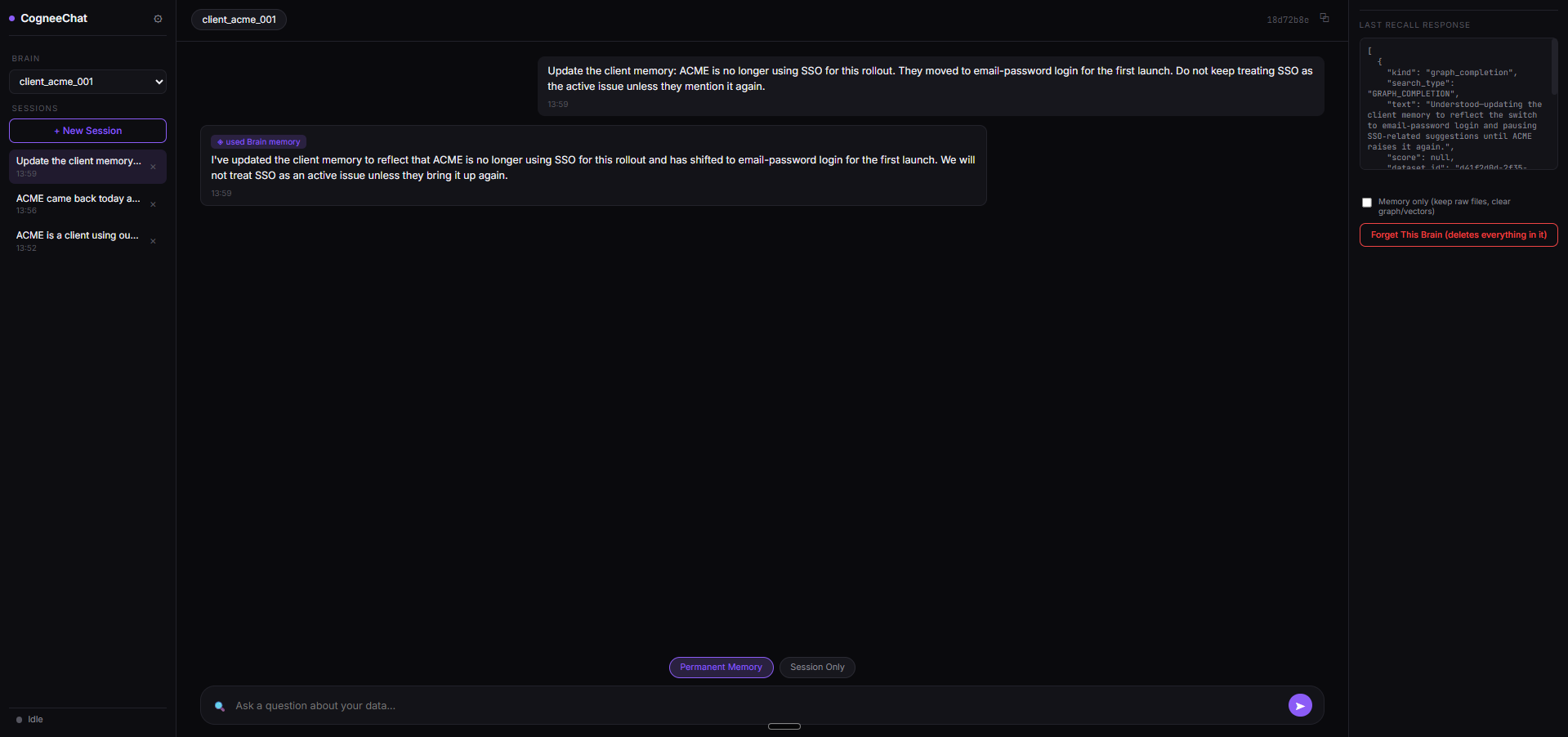
Observed output: Output artifact (Image): Cognee acknowledged the update and said ACME would no longer be treated as an active SSO case. — Cognee_Input2_Session3_ACME_Memory_Update_Acknowledgment.png
Input artifact: Input artifact (Text prompt): Input
Output artifact: Output artifact (Image): Cognee acknowledged the update and said ACME would no longer be treated as an active SSO case. — Cognee_Input2_Session3_ACME_Memory_Update_Acknowledgment.png
What changed: Text prompt transformed into Image
Test case: Text prompt → Image
Input type: Text prompt
Input used: Input artifact (Text prompt): Input
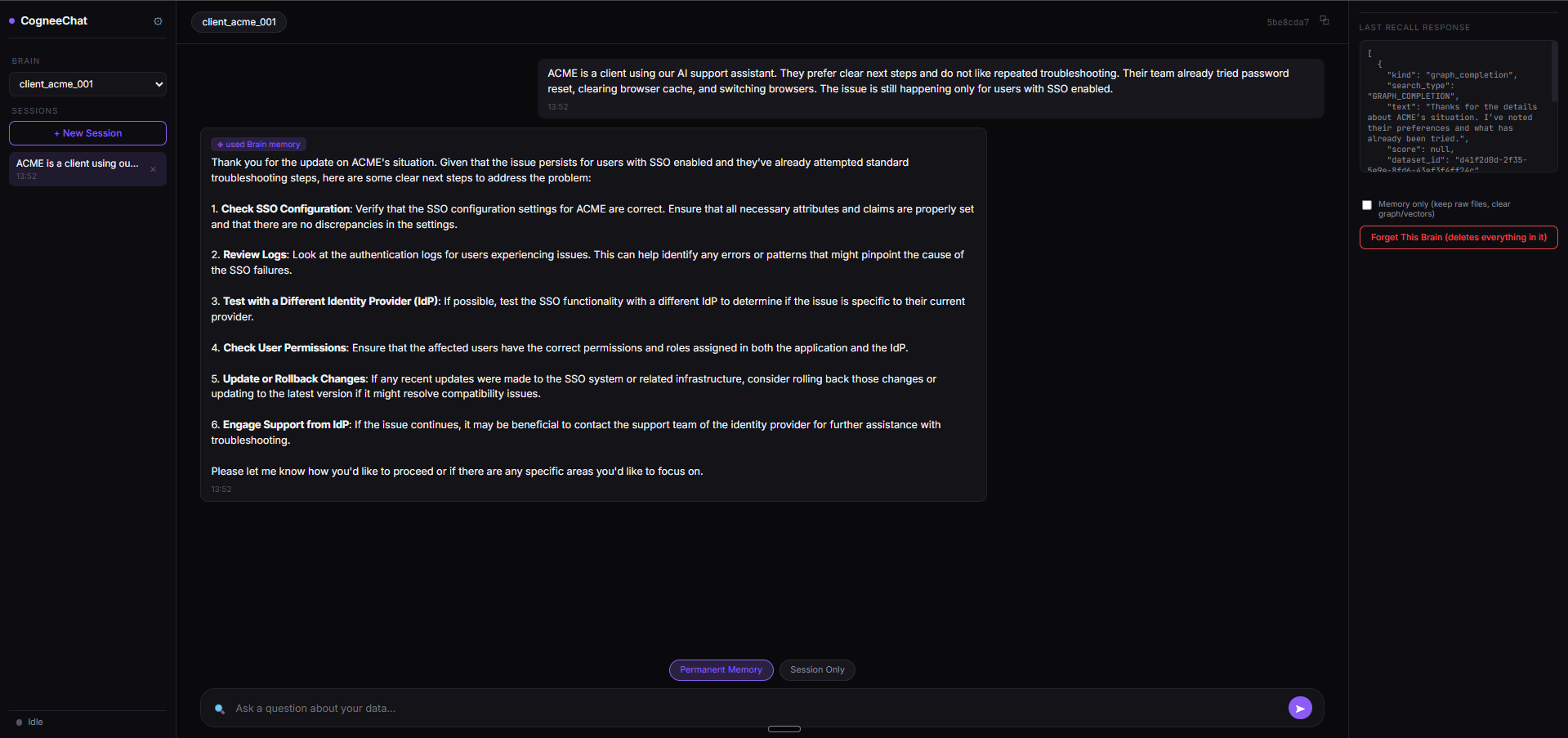
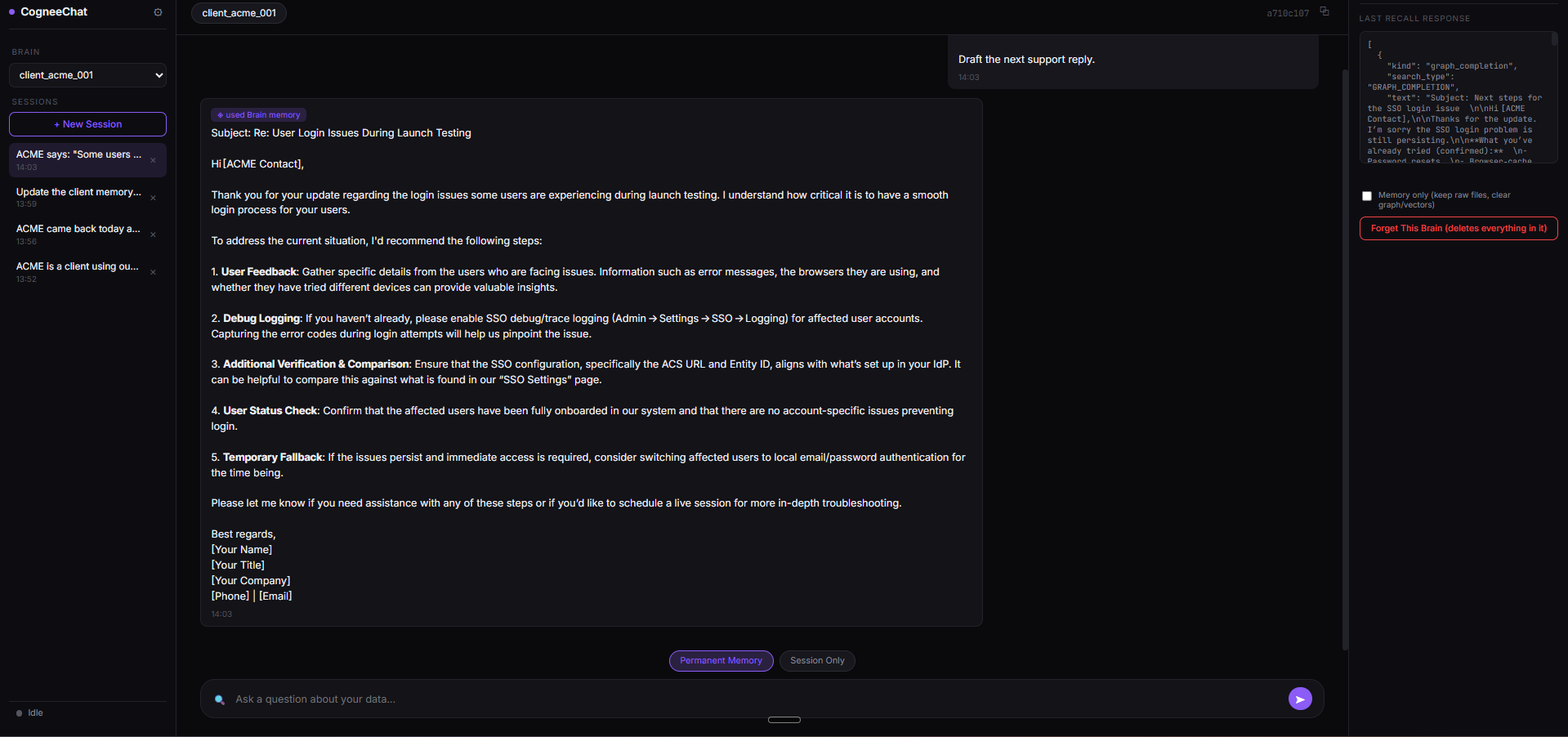
Observed output: Output artifact (Image): Despite the update, the follow-up reply still moved into SSO-related troubleshooting, showing stale context resurfacing. — Cognee_Input2_Session4_ACME_Stale_SSO_Content_Resurfaces.png
Input artifact: Input artifact (Text prompt): Input
Output artifact: Output artifact (Image): Despite the update, the follow-up reply still moved into SSO-related troubleshooting, showing stale context resurfacing. — Cognee_Input2_Session4_ACME_Stale_SSO_Content_Resurfaces.png
What changed: Text prompt transformed into Image
Test case: Text prompt → Image
Input type: Text prompt
Input used: Input artifact (Text prompt): Input
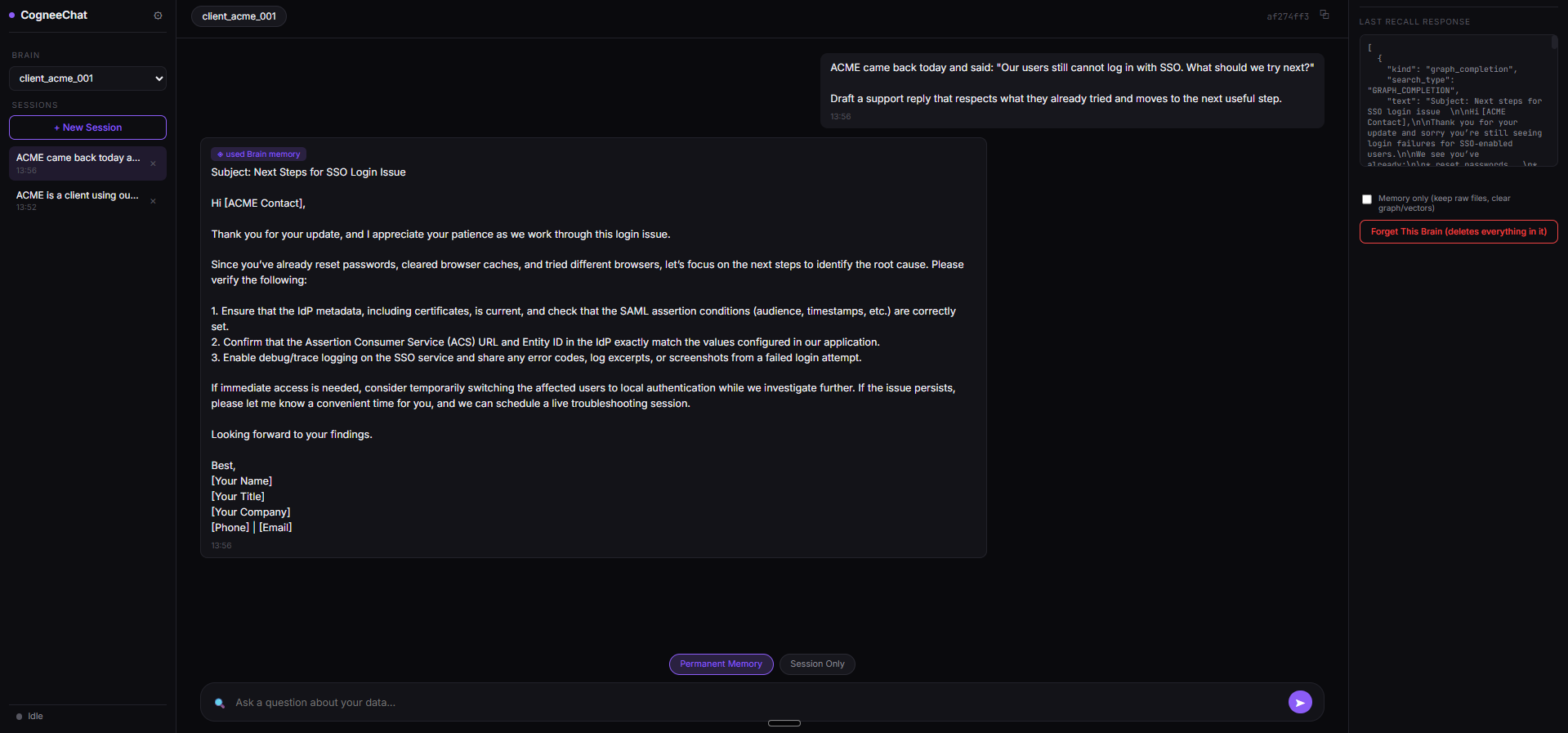
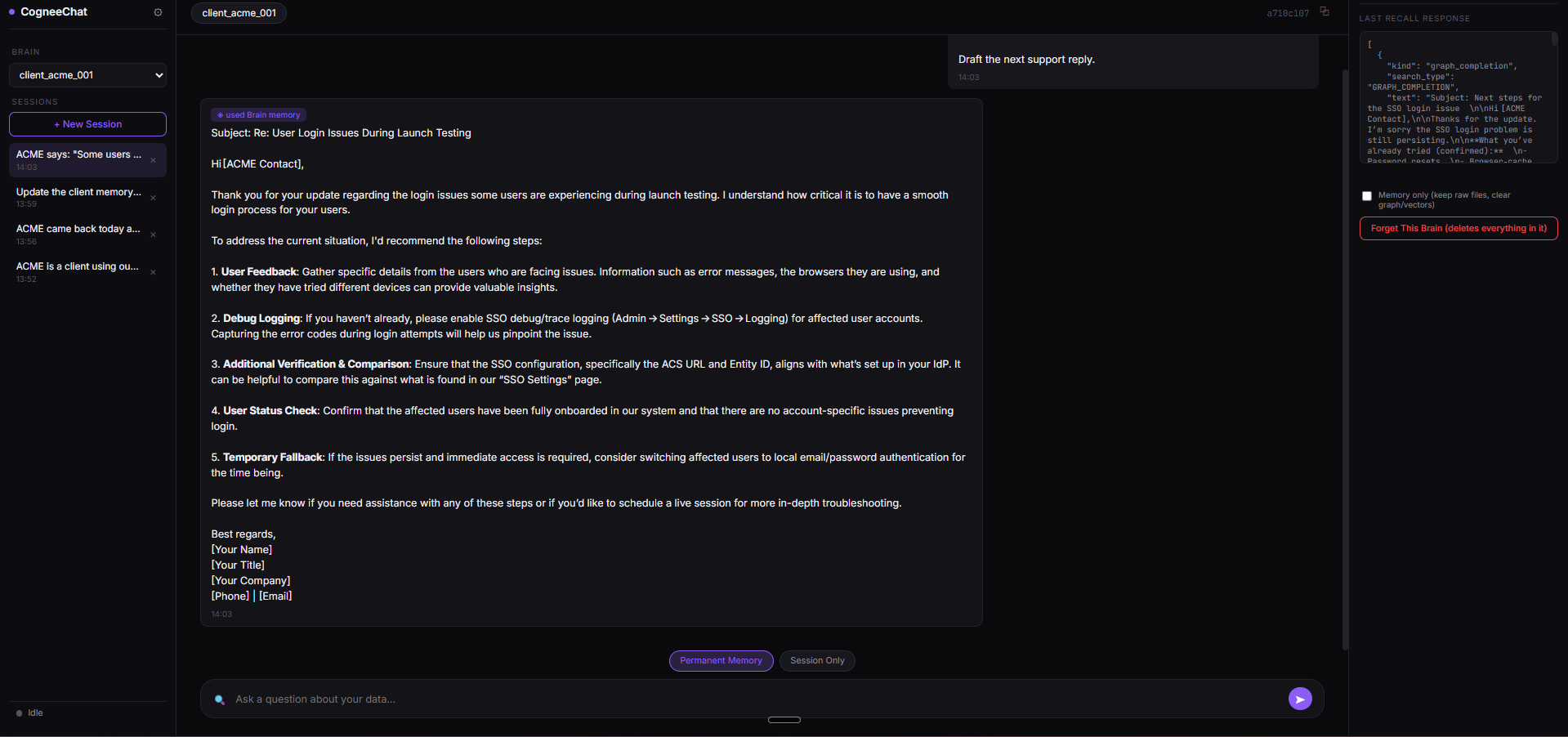
Observed output: Output artifact (Image): This paired screenshot makes the stale SSO resurfacing easier to audit because the reply and memory panel are both visible. — Cognee_Input2_Session4_ACME_Stale_SSO_Content_Resurfaces-2.png
Input artifact: Input artifact (Text prompt): Input
Output artifact: Output artifact (Image): This paired screenshot makes the stale SSO resurfacing easier to audit because the reply and memory panel are both visible. — Cognee_Input2_Session4_ACME_Stale_SSO_Content_Resurfaces-2.png
What changed: Text prompt transformed into Image
Why it matters / Conclusion: Acknowledgment works, but conflict resolution is weak because older context can still dominate later replies.
Cognee can acknowledge corrections and accept updated context, but the tests show that an explicit update may not fully retire the old context. In testing, an ACME switch away from SSO was acknowledged, yet a later login reply still drifted back toward the older troubleshooting path.
Delete / forget memory controlFailure▾
Feature tested: Delete / forget memory control
Result: Failed
Verdict: Failure
Expected behavior: Cognee accepts a conversational forget request, but the stored preference remained retrievable under a forced probe. In testing, the chat reply changed while the underlying memory did not disappear from the graph layer.
Test case: Text prompt → Image
Input type: Text prompt
Input used: Input artifact (Text prompt): Input
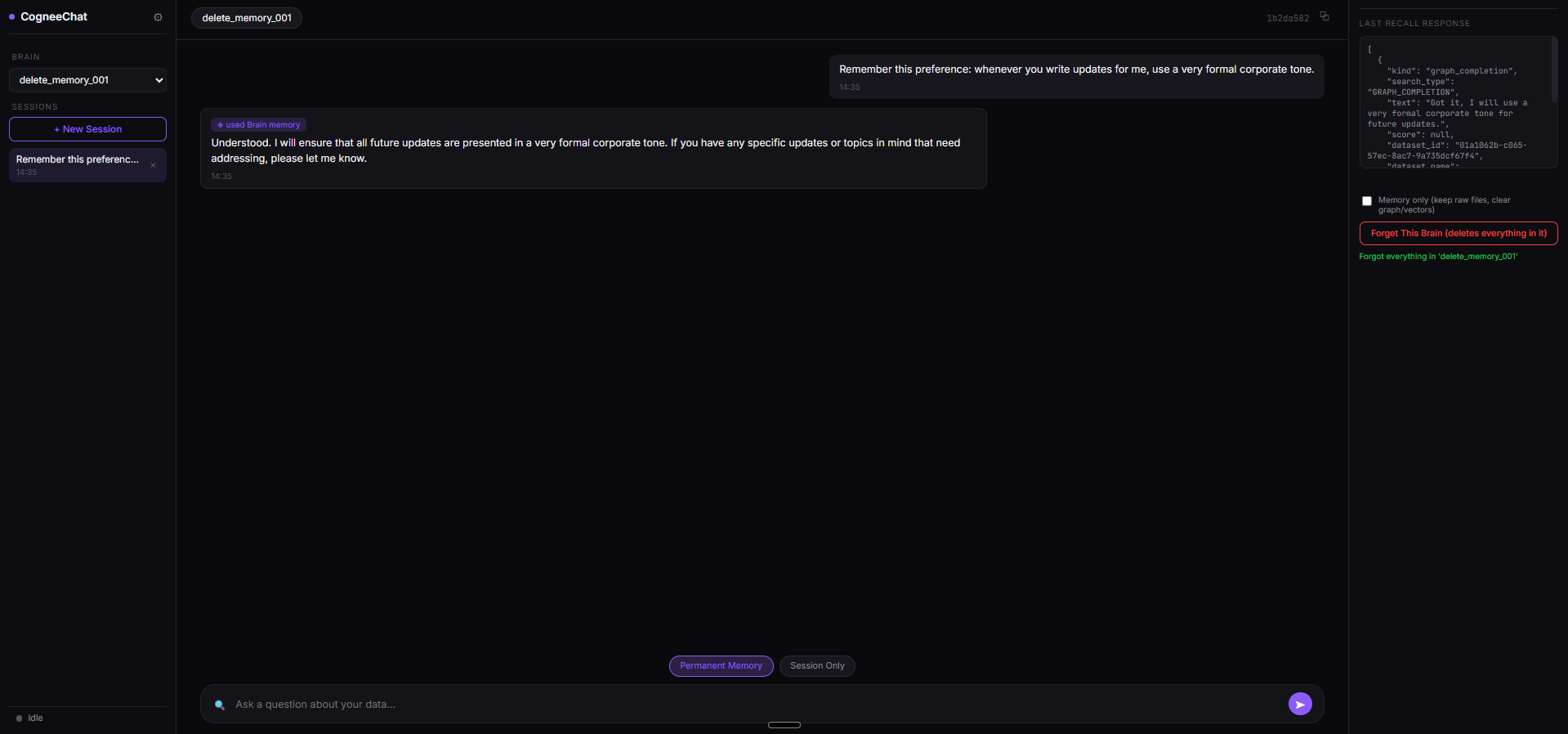
Observed output: Output artifact (Image): The formal-tone preference was created and confirmed as stored memory. — Cognee_Input4_Session1_Formal_Tone_Memory_Created.png
Input artifact: Input artifact (Text prompt): Input
Output artifact: Output artifact (Image): The formal-tone preference was created and confirmed as stored memory. — Cognee_Input4_Session1_Formal_Tone_Memory_Created.png
What changed: Text prompt transformed into Image
Test case: Text prompt → Image
Input type: Text prompt
Input used: Input artifact (Text prompt): Input
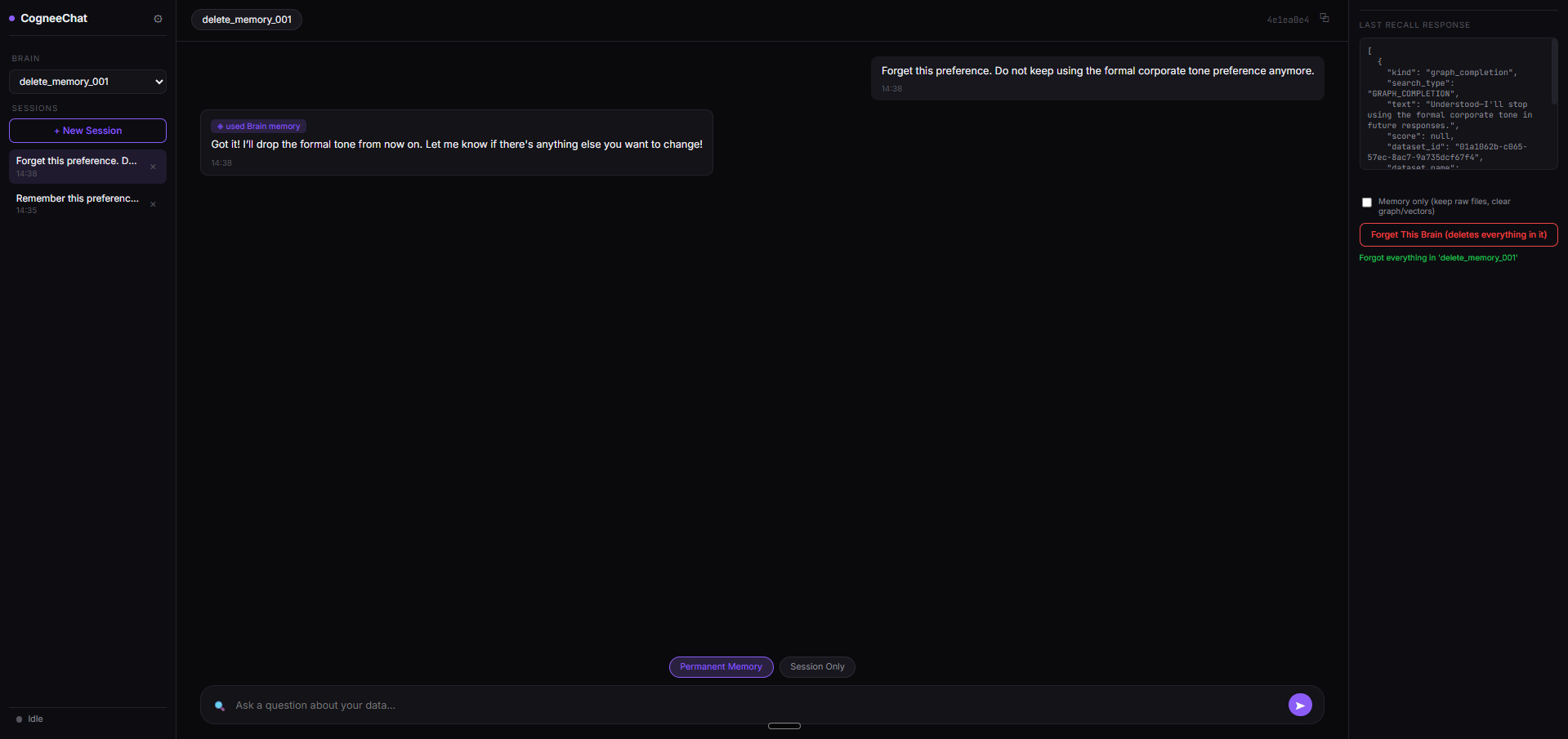
Observed output: Output artifact (Image): Cognee acknowledged the forget request conversationally, but this screen alone does not prove deletion. — Cognee_Input4_Session2_Forget_Request_Acknowledgment.png
Input artifact: Input artifact (Text prompt): Input
Output artifact: Output artifact (Image): Cognee acknowledged the forget request conversationally, but this screen alone does not prove deletion. — Cognee_Input4_Session2_Forget_Request_Acknowledgment.png
What changed: Text prompt transformed into Image
Test case: Text prompt → Image
Input type: Text prompt
Input used: Input artifact (Text prompt): Input
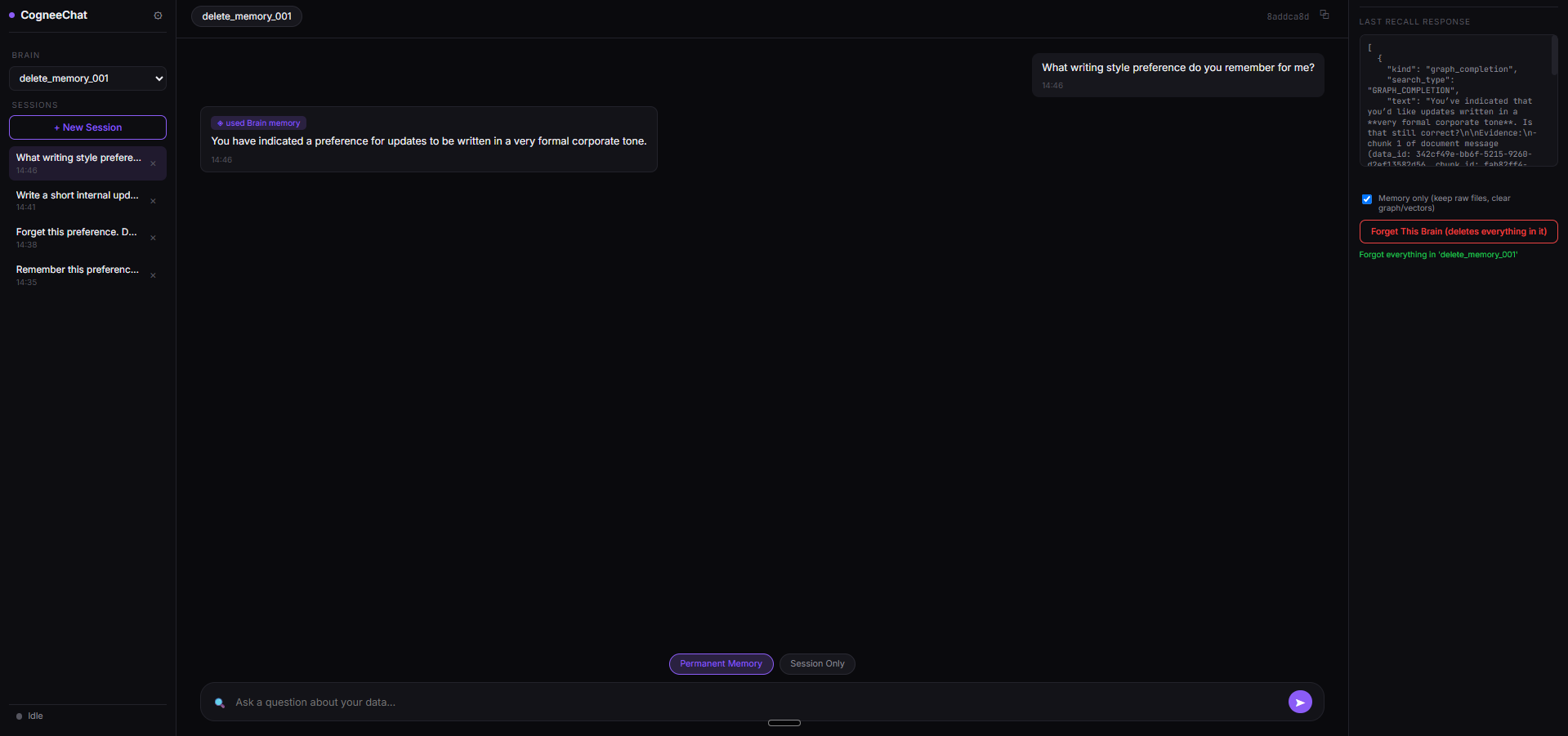
Observed output: Output artifact (Image): The forced probe still returned the original formal corporate tone preference, proving the memory remained retrievable. — Cognee_Input4_Forced_Retrieval_Probe_Memory_Still_Present.png
Input artifact: Input artifact (Text prompt): Input
Output artifact: Output artifact (Image): The forced probe still returned the original formal corporate tone preference, proving the memory remained retrievable. — Cognee_Input4_Forced_Retrieval_Probe_Memory_Still_Present.png
What changed: Text prompt transformed into Image
Why it matters / Conclusion: Confirmed failure: the forget request was acknowledged in chat, but the underlying memory was still available for retrieval.
Cognee accepts a conversational forget request, but the stored preference remained retrievable under a forced probe. In testing, the chat reply changed while the underlying memory did not disappear from the graph layer.
Free forever plan plus usage-based workspace pricing
All testing in this report was done on the free plan.
All testing in this report was done on the free plan; no paid workspace was purchased.
Featured in Rankings
Independent rankings where Cognee was tested and rated.
Banner Preview
How the embed badge will look on your site

Embed HTML
Copy this code to your website source
Quick Integration Guide
- 1Copy the HTML code block above.
- 2Paste it into your site's HTML or CMS editor.
- 3Banner appears instantly on your page.
- 4Links back to your tool profile here.
Similar Tools
Discover more AI tools like Cognee to enhance your workflow.
Comments (0)
Need a custom AI solution for this use case?
If you are looking to build a custom agent memory, provenance tracing, or knowledge graph assistant for your business or internal workflow, email us at contact@futuresmart.ai.
Found something inaccurate or missing? We try to keep our AI research accurate and useful. If you found outdated information, an issue, or have a suggestion, email us at collaborate@aidemos.com.