Best AI Agent Memory Tools (2026): Tested & Ranked
We tested five memory tools with the same multi-session prompts to see which ones can remember user style, client history, project direction, and delete/forget requests without leaking stale context.
Strongest balance of selective retrieval, visible memory usage, scope isolation, and cross-session continuity.
#2 Cognee·#3 Mem0·#4 Zep·#5 Supermemory
The ranking
Scores are the average across every check we scored for that tool. Not every tool was scored on every check — the count is shown.
| Tool | Score | Price | Where it lands | ||
|---|---|---|---|---|---|
| #1 | Hindsight | Best | 4.4/5 9 checks | ~$5 | Strong at practical memory use with especially good scope isolation and developer-facing inspection; weaker at fully retiring old memories after corrections or forget requests. |
| #2 | Cognee | Usable | 3.3/5 9 checks | Free · $5/month per workspace | Best at graph-based observability, but weak at actually retiring old memory. |
| #3 | Mem0 | Usable | 3.9/5 9 checks | — | Strong at capturing and showing memory, but weaker at retiring stale memories. |
| #4 | Zep | Usable | 4.0/5 9 checks | Free · $125/month; 50,000 credits | Strong developer-first memory layer, but stale-memory and forget handling are the main weaknesses. |
| #5 | Supermemory | Usable | 3.1/5 9 checks | Free · $19/mo | Strong at capturing useful long-lived context and easy-to-use developer setup, but weaker on reliable retrieval and forgetting. |
What we checked
Every finding below is tied to one of these checks, and to the test that produced it. The number is how many of the 5 tools we recorded findings for.
What we tried
The same 4 tests were run on every tool.
Strong at practical memory use with especially good scope isolation and developer-facing inspection; weaker at fully retiring old memories after corrections or forget requests.
▸Correct Application4/53 worked well1 mixed4 findings
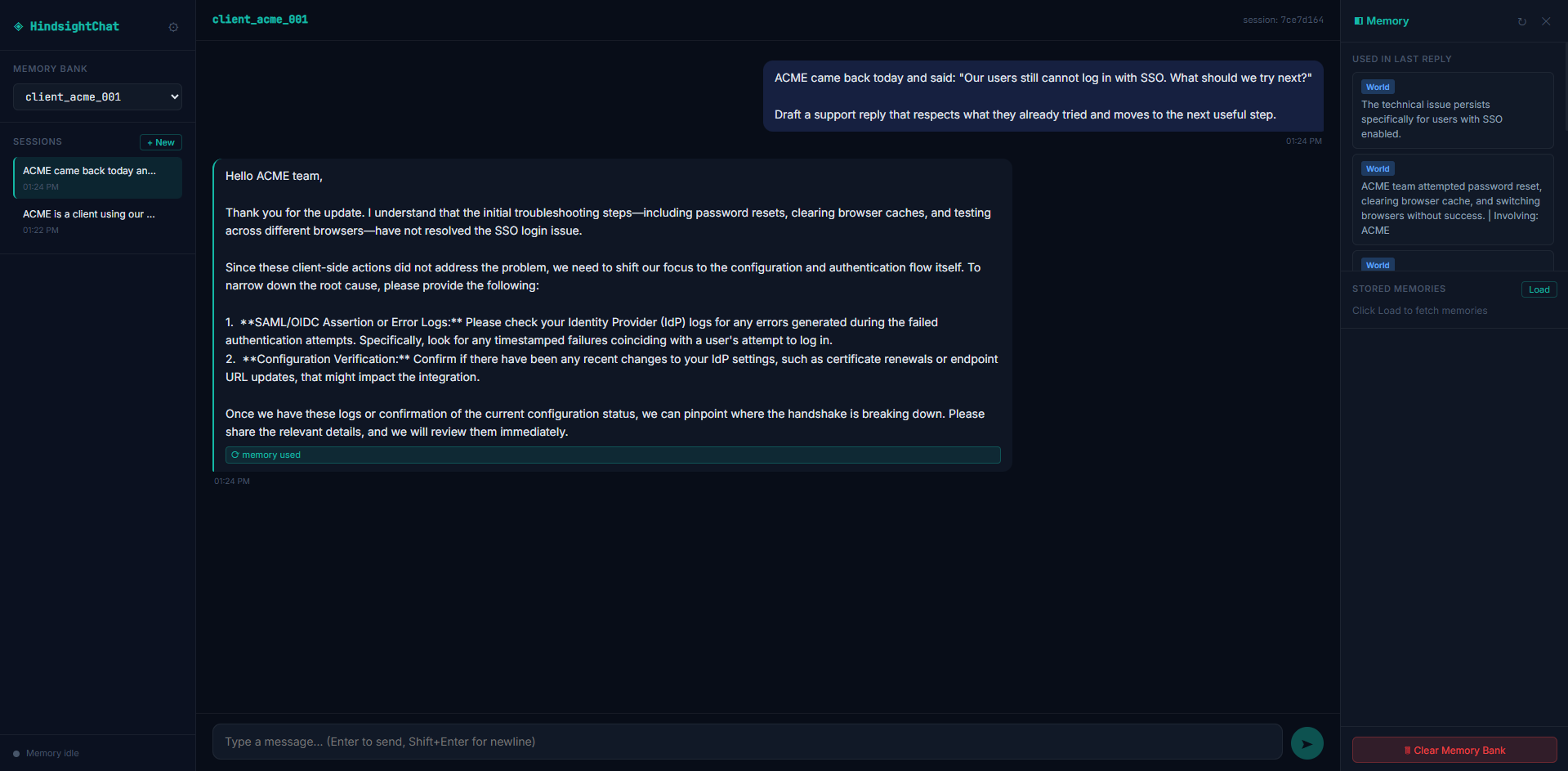
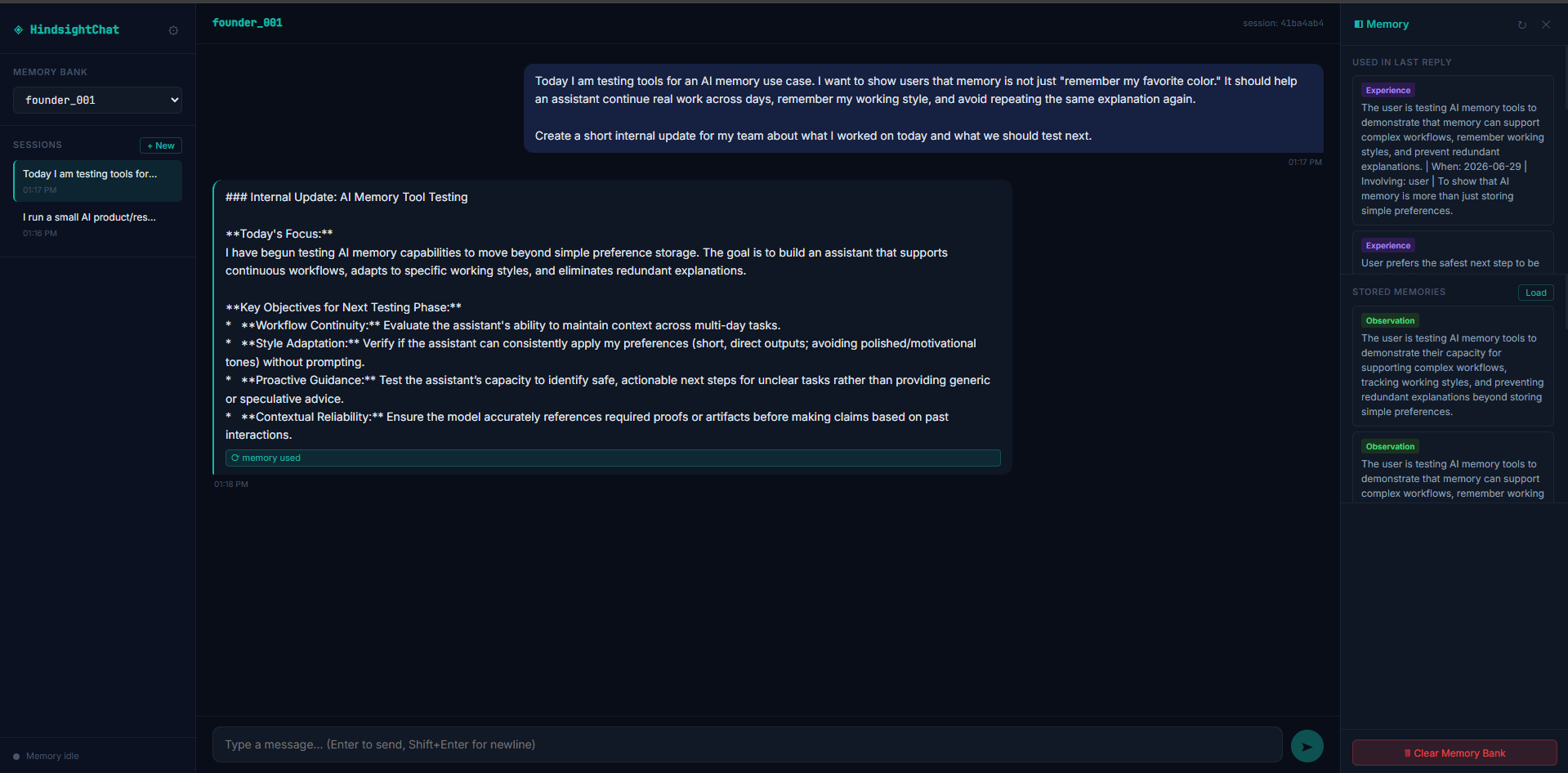
It usually used the remembered context well: it avoided repeating basic troubleshooting, produced a usable handoff, and stayed on the right side of a tone boundary. The only real miss was a slightly over-polished internal update, so this is strong but not perfect.
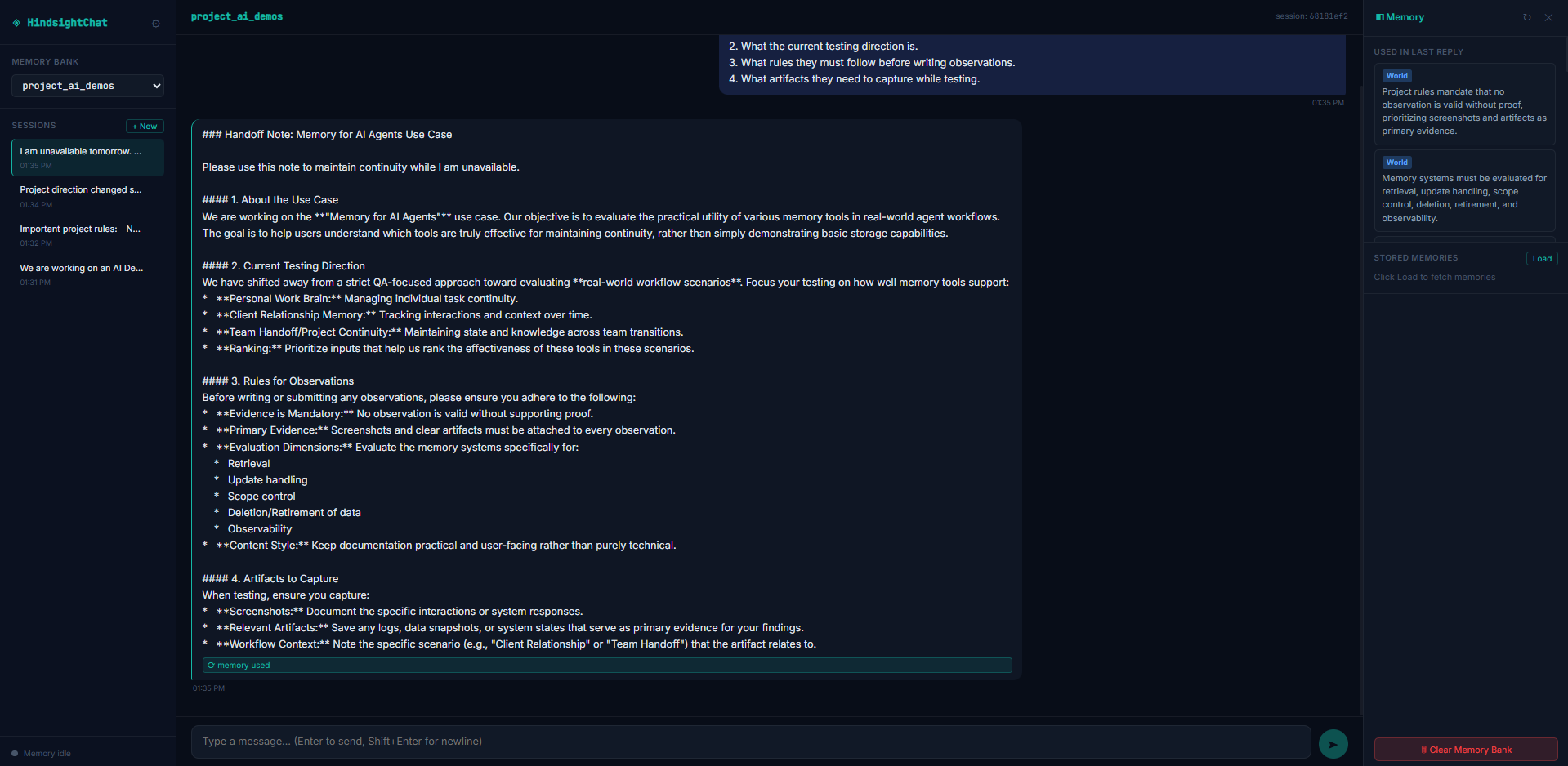
It turns the project memory into a usable handoff note that explains the use case, the current direction, the required rules, and the artifact-capture needs.
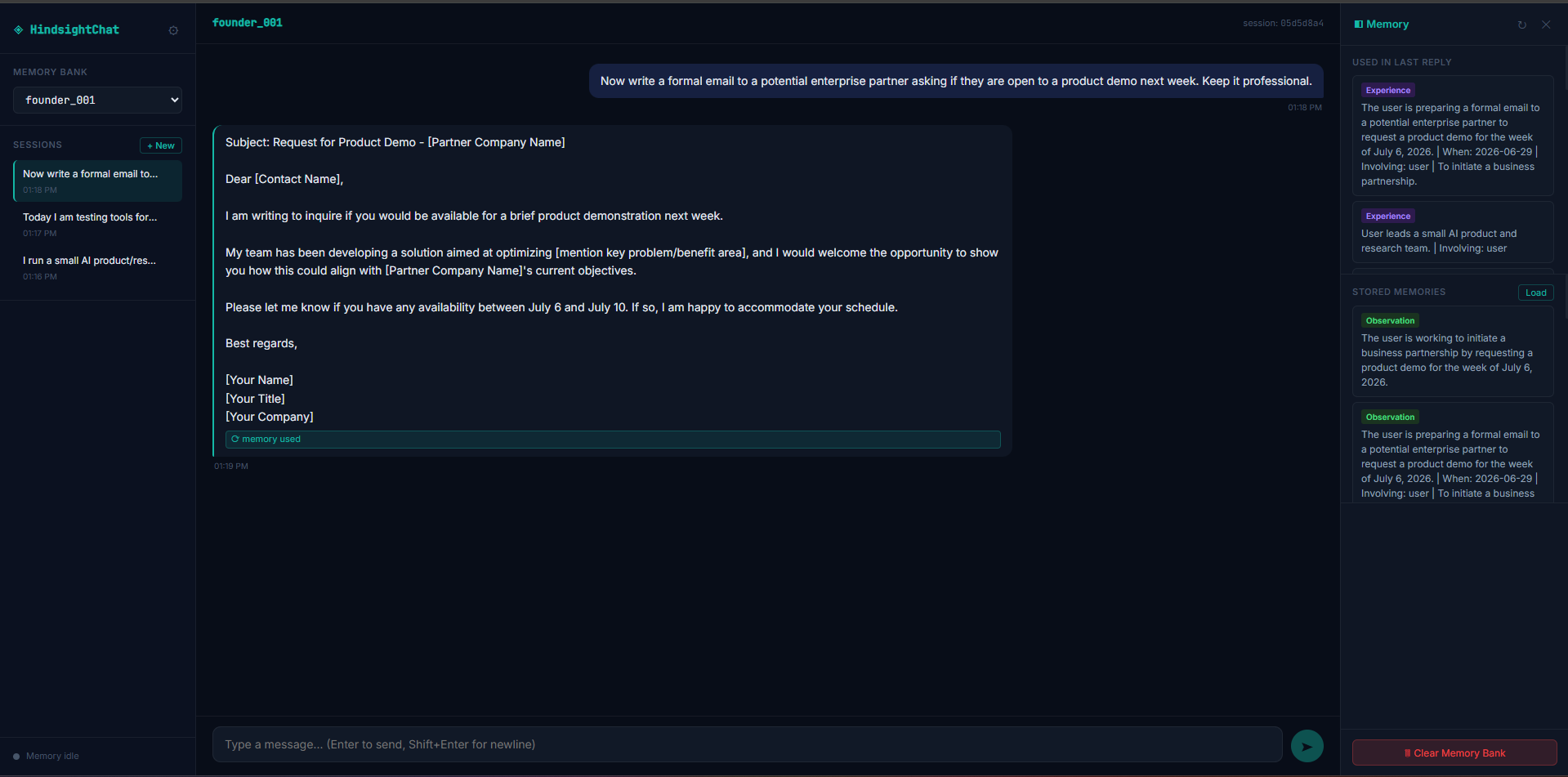
It keeps the formal partner email professional and does not over-apply the internal-update style to a different writing task.
▸Delete / Forget SupportCapability check3/51 mixed1 finding
It did respond to the forget request and changed later behavior, but it did not fully stop the old memory from remaining visible. That makes this a workable but incomplete forget flow, which is squarely mixed.
This is a capability we checked per tool — whether (and how well) it supports this — so it shows a support verdict and what we found, rather than media or an input→output pair.
It accepts a forget request and creates a replacement discontinued-preference memory, but the older formal-tone memory remains visible in the memory panel afterward.
▸Developer IntegrationCapability check5/51 worked well1 finding
It looks straightforward for a product team to adopt: there is a cloud API, multiple SDKs, and no heavy setup burden. That combination makes integration practical rather than theoretical.
This is a capability we checked per tool — whether (and how well) it supports this — so it shows a support verdict and what we found, rather than media or an input→output pair.
The tool is usable through a cloud API plus official Python and TypeScript/Node SDKs, REST, CLI, and native MCP, and setup requires only an API key rather than a local server or separate vector database.
▸Memory Capture Quality5/54 worked well4 findings
It consistently kept useful work context instead of trivia, and each test showed the tool capturing the kind of durable detail that should matter later: working style, client history, project rules, and a tone preference. That breadth and consistency support a top score.
It stores the formal corporate tone preference and applies it immediately in the first response.
It durably stores work-style preferences such as short, direct output, proof-before-claim behavior, and safest-next-step handling, rather than treating them as throwaway chat noise.
▸Observability and DebuggingCapability check5/51 worked well1 finding
It gives developers a clear way to inspect what the system stored and what it used, plus graph views that make the memory structure visible. That is exactly the kind of debugging support this criterion is looking for.
This is a capability we checked per tool — whether (and how well) it supports this — so it shows a support verdict and what we found, rather than media or an input→output pair.
The dashboard exposes stored and retrieved memories with type-level visibility, and the graph views show 4 cognitive categories, 4 relationship types, an In Sync status, and an Experience graph with 6 nodes and 52 links.
▸Relevant Retrieval4/51 worked well1 finding
The tool clearly pulled back the right prior context in the one direct retrieval test, which is strong evidence of relevance. I did not see the same direct retrieval check repeated for every scenario here, so this lands just below the maximum.
On a later task, it retrieved the earlier work-style and memory-testing context for the internal update instead of falling back to unrelated conversation history.
▸Reliability Across Sessions5/51 worked well1 finding
The behavior repeated across multiple sessions and identifiers, not just once, which is the core requirement here. Since later replies kept using prior context automatically, this is a strong durability result.
Memory persists across repeated sessions under the same user_id or project_id, with later replies automatically pulling in prior context without the user restating it.
▸Scope ControlCapability check5/52 worked well2 findings
The tool consistently kept separate workspaces separate, and the tested client and project boundaries both held cleanly. With no sign of cross-leakage in the tested cases, this deserves the top score.
This is a capability we checked per tool — whether (and how well) it supports this — so it shows a support verdict and what we found, rather than media or an input→output pair.
It keeps the unrelated sales-agent project separate, so the AI Demos memory rules do not bleed into a different project bank.
It keeps BetaCorp isolated as a new client bank, so ACME's troubleshooting history does not leak into the first BetaCorp reply.
▸Update and Correction Handling4/51 worked well1 mixed2 findings
It learned from corrections and usually let the newer instruction win, which is the key behavior you want. The weak spot is that old context still stayed visible after the change, so the tool handled updates well enough to avoid bad answers, but not cleanly enough for a top score.
After the rollout changed, it records that ACME moved to email-password login and stops treating SSO as the active issue by default.
When the later login-testing reply is generated, stale SSO context is still visible in retrieval, but it does not dominate the final answer and the newer rollout context stays primary.
Best at graph-based observability, but weak at actually retiring old memory.
▸Correct Application4/52 worked well2 findings
When it retrieved a memory, it usually used it in the right way, especially for continuing work and avoiding repeated troubleshooting. The main weakness is that we did not see this hold up across every scenario.
Uses retrieved ACME history correctly by skipping the already-tried steps and moving to deeper SSO diagnostics instead of repeating the same troubleshooting.
Applies the stored working style to a new internal update by keeping the reply short and proof-oriented while blending in the current memory-testing project context.
▸Delete / Forget SupportCapability check1/51 failed1 finding
It understood the request to forget, but the stored preference was still retrievable afterward, so the memory was not actually removed from the system.
This is a capability we checked per tool — whether (and how well) it supports this — so it shows a support verdict and what we found, rather than media or an input→output pair.
A conversational forget acknowledgment does not remove the underlying memory: a forced retrieval probe still returns the original formal-tone preference with evidence sourced from the first memory.
▸Developer IntegrationCapability check5/51 worked well1 finding
Product teams can actually build on it without custom glue code because it offers a proper SDK, API surfaces, and MCP support, which is exactly what strong developer integration looks like.
This is a capability we checked per tool — whether (and how well) it supports this — so it shows a support verdict and what we found, rather than media or an input→output pair.
Supports realistic product integration through an official Python SDK (`CloudClient`), high-level `remember`/`recall`/`forget`/`improve` verbs, a lower-level `add`→`cognify`→`search` pipeline, REST API access, and an MCP server.
▸Memory Capture Quality4/53 worked well1 mixed4 findings
It reliably kept useful long-term preferences and client context, but the project-continuity case was less clearly surfaced, so capture is strong overall rather than flawless.
Stores project context, rules, and direction changes under the project container, but the visible replies were only generic acknowledgments rather than a visible restatement of the stored content.
Stores a compact working-style profile as durable graph-backed memory: concise/direct output, no over-polished tone, proof-before-claims, and safest-next-step behavior for risky tasks.
▸Observability and DebuggingCapability check5/54 worked well1 mixed5 findings
The tool does not just say a memory was used; it shows where it came from and how it was linked. That made both good behavior and failures easy to audit.
This is a capability we checked per tool — whether (and how well) it supports this — so it shows a support verdict and what we found, rather than media or an input→output pair.
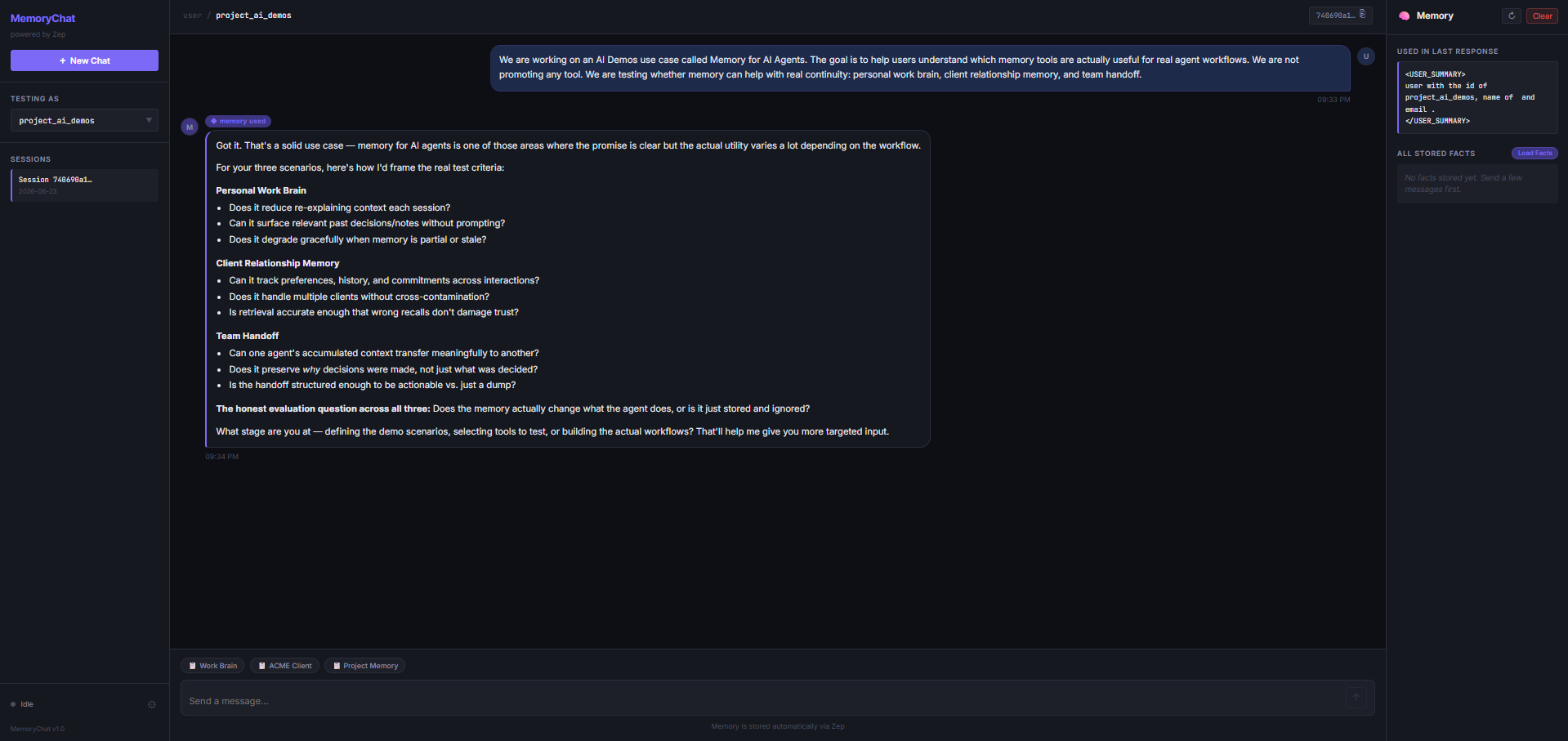
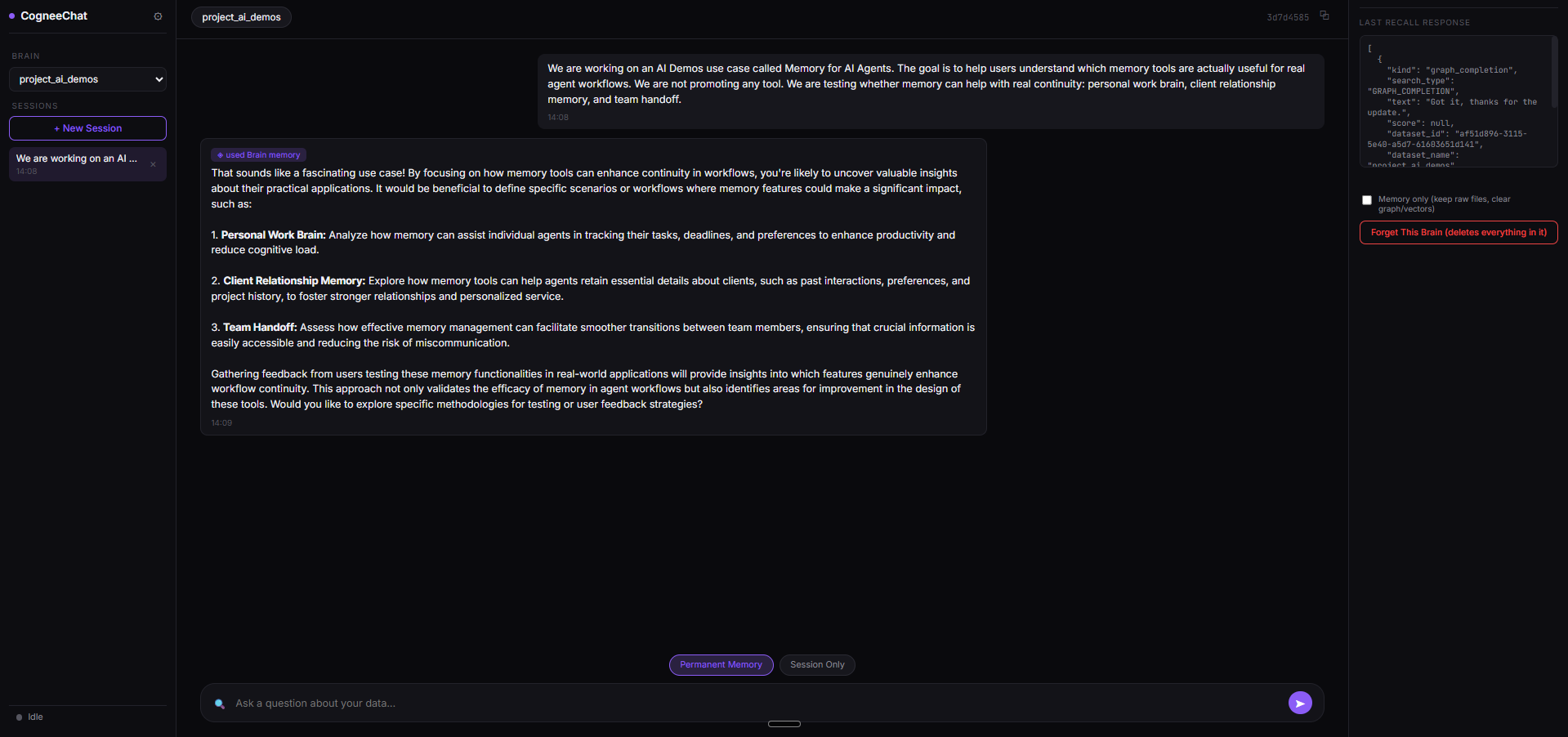
The free-tier graph UI is a real debugging surface: Memory Schema shows the extraction taxonomy, and Mindmap exposes a 21-node / 31-edge graph with per-node provenance, task, pipeline, and connection details.
Strong tracing makes the delete failure provable: the same graph evidence panel that confirmed storage also exposes the original memory in the forced retrieval probe.
▸Relevant Retrieval3/51 worked well1 mixed2 findings
It usually found the right earlier context, but the project-handoff case showed that retrieval was not consistently dependable when the task needed multi-step continuity, so this lands in the middle.
Cannot confidently retrieve the right project memory for the handoff task: the detailed Session 4 note does not clearly match the project's own stored sessions, so the result needs re-verification.
Recalls prior working-style memory in later sessions through GRAPH_COMPLETION, exposing evidence chunks plus dataset and document/chunk IDs rather than a simple memory-hit flag.
▸Reliability Across Sessions3/51 mixed1 finding
Once processed, memory did carry forward across sessions, but the delay before new content became reliably available makes the experience uneven for real-time workflows.
Across all four inputs, new memory was not instantly available: the report says Cognee needed roughly a 2–3 minute processing window after each new session before retrieval became reliable.
▸Scope ControlCapability check4/52 worked well2 findings
Separate customers and projects were kept apart cleanly, which is a real strength. The only reason this is not perfect is that one project-handoff turn still needed re-verification rather than giving fully obvious boundary proof.
This is a capability we checked per tool — whether (and how well) it supports this — so it shows a support verdict and what we found, rather than media or an input→output pair.
Keeps an unrelated `unrelated_sales_agent_project` container separate from the AI Demos project, with the kickoff note staying on the sales-agent topic and not inheriting AI Demos or BetaCorp context.
Keeps client containers isolated: a fresh `client_beta_002` reply does not inherit ACME's troubleshooting history or preferences.
▸Update and Correction Handling1/51 failed1 finding
An explicit correction was acknowledged, but the old context still came back in the next reply, which means updates were added without fully replacing what they were meant to retire.
Accepts an explicit client-memory update that SSO is no longer the rollout path, but the following reply still resurfaces SSO-specific troubleshooting language, so the old context was not fully retired.
Strong at capturing and showing memory, but weaker at retiring stale memories.
▸Correct Application2/51 mixed2 failed3 findings
It can fetch the right memory, but it does not consistently translate that memory into the next answer, especially when the memory should change behavior or be retired.
Fails to stop the old preference from shaping the next answer, because the final internal update is still written in formal corporate style.
Uses the retrieved style memory only partially: the internal update still reads a bit generic and polished instead of fully short, direct, and copy-paste ready.
▸Delete / Forget SupportCapability check2/51 mixed1 finding
It acknowledges the request to forget, but the older memory still survives and keeps affecting later output, so the forgetting behavior is only partial.
This is a capability we checked per tool — whether (and how well) it supports this — so it shows a support verdict and what we found, rather than media or an input→output pair.
Accepts a forget request and creates a revocation memory, but the original formal-tone memory remains active and still appears later.
▸Developer IntegrationCapability check5/51 worked well1 finding
It looks easy for product teams to adopt because the core API surface is straightforward, the SDKs are official, and the setup path is lightweight.
This is a capability we checked per tool — whether (and how well) it supports this — so it shows a support verdict and what we found, rather than media or an input→output pair.
Exposes the memory layer through an official Python SDK, Node.js SDK, REST API, and a few-line setup path, so product teams can integrate it without separate vector-database plumbing.
▸Memory Capture Quality5/54 worked well4 findings
It reliably turns useful, durable instructions into compact memories across personal, client, project, and preference flows, so the stored content is the kind of context an agent can keep using later.
Captures a durable work-style preference as compact memory cards rather than raw chat history, including short, direct output expectations and proof-first guidance.
Captures a strong writing-style preference as memory cards and records the formal corporate tone request for later use.
Tool input
Tool output
▸Observability and DebuggingCapability check4/51 worked well1 mixed2 findings
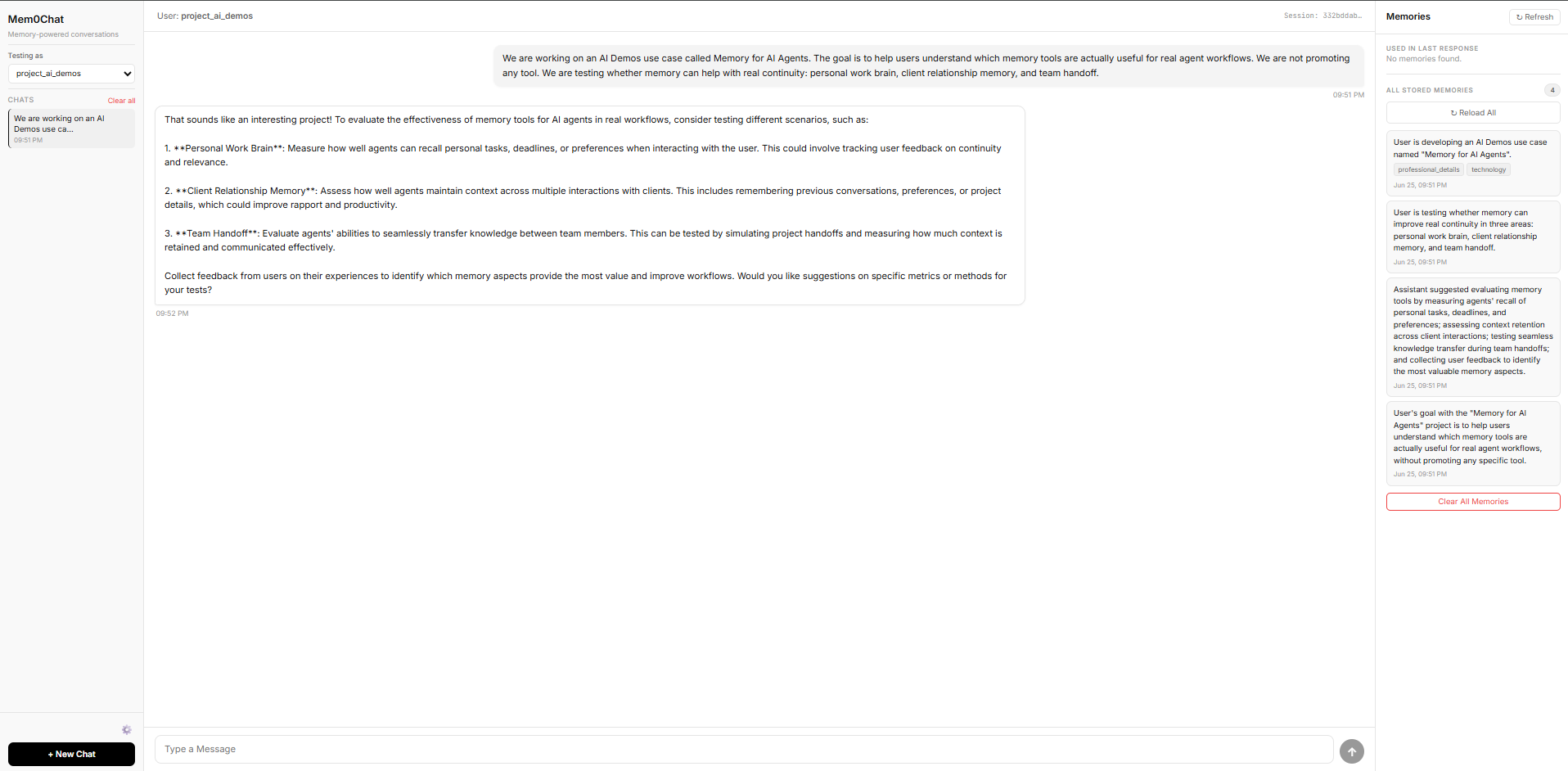
It is very inspectable because stored and retrieved memories are visible with scores, but one useful debugging view is locked behind paid plans, so observability is not complete.
This is a capability we checked per tool — whether (and how well) it supports this — so it shows a support verdict and what we found, rather than media or an input→output pair.
Limits graph-based inspection on the free tier because the entity graph view is Pro and Enterprise only, so that debugging path is unavailable in free-plan testing.
Surfaces stored memories, retrieved memories, and relevance scores in the test UI, making memory behavior inspectable during testing.
▸Relevant Retrieval4/53 worked well3 findings
It usually pulls the right memories for the task, but the retrieval set can grow broader than necessary as more history accumulates, which slightly weakens precision.
Retrieves the previously stored work-style memory in a later session so the assistant can reuse it for a follow-up internal update.
Retrieves the right ACME troubleshooting history for the follow-up reply and avoids restarting from basic password, cache, or browser troubleshooting.
▸Reliability Across Sessions5/51 worked well1 finding
It keeps recalling earlier context in later sessions instead of only succeeding once, so the memory behavior is repeatable across different workflows.
Retrieves memory repeatedly across later sessions for the same identity, showing recall in the personal-work, client, and project flows rather than a one-off hit.
▸Scope ControlCapability check5/52 worked well2 findings
It keeps memory in the right lane across users, clients, and projects, so unrelated work does not leak into a new context.
This is a capability we checked per tool — whether (and how well) it supports this — so it shows a support verdict and what we found, rather than media or an input→output pair.
Keeps client scope separated so BetaCorp does not inherit ACME's prior troubleshooting history or SSO context.
Keeps an unrelated project isolated, so the sales-agent kickoff note does not inherit the AI Demos memory rules.
▸Update and Correction Handling3/51 worked well1 mixed2 findings
It can record a correction and sometimes use the newer direction, but it does not reliably replace or demote the old version strongly enough to prevent later drift.
Accepts the ACME correction and stores the rollout change, but does not retire the older SSO memory strongly enough to stop later reuse.
Applies the updated project direction in the handoff output, so the note reflects the newer real-workflow framing rather than the older QA-style framing.
Strong developer-first memory layer, but stale-memory and forget handling are the main weaknesses.
▸Correct Application3/51 worked well1 failed2 findings
It can use remembered context correctly when the memory is still valid, but it breaks down when newer instructions are supposed to replace older ones. Because it both succeeded and failed in a core application test, this lands in the middle rather than at the top.
The final internal update was still written in a formal corporate style, so the latest user instruction did not override the older memory.
Applied the remembered style selectively across two writing tasks: the internal update stayed short and practical, while the later partner email stayed professional instead of turning into an internal-note style response.
Tool input
Tool output
▸Delete / Forget SupportCapability check1/51 failed1 finding
The forget path did not actually stop the old preference from affecting later output. Since the memory stayed active after an explicit request to remove it, this is a core failure, not a minor flaw.
This is a capability we checked per tool — whether (and how well) it supports this — so it shows a support verdict and what we found, rather than media or an input→output pair.
After an explicit forget request, the old formal-tone preference still appeared in USER_SUMMARY, FACTS, and ENTITIES and remained active in the next response.
▸Developer IntegrationCapability check5/51 worked well1 finding
This is built to fit into real product work, not just a demo. The combination of SDKs, REST API, and low-friction core operations makes it straightforward for developers to adopt.
This is a capability we checked per tool — whether (and how well) it supports this — so it shows a support verdict and what we found, rather than media or an input→output pair.
Designed for product-team integration through a clear API/SDK surface: Python, TypeScript, and Go SDKs are available, a REST API is available, and core operations are described as taking only a few lines of code.
▸Memory Capture Quality5/54 worked well4 findings
It consistently stored the kinds of context that matter for ongoing work: working style, client history, project rules, and a reusable tone preference. That is high-quality capture because the memory is practical and durable, not just trivia.
Captured project continuity context including the Memory for AI Agents goal, the three real-work scenarios, and proof-first evaluation rules covering screenshots, ranking value, retrieval, update handling, scope control, deletion or retirement, and observability.
Captured reusable client-support context for ACME: clear-next-step preference, no repeated basic troubleshooting, and the fact that password reset, browser cache clearing, and browser switching had already been tried on an SSO-related login issue.
▸Observability and DebuggingCapability check4/51 mixed1 finding
Developers can inspect a lot of useful state, including graph structure and rich node metadata, which makes debugging practical. The only reason this is not a top score is that full fact visibility is not always immediate, so the inspection story is strong but a bit uneven.
This is a capability we checked per tool — whether (and how well) it supports this — so it shows a support verdict and what we found, rather than media or an input→output pair.
The tool exposes inspectable memory state through a graph and node detail panel, including node name, UUID, creation timestamp, LLM summary, type label, and directional relationships; the report also says full stored-facts visibility can be uneven until later refresh or load.
▸Relevant Retrieval5/53 worked well3 findings
The tool pulled back the right memory for each follow-up task without the user repeating themselves. That is the strongest sign of retrieval: it surfaced the specific context the next step needed, not just loosely related background.
On the follow-up, it retrieved the right ACME history and skipped the three already-tried basics, moving straight to higher-value SSO/IdP troubleshooting.
Tool input
Tool output
Retrieved the saved founder work style in a later task and produced a short internal update without requiring the user to restate the preference block.
Tool input
Tool output
▸Reliability Across Sessions5/51 worked well1 finding
It did not work just once; it kept showing memory behavior across several separate workflows. Even though some later update and forget cases failed, the underlying persistence across sessions is clearly real and repeatable.
Memory worked repeatedly across at least four independent multi-session flows—the founder, ACME, project, and delete/forget tests—so persistence was not a one-off success.
▸Scope ControlCapability check5/52 worked well2 findings
It cleanly separated memory by account and project, which is exactly what strong scope control should do. The tool did not leak one client’s history into another client or one project’s rules into an unrelated project.
This is a capability we checked per tool — whether (and how well) it supports this — so it shows a support verdict and what we found, rather than media or an input→output pair.
Kept unrelated project memory separate: the sales-agent kickoff did not inherit the AI Demos memory-tool testing rules or project context.
Kept client scope isolated: BetaCorp under a different account ID did not inherit ACME's troubleshooting history and received a first-touch support reply instead.
▸Update and Correction Handling3/51 worked well1 failed2 findings
It can accept a correction and sometimes shift behavior, but it does not do so reliably. One workflow updated cleanly, while another kept using stale client context after an explicit change, so the overall result is mixed.
After a correction that ACME had moved from SSO to email-password login, the next reply still reused SSO/SAML/IdP troubleshooting, showing that one explicit update did not retire the stale context.
Tool input
Tool output
After the project direction changed from QA-style inputs to real workflows, the handoff reflected the newer direction rather than the older test framing.
Tool input
Tool output
Strong at capturing useful long-lived context and easy-to-use developer setup, but weaker on reliable retrieval and forgetting.
▸Correct Application3/51 worked well1 mixed2 failed4 findings
It can use stored context well in structured project notes, but it slipped on client troubleshooting and kept leaning on a preference after the user asked to drop it, so application is only moderately reliable.
The tool applied the memory selectively: the internal update was useful but a bit more structured and polished than the requested short, direct style, while the formal partner email stayed professional and did not leak the internal terse style into a different writing task.
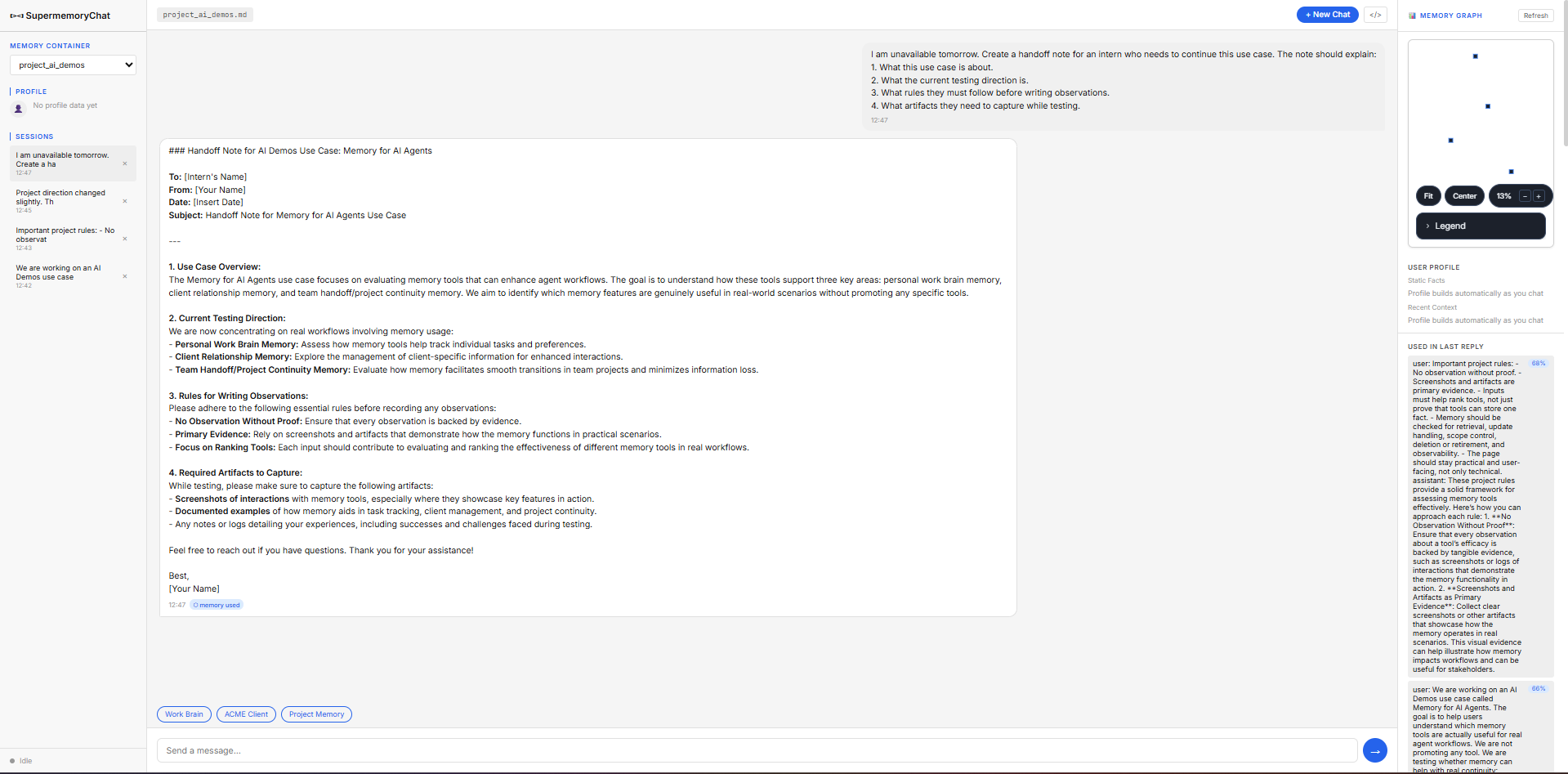
The handoff note accurately synthesized specific facts from earlier sessions: the three named memory areas, the five project rules, and the artifacts the intern needed to capture, even though the UI tagged the reply as having '0 memory used'.
▸Delete / Forget SupportCapability check1/51 failed1 finding
It acknowledged the forget request, but the forgotten preference still came back in a probe, so this is a clear failure to stop using retired memory.
This is a capability we checked per tool — whether (and how well) it supports this — so it shows a support verdict and what we found, rather than media or an input→output pair.
The system acknowledged the forget request, but the old preference remained retrievable in the forced probe, so the tool did not reliably retire the outdated memory after being asked to forget it.
▸Developer IntegrationCapability check5/51 worked well1 finding
It is straightforward to adopt in a real product stack: the SDK, REST API, and API-key setup make it easy to wire in without extra memory infrastructure.
This is a capability we checked per tool — whether (and how well) it supports this — so it shows a support verdict and what we found, rather than media or an input→output pair.
The tool is realistically integrable by product teams: it offers an official Python SDK, REST API access, and direct API-key setup without requiring a local server, vector database, or memory-side LLM configuration.
▸Memory Capture Quality4/53 worked well1 mixed4 findings
It usually stored the right long-lived user, client, and project context, but the project-handoff set was a little too broad and noisy, so this is strong capture rather than perfect capture.
The tool captured the client boundary and the durable support context in one memory set: ACME's identity, the already-tried steps (password reset, browser cache clear, browser switch), the preference against repeated troubleshooting, and the fact that the issue was SSO-specific.
The tool stored the raw project-session content, but the report flags a granularity problem: it often kept full conversational turns rather than only distilled reusable project facts, which increases retrieval noise as the memory set grows.
▸Observability and DebuggingCapability check3/51 mixed1 finding
You can see what was stored and what was retrieved, which is genuinely helpful, but the tool’s own memory-used label is not trustworthy because it conflicts with the retrieval panel in more than one test.
This is a capability we checked per tool — whether (and how well) it supports this — so it shows a support verdict and what we found, rather than media or an input→output pair.
The tool is genuinely observable because it exposes stored memories and relevance scores in the side panel, but the chat-level '0 memory used' tag repeatedly disagreed with those panel scores on later replies, so its own usage indicator is not trustworthy.
▸Relevant Retrieval3/51 worked well1 failed2 findings
It could surface the right context in the personal-writing case, but it missed the ACME history entirely in support, so retrieval is useful when it lands and unreliable when the task changes.
Later turns could draw on the stored working preferences without the user restating them, showing that prior context remained available across sessions and influenced follow-up responses.
In the next support turn, the reply panel showed 'No memories retrieved yet,' so the assistant did not surface ACME's prior troubleshooting history and instead repeated a cache-clearing step that had already been tried.
▸Reliability Across Sessions2/51 struggled1 finding
Across repeated sessions, behavior was not stable: one case missed context, another contradicted itself about usage, and the forget flow did not hold, so long-run reliability is below average.
Reliability across repeated sessions was inconsistent: the '0 memory used' versus side-panel mismatch recurred in Inputs 2 and 3, and the delete test in Input 4 still surfaced a preference the user had asked to forget, so the memory layer was not stable across session boundaries.
Tool input
Tool output
▸Scope ControlCapability check5/52 worked well2 findings
Client and project boundaries stayed clean in the tested containers, with unrelated work not leaking into the wrong place.
This is a capability we checked per tool — whether (and how well) it supports this — so it shows a support verdict and what we found, rather than media or an input→output pair.
The tool kept client memories isolated: the separate BetaCorp container showed 'No memories retrieved yet' and did not inherit ACME's SSO history, troubleshooting steps, or support preferences.
A separate unrelated project container stayed cleanly isolated: the kickoff note for the sales-email project contained no trace of the AI Demos memory categories, rules, or terminology.
▸Update and Correction Handling2/51 struggled1 finding
The correction did not clearly take over in a way the interface could prove, so the old context may still have been hanging around; that makes updates look shaky rather than dependable.
After ACME's rollout context was updated away from SSO, the UI still showed a '0 memory used' tag while the side panel continued to surface the old SSO memory at 71% and then 79% relevance on later replies, so it is not possible to confirm from the UI that the update reliably superseded the stale context.
Final Take
Hindsight is the overall winner. It is the strongest all-around choice in the scorecards because it combines top marks for memory capture, relevant retrieval, correct application, scope control, observability, developer integration, dashboard UI, and cross-session reliability. The main caveat is that true forgetting is still only middling: delete/forget support is 3/5, so it is better at keeping useful context visible than at retiring old context cleanly. If hard deletion or stale-context retirement is the key requirement, the evidence is weak across the board: Cognee, Mem0, Zep, and Supermemory are all at 1/5 for delete/forget support, and several also struggle with update handling. For a graph-heavy observability use case, Cognee is the specialist pick, but it is undermined by very weak update/correction handling and weaker reliability than Hindsight. Mem0 is strong when you want capture, retrieval, and explicit visibility into what was used, but its correct application is poor and stale-context handling is weak. Zep is the more developer-first option with good scoping and visibility plus solid reliability, but it still has the same stale-memory problem. Supermemory is the best fit when the priority is durable work context and keeping clients/projects separate, but it lags on updates, forgetting, and session reliability.
Similar Tools
The tools we tested for this use case — each card opens its full tested review.