OpenAI
Batch speech-to-text with word timestamps, but a strict 25 MB cap and weak code-switching make it a mixed fit for hard audio.
Useful on small, mostly-English audio; mixed on hard cases.
- You need a simple hosted batch STT API that returns word-level timestamps.
- Your audio files are under 25 MB.
- Your audio is mostly English or jargon-heavy narration rather than strongly code-switched speech.
- You need speaker labels or confidence scores.
Our take
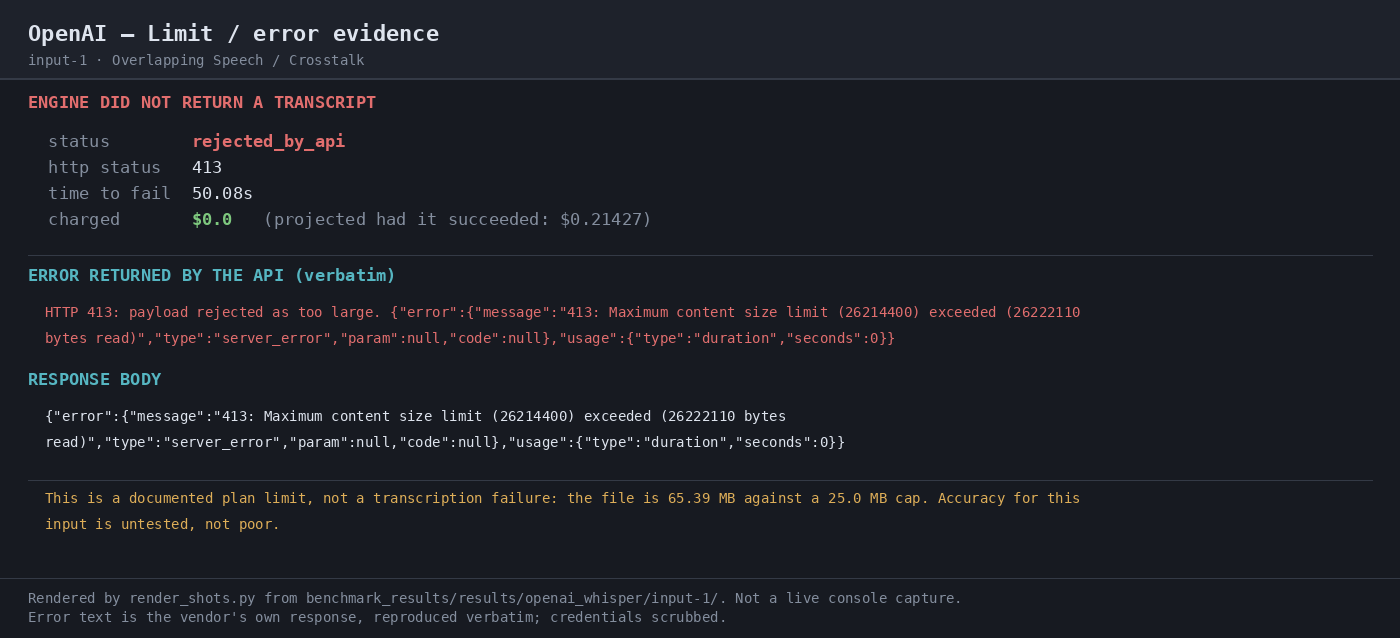
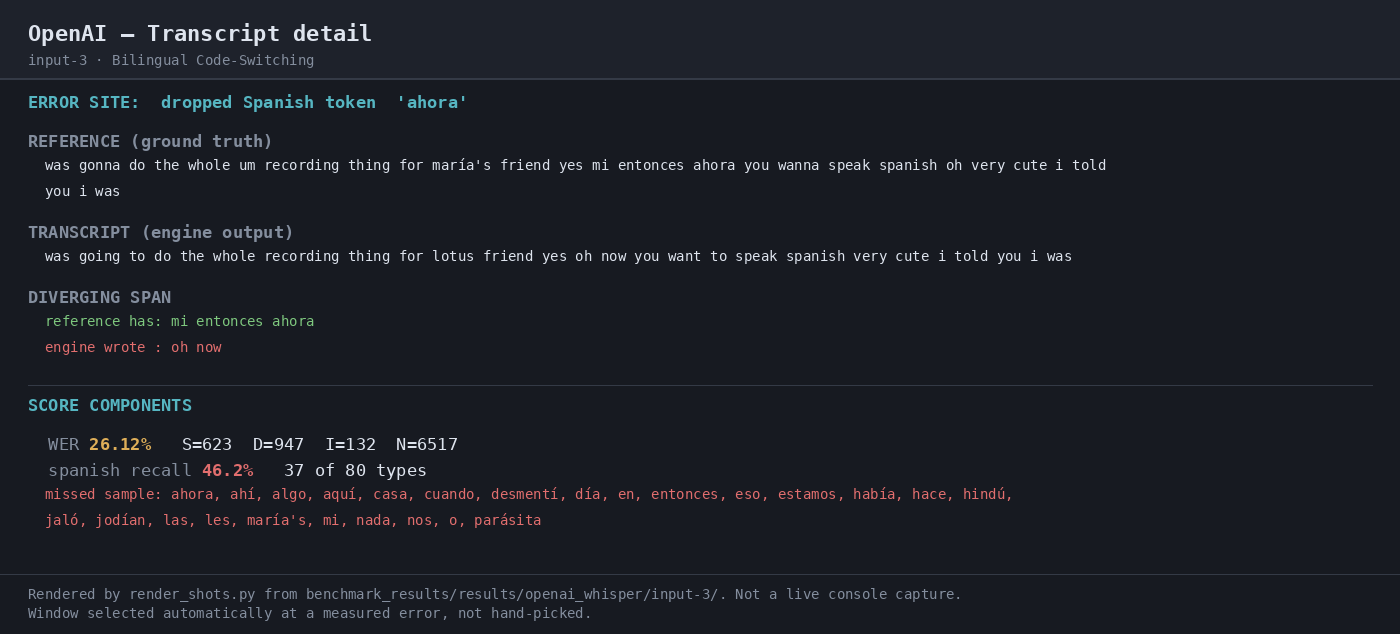
Benchmarked on whisper-1, OpenAI Speech-to-Text returned usable transcripts on the jargon-heavy sample and exposed word-level timestamps in verbose JSON. But the 65.39 MB crosstalk file was hard-rejected by the API's 25 MB cap, and the bilingual clip only recovered 46.2% of Spanish tokens, so this is a practical batch API for smaller English-heavy audio rather than a strong multilingual or meeting-style engine.
In-Depth Review
Our detailed analysis of OpenAI — features, performance, and real-world testing.
Feature-by-Feature Breakdown
Audio TranscriptionWorks on sub-25 MB files, but hard-rejects oversized audio.▾
Feature tested: Audio Transcription
Result: Partial
Verdict: Works on sub-25 MB files, but hard-rejects oversized audio.
Expected behavior: Transcribes uploaded audio into text, including multipart uploads under the documented size cap. The exercised inputs included jargon-heavy English medical narration, a Spanish-English mixed clip, and larger multipart files such as the 8.6 MB medical narration and 22.2 MB bilingual clip.
Test case: Audio file → Image
Input type: Audio file
Input used: Input artifact (Audio file): INPUT: Overlapping Speech / Crosstalk (crosstalk.wav, 65.39 MB WAV). — crosstalk.wav
Observed output: Output artifact (Image): The API rejected the 65.39 MB WAV with HTTP 413 after 50.08s because it exceeded the documented 25 MB upload cap. No transcript was returned and the run was charged $0.0, so this is a hard limit rather than a transcription-quality failure. — 05-limit-evidence-input-1-2.png
Input artifact: Input artifact (Audio file): INPUT: Overlapping Speech / Crosstalk (crosstalk.wav, 65.39 MB WAV). — crosstalk.wav
Output artifact: Output artifact (Image): The API rejected the 65.39 MB WAV with HTTP 413 after 50.08s because it exceeded the documented 25 MB upload cap. No transcript was returned and the run was charged $0.0, so this is a hard limit rather than a transcription-quality failure. — 05-limit-evidence-input-1-2.png
What changed: Audio file transformed into Image
Test case: Audio file → Image
Input type: Audio file
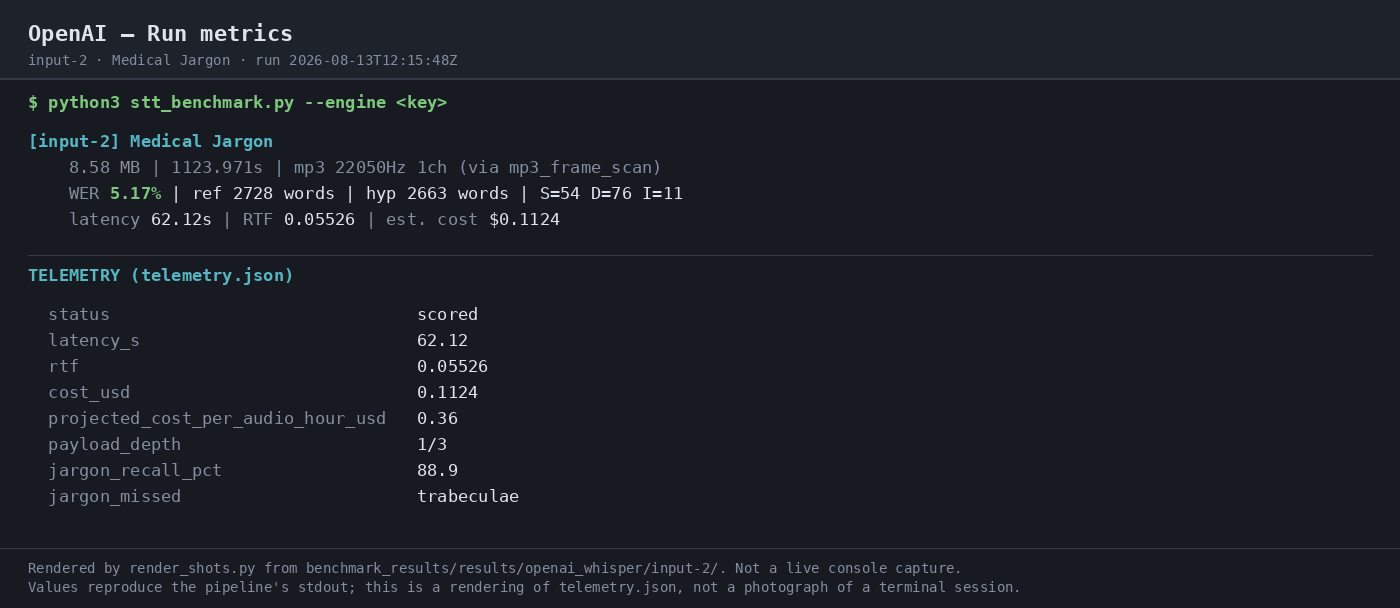
Input used: Input artifact (Audio file): INPUT: Medical Jargon (run metrics for the same anatomy sample). — medical_terms.mp3
Observed output: Output artifact (Image): The run metrics confirm the same accepted run at 62.12s latency, 0.05526 RTF, and $0.1124 estimated cost. — 03-terminal-metrics-input-2.png
Input artifact: Input artifact (Audio file): INPUT: Medical Jargon (run metrics for the same anatomy sample). — medical_terms.mp3
Output artifact: Output artifact (Image): The run metrics confirm the same accepted run at 62.12s latency, 0.05526 RTF, and $0.1124 estimated cost. — 03-terminal-metrics-input-2.png
What changed: Audio file transformed into Image
Test case: Audio file → Image
Input type: Audio file
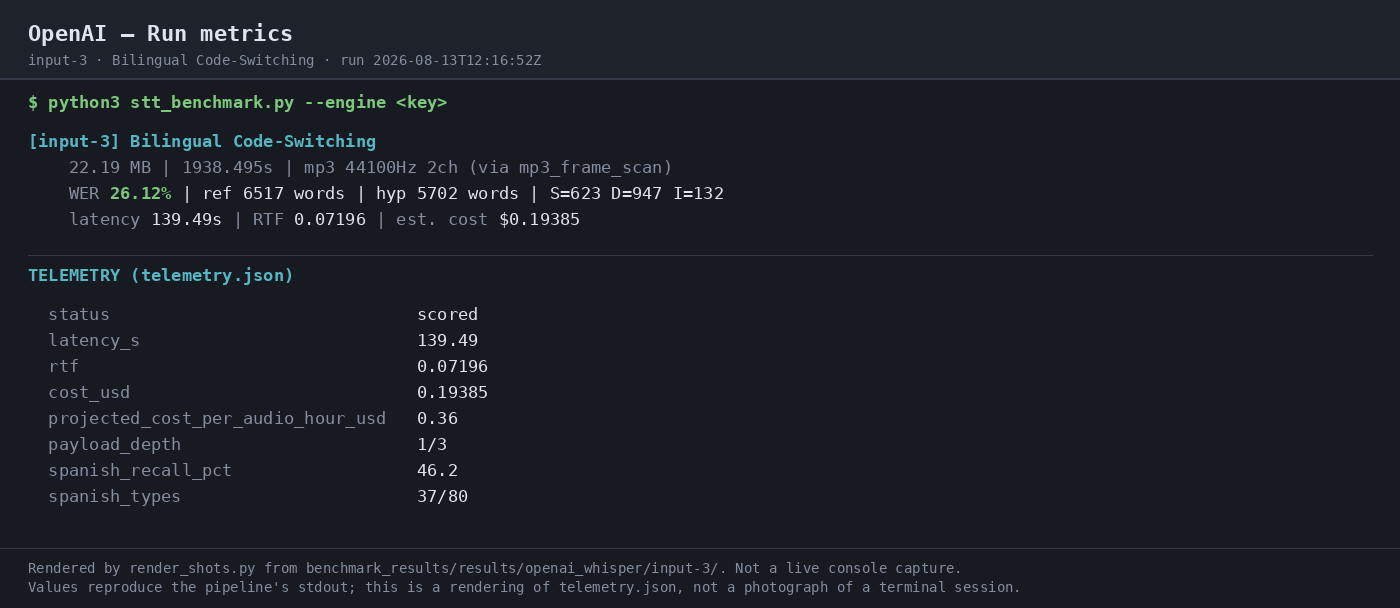
Input used: Input artifact (Audio file): INPUT: Bilingual Code-Switching (run metrics for the same mixed-language sample). — mix_language.mp3
Observed output: Output artifact (Image): The run metrics confirm the accepted run at 139.49s latency, 0.07196 RTF, and $0.19385 estimated cost. — 03-terminal-metrics-input-3.png
Input artifact: Input artifact (Audio file): INPUT: Bilingual Code-Switching (run metrics for the same mixed-language sample). — mix_language.mp3
Output artifact: Output artifact (Image): The run metrics confirm the accepted run at 139.49s latency, 0.07196 RTF, and $0.19385 estimated cost. — 03-terminal-metrics-input-3.png
What changed: Audio file transformed into Image
Test case: Audio file → Image
Input type: Audio file
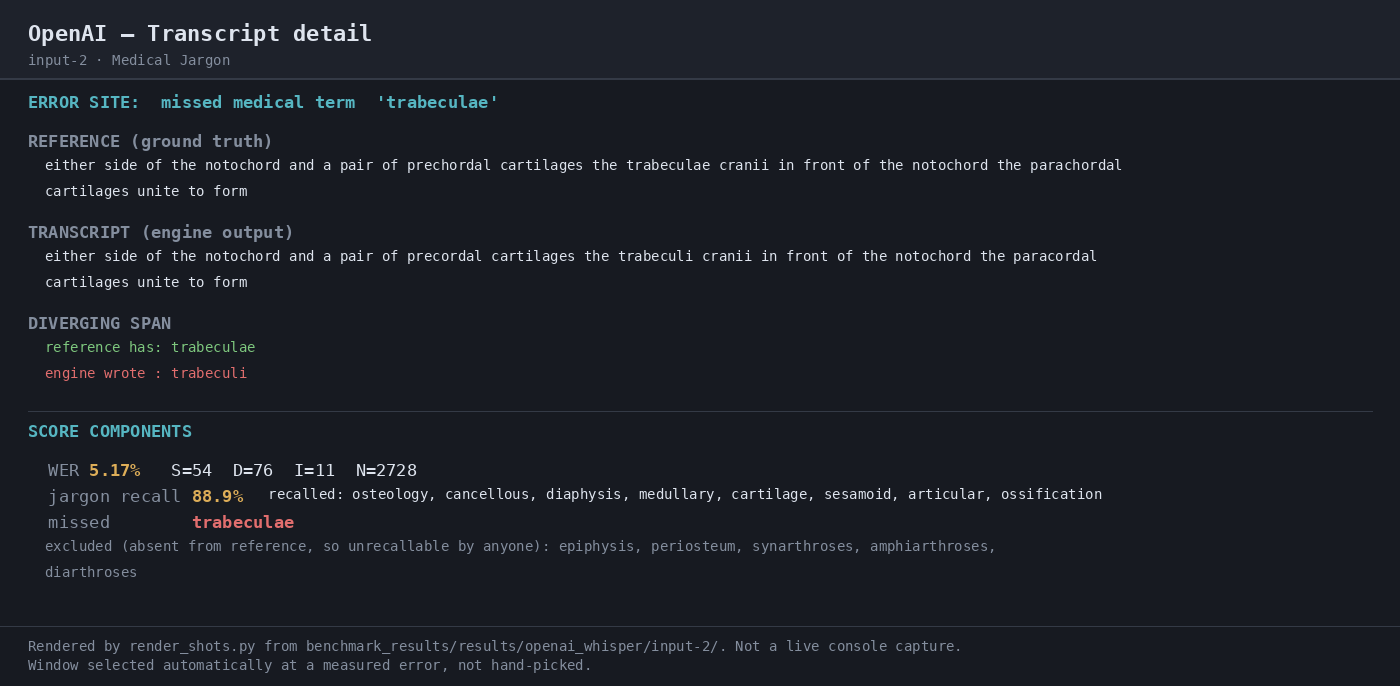
Input used: Input artifact (Audio file): INPUT: Medical Jargon (anatomy narration dense with technical terms). — medical_terms.mp3
Observed output: Output artifact (Image): The comparison highlights a single missed medical term, 'trabeculae', and reports 5.17% WER with 88.9% jargon recall on the anatomy sample. — 04-transcript-detail-input-2.png
Input artifact: Input artifact (Audio file): INPUT: Medical Jargon (anatomy narration dense with technical terms). — medical_terms.mp3
Output artifact: Output artifact (Image): The comparison highlights a single missed medical term, 'trabeculae', and reports 5.17% WER with 88.9% jargon recall on the anatomy sample. — 04-transcript-detail-input-2.png
What changed: Audio file transformed into Image
Test case: Audio file → Image
Input type: Audio file
Input used: Input artifact (Audio file): INPUT: Bilingual Code-Switching (mostly English conversation with Spanish phrases). — mix_language.mp3
Observed output: Output artifact (Image): The comparison shows a dropped Spanish span around 'mi entonces ahora' and reports 26.12% WER with 46.2% Spanish token recall on the bilingual sample. — 04-transcript-detail-input-3.png
Input artifact: Input artifact (Audio file): INPUT: Bilingual Code-Switching (mostly English conversation with Spanish phrases). — mix_language.mp3
Output artifact: Output artifact (Image): The comparison shows a dropped Spanish span around 'mi entonces ahora' and reports 26.12% WER with 46.2% Spanish token recall on the bilingual sample. — 04-transcript-detail-input-3.png
What changed: Audio file transformed into Image
Why it matters / Conclusion: Good for small batch uploads; the 25 MB cap is a real deployment constraint.
Transcribes uploaded audio into text, including multipart uploads under the documented size cap. The exercised inputs included jargon-heavy English medical narration, a Spanish-English mixed clip, and larger multipart files such as the 8.6 MB medical narration and 22.2 MB bilingual clip.
Word-Level Timestamped Transcript OutputTimed tokens are present, but there is no confidence or speaker-label signal.▾
Feature tested: Word-Level Timestamped Transcript Output
Result: Passed
Verdict: Timed tokens are present, but there is no confidence or speaker-label signal.
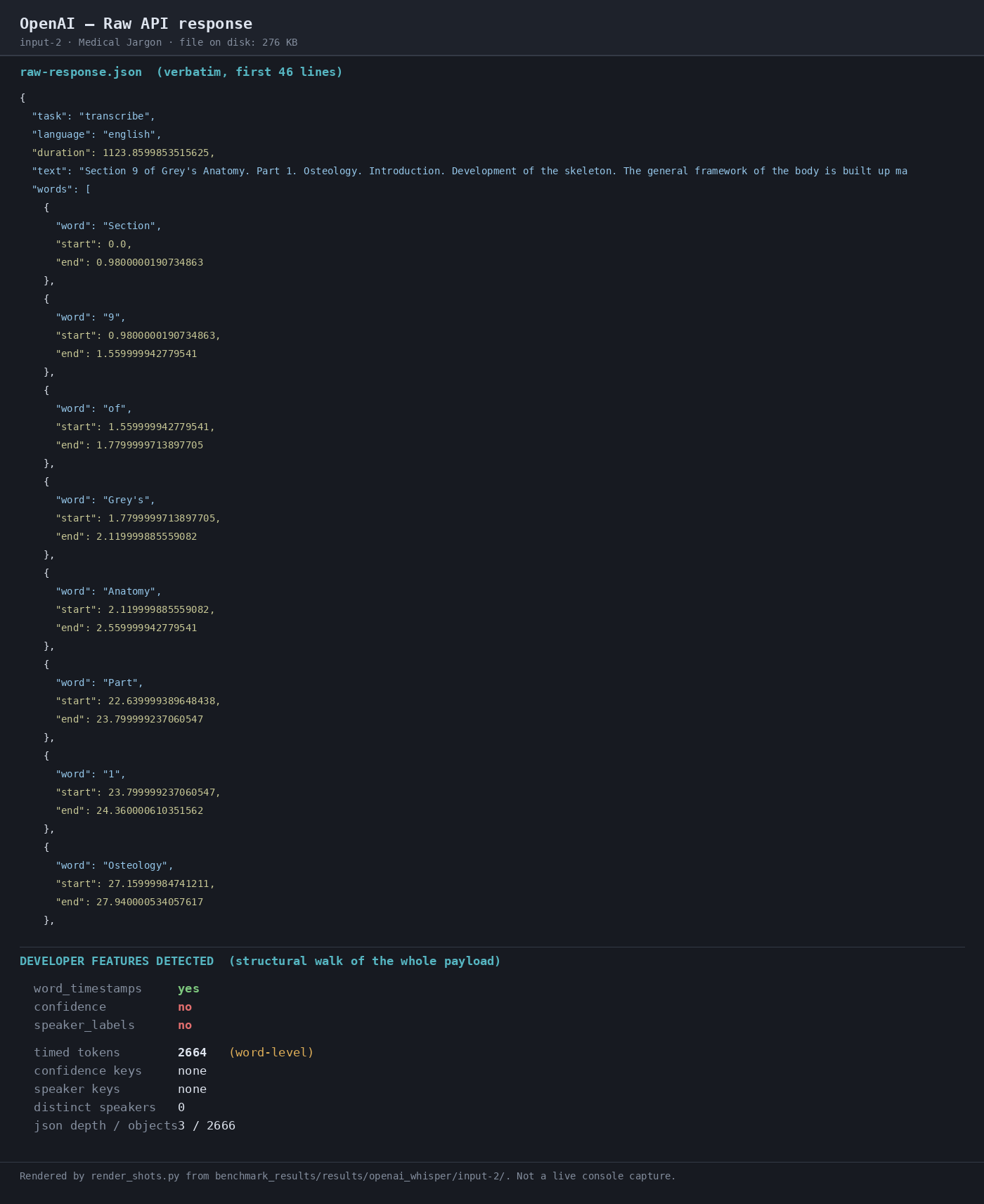
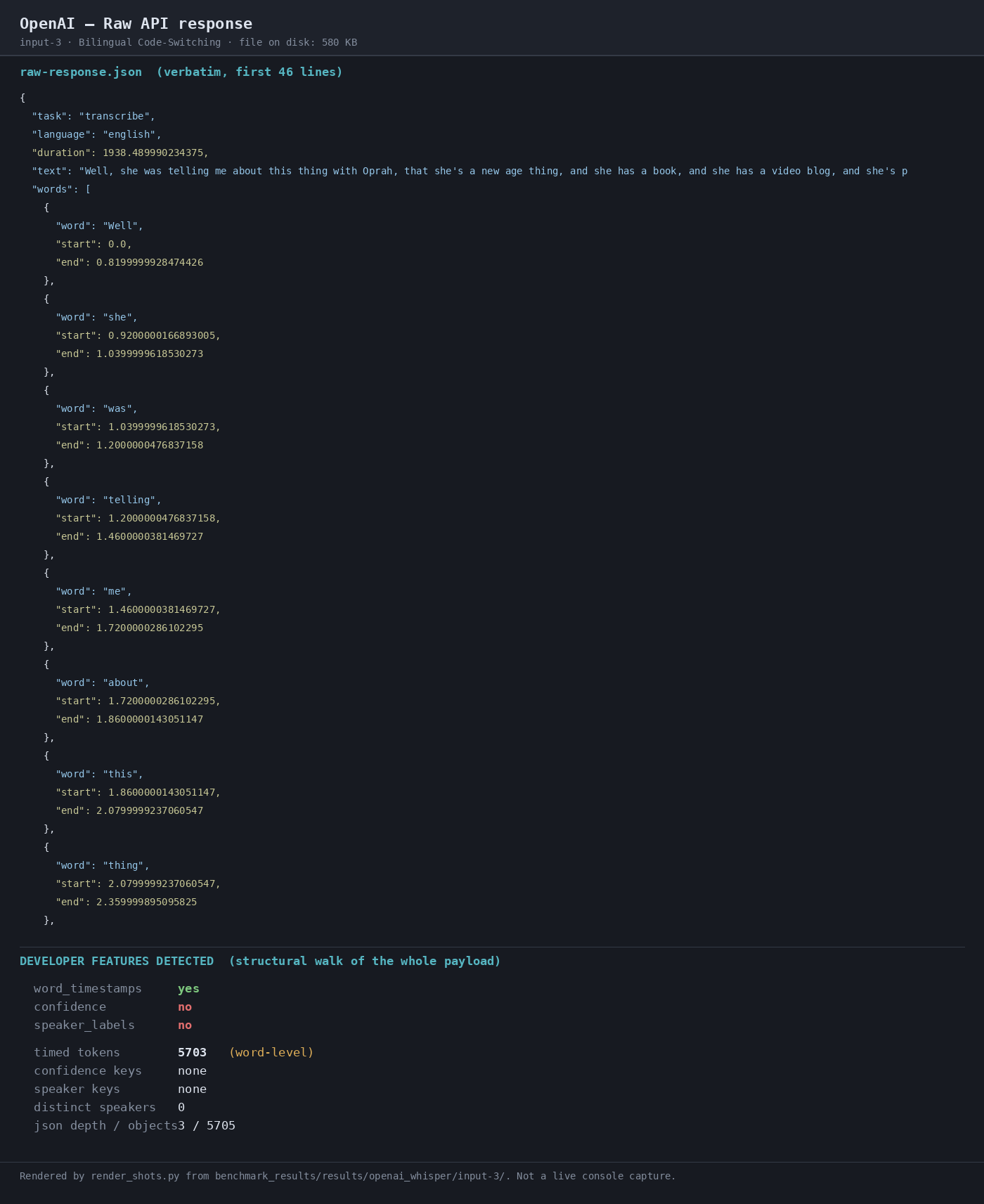
Expected behavior: Returns transcript output with word-level timing metadata when verbose JSON and timestamp granularity are enabled. The exercised outputs were structured JSON exports with timed tokens for captioning, search alignment, and downstream synchronization.
Test case: Audio file → Image
Input type: Audio file
Input used: Input artifact (Audio file): INPUT: Medical Jargon with response_format set to verbose_json and timestamp_granularities[] word. — medical_terms.mp3
Observed output: Output artifact (Image): The raw JSON transcript includes word-level timestamps, and the feature summary shows word_timestamps yes, confidence no, and speaker_labels no. — 02-response-raw-input-2.png
Input artifact: Input artifact (Audio file): INPUT: Medical Jargon with response_format set to verbose_json and timestamp_granularities[] word. — medical_terms.mp3
Output artifact: Output artifact (Image): The raw JSON transcript includes word-level timestamps, and the feature summary shows word_timestamps yes, confidence no, and speaker_labels no. — 02-response-raw-input-2.png
What changed: Audio file transformed into Image
Test case: Audio file → Image
Input type: Audio file
Input used: Input artifact (Audio file): INPUT: Bilingual Code-Switching with response_format set to verbose_json and timestamp_granularities[] word. — mix_language.mp3
Observed output: Output artifact (Image): The raw JSON transcript includes word-level timestamps, and the feature summary again shows word_timestamps yes with confidence no and speaker_labels no. — 02-response-raw-input-3.png
Input artifact: Input artifact (Audio file): INPUT: Bilingual Code-Switching with response_format set to verbose_json and timestamp_granularities[] word. — mix_language.mp3
Output artifact: Output artifact (Image): The raw JSON transcript includes word-level timestamps, and the feature summary again shows word_timestamps yes with confidence no and speaker_labels no. — 02-response-raw-input-3.png
What changed: Audio file transformed into Image
Why it matters / Conclusion: Useful alignment metadata, but not enough for diarization or confidence gating.
Returns transcript output with word-level timing metadata when verbose JSON and timestamp granularity are enabled. The exercised outputs were structured JSON exports with timed tokens for captioning, search alignment, and downstream synchronization.
Official list prices from OpenAI's pricing page
Per-minute API pricing; whisper-1 is the benchmarked model on this page.
Prices were read from OpenAI's pricing page on 2026-08-14 and should be re-verified at test time. No free tier or free credits are published on the API pricing page, and Batch API is not priced separately for transcription.
Banner Preview
How the embed badge will look on your site

Embed HTML
Copy this code to your website source
Quick Integration Guide
- 1Copy the HTML code block above.
- 2Paste it into your site's HTML or CMS editor.
- 3Banner appears instantly on your page.
- 4Links back to your tool profile here.
Similar Tools
Discover more AI tools like OpenAI to enhance your workflow.
Comments (0)
Need a custom AI solution for this use case?
If you are looking to build a custom speech-to-text, audio transcription, or word timestamping system for your business or internal workflow, email us at contact@futuresmart.ai.
Found something inaccurate or missing? We try to keep our AI research accurate and useful. If you found outdated information, an issue, or have a suggestion, email us at collaborate@aidemos.com.