
Speechmatics
Strong batch STT for hard English audio, but weak on code-switching as configured.
Mixed but genuinely useful for the right audio
- You need batch speech-to-text that returns word timings, confidence values, and speaker labels.
- You are comparing engines on hard English audio such as overlapping speakers or jargon-heavy narration.
- You can accept batch processing rather than live streaming.
- You need proven balanced multilingual or code-switching performance; this run was mostly English and Spanish recall was poor.
Our take
Speechmatics is a strong batch STT choice for hard English audio: it won the overlapping-speech test, stayed near the top on medical jargon, and returned structured JSON with word timings, confidence, and speaker labels. The configured bilingual run was still mostly English and Spanish recall was very low, so multilingual robustness is not proven here. The benchmark also used the Enhanced batch rate, so the quality needs to justify that price against cheaper engines.
In-Depth Review
Our detailed analysis of Speechmatics — features, performance, and real-world testing.
Feature-by-Feature Breakdown
Asynchronous Batch TranscriptionReliable batch execution▾
Feature tested: Asynchronous Batch Transcription
Result: Partial
Verdict: Reliable batch execution
Expected behavior: Submits audio as an asynchronous batch job and returns a completed transcript without manual intervention. The member cards exercised crosstalk meeting audio, a jargon-heavy lecture, a medical narration, and a Spanish-English conversation through the documented batch flow.
Test case: Audio file → Image
Input type: Audio file
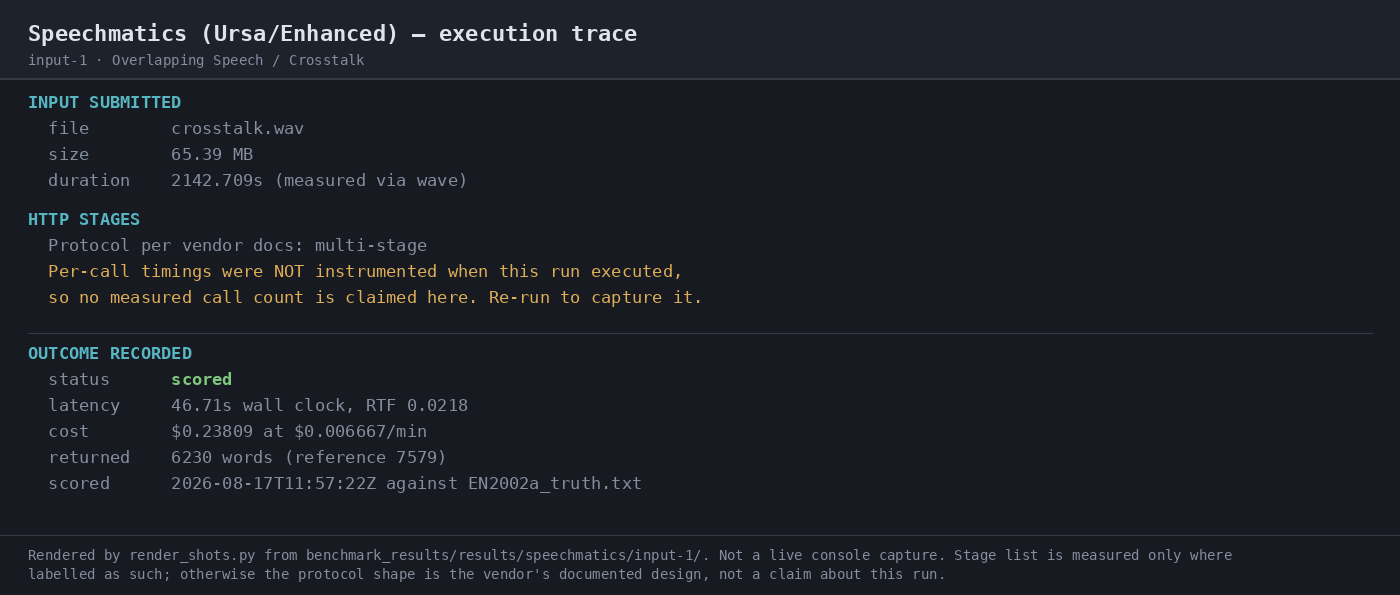
Input used: Input artifact (Audio file): Input-1: Overlapping Speech / Crosstalk batch run on crosstalk.wav (long-form meeting audio with heavy overlap). — crosstalk.wav
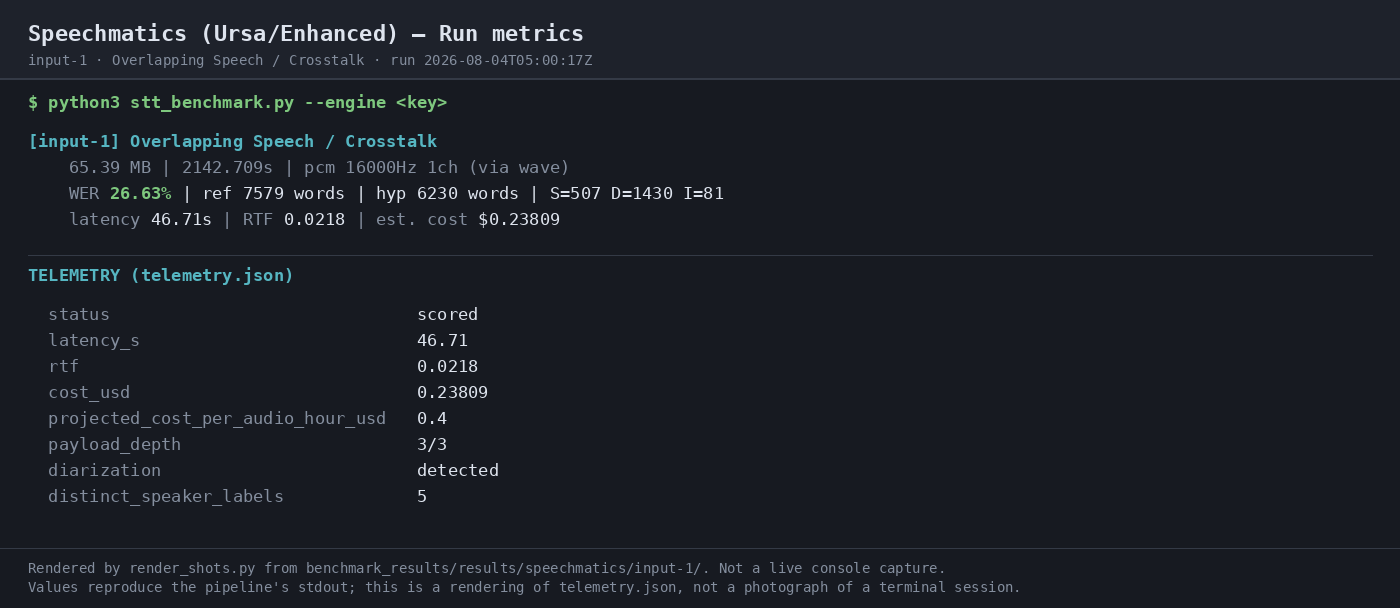
Observed output: Output artifact (Image): Scored batch run for the crosstalk input: status scored, 46.71s latency, RTF 0.0218, cost $0.23809, and 6230 returned words against the reference transcript. — 07-automation-trace.png
Input artifact: Input artifact (Audio file): Input-1: Overlapping Speech / Crosstalk batch run on crosstalk.wav (long-form meeting audio with heavy overlap). — crosstalk.wav
Output artifact: Output artifact (Image): Scored batch run for the crosstalk input: status scored, 46.71s latency, RTF 0.0218, cost $0.23809, and 6230 returned words against the reference transcript. — 07-automation-trace.png
What changed: Audio file transformed into Image
Test case: Audio file → Image
Input type: Audio file
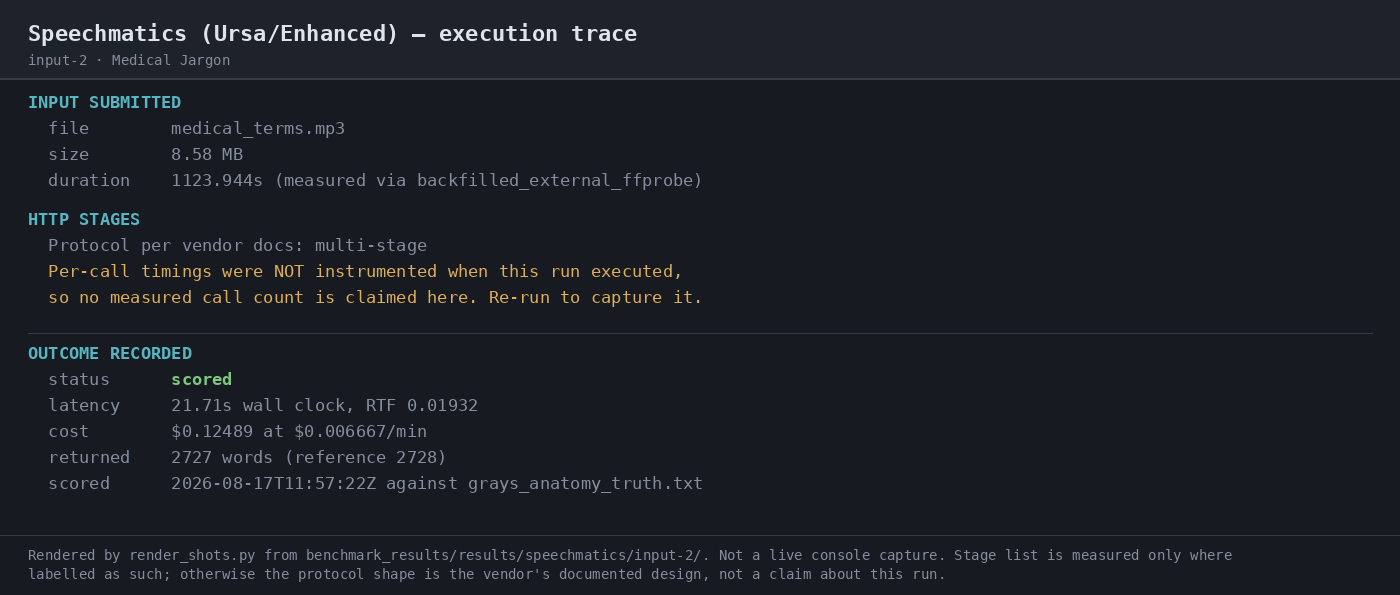
Input used: Input artifact (Audio file): Input-2: Medical Jargon batch run on medical_terms.mp3 (single-speaker anatomical narration). — medical_terms.mp3
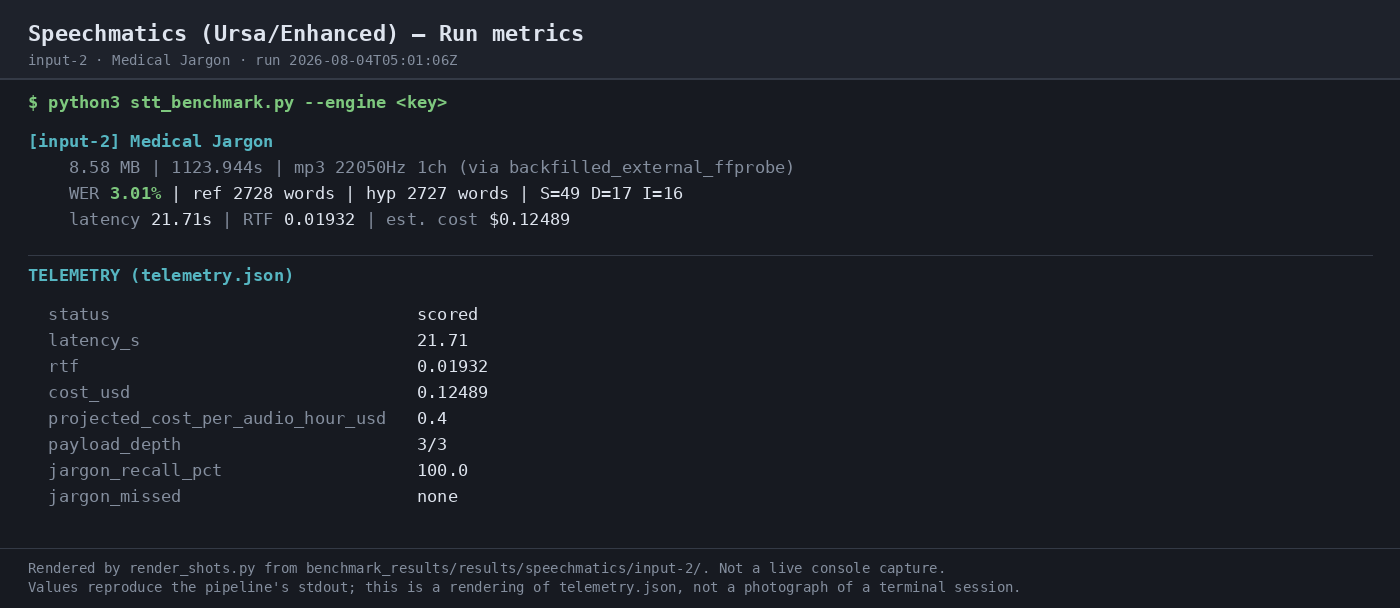
Observed output: Output artifact (Image): Scored batch run for the medical-jargon input: status scored, 21.71s latency, RTF 0.0193, cost $0.12489, and 2727 returned words against the reference transcript. — 07-automation-trace-2.png
Input artifact: Input artifact (Audio file): Input-2: Medical Jargon batch run on medical_terms.mp3 (single-speaker anatomical narration). — medical_terms.mp3
Output artifact: Output artifact (Image): Scored batch run for the medical-jargon input: status scored, 21.71s latency, RTF 0.0193, cost $0.12489, and 2727 returned words against the reference transcript. — 07-automation-trace-2.png
What changed: Audio file transformed into Image
Test case: Audio file → Image
Input type: Audio file
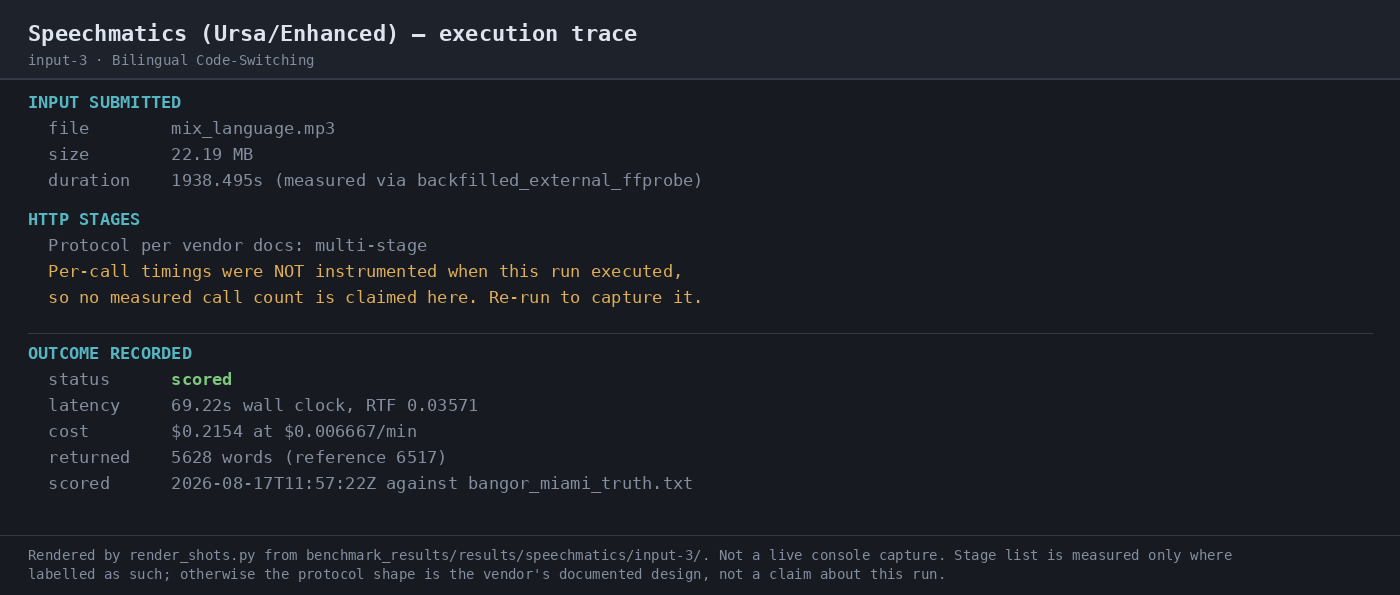
Input used: Input artifact (Audio file): Input-3: Bilingual Code-Switching batch run on mix_language.mp3 (Spanish-English conversation configured with English language routing). — mix_language.mp3
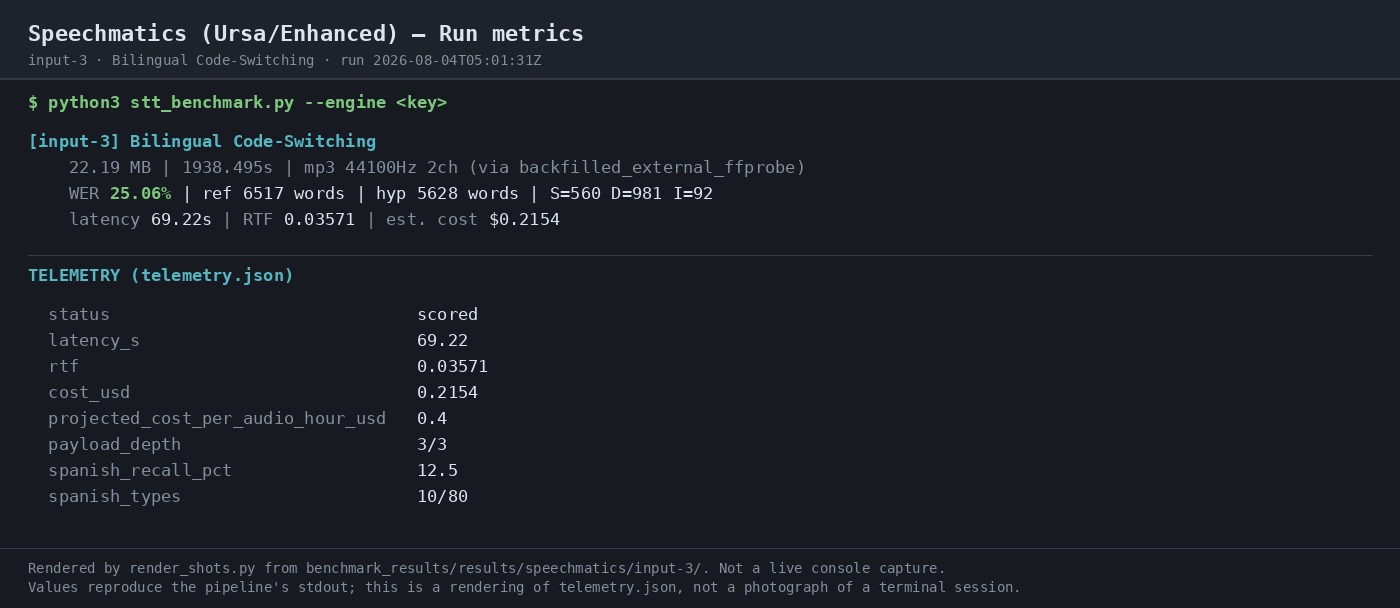
Observed output: Output artifact (Image): Scored batch run for the bilingual input: status scored, 69.22s latency, RTF 0.03571, cost $0.2154, and 5628 returned words against the reference transcript. — 07-automation-trace-3.png
Input artifact: Input artifact (Audio file): Input-3: Bilingual Code-Switching batch run on mix_language.mp3 (Spanish-English conversation configured with English language routing). — mix_language.mp3
Output artifact: Output artifact (Image): Scored batch run for the bilingual input: status scored, 69.22s latency, RTF 0.03571, cost $0.2154, and 5628 returned words against the reference transcript. — 07-automation-trace-3.png
What changed: Audio file transformed into Image
Test case: Audio file → Image
Input type: Audio file
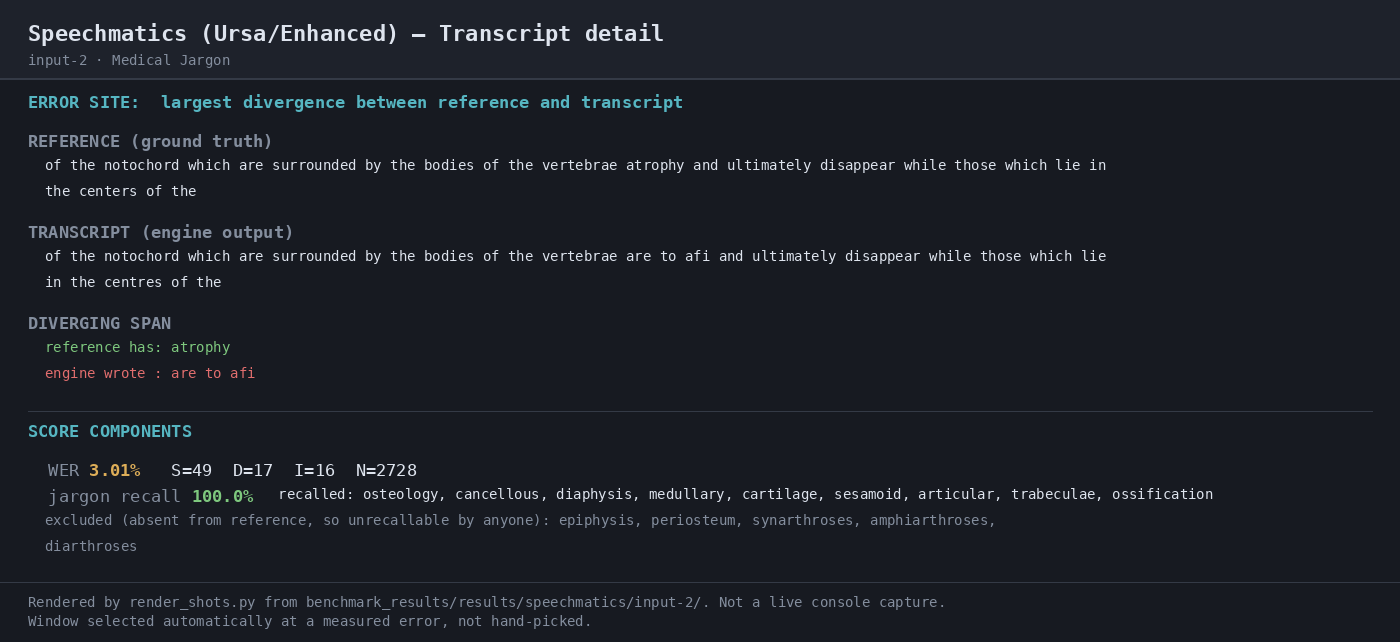
Input used: Input artifact (Audio file): Medical Jargon — dense anatomical vocabulary from Gray's Anatomy. — medical_terms.mp3
Observed output: Output artifact (Image): The medical-jargon sample scored 3.01% WER and 100.0% jargon recall; the transcript preserved the scored anatomy terms rather than dropping them. — 04-transcript-detail-2.png
Input artifact: Input artifact (Audio file): Medical Jargon — dense anatomical vocabulary from Gray's Anatomy. — medical_terms.mp3
Output artifact: Output artifact (Image): The medical-jargon sample scored 3.01% WER and 100.0% jargon recall; the transcript preserved the scored anatomy terms rather than dropping them. — 04-transcript-detail-2.png
What changed: Audio file transformed into Image
Test case: Audio file → Text/code file
Input type: Audio file
Input used: Input artifact (Audio file): INPUT — crosstalk.wav: 35:43 four-way overlapping meeting audio (AMI EN2002a). — crosstalk.wav
Observed output: Output artifact (Text/code file): Batch transcript returned for the crosstalk run; WER 26.63% and wall-clock 46.71s. — raw-response.json
Input artifact: Input artifact (Audio file): INPUT — crosstalk.wav: 35:43 four-way overlapping meeting audio (AMI EN2002a). — crosstalk.wav
Output artifact: Output artifact (Text/code file): Batch transcript returned for the crosstalk run; WER 26.63% and wall-clock 46.71s. — raw-response.json
What changed: Audio file transformed into Text/code file
Test case: Audio file → Text/code file
Input type: Audio file
Input used: Input artifact (Audio file): INPUT — medical_terms.mp3: 18:44 clean single-speaker medical narration (Gray's Anatomy via LibriVox). — medical_terms.mp3
Observed output: Output artifact (Text/code file): Batch transcript returned for the medical jargon run; WER 3.01% and wall-clock 21.71s. — raw-response-2.json
Input artifact: Input artifact (Audio file): INPUT — medical_terms.mp3: 18:44 clean single-speaker medical narration (Gray's Anatomy via LibriVox). — medical_terms.mp3
Output artifact: Output artifact (Text/code file): Batch transcript returned for the medical jargon run; WER 3.01% and wall-clock 21.71s. — raw-response-2.json
What changed: Audio file transformed into Text/code file
Test case: Audio file → Text/code file
Input type: Audio file
Input used: Input artifact (Audio file): INPUT — mix_language.mp3: 32:18 Spanish-English conversation, mostly English. — mix_language.mp3
Observed output: Output artifact (Text/code file): Batch transcript returned for the bilingual run; WER 25.06% and wall-clock 69.22s. — raw-response-3.json
Input artifact: Input artifact (Audio file): INPUT — mix_language.mp3: 32:18 Spanish-English conversation, mostly English. — mix_language.mp3
Output artifact: Output artifact (Text/code file): Batch transcript returned for the bilingual run; WER 25.06% and wall-clock 69.22s. — raw-response-3.json
What changed: Audio file transformed into Text/code file
Test case: Audio file → Image
Input type: Audio file
Input used: Input artifact (Audio file): Input-1: Overlapping Speech / Crosstalk — crosstalk.wav, 35:43, four-way overlapping meeting audio. — crosstalk.wav
Observed output: Output artifact (Image): WER 26.63% on the crosstalk run, with 507 substitutions, 1430 deletions, and 81 insertions against a 7579-word reference. It was the best of 8 engines on this input, but the largest divergence omitted a long overlapping span. — 03-terminal-metrics-input-1.png
Input artifact: Input artifact (Audio file): Input-1: Overlapping Speech / Crosstalk — crosstalk.wav, 35:43, four-way overlapping meeting audio. — crosstalk.wav
Output artifact: Output artifact (Image): WER 26.63% on the crosstalk run, with 507 substitutions, 1430 deletions, and 81 insertions against a 7579-word reference. It was the best of 8 engines on this input, but the largest divergence omitted a long overlapping span. — 03-terminal-metrics-input-1.png
What changed: Audio file transformed into Image
Test case: Audio file → Image
Input type: Audio file
Input used: Input artifact (Audio file): Input-2: Medical Jargon — medical_terms.mp3, 18:44, Gray's Anatomy narration dense with anatomical terms. — medical_terms.mp3
Observed output: Output artifact (Image): WER 3.01% on the medical-jargon run, with 49 substitutions, 17 deletions, and 16 insertions against a 2728-word reference. It was second of 10 and kept jargon recall at 100%. — 03-terminal-metrics-input-2.png
Input artifact: Input artifact (Audio file): Input-2: Medical Jargon — medical_terms.mp3, 18:44, Gray's Anatomy narration dense with anatomical terms. — medical_terms.mp3
Output artifact: Output artifact (Image): WER 3.01% on the medical-jargon run, with 49 substitutions, 17 deletions, and 16 insertions against a 2728-word reference. It was second of 10 and kept jargon recall at 100%. — 03-terminal-metrics-input-2.png
What changed: Audio file transformed into Image
Test case: Audio file → Image
Input type: Audio file
Input used: Input artifact (Audio file): Input-3: Bilingual Code-Switching — mix_language.mp3, 32:18, spontaneous Spanish-English conversation. — mix_language.mp3
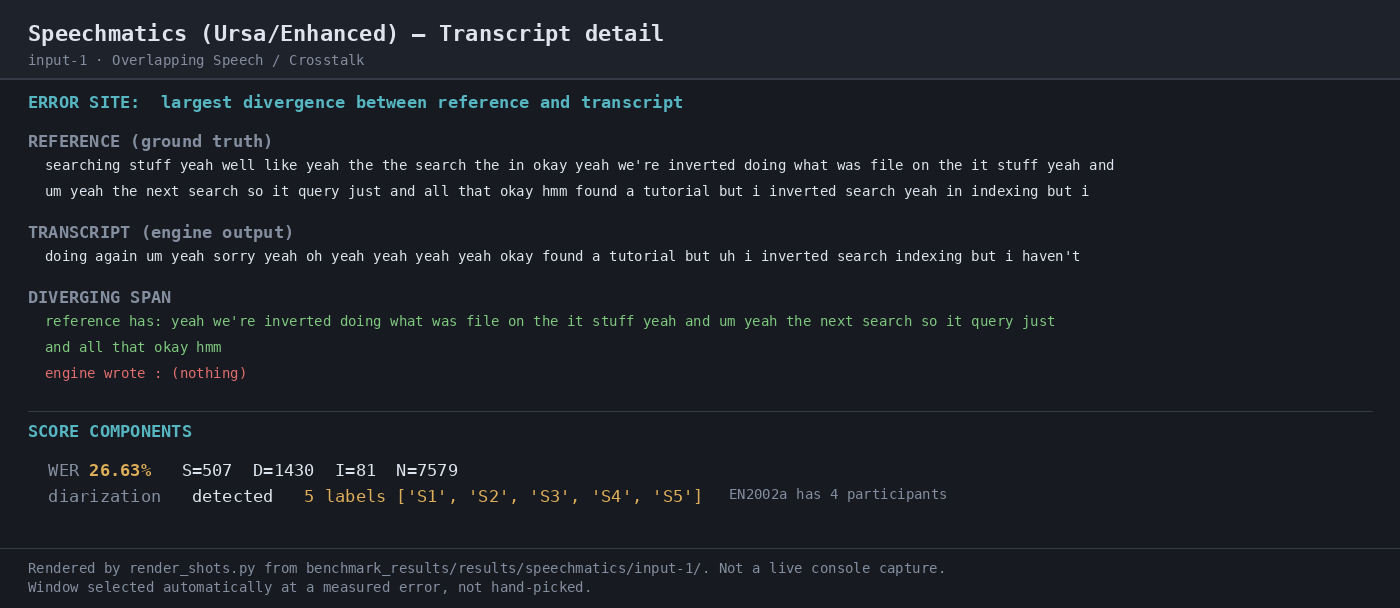
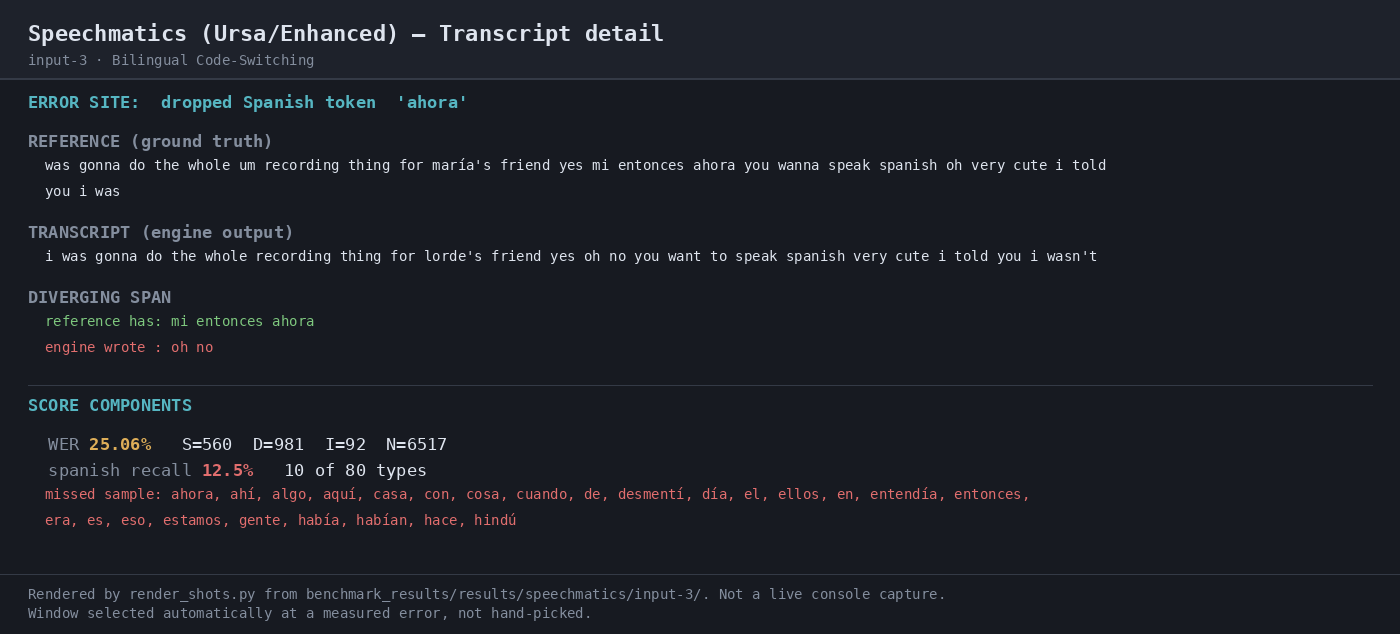
Observed output: Output artifact (Image): WER 25.06% on the bilingual run, with 560 substitutions, 981 deletions, and 92 insertions against a 6517-word reference. Spanish token recall was only 12.5%, so this run does not support balanced code-switching claims. — 03-terminal-metrics-input-3.png
Input artifact: Input artifact (Audio file): Input-3: Bilingual Code-Switching — mix_language.mp3, 32:18, spontaneous Spanish-English conversation. — mix_language.mp3
Output artifact: Output artifact (Image): WER 25.06% on the bilingual run, with 560 substitutions, 981 deletions, and 92 insertions against a 6517-word reference. Spanish token recall was only 12.5%, so this run does not support balanced code-switching claims. — 03-terminal-metrics-input-3.png
What changed: Audio file transformed into Image
Why it matters / Conclusion: Stable batch execution across all three inputs. The run completed end to end, but per-call timings were not instrumented, so the exact HTTP call count is documented rather than measured here.
Submits audio as an asynchronous batch job and returns a completed transcript without manual intervention. The member cards exercised crosstalk meeting audio, a jargon-heavy lecture, a medical narration, and a Spanish-English conversation through the documented batch flow.
Transcript Metadata ExportConsistently present across all three runs.▾
Feature tested: Transcript Metadata Export
Result: Partial
Verdict: Consistently present across all three runs.
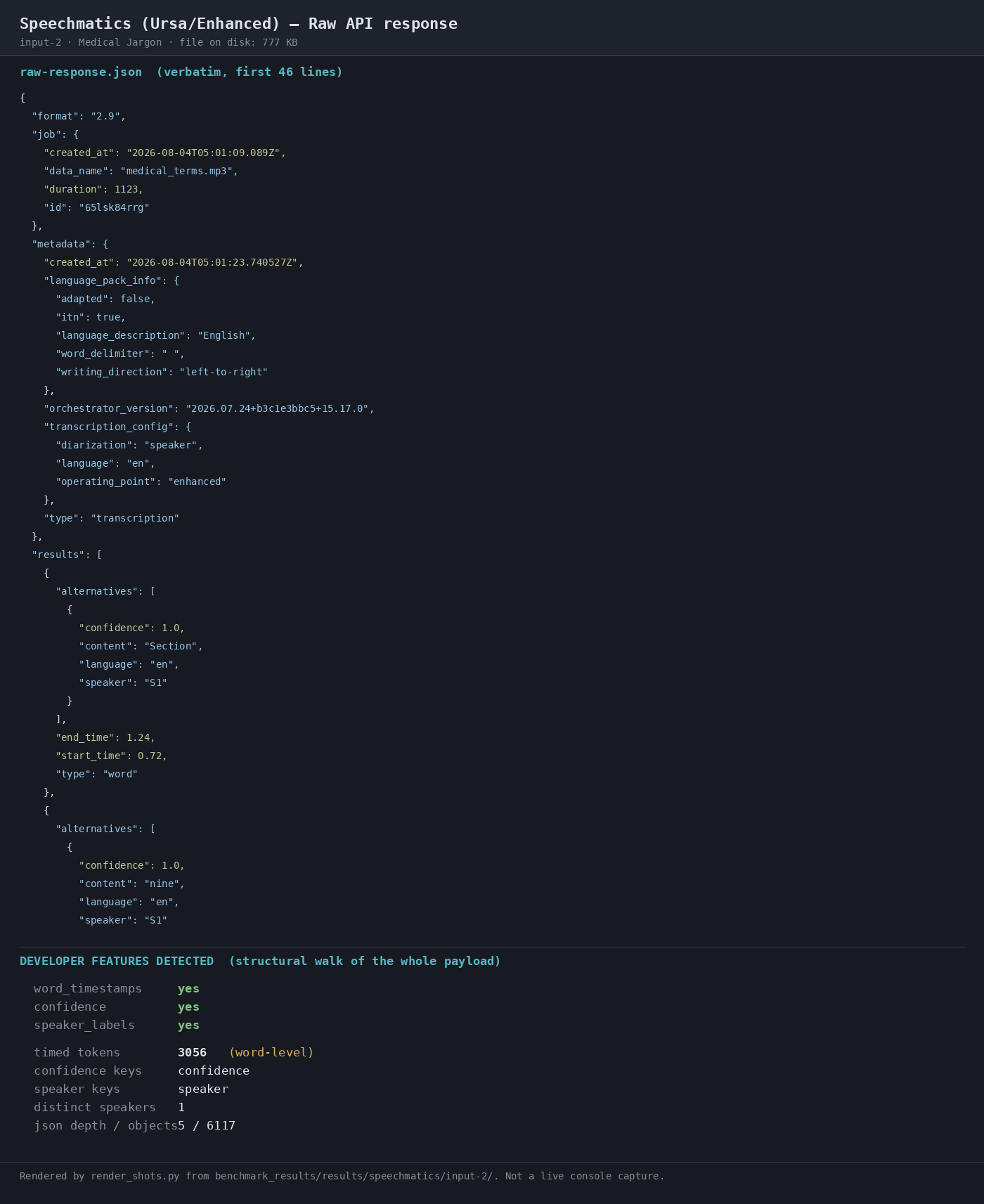
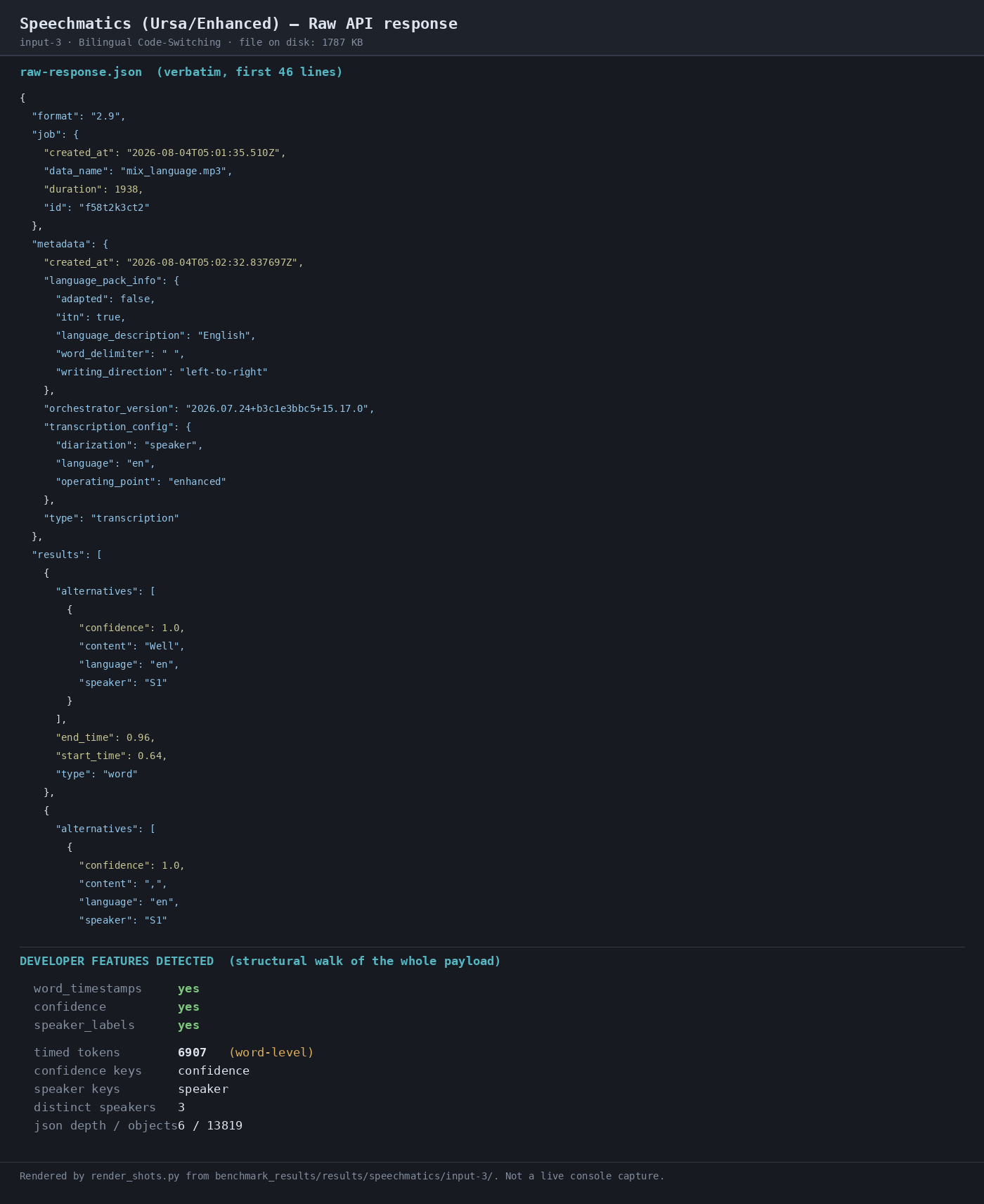
Expected behavior: Returns transcript payloads with developer-facing metadata such as word-level timestamps, confidence values, speaker labels, transcription_config, language_pack_info, and timed_tokens. The member cards show those structured fields present across the observed runs.
Test case: Audio file → Text/code file
Input type: Audio file
Input used: Input artifact (Audio file): INPUT — crosstalk.wav: 35:43 four-way overlapping meeting audio (AMI EN2002a). — crosstalk.wav
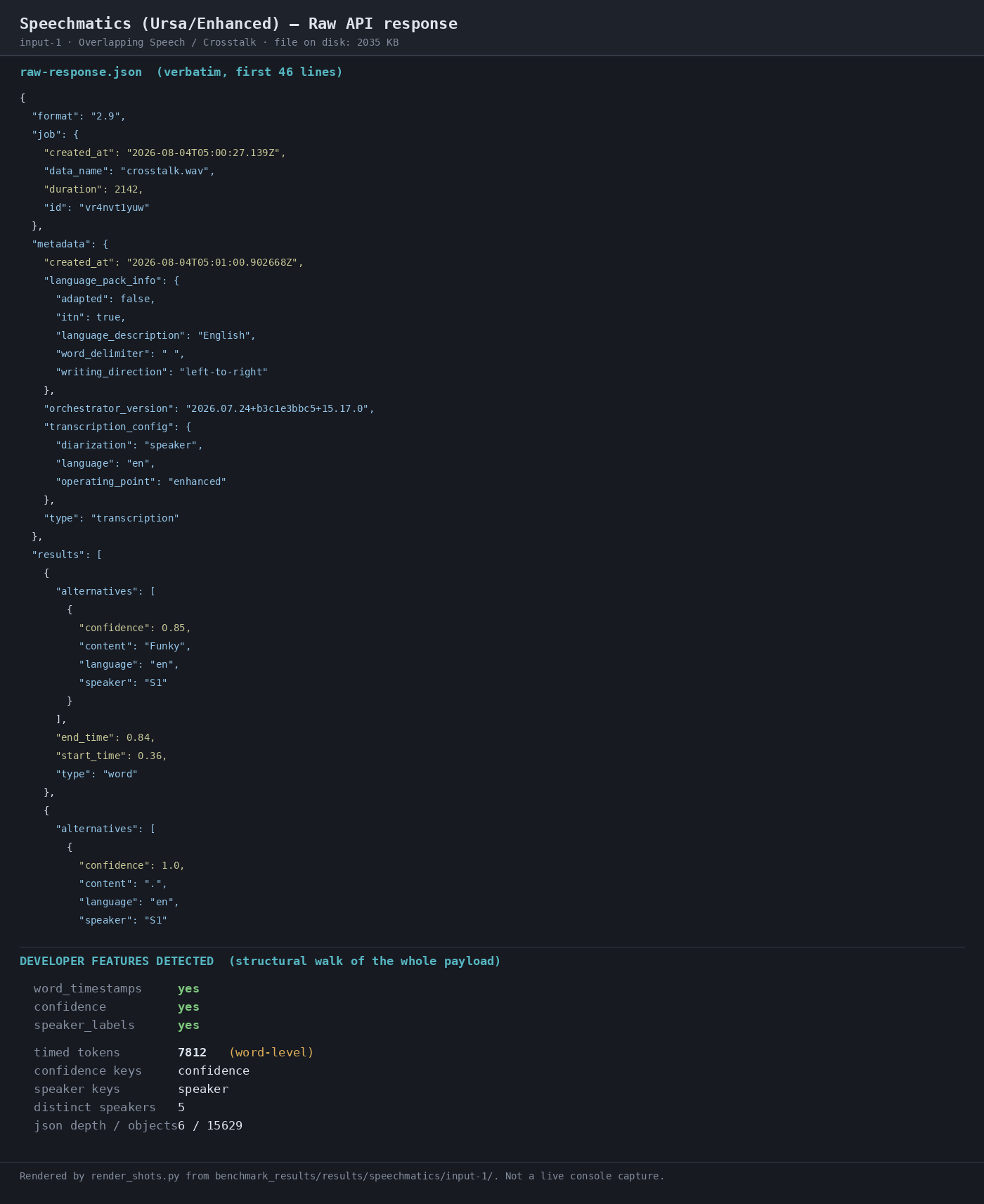
Observed output: Output artifact (Text/code file): JSON payload includes timed tokens, confidence, and speaker labels; 7,812 timed tokens on the crosstalk run. — raw-response.json
Input artifact: Input artifact (Audio file): INPUT — crosstalk.wav: 35:43 four-way overlapping meeting audio (AMI EN2002a). — crosstalk.wav
Output artifact: Output artifact (Text/code file): JSON payload includes timed tokens, confidence, and speaker labels; 7,812 timed tokens on the crosstalk run. — raw-response.json
What changed: Audio file transformed into Text/code file
Test case: Audio file → Text/code file
Input type: Audio file
Input used: Input artifact (Audio file): INPUT — medical_terms.mp3: 18:44 clean single-speaker medical narration (Gray's Anatomy via LibriVox). — medical_terms.mp3
Observed output: Output artifact (Text/code file): JSON payload includes the same metadata on the medical run; 3,056 timed tokens. — raw-response-2.json
Input artifact: Input artifact (Audio file): INPUT — medical_terms.mp3: 18:44 clean single-speaker medical narration (Gray's Anatomy via LibriVox). — medical_terms.mp3
Output artifact: Output artifact (Text/code file): JSON payload includes the same metadata on the medical run; 3,056 timed tokens. — raw-response-2.json
What changed: Audio file transformed into Text/code file
Test case: Audio file → Text/code file
Input type: Audio file
Input used: Input artifact (Audio file): INPUT — mix_language.mp3: 32:18 Spanish-English conversation, mostly English. — mix_language.mp3
Observed output: Output artifact (Text/code file): JSON payload includes the same metadata on the bilingual run; 6,907 timed tokens. — raw-response-3.json
Input artifact: Input artifact (Audio file): INPUT — mix_language.mp3: 32:18 Spanish-English conversation, mostly English. — mix_language.mp3
Output artifact: Output artifact (Text/code file): JSON payload includes the same metadata on the bilingual run; 6,907 timed tokens. — raw-response-3.json
What changed: Audio file transformed into Text/code file
Test case: Audio file → Image
Input type: Audio file
Input used: Input artifact (Audio file): Input-1: Overlapping Speech / Crosstalk — crosstalk.wav, 35:43, four-way overlapping meeting audio. — crosstalk.wav
Observed output: Output artifact (Image): Raw API response showing transcription_config with operating_point enhanced, diarization speaker, language en, and word-level output with confidence and speaker fields. — 02-response-raw-input-1.png
Input artifact: Input artifact (Audio file): Input-1: Overlapping Speech / Crosstalk — crosstalk.wav, 35:43, four-way overlapping meeting audio. — crosstalk.wav
Output artifact: Output artifact (Image): Raw API response showing transcription_config with operating_point enhanced, diarization speaker, language en, and word-level output with confidence and speaker fields. — 02-response-raw-input-1.png
What changed: Audio file transformed into Image
Test case: Audio file → Image
Input type: Audio file
Input used: Input artifact (Audio file): Input-2: Medical Jargon — medical_terms.mp3, 18:44, Gray's Anatomy narration dense with anatomical terms. — medical_terms.mp3
Observed output: Output artifact (Image): Raw API response showing the same transcription configuration and payload structure, including confidence and speaker fields in the JSON transcript. — 02-response-raw-input-2.png
Input artifact: Input artifact (Audio file): Input-2: Medical Jargon — medical_terms.mp3, 18:44, Gray's Anatomy narration dense with anatomical terms. — medical_terms.mp3
Output artifact: Output artifact (Image): Raw API response showing the same transcription configuration and payload structure, including confidence and speaker fields in the JSON transcript. — 02-response-raw-input-2.png
What changed: Audio file transformed into Image
Test case: Audio file → Image
Input type: Audio file
Input used: Input artifact (Audio file): Input-3: Bilingual Code-Switching — mix_language.mp3, 32:18, spontaneous Spanish-English conversation. — mix_language.mp3
Observed output: Output artifact (Image): Raw API response showing timed_tokens 6907, confidence yes, speaker_labels yes, and distinct speakers 3 in the developer-feature summary. — 02-response-raw-input-3.png
Input artifact: Input artifact (Audio file): Input-3: Bilingual Code-Switching — mix_language.mp3, 32:18, spontaneous Spanish-English conversation. — mix_language.mp3
Output artifact: Output artifact (Image): Raw API response showing timed_tokens 6907, confidence yes, speaker_labels yes, and distinct speakers 3 in the developer-feature summary. — 02-response-raw-input-3.png
What changed: Audio file transformed into Image
Why it matters / Conclusion: Timing metadata was consistently present across all three runs, even when transcription quality varied.
Returns transcript payloads with developer-facing metadata such as word-level timestamps, confidence values, speaker labels, transcription_config, language_pack_info, and timed_tokens. The member cards show those structured fields present across the observed runs.
Speaker DiarizationLabels present; attribution unverified▾
Feature tested: Speaker Diarization
Result: Partial
Verdict: Labels present; attribution unverified
Expected behavior: Labels speakers in the transcript output. The member cards exercised crosstalk meeting audio and observed speaker tags/labels across runs, including a multi-speaker conversation.
Test case: Audio file → Image
Input type: Audio file
Input used: Input artifact (Audio file): Input-1: Overlapping Speech / Crosstalk — crosstalk.wav, 35:43, four-way overlapping meeting audio. — crosstalk.wav
Observed output: Output artifact (Image): The transcript detail panel reports diarization detected 5 labels, while the reference meeting has 4 participants, so the run is over-segmented even though attribution correctness was not scored. — 04-transcript-detail-input-1.png
Input artifact: Input artifact (Audio file): Input-1: Overlapping Speech / Crosstalk — crosstalk.wav, 35:43, four-way overlapping meeting audio. — crosstalk.wav
Output artifact: Output artifact (Image): The transcript detail panel reports diarization detected 5 labels, while the reference meeting has 4 participants, so the run is over-segmented even though attribution correctness was not scored. — 04-transcript-detail-input-1.png
What changed: Audio file transformed into Image
Test case: Audio file → Image
Input type: Audio file
Input used: Input artifact (Audio file): Input-2: Medical Jargon — medical_terms.mp3, 18:44, Gray's Anatomy narration dense with anatomical terms. — medical_terms.mp3
Observed output: Output artifact (Image): The raw JSON response includes speaker fields in the returned alternatives, confirming that speaker labels are available in the payload. — 02-response-raw-input-2.png
Input artifact: Input artifact (Audio file): Input-2: Medical Jargon — medical_terms.mp3, 18:44, Gray's Anatomy narration dense with anatomical terms. — medical_terms.mp3
Output artifact: Output artifact (Image): The raw JSON response includes speaker fields in the returned alternatives, confirming that speaker labels are available in the payload. — 02-response-raw-input-2.png
What changed: Audio file transformed into Image
Test case: Audio file → Image
Input type: Audio file
Input used: Input artifact (Audio file): Input-3: Bilingual Code-Switching — mix_language.mp3, 32:18, spontaneous Spanish-English conversation. — mix_language.mp3
Observed output: Output artifact (Image): The raw API response's developer-feature summary shows speaker_labels yes and distinct speakers 3, confirming diarization metadata is present in the output. — 02-response-raw-input-3.png
Input artifact: Input artifact (Audio file): Input-3: Bilingual Code-Switching — mix_language.mp3, 32:18, spontaneous Spanish-English conversation. — mix_language.mp3
Output artifact: Output artifact (Image): The raw API response's developer-feature summary shows speaker_labels yes and distinct speakers 3, confirming diarization metadata is present in the output. — 02-response-raw-input-3.png
What changed: Audio file transformed into Image
Test case: Audio file → Image
Input type: Audio file
Input used: Input artifact (Audio file): Input-2: Medical Jargon diarization test. — medical_terms.mp3
Observed output: Output artifact (Image): Raw response preview reports one distinct speaker label on the medical-jargon narration. — 02-response-raw-2.png
Input artifact: Input artifact (Audio file): Input-2: Medical Jargon diarization test. — medical_terms.mp3
Output artifact: Output artifact (Image): Raw response preview reports one distinct speaker label on the medical-jargon narration. — 02-response-raw-2.png
What changed: Audio file transformed into Image
Test case: Audio file → Text/code file
Input type: Audio file
Input used: Input artifact (Audio file): INPUT-2: Medical Jargon — medical_terms.mp3, 8.58 MB, 1123.944 s, mp3 22.05 kHz mono. — medical_terms.mp3
Observed output: Output artifact (Text/code file): The transcript metadata exposed one speaker label on the single-speaker narration input. — raw-response-2.json
Input artifact: Input artifact (Audio file): INPUT-2: Medical Jargon — medical_terms.mp3, 8.58 MB, 1123.944 s, mp3 22.05 kHz mono. — medical_terms.mp3
Output artifact: Output artifact (Text/code file): The transcript metadata exposed one speaker label on the single-speaker narration input. — raw-response-2.json
What changed: Audio file transformed into Text/code file
Why it matters / Conclusion: Useful for downstream speaker-aware workflows, but this benchmark did not verify true diarization accuracy.
Labels speakers in the transcript output. The member cards exercised crosstalk meeting audio and observed speaker tags/labels across runs, including a multi-speaker conversation.

Audio TranscriptionWeak as configured▾
Feature tested: Audio Transcription
Result: Partial
Verdict: Weak as configured
Expected behavior: Transcribes speech audio into a transcript, including hard English narration and Spanish-English mixed-language audio. The member cards cover a hard-English overlap test, a jargon-heavy lecture, and a bilingual code-switching sample.
Test case: Audio file → Image
Input type: Audio file
Input used: Input artifact (Audio file): Input-3: Bilingual Code-Switching — mix_language.mp3, 32:18, spontaneous Spanish-English conversation. — mix_language.mp3
Observed output: Output artifact (Image): The largest error site dropped the Spanish token 'ahora'; Spanish token recall was only 12.5% (10/80), so this is not balanced code-switching evidence. — 04-transcript-detail-input-3.png
Input artifact: Input artifact (Audio file): Input-3: Bilingual Code-Switching — mix_language.mp3, 32:18, spontaneous Spanish-English conversation. — mix_language.mp3
Output artifact: Output artifact (Image): The largest error site dropped the Spanish token 'ahora'; Spanish token recall was only 12.5% (10/80), so this is not balanced code-switching evidence. — 04-transcript-detail-input-3.png
What changed: Audio file transformed into Image
Why it matters / Conclusion: Do not treat this run as proof of balanced multilingual performance; it is still mostly English and performs poorly on Spanish tokens.
Transcribes speech audio into a transcript, including hard English narration and Spanish-English mixed-language audio. The member cards cover a hard-English overlap test, a jargon-heavy lecture, and a bilingual code-switching sample.
Official pricing
Pro includes model-tiered batch rates; the benchmarked configuration used Batch Enhanced.
Official pricing page last updated 31 July 2026. The benchmarked run used the Enhanced batch rate, not the cheapest Batch Melia 1 headline rate. The page also lists model-training opt-in and volume discounts; the figures here are list prices.
Featured in Rankings
Independent rankings where Speechmatics was tested and rated.
Banner Preview
How the embed badge will look on your site

Embed HTML
Copy this code to your website source
Quick Integration Guide
- 1Copy the HTML code block above.
- 2Paste it into your site's HTML or CMS editor.
- 3Banner appears instantly on your page.
- 4Links back to your tool profile here.
Similar Tools
Discover more AI tools like Speechmatics to enhance your workflow.
Comments (0)
Need a custom AI solution for this use case?
If you are looking to build a custom speech-to-text transcription, audio indexing, or speech analytics system for your business or internal workflow, email us at contact@futuresmart.ai.
Found something inaccurate or missing? We try to keep our AI research accurate and useful. If you found outdated information, an issue, or have a suggestion, email us at collaborate@aidemos.com.