
Gladia
Batch STT with rich word-level metadata and strong jargon recall, but overlap handling is weak and bilingual WER needs a mono-downmixed rerun.
Strong metadata and jargon performance, but not uniformly reliable
- You need a batch STT API that returns word-level timestamps, confidence, and speaker labels.
- You care about technical jargon recall on dense domain audio.
- You can rerun stereo or code-switching audio with mono downmix or explicit channel control before trusting the bilingual score.
- You need reliable overlap handling on crosstalk-heavy audio.
Our take
Gladia looks strong as a batch STT API for developer workflows: every scored run returned word-level timestamps, confidence, and speaker labels, and the medical-jargon sample scored very well with 100% jargon recall. But the crosstalk case missed large spans, and the bilingual run is confounded by channel duplication, so that WER should not be treated as a clean accuracy result until it is rerun with mono downmix or explicit channel control.
In-Depth Review
Our detailed analysis of Gladia — features, performance, and real-world testing.
Feature-by-Feature Breakdown
Batch Transcription▾
Feature tested: Batch Transcription
Result: Partial
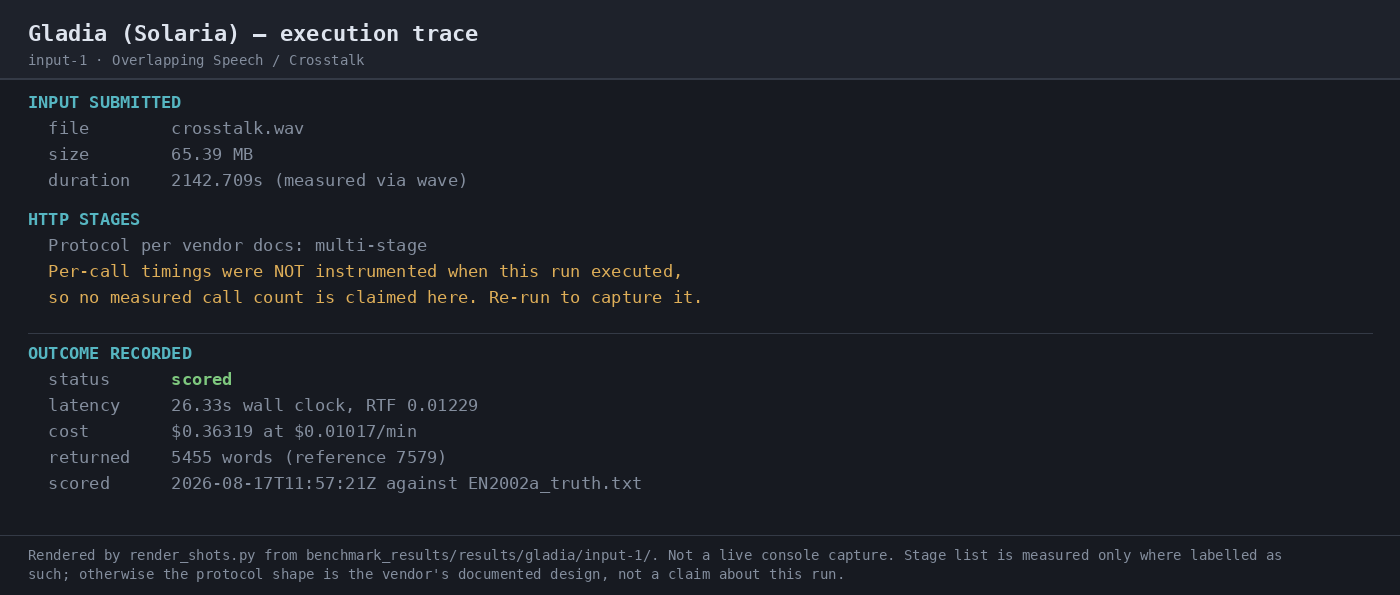
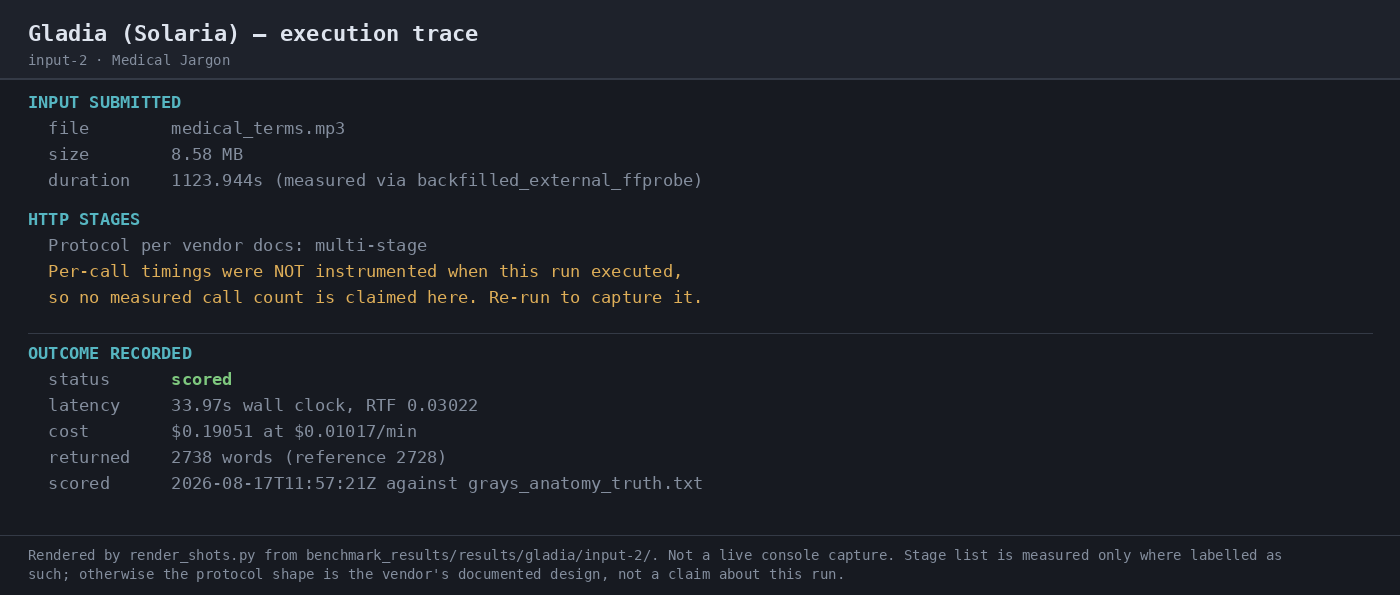
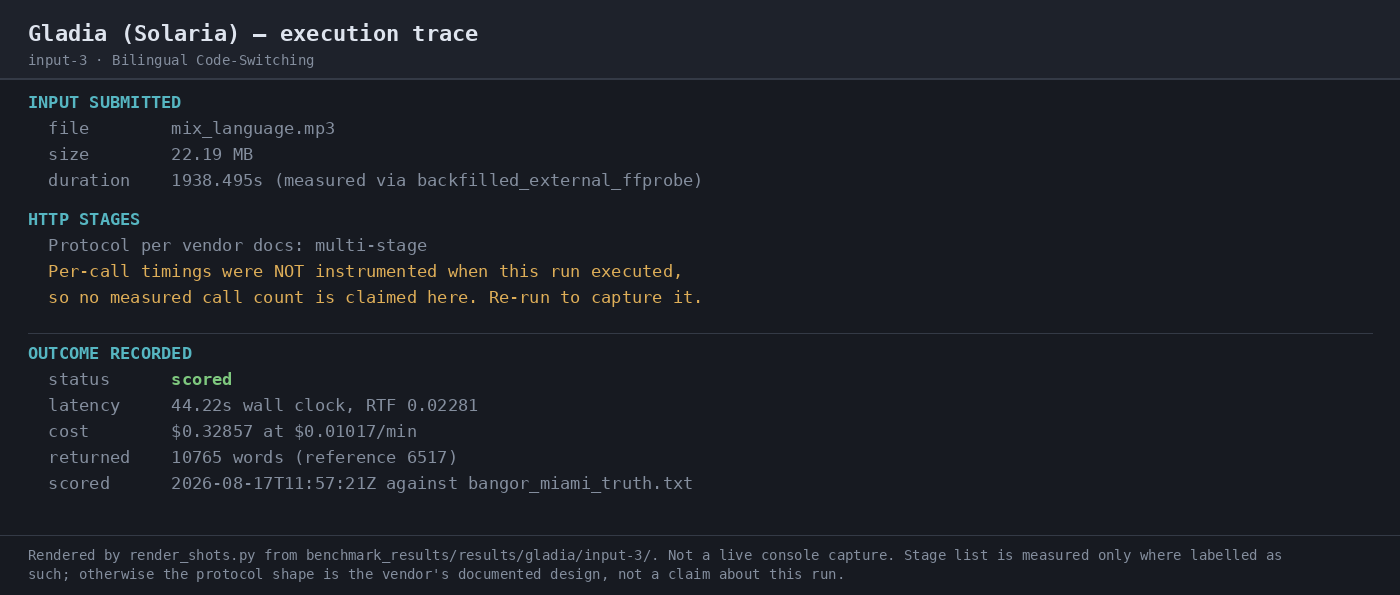
Expected behavior: Completes pre-recorded audio as batch transcription jobs end to end. The capability was exercised on crosstalk.wav, medical_terms.mp3, and mix_language.mp3, with job completion, latency, cost, and transcript outputs observed across those runs.
Test case: Audio file → Image
Input type: Audio file
Input used: Input artifact (Audio file): INPUT — Overlapping Speech / Crosstalk: crosstalk.wav, 65.39 MB, 2142.709 s, mono PCM 16 kHz, diarization enabled. — crosstalk.wav
Observed output: Output artifact (Image): The batch run completed with status scored, 26.33s latency, 0.01229 RTF, and $0.36319 estimated cost; 5,455 words were returned against a 7,579-word reference. — 07-automation-trace-input-1.png
Input artifact: Input artifact (Audio file): INPUT — Overlapping Speech / Crosstalk: crosstalk.wav, 65.39 MB, 2142.709 s, mono PCM 16 kHz, diarization enabled. — crosstalk.wav
Output artifact: Output artifact (Image): The batch run completed with status scored, 26.33s latency, 0.01229 RTF, and $0.36319 estimated cost; 5,455 words were returned against a 7,579-word reference. — 07-automation-trace-input-1.png
What changed: Audio file transformed into Image
Test case: Audio file → Image
Input type: Audio file
Input used: Input artifact (Audio file): INPUT — Medical Jargon: medical_terms.mp3, 8.58 MB, 1123.944 s, single-channel narration with diarization enabled. — medical_terms.mp3
Observed output: Output artifact (Image): The batch run completed with status scored, 33.97s latency, 0.03022 RTF, and $0.19051 estimated cost; 2,738 words were returned against a 2,728-word reference. — 07-automation-trace-input-2.png
Input artifact: Input artifact (Audio file): INPUT — Medical Jargon: medical_terms.mp3, 8.58 MB, 1123.944 s, single-channel narration with diarization enabled. — medical_terms.mp3
Output artifact: Output artifact (Image): The batch run completed with status scored, 33.97s latency, 0.03022 RTF, and $0.19051 estimated cost; 2,738 words were returned against a 2,728-word reference. — 07-automation-trace-input-2.png
What changed: Audio file transformed into Image
Test case: Audio file → Image
Input type: Audio file
Input used: Input artifact (Audio file): INPUT — Bilingual Code-Switching: mix_language.mp3, 22.19 MB, 1938.495 s, stereo audio with diarization enabled. — mix_language.mp3
Observed output: Output artifact (Image): The batch run completed with status scored, 44.22s latency, 0.02281 RTF, and $0.32857 estimated cost; 10,765 words were returned against a 6,517-word reference. — 07-automation-trace-input-3.png
Input artifact: Input artifact (Audio file): INPUT — Bilingual Code-Switching: mix_language.mp3, 22.19 MB, 1938.495 s, stereo audio with diarization enabled. — mix_language.mp3
Output artifact: Output artifact (Image): The batch run completed with status scored, 44.22s latency, 0.02281 RTF, and $0.32857 estimated cost; 10,765 words were returned against a 6,517-word reference. — 07-automation-trace-input-3.png
What changed: Audio file transformed into Image
Why it matters / Conclusion: The batch workflow itself is solid: all three jobs completed with status scored, and the benchmark captured latency, cost, and returned-word counts for comparison.
Completes pre-recorded audio as batch transcription jobs end to end. The capability was exercised on crosstalk.wav, medical_terms.mp3, and mix_language.mp3, with job completion, latency, cost, and transcript outputs observed across those runs.
Structured Transcript OutputConsistent metadata export across all three inputs.▾
Feature tested: Structured Transcript Output
Result: Partial
Verdict: Consistent metadata export across all three inputs.
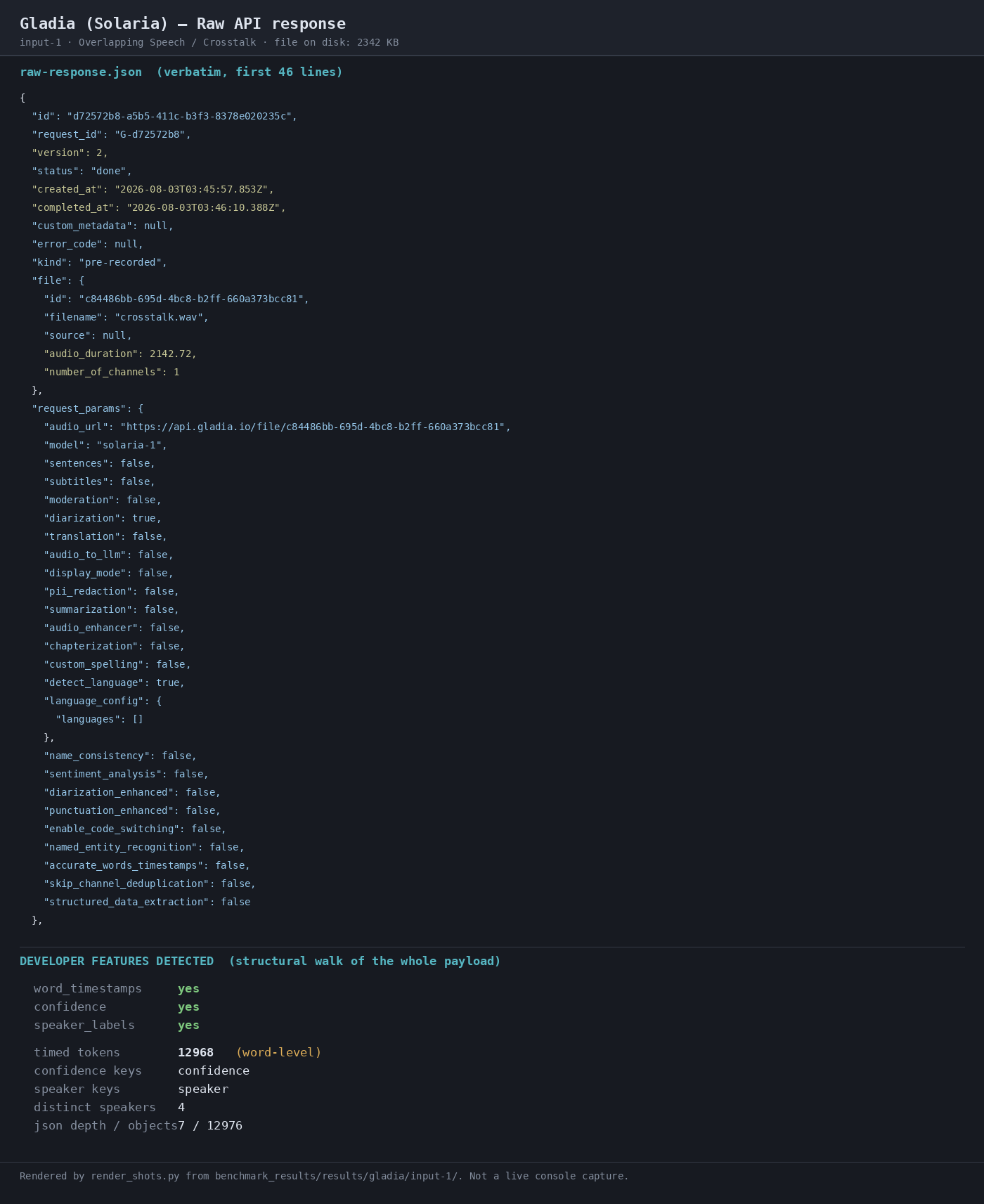
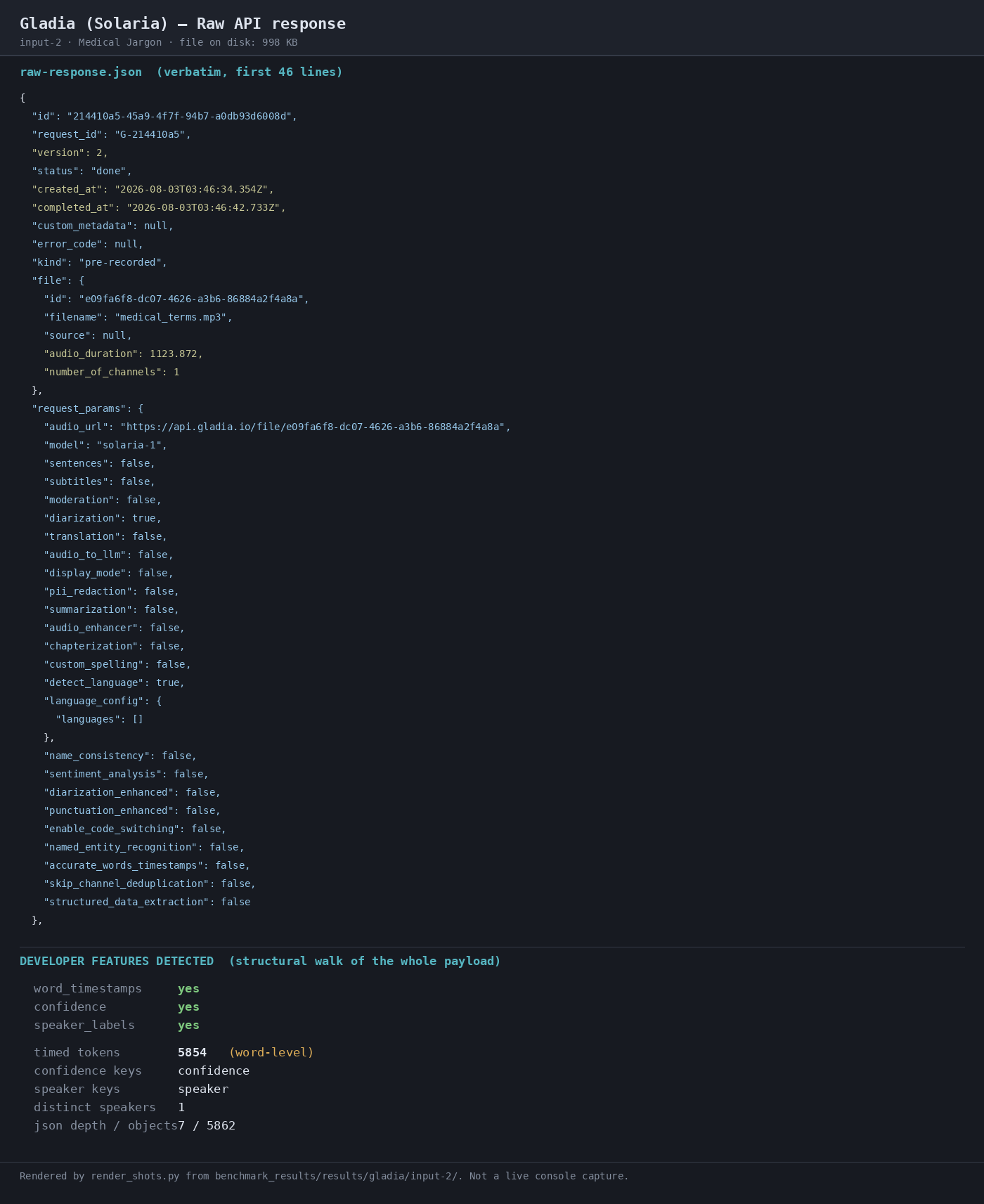
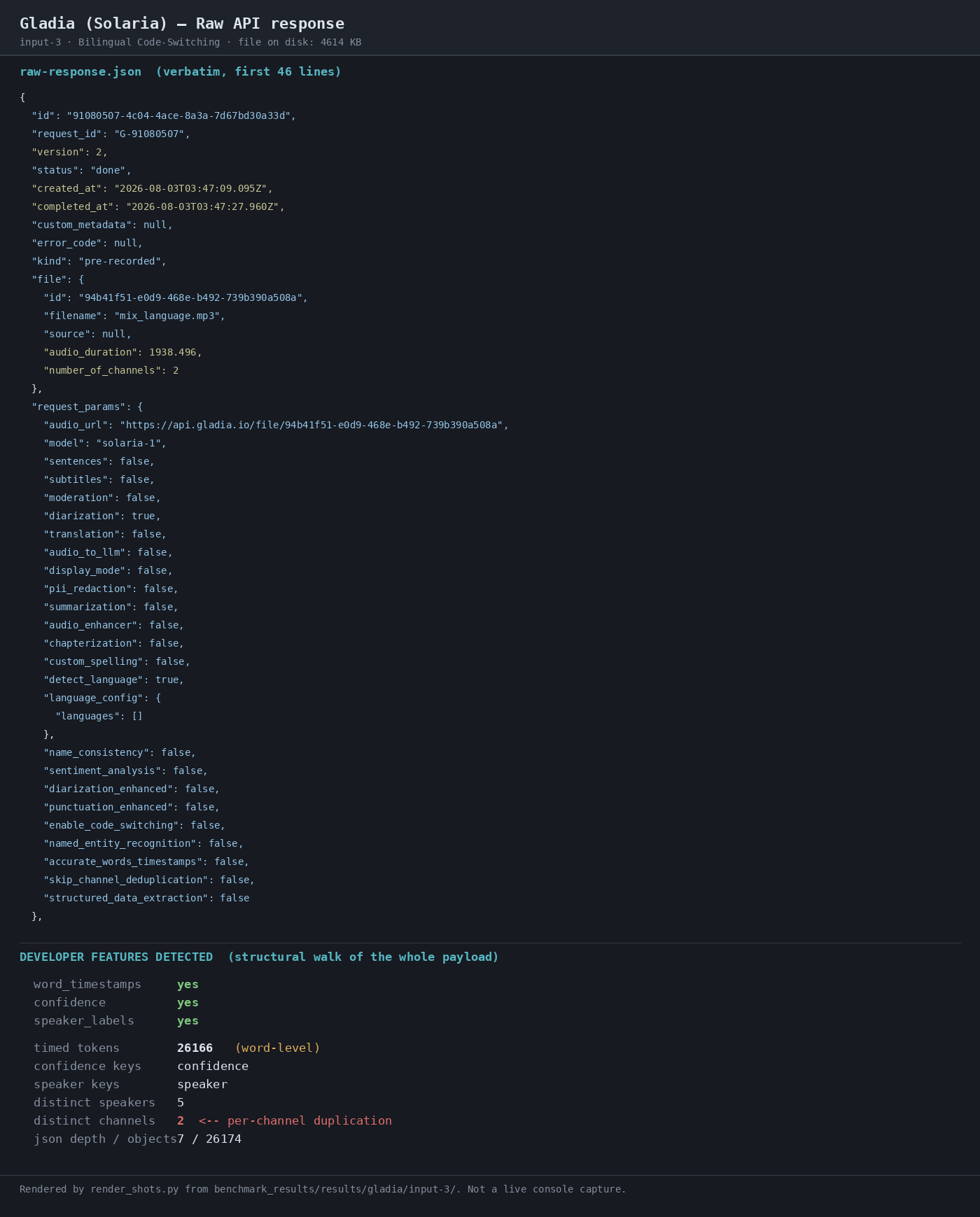
Expected behavior: Returns machine-readable transcript payloads with word-level timing, confidence scores, speaker labels, speaker counts, and related metadata. Across the tested audio, the responses were deep JSON structures that were easy to consume downstream.
Test case: Audio file → Image
Input type: Audio file
Input used: Input artifact (Audio file): INPUT — Overlapping Speech / Crosstalk: diarization enabled on AMI EN2002a. — crosstalk.wav
Observed output: Output artifact (Image): The raw response reported speaker_labels yes and distinct Speakers 4, matching the four participants in the crosstalk dataset. — 02-response-raw-input-1.png
Input artifact: Input artifact (Audio file): INPUT — Overlapping Speech / Crosstalk: diarization enabled on AMI EN2002a. — crosstalk.wav
Output artifact: Output artifact (Image): The raw response reported speaker_labels yes and distinct Speakers 4, matching the four participants in the crosstalk dataset. — 02-response-raw-input-1.png
What changed: Audio file transformed into Image
Test case: Audio file → Image
Input type: Audio file
Input used: Input artifact (Audio file): INPUT — Medical Jargon: diarization enabled on single-speaker narration. — medical_terms.mp3
Observed output: Output artifact (Image): The raw response reported speaker_labels yes and distinct Speakers 1 on the medical narration sample. — 02-response-raw-input-2.png
Input artifact: Input artifact (Audio file): INPUT — Medical Jargon: diarization enabled on single-speaker narration. — medical_terms.mp3
Output artifact: Output artifact (Image): The raw response reported speaker_labels yes and distinct Speakers 1 on the medical narration sample. — 02-response-raw-input-2.png
What changed: Audio file transformed into Image
Test case: Audio file → Image
Input type: Audio file
Input used: Input artifact (Audio file): INPUT — Bilingual Code-Switching: diarization enabled on stereo audio. — mix_language.mp3
Observed output: Output artifact (Image): The raw response reported speaker_labels yes, distinct speakers 5, and distinct channels 2 on the bilingual stereo sample. — 02-response-raw-input-3.png
Input artifact: Input artifact (Audio file): INPUT — Bilingual Code-Switching: diarization enabled on stereo audio. — mix_language.mp3
Output artifact: Output artifact (Image): The raw response reported speaker_labels yes, distinct speakers 5, and distinct channels 2 on the bilingual stereo sample. — 02-response-raw-input-3.png
What changed: Audio file transformed into Image
Why it matters / Conclusion: The output shape is stable and integration-friendly: word timestamps, confidence, and speaker labels are always present in the scored runs.
Returns machine-readable transcript payloads with word-level timing, confidence scores, speaker labels, speaker counts, and related metadata. Across the tested audio, the responses were deep JSON structures that were easy to consume downstream.
Robust Speech TranscriptionWeak on crosstalk-heavy audio.▾
Feature tested: Robust Speech Transcription
Result: Failed
Verdict: Weak on crosstalk-heavy audio.
Expected behavior: Handles difficult speech conditions such as overlapping speakers, domain-specific jargon, and Spanish-English code-switching. The capability was exercised on crosstalk-heavy meeting audio, a medical lecture, bilingual files, and speaker-labeled overlap variants.
Test case: Audio file → Image
Input type: Audio file
Input used: Input artifact (Audio file): INPUT — Overlapping Speech / Crosstalk: four-way meeting audio from AMI EN2002a, 65.39 MB, 2142.709 s. — crosstalk.wav
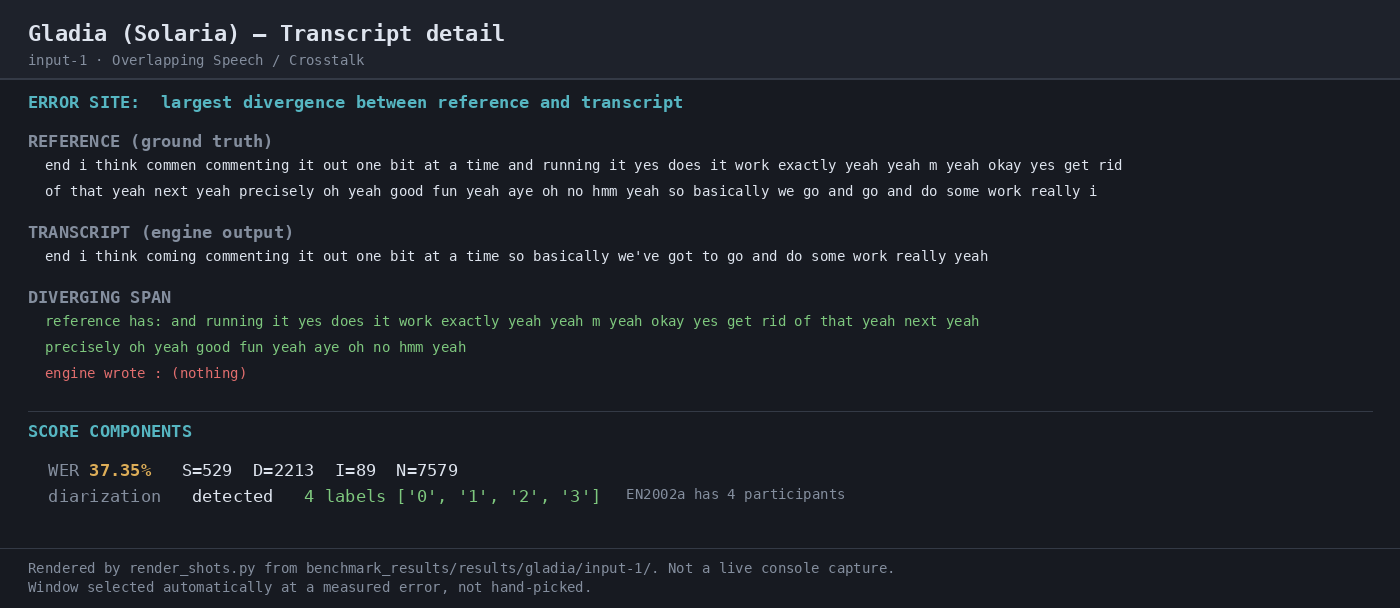
Observed output: Output artifact (Image): The transcript detail shows 37.35% WER with 529 substitutions, 2213 deletions, and 89 insertions against a 7,579-word reference; the engine detected 4 speaker labels, matching the four participants, but the transcript is incomplete. — 04-transcript-detail-input-1.png
Input artifact: Input artifact (Audio file): INPUT — Overlapping Speech / Crosstalk: four-way meeting audio from AMI EN2002a, 65.39 MB, 2142.709 s. — crosstalk.wav
Output artifact: Output artifact (Image): The transcript detail shows 37.35% WER with 529 substitutions, 2213 deletions, and 89 insertions against a 7,579-word reference; the engine detected 4 speaker labels, matching the four participants, but the transcript is incomplete. — 04-transcript-detail-input-1.png
What changed: Audio file transformed into Image
Test case: Audio file → Image
Input type: Audio file
Input used: Input artifact (Audio file): INPUT — Medical Jargon: Gray's Anatomy narration, 8.58 MB, 1123.944 s, single speaker with medical terminology. — medical_terms.mp3
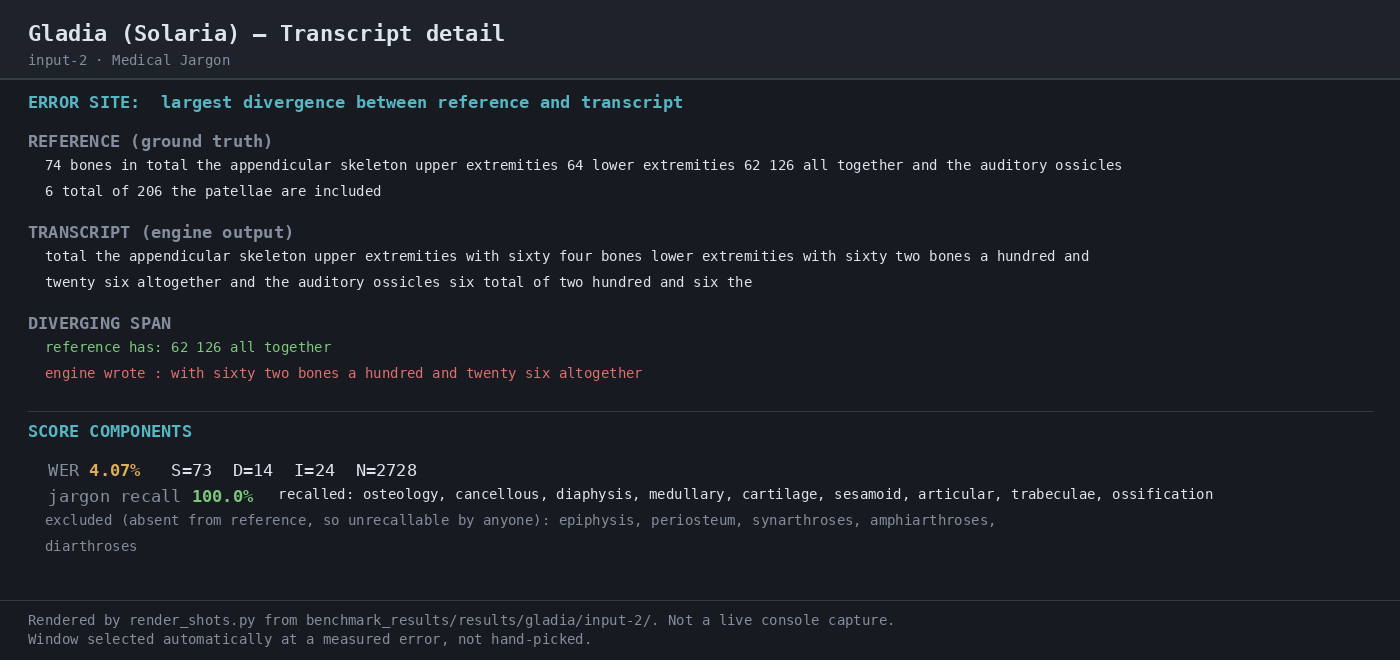
Observed output: Output artifact (Image): The transcript detail shows 4.07% WER with 73 substitutions, 14 deletions, and 24 insertions against a 2,728-word reference, and jargon recall was 100.0%. — 04-transcript-detail-input-2.png
Input artifact: Input artifact (Audio file): INPUT — Medical Jargon: Gray's Anatomy narration, 8.58 MB, 1123.944 s, single speaker with medical terminology. — medical_terms.mp3
Output artifact: Output artifact (Image): The transcript detail shows 4.07% WER with 73 substitutions, 14 deletions, and 24 insertions against a 2,728-word reference, and jargon recall was 100.0%. — 04-transcript-detail-input-2.png
What changed: Audio file transformed into Image
Test case: Audio file → Image
Input type: Audio file
Input used: Input artifact (Audio file): INPUT — Bilingual Code-Switching: Bangor Miami spontaneous Spanish-English conversation, 22.19 MB, 1938.495 s, stereo audio. — mix_language.mp3
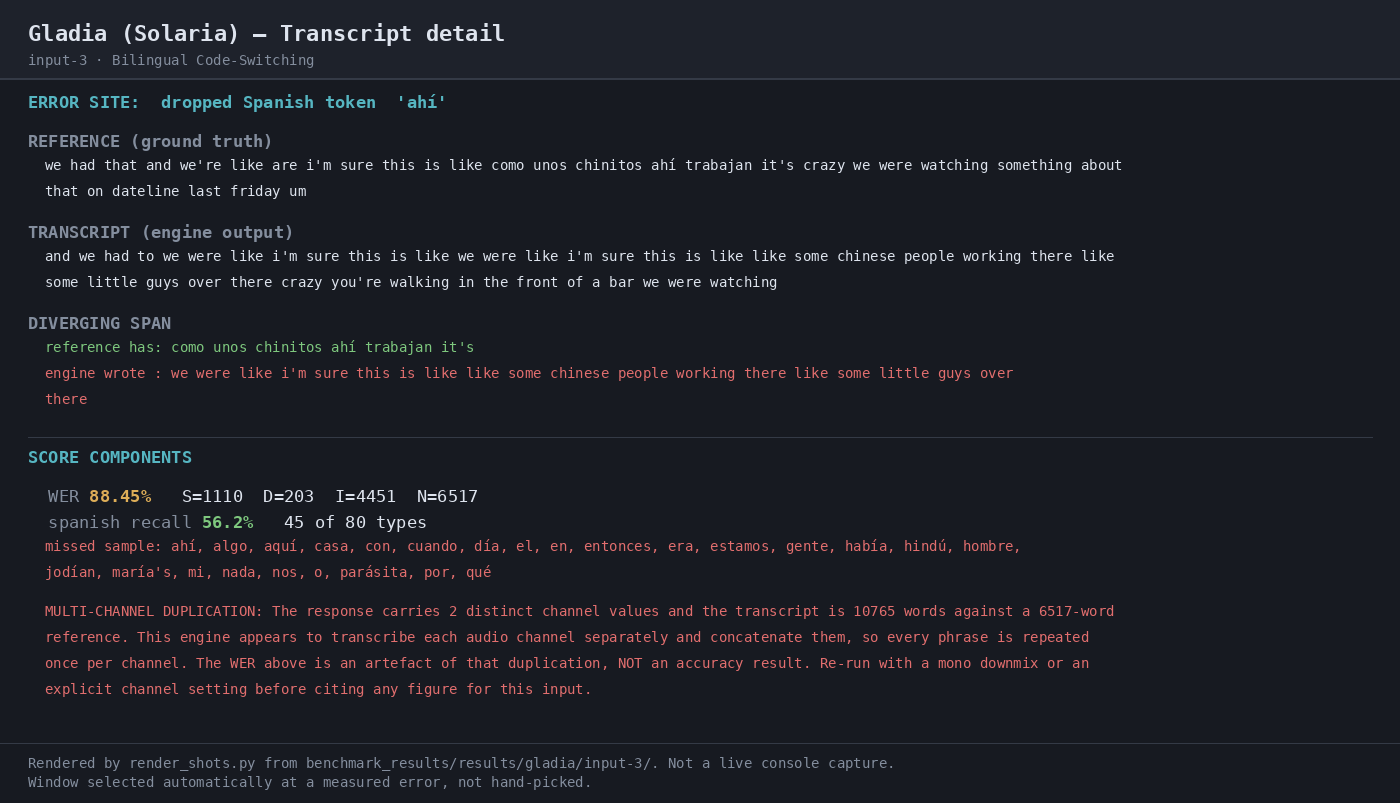
Observed output: Output artifact (Image): The transcript detail shows 88.45% WER, Spanish recall 56.2%, and an explicit multi-channel duplication caveat: the response carried 2 distinct channel values and 10,765 transcript words against a 6,517-word reference, so the WER is an artefact rather than a clean accuracy result. — 04-transcript-detail-input-3.png
Input artifact: Input artifact (Audio file): INPUT — Bilingual Code-Switching: Bangor Miami spontaneous Spanish-English conversation, 22.19 MB, 1938.495 s, stereo audio. — mix_language.mp3
Output artifact: Output artifact (Image): The transcript detail shows 88.45% WER, Spanish recall 56.2%, and an explicit multi-channel duplication caveat: the response carried 2 distinct channel values and 10,765 transcript words against a 6,517-word reference, so the WER is an artefact rather than a clean accuracy result. — 04-transcript-detail-input-3.png
What changed: Audio file transformed into Image
Why it matters / Conclusion: It recognized the number of speakers, but overlap-heavy speech still produced a badly incomplete transcript.
Handles difficult speech conditions such as overlapping speakers, domain-specific jargon, and Spanish-English code-switching. The capability was exercised on crosstalk-heavy meeting audio, a medical lecture, bilingual files, and speaker-labeled overlap variants.
Official pricing
Async and real-time rates differ, and the paid plans bundle the core speech features used in this benchmark.
Source: https://www.gladia.io/pricing, accessed 2026-08-14. The report notes that paid plans include diarization, automatic language detection/switching, word-level timestamps, and 100+ languages; Enterprise adds zero data retention and custom hosting.
Featured in Rankings
Independent rankings where Gladia was tested and rated.
Banner Preview
How the embed badge will look on your site

Embed HTML
Copy this code to your website source
Quick Integration Guide
- 1Copy the HTML code block above.
- 2Paste it into your site's HTML or CMS editor.
- 3Banner appears instantly on your page.
- 4Links back to your tool profile here.
Similar Tools
Discover more AI tools like Gladia to enhance your workflow.
Comments (0)
Need a custom AI solution for this use case?
If you are looking to build a custom speech-to-text transcription, audio transcription, or batch transcription pipeline for your business or internal workflow, email us at contact@futuresmart.ai.
Found something inaccurate or missing? We try to keep our AI research accurate and useful. If you found outdated information, an issue, or have a suggestion, email us at collaborate@aidemos.com.