
Google Cloud Speech-to-Text
Timed batch transcripts for mostly English, jargon-heavy audio — but not for diarization or code-switching.
Good timed transcription for technical English, but weak where the use case gets hard
- you need batch STT with word-level timestamps and confidence
- your audio is mostly English and jargon-heavy
- you can tolerate Standard-tier pricing or want to benchmark offline batch jobs
- you need reliable speaker diarization or speaker-separated transcripts
Our take
Google Cloud Speech-to-Text is workable if you need batch transcripts with word-level timing and confidence for mostly English, jargon-heavy audio. The scored runs were much weaker on overlapping speech and code-switching, and diarization was not usable in the logged configuration. It is also priced at the Standard tier here, so this is not the cheapest path unless you re-test Dynamic Batch.
In-Depth Review
Our detailed analysis of Google Cloud Speech-to-Text — features, performance, and real-world testing.
Feature-by-Feature Breakdown
Word-Level Transcript MetadataTiming and confidence are available, but speaker labels are not.▾
Feature tested: Word-Level Transcript Metadata
Result: Partial
Verdict: Timing and confidence are available, but speaker labels are not.
Expected behavior: Produces transcript metadata at the word level for the tested long-form audio inputs, including timing offsets and, in one scored configuration, confidence values. The outputs were useful for captions, alignment, search, and review, but did not include speaker labels in these runs.
Test case: Audio file → Text/code file
Input type: Audio file
Input used: Input artifact (Audio file): INPUT 1 — Overlapping Speech / Crosstalk (crosstalk.wav) — crosstalk.wav
Observed output: Output artifact (Text/code file): The raw JSON response includes word-level timing fields for the crosstalk transcript. The payload also lacks confidence scores and speaker labels. — raw-response.json
Input artifact: Input artifact (Audio file): INPUT 1 — Overlapping Speech / Crosstalk (crosstalk.wav) — crosstalk.wav
Output artifact: Output artifact (Text/code file): The raw JSON response includes word-level timing fields for the crosstalk transcript. The payload also lacks confidence scores and speaker labels. — raw-response.json
What changed: Audio file transformed into Text/code file
Test case: Audio file → Text/code file
Input type: Audio file
Input used: Input artifact (Audio file): INPUT 2 — Medical Jargon (medical_terms.mp3) — medical_terms.mp3
Observed output: Output artifact (Text/code file): The raw JSON response includes word-level timing fields for the medical-jargon transcript. The payload also lacks confidence scores and speaker labels. — raw-response-2.json
Input artifact: Input artifact (Audio file): INPUT 2 — Medical Jargon (medical_terms.mp3) — medical_terms.mp3
Output artifact: Output artifact (Text/code file): The raw JSON response includes word-level timing fields for the medical-jargon transcript. The payload also lacks confidence scores and speaker labels. — raw-response-2.json
What changed: Audio file transformed into Text/code file
Test case: Audio file → Text/code file
Input type: Audio file
Input used: Input artifact (Audio file): INPUT 3 — Bilingual Code-Switching (mix_language.mp3) — mix_language.mp3
Observed output: Output artifact (Text/code file): The raw JSON response includes word-level timing fields for the bilingual transcript. The payload also lacks confidence scores and speaker labels. — raw-response-3.json
Input artifact: Input artifact (Audio file): INPUT 3 — Bilingual Code-Switching (mix_language.mp3) — mix_language.mp3
Output artifact: Output artifact (Text/code file): The raw JSON response includes word-level timing fields for the bilingual transcript. The payload also lacks confidence scores and speaker labels. — raw-response-3.json
What changed: Audio file transformed into Text/code file
Why it matters / Conclusion: Useful transcript metadata for captions, search, and review, but not enough for speaker-separated workflows.
Produces transcript metadata at the word level for the tested long-form audio inputs, including timing offsets and, in one scored configuration, confidence values. The outputs were useful for captions, alignment, search, and review, but did not include speaker labels in these runs.
Speaker DiarizationDiarization was not usable in the scored runs.▾
Feature tested: Speaker Diarization
Result: Failed
Verdict: Diarization was not usable in the scored runs.
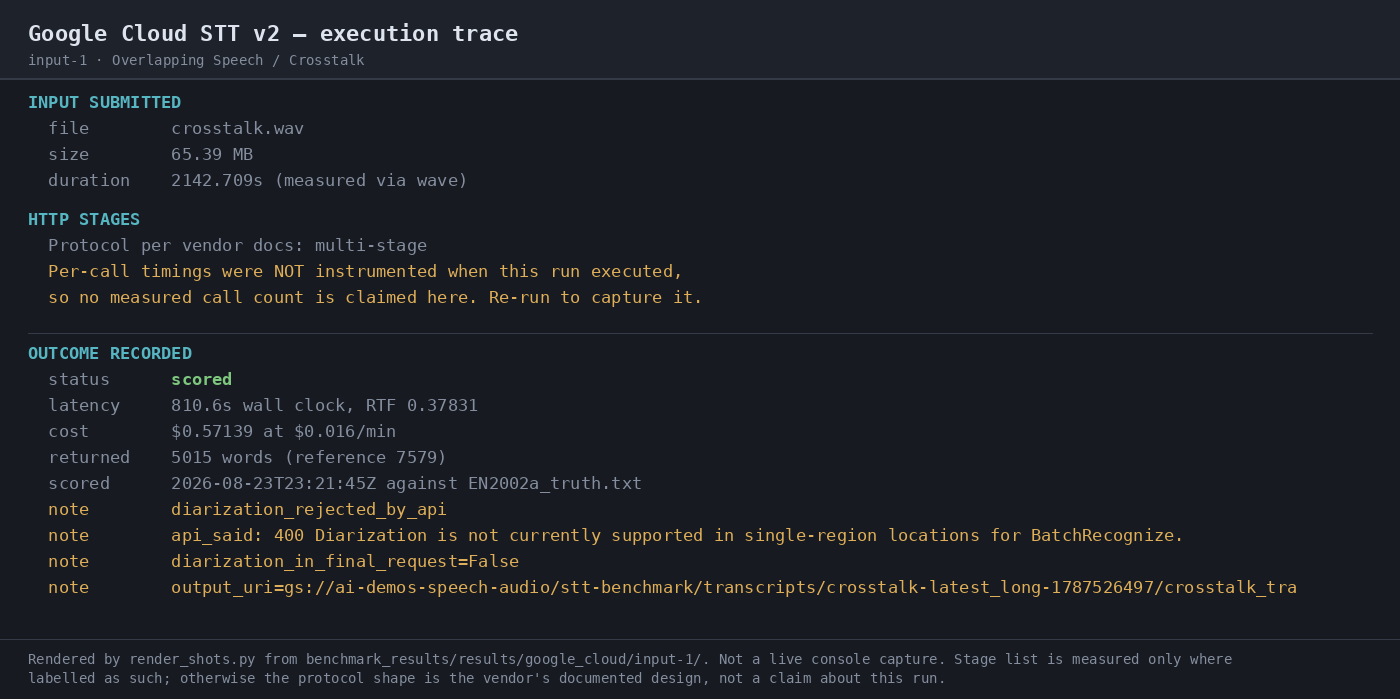
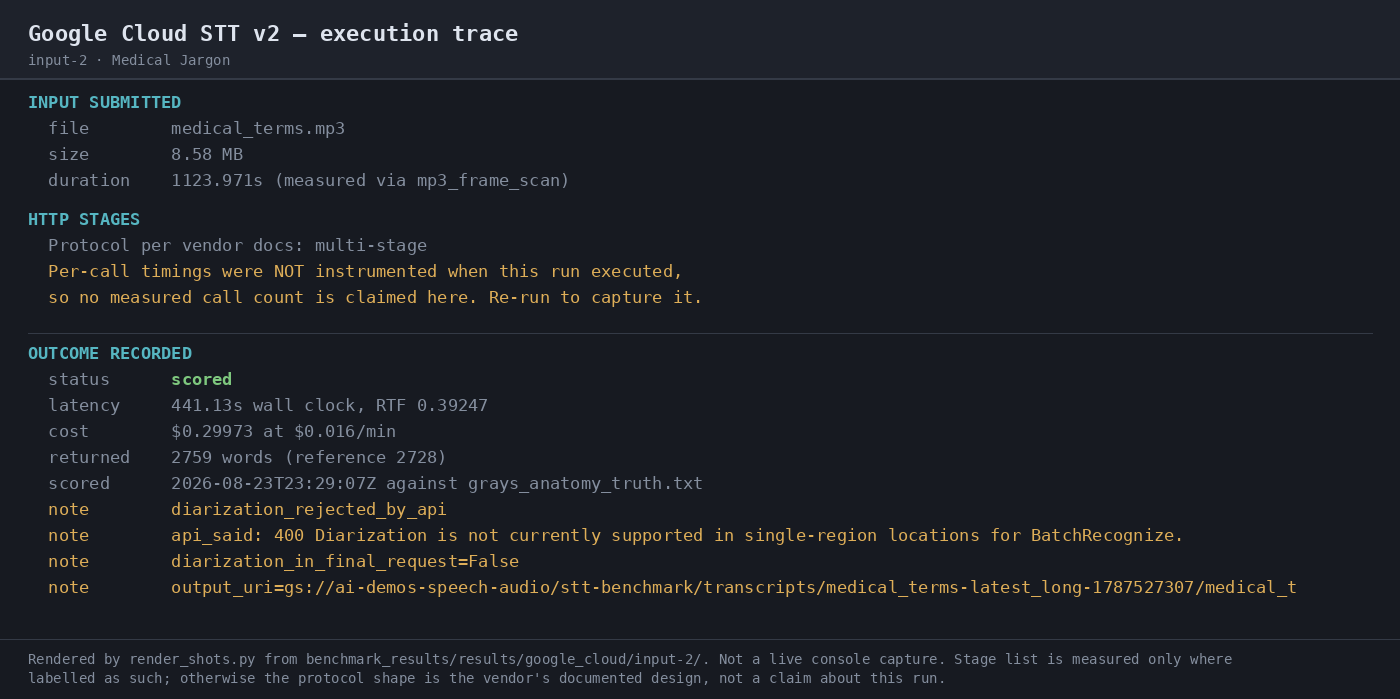
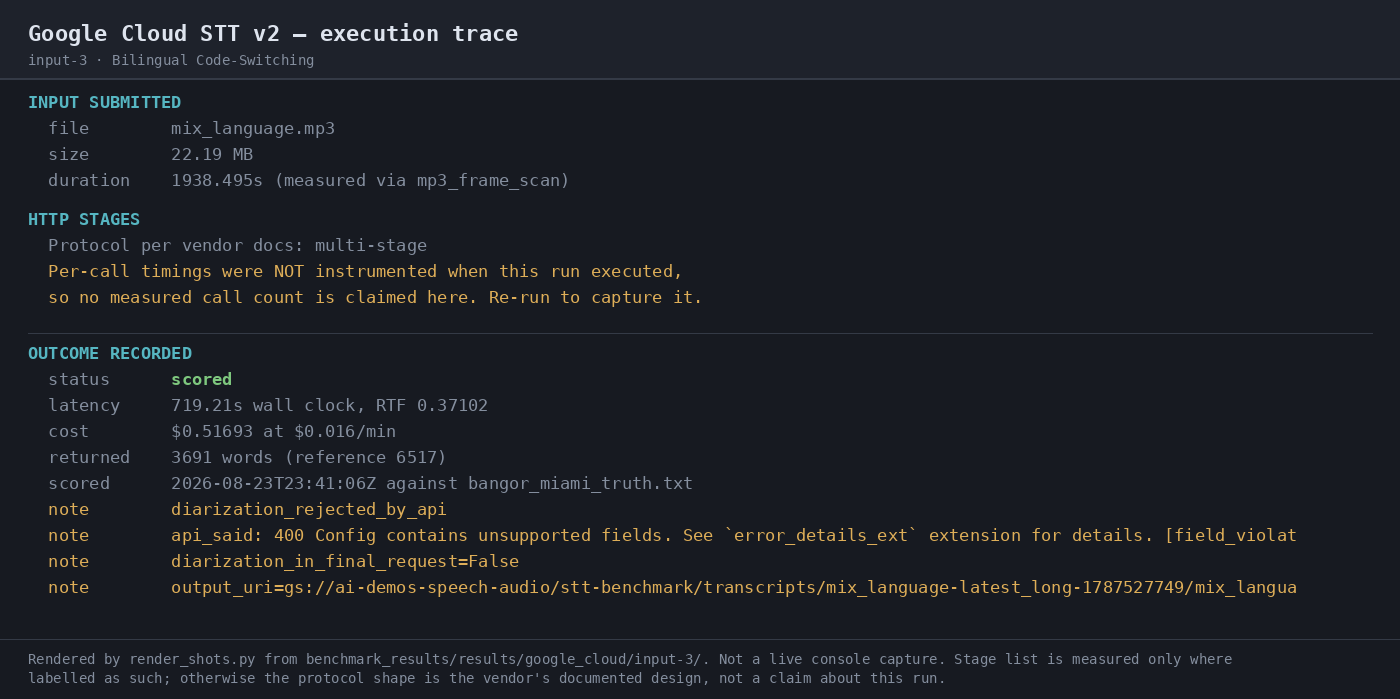
Expected behavior: Attempts to assign speaker labels in transcribed audio for the benchmarked long-form runs, where diarization was requested but the outputs showed API rejection or unsupported-field behavior and no usable speaker attribution. The tested configurations did not return speaker labels.
Test case: Audio file → Image
Input type: Audio file
Input used: Input artifact (Audio file): INPUT 1: Overlapping Speech / Crosstalk — crosstalk.wav (65.39 MB, 2142.709 s). — crosstalk.wav
Observed output: Output artifact (Image): Execution trace for the crosstalk sample; it records a diarization rejection note and no speaker labels in the scored outcome. — 07-automation-trace-input-1.png
Input artifact: Input artifact (Audio file): INPUT 1: Overlapping Speech / Crosstalk — crosstalk.wav (65.39 MB, 2142.709 s). — crosstalk.wav
Output artifact: Output artifact (Image): Execution trace for the crosstalk sample; it records a diarization rejection note and no speaker labels in the scored outcome. — 07-automation-trace-input-1.png
What changed: Audio file transformed into Image
Test case: Audio file → Image
Input type: Audio file
Input used: Input artifact (Audio file): INPUT 2: Medical Jargon — medical_terms.mp3 (8.58 MB, 1123.971 s). — medical_terms.mp3
Observed output: Output artifact (Image): Execution trace for the medical sample; it records a diarization rejection note and no speaker labels in the scored outcome. — 07-automation-trace-input-2.png
Input artifact: Input artifact (Audio file): INPUT 2: Medical Jargon — medical_terms.mp3 (8.58 MB, 1123.971 s). — medical_terms.mp3
Output artifact: Output artifact (Image): Execution trace for the medical sample; it records a diarization rejection note and no speaker labels in the scored outcome. — 07-automation-trace-input-2.png
What changed: Audio file transformed into Image
Test case: Audio file → Image
Input type: Audio file
Input used: Input artifact (Audio file): INPUT 3: Bilingual Code-Switching — mix_language.mp3 (22.19 MB, 1938.495 s). — mix_language.mp3
Observed output: Output artifact (Image): Execution trace for the bilingual sample; it records a diarization rejection note and no speaker labels in the scored outcome. — 07-automation-trace-input-3.png
Input artifact: Input artifact (Audio file): INPUT 3: Bilingual Code-Switching — mix_language.mp3 (22.19 MB, 1938.495 s). — mix_language.mp3
Output artifact: Output artifact (Image): Execution trace for the bilingual sample; it records a diarization rejection note and no speaker labels in the scored outcome. — 07-automation-trace-input-3.png
What changed: Audio file transformed into Image
Why it matters / Conclusion: Do not rely on this configuration for meeting separation or speaker attribution.
Attempts to assign speaker labels in transcribed audio for the benchmarked long-form runs, where diarization was requested but the outputs showed API rejection or unsupported-field behavior and no usable speaker attribution. The tested configurations did not return speaker labels.
Technical Terminology TranscriptionStrong on the medical-jargon sample.▾
Feature tested: Technical Terminology Transcription
Result: Passed
Verdict: Strong on the medical-jargon sample.
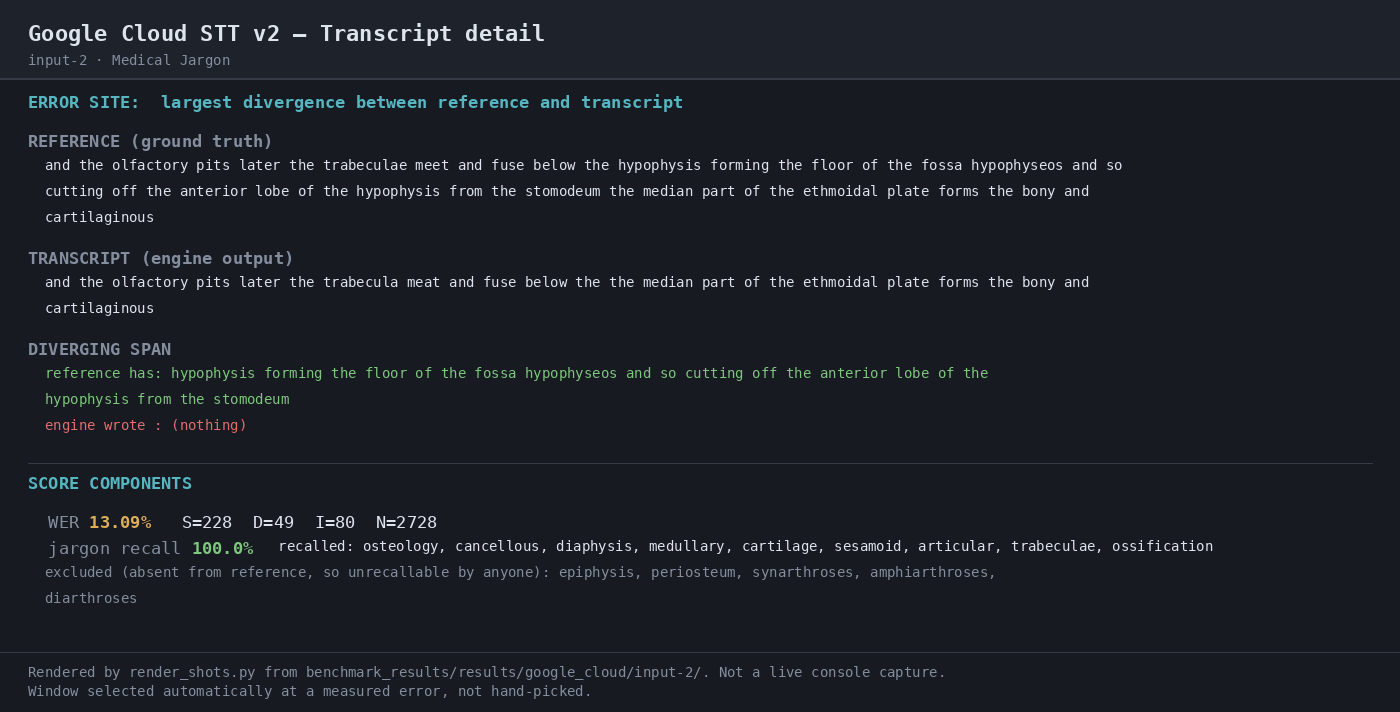
Expected behavior: Transcribes speech with domain-specific jargon, demonstrated on the Gray's Anatomy narration where the scored transcript preserved technical terms with relatively low WER despite some insertion noise.
Test case: Audio file → Image
Input type: Audio file
Input used: Input artifact (Audio file): INPUT: Medical Jargon — medical_terms.mp3 (8.58 MB, 1123.971 s). — medical_terms.mp3
Observed output: Output artifact (Image): Transcript detail for the medical sample; it shows 13.09% WER, 100.0% jargon recall, and a long omitted span in the middle of the transcript. — 04-transcript-detail-input-2.png
Input artifact: Input artifact (Audio file): INPUT: Medical Jargon — medical_terms.mp3 (8.58 MB, 1123.971 s). — medical_terms.mp3
Output artifact: Output artifact (Image): Transcript detail for the medical sample; it shows 13.09% WER, 100.0% jargon recall, and a long omitted span in the middle of the transcript. — 04-transcript-detail-input-2.png
What changed: Audio file transformed into Image
Why it matters / Conclusion: This is the clearest strength in the scored set: technical terms were recognized well, even though the transcript still had insertion noise.
Transcribes speech with domain-specific jargon, demonstrated on the Gray's Anatomy narration where the scored transcript preserved technical terms with relatively low WER despite some insertion noise.
Multilingual Code-Switch TranscriptionWeak on the bilingual sample as configured.▾
Feature tested: Multilingual Code-Switch Transcription
Result: Failed
Verdict: Weak on the bilingual sample as configured.
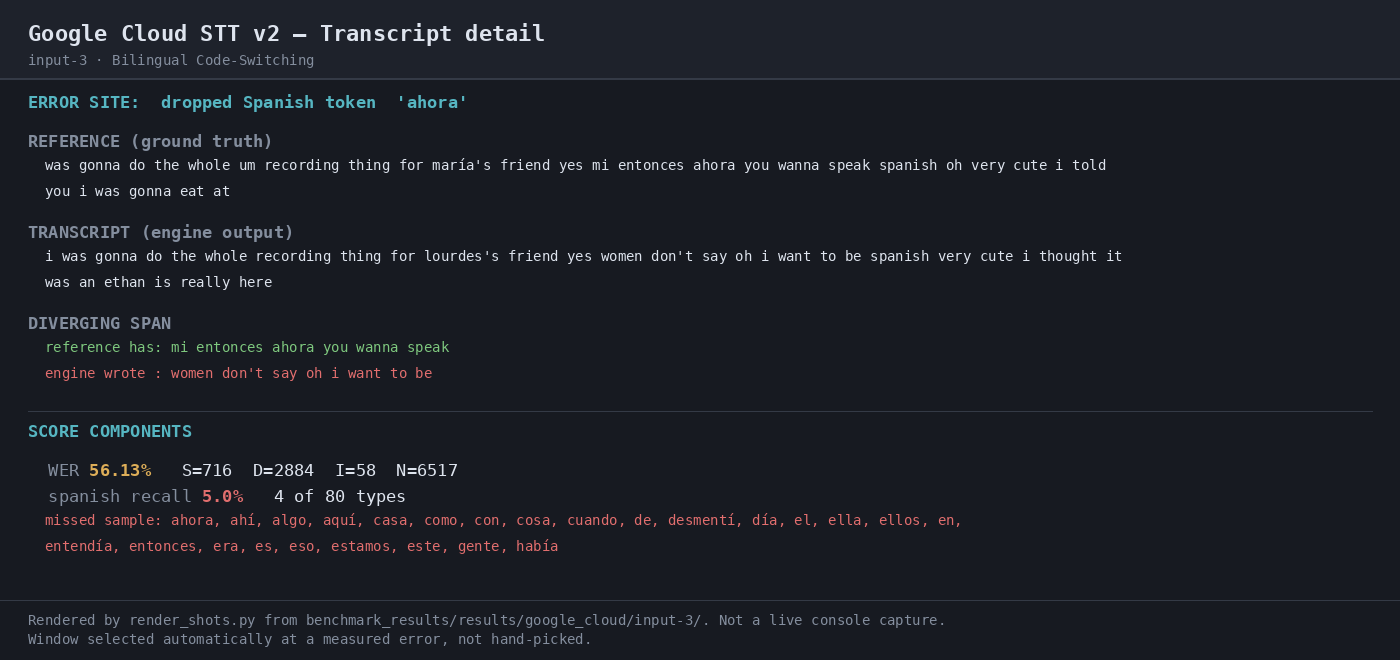
Expected behavior: Handles speech that mixes languages, exercised on the bilingual code-switching sample where many Spanish tokens were dropped or anglicized. The benchmark notes the sample is heavily English-dominant, so the main evidence is reduced Spanish-token recall.
Test case: Audio file → Image
Input type: Audio file
Input used: Input artifact (Audio file): INPUT: Bilingual Code-Switching — mix_language.mp3 (22.19 MB, 1938.495 s). — mix_language.mp3
Observed output: Output artifact (Image): Transcript detail for the bilingual sample; it shows 56.13% WER, only 5.0% Spanish token recall, and a highlighted dropped Spanish token ('ahora'). — 04-transcript-detail-input-3.png
Input artifact: Input artifact (Audio file): INPUT: Bilingual Code-Switching — mix_language.mp3 (22.19 MB, 1938.495 s). — mix_language.mp3
Output artifact: Output artifact (Image): Transcript detail for the bilingual sample; it shows 56.13% WER, only 5.0% Spanish token recall, and a highlighted dropped Spanish token ('ahora'). — 04-transcript-detail-input-3.png
What changed: Audio file transformed into Image
Why it matters / Conclusion: Do not treat this as reliable multilingual support in the tested configuration.
Handles speech that mixes languages, exercised on the bilingual code-switching sample where many Spanish tokens were dropped or anglicized. The benchmark notes the sample is heavily English-dominant, so the main evidence is reduced Spanish-token recall.
Batch Speech TranscriptionCompleted all three batch jobs, but quality varied sharply by audio type.▾
Feature tested: Batch Speech Transcription
Result: Partial
Verdict: Completed all three batch jobs, but quality varied sharply by audio type.
Expected behavior: Transcribes long-form audio in batch mode, exercised on the medical-jargon, overlapping-speech, and bilingual code-switching inputs. The benchmarked runs completed the transcription job, though output quality varied on harder audio.
Test case: Audio file → Text/code file
Input type: Audio file
Input used: Input artifact (Audio file): INPUT 1 — Overlapping Speech / Crosstalk (crosstalk.wav, 65.39 MB, 2142.709s) — crosstalk.wav
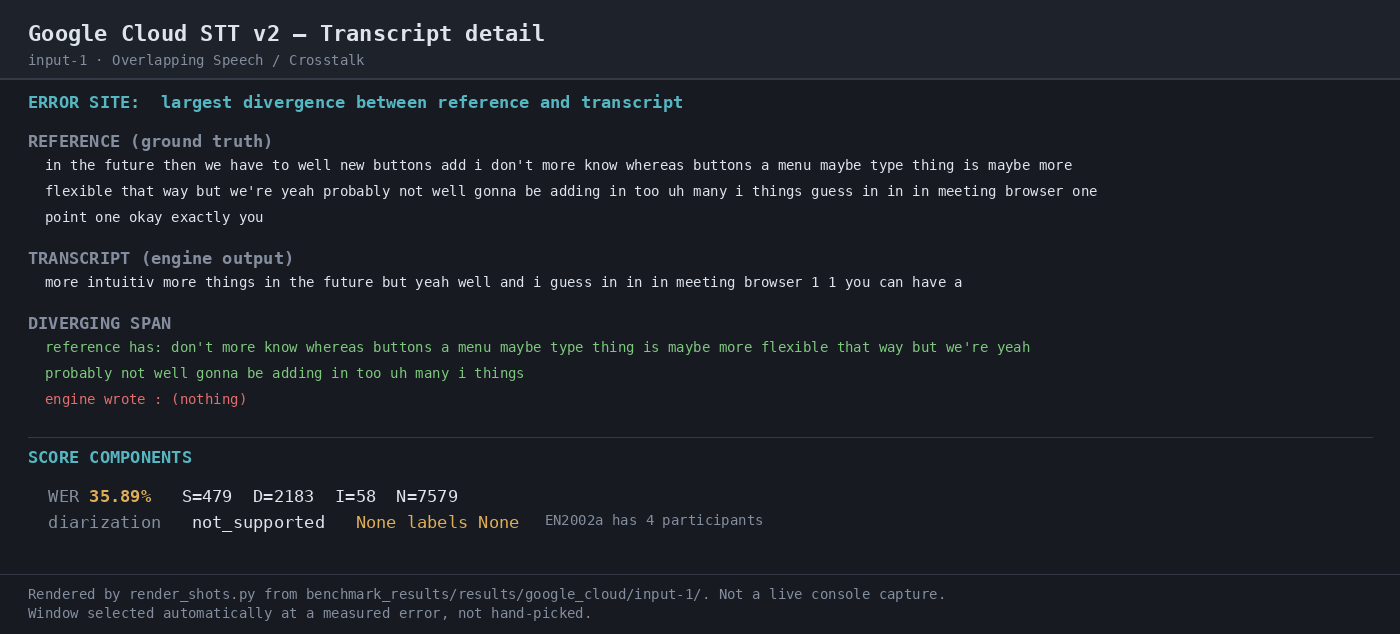
Observed output: Output artifact (Text/code file): Raw JSON transcript for the crosstalk run. The engine returned 5,454 words against a 7,579-word reference and the benchmark scored it at 35.89% WER, with large omissions in the overlap-heavy portions. — raw-response.json
Input artifact: Input artifact (Audio file): INPUT 1 — Overlapping Speech / Crosstalk (crosstalk.wav, 65.39 MB, 2142.709s) — crosstalk.wav
Output artifact: Output artifact (Text/code file): Raw JSON transcript for the crosstalk run. The engine returned 5,454 words against a 7,579-word reference and the benchmark scored it at 35.89% WER, with large omissions in the overlap-heavy portions. — raw-response.json
What changed: Audio file transformed into Text/code file
Test case: Audio file → Text/code file
Input type: Audio file
Input used: Input artifact (Audio file): INPUT 2 — Medical Jargon (medical_terms.mp3, 8.58 MB, 1123.971s) — medical_terms.mp3
Observed output: Output artifact (Text/code file): Raw JSON transcript for the medical-jargon run. The engine returned 2,746 words against a 2,728-word reference and scored 9.42% WER, which was the best result of the three inputs. — raw-response-2.json
Input artifact: Input artifact (Audio file): INPUT 2 — Medical Jargon (medical_terms.mp3, 8.58 MB, 1123.971s) — medical_terms.mp3
Output artifact: Output artifact (Text/code file): Raw JSON transcript for the medical-jargon run. The engine returned 2,746 words against a 2,728-word reference and scored 9.42% WER, which was the best result of the three inputs. — raw-response-2.json
What changed: Audio file transformed into Text/code file
Test case: Audio file → Text/code file
Input type: Audio file
Input used: Input artifact (Audio file): INPUT 3 — Bilingual Code-Switching (mix_language.mp3, 22.19 MB, 1938.495s) — mix_language.mp3
Observed output: Output artifact (Text/code file): Raw JSON transcript for the bilingual run. The engine returned 4,442 words against a 6,517-word reference and scored 41.72% WER, with especially poor handling of the Spanish portion. — raw-response-3.json
Input artifact: Input artifact (Audio file): INPUT 3 — Bilingual Code-Switching (mix_language.mp3, 22.19 MB, 1938.495s) — mix_language.mp3
Output artifact: Output artifact (Text/code file): Raw JSON transcript for the bilingual run. The engine returned 4,442 words against a 6,517-word reference and scored 41.72% WER, with especially poor handling of the Spanish portion. — raw-response-3.json
What changed: Audio file transformed into Text/code file
Test case: Audio file → Image
Input type: Audio file
Input used: Input artifact (Audio file): INPUT: Overlapping Speech / Crosstalk — crosstalk.wav (65.39 MB, 2142.709 s). — crosstalk.wav
Observed output: Output artifact (Image): Transcript detail for the overlap-heavy input; the benchmarked run was weak on this clip. — 04-transcript-detail.png
Input artifact: Input artifact (Audio file): INPUT: Overlapping Speech / Crosstalk — crosstalk.wav (65.39 MB, 2142.709 s). — crosstalk.wav
Output artifact: Output artifact (Image): Transcript detail for the overlap-heavy input; the benchmarked run was weak on this clip. — 04-transcript-detail.png
What changed: Audio file transformed into Image
Why it matters / Conclusion: It reliably finishes the batch job, but hard audio exposes large quality swings.
Transcribes long-form audio in batch mode, exercised on the medical-jargon, overlapping-speech, and bilingual code-switching inputs. The benchmarked runs completed the transcription job, though output quality varied on harder audio.
Official pricing
Standard-tier costs were used for the benchmark; Dynamic Batch is cheaper but was not exercised here.
Prices are from the vendor pricing page and reflect the benchmark's Standard-tier billing path.
Featured in Rankings
Independent rankings where Google Cloud Speech-to-Text was tested and rated.
Banner Preview
How the embed badge will look on your site

Embed HTML
Copy this code to your website source
Quick Integration Guide
- 1Copy the HTML code block above.
- 2Paste it into your site's HTML or CMS editor.
- 3Banner appears instantly on your page.
- 4Links back to your tool profile here.
Similar Tools
Discover more AI tools like Google Cloud Speech-to-Text to enhance your workflow.
Comments (0)
Need a custom AI solution for this use case?
If you are looking to build a custom speech-to-text transcription, batch transcription, or audio transcription pipeline for your business or internal workflow, email us at contact@futuresmart.ai.
Found something inaccurate or missing? We try to keep our AI research accurate and useful. If you found outdated information, an issue, or have a suggestion, email us at collaborate@aidemos.com.