
Deepgram
Batch speech-to-text with rich metadata, but weak on crosstalk and code-switching.
Strong on technical narration, but not reliable on bilingual or overlapping speech.
- you need a batch STT API that returns word-level timing, confidence, and speaker labels
- you primarily transcribe single-language technical narration and care about jargon recall
- you can process audio offline and care more about throughput than live streaming
- you need strong Spanish-English code-switching or multilingual transcription
Our take
Deepgram Nova-3 returned a full developer payload on every run and was very strong on the medical-jargon clip, but it struggled badly on overlapping speech and bilingual code-switching. As configured here, it looks best for single-language technical audio, not multilingual or crosstalk-heavy recordings.
In-Depth Review
Our detailed analysis of Deepgram — features, performance, and real-world testing.
Feature-by-Feature Breakdown
Audio TranscriptionHandled the file, but crosstalk quality was poor.▾
Feature tested: Audio Transcription
Result: Failed
Verdict: Handled the file, but crosstalk quality was poor.
Expected behavior: Deepgram transcribes spoken audio into text from pre-recorded uploads and other difficult inputs. The member cards exercise it on a four-speaker crosstalk meeting, a medical narration with jargon, and a spontaneous Spanish-English conversation, plus batch-uploaded clips.
Test case: Audio file → Image
Input type: Audio file
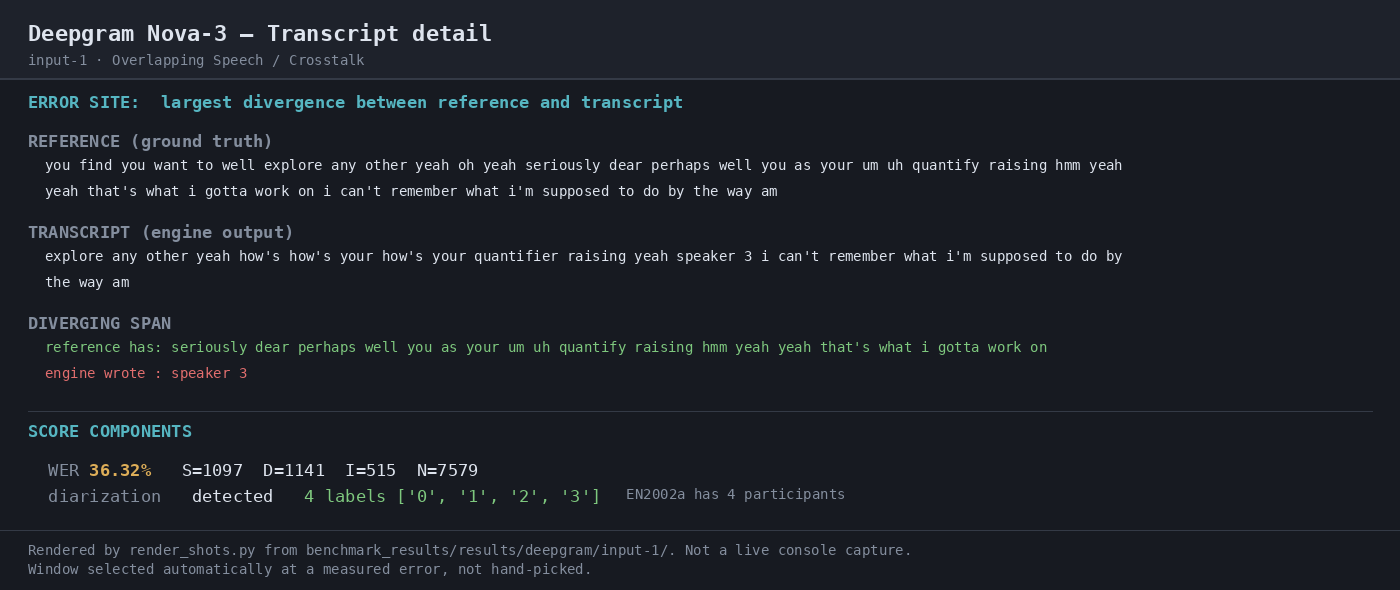
Input used: Input artifact (Audio file): Overlapping Speech / Crosstalk test clip: crosstalk.wav (35:43, 65.39 MB, AMI EN2002a). — crosstalk.wav
Observed output: Output artifact (Image): On the overlapping-speech clip, the run produced a transcript but the benchmark measured 36.27% WER with 1,143 deletions and 510 insertions, so the result was weak on crosstalk. — 04-transcript-detail.png
Input artifact: Input artifact (Audio file): Overlapping Speech / Crosstalk test clip: crosstalk.wav (35:43, 65.39 MB, AMI EN2002a). — crosstalk.wav
Output artifact: Output artifact (Image): On the overlapping-speech clip, the run produced a transcript but the benchmark measured 36.27% WER with 1,143 deletions and 510 insertions, so the result was weak on crosstalk. — 04-transcript-detail.png
What changed: Audio file transformed into Image
Test case: Audio file → Image
Input type: Audio file
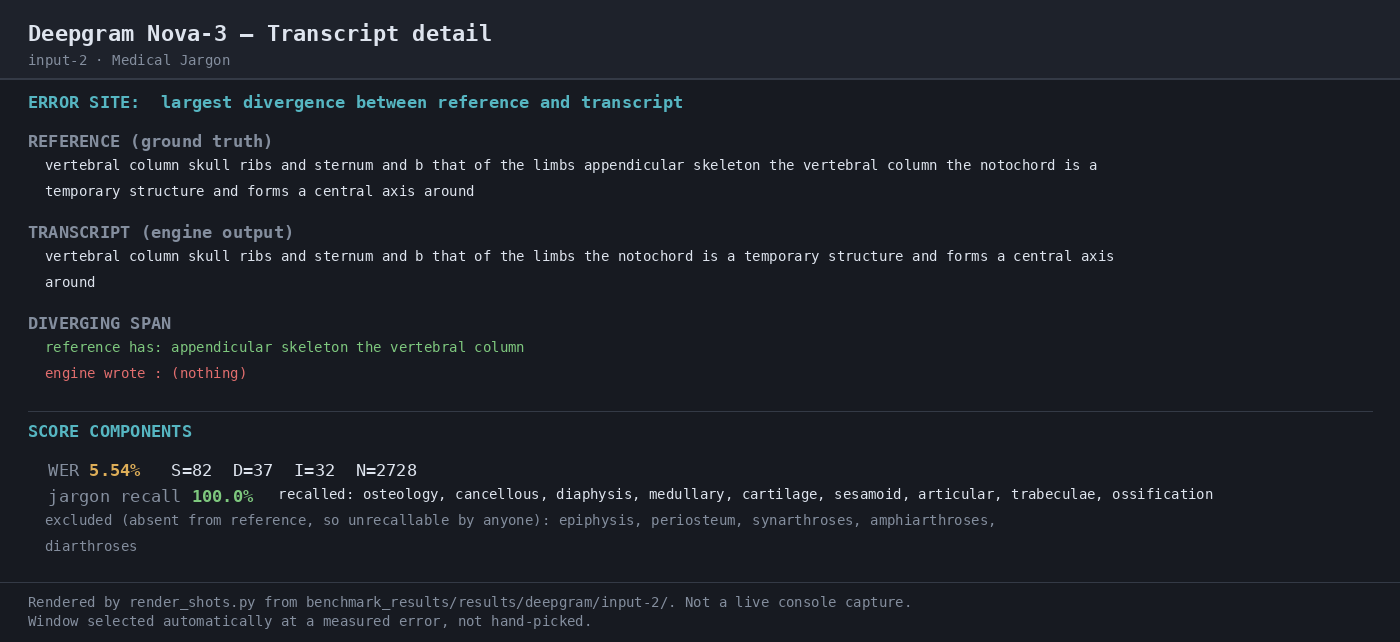
Input used: Input artifact (Audio file): Medical Jargon test clip: medical_terms.mp3 (18:44, 8.58 MB, Gray's Anatomy via LibriVox). — medical_terms.mp3
Observed output: Output artifact (Image): On the medical-jargon clip, the run was much stronger, with 5.43% WER and 100% recall on the scored jargon terms. — 04-transcript-detail-2.png
Input artifact: Input artifact (Audio file): Medical Jargon test clip: medical_terms.mp3 (18:44, 8.58 MB, Gray's Anatomy via LibriVox). — medical_terms.mp3
Output artifact: Output artifact (Image): On the medical-jargon clip, the run was much stronger, with 5.43% WER and 100% recall on the scored jargon terms. — 04-transcript-detail-2.png
What changed: Audio file transformed into Image
Test case: Audio file → Image
Input type: Audio file
Input used: Input artifact (Audio file): Bilingual Code-Switching test clip: mix_language.mp3 (32:18, 22.19 MB, Bangor Miami herring1). — mix_language.mp3
Observed output: Output artifact (Image): On the bilingual clip, the run struggled badly, with 38.13% WER and only 3.8% Spanish token recall. — 04-transcript-detail-3.png
Input artifact: Input artifact (Audio file): Bilingual Code-Switching test clip: mix_language.mp3 (32:18, 22.19 MB, Bangor Miami herring1). — mix_language.mp3
Output artifact: Output artifact (Image): On the bilingual clip, the run struggled badly, with 38.13% WER and only 3.8% Spanish token recall. — 04-transcript-detail-3.png
What changed: Audio file transformed into Image
Why it matters / Conclusion: Functionally completed the transcription, but the overlap error rate was too high for reliable captions or meeting notes.
Deepgram transcribes spoken audio into text from pre-recorded uploads and other difficult inputs. The member cards exercise it on a four-speaker crosstalk meeting, a medical narration with jargon, and a spontaneous Spanish-English conversation, plus batch-uploaded clips.

Structured Transcript OutputStructured JSON transcript output returned on every run.▾
Feature tested: Structured Transcript Output
Result: Passed
Verdict: Structured JSON transcript output returned on every run.
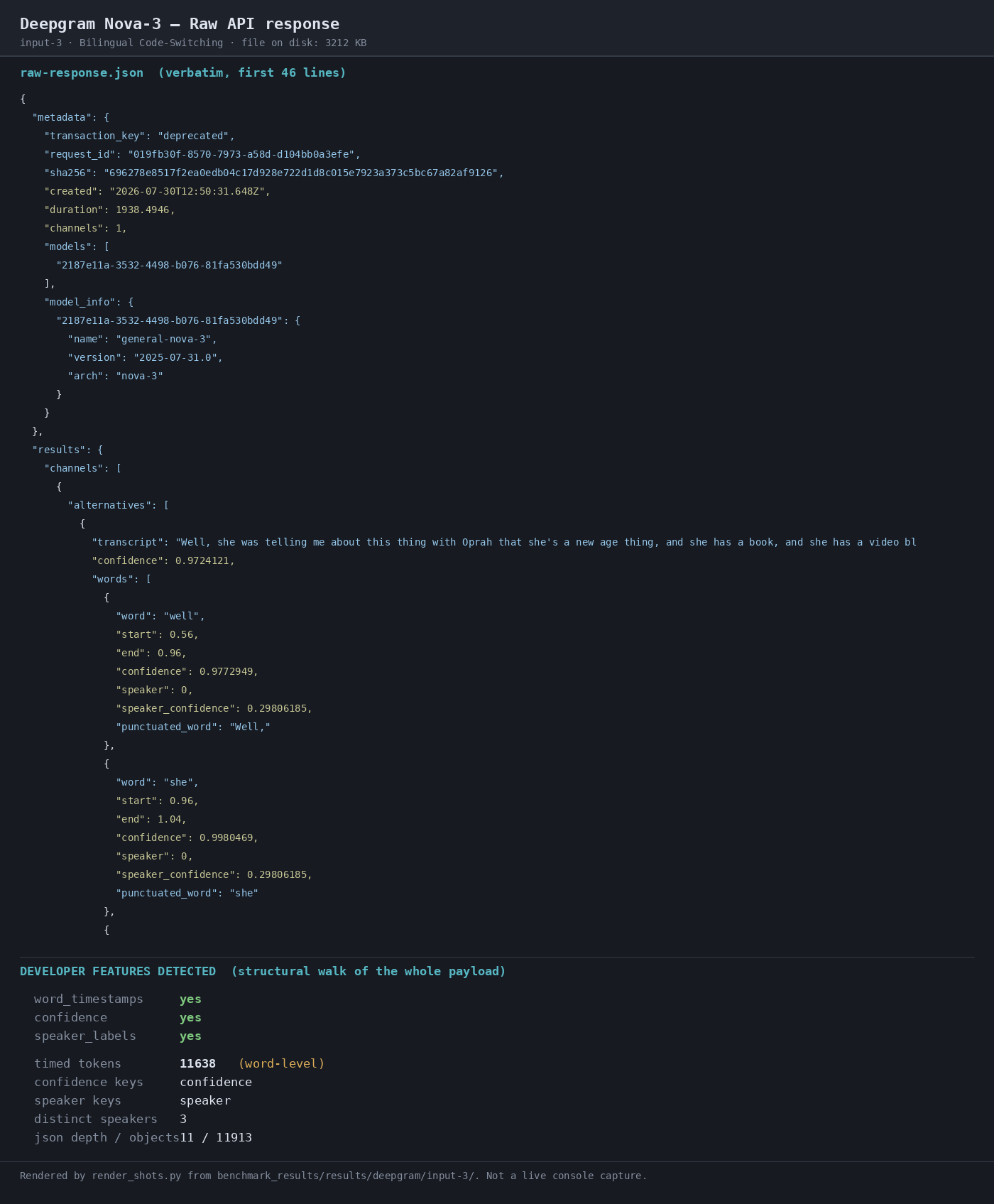
Expected behavior: Deepgram can return a structured transcript payload from audio when options like smart_format, diarize, punctuate, and utterances are enabled. The exercised outputs included word-level timing, confidence values, and speaker labels.
Test case: Audio file → Image
Input type: Audio file
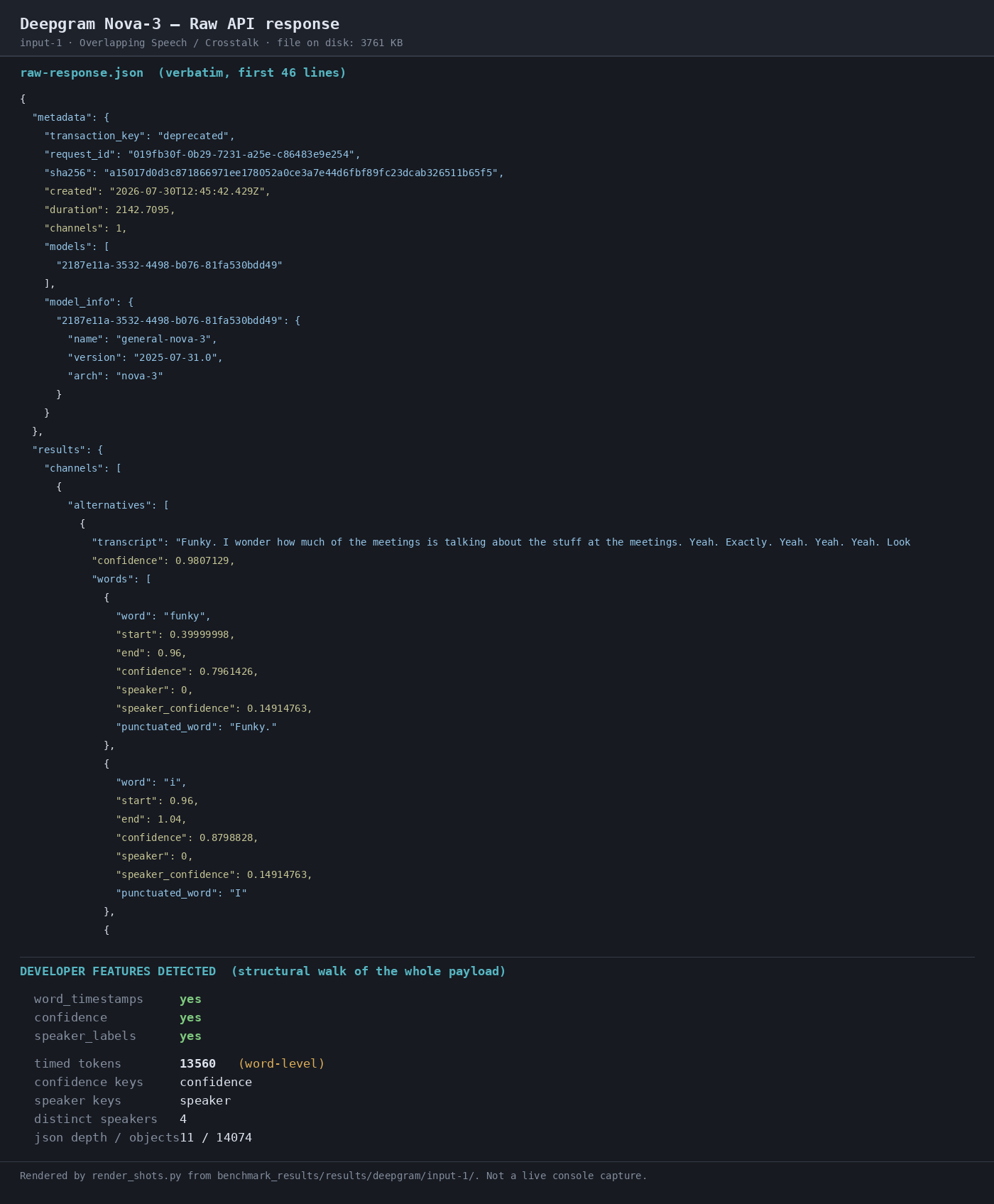
Input used: Input artifact (Audio file): INPUT 1 — Overlapping Speech / Crosstalk; crosstalk.wav; 65.39 MB; 2142.709 s; AMI EN2002a. — crosstalk.wav
Observed output: Output artifact (Image): Raw API response preview for the overlap clip; the response surface exposed developer features such as word_timestamps, confidence, and speaker_labels. — 02-response-raw.png
Input artifact: Input artifact (Audio file): INPUT 1 — Overlapping Speech / Crosstalk; crosstalk.wav; 65.39 MB; 2142.709 s; AMI EN2002a. — crosstalk.wav
Output artifact: Output artifact (Image): Raw API response preview for the overlap clip; the response surface exposed developer features such as word_timestamps, confidence, and speaker_labels. — 02-response-raw.png
What changed: Audio file transformed into Image
Test case: Audio file → Image
Input type: Audio file
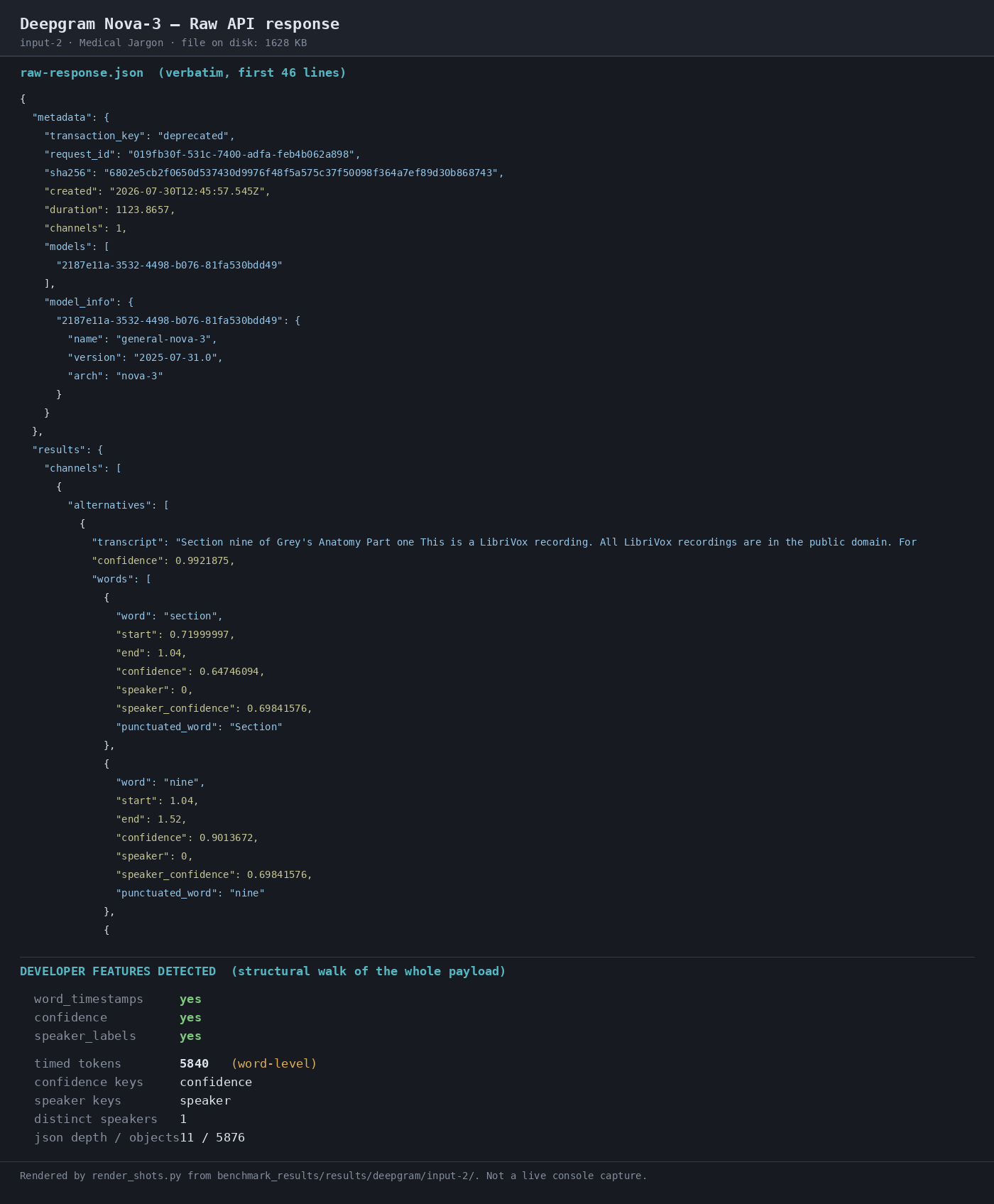
Input used: Input artifact (Audio file): INPUT 2 — Medical Jargon; medical_terms.mp3; 8.58 MB; 1123.971 s; Gray's Anatomy via LibriVox. — medical_terms.mp3
Observed output: Output artifact (Image): Raw API response preview for the medical clip; the response surface again exposed word_timestamps, confidence, and speaker_labels, with one distinct speaker. — 02-response-raw-2.png
Input artifact: Input artifact (Audio file): INPUT 2 — Medical Jargon; medical_terms.mp3; 8.58 MB; 1123.971 s; Gray's Anatomy via LibriVox. — medical_terms.mp3
Output artifact: Output artifact (Image): Raw API response preview for the medical clip; the response surface again exposed word_timestamps, confidence, and speaker_labels, with one distinct speaker. — 02-response-raw-2.png
What changed: Audio file transformed into Image
Test case: Audio file → Image
Input type: Audio file
Input used: Input artifact (Audio file): INPUT 3 — Bilingual Code-Switching; mix_language.mp3; 22.19 MB; 1938.495 s; Bangor Miami herring1. — mix_language.mp3
Observed output: Output artifact (Image): Raw API response preview for the bilingual clip; the response surface again exposed the structured transcript payload and developer metadata. — 02-response-raw-3.png
Input artifact: Input artifact (Audio file): INPUT 3 — Bilingual Code-Switching; mix_language.mp3; 22.19 MB; 1938.495 s; Bangor Miami herring1. — mix_language.mp3
Output artifact: Output artifact (Image): Raw API response preview for the bilingual clip; the response surface again exposed the structured transcript payload and developer metadata. — 02-response-raw-3.png
What changed: Audio file transformed into Image
Why it matters / Conclusion: Consistently useful for downstream parsing, even when the transcript quality itself varies.
Deepgram can return a structured transcript payload from audio when options like smart_format, diarize, punctuate, and utterances are enabled. The exercised outputs included word-level timing, confidence values, and speaker labels.
Speaker DiarizationDetected speaker labels and matched the overlap clip's speaker count.▾
Feature tested: Speaker Diarization
Result: Partial
Verdict: Detected speaker labels and matched the overlap clip's speaker count.
Expected behavior: Deepgram can label speakers in the transcript and report speaker counts when diarization is enabled. The exercised inputs included overlapping multi-speaker audio as well as single-speaker recordings.
Test case: Audio file → Image
Input type: Audio file
Input used: Input artifact (Audio file): Overlapping Speech / Crosstalk test clip: crosstalk.wav (35:43, 65.39 MB, AMI EN2002a). — crosstalk.wav
Observed output: Output artifact (Image): The run metrics reported distinct_speaker_labels 4 on the overlap clip, which matched the four participants in the benchmark reference. — 03-terminal-metrics.png
Input artifact: Input artifact (Audio file): Overlapping Speech / Crosstalk test clip: crosstalk.wav (35:43, 65.39 MB, AMI EN2002a). — crosstalk.wav
Output artifact: Output artifact (Image): The run metrics reported distinct_speaker_labels 4 on the overlap clip, which matched the four participants in the benchmark reference. — 03-terminal-metrics.png
What changed: Audio file transformed into Image
Test case: Audio file → Image
Input type: Audio file
Input used: Input artifact (Audio file): Medical Jargon test clip: medical_terms.mp3 (18:44, 8.58 MB, Gray's Anatomy via LibriVox). — medical_terms.mp3
Observed output: Output artifact (Image): The raw response preview shows speaker_labels enabled and a single distinct speaker on the medical narration. — 02-response-raw-2.png
Input artifact: Input artifact (Audio file): Medical Jargon test clip: medical_terms.mp3 (18:44, 8.58 MB, Gray's Anatomy via LibriVox). — medical_terms.mp3
Output artifact: Output artifact (Image): The raw response preview shows speaker_labels enabled and a single distinct speaker on the medical narration. — 02-response-raw-2.png
What changed: Audio file transformed into Image
Test case: Audio file → Image
Input type: Audio file
Input used: Input artifact (Audio file): Bilingual Code-Switching test clip: mix_language.mp3 (32:18, 22.19 MB, Bangor Miami herring1). — mix_language.mp3
Observed output: Output artifact (Image): The raw response preview shows speaker_labels enabled on the bilingual clip and a successful structured transcript payload. — 02-response-raw-3.png
Input artifact: Input artifact (Audio file): Bilingual Code-Switching test clip: mix_language.mp3 (32:18, 22.19 MB, Bangor Miami herring1). — mix_language.mp3
Output artifact: Output artifact (Image): The raw response preview shows speaker_labels enabled on the bilingual clip and a successful structured transcript payload. — 02-response-raw-3.png
What changed: Audio file transformed into Image
Why it matters / Conclusion: Speaker labels are present and count-correct on the hardest overlap case, but attribution correctness was not independently scored.
Deepgram can label speakers in the transcript and report speaker counts when diarization is enabled. The exercised inputs included overlapping multi-speaker audio as well as single-speaker recordings.

How it scored on the research's own criteria
The 4 evaluation dimensions from our hands-on research on Deepgram , each judged from recorded runs on 3 test inputs — the same verdicts the ranking page ranks on.
held up partial failed not exercised by this input
| Criterion | Verdict | What the runs showed | Per input | Proof |
|---|---|---|---|---|
| Output quality | Weak2/5 | One narration run was very accurate, but the other two were far weaker, with high WER and large deletion/insertion counts; the Spanish-English mix was especially brittle, so the overall accuracy picture is poor rather than merely uneven. | open proof ↗ | |
| Automation level | Strong5/5 | Each run went through in one shot with no handholding, using the same simple request pattern from start to finish, so the tool deserves the top score for automation. | — | |
| Export | Strong5/5 | Every run came back with word-level timing, confidence, and speaker labels in a deep JSON payload, so the tool consistently exposes the full transcript package instead of a thin text-only result. | — | |
| Input handling | Strong5/5 | It accepted every file without complaint and finished each run quickly, with all three wall-clock times well under real time and the listed costs reported, so this is a clear 5/5 for basic ingestion and throughput. | open proof ↗ |
Verdicts come verbatim from the study's recorded observations, never re-derived at render; a criterion with no recorded run shows Not exercised — this section cannot invent a score.
Published Deepgram plans
Vendor pricing was available, but the pre-recorded Nova-3 tab was not fully browser-verified in this research.
Benchmark cost here reflects the configured list price of $0.0063/min ($0.378/audio-hour), not an invoice. The vendor page also shows add-ons billed separately, including Speaker Diarization at $0.0020/min on Pay As You Go. Pre-recorded-specific Nova-3 pricing should be re-verified in a live browser before publishing.
Banner Preview
How the embed badge will look on your site

Embed HTML
Copy this code to your website source
Quick Integration Guide
- 1Copy the HTML code block above.
- 2Paste it into your site's HTML or CMS editor.
- 3Banner appears instantly on your page.
- 4Links back to your tool profile here.
Similar Tools
Discover more AI tools like Deepgram to enhance your workflow.
Comments (0)
Need a custom AI solution for this use case?
If you are looking to build a custom speech-to-text transcription, audio transcription, or transcription workflow for your business or internal workflow, email us at contact@futuresmart.ai.
Found something inaccurate or missing? We try to keep our AI research accurate and useful. If you found outdated information, an issue, or have a suggestion, email us at collaborate@aidemos.com.