Quiz Generation
Version 1No published result

Generate diagram-rich quizzes from PDFs, scans, and pasted notes, then study and export them.
Strong quiz generator, but mixed on flashcards and polish.
StudyGlen handled typed PDFs, scanned notes, and pasted text, and its clearest strength is embedding AI-generated diagrams directly inside quiz questions. The study-mode loop and export options are solid, but flashcard generation failed validation in this run, the free tier is tightly capped, and one short-answer question leaked an internal prompt tag into the visible stem.
Explore StudyGlen in our public benchmarks.
No published result
Our detailed analysis of StudyGlen — features, performance, and real-world testing.
Feature tested: Multi-format Material Intake
Result: Passed
Verdict: Verified on PDF, scan, and pasted text
Expected behavior: StudyGlen can generate quizzes from uploaded PDFs/images and from pasted text. In the tested run it handled a typed biology PDF, a handwritten/scanned notes upload, and a long pasted-text sample.
Test case: PDF document → Image
Input type: PDF document
Input used: Input artifact (PDF document): NCERT Input 1.pdf — a biology chapter on sexual reproduction in flowering plants. — input1_primary.pdf
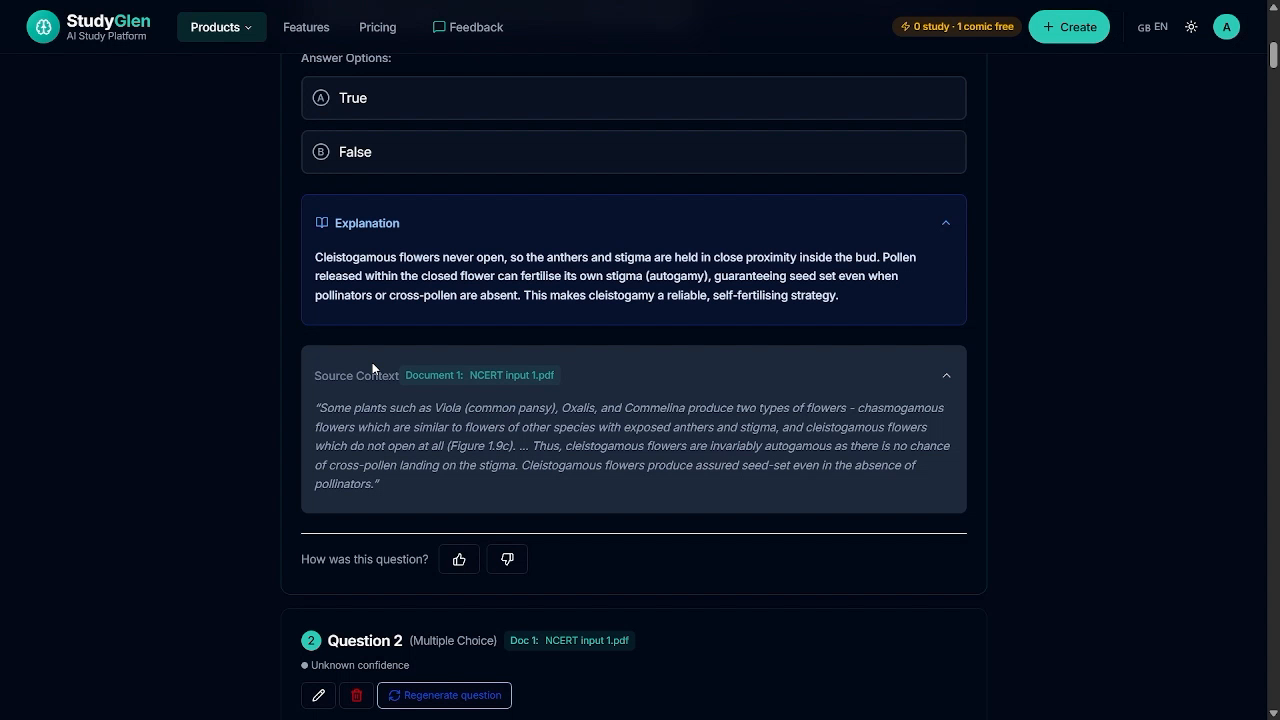
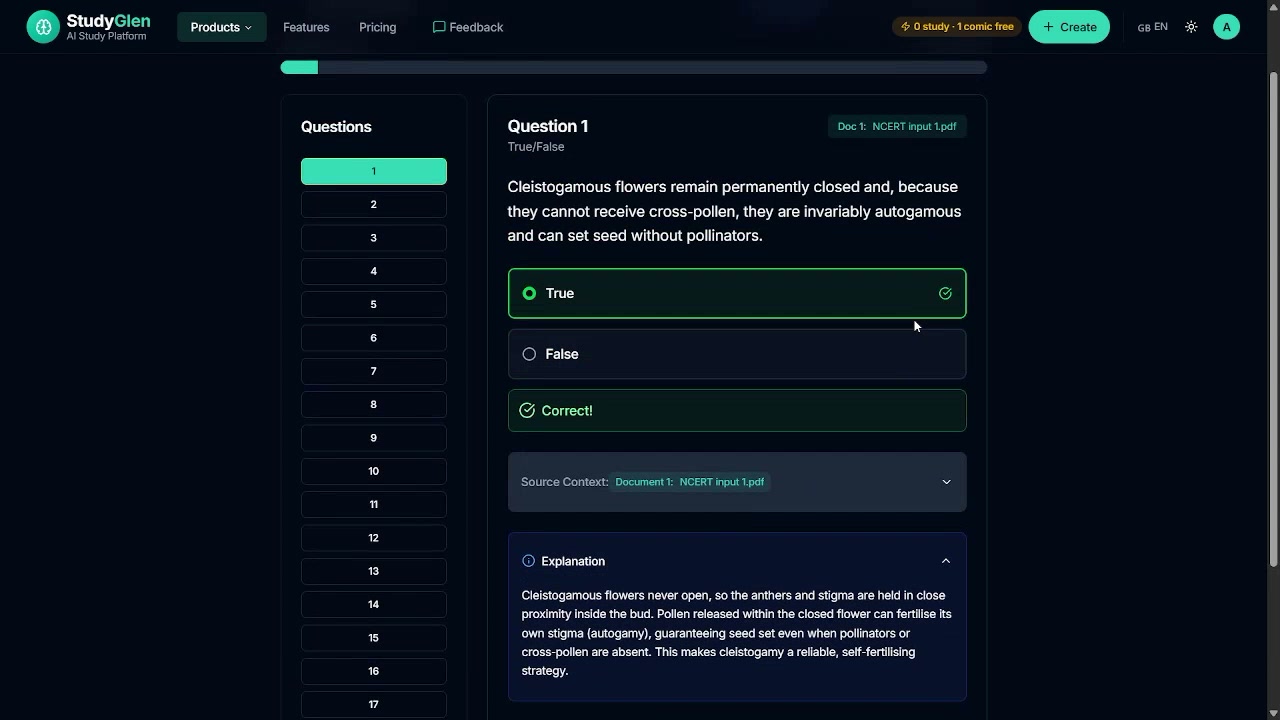
Observed output: Output artifact (Image): A typed PDF produced a True/False quiz item with an explanation panel and quoted source context. — out1_truefalse_explanation.png
Input artifact: Input artifact (PDF document): NCERT Input 1.pdf — a biology chapter on sexual reproduction in flowering plants. — input1_primary.pdf
Output artifact: Output artifact (Image): A typed PDF produced a True/False quiz item with an explanation panel and quoted source context. — out1_truefalse_explanation.png
What changed: PDF document transformed into Image
Test case: PDF document → PDF document
Input type: PDF document
Input used: Input artifact (PDF document): Handwritten biology notes from the same chapter, uploaded as a scan/photo for OCR processing. — input2_secondary.pdf
Observed output: Output artifact (PDF document): The handwritten-notes run exported a 5-question quiz deck with full explanations. — out2_handwritten_quiz_output.pdf
Input artifact: Input artifact (PDF document): Handwritten biology notes from the same chapter, uploaded as a scan/photo for OCR processing. — input2_secondary.pdf
Output artifact: Output artifact (PDF document): The handwritten-notes run exported a 5-question quiz deck with full explanations. — out2_handwritten_quiz_output.pdf
What changed: PDF document transformed into PDF document
Test case: Text prompt → Image
Input type: Text prompt
Input used: Input artifact (Text prompt): Pasted study text
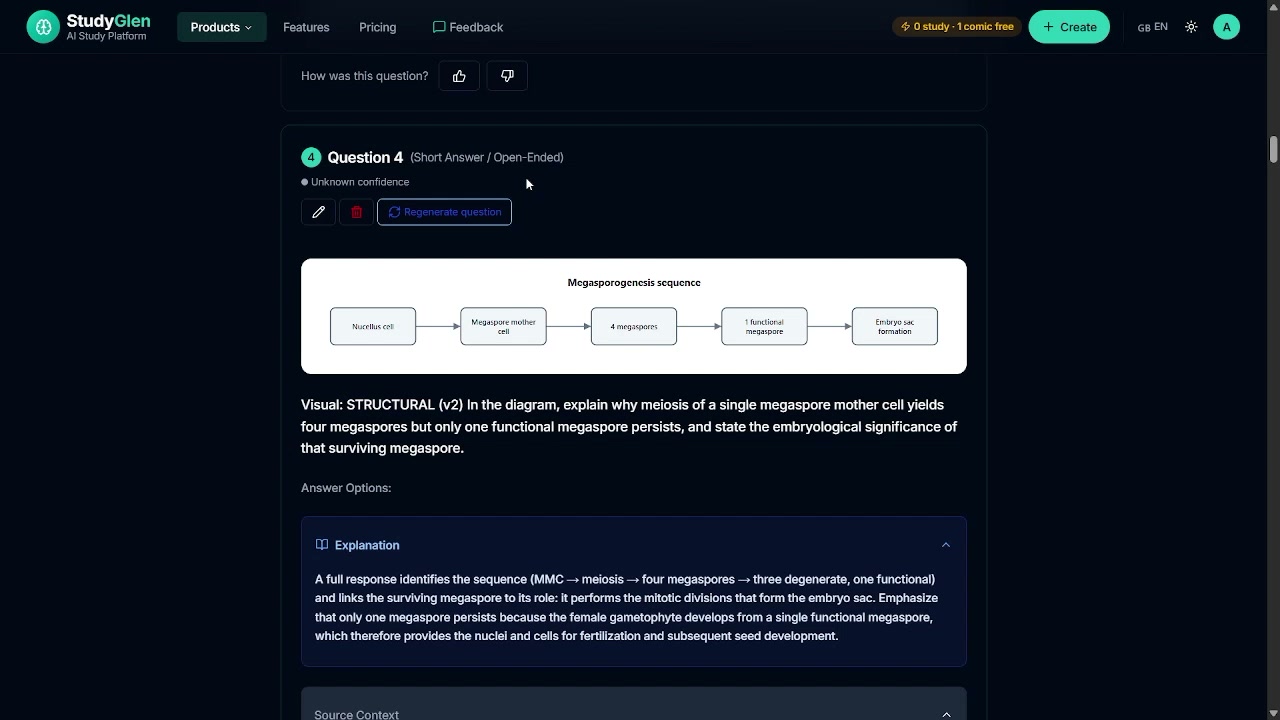
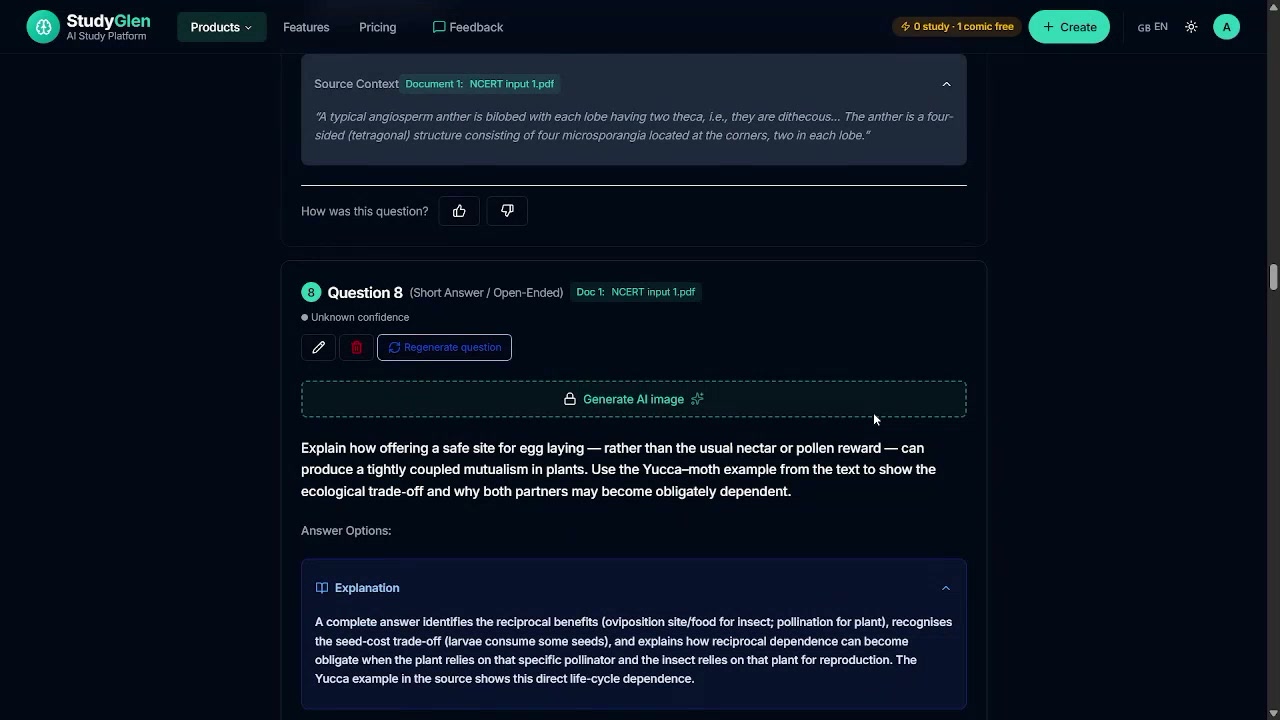
Observed output: Output artifact (Image): Pasted text produced a short-answer quiz item with a diagram and explanatory prompt. — out3_diagram_anther_sequence.png
Input artifact: Input artifact (Text prompt): Pasted study text
Output artifact: Output artifact (Image): Pasted text produced a short-answer quiz item with a diagram and explanatory prompt. — out3_diagram_anther_sequence.png
What changed: Text prompt transformed into Image
Why it matters / Conclusion: Typed PDFs, handwritten/scanned notes, and pasted text all worked in the tested flow. The OCR/scanned-file warning appeared in the capture set, but it should be treated as a generic notice rather than a proven handwriting-specific detector.
StudyGlen can generate quizzes from uploaded PDFs/images and from pasted text. In the tested run it handled a typed biology PDF, a handwritten/scanned notes upload, and a long pasted-text sample.
Feature tested: Question-Type Configuration
Result: Passed
Verdict: MCQ, True/False, and Short Answer all worked
Expected behavior: StudyGlen lets you choose and combine quiz formats such as multiple choice, true/false, and short answer, with controls for question mix, maximum count, and language. The run only showed evidence for those three formats.
Test case: Text prompt → Image
Input type: Text prompt
Input used: Input artifact (Text prompt): Request a true/false question
Observed output: Output artifact (Image): A true/false question was generated and later shown with explanation and source context. — out1_truefalse_explanation.png
Input artifact: Input artifact (Text prompt): Request a true/false question
Output artifact: Output artifact (Image): A true/false question was generated and later shown with explanation and source context. — out1_truefalse_explanation.png
What changed: Text prompt transformed into Image
Test case: Text prompt → Image
Input type: Text prompt
Input used: Input artifact (Text prompt): Request a multiple-choice question
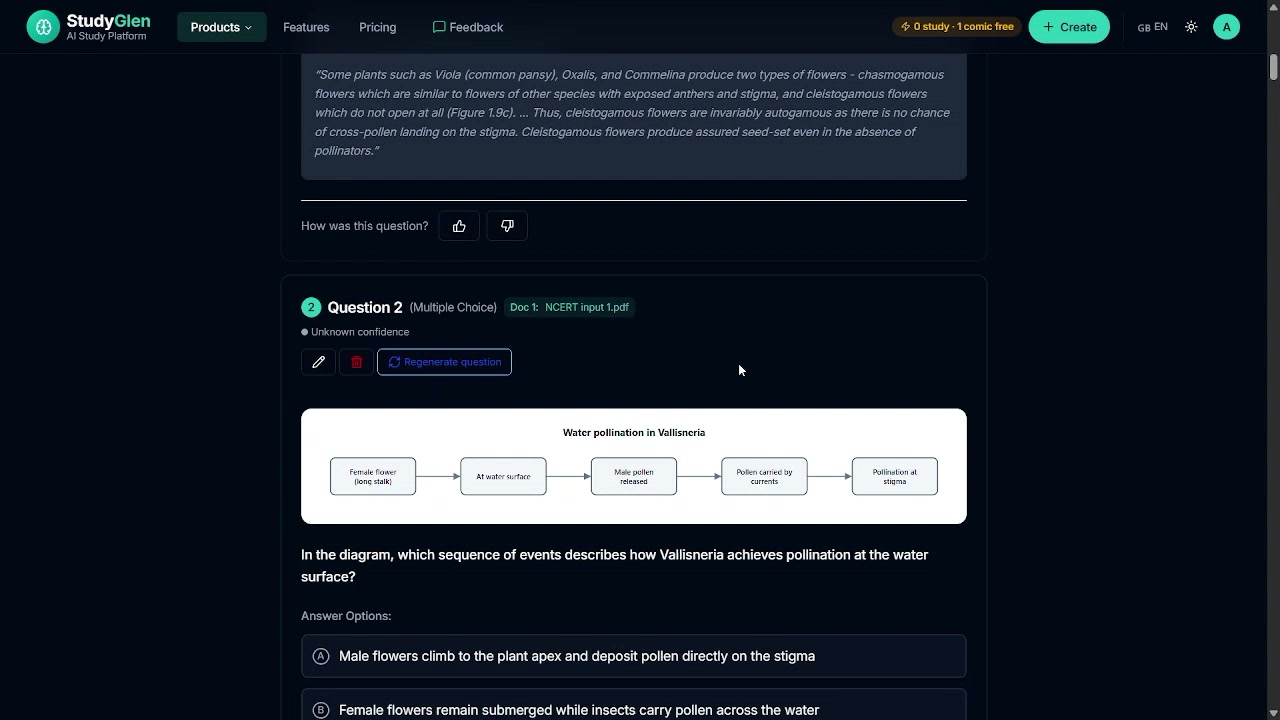
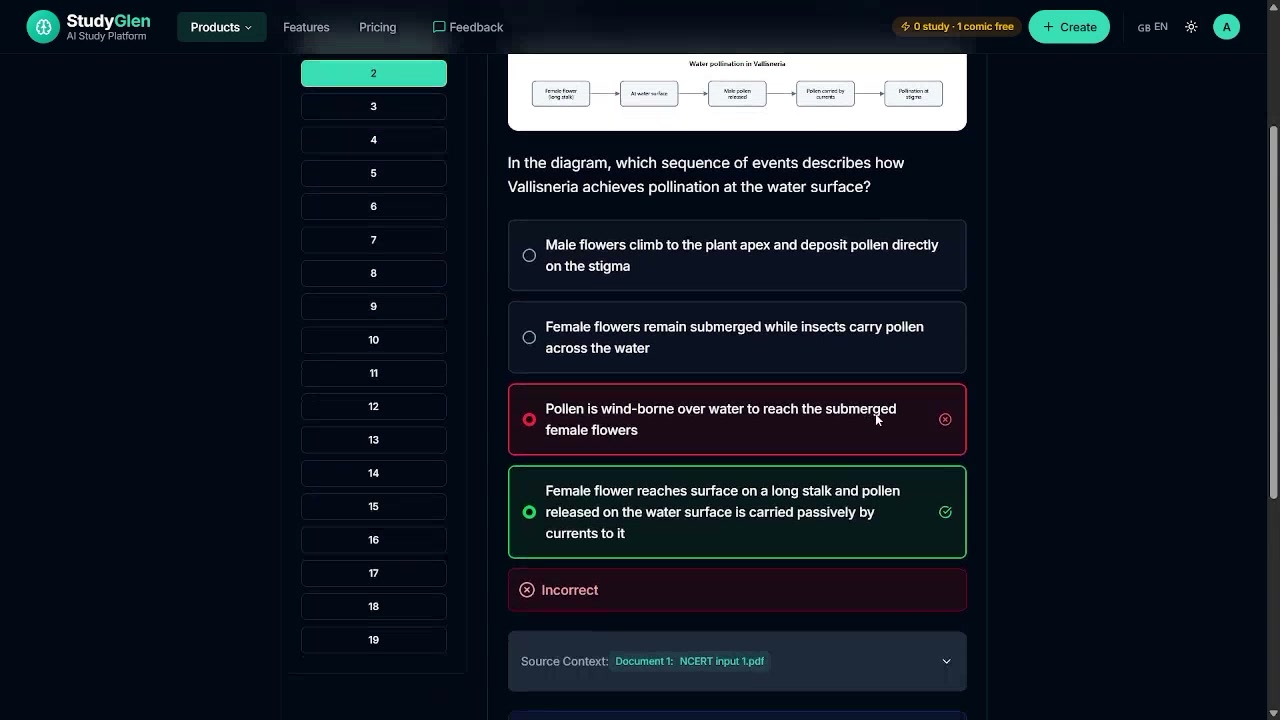
Observed output: Output artifact (Image): A multiple-choice question was generated with answer choices under a diagram. — out1_diagram_question_vallisneria.png
Input artifact: Input artifact (Text prompt): Request a multiple-choice question
Output artifact: Output artifact (Image): A multiple-choice question was generated with answer choices under a diagram. — out1_diagram_question_vallisneria.png
What changed: Text prompt transformed into Image
Test case: Text prompt → Image
Input type: Text prompt
Input used: Input artifact (Text prompt): Request a short-answer question
Observed output: Output artifact (Image): A short-answer question was generated with a diagram and an explanation prompt. — out3_diagram_anther_sequence.png
Input artifact: Input artifact (Text prompt): Request a short-answer question
Output artifact: Output artifact (Image): A short-answer question was generated with a diagram and an explanation prompt. — out3_diagram_anther_sequence.png
What changed: Text prompt transformed into Image
Test case: PDF document → Image
Input type: PDF document
Input used: Input artifact (PDF document): Configured the generator for true/false questions from the same source material. — input1_primary.pdf
Observed output: Output artifact (Image): Generated a true/false question with an expanded explanation and source context. — out1_truefalse_explanation.png
Input artifact: Input artifact (PDF document): Configured the generator for true/false questions from the same source material. — input1_primary.pdf
Output artifact: Output artifact (Image): Generated a true/false question with an expanded explanation and source context. — out1_truefalse_explanation.png
What changed: PDF document transformed into Image
Why it matters / Conclusion: Verified for MCQ, True/False, and Short Answer. No evidence was captured for matching, fill-in-the-blank, or other formats.
StudyGlen lets you choose and combine quiz formats such as multiple choice, true/false, and short answer, with controls for question mix, maximum count, and language. The run only showed evidence for those three formats.
Feature tested: Inline AI-Generated Diagrams
Result: Partial
Verdict: Distinctive and useful, but not perfectly clean
Expected behavior: StudyGlen can embed AI-generated diagrams and flow-style visuals directly inside quiz questions when a topic benefits from visuals. In the biology run it produced diagrammed questions for topics like Vallisneria pollination, apomixis/polyembryony, and megasporogenesis.
Test case: Text prompt → Image
Input type: Text prompt
Input used: Input artifact (Text prompt): Pollination-sequence question
Observed output: Output artifact (Image): A multiple-choice question included a labeled diagram about water pollination in Vallisneria. — out1_diagram_question_vallisneria.png
Input artifact: Input artifact (Text prompt): Pollination-sequence question
Output artifact: Output artifact (Image): A multiple-choice question included a labeled diagram about water pollination in Vallisneria. — out1_diagram_question_vallisneria.png
What changed: Text prompt transformed into Image
Test case: Text prompt → Image
Input type: Text prompt
Input used: Input artifact (Text prompt): Comparison-diagram question
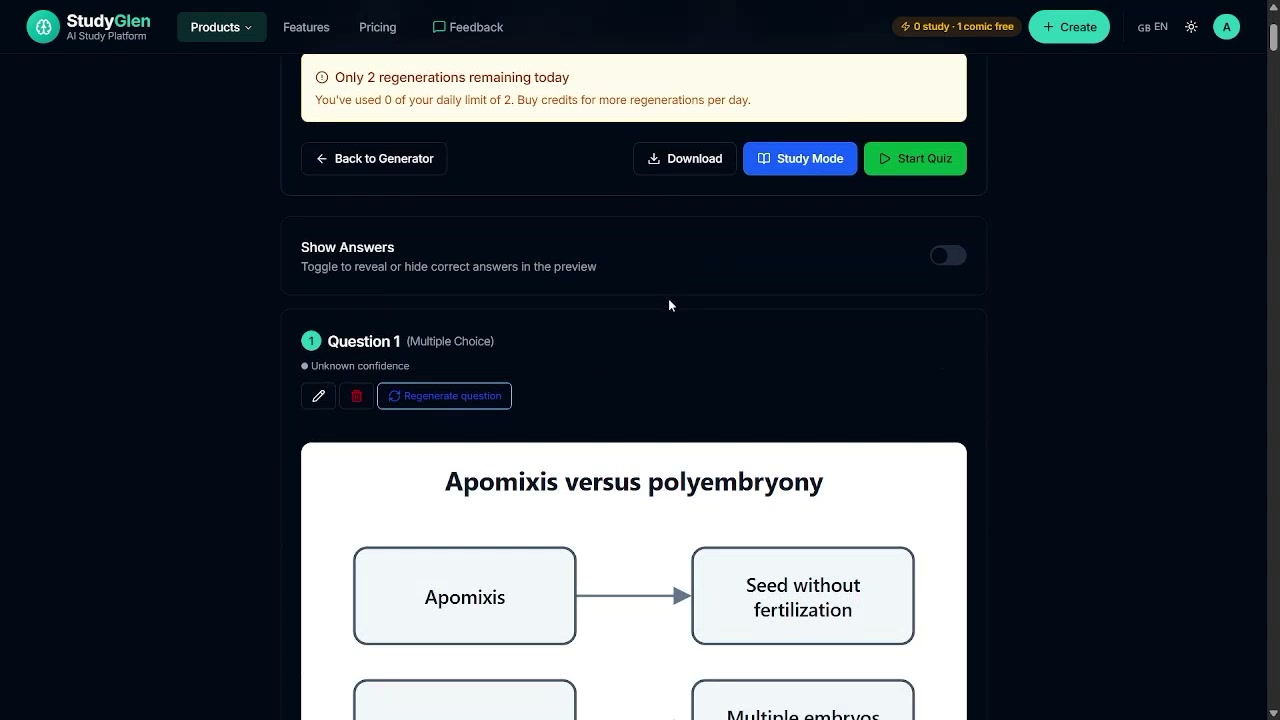
Observed output: Output artifact (Image): A quiz item included a comparison diagram for apomixis versus polyembryony. — out3_diagram_apomixis.png
Input artifact: Input artifact (Text prompt): Comparison-diagram question
Output artifact: Output artifact (Image): A quiz item included a comparison diagram for apomixis versus polyembryony. — out3_diagram_apomixis.png
What changed: Text prompt transformed into Image
Test case: Text prompt → Image
Input type: Text prompt
Input used: Input artifact (Text prompt): Sequence-diagram question
Observed output: Output artifact (Image): A short-answer item included a sequence diagram and visible internal-tag leakage in the stem. — out3_diagram_anther_sequence.png
Input artifact: Input artifact (Text prompt): Sequence-diagram question
Output artifact: Output artifact (Image): A short-answer item included a sequence diagram and visible internal-tag leakage in the stem. — out3_diagram_anther_sequence.png
What changed: Text prompt transformed into Image
Test case: Text prompt → Image
Input type: Text prompt
Input used: Input artifact (Text prompt): Try to generate an AI image on a short-answer question
Observed output: Output artifact (Image): The Generate AI image control was visible on a short-answer question but locked. — shortanswer_generateaiimage_locked.png
Input artifact: Input artifact (Text prompt): Try to generate an AI image on a short-answer question
Output artifact: Output artifact (Image): The Generate AI image control was visible on a short-answer question but locked. — shortanswer_generateaiimage_locked.png
What changed: Text prompt transformed into Image
Why it matters / Conclusion: This is StudyGlen's clearest differentiator: the diagrams are integrated into the quiz itself rather than bolted on afterward. The visual layer is not flawless, though — the tested biology set showed repeated motifs, one locked manual image control, and one internal prompt tag leak.
StudyGlen can embed AI-generated diagrams and flow-style visuals directly inside quiz questions when a topic benefits from visuals. In the biology run it produced diagrammed questions for topics like Vallisneria pollination, apomixis/polyembryony, and megasporogenesis.
Feature tested: Interactive Study Mode with Instant Feedback and Source Context
Result: Partial
Verdict: Immediate correctness feedback works
Expected behavior: StudyGlen's review flow presents one question at a time, marks answers correct or incorrect immediately, and opens explanations with source context inline. The captured session also routed from the ready screen into study mode and related follow-on actions.
Test case: Text prompt → Image
Input type: Text prompt
Input used: Input artifact (Text prompt): Correct study-mode response
Observed output: Output artifact (Image): The answer was marked Correct and the explanation was shown inline with source context. — study_mode_correct_feedback.png
Input artifact: Input artifact (Text prompt): Correct study-mode response
Output artifact: Output artifact (Image): The answer was marked Correct and the explanation was shown inline with source context. — study_mode_correct_feedback.png
What changed: Text prompt transformed into Image
Test case: Text prompt → Image
Input type: Text prompt
Input used: Input artifact (Text prompt): Incorrect study-mode response
Observed output: Output artifact (Image): The wrong answer was marked Incorrect and the correct option was revealed in green. — study_mode_incorrect_reveal.png
Input artifact: Input artifact (Text prompt): Incorrect study-mode response
Output artifact: Output artifact (Image): The wrong answer was marked Incorrect and the correct option was revealed in green. — study_mode_incorrect_reveal.png
What changed: Text prompt transformed into Image
Why it matters / Conclusion: The interactive quiz loop works as expected: you can answer, get instant correctness feedback, and review the explanation without leaving the question.
StudyGlen's review flow presents one question at a time, marks answers correct or incorrect immediately, and opens explanations with source context inline. The captured session also routed from the ready screen into study mode and related follow-on actions.
Feature tested: Export and Sharing Formats
Result: Passed
Verdict: Broad export breadth is verified
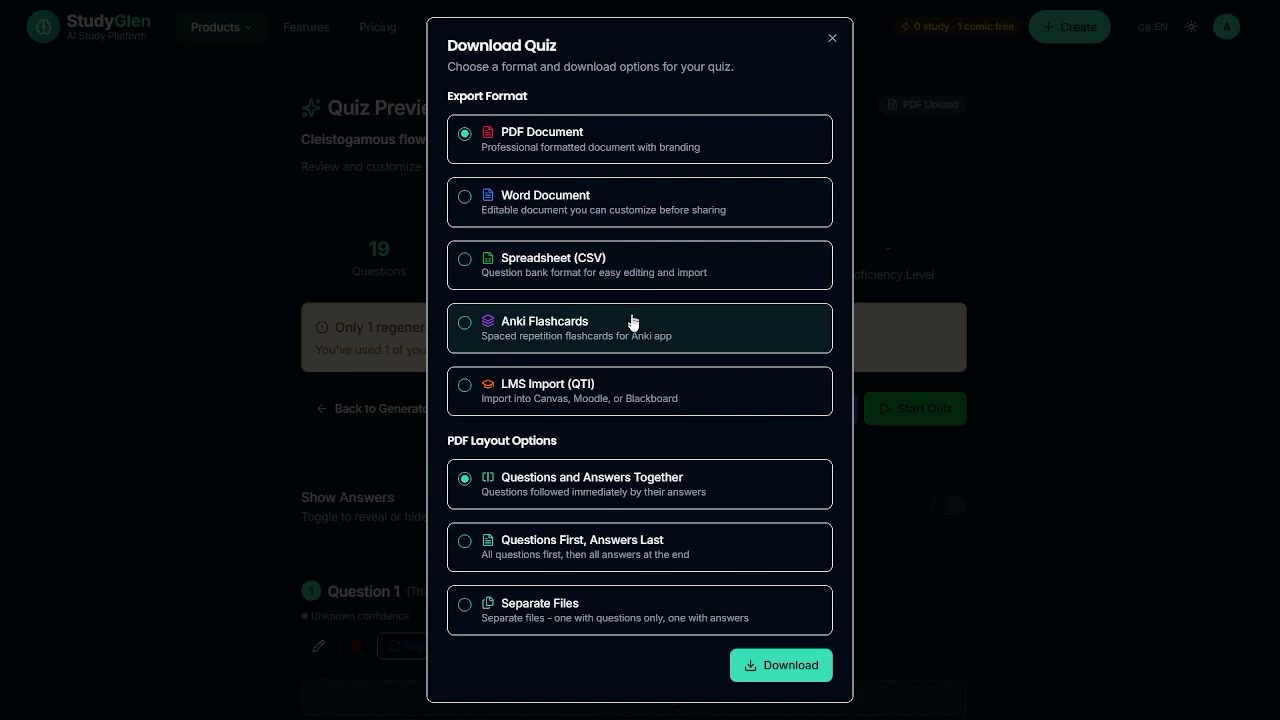
Expected behavior: The download/export UI offers several ways to take quizzes outside the app, including PDF, Word, CSV, Anki flashcards, and LMS/QTI-style export. The captured modal showed these output paths in one place.
Test case: Text prompt → Image
Input type: Text prompt
Input used: Input artifact (Text prompt): Open the download modal from a quiz preview
Observed output: Output artifact (Image): The Download Quiz modal lists PDF, Word, CSV, Anki Flashcards, and LMS Import (QTI), plus PDF layout options. — export_download_modal.png
Input artifact: Input artifact (Text prompt): Open the download modal from a quiz preview
Output artifact: Output artifact (Image): The Download Quiz modal lists PDF, Word, CSV, Anki Flashcards, and LMS Import (QTI), plus PDF layout options. — export_download_modal.png
What changed: Text prompt transformed into Image
Why it matters / Conclusion: Export breadth is a real strength here: the app exposes PDF, Word, CSV, Anki, and LMS/QTI output paths in one place.
The download/export UI offers several ways to take quizzes outside the app, including PDF, Word, CSV, Anki flashcards, and LMS/QTI-style export. The captured modal showed these output paths in one place.
Feature tested: Quiz Regeneration Controls
Result: Partial
Verdict: Prefill works, but deck creation failed
Expected behavior: StudyGlen can regenerate questions from the preview flow and enforces free-tier limits on how often that can happen. The run showed daily regeneration caps and a paywall once free usage was exhausted.
Test case: Text prompt → Image
Input type: Text prompt
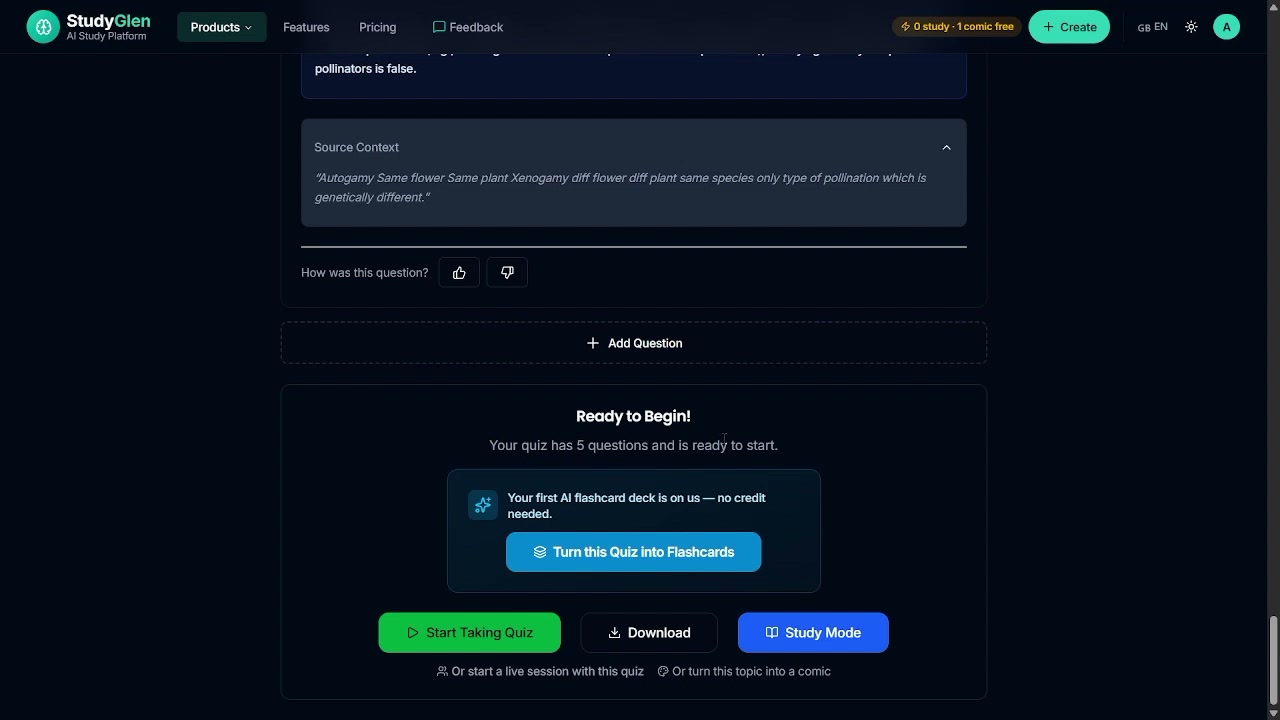
Input used: Input artifact (Text prompt): Turn a finished quiz into flashcards
Observed output: Output artifact (Image): The quiz end screen exposed a one-click path to turn the quiz into flashcards. — ready_to_begin_flashcard_convert.png
Input artifact: Input artifact (Text prompt): Turn a finished quiz into flashcards
Output artifact: Output artifact (Image): The quiz end screen exposed a one-click path to turn the quiz into flashcards. — ready_to_begin_flashcard_convert.png
What changed: Text prompt transformed into Image
Test case: Text prompt → Image
Input type: Text prompt
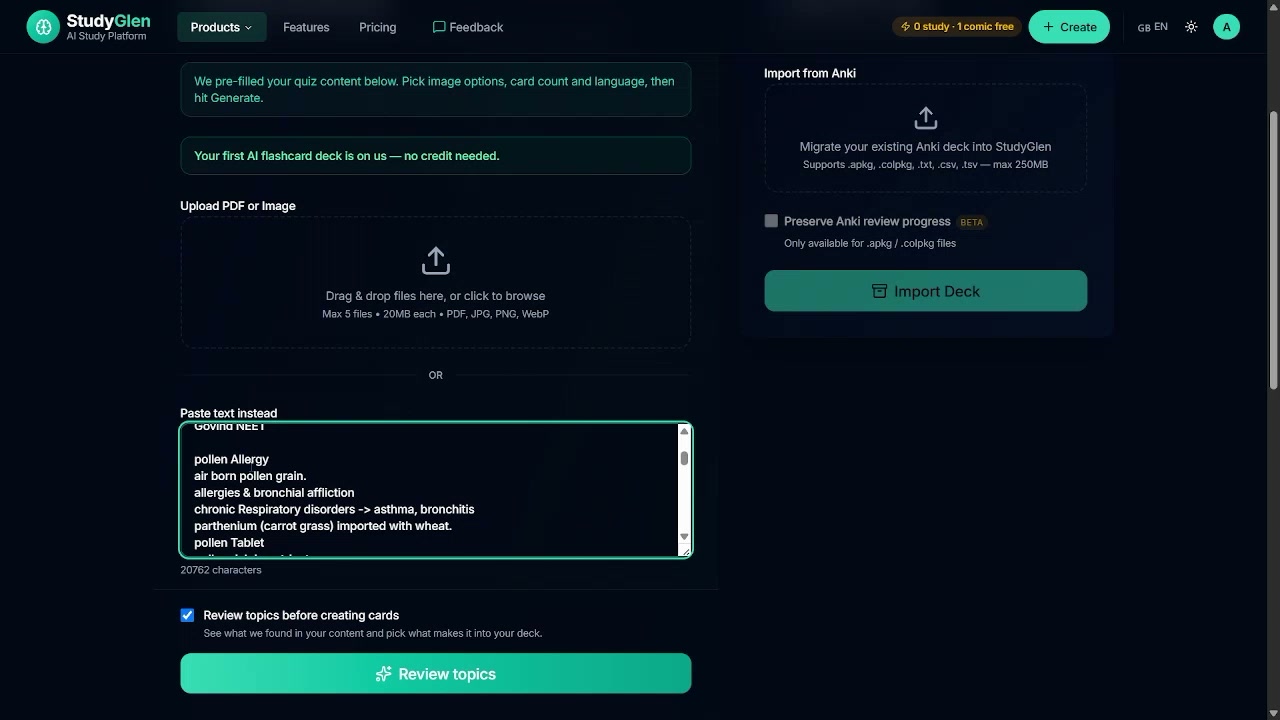
Input used: Input artifact (Text prompt): Open the flashcard generator with prefilled content
Observed output: Output artifact (Image): The flashcard generator accepted the quiz content and prefilled the input area. — flashcard_input_prefilled.png
Input artifact: Input artifact (Text prompt): Open the flashcard generator with prefilled content
Output artifact: Output artifact (Image): The flashcard generator accepted the quiz content and prefilled the input area. — flashcard_input_prefilled.png
What changed: Text prompt transformed into Image
Test case: Text prompt → Image
Input type: Text prompt
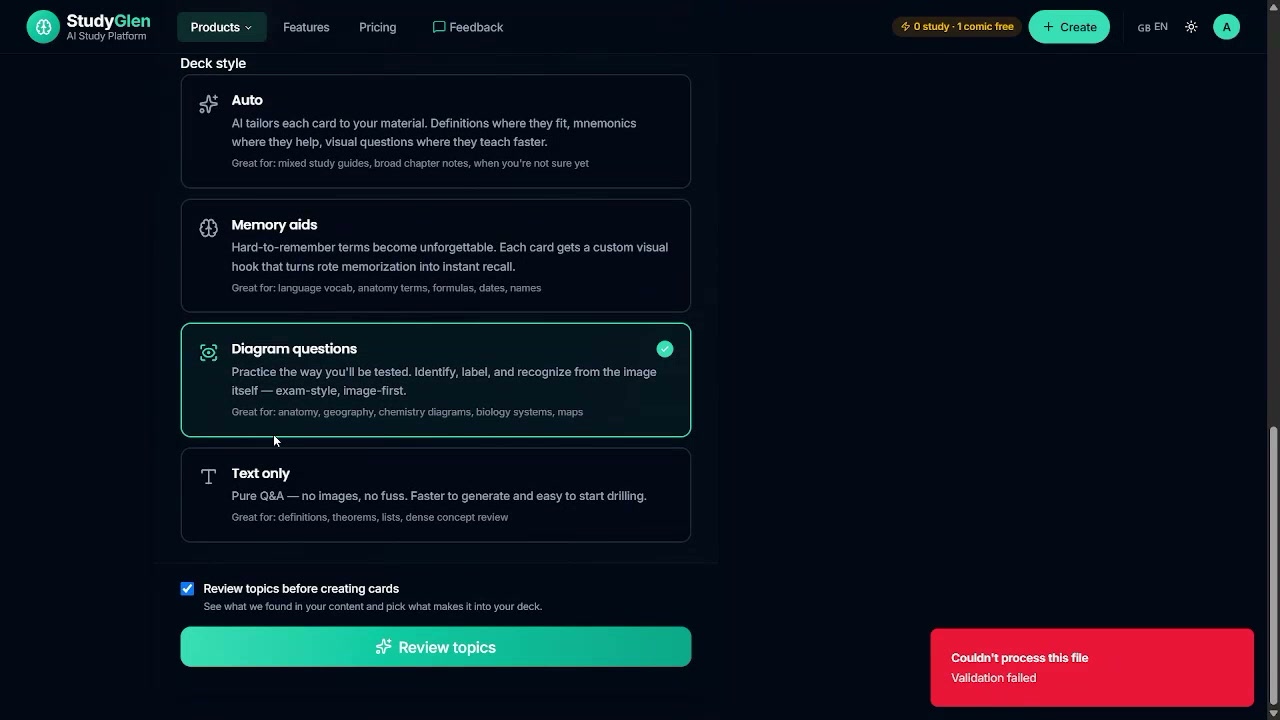
Input used: Input artifact (Text prompt): Generate the flashcard deck after prefill
Observed output: Output artifact (Image): The flashcard run stopped with a validation error before any deck was created. — flashcard_validation_error.png
Input artifact: Input artifact (Text prompt): Generate the flashcard deck after prefill
Output artifact: Output artifact (Image): The flashcard run stopped with a validation error before any deck was created. — flashcard_validation_error.png
What changed: Text prompt transformed into Image
Test case: Text prompt → Image
Input type: Text prompt
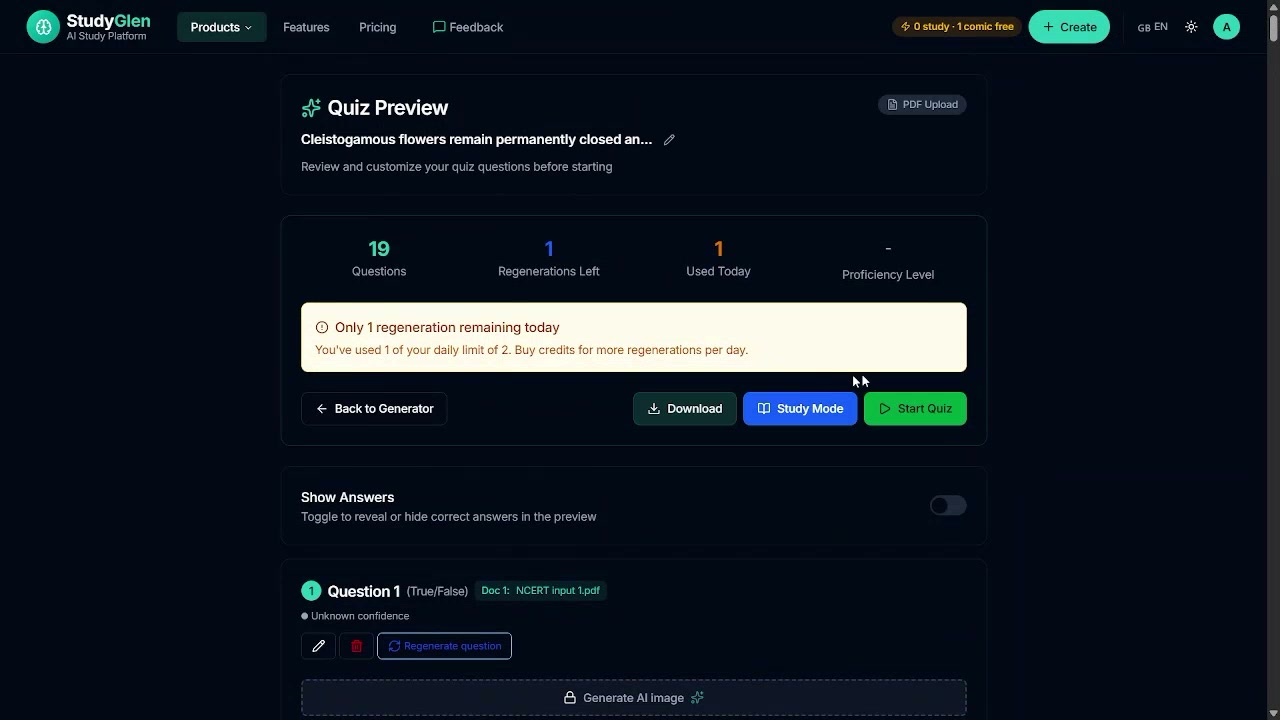
Input used: Input artifact (Text prompt): Try to regenerate a quiz item
Observed output: Output artifact (Image): The preview showed only one regeneration remaining and warned about the daily cap. — out1_regeneration_limit.png
Input artifact: Input artifact (Text prompt): Try to regenerate a quiz item
Output artifact: Output artifact (Image): The preview showed only one regeneration remaining and warned about the daily cap. — out1_regeneration_limit.png
What changed: Text prompt transformed into Image
Test case: Text prompt → Image
Input type: Text prompt
Input used: Input artifact (Text prompt): Continue after free quiz quota is exhausted
Observed output: Output artifact (Image): A real paywall modal appeared with Starter, Plus, and Pro credit packs and a checkout button. — paywall_outoffreequizzes.png
Input artifact: Input artifact (Text prompt): Continue after free quiz quota is exhausted
Output artifact: Output artifact (Image): A real paywall modal appeared with Starter, Plus, and Pro credit packs and a checkout button. — paywall_outoffreequizzes.png
What changed: Text prompt transformed into Image
Why it matters / Conclusion: The handoff into flashcards is real, and the Anki import panel is present, but the actual deck-generation path failed in this run, so no flashcard deck was produced.
StudyGlen can regenerate questions from the preview flow and enforces free-tier limits on how often that can happen. The run showed daily regeneration caps and a paywall once free usage was exhausted.

Feature tested: Flashcard Generation with Anki Import
Result: Failed
Verdict: Verified with failure
Expected behavior: StudyGlen includes a separate AI flashcard generator that can take prefilled quiz content and supports Anki import. In this session the generation path failed validation, so no deck was produced.
Test case: Text prompt → Image
Input type: Text prompt
Input used: Input artifact (Text prompt): Input
Observed output: Output artifact (Image): The generator landing page showed upload support and an Import from Anki panel. — flashcard_generator_intro.png
Input artifact: Input artifact (Text prompt): Input
Output artifact: Output artifact (Image): The generator landing page showed upload support and an Import from Anki panel. — flashcard_generator_intro.png
What changed: Text prompt transformed into Image
Why it matters / Conclusion: The prefill handoff works, but no flashcard deck was produced in this session because validation failed.
StudyGlen includes a separate AI flashcard generator that can take prefilled quiz content and supports Anki import. In this session the generation path failed validation, so no deck was produced.

Free use is limited; paid packs are one-time purchases.
The free plan requires no credit card. The report states paid credits never expire.
Independent rankings where StudyGlen was tested and rated.
How the embed badge will look on your site

Copy this code to your website source
Discover more AI tools like StudyGlen to enhance your workflow.
If you are looking to build a custom quiz generation, study assistant, or note-to-quiz workflow for your business or internal workflow, email us at contact@futuresmart.ai.
Found something inaccurate or missing? We try to keep our AI research accurate and useful. If you found outdated information, an issue, or have a suggestion, email us at collaborate@aidemos.com.