Quiz Generation
Version 1No published result

Best for YouTube lecture quizzes, but unreliable for PDF or handwritten uploads in this test.
Strong on YouTube, weak on uploads.
Edcafe AI's best result here came from the YouTube lecture URL: it produced deeper biology questions, comparison prompts, and even one open-ended item. Both tested PDFs failed extraction with the same error, answers are revealed immediately with explanations, and math notation broke in more than one place. It's useful for fast quiz creation from topic text or a lecture URL, but not yet a reliable upload-first study loop.
Explore Edcafe AI in our public benchmarks.
No published result
Our detailed analysis of Edcafe AI — features, performance, and real-world testing.
Feature tested: Quiz Generation from Source Material
Result: Failed
Verdict: Mixed
Expected behavior: Creates quizzes from imported learning material or a topic prompt. Across the tested runs, the typed topic fallback and the YouTube lecture URL both produced quizzes, while uploaded PDFs failed during extraction.
Test case: Text prompt → File
Input type: Text prompt
Input used: Input artifact (Text prompt): Topic fallback
Observed output: Output artifact (File): 20 multiple-choice questions with a good logical sequence — flower structure → pollination → fertilization → seed formation → germination — but every single question was pure recall ("What is this called?", "Which structure is X?") and delivered exclusively in MCQ format, confirmed directly by the sampled question artifact below. Since this output was generated from a bare topic name rather than the source PDF, there is no source-material fidelity to check it against. — Generate-Quizzes-and-Practice-Tests-from-Study-Material-Using-AI__Edcafe-AI__11__input1_topic_output_review
Input artifact: Input artifact (Text prompt): Topic fallback
Output artifact: Output artifact (File): 20 multiple-choice questions with a good logical sequence — flower structure → pollination → fertilization → seed formation → germination — but every single question was pure recall ("What is this called?", "Which structure is X?") and delivered exclusively in MCQ format, confirmed directly by the sampled question artifact below. Since this output was generated from a bare topic name rather than the source PDF, there is no source-material fidelity to check it against. — Generate-Quizzes-and-Practice-Tests-from-Study-Material-Using-AI__Edcafe-AI__11__input1_topic_output_review
What changed: Text prompt transformed into File
Test case: YouTube video → Image
Input type: YouTube video
Input used: Input artifact (YouTube video): Biology video on "Sexual Reproduction in Flowering Plants," testing native video-to-quiz generation. Edcafe accepted the URL directly and generated 30 Mixed-type questions.
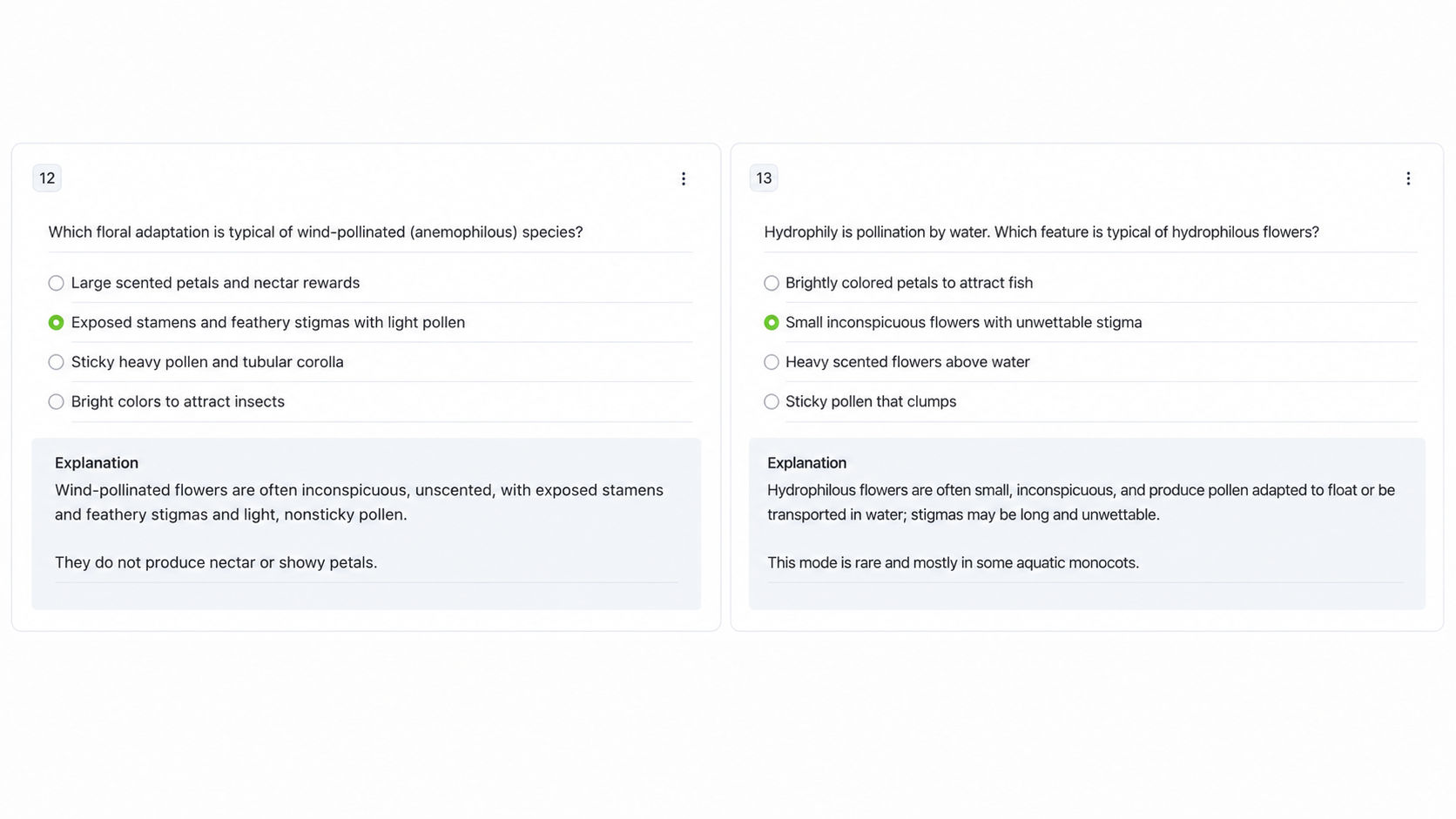
Observed output: Output artifact (Image): Two side-by-side quiz cards from an AI-generated assessment, showing multiple-choice questions about floral adaptations in wind pollination and hydrophilous pollination. Each card has one answer selected and an explanation box below. — Generate-Quizzes-and-Practice-Tests-from-Study-Material-Using-AI__Edcafe-AI__21__input3_wind_vs_water_pollination_comparison.png
Input artifact: Input artifact (YouTube video): Biology video on "Sexual Reproduction in Flowering Plants," testing native video-to-quiz generation. Edcafe accepted the URL directly and generated 30 Mixed-type questions.
Output artifact: Output artifact (Image): Two side-by-side quiz cards from an AI-generated assessment, showing multiple-choice questions about floral adaptations in wind pollination and hydrophilous pollination. Each card has one answer selected and an explanation box below. — Generate-Quizzes-and-Practice-Tests-from-Study-Material-Using-AI__Edcafe-AI__21__input3_wind_vs_water_pollination_comparison.png
What changed: YouTube video transformed into Image
Why it matters / Conclusion: Mixed: document uploads failed on both tested files, but topic fallback and YouTube ingestion both generated quizzes, with the YouTube path producing the stronger result.
Creates quizzes from imported learning material or a topic prompt. Across the tested runs, the typed topic fallback and the YouTube lecture URL both produced quizzes, while uploaded PDFs failed during extraction.
Feature tested: Document Text Extraction
Result: Failed
Verdict: Failed on both tested PDFs with the same no-text-extracted error.
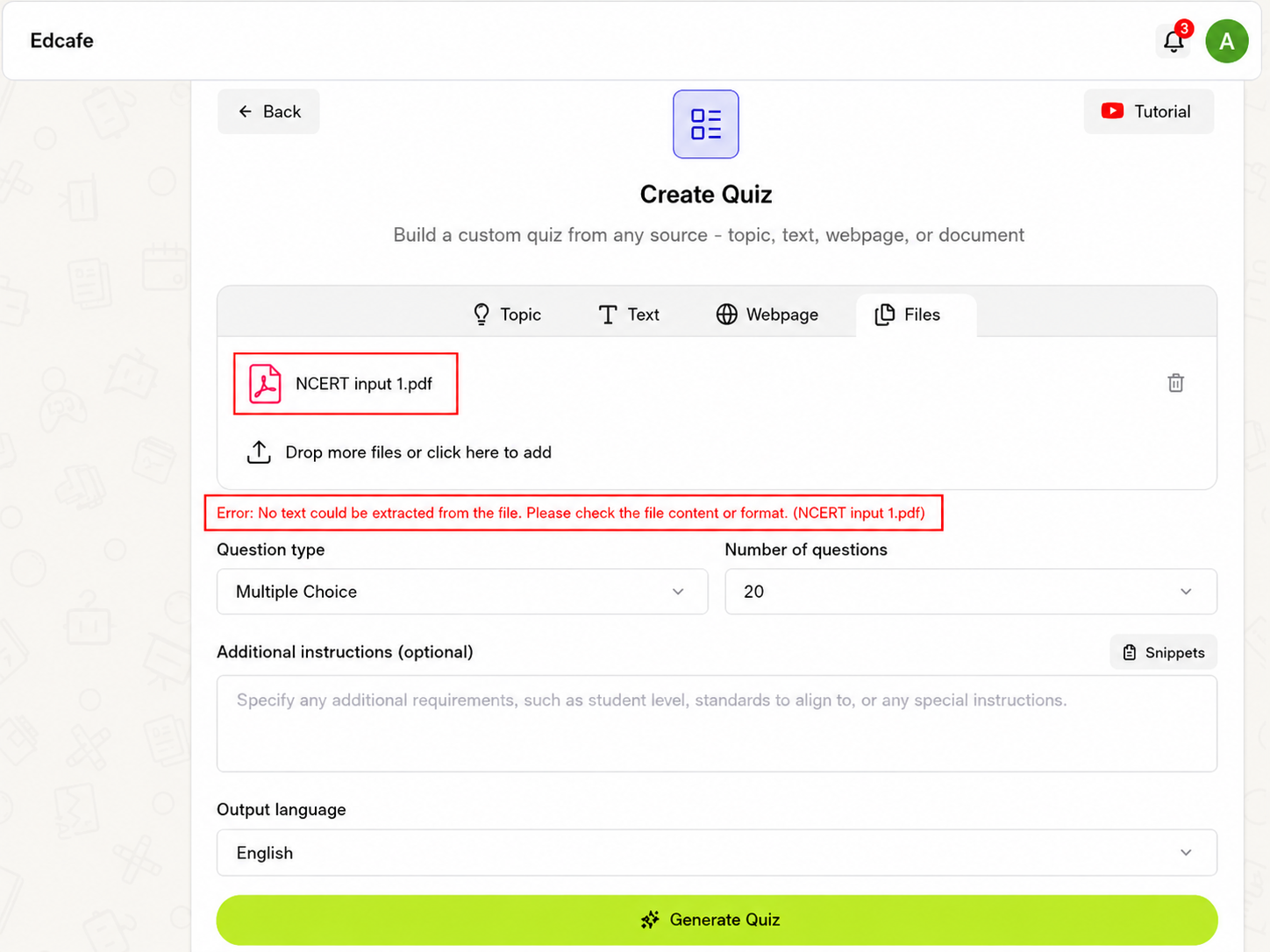
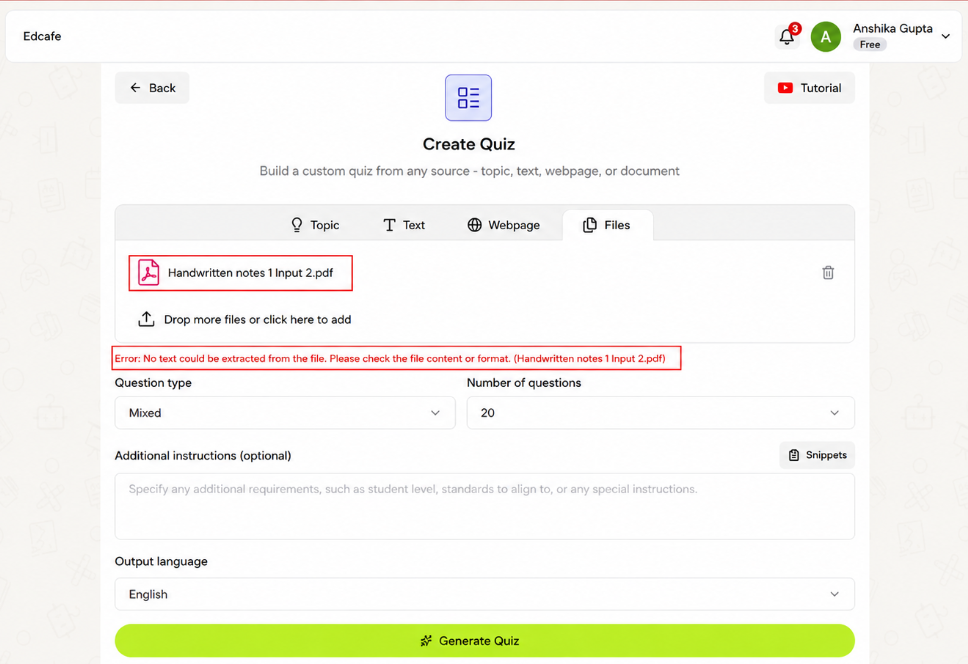
Expected behavior: Extracts text from uploaded documents before quiz creation begins. In the captured tests, both the dense NCERT PDF and the handwritten-notes PDF returned the same error, so document ingestion never completed.
Test case: PDF document → Image
Input type: PDF document
Input used: Input artifact (PDF document): NCERT biology PDF uploaded in the Files tab. — input1_primary.pdf
Observed output: Output artifact (Image): The Create Quiz page with the Files tab active and a PDF uploaded. A red error banner says no text could be extracted from the file, indicating the PDF import failed and the quiz setup remains on screen. — Generate-Quizzes-and-Practice-Tests-from-Study-Material-Using-AI__Edcafe-AI__14__input1_pdf_extraction_error.png
Input artifact: Input artifact (PDF document): NCERT biology PDF uploaded in the Files tab. — input1_primary.pdf
Output artifact: Output artifact (Image): The Create Quiz page with the Files tab active and a PDF uploaded. A red error banner says no text could be extracted from the file, indicating the PDF import failed and the quiz setup remains on screen. — Generate-Quizzes-and-Practice-Tests-from-Study-Material-Using-AI__Edcafe-AI__14__input1_pdf_extraction_error.png
What changed: PDF document transformed into Image
Test case: PDF document → Image
Input type: PDF document
Input used: Input artifact (PDF document): Handwritten-notes PDF uploaded in the Files tab. — input2_secondary.pdf
Observed output: Output artifact (Image): The Create Quiz page with a handwritten-notes PDF uploaded in the Files tab. A red error message reports that no text could be extracted, showing the app cannot read this file format or scan quality. — Generate-Quizzes-and-Practice-Tests-from-Study-Material-Using-AI__Edcafe-AI__16__input2_handwritten_notes_error.png
Input artifact: Input artifact (PDF document): Handwritten-notes PDF uploaded in the Files tab. — input2_secondary.pdf
Output artifact: Output artifact (Image): The Create Quiz page with a handwritten-notes PDF uploaded in the Files tab. A red error message reports that no text could be extracted, showing the app cannot read this file format or scan quality. — Generate-Quizzes-and-Practice-Tests-from-Study-Material-Using-AI__Edcafe-AI__16__input2_handwritten_notes_error.png
What changed: PDF document transformed into Image
Why it matters / Conclusion: Document ingestion was not reliable here: both tested PDFs failed before quiz generation could start.
Extracts text from uploaded documents before quiz creation begins. In the captured tests, both the dense NCERT PDF and the handwritten-notes PDF returned the same error, so document ingestion never completed.
Feature tested: Inline Answer Review with Explanations
Result: Partial
Verdict: Good for instant feedback, but it does not force an attempt-first study flow.
Expected behavior: Displays quizzes with the correct answer already marked and an explanation directly underneath each item. In the tested output, this made the quiz suitable for quick review rather than a hide-then-reveal study flow.
Test case: YouTube video → File
Input type: YouTube video
Input used: Input artifact (YouTube video): YouTube biology lecture on Sexual Reproduction in Flowering Plants — accepted natively by Edcafe with no manual transcript step required, and used to generate Input 3's 30-question Mixed-type output
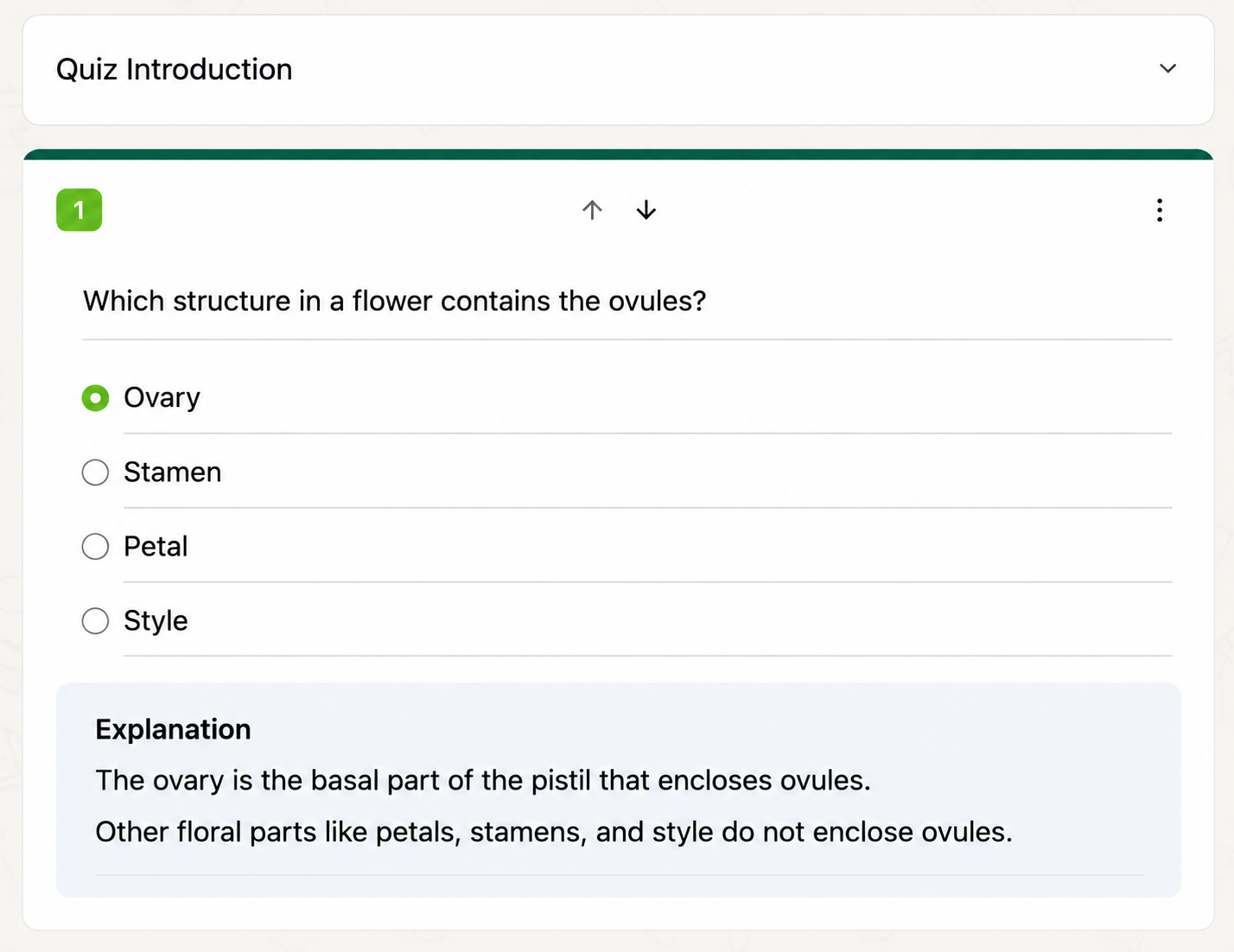
Observed output: Output artifact (File): A generated quiz question card labeled Quiz Introduction. It asks which flower structure contains the ovules, with Ovary selected and an explanation shown below. — Generate-Quizzes-and-Practice-Tests-from-Study-Material-Using-AI__Edcafe-AI__12__input3_youtube_output_review
Input artifact: Input artifact (YouTube video): YouTube biology lecture on Sexual Reproduction in Flowering Plants — accepted natively by Edcafe with no manual transcript step required, and used to generate Input 3's 30-question Mixed-type output
Output artifact: Output artifact (File): A generated quiz question card labeled Quiz Introduction. It asks which flower structure contains the ovules, with Ovary selected and an explanation shown below. — Generate-Quizzes-and-Practice-Tests-from-Study-Material-Using-AI__Edcafe-AI__12__input3_youtube_output_review
What changed: YouTube video transformed into File
Test case: YouTube video → Image
Input type: YouTube video
Input used: Input artifact (YouTube video): YouTube quiz question
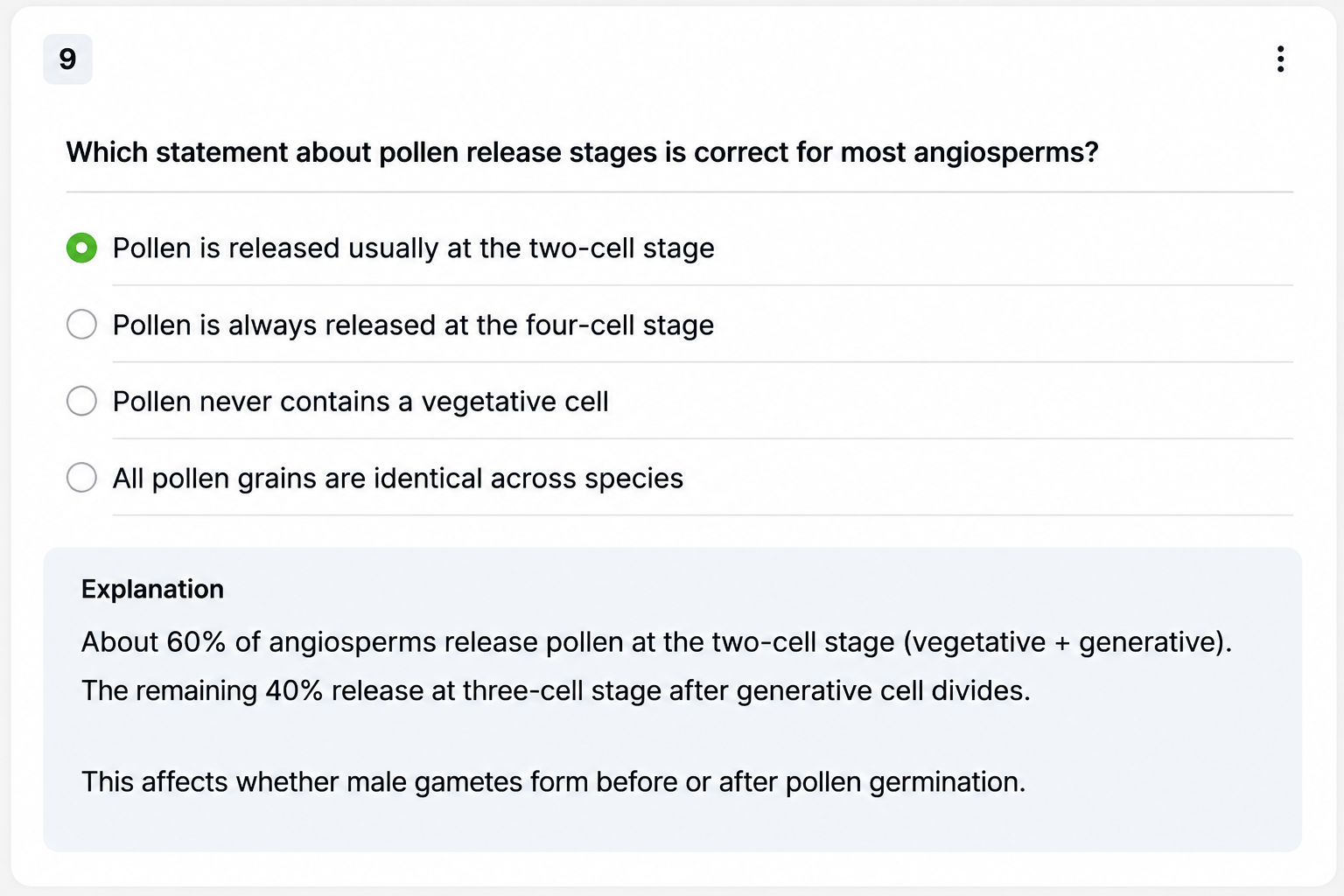
Observed output: Output artifact (Image): A generated multiple-choice quiz item numbered 9 about pollen release stages in angiosperms. The first option is selected and an explanation underneath states that most angiosperms release pollen at the two-cell stage. — Generate-Quizzes-and-Practice-Tests-from-Study-Material-Using-AI__Edcafe-AI__19__input3_pollen_stage_reasoning_mcq.png
Input artifact: Input artifact (YouTube video): YouTube quiz question
Output artifact: Output artifact (Image): A generated multiple-choice quiz item numbered 9 about pollen release stages in angiosperms. The first option is selected and an explanation underneath states that most angiosperms release pollen at the two-cell stage. — Generate-Quizzes-and-Practice-Tests-from-Study-Material-Using-AI__Edcafe-AI__19__input3_pollen_stage_reasoning_mcq.png
What changed: YouTube video transformed into Image
Why it matters / Conclusion: The feedback is immediate and clear, but it skips the recall step that makes quizzes more study-like.
Displays quizzes with the correct answer already marked and an explanation directly underneath each item. In the tested output, this made the quiz suitable for quick review rather than a hide-then-reveal study flow.
Feature tested: Quiz Question Format Variation
Result: Partial
Verdict: Format variety is real on the YouTube path, but the topic fallback stayed MCQ-only.
Expected behavior: Produces more than one quiz question format within a generated quiz. On the YouTube path, the output included comparison-style multiple-choice questions, reasoning questions, and a final short-answer prompt with a suggested answer, while the topic fallback stayed multiple-choice only.
Test case: Text prompt → Image
Input type: Text prompt
Input used: Input artifact (Text prompt): Topic fallback quiz
Observed output: Output artifact (Image): A generated quiz question card labeled Quiz Introduction. It asks which flower structure contains the ovules, with Ovary selected and an explanation shown below. — Generate-Quizzes-and-Practice-Tests-from-Study-Material-Using-AI__Edcafe-AI__18__input1_topic_output_recall_question.png
Input artifact: Input artifact (Text prompt): Topic fallback quiz
Output artifact: Output artifact (Image): A generated quiz question card labeled Quiz Introduction. It asks which flower structure contains the ovules, with Ovary selected and an explanation shown below. — Generate-Quizzes-and-Practice-Tests-from-Study-Material-Using-AI__Edcafe-AI__18__input1_topic_output_recall_question.png
What changed: Text prompt transformed into Image
Test case: YouTube video → Image
Input type: YouTube video
Input used: Input artifact (YouTube video): YouTube quiz
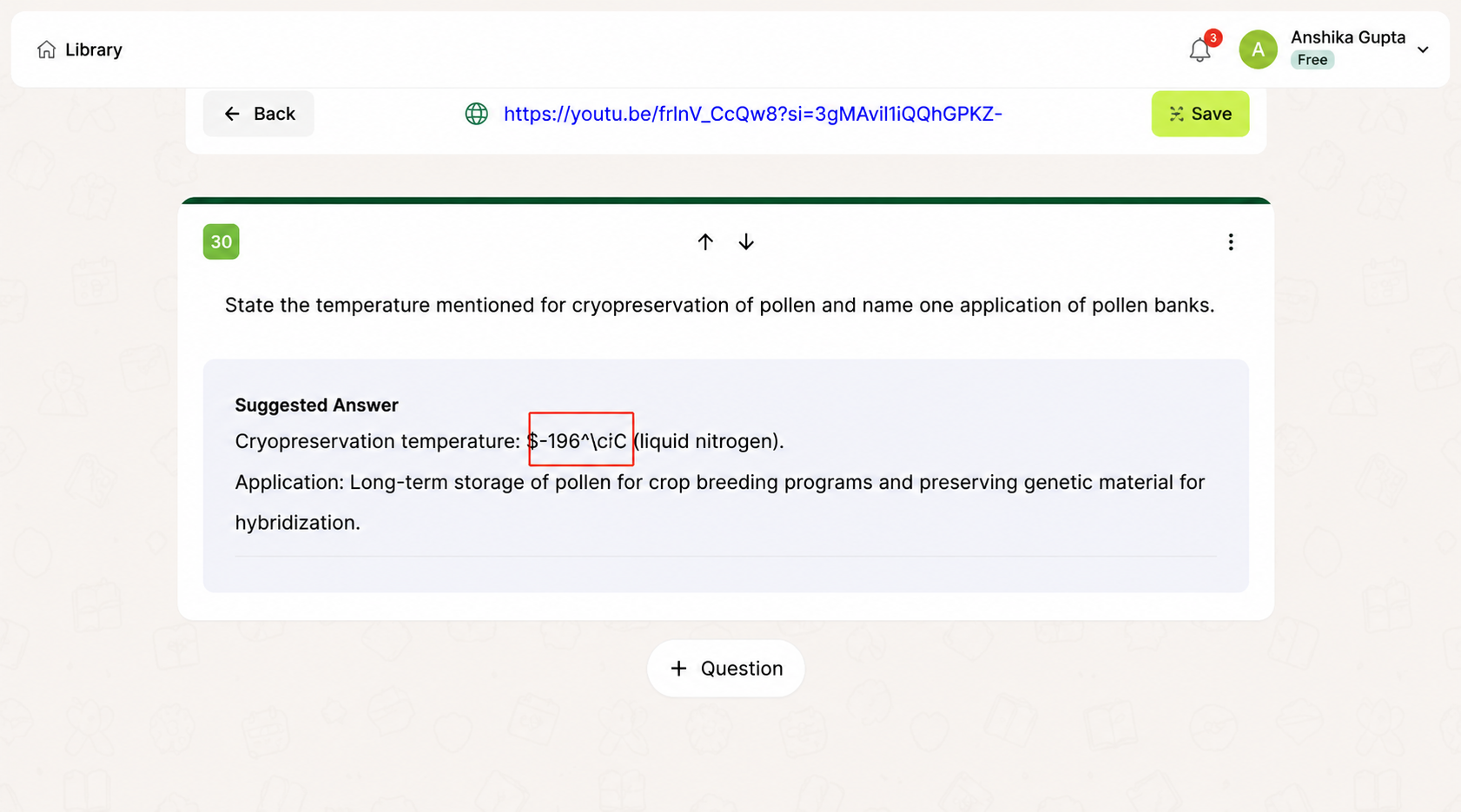
Observed output: Output artifact (Image): A quiz question editor/result page for an open-ended question, with a suggested answer displayed in a gray response box. A red annotation highlights a corrupted or unrendered LaTeX-looking temperature expression in the answer. — Generate-Quizzes-and-Practice-Tests-from-Study-Material-Using-AI__Edcafe-AI__22__input3_final_openended_unrendered_latex.png
Input artifact: Input artifact (YouTube video): YouTube quiz
Output artifact: Output artifact (Image): A quiz question editor/result page for an open-ended question, with a suggested answer displayed in a gray response box. A red annotation highlights a corrupted or unrendered LaTeX-looking temperature expression in the answer. — Generate-Quizzes-and-Practice-Tests-from-Study-Material-Using-AI__Edcafe-AI__22__input3_final_openended_unrendered_latex.png
What changed: YouTube video transformed into Image
Why it matters / Conclusion: Question variety appears on the YouTube path only, and the final open-ended item also exposed the math-rendering bug.
Produces more than one quiz question format within a generated quiz. On the YouTube path, the output included comparison-style multiple-choice questions, reasoning questions, and a final short-answer prompt with a suggested answer, while the topic fallback stayed multiple-choice only.
Feature tested: Formula and Notation Rendering
Result: Failed
Verdict: Raw LaTeX showed up in multiple quiz screens instead of rendered equations.
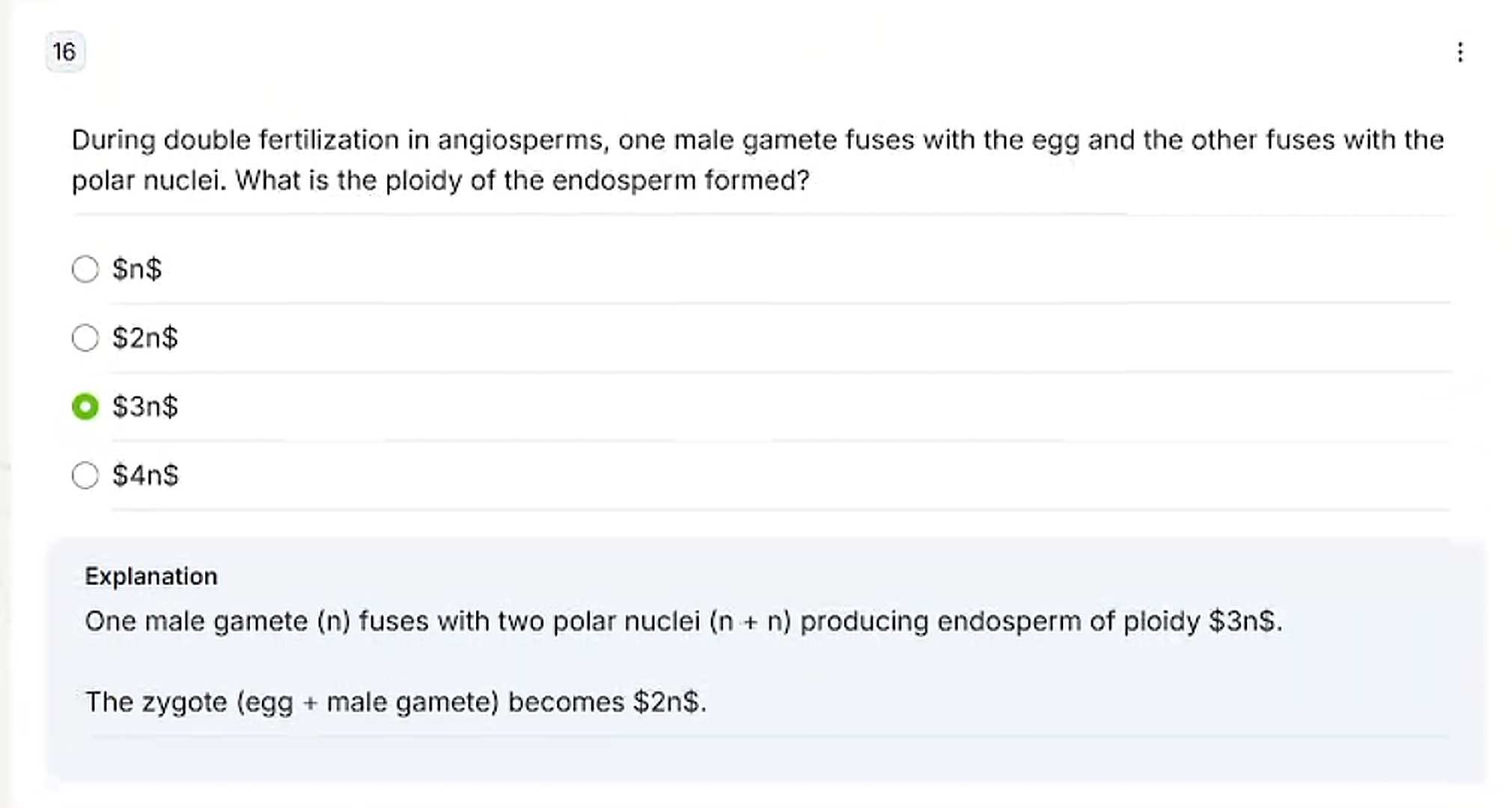
Expected behavior: Renders math formulas and notation in quiz content. In the biology examples, dollar-wrapped formulas appeared as raw LaTeX in both multiple-choice options and suggested answers.
Test case: Text prompt → Image
Input type: Text prompt
Input used: Input artifact (Text prompt): Mid-quiz math question
Observed output: Output artifact (Image): A later quiz question card numbered 16 about double fertilization in angiosperms. The selected option and explanation show malformed math rendering, with the ploidy displayed as literal dollar-sign notation instead of formatted equations. — Generate-Quizzes-and-Practice-Tests-from-Study-Material-Using-AI__Edcafe-AI__20__input3_unrendered_latex_mcq_midquiz.png
Input artifact: Input artifact (Text prompt): Mid-quiz math question
Output artifact: Output artifact (Image): A later quiz question card numbered 16 about double fertilization in angiosperms. The selected option and explanation show malformed math rendering, with the ploidy displayed as literal dollar-sign notation instead of formatted equations. — Generate-Quizzes-and-Practice-Tests-from-Study-Material-Using-AI__Edcafe-AI__20__input3_unrendered_latex_mcq_midquiz.png
What changed: Text prompt transformed into Image
Why it matters / Conclusion: Broken in more than one place; the on-screen note says formulas should render properly when saved, but that was not tested.
Renders math formulas and notation in quiz content. In the biology examples, dollar-wrapped formulas appeared as raw LaTeX in both multiple-choice options and suggested answers.
Feature tested: Multi-Tool Creation Dashboard
Result: Partial
Verdict: The home screen exposes more than quizzes, including flashcards and lesson-planning tools, but none of those modes were opened in this session.
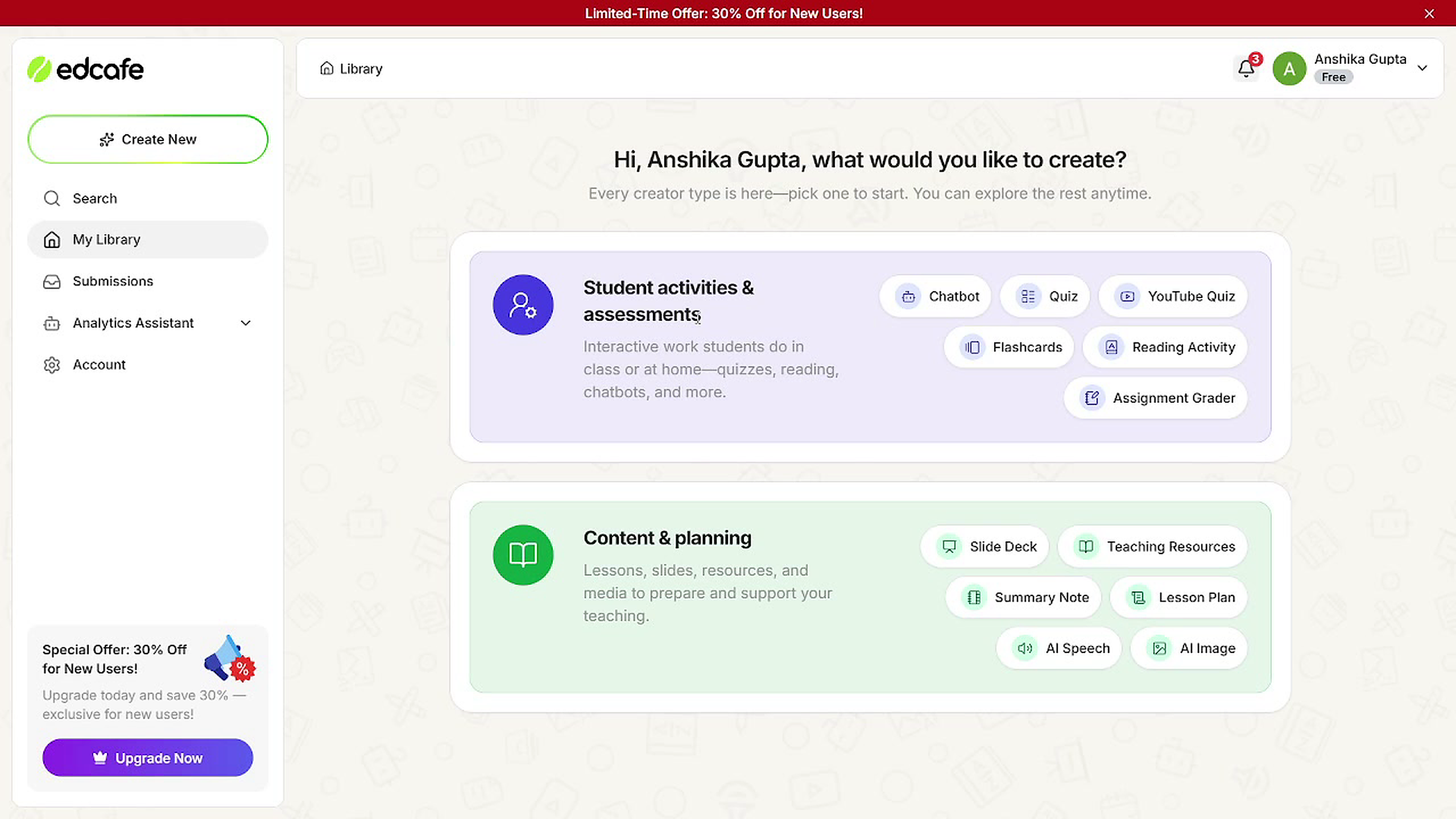
Expected behavior: Provides a dashboard that launches multiple creation paths beyond quizzes, including Chatbot, Flashcards, Reading Activity, Assignment Grader, Slide Deck, Teaching Resources, Summary Note, Lesson Plan, AI Speech, and AI Image. The tested evidence only confirms the hub/navigation surface, not deeper tool behavior.
Test case: Text prompt → Image
Input type: Text prompt
Input used: Input artifact (Text prompt): Dashboard visit
Observed output: Output artifact (Image): The Edcafe AI library/dashboard home screen with a left navigation sidebar and two large creation-category panels in the main area. It invites the user to choose what to create, showing multiple creation tools as pill buttons. — Generate-Quizzes-and-Practice-Tests-from-Study-Material-Using-AI__Edcafe-AI__23__library_dashboard_feature_set.png
Input artifact: Input artifact (Text prompt): Dashboard visit
Output artifact: Output artifact (Image): The Edcafe AI library/dashboard home screen with a left navigation sidebar and two large creation-category panels in the main area. It invites the user to choose what to create, showing multiple creation tools as pill buttons. — Generate-Quizzes-and-Practice-Tests-from-Study-Material-Using-AI__Edcafe-AI__23__library_dashboard_feature_set.png
What changed: Text prompt transformed into Image
Why it matters / Conclusion: Visible in the product surface, but untested beyond the landing page.
Provides a dashboard that launches multiple creation paths beyond quizzes, including Chatbot, Flashcards, Reading Activity, Assignment Grader, Slide Deck, Teaching Resources, Summary Note, Lesson Plan, AI Speech, and AI Image. The tested evidence only confirms the hub/navigation surface, not deeper tool behavior.
Free was the tested tier; Pro and Premium unlock export and broader limits.
Captured from the pricing page. The tested Free plan is in-app only, while file export is listed on Pro and Premium.
Independent rankings where Edcafe AI was tested and rated.
How the embed badge will look on your site

Copy this code to your website source
Discover more AI tools like Edcafe AI to enhance your workflow.
If you are looking to build a custom lecture quiz generation, question generation, or study guide assistant for your business or internal workflow, email us at contact@futuresmart.ai.
Found something inaccurate or missing? We try to keep our AI research accurate and useful. If you found outdated information, an issue, or have a suggestion, email us at collaborate@aidemos.com.