Quiz Generation
Version 1No published result

Quizizz quickly turns PDFs, handwritten notes, and YouTube lectures into quiz drafts, but the free-tier output stayed MCQ-heavy and uneven in depth.
Fast ingestion and useful previews, but question depth and format control were unreliable.
Quizizz handled the PDF, handwritten-notes, and YouTube inputs in this run, and the Enhance flow did make weak questions more scenario-based. But the generated sets still stayed MCQ-only, DOK Level 3 did not reliably raise question depth, and the free tier did not give us a verified export or a real study-over-time loop.
Explore Quizizz in our public benchmarks.
No published result
Our detailed analysis of Quizizz — features, performance, and real-world testing.
Feature tested: Source-to-Quiz Generation
Result: Partial
Verdict: Verified
Expected behavior: Quizizz turns study inputs such as typed PDFs, scanned handwritten-notes PDFs, dense NCERT PDFs, and YouTube lecture URLs into quiz drafts/MCQ quizzes. The runs showed the YouTube flow was accepted directly and could auto-detect duration.
Test case: PDF document → Video file
Input type: PDF document
Input used: Input artifact (PDF document): Input — input1_primary.pdf
Observed output: Output artifact (Video file): From the NCERT biology PDF, Quizizz produced a 20-question assessment draft titled 'Quiz on Flowering Plants' with biology MCQs; the output video shows the generated quiz and student preview. — out1_ncert_pdf_output.mp4
Input artifact: Input artifact (PDF document): Input — input1_primary.pdf
Output artifact: Output artifact (Video file): From the NCERT biology PDF, Quizizz produced a 20-question assessment draft titled 'Quiz on Flowering Plants' with biology MCQs; the output video shows the generated quiz and student preview. — out1_ncert_pdf_output.mp4
What changed: PDF document transformed into Video file
Test case: PDF document → Text prompt
Input type: PDF document
Input used: Input artifact (PDF document): INPUT — input2_secondary.pdf
Observed output: Output artifact (Text prompt): OUTPUT
Input artifact: Input artifact (PDF document): INPUT — input2_secondary.pdf
Output artifact: Output artifact (Text prompt): OUTPUT
What changed: PDF document transformed into Text prompt
Test case: YouTube video → YouTube video
Input type: YouTube video
Input used: Input artifact (YouTube video): INPUT
Observed output: Output artifact (YouTube video): OUTPUT
Input artifact: Input artifact (YouTube video): INPUT
Output artifact: Output artifact (YouTube video): OUTPUT
What changed: YouTube video transformed into YouTube video
Why it matters / Conclusion: This is Quizizz’s strongest onboarding strength: it handled every study format in the test set, and the YouTube URL flow was the cleanest. The tradeoff is that the generated quiz drafts still skewed heavily to multiple choice.
Quizizz turns study inputs such as typed PDFs, scanned handwritten-notes PDFs, dense NCERT PDFs, and YouTube lecture URLs into quiz drafts/MCQ quizzes. The runs showed the YouTube flow was accepted directly and could auto-detect duration.
Feature tested: AI Question Rewriting
Result: Passed
Verdict: Verified
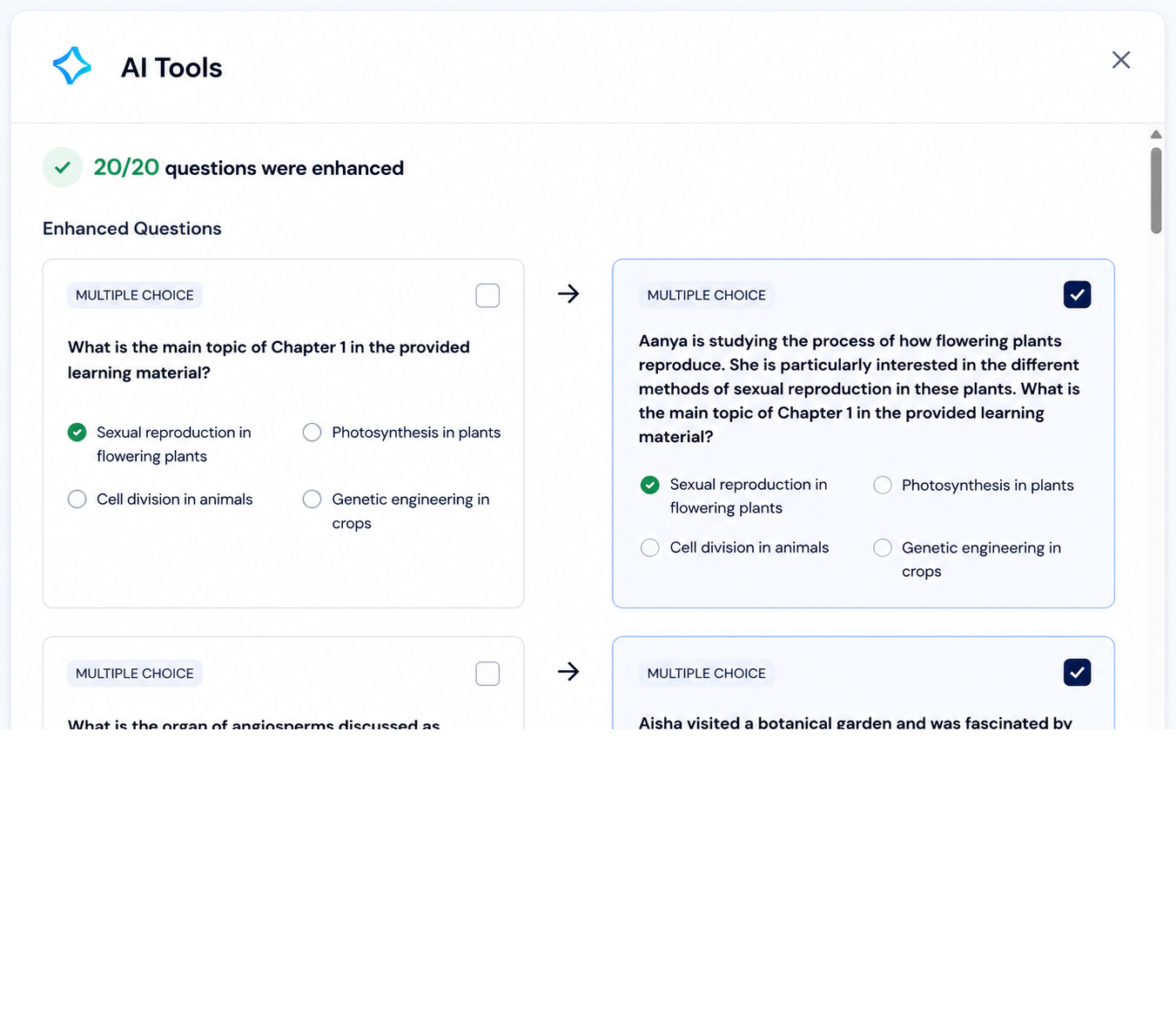
Expected behavior: The Enhance flow rewrites weak generated questions into fuller, scenario-based prompts while keeping the answer choices intact. In the observed PDF run, it improved a generic question by adding extra Aanya context and enhanced all 20 questions shown.
Test case: Text prompt → Image
Input type: Text prompt
Input used: Input artifact (Text prompt): INPUT
Observed output: Output artifact (Image): The AI Tools modal shows that 20/20 questions were enhanced. In the side-by-side comparison, the enhanced version adds a short scenario about Aanya studying flowering plant reproduction while keeping the same answer choices. — out_enhanced_question.png
Input artifact: Input artifact (Text prompt): INPUT
Output artifact: Output artifact (Image): The AI Tools modal shows that 20/20 questions were enhanced. In the side-by-side comparison, the enhanced version adds a short scenario about Aanya studying flowering plant reproduction while keeping the same answer choices. — out_enhanced_question.png
What changed: Text prompt transformed into Image
Why it matters / Conclusion: This is the product’s most useful quality-improvement lever, but it is manual and does not rescue every shallow prompt. It improves framing more than it improves depth.
The Enhance flow rewrites weak generated questions into fuller, scenario-based prompts while keeping the answer choices intact. In the observed PDF run, it improved a generic question by adding extra Aanya context and enhanced all 20 questions shown.
Feature tested: Quiz Configuration Controls
Result: Partial
Verdict: Partially effective
Expected behavior: The setup screen exposes controls for grade level, DOK level, question type, question count, and output language when shaping a generated quiz. In this pass, the controls were present even though they did not reliably change the output.
Test case: Text prompt → Video file
Input type: Text prompt
Input used: Input artifact (Text prompt): Input
Observed output: Output artifact (Video file): The generated quiz shows the configured assessment draft and confirms that the run completed, but the output remained MCQ-only. — out1_ncert_pdf_output.mp4
Input artifact: Input artifact (Text prompt): Input
Output artifact: Output artifact (Video file): The generated quiz shows the configured assessment draft and confirms that the run completed, but the output remained MCQ-only. — out1_ncert_pdf_output.mp4
What changed: Text prompt transformed into Video file
Test case: Text prompt → Image
Input type: Text prompt
Input used: Input artifact (Text prompt): INPUT
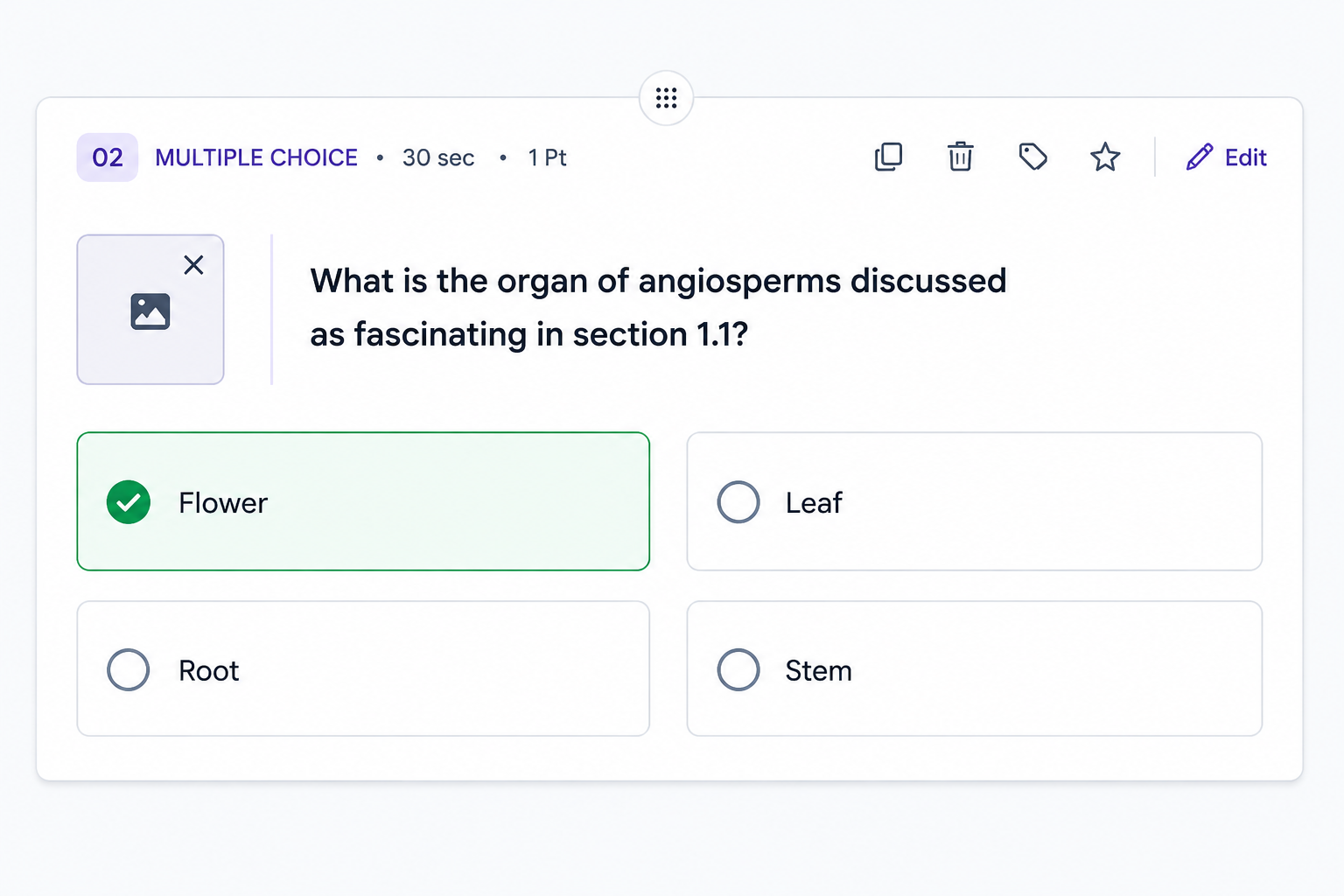
Observed output: Output artifact (Image): The generated card is still a multiple-choice question with four options and one marked correct answer, so the question-type picker did not translate into mixed output. — out1_pdf_mcq_only.png
Input artifact: Input artifact (Text prompt): INPUT
Output artifact: Output artifact (Image): The generated card is still a multiple-choice question with four options and one marked correct answer, so the question-type picker did not translate into mixed output. — out1_pdf_mcq_only.png
What changed: Text prompt transformed into Image
Test case: Text prompt → Image
Input type: Text prompt
Input used: Input artifact (Text prompt): INPUT
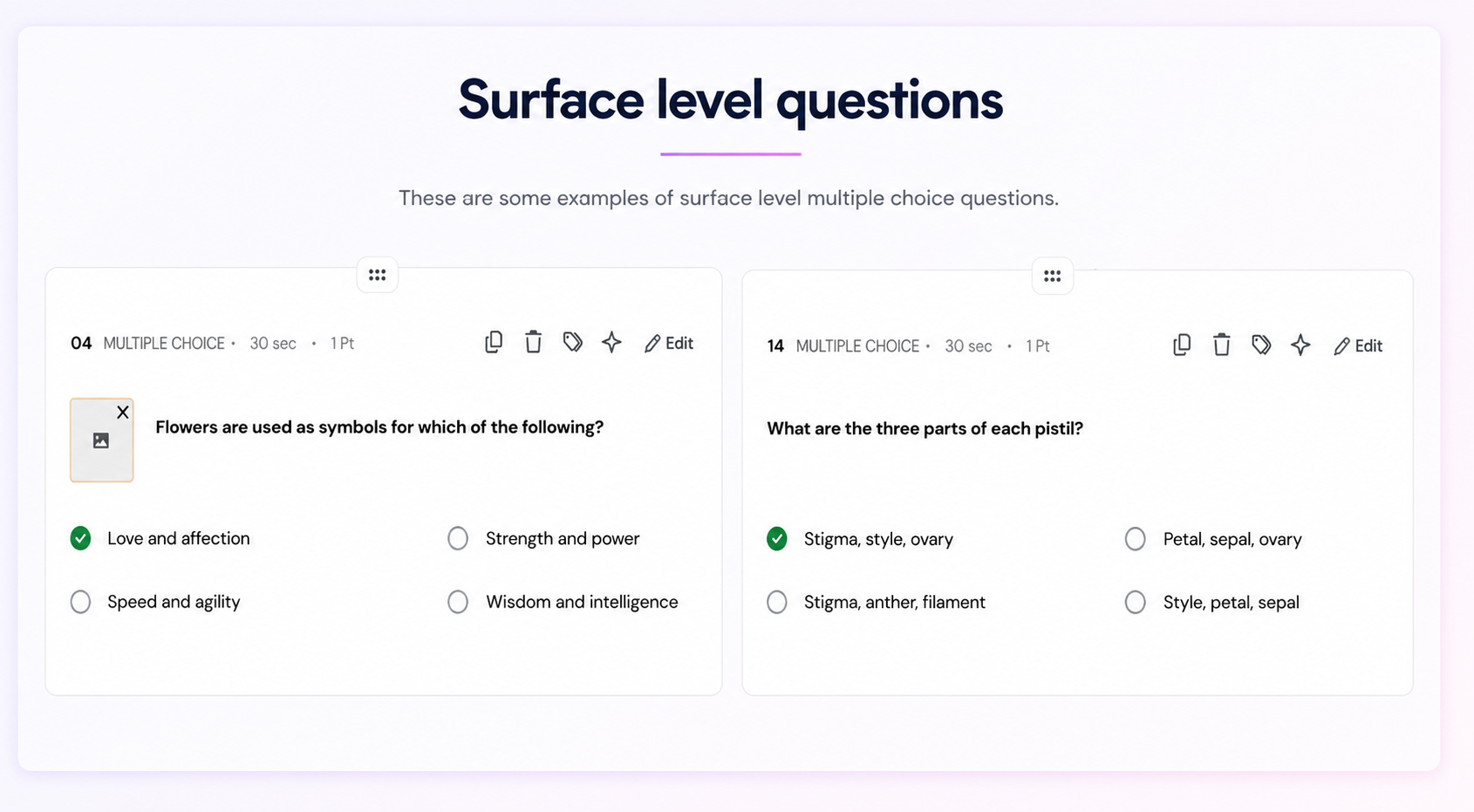
Observed output: Output artifact (Image): A surface-level MCQ still appears under DOK Level 3, showing that the depth control did not reliably force strategic-thinking questions. — out1_pdf_surfacelevel_questions.png
Input artifact: Input artifact (Text prompt): INPUT
Output artifact: Output artifact (Image): A surface-level MCQ still appears under DOK Level 3, showing that the depth control did not reliably force strategic-thinking questions. — out1_pdf_surfacelevel_questions.png
What changed: Text prompt transformed into Image
Why it matters / Conclusion: The controls exist, but they do not reliably shape the generated set. Question-type selection stayed MCQ-only, and DOK Level 3 did not consistently increase depth.
The setup screen exposes controls for grade level, DOK level, question type, question count, and output language when shaping a generated quiz. In this pass, the controls were present even though they did not reliably change the output.
Feature tested: Interactive Quiz Modes
Result: Partial
Verdict: Provides a real quiz-like shell for previewing questions
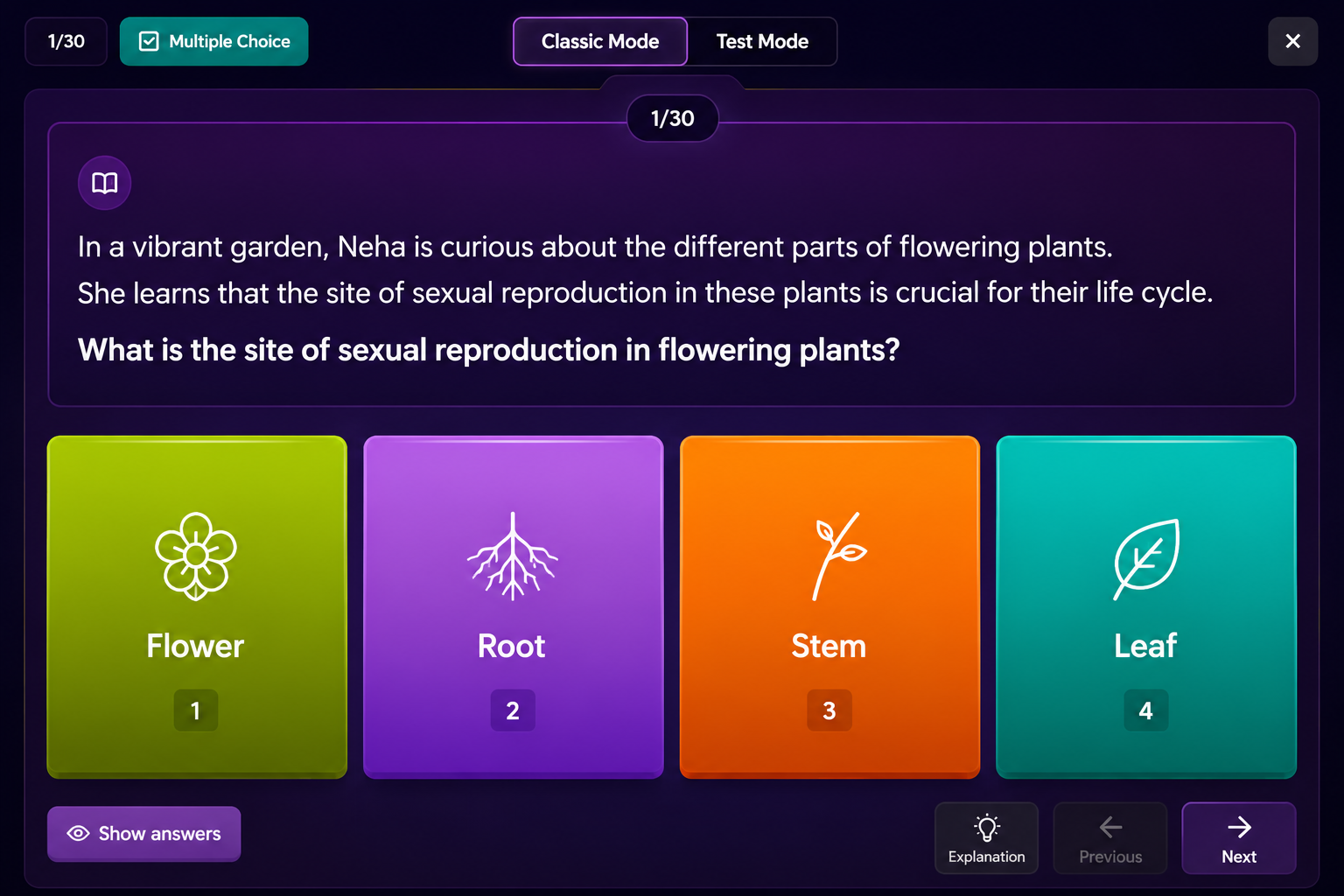
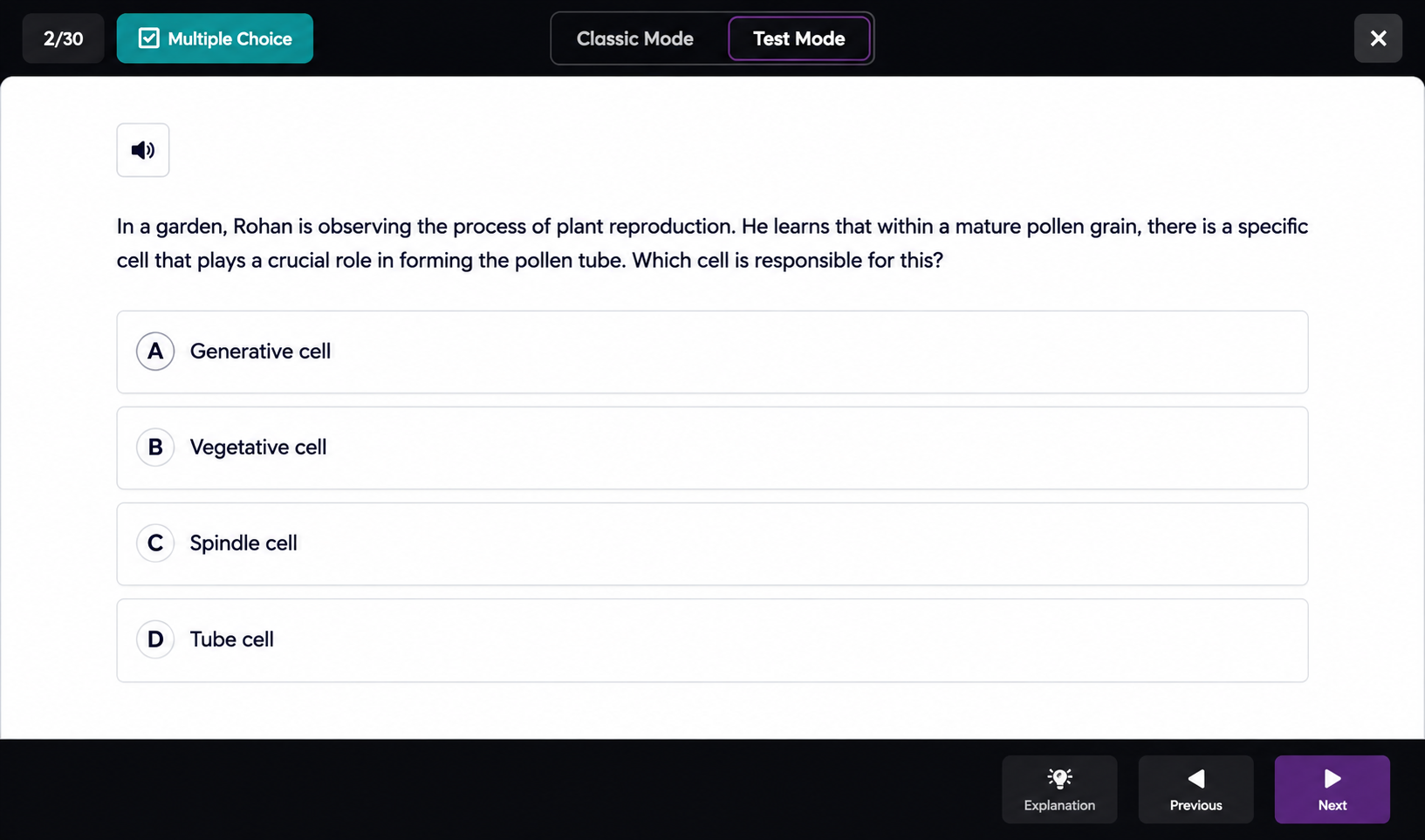
Expected behavior: Classic Mode and Test Mode provide one-question-at-a-time quiz shells for reviewing or practicing generated questions. In the run, they made the experience feel more like a quiz, with Classic showing answer tiles and Test Mode hiding answer styling.
Test case: Text prompt → Image
Input type: Text prompt
Input used: Input artifact (Text prompt): INPUT
Observed output: Output artifact (Image): Classic Mode shows a colorful one-question-at-a-time quiz screen with visible answer choices and navigation controls, but no timer or automated scoring. — out_classic_mode.png
Input artifact: Input artifact (Text prompt): INPUT
Output artifact: Output artifact (Image): Classic Mode shows a colorful one-question-at-a-time quiz screen with visible answer choices and navigation controls, but no timer or automated scoring. — out_classic_mode.png
What changed: Text prompt transformed into Image
Test case: Text prompt → Image
Input type: Text prompt
Input used: Input artifact (Text prompt): INPUT
Observed output: Output artifact (Image): Test Mode shows a more exam-like question screen with text-only answers and navigation controls, again without visible timer or auto-scoring. — out_test_mode.png
Input artifact: Input artifact (Text prompt): INPUT
Output artifact: Output artifact (Image): Test Mode shows a more exam-like question screen with text-only answers and navigation controls, again without visible timer or auto-scoring. — out_test_mode.png
What changed: Text prompt transformed into Image
Why it matters / Conclusion: This gives Quizizz a real practice shell, but it is still not a full study loop with timers, scoring, or retention tracking.
Classic Mode and Test Mode provide one-question-at-a-time quiz shells for reviewing or practicing generated questions. In the run, they made the experience feel more like a quiz, with Classic showing answer tiles and Test Mode hiding answer styling.
Independent rankings where Quizizz was tested and rated.
How the embed badge will look on your site

Copy this code to your website source
Discover more AI tools like Quizizz to enhance your workflow.
If you are looking to build a custom quiz generation, study guide creation, or assessment drafting system for your business or internal workflow, email us at contact@futuresmart.ai.
Found something inaccurate or missing? We try to keep our AI research accurate and useful. If you found outdated information, an issue, or have a suggestion, email us at collaborate@aidemos.com.