
Spider Review: Static, JS-Heavy, and Protected Pages (2026)
Fast static-page scraping, but weak cleanup and poor reliability on dynamic or protected sites.
Useful for quick static grabs, not for dependable modern-site extraction
- You mainly need quick scraping of static or lightly dynamic public pages and can tolerate cleanup afterward.
- You want a pay-as-you-go cost model instead of a recurring subscription.
- You care more about fast broad indexing than about perfectly cleaned markdown from every page.
- You need markdown that automatically strips almost all nav, cookie, and site-wide boilerplate.
Our take
In this hands-on test, Spider preserved core content on a recipe page, but its cleanup was noisy and it left major boilerplate in the output. It also only partially rendered a Nike product page and was fully blocked on Glassdoor. Based on these results, Spider looks better suited to fast indexing of simpler public pages than to clean, production-ready extraction from JavaScript-heavy or protected sites.
Benchmark participation
Benchmark participation is temporarily unavailable.
In-Depth Review
Our detailed analysis of Spider — features, performance, and real-world testing.
Feature-by-Feature Breakdown
Markdown extraction from static pagesCaptures core page copy accurately, but does a weak job removing site boilerplate.▾
Feature tested: Markdown extraction from static pages
Result: Partial
Verdict: Captures core page copy accurately, but does a weak job removing site boilerplate.
Expected behavior: Spider can scrape a public page and return rendered text/markdown-style output through its playground. This was tested on a recipe blog page for chocolate chip cookies, where Spider preserved the central recipe content and layout blocks but also pulled in large amounts of non-essential site text.
Test case: Text prompt → Image
Input type: Text prompt
Input used: Input artifact (Text prompt): Recipe blog URL
Observed output: Output artifact (Image): On the recipe-page test, Spider preserved the core recipe title and central content structure, but the rendered output was bloated with navigation categories, s — spider-spider-playground-sallys-baking-scrape.png
Input artifact: Input artifact (Text prompt): Recipe blog URL
Output artifact: Output artifact (Image): On the recipe-page test, Spider preserved the core recipe title and central content structure, but the rendered output was bloated with navigation categories, s — spider-spider-playground-sallys-baking-scrape.png
What changed: Text prompt transformed into Image
Why it matters / Conclusion: Spider can pull the main content from a static page, but it does not reliably return clean markdown when the source page carries heavy navigation and boilerplate.
Spider can scrape a public page and return rendered text/markdown-style output through its playground. This was tested on a recipe blog page for chocolate chip cookies, where Spider preserved the central recipe content and layout blocks but also pulled in large amounts of non-essential site text.
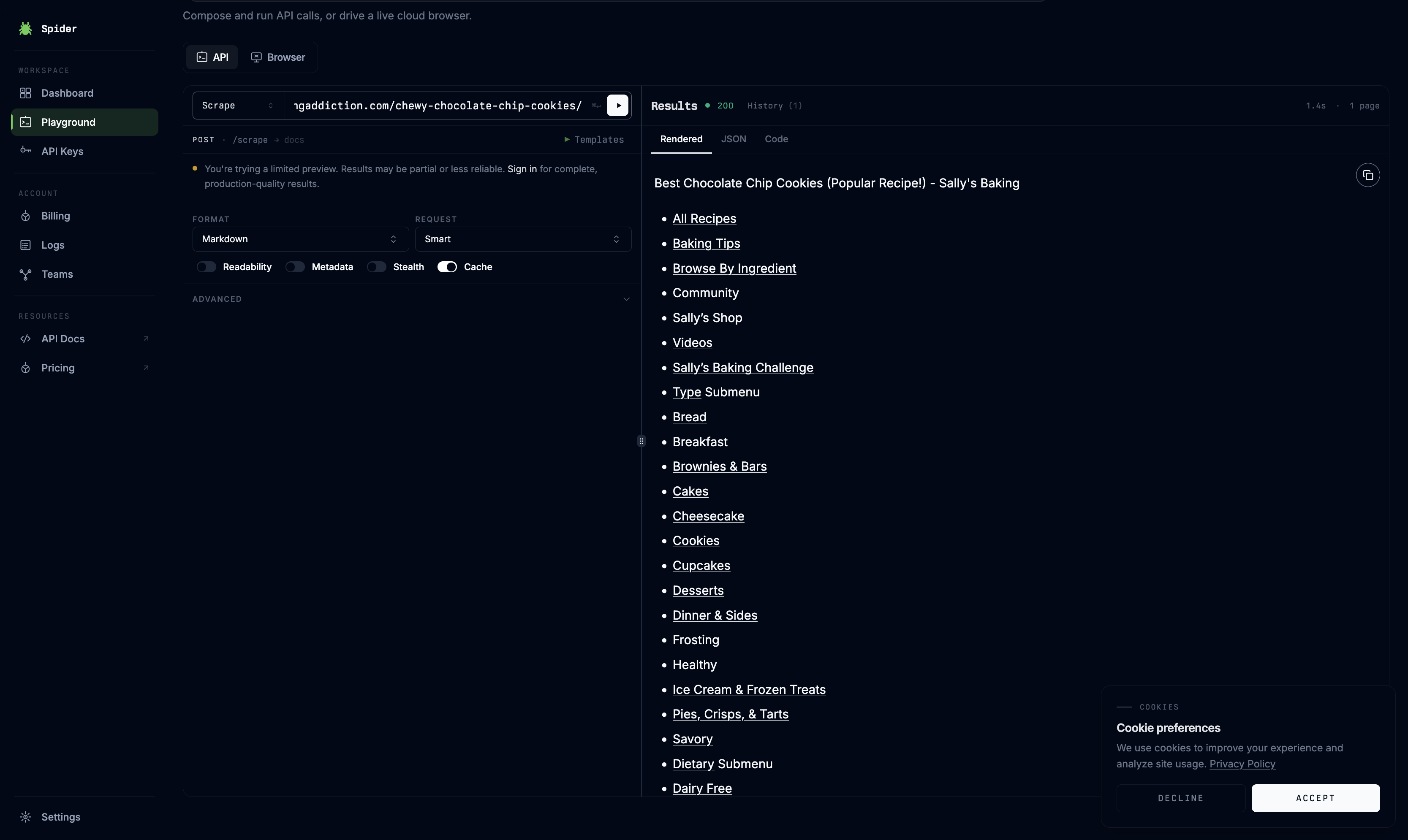
On the recipe-page test, Spider preserved the core recipe title and central content structure, but the rendered output was bloated with navigation categories, site-wide menu links, cookie-preference text, social/share elements, and other non-essential page copy. The result showed accurate text capture but poor noise stripping for downstream markdown use.
JavaScript-rendered page scrapingPartially works on a JS-heavy product page, but misses important hydrated content.▾
Feature tested: JavaScript-rendered page scraping
Result: Partial
Verdict: Partially works on a JS-heavy product page, but misses important hydrated content.
Expected behavior: Spider’s Smart mode is intended to handle dynamically rendered pages without manual selector work. It was tested on a Nike Air Force 1 product page to see whether client-side product details would fully load before extraction.
Test case: Text prompt → Image
Input type: Text prompt
Input used: Input artifact (Text prompt): Nike product page URL
Observed output: Output artifact (Image): On the Nike product-page test, Spider extracted the product title, category, and $115 price, but large blank regions remained in the rendered output and the siz — spider-spider-playground-nike-air-force-scrape.png
Input artifact: Input artifact (Text prompt): Nike product page URL
Output artifact: Output artifact (Image): On the Nike product-page test, Spider extracted the product title, category, and $115 price, but large blank regions remained in the rendered output and the siz — spider-spider-playground-nike-air-force-scrape.png
What changed: Text prompt transformed into Image
Why it matters / Conclusion: Spider can capture some top-level product attributes from a JS-heavy page, but it missed vital transactional elements and did not fully render the page state.
Spider’s Smart mode is intended to handle dynamically rendered pages without manual selector work. It was tested on a Nike Air Force 1 product page to see whether client-side product details would fully load before extraction.
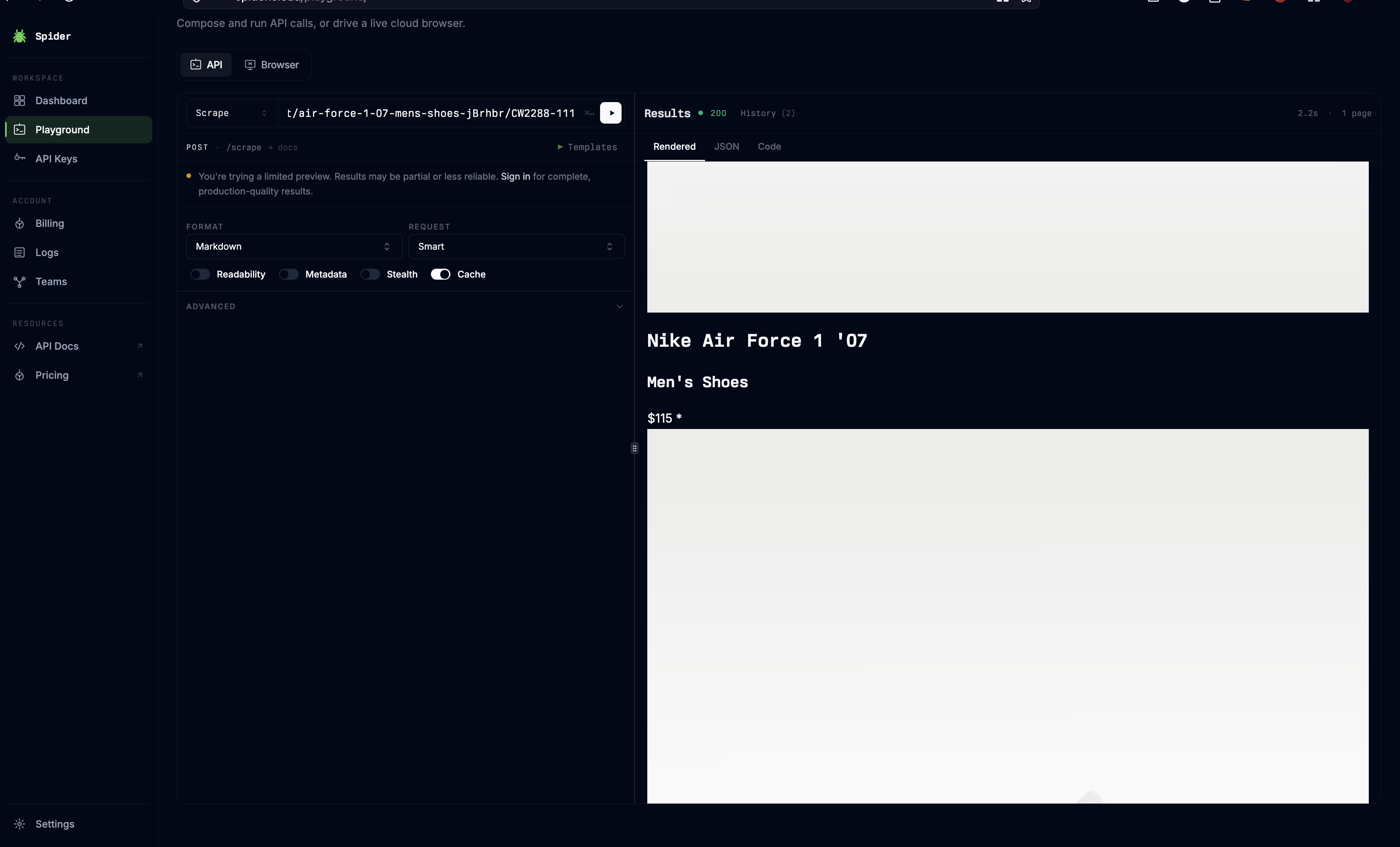
On the Nike product-page test, Spider extracted the product title, category, and $115 price, but large blank regions remained in the rendered output and the size-selection interface did not load. The result indicates Smart mode did not wait long enough for critical client-side components to finish hydrating.
Protected-site accessFailed on a site with active anti-bot protection.▾
Feature tested: Protected-site access
Result: Failed
Verdict: Failed on a site with active anti-bot protection.
Expected behavior: Spider attempts to fetch public URLs through its native scraping infrastructure, including pages that may apply security checks. This was tested on a Glassdoor jobs page to see whether Spider could get past a standard anti-bot interstitial.
Test case: Text prompt → Image
Input type: Text prompt
Input used: Input artifact (Text prompt): Glassdoor jobs URL
Observed output: Output artifact (Image): On the Glassdoor test, Spider returned a 'Humans only' security page with the blocking notice repeated in multiple languages instead of any job-listing content. — spider-spider-playground-glassdoor-humans-only.png
Input artifact: Input artifact (Text prompt): Glassdoor jobs URL
Output artifact: Output artifact (Image): On the Glassdoor test, Spider returned a 'Humans only' security page with the blocking notice repeated in multiple languages instead of any job-listing content. — spider-spider-playground-glassdoor-humans-only.png
What changed: Text prompt transformed into Image
Why it matters / Conclusion: Spider was not able to bypass the target site’s protection and returned only the block/interstitial page.
Spider attempts to fetch public URLs through its native scraping infrastructure, including pages that may apply security checks. This was tested on a Glassdoor jobs page to see whether Spider could get past a standard anti-bot interstitial.
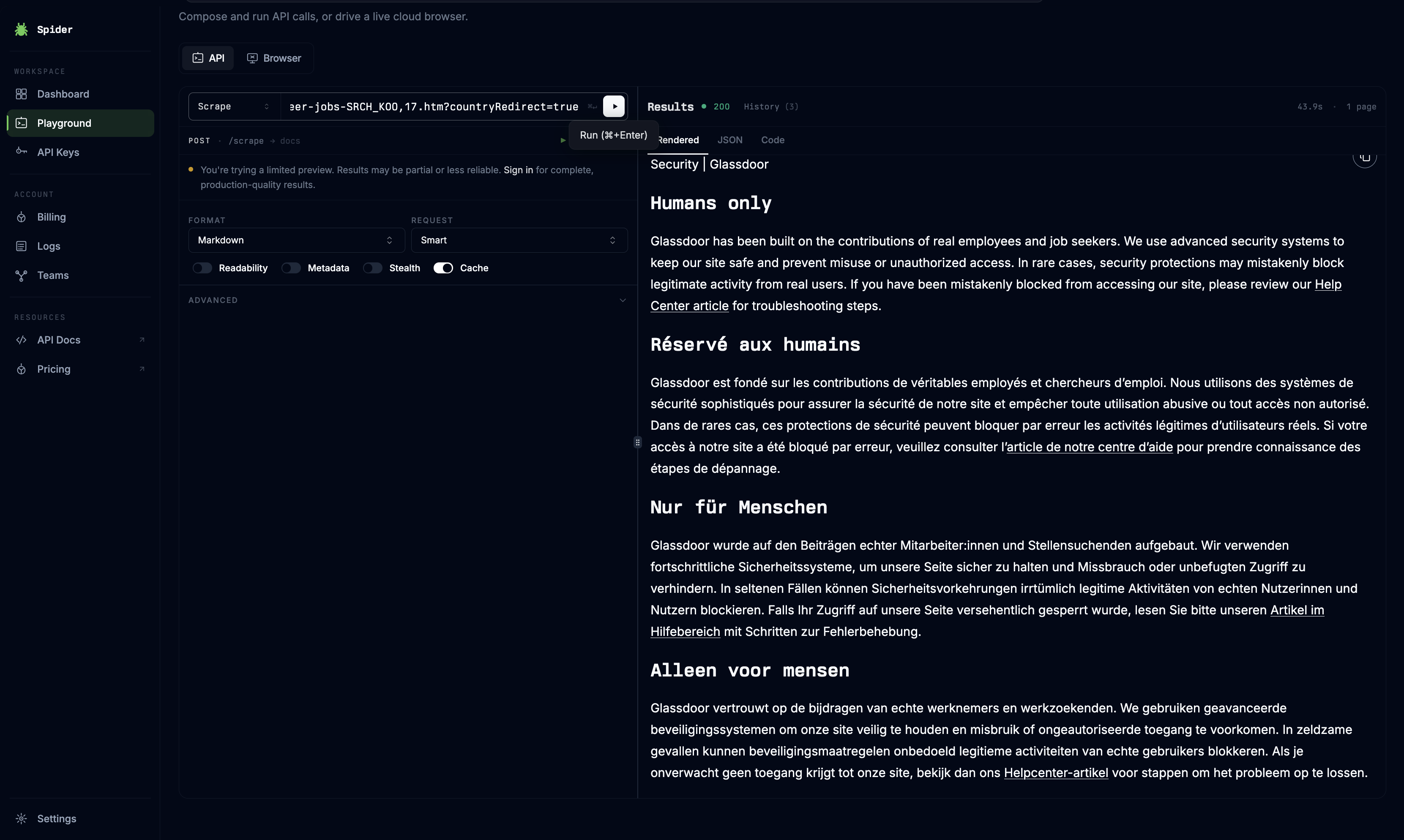
On the Glassdoor test, Spider returned a 'Humans only' security page with the blocking notice repeated in multiple languages instead of any job-listing content. The scrape was stopped at the protection layer, so no usable payload was extracted.
URL-to-Markdown extractionIt preserved the main recipe content accurately, but the returned markdown was heavily polluted by page chrome and secondary content.▾
Feature tested: URL-to-Markdown extraction
Result: Passed
Verdict: It preserved the main recipe content accurately, but the returned markdown was heavily polluted by page chrome and secondary content.
Expected behavior: Spider can scrape a public webpage through its cloud playground and return markdown without manual selector setup. On a noisy recipe blog page, it kept the ingredients block and step-by-step directions accurate, but it also dumped header navigation, submenu links, dietary links, social sharing URLs, cookie choice notices, and user reviews into the same markdown output.
Test case: Text prompt → Text prompt
Input type: Text prompt
Input used: Input artifact (Text prompt): Recipe blog page
Observed output: Output artifact (Text prompt): Observed markdown result
Input artifact: Input artifact (Text prompt): Recipe blog page
Output artifact: Output artifact (Text prompt): Observed markdown result
What changed: Text prompt transformed into Text prompt
Why it matters / Conclusion: Spider can capture the main text from a static page, but it did not clean the page structure well enough for downstream use without extra post-processing.
Spider can scrape a public webpage through its cloud playground and return markdown without manual selector setup. On a noisy recipe blog page, it kept the ingredients block and step-by-step directions accurate, but it also dumped header navigation, submenu links, dietary links, social sharing URLs, cookie choice notices, and user reviews into the same markdown output.
Smart rendering for dynamic pagesSpider's Smart mode did not reliably wait for client-side hydration to complete.▾
Feature tested: Smart rendering for dynamic pages
Result: Passed
Verdict: Spider's Smart mode did not reliably wait for client-side hydration to complete.
Expected behavior: Spider offers a Smart request mode intended to handle more complex pages. On a Nike single-page product page with asynchronously loaded content, it extracted structural product descriptions and basic marketing copy, but it missed the dynamically loaded size-selection module entirely and returned an empty layout node where sizing data should have appeared.
Test case: Text prompt → Text prompt
Input type: Text prompt
Input used: Input artifact (Text prompt): Nike SPA product page
Observed output: Output artifact (Text prompt): Observed dynamic rendering result
Input artifact: Input artifact (Text prompt): Nike SPA product page
Output artifact: Output artifact (Text prompt): Observed dynamic rendering result
What changed: Text prompt transformed into Text prompt
Why it matters / Conclusion: Spider handled some visible product copy, but it missed an important dynamic purchase element, which makes its Smart mode unreliable for JS-heavy ecommerce pages.
Spider offers a Smart request mode intended to handle more complex pages. On a Nike single-page product page with asynchronously loaded content, it extracted structural product descriptions and basic marketing copy, but it missed the dynamically loaded size-selection module entirely and returned an empty layout node where sizing data should have appeared.
Proxy-based access to protected sitesSpider failed completely on the protected target in this test.▾
Feature tested: Proxy-based access to protected sites
Result: Passed
Verdict: Spider failed completely on the protected target in this test.
Expected behavior: Spider relies on its own scraping infrastructure and proxies to reach target pages automatically. On a Glassdoor page protected by Cloudflare, the request was blocked before extraction began, and the returned text consisted only of CAPTCHA and security-warning language rather than page content.
Test case: Text prompt → Text prompt
Input type: Text prompt
Input used: Input artifact (Text prompt): Glassdoor page behind Cloudflare
Observed output: Output artifact (Text prompt): Observed anti-bot result
Input artifact: Input artifact (Text prompt): Glassdoor page behind Cloudflare
Output artifact: Output artifact (Text prompt): Observed anti-bot result
What changed: Text prompt transformed into Text prompt
Why it matters / Conclusion: Spider's native proxies did not mask the scraper successfully enough to reach this Cloudflare-protected page.
Spider relies on its own scraping infrastructure and proxies to reach target pages automatically. On a Glassdoor page protected by Cloudflare, the request was blocked before extraction began, and the returned text consisted only of CAPTCHA and security-warning language rather than page content.
Usage-based pricing
The source report describes Spider as pay-as-you-go rather than subscription-first.
Pricing was taken from the researcher’s report and was not independently validated with a billing artifact in this task.
Is This Right For You?
A side-by-side guide based on our hands-on testing.
Banner Preview
How the embed badge will look on your site

Embed HTML
Copy this code to your website source
Quick Integration Guide
- 1Copy the HTML code block above.
- 2Paste it into your site's HTML or CMS editor.
- 3Banner appears instantly on your page.
- 4Links back to your tool profile here.
Similar Tools
Discover more AI tools like Spider to enhance your workflow.
Comments (0)
Need a custom AI solution for this use case?
If you are looking to build a custom web scraping, page extraction, or data collection workflow for your business or internal workflow, email us at contact@futuresmart.ai.
Found something inaccurate or missing? We try to keep our AI research accurate and useful. If you found outdated information, an issue, or have a suggestion, email us at collaborate@aidemos.com.