Firecrawl is strongest when you want a lot of usable page content from live web search or single-URL scraping, especially on JavaScript-hydrated and public anti-bot-protected pages, and you do not want to write selectors. The tradeoff is that the output is often noisy and flattened rather than semantically cleaned, so it works best with a downstream cleanup step. As a search layer, it returned very large rendered-page results, but recall, freshness, and multi-source performance were only middling, and it was the slowest, most credit-hungry tool in the benchmark.
Screen recording of the Firecrawl playground used during the hands-on evaluation.
In-Depth Review
Our detailed analysis of Firecrawl — features, performance, and real-world testing.
AD
AI Demos Team
Expert Reviewer
Verified Review
Feature-by-Feature Breakdown
Live Web Search with Markdown Extraction
Returns full-page markdown from search results, with very large content volume, but retrieval quality is mixed.
▾
Test Summary
Feature tested: Live Web Search with Markdown Extraction
Result: Partial — Returns full-page markdown from search results, with very large content volume, but retrieval quality is mixed.
Feature tested: Live Web Search with Markdown Extraction
Result: Partial
Verdict: Returns full-page markdown from search results, with very large content volume, but retrieval quality is mixed.
Expected behavior: Firecrawl's `/v2/search` mode with `scrapeOptions.formats=[markdown]` returned substantially more usable text than snippet-first search APIs on answerable benchmark queries. The same search behavior also stayed non-fabricating on unanswerable probes such as Serper SOC2 date, Jina ARR, Exa Enterprise pricing, Olostep index size, and Linkup index size.
What changed: Text prompt transformed into Text prompt
Test case: Text prompt → Text/code file
Input type: Text prompt
Input used: Input artifact (Text prompt): Input
Observed output: Output artifact (Text/code file): Returned generic SOC2 explainer content rather than inventing a Serper-specific date. — FIRECRAWL-raw-Q48.json
Output artifact: Output artifact (Text/code file): Returned generic SOC2 explainer content rather than inventing a Serper-specific date. — FIRECRAWL-raw-Q48.json
What changed: Text prompt transformed into Text/code file
Test case: Text prompt → Text/code file
Input type: Text prompt
Input used: Input artifact (Text prompt): Input
Observed output: Output artifact (Text/code file): Surfaced the same GetLatka artifact seen in other tools, including the '$6.3M Est. ARR' page. — FIRECRAWL-raw-Q49.json
Output artifact: Output artifact (Text/code file): Surfaced the same GetLatka artifact seen in other tools, including the '$6.3M Est. ARR' page. — FIRECRAWL-raw-Q49.json
What changed: Text prompt transformed into Text/code file
Test case: Text prompt → Text/code file
Input type: Text prompt
Input used: Input artifact (Text prompt): Input
Observed output: Output artifact (Text/code file): Surfaced Exa's real pricing-page content without inventing an Enterprise-specific number. — FIRECRAWL-raw-Q50.json
Output artifact: Output artifact (Text/code file): Surfaced Exa's real pricing-page content without inventing an Enterprise-specific number. — FIRECRAWL-raw-Q50.json
What changed: Text prompt transformed into Text/code file
Test case: Text prompt → Text/code file
Input type: Text prompt
Input used: Input artifact (Text prompt): Input
Observed output: Output artifact (Text/code file): Surfaced Olostep's own homepage/docs content without inventing a specific page count. — FIRECRAWL-raw-Q51.json
Output artifact: Output artifact (Text/code file): Surfaced Olostep's own homepage/docs content without inventing a specific page count. — FIRECRAWL-raw-Q51.json
What changed: Text prompt transformed into Text/code file
Test case: Text prompt → Text/code file
Input type: Text prompt
Input used: Input artifact (Text prompt): Input
Observed output: Output artifact (Text/code file): Surfaced Linkup marketing content and an unrelated YouTube interview, not the claimed 'billions of pages a day' detail. — FIRECRAWL-raw-Q52.json
Output artifact: Output artifact (Text/code file): Surfaced Linkup marketing content and an unrelated YouTube interview, not the claimed 'billions of pages a day' detail. — FIRECRAWL-raw-Q52.json
What changed: Text prompt transformed into Text/code file
Why it matters / Conclusion: Good when the model needs a lot of source text, but not a clear winner on retrieval quality, freshness, or speed.
Firecrawl's `/v2/search` mode with `scrapeOptions.formats=[markdown]` returned substantially more usable text than snippet-first search APIs on answerable benchmark queries. The same search behavior also stayed non-fabricating on unanswerable probes such as Serper SOC2 date, Jina ARR, Exa Enterprise pricing, Olostep index size, and Linkup index size.
INPUT
Fixed 52-query web-search benchmark run through Firecrawl `/v2/search` with `limit=10`, `scrapeOptions.formats=[markdown]`, same input set, same timeout, region `ap-south-1`.
↓→
OUTPUT
Top-1 34.0% (16/47), top-3 55.3% (26/47), top-10 66.0% (31/47). Per-block top-3: current fact 60%, niche tech 58%, ambiguity 86%, multi-source 17%, content-depth 83%, freshness 17%. Median content was 18,437 chars, and web results exposed no published-date field.
INPUT
Q48 — Serper SOC2 date probe.
↓→
file
FIRECRAWL-raw-Q48.json
Loading file...
Returned generic SOC2 explainer content rather than inventing a Serper-specific date.
INPUT
Q49 — Jina ARR probe.
↓→
file
FIRECRAWL-raw-Q49.json
Loading file...
Surfaced the same GetLatka artifact seen in other tools, including the '$6.3M Est. ARR' page.
INPUT
Q50 — Exa Enterprise price probe.
↓→
file
FIRECRAWL-raw-Q50.json
Loading file...
Surfaced Exa's real pricing-page content without inventing an Enterprise-specific number.
INPUT
Q51 — Olostep index size probe.
↓→
file
FIRECRAWL-raw-Q51.json
Loading file...
Surfaced Olostep's own homepage/docs content without inventing a specific page count.
INPUT
Q52 — Linkup index size probe.
↓→
file
FIRECRAWL-raw-Q52.json
Loading file...
Surfaced Linkup marketing content and an unrelated YouTube interview, not the claimed 'billions of pages a day' detail.
Bottom Line
Good when the model needs a lot of source text, but not a clear winner on retrieval quality, freshness, or speed.
From our researchSearch the Web From an Agent — Web Search & Answer APIs Compared
Robust Dynamic-Page Scraping
Previously reported to scrape JS-rendered and bot-protected public pages without manual selectors.
▾
Test Summary
Feature tested: Robust Dynamic-Page Scraping
Result: Passed — Previously reported to scrape JS-rendered and bot-protected public pages without manual selectors.
Feature tested: Robust Dynamic-Page Scraping
Result: Passed
Verdict: Previously reported to scrape JS-rendered and bot-protected public pages without manual selectors.
Expected behavior: Firecrawl was reported to scrape a static recipe page, a JavaScript-hydrated Nike product page, and a Glassdoor jobs page behind anti-bot protections without manual selectors. The published report also noted that the resulting markdown could be noisy.
What changed: Text prompt transformed into Text prompt
Why it matters / Conclusion: Still a useful published strength, but it was not revalidated in this 2026-09-04 search run.
Firecrawl was reported to scrape a static recipe page, a JavaScript-hydrated Nike product page, and a Glassdoor jobs page behind anti-bot protections without manual selectors. The published report also noted that the resulting markdown could be noisy.
INPUT
Prior published-page test set: a static recipe page, a JavaScript-hydrated Nike product page, and a Glassdoor jobs page behind anti-bot protections.
↓→
OUTPUT
The earlier report said Firecrawl fetched those pages without manual selectors, but the markdown behaved like a flattened DOM dump and needed cleanup.
Bottom Line
Still a useful published strength, but it was not revalidated in this 2026-09-04 search run.
From our researchSearch the Web From an Agent — Web Search & Answer APIs Compared
URL-to-Markdown Extraction
Accurate text capture, but poor semantic filtering.
▾
Test Summary
Feature tested: URL-to-Markdown Extraction
Result: Partial — Accurate text capture, but poor semantic filtering.
Feature tested: URL-to-Markdown Extraction
Result: Partial
Verdict: Accurate text capture, but poor semantic filtering.
Expected behavior: Converts a public URL into Markdown without manual CSS selectors or DOM mapping. The member cards were exercised on recipe-blog pages, where Firecrawl preserved article structure and core text while also carrying along some boilerplate and page chrome.
Test case: Text prompt → Text prompt
Input type: Text prompt
Input used: Input artifact (Text prompt): Recipe blog URL
Observed output: Output artifact (Text prompt): Observed result
Input artifact: Input artifact (Text prompt): Recipe blog URL
Output artifact: Output artifact (Text prompt): Observed result
What changed: Text prompt transformed into Text prompt
Test case: Text prompt → Image
Input type: Text prompt
Input used: Input artifact (Text prompt): Input
Observed output: Output artifact (Image): Firecrawl preserved the article's headings, ingredients, and step-by-step baking workflow, but it also scraped the full multi-level navigation tree, sidebar components, thousands of user review nodes, and the footer block. — output1.png
Output artifact: Output artifact (Image): Firecrawl preserved the article's headings, ingredients, and step-by-step baking workflow, but it also scraped the full multi-level navigation tree, sidebar components, thousands of user review nodes, and the footer block. — output1.png
What changed: Text prompt transformed into Image
Why it matters / Conclusion: Good at flattening page text into Markdown; not good at separating main content from site chrome.
Converts a public URL into Markdown without manual CSS selectors or DOM mapping. The member cards were exercised on recipe-blog pages, where Firecrawl preserved article structure and core text while also carrying along some boilerplate and page chrome.
INPUT
Static but boilerplate-heavy recipe blog page used to test noise reduction and clean Markdown extraction.
↓→
OUTPUT
The URL processed successfully in the interface with zero custom CSS selection. Markdown formatting was structurally correct, including headings and lists, and the core article layout, ingredients table, and baking workflow were extracted accurately. However, semantic filtering was effectively absent: the output included multi-level primary navigation links, historical sidebar modules, thousands of review entries, and footer content mixed into the article body.
INPUT
Public recipe blog URL with heavy navigation, historical sidebar components, user reviews, and a footer block.
↓→
OUTPUT
Firecrawl preserved the article's headings, ingredients, and step-by-step baking workflow, but it also scraped the full multi-level navigation tree, sidebar components, thousands of user review nodes, and the footer block.
Bottom Line
Good at flattening page text into Markdown; not good at separating main content from site chrome.
From our researchearlier researchScrape Web Pages Into Clean Markdown or Structured Data Using AI
Expected behavior: Renders client-side JavaScript before extracting page content. The member cards were exercised on a Nike product page / SPA, where Firecrawl waited for hydration and captured dynamic product details such as title, price, and size availability.
Output artifact: Output artifact (Text prompt): Observed result
What changed: Text prompt transformed into Text prompt
Test case: Text prompt → Image
Input type: Text prompt
Input used: Input artifact (Text prompt): Input
Observed output: Output artifact (Image): Firecrawl waited for JavaScript hydration and captured the title, pricing, and full size menu, but it also returned raw backend code artifacts, localization links, and raw media-attachment trees. — firecrawl_output_1.png
Output artifact: Output artifact (Image): Firecrawl waited for JavaScript hydration and captured the title, pricing, and full size menu, but it also returned raw backend code artifacts, localization links, and raw media-attachment trees. — firecrawl_output_1.png
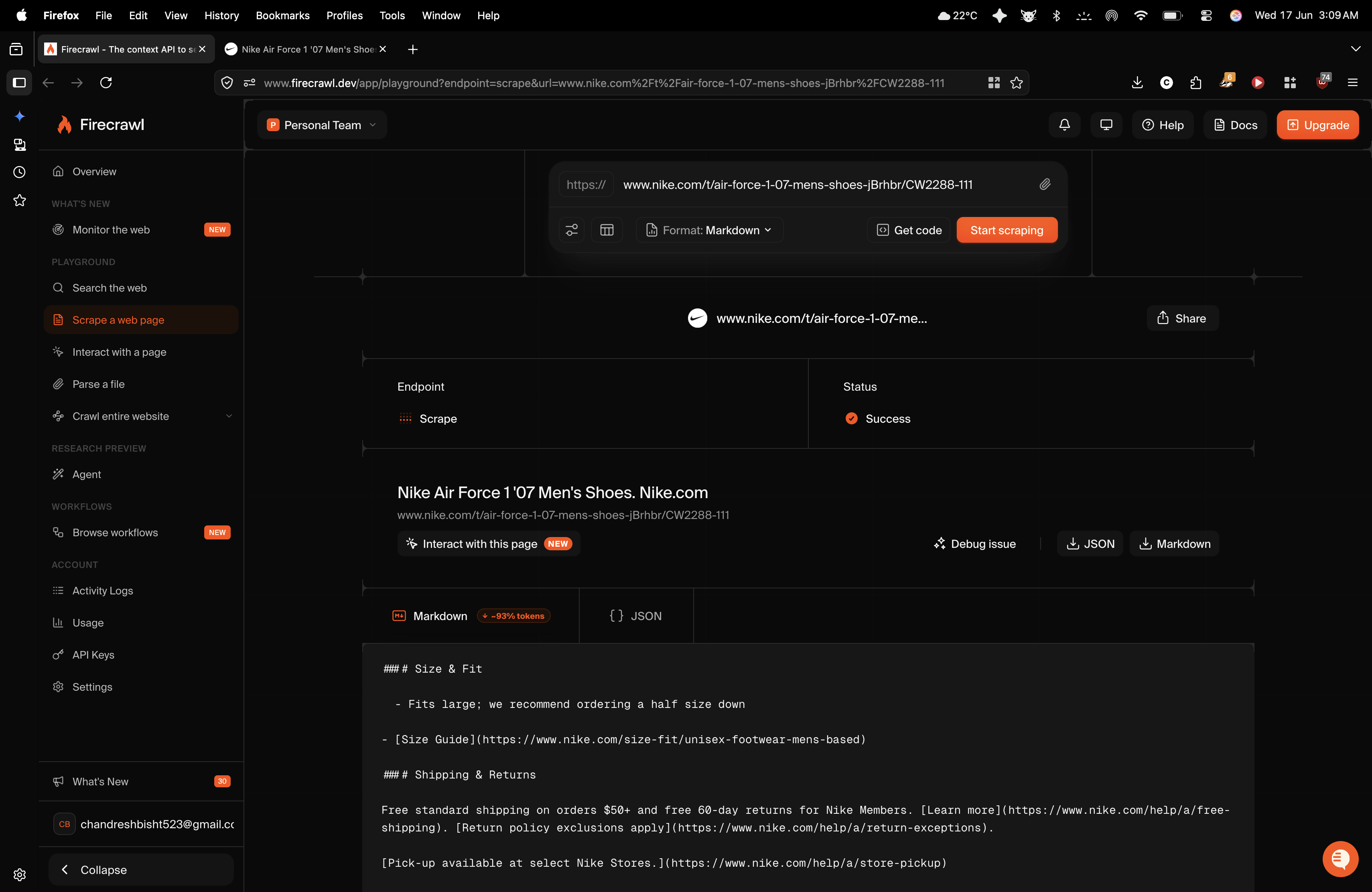
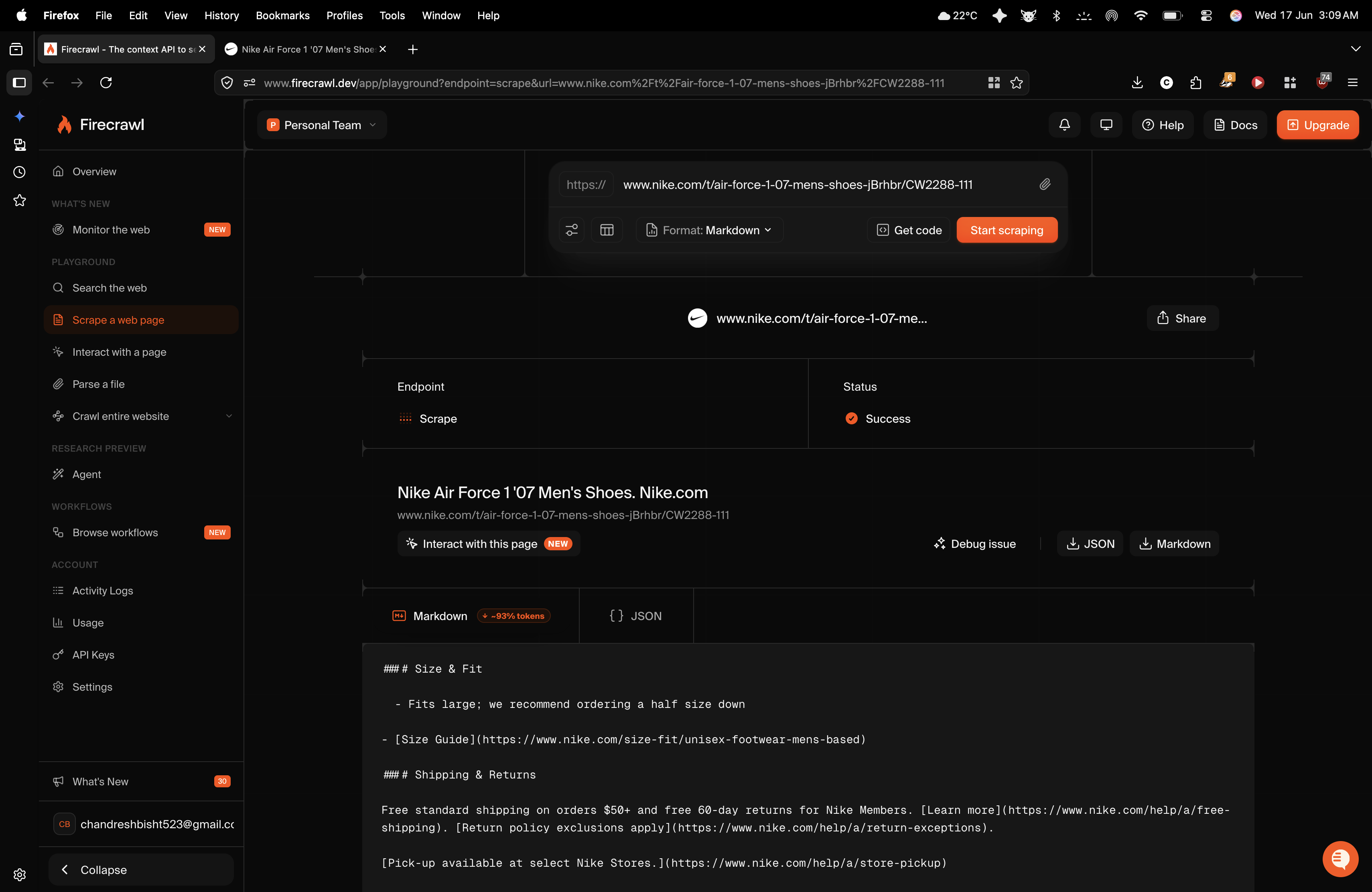
Observed output: Output artifact (Image): Firecrawl returned a successful Markdown scrape of the Nike product page with the rendered product title and key sections such as Size & Fit and Shipping & Retu — firecrawl-firecrawl-nike-scrape-markdown-output.png
Output artifact: Output artifact (Image): Firecrawl returned a successful Markdown scrape of the Nike product page with the rendered product title and key sections such as Size & Fit and Shipping & Retu — firecrawl-firecrawl-nike-scrape-markdown-output.png
What changed: Text prompt transformed into Image
Why it matters / Conclusion: Reliable for pulling data that only appears after hydration, but the returned Markdown is still noisy and messy.
Renders client-side JavaScript before extracting page content. The member cards were exercised on a Nike product page / SPA, where Firecrawl waited for hydration and captured dynamic product details such as title, price, and size availability.
INPUT
Dynamic Nike product page used to test asynchronous client-side rendering and extraction after JavaScript hydration.
↓→
OUTPUT
Firecrawl processed the dynamic link through its normal flow and handled browser rendering server-side. It extracted critical product state, including title, pricing, and the complete size menu, showing that JavaScript execution completed successfully. At the same time, the Markdown contained raw backend/code artifacts such as %ESI_AUDIENCE_SEGMENTATION%, plus global localization links, background asset tags, raw media attachment matrices, and image URL trees.
INPUT
Nike single-page product page with asynchronous client-side JavaScript hydration and dynamically loaded size variations.
↓→
OUTPUT
Firecrawl waited for JavaScript hydration and captured the title, pricing, and full size menu, but it also returned raw backend code artifacts, localization links, and raw media-attachment trees.
INPUT
Nike Air Force 1 ’07 men’s shoes page, tested as a JavaScript-heavy product page to check whether Firecrawl could wait for hydration and capture dynamic content.
↓→
image
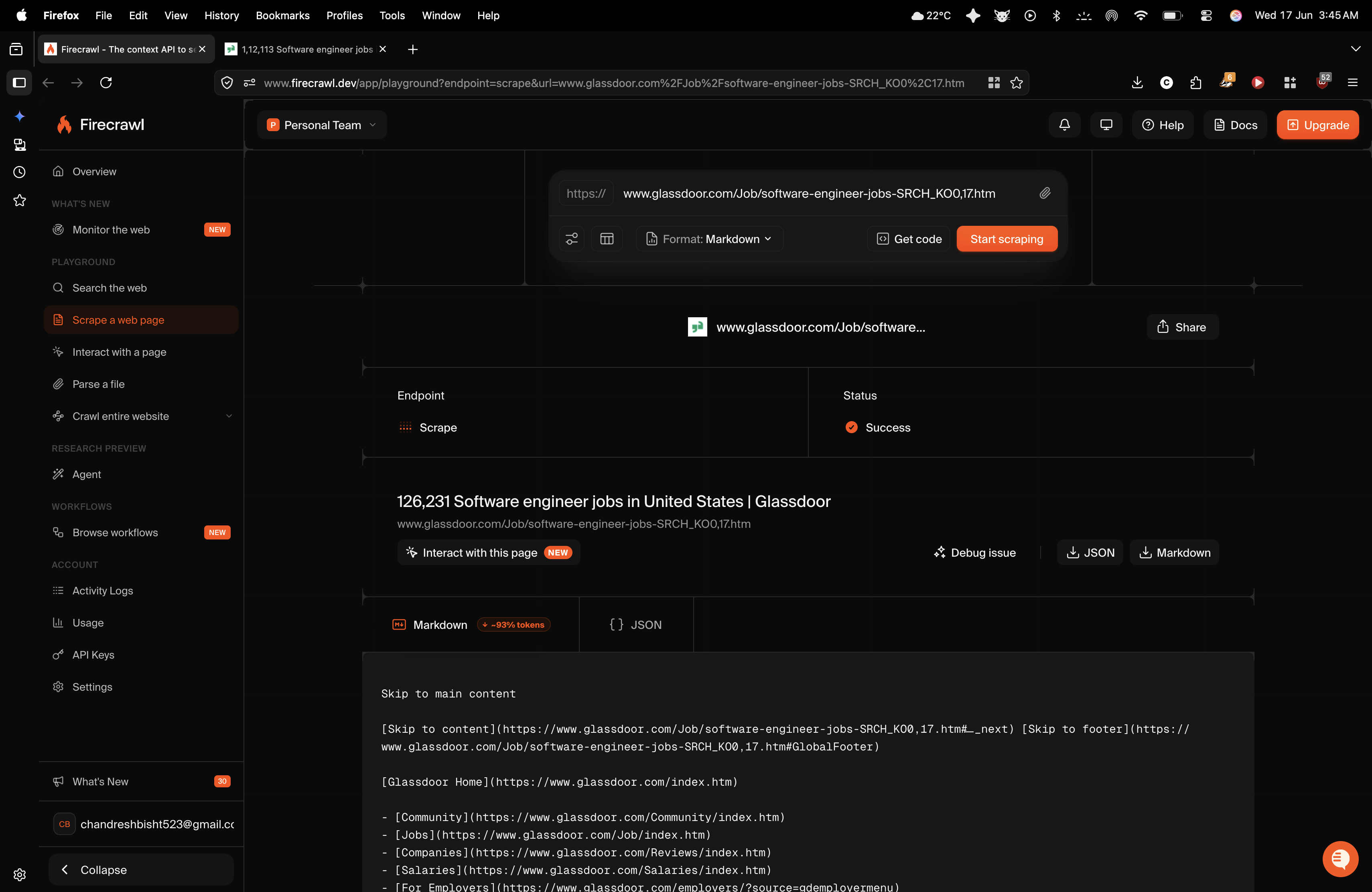
Firecrawl returned a successful Markdown scrape of the Nike product page with the rendered product title and key sections such as Size & Fit and Shipping & Returns. The researcher also observed that the full menu of dynamically loaded size variations was captured, confirming JavaScript execution. However, the output still contained extra localization links, asset references, and raw media-related clutter instead of a tightly cleaned product extract.
Bottom Line
Reliable for pulling data that only appears after hydration, but the returned Markdown is still noisy and messy.
From our researchearlier researchScrape Web Pages Into Clean Markdown or Structured Data Using AI
Anti-Bot Protected Page Access
It got through the wall, but not cleanly.
▾
Test Summary
Feature tested: Anti-Bot Protected Page Access
Result: Partial — It got through the wall, but not cleanly.
Feature tested: Anti-Bot Protected Page Access
Result: Partial
Verdict: It got through the wall, but not cleanly.
Expected behavior: Accesses public pages protected by anti-bot or edge-defense layers and returns the underlying content. The member cards were exercised on a Glassdoor job listing, where Firecrawl got through Cloudflare-style protection and retrieved live job information despite noisy output.
Output artifact: Output artifact (Text prompt): Observed result
What changed: Text prompt transformed into Text prompt
Test case: Text prompt → Image
Input type: Text prompt
Input used: Input artifact (Text prompt): Input
Observed output: Output artifact (Image): Firecrawl bypassed the protection layer and recovered the job listing, corporate profile name, salary estimates, and required skill arrays, but the result was interleaved with navigation buttons, search filters, login fields, and internal links. — firecrawl_output_3.png
Output artifact: Output artifact (Image): Firecrawl bypassed the protection layer and recovered the job listing, corporate profile name, salary estimates, and required skill arrays, but the result was interleaved with navigation buttons, search filters, login fields, and internal links. — firecrawl_output_3.png
What changed: Text prompt transformed into Image
Test case: Text prompt → Image
Input type: Text prompt
Input used: Input artifact (Text prompt): Protected jobs page URL
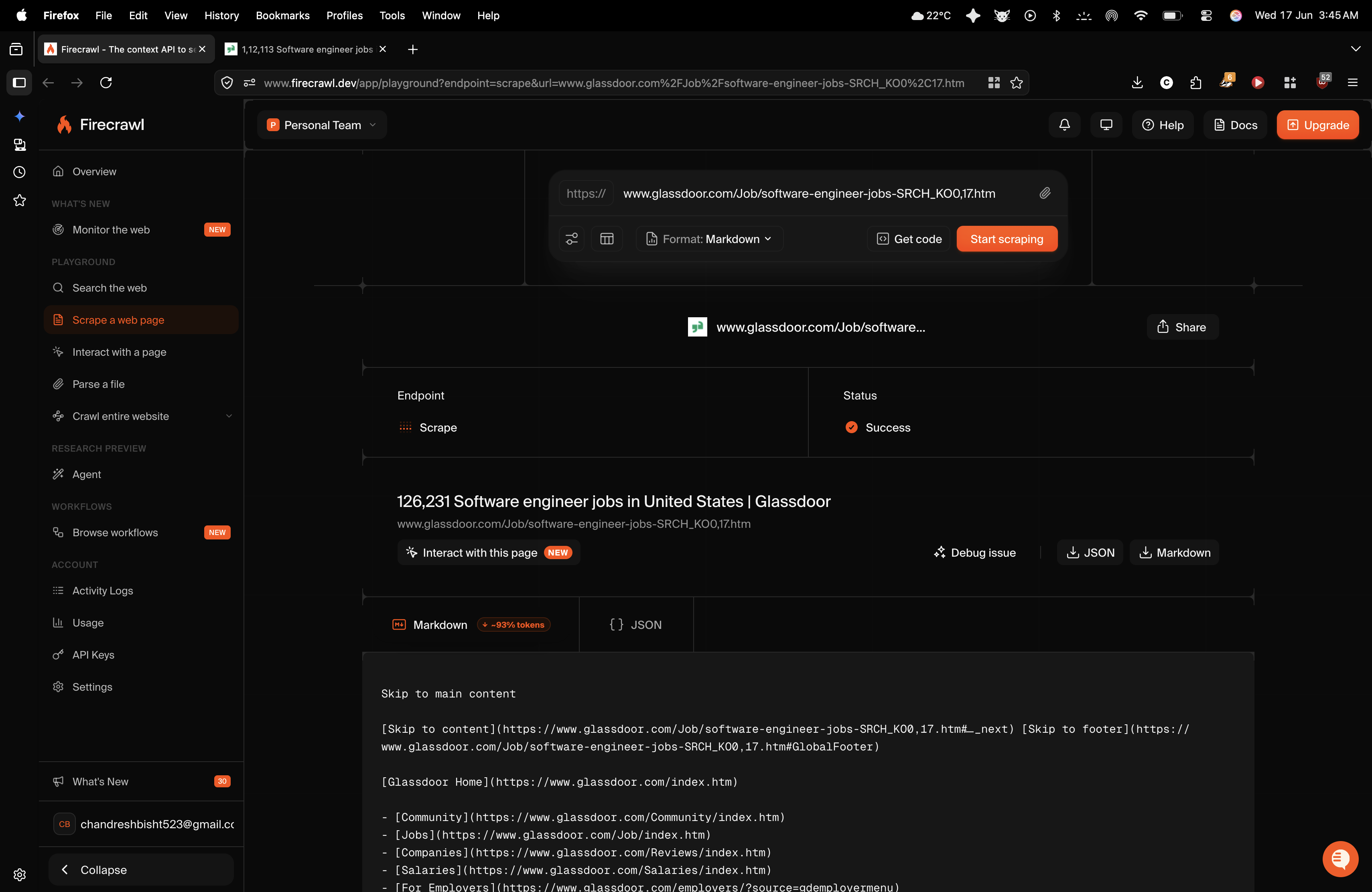
Observed output: Output artifact (Image): Firecrawl returned a successful Markdown scrape of the Glassdoor jobs page, including jobs-page text and navigation links. The researcher reported that it bypas — firecrawl-firecrawl-glassdoor-scrape-markdown-output.png
Input artifact: Input artifact (Text prompt): Protected jobs page URL
Output artifact: Output artifact (Image): Firecrawl returned a successful Markdown scrape of the Glassdoor jobs page, including jobs-page text and navigation links. The researcher reported that it bypas — firecrawl-firecrawl-glassdoor-scrape-markdown-output.png
What changed: Text prompt transformed into Image
Why it matters / Conclusion: Strong access layer for protected public pages, but the extracted Markdown still needs post-processing to become usable.
Accesses public pages protected by anti-bot or edge-defense layers and returns the underlying content. The member cards were exercised on a Glassdoor job listing, where Firecrawl got through Cloudflare-style protection and retrieved live job information despite noisy output.
INPUT
Public Glassdoor job page used to test anti-bot resistance and extraction quality behind an interstitial/protected environment.
↓→
OUTPUT
Firecrawl bypassed the cloud proxy/firewall layer and returned text from the protected page without manual intervention. It pulled active software engineering job listings, company names, salary estimates, and required skill arrays. But the output mixed this core content with raw UI button text such as apply/search elements, search filter blocks, internal page links, and login-related fields.
INPUT
Glassdoor job listing page behind anti-bot protections, with active software engineering roles and salary estimates.
↓→
OUTPUT
Firecrawl bypassed the protection layer and recovered the job listing, corporate profile name, salary estimates, and required skill arrays, but the result was interleaved with navigation buttons, search filters, login fields, and internal links.
INPUT
Glassdoor software engineer jobs listing page, tested to see whether Firecrawl could get past anti-bot protections and extract usable content from a noisy jobs interface.
↓→
image
Firecrawl returned a successful Markdown scrape of the Glassdoor jobs page, including jobs-page text and navigation links. The researcher reported that it bypassed the page’s protection layer and pulled active job listings, company names, salary information, and technical skill details, but the resulting text was broken up by navigation controls, filters, internal links, and login-related layout elements.
Bottom Line
Strong access layer for protected public pages, but the extracted Markdown still needs post-processing to become usable.
From our researchearlier researchScrape Web Pages Into Clean Markdown or Structured Data Using AI
Single-URL page scraping to Markdown
It preserved article text and markdown structure, but did not meaningfully filter site boilerplate.
▾
Test Summary
Feature tested: Single-URL page scraping to Markdown
Result: Passed — It preserved article text and markdown structure, but did not meaningfully filter site boilerplate.
Feature tested: Single-URL page scraping to Markdown
Result: Passed
Verdict: It preserved article text and markdown structure, but did not meaningfully filter site boilerplate.
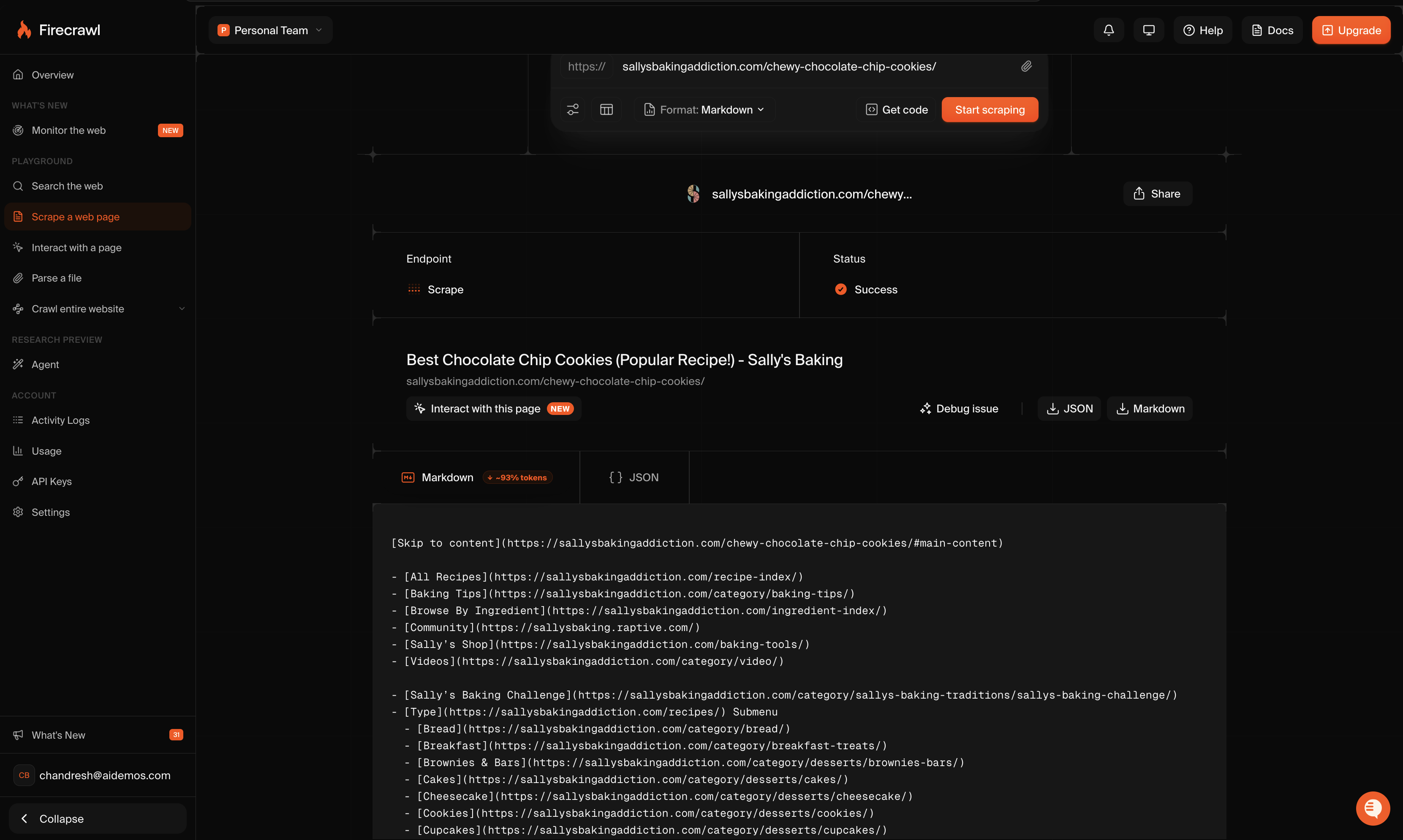
Expected behavior: Firecrawl can take a public URL and return a Markdown version of the page without manual CSS selection. This was tested on Sally’s Baking Addiction’s chewy chocolate chip cookies page, where it preserved the article’s textual structure, including headings, lists, and linked sections, but also pulled large amounts of navigation, sidebar, review, and footer content into the same output.
Test case: Text prompt → Image
Input type: Text prompt
Input used: Input artifact (Text prompt): Recipe blog URL
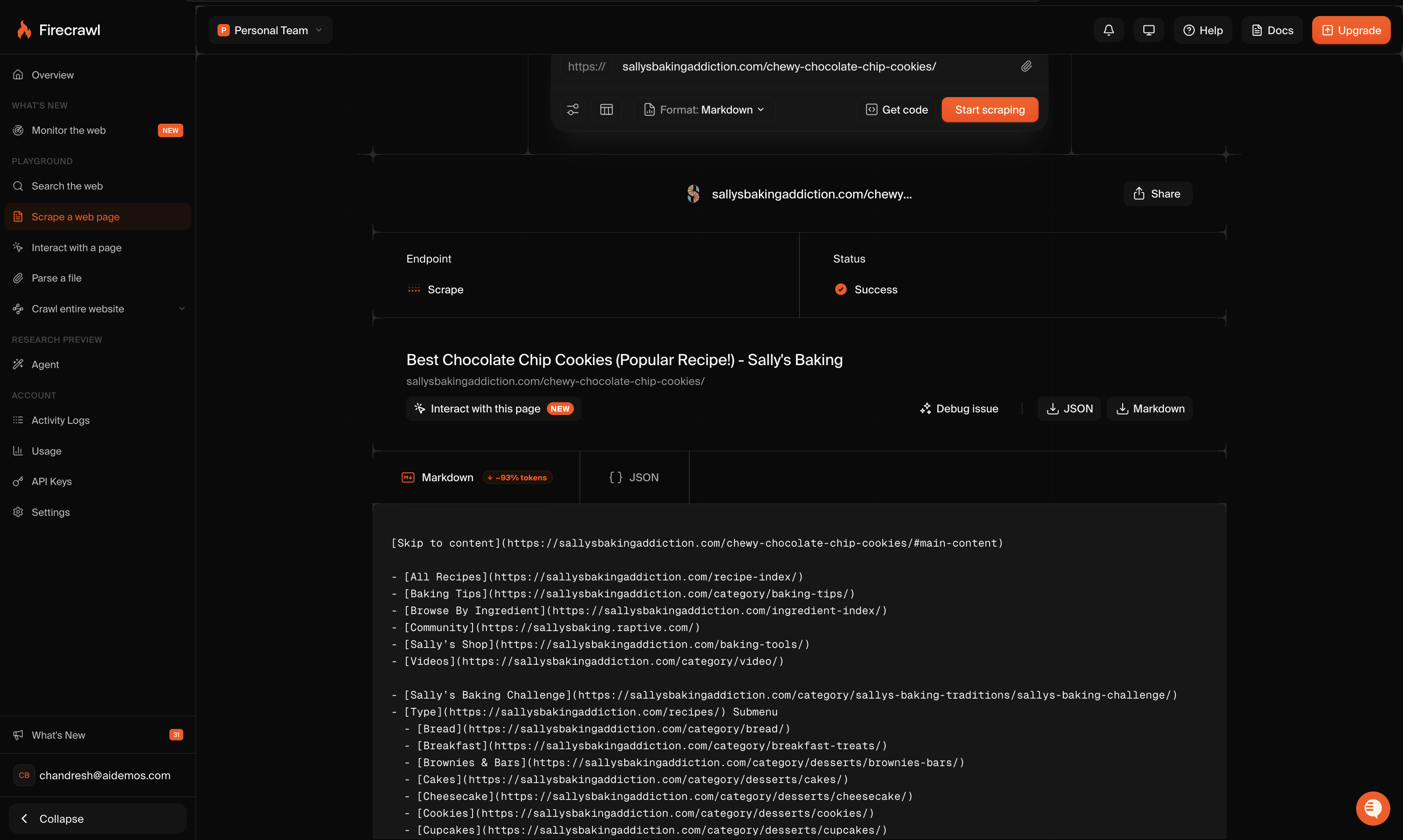
Observed output: Output artifact (Image): Firecrawl returned a successful Markdown scrape of the Sally’s Baking Addiction recipe page. The output preserved the page title, heading structure, links, ingr — firecrawl-firecrawl-scrape-dashboard-nike-page.png
Input artifact: Input artifact (Text prompt): Recipe blog URL
Output artifact: Output artifact (Image): Firecrawl returned a successful Markdown scrape of the Sally’s Baking Addiction recipe page. The output preserved the page title, heading structure, links, ingr — firecrawl-firecrawl-scrape-dashboard-nike-page.png
What changed: Text prompt transformed into Image
Why it matters / Conclusion: Good raw Markdown conversion from a public URL, weak semantic cleanup.
Firecrawl can take a public URL and return a Markdown version of the page without manual CSS selection. This was tested on Sally’s Baking Addiction’s chewy chocolate chip cookies page, where it preserved the article’s textual structure, including headings, lists, and linked sections, but also pulled large amounts of navigation, sidebar, review, and footer content into the same output.
INPUT
Sally’s Baking Addiction chewy chocolate chip cookies page, tested as a noisy static article to see whether Firecrawl could isolate the main content in clean Markdown.
↓→
image
Firecrawl returned a successful Markdown scrape of the Sally’s Baking Addiction recipe page. The output preserved the page title, heading structure, links, ingredients, and recipe flow, but it also included major site-wide navigation items, category links, and other boilerplate instead of isolating only the main article body.
Bottom Line
Good raw Markdown conversion from a public URL, weak semantic cleanup.
From our researchearlier research
JavaScript-rendered page extraction
It successfully waited for client-side rendering and captured dynamic product details, but the final Markdown remained cluttered.
Verdict: It successfully waited for client-side rendering and captured dynamic product details, but the final Markdown remained cluttered.
Expected behavior: Firecrawl can scrape pages that rely on client-side JavaScript hydration. This was tested on a Nike Air Force 1 product page, where it captured dynamic product details and the full size run after rendering, showing that the tool waited for the page’s JavaScript state to load before extracting content.
Observed output: Output artifact (Image): Firecrawl returned a successful Markdown scrape of the Nike product page with the rendered product title and key sections such as Size & Fit and Shipping & Retu — firecrawl-firecrawl-nike-scrape-markdown-output.png
Output artifact: Output artifact (Image): Firecrawl returned a successful Markdown scrape of the Nike product page with the rendered product title and key sections such as Size & Fit and Shipping & Retu — firecrawl-firecrawl-nike-scrape-markdown-output.png
What changed: Text prompt transformed into Image
Why it matters / Conclusion: Strong JS rendering support, but not strong content cleanup.
Firecrawl can scrape pages that rely on client-side JavaScript hydration. This was tested on a Nike Air Force 1 product page, where it captured dynamic product details and the full size run after rendering, showing that the tool waited for the page’s JavaScript state to load before extracting content.
INPUT
Nike Air Force 1 ’07 men’s shoes page, tested as a JavaScript-heavy product page to check whether Firecrawl could wait for hydration and capture dynamic content.
↓→
image
Firecrawl returned a successful Markdown scrape of the Nike product page with the rendered product title and key sections such as Size & Fit and Shipping & Returns. The researcher also observed that the full menu of dynamically loaded size variations was captured, confirming JavaScript execution. However, the output still contained extra localization links, asset references, and raw media-related clutter instead of a tightly cleaned product extract.
Bottom Line
Strong JS rendering support, but not strong content cleanup.
From our researchearlier researchScrape Web Pages Into Clean Markdown or Structured Data Using AI
Anti-bot page access
It got through a protected jobs page and pulled useful job data, but the extracted text was still mixed with interface noise.
▾
Test Summary
Feature tested: Anti-bot page access
Result: Passed — It got through a protected jobs page and pulled useful job data, but the extracted text was still mixed with interface noise.
Feature tested: Anti-bot page access
Result: Passed
Verdict: It got through a protected jobs page and pulled useful job data, but the extracted text was still mixed with interface noise.
Expected behavior: Firecrawl can access and extract content from pages protected by anti-bot layers. This was tested on a Glassdoor software engineer jobs page, where it successfully returned live jobs-page content despite Cloudflare-style protections and heavy page chrome.
Test case: Text prompt → Image
Input type: Text prompt
Input used: Input artifact (Text prompt): Protected jobs page URL
Observed output: Output artifact (Image): Firecrawl returned a successful Markdown scrape of the Glassdoor jobs page, including jobs-page text and navigation links. The researcher reported that it bypas — firecrawl-firecrawl-glassdoor-scrape-markdown-output.png
Input artifact: Input artifact (Text prompt): Protected jobs page URL
Output artifact: Output artifact (Image): Firecrawl returned a successful Markdown scrape of the Glassdoor jobs page, including jobs-page text and navigation links. The researcher reported that it bypas — firecrawl-firecrawl-glassdoor-scrape-markdown-output.png
What changed: Text prompt transformed into Image
Why it matters / Conclusion: Very good at getting data out of protected pages, but the output is not clean enough to use as-is.
Firecrawl can access and extract content from pages protected by anti-bot layers. This was tested on a Glassdoor software engineer jobs page, where it successfully returned live jobs-page content despite Cloudflare-style protections and heavy page chrome.
INPUT
Glassdoor software engineer jobs listing page, tested to see whether Firecrawl could get past anti-bot protections and extract usable content from a noisy jobs interface.
↓→
image
Firecrawl returned a successful Markdown scrape of the Glassdoor jobs page, including jobs-page text and navigation links. The researcher reported that it bypassed the page’s protection layer and pulled active job listings, company names, salary information, and technical skill details, but the resulting text was broken up by navigation controls, filters, internal links, and login-related layout elements.
Bottom Line
Very good at getting data out of protected pages, but the output is not clean enough to use as-is.
From our researchearlier researchScrape Web Pages Into Clean Markdown or Structured Data Using AI
Zero-selector Markdown extraction
Accurate text capture, but poor semantic filtering.
▾
Test Summary
Feature tested: Zero-selector Markdown extraction
Result: Partial — Accurate text capture, but poor semantic filtering.
Feature tested: Zero-selector Markdown extraction
Result: Partial
Verdict: Accurate text capture, but poor semantic filtering.
Expected behavior: Converts a public URL into Markdown without manual DOM selection. On a noisy recipe blog, Firecrawl preserved the article structure, ingredients, and step-by-step baking instructions with strong textual fidelity, but it also scraped the full primary navigation tree, sidebar/history components, thousands of user review nodes, and the footer into the same Markdown output.
Test case: Text prompt → Text prompt
Input type: Text prompt
Input used: Input artifact (Text prompt): Recipe blog URL
Observed output: Output artifact (Text prompt): Observed result
Input artifact: Input artifact (Text prompt): Recipe blog URL
Output artifact: Output artifact (Text prompt): Observed result
What changed: Text prompt transformed into Text prompt
Why it matters / Conclusion: Good at flattening page text into Markdown; not good at separating main content from site chrome.
Converts a public URL into Markdown without manual DOM selection. On a noisy recipe blog, Firecrawl preserved the article structure, ingredients, and step-by-step baking instructions with strong textual fidelity, but it also scraped the full primary navigation tree, sidebar/history components, thousands of user review nodes, and the footer into the same Markdown output.
INPUT
Static but boilerplate-heavy recipe blog page used to test noise reduction and clean Markdown extraction.
↓→
OUTPUT
The URL processed successfully in the interface with zero custom CSS selection. Markdown formatting was structurally correct, including headings and lists, and the core article layout, ingredients table, and baking workflow were extracted accurately. However, semantic filtering was effectively absent: the output included multi-level primary navigation links, historical sidebar modules, thousands of review entries, and footer content mixed into the article body.
Bottom Line
Good at flattening page text into Markdown; not good at separating main content from site chrome.
From our researchearlier research
Credit-based subscription plans
Plans reported in the research.
Free
$0/month
1,000 credits per month
Hobby
$16/month
5,000 credits per month
Standard
$83/month
100,000 credits per month
Growth
$333/month
500,000 credits per month
Scale
$599/month
1,000,000 credits per month
Enterprise
Custom pricing
Unlimited credits and a dedicated SLA
Enterprise includes unlimited credits and a dedicated SLA.
✓ Use This If
●You need full-page markdown or text from live web search, not just snippets.
●You need to extract public pages without writing selectors or manual DOM mapping.
●You need to reach JavaScript-rendered or anti-bot protected public pages.
●You can tolerate slower, credit-based runs for richer page content.
●You can clean up noisy markdown downstream.
✕ Skip This If
●You need near-clean semantic Markdown with boilerplate already removed.
●You need fast, low-cost retrieval at agent-turn frequency.
●You need strong freshness or multi-source recall from the search layer.
●You need native answer, citation, or published-date fields in web responses.
●You need validated structured JSON extraction from this report.
Featured in Rankings
Independent rankings where Firecrawl was tested and rated.
Yes. In the Nike SPA test, it waited for client-side hydration and captured the product title, pricing, and the dynamically loaded size menu.
Yes for the tested public page. In the Glassdoor test, it bypassed the protection layer and returned job listing content, salary estimates, and required skill arrays.
The output was noisy in every test. It preserved useful content, but it also included navigation trees, sidebar components, footer links, localization links, filters, login fields, and even raw backend or media-artifact noise.
No. The tests were run zero-shot, and the report says Firecrawl processed the pages without custom CSS selection or manual mapping.
Across the 47 answerable queries, Firecrawl scored 34.0% top-1, 55.3% top-3, and 66.0% top-10. It did best on ambiguity and content-depth, and worst on freshness and multi-source queries.
It returned a lot of text: a median 18,437 characters per query, with a median max-per-query size of 45,603 characters, and one query reaching 301,259 characters on a single result. It was also the slowest tool in the benchmark, with p50 latency of 12,254 ms and p95 latency of 21,316 ms.
No separate answer-synthesis or citation field was present in the tested search responses, and web results did not include a published-date field. The adapter received `data.web[]` results only.
No. This report evaluated Markdown/text extraction from web pages, but it did not validate a schema-driven JSON extraction path.
The report lists credit-based monthly plans: Free at $0 for 1,000 credits, Hobby at $16 for 5,000 credits, Standard at $83 for 100,000 credits, Growth at $333 for 500,000 credits, Scale at $599 for 1,000,000 credits, and Enterprise with custom pricing, unlimited credits, and a dedicated SLA.
Banner Preview
How the embed badge will look on your site
Embed HTML
Copy this code to your website source
<a target="_blank" href="https://aidemos.com/tools/firecrawl?utm_source=firecrawl_embed" style="width: 250px; height: 80px; border-radius:4px;" width="250" height="80">
<img src="https://aidemos-website-images.s3.amazonaws.com/featured.png" alt="Firecrawl | Featured on AI Demos" style="width: 250px; height: 80px; border-radius:4px;" width="250" height="80">
</a>
Quick Integration Guide
1Copy the HTML code block above.
2Paste it into your site's HTML or CMS editor.
3Banner appears instantly on your page.
4Links back to your tool profile here.
Similar Tools
Similar Tools
Discover more AI tools like Firecrawl to enhance your workflow.
⚡ Built by FutureSmart AI — the team behind AI Demos
Need a custom AI solution for this use case?
If you are looking to build a custom web scraping, content extraction, or crawl automation system for your business or internal workflow, email us at contact@futuresmart.ai.
Found something inaccurate or missing? We try to keep our AI research accurate and useful. If you found outdated information, an issue, or have a suggestion, email us at collaborate@aidemos.com.