
Jina AI Reader Review: Static, JS-Heavy, and Protected Pages (2026)
Turns public URLs into LLM-ready text, with the strongest tested results on static pages and weaker results on JS-heavy or protected sites.
Useful for simple page-to-text extraction, but inconsistent on harder targets
- You mainly need readable text from public, static, text-heavy pages.
- You can accept plain extracted text and do additional cleanup downstream if needed.
- You want a token-based API option for lightweight experimentation before production.
- You need reliable extraction from JS-heavy e-commerce flows with hydrated interactive elements.
Our take
In this test, Jina AI Reader did the most convincing work on a static recipe page, where it returned readable body content with headings and section text. On a JS-heavy Nike product page it only partially captured the important content, and on Glassdoor it returned the anti-bot interstitial instead of the underlying jobs data. The overall pattern matches the researcher's final assessment: Jina is more dependable for unprotected, text-heavy pages than for modern dynamic or protected sites.
In-Depth Review
Our detailed analysis of Jina AI Reader — features, performance, and real-world testing.
Feature-by-Feature Breakdown
Public URL text extractionWorked well on the static recipe-page test.▾
Feature tested: Public URL text extraction
Result: Passed
Verdict: Worked well on the static recipe-page test.
Expected behavior: Jina AI Reader converts a public URL into readable text/markdown-like output without manual selector setup. This capability was exercised on a Sally’s Baking Addiction recipe page to test whether the tool could pull the main body content from a static but content-heavy article.
Test case: Text prompt → Image
Input type: Text prompt
Input used: Input artifact (Text prompt): Static article URL
Observed output: Output artifact (Image): The captured result shows a 200 OK response for the Sally’s Baking Addiction cookie recipe URL and returns the core article text in a readable layout. The extra — jina-ai-reader-jina-reader-cookie-extraction-response.png
Input artifact: Input artifact (Text prompt): Static article URL
Output artifact: Output artifact (Image): The captured result shows a 200 OK response for the Sally’s Baking Addiction cookie recipe URL and returns the core article text in a readable layout. The extra — jina-ai-reader-jina-reader-cookie-extraction-response.png
What changed: Text prompt transformed into Image
Why it matters / Conclusion: For a static, text-heavy page, Jina returned useful article content that looked suitable for downstream LLM or RAG ingestion.
Jina AI Reader converts a public URL into readable text/markdown-like output without manual selector setup. This capability was exercised on a Sally’s Baking Addiction recipe page to test whether the tool could pull the main body content from a static but content-heavy article.
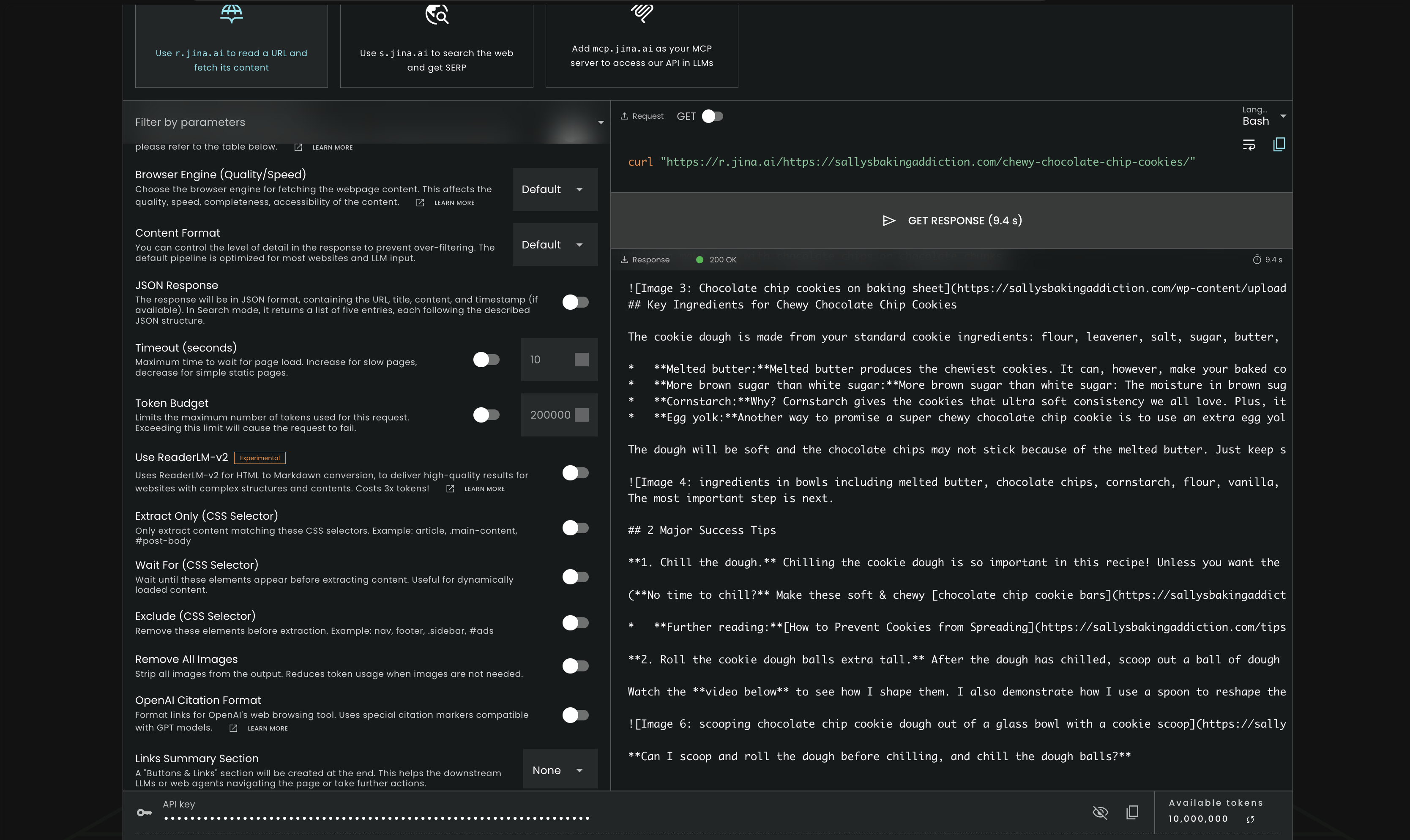
The captured result shows a 200 OK response for the Sally’s Baking Addiction cookie recipe URL and returns the core article text in a readable layout. The extracted output includes the recipe title context, ingredient explanations such as melted butter, brown sugar, cornstarch, and egg yolk, plus the '3 Major Success Tips' section and follow-up FAQ-style text. In this test, Jina successfully surfaced the main body content from a static article page rather than only navigation or boilerplate.
JavaScript-rendered page captureJina AI Reader did not reliably wait for client-side hydration on the SPA test.▾
Feature tested: JavaScript-rendered page capture
Result: Passed
Verdict: Jina AI Reader did not reliably wait for client-side hydration on the SPA test.
Expected behavior: This capability was tested on a Nike single-page-app product page where key product data, especially size-selection content, depends on client-side JavaScript hydration. The goal was to see whether Jina AI Reader could render the final user-facing state rather than just partial static scaffolding.
Test case: Text prompt → Text prompt
Input type: Text prompt
Input used: Input artifact (Text prompt): SPA rendering test
Observed output: Output artifact (Text prompt): Observed result
Input artifact: Input artifact (Text prompt): SPA rendering test
Output artifact: Output artifact (Text prompt): Observed result
What changed: Text prompt transformed into Text prompt
Why it matters / Conclusion: It picked up static page markers, but missed the most important dynamic content on the JavaScript-heavy product page.
This capability was tested on a Nike single-page-app product page where key product data, especially size-selection content, depends on client-side JavaScript hydration. The goal was to see whether Jina AI Reader could render the final user-facing state rather than just partial static scaffolding.
JavaScript-rendered page retrievalPartial success on the Nike SPA test.▾
Feature tested: JavaScript-rendered page retrieval
Result: Partial
Verdict: Partial success on the Nike SPA test.
Expected behavior: Jina AI Reader attempts to render and extract content from modern client-side pages. This was tested on a Nike product page to see whether the tool could recover product details from a JS-heavy e-commerce experience.
Test case: Text prompt → Image
Input type: Text prompt
Input used: Input artifact (Text prompt): JS-heavy product URL
Observed output: Output artifact (Image): The captured output shows a 200 OK response and includes the core Nike product header data: 'Nike Air Force 1 '07', the category 'Men's Shoes', the listed price — jina-ai-reader-jina-reader-nike-product-extraction.png
Input artifact: Input artifact (Text prompt): JS-heavy product URL
Output artifact: Output artifact (Image): The captured output shows a 200 OK response and includes the core Nike product header data: 'Nike Air Force 1 '07', the category 'Men's Shoes', the listed price — jina-ai-reader-jina-reader-nike-product-extraction.png
What changed: Text prompt transformed into Image
Why it matters / Conclusion: Jina could recover top-level product metadata from the Nike page, but the test suggests its rendering/extraction was not complete enough for reliable e-commerce scraping.
Jina AI Reader attempts to render and extract content from modern client-side pages. This was tested on a Nike product page to see whether the tool could recover product details from a JS-heavy e-commerce experience.
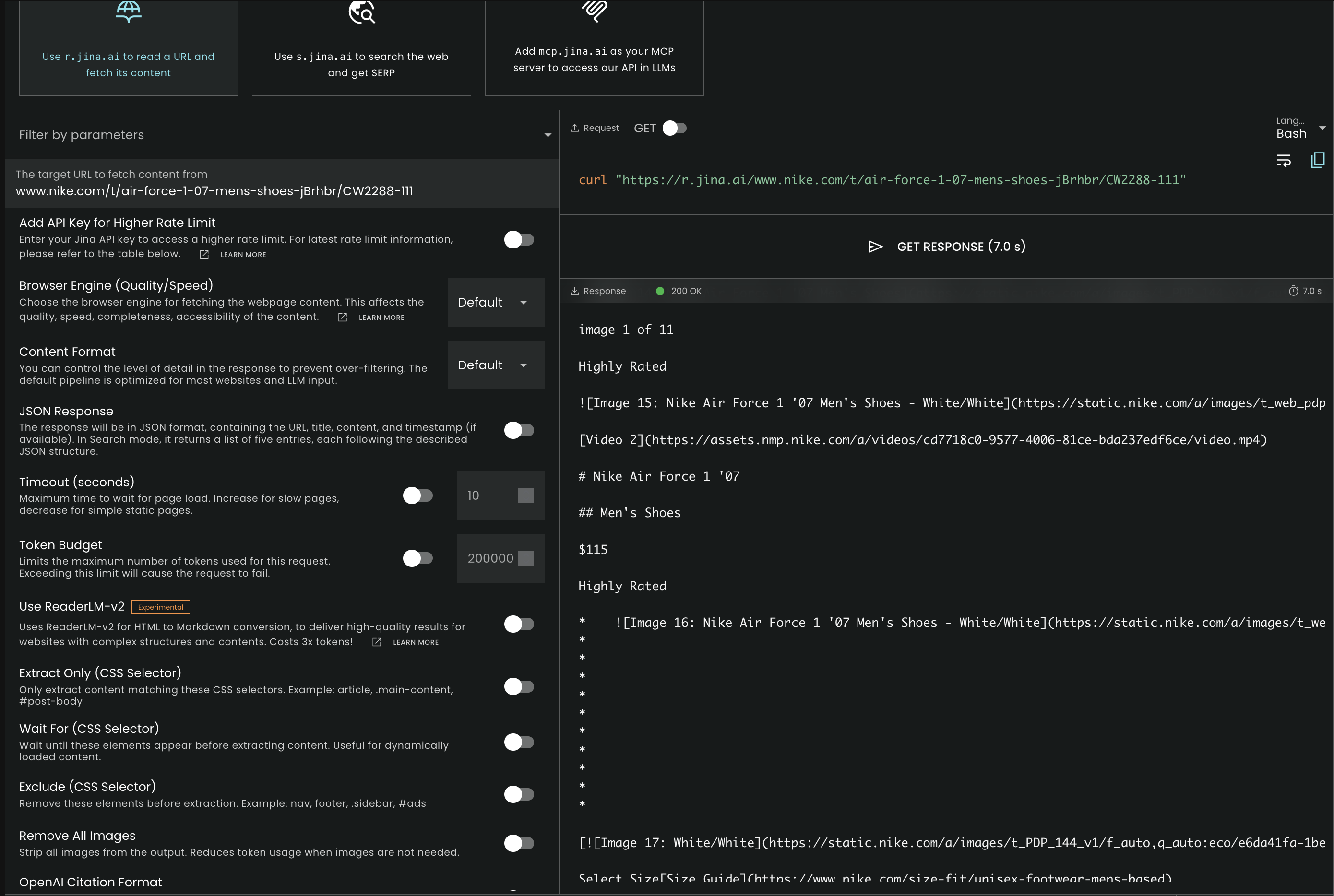
The captured output shows a 200 OK response and includes the core Nike product header data: 'Nike Air Force 1 '07', the category 'Men's Shoes', the listed price '$115', and media references such as product images and a video link. However, the researcher judged the result incomplete because the returned text did not include key JS-hydrated transactional elements, such as the size selector grid, and did not demonstrate a fully cleaned product extraction beyond the headline metadata.
Anti-bot and interstitial handlingFailed on the Glassdoor protection test.▾
Feature tested: Anti-bot and interstitial handling
Result: Failed
Verdict: Failed on the Glassdoor protection test.
Expected behavior: Jina AI Reader can attempt to fetch protected public pages and return whatever text layer is reachable. This was tested on a Glassdoor software-engineer jobs results page to see whether the tool could get through anti-bot protections and extract the underlying jobs content.
Test case: Text prompt → Image
Input type: Text prompt
Input used: Input artifact (Text prompt): Protected jobs URL
Observed output: Output artifact (Image): The captured result shows a 200 OK response, but the returned content is Glassdoor's anti-bot interstitial rather than the target jobs listings. The text is hea — jina-ai-reader-jina-reader-glassdoor-humans-only.png
Input artifact: Input artifact (Text prompt): Protected jobs URL
Output artifact: Output artifact (Image): The captured result shows a 200 OK response, but the returned content is Glassdoor's anti-bot interstitial rather than the target jobs listings. The text is hea — jina-ai-reader-jina-reader-glassdoor-humans-only.png
What changed: Text prompt transformed into Image
Why it matters / Conclusion: On this protected Glassdoor page, Jina did not bypass the interstitial in a useful way; it extracted the block message instead of the jobs content.
Jina AI Reader can attempt to fetch protected public pages and return whatever text layer is reachable. This was tested on a Glassdoor software-engineer jobs results page to see whether the tool could get through anti-bot protections and extract the underlying jobs content.
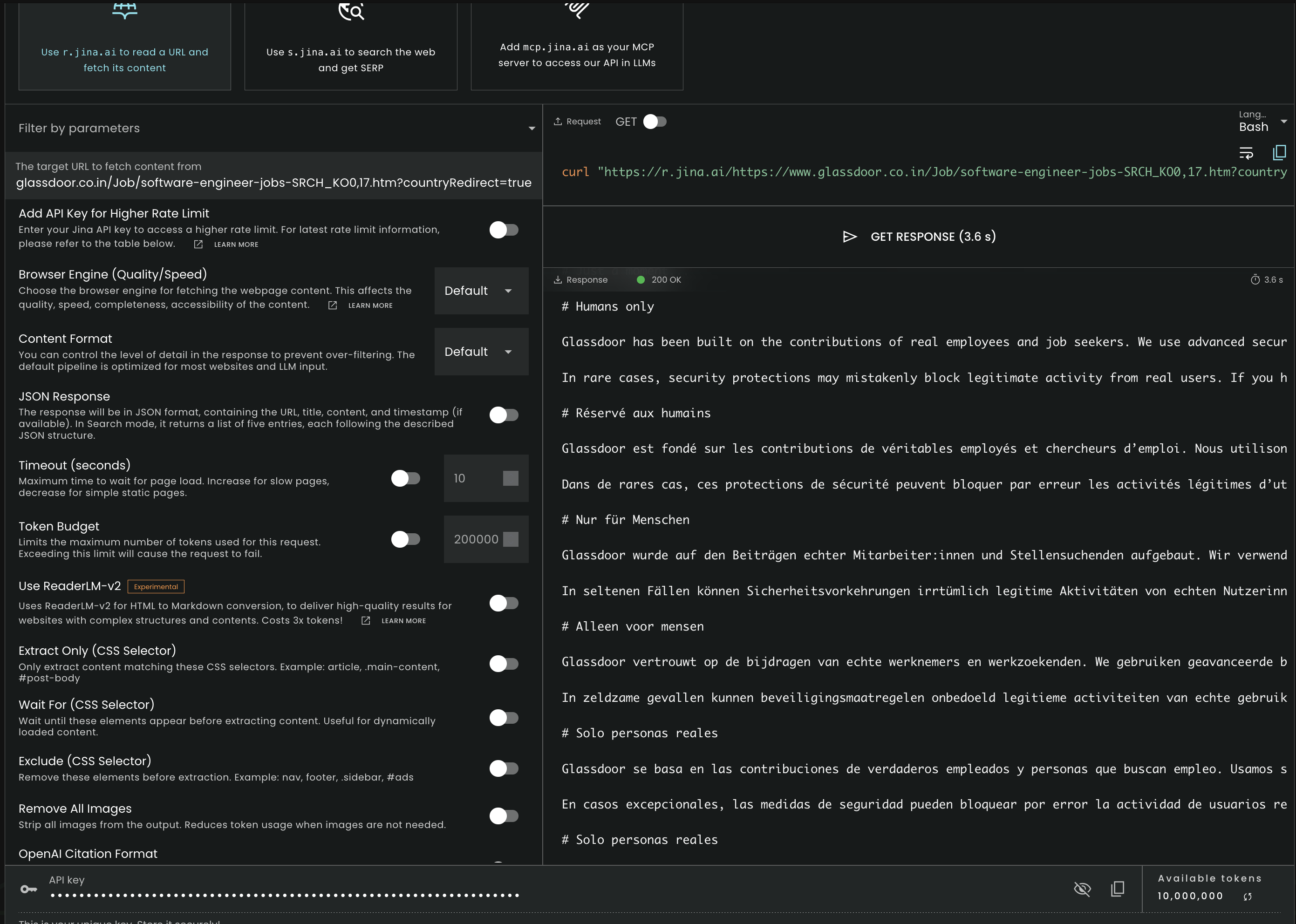
The captured result shows a 200 OK response, but the returned content is Glassdoor's anti-bot interstitial rather than the target jobs listings. The text is headed 'Humans only' and repeats the same protection message in multiple languages, which means the tool retrieved the block page text instead of the underlying job data.
Boilerplate filteringIn this research, Jina AI Reader did not reliably strip navigation, redirects, and other page chrome out of the final text.▾
Feature tested: Boilerplate filtering
Result: Passed
Verdict: In this research, Jina AI Reader did not reliably strip navigation, redirects, and other page chrome out of the final text.
Expected behavior: Jina AI Reader is meant to return the meaningful text layer of a page without requiring manual selectors. It was tested on a noisy recipe blog page and a high-friction Glassdoor page to see whether the extracted output stayed focused on the target content instead of site-wide UI, legal text, and navigation.
Test case: Text prompt → Text prompt
Input type: Text prompt
Input used: Input artifact (Text prompt): Noise reduction test
Observed output: Output artifact (Text prompt): Observed result
Input artifact: Input artifact (Text prompt): Noise reduction test
Output artifact: Output artifact (Text prompt): Observed result
What changed: Text prompt transformed into Text prompt
Test case: Text prompt → Text prompt
Input type: Text prompt
Input used: Input artifact (Text prompt): Protected job page cleanup test
Observed output: Output artifact (Text prompt): Observed result
Input artifact: Input artifact (Text prompt): Protected job page cleanup test
Output artifact: Output artifact (Text prompt): Observed result
What changed: Text prompt transformed into Text prompt
Why it matters / Conclusion: It could extract text, but not clean text. In both noisy scenarios, the returned output still carried too much site chrome or broken-page text to count as downstream-ready markdown.
Jina AI Reader is meant to return the meaningful text layer of a page without requiring manual selectors. It was tested on a noisy recipe blog page and a high-friction Glassdoor page to see whether the extracted output stayed focused on the target content instead of site-wide UI, legal text, and navigation.
Anti-bot page accessJina AI Reader got through the protected page in this run, but access alone did not guarantee usable extraction quality.▾
Feature tested: Anti-bot page access
Result: Passed
Verdict: Jina AI Reader got through the protected page in this run, but access alone did not guarantee usable extraction quality.
Expected behavior: The report specifically tested whether Jina AI Reader could process a high-security Glassdoor URL without being blocked by standard edge protections. This measures whether the tool can at least reach pages that often stop simpler scrapers.
Test case: Text prompt → Text prompt
Input type: Text prompt
Input used: Input artifact (Text prompt): Anti-bot access test
Observed output: Output artifact (Text prompt): Observed result
Input artifact: Input artifact (Text prompt): Anti-bot access test
Output artifact: Output artifact (Text prompt): Observed result
What changed: Text prompt transformed into Text prompt
Why it matters / Conclusion: It showed some anti-bot resilience, but the resulting text still needed substantial cleanup before it would be useful in a pipeline.
The report specifically tested whether Jina AI Reader could process a high-security Glassdoor URL without being blocked by standard edge protections. This measures whether the tool can at least reach pages that often stop simpler scrapers.
Token-based pricing
The source report lists Reader/Embedding token packs plus an aggregator rate.
The free tier is described in the source report as non-commercial under a CC-BY-NC license.
Is This Right For You?
A side-by-side guide based on our hands-on testing.
Featured in Rankings
Independent rankings where Jina AI Reader was tested and rated.

Banner Preview
How the embed badge will look on your site

Embed HTML
Copy this code to your website source
Quick Integration Guide
- 1Copy the HTML code block above.
- 2Paste it into your site's HTML or CMS editor.
- 3Banner appears instantly on your page.
- 4Links back to your tool profile here.
Similar Tools
Discover more AI tools like Jina AI Reader to enhance your workflow.
Comments (0)
Need a custom AI solution for this use case?
If you are looking to build a custom web page extraction, URL-to-text conversion, or content scraping system for your business or internal workflow, email us at contact@futuresmart.ai.
Found something inaccurate or missing? We try to keep our AI research accurate and useful. If you found outdated information, an issue, or have a suggestion, email us at collaborate@aidemos.com.