
Skyvern Review: Messy Page Extraction Tests (2026)
Visually navigates messy and JS-heavy pages to extract clean structured outputs, but it runs slower than text-first scrapers.
Excellent extraction, with speed and debugging tradeoffs
- You need clean field-level extraction from noisy public pages like recipe blogs without mapping CSS selectors manually.
- You need a browser-based system that can handle JavaScript-rendered ecommerce pages; the Nike test reportedly extracted dynamic sizes and price successfully.
- You prefer managed workflows and prompt guardrails over lower-level scraping primitives.
- You need the fastest possible extraction throughput; the report repeatedly notes higher latency from visual validation and layout interpretation.
Our take
In this research, Skyvern performed very well at pulling the useful content out of messy pages and returning structured outputs across a recipe blog, a Nike product page, and a job listings page. Its main downside was operational overhead: the report repeatedly notes slower execution from visual validation, and the Nike run’s recording froze even though the backend extraction itself succeeded.
Benchmark participation
Benchmark participation is temporarily unavailable.
In-Depth Review
Our detailed analysis of Skyvern — features, performance, and real-world testing.
Feature-by-Feature Breakdown
Vision-driven content extractionStrong on messy public pages, with one evidence mismatch on the Glassdoor output format.▾
Feature tested: Vision-driven content extraction
Result: Passed
Verdict: Strong on messy public pages, with one evidence mismatch on the Glassdoor output format.
Expected behavior: Skyvern uses visual page understanding rather than selector-based scraping to isolate the main content and return usable extracted output. In this research it was tested on a noisy Sally’s Baking Addiction recipe page and a Glassdoor job listings page.
Test case: Text prompt → Image
Input type: Text prompt
Input used: Input artifact (Text prompt): Recipe blog extraction test
Observed output: Output artifact (Image): Skyvern completed the recipe extraction run and surfaced structured fields for 'Chewy Chocolate Chip Cookies,' including recipe name, description, prep time, co — skyvern-skyvern-extract-chewy-cookie-recipe-completed.png
Input artifact: Input artifact (Text prompt): Recipe blog extraction test
Output artifact: Output artifact (Image): Skyvern completed the recipe extraction run and surfaced structured fields for 'Chewy Chocolate Chip Cookies,' including recipe name, description, prep time, co — skyvern-skyvern-extract-chewy-cookie-recipe-completed.png
What changed: Text prompt transformed into Image
Test case: Text prompt → Image
Input type: Text prompt
Input used: Input artifact (Text prompt): Job listings extraction test
Observed output: Output artifact (Image): The saved output for the Glassdoor run shows a completed extraction job with markdown_content containing multiple job listings, company names, locations, and su — skyvern-skyvern-job-listings-output-markdown.png
Input artifact: Input artifact (Text prompt): Job listings extraction test
Output artifact: Output artifact (Image): The saved output for the Glassdoor run shows a completed extraction job with markdown_content containing multiple job listings, company names, locations, and su — skyvern-skyvern-job-listings-output-markdown.png
What changed: Text prompt transformed into Image
Why it matters / Conclusion: Skyvern clearly extracted the important content from two very different noisy page types, but the Glassdoor evidence supports successful extraction more confidently than it supports the stronger JSON-schema and modal-bypass wording in the notes.
Skyvern uses visual page understanding rather than selector-based scraping to isolate the main content and return usable extracted output. In this research it was tested on a noisy Sally’s Baking Addiction recipe page and a Glassdoor job listings page.
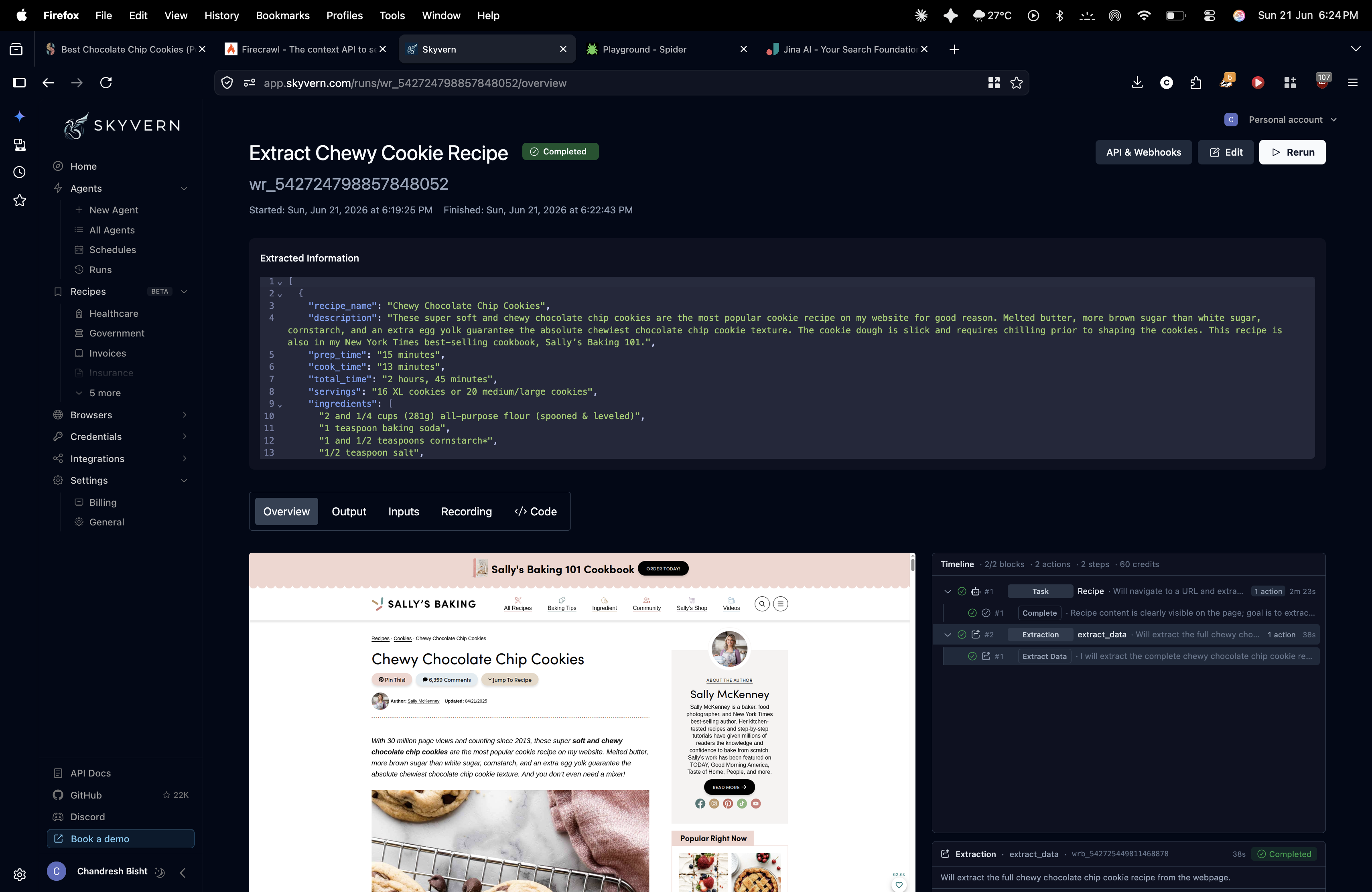
Skyvern completed the recipe extraction run and surfaced structured fields for 'Chewy Chocolate Chip Cookies,' including recipe name, description, prep time, cook time, total time, servings, and ingredients. The report states it ignored navigation, ads, author biography, and comments, so the useful recipe data was isolated instead of being mixed with blog boilerplate.
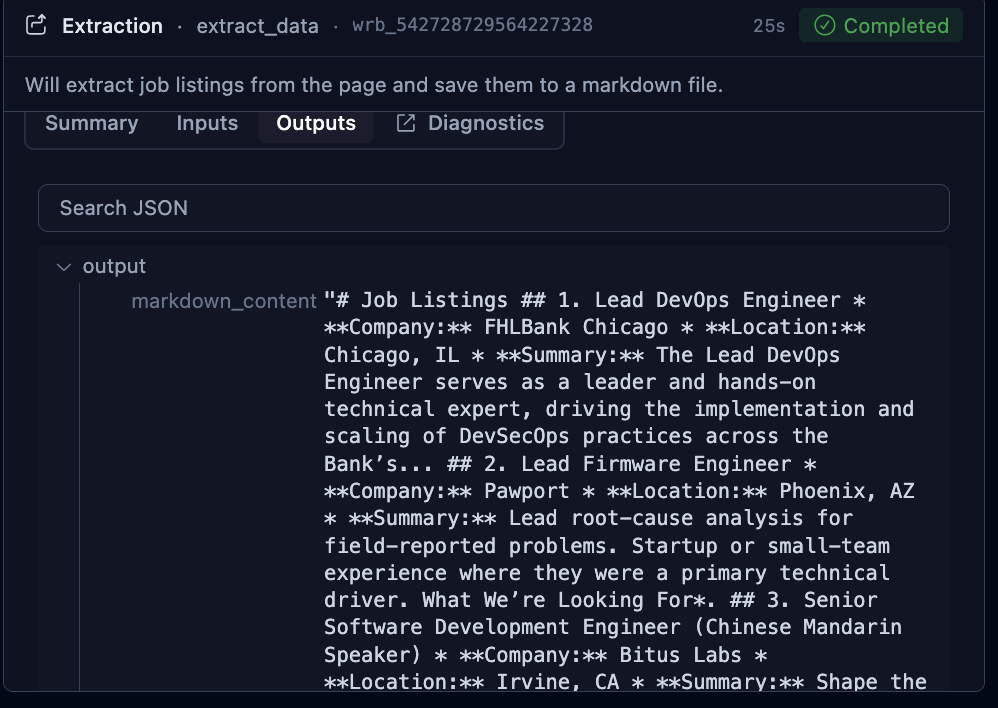
The saved output for the Glassdoor run shows a completed extraction job with markdown_content containing multiple job listings, company names, locations, and summaries. The written report says Skyvern bypassed a sign-in overlay and produced a deterministic schema, but the inspected artifact itself shows markdown-style extracted content rather than a visible JSON object or the modal-handling moment.
JavaScript-rendered page handlingAccurate on client-side hydration, but the run recorder was unreliable.▾
Feature tested: JavaScript-rendered page handling
Result: Passed
Verdict: Accurate on client-side hydration, but the run recorder was unreliable.
Expected behavior: Skyvern can wait for and extract data from client-side rendered interfaces. This was tested on a Nike single-page product page where size options loaded asynchronously and the goal was to capture the full dynamic size set in structured output.
Test case: Text prompt → Text prompt
Input type: Text prompt
Input used: Input artifact (Text prompt): Nike SPA hydration test
Observed output: Output artifact (Text prompt): Hydrated page extraction result
Input artifact: Input artifact (Text prompt): Nike SPA hydration test
Output artifact: Output artifact (Text prompt): Hydrated page extraction result
What changed: Text prompt transformed into Text prompt
Why it matters / Conclusion: Skyvern handled dynamic rendering correctly in the data layer, but its observability layer lagged behind the actual run.
Skyvern can wait for and extract data from client-side rendered interfaces. This was tested on a Nike single-page product page where size options loaded asynchronously and the goal was to capture the full dynamic size set in structured output.
JavaScript-rendered page handlingAccurate extraction on a hydrated ecommerce page, but the run recording was unreliable.▾
Feature tested: JavaScript-rendered page handling
Result: Passed
Verdict: Accurate extraction on a hydrated ecommerce page, but the run recording was unreliable.
Expected behavior: Skyvern can wait for dynamic content to load and then extract the requested fields from a JS-heavy page. This capability was tested on Nike’s Air Force 1 ’07 product page, where the prompt asked for pricing, all available sizes, and customer reviews if present.
Test case: Text prompt → Image
Input type: Text prompt
Input used: Input artifact (Text prompt): Nike product extraction prompt
Observed output: Output artifact (Image): The prompt editor shows Skyvern comparing an improved versus original prompt and adding concrete guardrails for page-load waiting, pop-up handling, product veri — skyvern-prompt-editor-skyvern-shoe-scrape.png
Input artifact: Input artifact (Text prompt): Nike product extraction prompt
Output artifact: Output artifact (Image): The prompt editor shows Skyvern comparing an improved versus original prompt and adding concrete guardrails for page-load waiting, pop-up handling, product veri — skyvern-prompt-editor-skyvern-shoe-scrape.png
What changed: Text prompt transformed into Image
Test case: Text prompt → Image
Input type: Text prompt
Input used: Input artifact (Text prompt): Nike SPA run
Observed output: Output artifact (Image): Skyvern completed the Nike run and the report says the backend extraction accurately captured the dynamic size variants and price data from the hydrated product — skyvern-skyvern-extract-nike-af1-product-data.png
Input artifact: Input artifact (Text prompt): Nike SPA run
Output artifact: Output artifact (Image): Skyvern completed the Nike run and the report says the backend extraction accurately captured the dynamic size variants and price data from the hydrated product — skyvern-skyvern-extract-nike-af1-product-data.png
What changed: Text prompt transformed into Image
Why it matters / Conclusion: Skyvern handled the JS-heavy Nike page successfully, which is a major strength for this use case, but the broken recording reduces confidence in its debugging experience.
Skyvern can wait for dynamic content to load and then extract the requested fields from a JS-heavy page. This capability was tested on Nike’s Air Force 1 ’07 product page, where the prompt asked for pricing, all available sizes, and customer reviews if present.
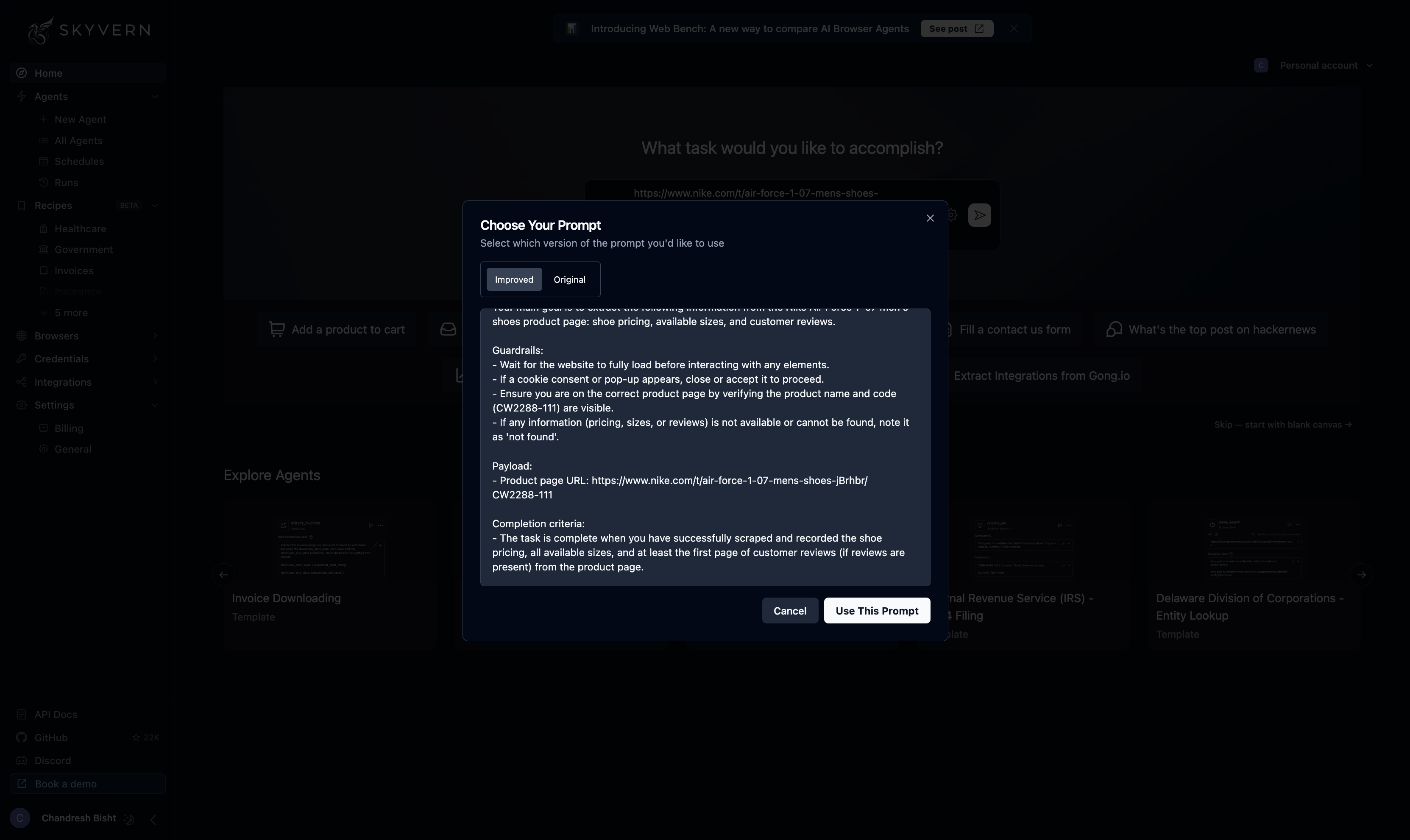
The prompt editor shows Skyvern comparing an improved versus original prompt and adding concrete guardrails for page-load waiting, pop-up handling, product verification, and missing-field handling before the run starts. This indicates the tool supports detailed natural-language setup for dynamic extraction tasks.
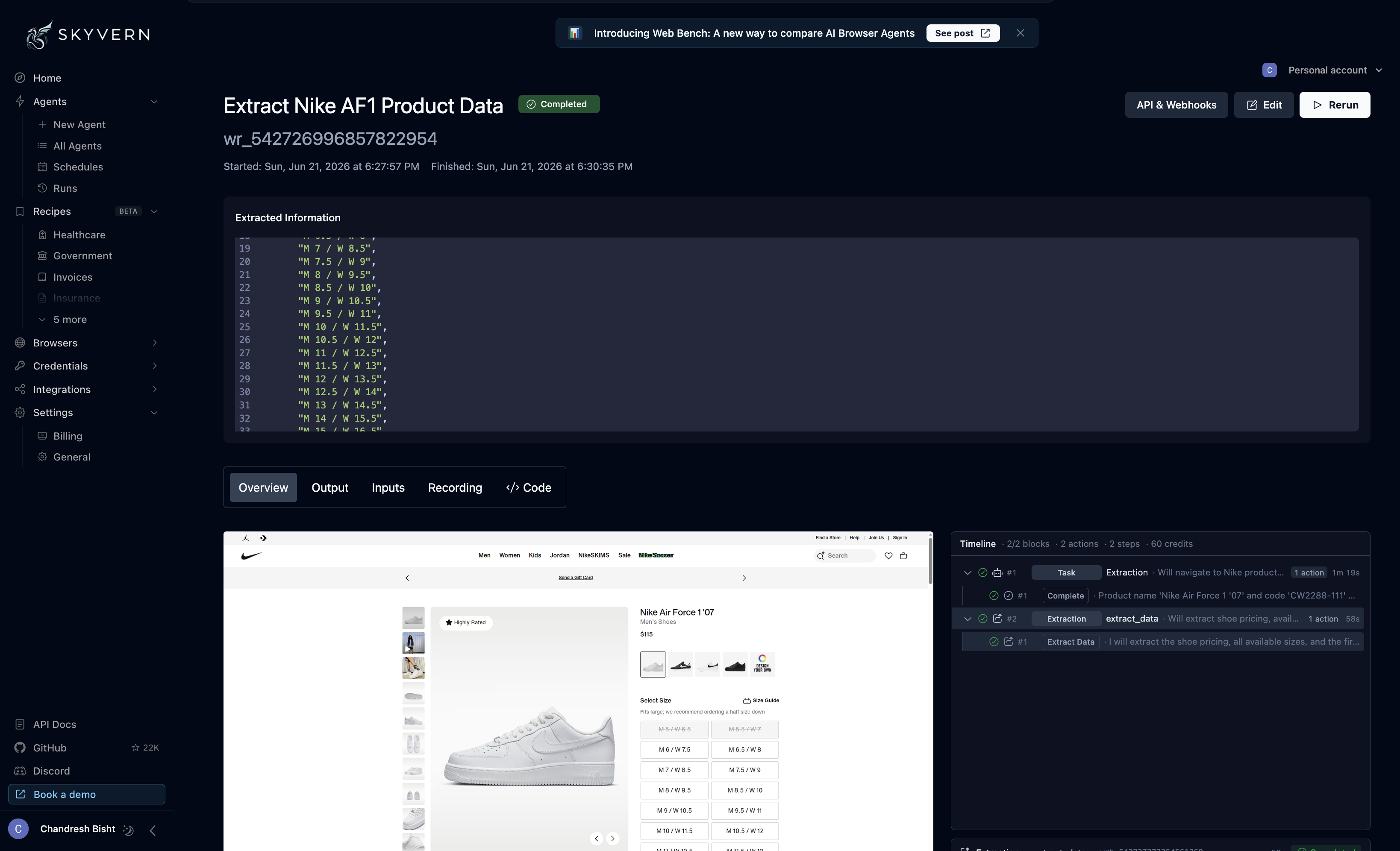
Skyvern completed the Nike run and the report says the backend extraction accurately captured the dynamic size variants and price data from the hydrated product page. The weakness was not the extraction itself but the debugging layer: the run recording reportedly froze on the initial page view and went out of sync, making the session harder to inspect visually.
Workflow-based agent setupUseful if you want managed browser workflows instead of one-off scraping steps.▾
Feature tested: Workflow-based agent setup
Result: Passed
Verdict: Useful if you want managed browser workflows instead of one-off scraping steps.
Expected behavior: Skyvern packages extraction tasks as reusable workflows with prompts, inputs, run controls, and step tracking. The research includes both a workflow builder for the recipe task and a prompt chooser that can refine prompts before execution.
Test case: Text prompt → Image
Input type: Text prompt
Input used: Input artifact (Text prompt): Recipe extraction workflow setup
Observed output: Output artifact (Image): The workflow builder screen shows a named task, URL field, recipe-style prompt, inputs, run controls, and basic run metadata such as actions, steps, and credits — skyvern-skyvern-agents-workspace-chewy-cookie-recipe.png
Input artifact: Input artifact (Text prompt): Recipe extraction workflow setup
Output artifact: Output artifact (Image): The workflow builder screen shows a named task, URL field, recipe-style prompt, inputs, run controls, and basic run metadata such as actions, steps, and credits — skyvern-skyvern-agents-workspace-chewy-cookie-recipe.png
What changed: Text prompt transformed into Image
Test case: Text prompt → Image
Input type: Text prompt
Input used: Input artifact (Text prompt): Prompt refinement before run
Observed output: Output artifact (Image): Skyvern’s prompt modal lets the user choose between an original and improved prompt. In the Nike example, the improved version adds load-waiting, cookie-pop-up — skyvern-prompt-editor-skyvern-shoe-scrape.png
Input artifact: Input artifact (Text prompt): Prompt refinement before run
Output artifact: Output artifact (Image): Skyvern’s prompt modal lets the user choose between an original and improved prompt. In the Nike example, the improved version adds load-waiting, cookie-pop-up — skyvern-prompt-editor-skyvern-shoe-scrape.png
What changed: Text prompt transformed into Image
Why it matters / Conclusion: Skyvern is well suited to users who want extraction jobs organized as reusable, managed browser workflows.
Skyvern packages extraction tasks as reusable workflows with prompts, inputs, run controls, and step tracking. The research includes both a workflow builder for the recipe task and a prompt chooser that can refine prompts before execution.
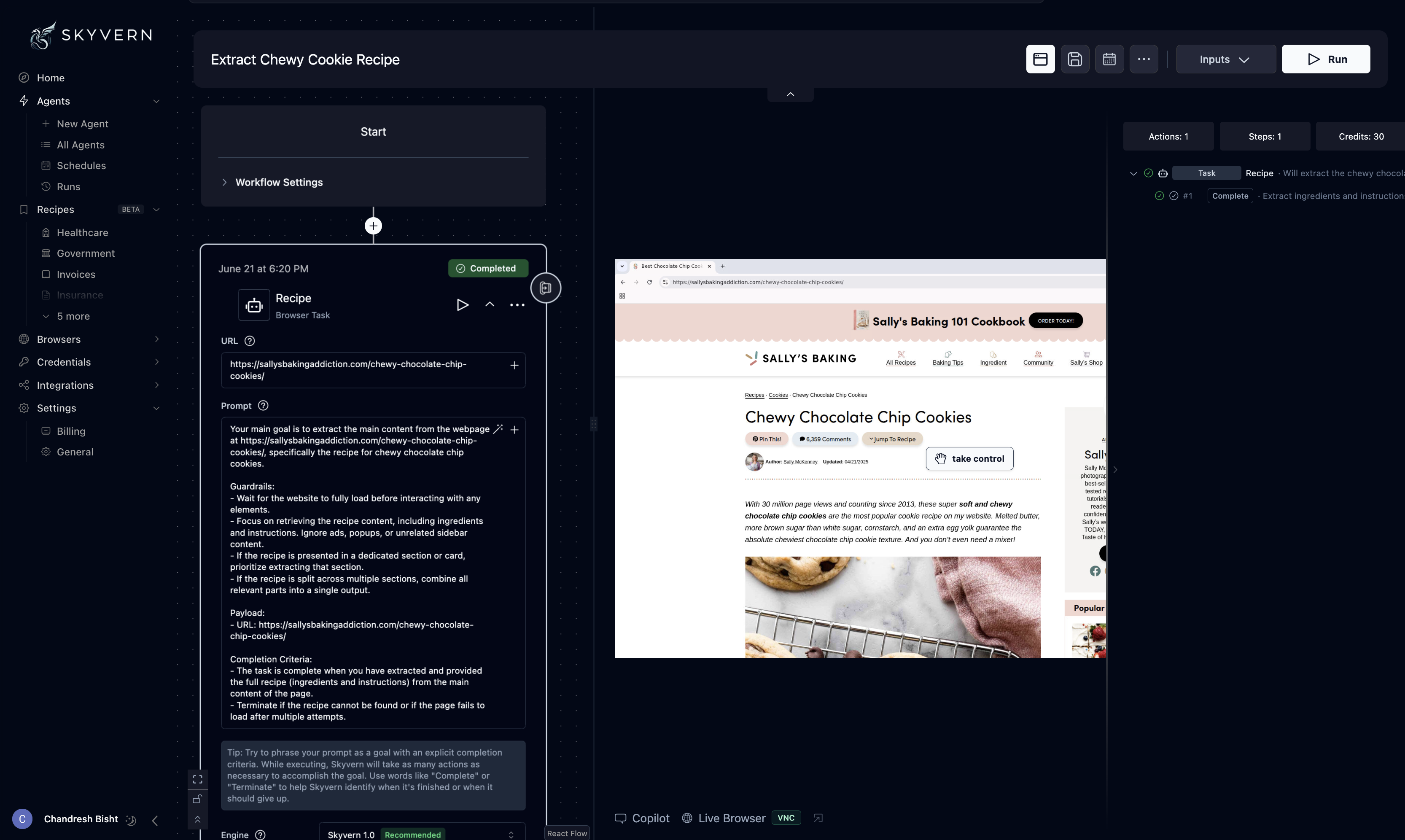
The workflow builder screen shows a named task, URL field, recipe-style prompt, inputs, run controls, and basic run metadata such as actions, steps, and credits. This supports the report’s framing of Skyvern as an agentic extraction workflow rather than a bare text-only scraping endpoint.
Skyvern’s prompt modal lets the user choose between an original and improved prompt. In the Nike example, the improved version adds load-waiting, cookie-pop-up handling, product verification, and explicit completion criteria, showing that prompt refinement is part of the workflow setup.
Run timeline and recording logsUseful for inspecting runs, but not fully dependable on dynamic pages.▾
Feature tested: Run timeline and recording logs
Result: Passed
Verdict: Useful for inspecting runs, but not fully dependable on dynamic pages.
Expected behavior: Skyvern surfaces run history through timelines, output panels, and recordings. The research shows completed timelines on extraction runs and specifically calls out a failure in the Nike recording flow.
Test case: Text prompt → Image
Input type: Text prompt
Input used: Input artifact (Text prompt): Recipe run inspection
Observed output: Output artifact (Image): The recipe extraction screen shows a completed run with extracted information, output tabs, a recording tab, and a right-side timeline of steps. This suggests S — skyvern-skyvern-extract-chewy-cookie-recipe-completed.png
Input artifact: Input artifact (Text prompt): Recipe run inspection
Output artifact: Output artifact (Image): The recipe extraction screen shows a completed run with extracted information, output tabs, a recording tab, and a right-side timeline of steps. This suggests S — skyvern-skyvern-extract-chewy-cookie-recipe-completed.png
What changed: Text prompt transformed into Image
Test case: Text prompt → Text prompt
Input type: Text prompt
Input used: Input artifact (Text prompt): Nike run debugging
Observed output: Output artifact (Text prompt): Observed recording issue
Input artifact: Input artifact (Text prompt): Nike run debugging
Output artifact: Output artifact (Text prompt): Observed recording issue
What changed: Text prompt transformed into Text prompt
Why it matters / Conclusion: Skyvern provides run-inspection tooling, but this research found its recording layer less reliable than its actual extraction layer.
Skyvern surfaces run history through timelines, output panels, and recordings. The research shows completed timelines on extraction runs and specifically calls out a failure in the Nike recording flow.
The recipe extraction screen shows a completed run with extracted information, output tabs, a recording tab, and a right-side timeline of steps. This suggests Skyvern gives users multiple ways to inspect what happened during a run.
Vision-based structured data extractionStrong at pulling only the requested fields from cluttered pages.▾
Feature tested: Vision-based structured data extraction
Result: Passed
Verdict: Strong at pulling only the requested fields from cluttered pages.
Expected behavior: Skyvern uses visual page understanding to locate relevant content blocks and return them as structured JSON. This was exercised on a noisy recipe blog, where only recipe fields were requested, and on a Glassdoor listings page, where titles, locations, and company names were extracted into a deterministic schema.
Test case: Text prompt → Text prompt
Input type: Text prompt
Input used: Input artifact (Text prompt): Recipe blog test
Observed output: Output artifact (Text prompt): Recipe extraction result
Input artifact: Input artifact (Text prompt): Recipe blog test
Output artifact: Output artifact (Text prompt): Recipe extraction result
What changed: Text prompt transformed into Text prompt
Test case: Text prompt → Text prompt
Input type: Text prompt
Input used: Input artifact (Text prompt): Glassdoor listings test
Observed output: Output artifact (Text prompt): Job listing extraction result
Input artifact: Input artifact (Text prompt): Glassdoor listings test
Output artifact: Output artifact (Text prompt): Job listing extraction result
What changed: Text prompt transformed into Text prompt
Why it matters / Conclusion: This was the clearest strength in the report: Skyvern consistently turned messy visual layouts into clean structured data without selector mapping.
Skyvern uses visual page understanding to locate relevant content blocks and return them as structured JSON. This was exercised on a noisy recipe blog, where only recipe fields were requested, and on a Glassdoor listings page, where titles, locations, and company names were extracted into a deterministic schema.
Autonomous overlay and modal handlingUseful when extraction depends on visually working around blockers instead of hardcoded scripts.▾
Feature tested: Autonomous overlay and modal handling
Result: Passed
Verdict: Useful when extraction depends on visually working around blockers instead of hardcoded scripts.
Expected behavior: Skyvern can operate inside an automated browser environment and deal with obstructive interface elements on its own. This was tested on Glassdoor, where a sign-in modal overlay appeared before the job listing data was extracted.
Test case: Text prompt → Text prompt
Input type: Text prompt
Input used: Input artifact (Text prompt): Modal overlay test
Observed output: Output artifact (Text prompt): Overlay handling result
Input artifact: Input artifact (Text prompt): Modal overlay test
Output artifact: Output artifact (Text prompt): Overlay handling result
What changed: Text prompt transformed into Text prompt
Why it matters / Conclusion: The report suggests Skyvern is a better fit than text-only extractors when a page must be visually navigated before data can be pulled.
Skyvern can operate inside an automated browser environment and deal with obstructive interface elements on its own. This was tested on Glassdoor, where a sign-in modal overlay appeared before the job listing data was extracted.
Credit-based pricing from the report
Skyvern was described as using subscription tiers tied to workflow execution credits.
Pricing was stated in the research notes; no billing page artifact was provided.
Is This Right For You?
A side-by-side guide based on our hands-on testing.
Banner Preview
How the embed badge will look on your site

Embed HTML
Copy this code to your website source
Quick Integration Guide
- 1Copy the HTML code block above.
- 2Paste it into your site's HTML or CMS editor.
- 3Banner appears instantly on your page.
- 4Links back to your tool profile here.
Similar Tools
Discover more AI tools like Skyvern to enhance your workflow.
Comments (0)
Need a custom AI solution for this use case?
If you are looking to build a custom browser automation, web scraping, or data extraction system for your business or internal workflow, email us at contact@futuresmart.ai.
Found something inaccurate or missing? We try to keep our AI research accurate and useful. If you found outdated information, an issue, or have a suggestion, email us at collaborate@aidemos.com.