
GroqCloud
Low-cost batch speech-to-text that stays strong on jargon-heavy audio, but shows uneven multilingual accuracy and a strict upload cap.
Good on cost and jargon, weaker on code-switching, and one hard overlap case never got past the upload cap.
- You want low-cost batch transcription for valid audio uploads.
- You need word-level timestamps and confidence metadata in the response.
- Your audio is jargon-heavy and mostly English-dominant.
- You need native speaker diarization.
Our take
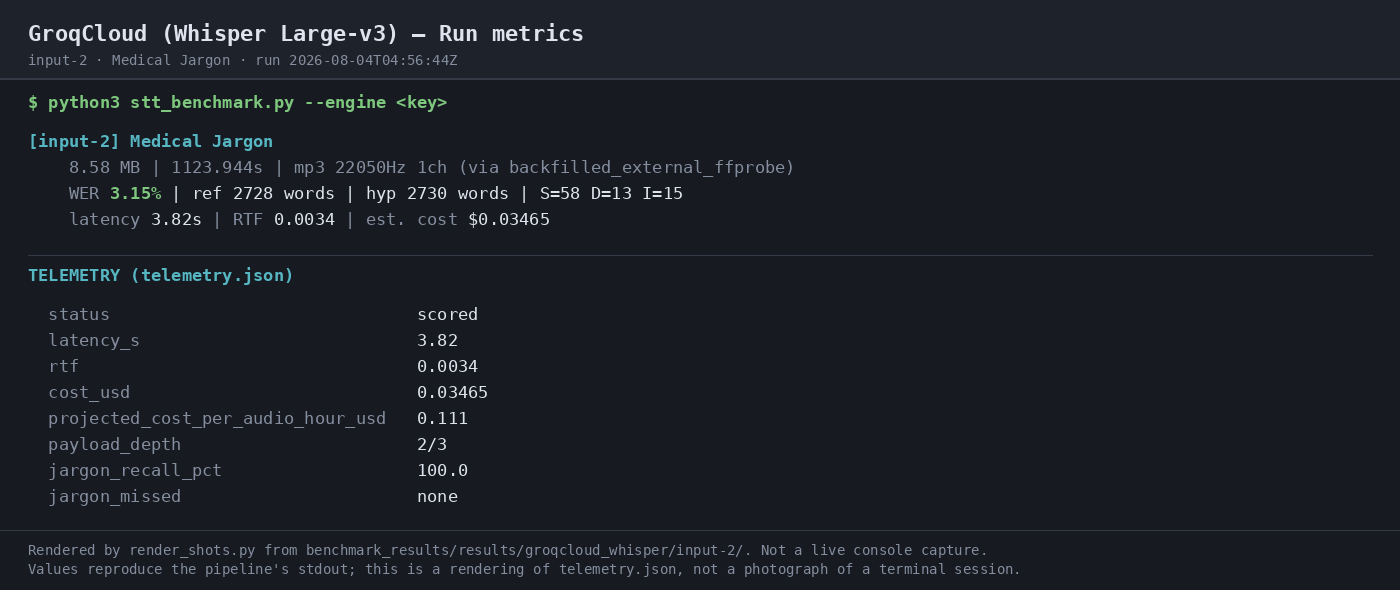
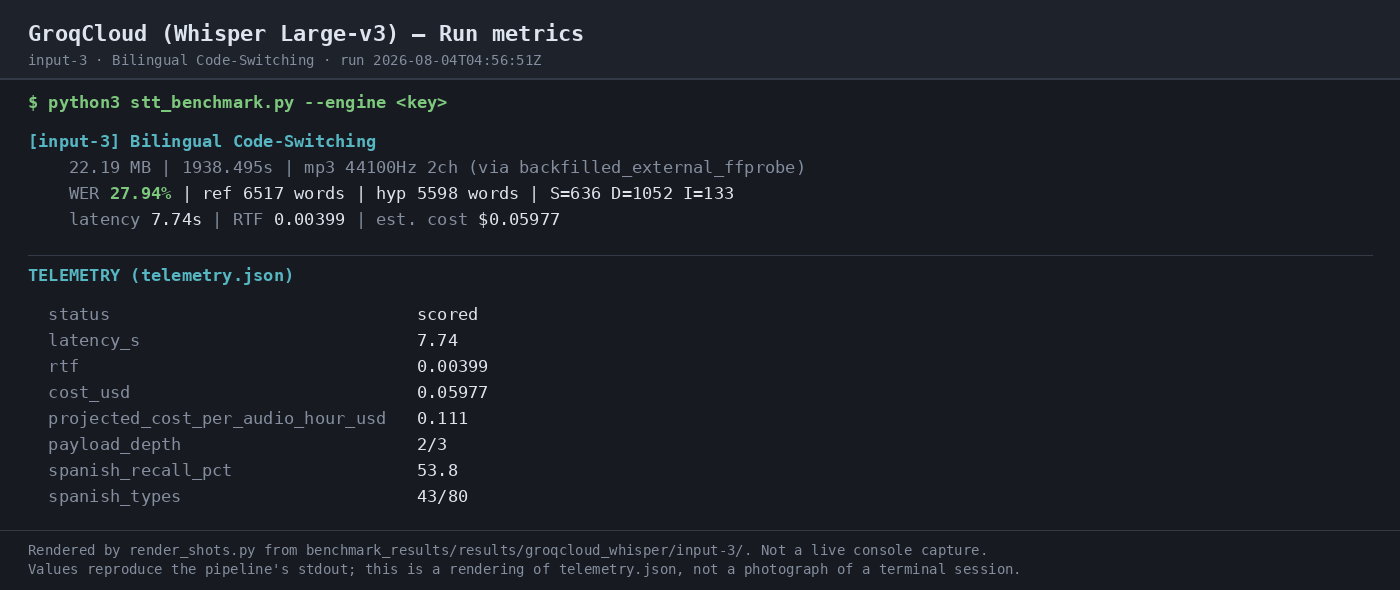
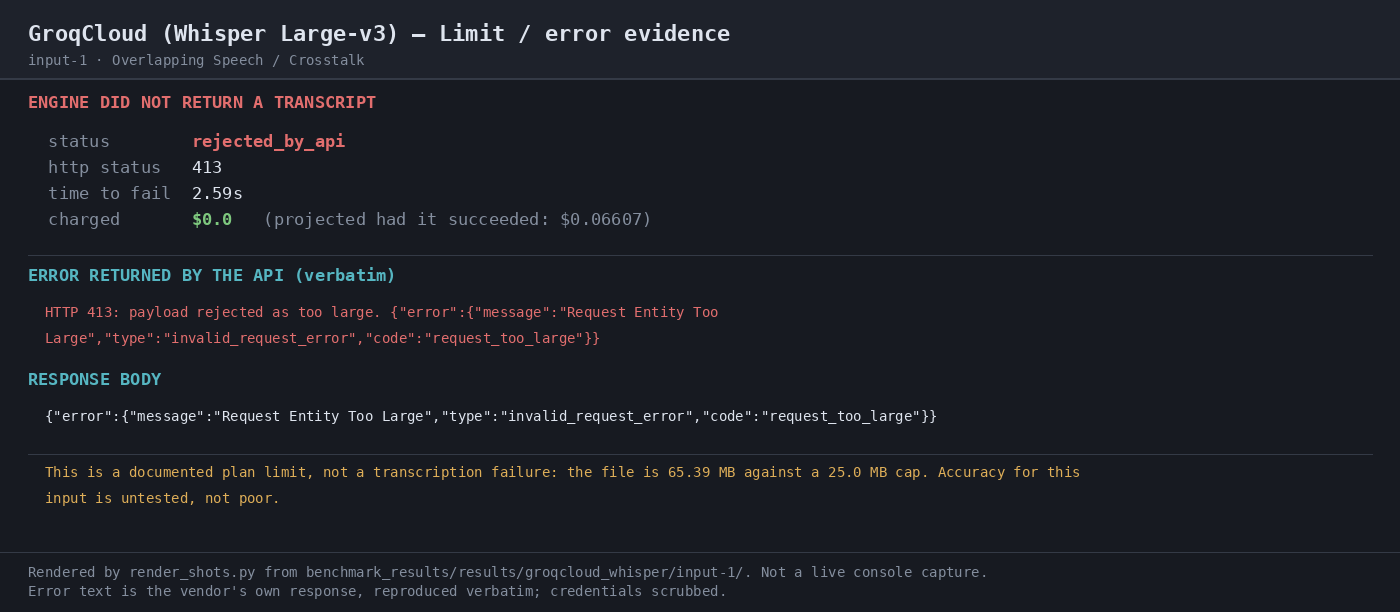
GroqCloud Whisper Large-v3 is attractive on price and handled the accepted uploads quickly, with 3.15% WER and 100% jargon recall on the medical narration. But it dropped sharply on bilingual code-switching at 27.94% WER, and the overlapping-speech test was rejected before transcription because the file exceeded the documented 25 MB cap. This makes it a solid low-cost batch STT option for valid uploads, not a confirmed winner on the hardest audio types.
In-Depth Review
Our detailed analysis of GroqCloud — features, performance, and real-world testing.
Feature-by-Feature Breakdown
Audio Transcription▾
Feature tested: Audio Transcription
Result: Partial
Expected behavior: Converts uploaded spoken audio into transcript text through the transcription endpoint, including accepted multipart uploads and narration/bilingual speech inputs. The same flow also produced verbose JSON with segment timing, token arrays, confidence fields, and word-level timestamps on the exercised tests.
Test case: Audio file → Text/code file
Input type: Audio file
Input used: Input artifact (Audio file): INPUT: Medical Jargon audio with verbose_json and word timestamps enabled. — medical_terms.mp3
Observed output: Output artifact (Text/code file): The raw response includes task, language, duration, transcript text, and segment objects; the benchmark detected word_timestamps=yes, confidence=yes, speaker_labels=no, and only segment-level timing rather than native speaker attribution. — raw-response.json
Input artifact: Input artifact (Audio file): INPUT: Medical Jargon audio with verbose_json and word timestamps enabled. — medical_terms.mp3
Output artifact: Output artifact (Text/code file): The raw response includes task, language, duration, transcript text, and segment objects; the benchmark detected word_timestamps=yes, confidence=yes, speaker_labels=no, and only segment-level timing rather than native speaker attribution. — raw-response.json
What changed: Audio file transformed into Text/code file
Test case: Audio file → Text/code file
Input type: Audio file
Input used: Input artifact (Audio file): INPUT: Bilingual Code-Switching audio with verbose_json and word timestamps enabled. — mix_language.mp3
Observed output: Output artifact (Text/code file): The raw response again includes transcript text and segment metadata, with word_timestamps=yes, confidence=yes, speaker_labels=no, and segment-level timing only. — raw-response-2.json
Input artifact: Input artifact (Audio file): INPUT: Bilingual Code-Switching audio with verbose_json and word timestamps enabled. — mix_language.mp3
Output artifact: Output artifact (Text/code file): The raw response again includes transcript text and segment metadata, with word_timestamps=yes, confidence=yes, speaker_labels=no, and segment-level timing only. — raw-response-2.json
What changed: Audio file transformed into Text/code file
Test case: Audio file → Image
Input type: Audio file
Input used: Input artifact (Audio file): The benchmark's scored run for the Gray's Anatomy narration, including speed and cost measurements. — medical_terms.mp3
Observed output: Output artifact (Image): The run completed in 3.82s with RTF 0.0034 and estimated cost $0.03465, making it the fastest engine on this input in the report. — 03-terminal-metrics-2.png
Input artifact: Input artifact (Audio file): The benchmark's scored run for the Gray's Anatomy narration, including speed and cost measurements. — medical_terms.mp3
Output artifact: Output artifact (Image): The run completed in 3.82s with RTF 0.0034 and estimated cost $0.03465, making it the fastest engine on this input in the report. — 03-terminal-metrics-2.png
What changed: Audio file transformed into Image
Test case: Audio file → Image
Input type: Audio file
Input used: Input artifact (Audio file): The scored benchmark run for the Spanish-English conversation, including latency, RTF, and cost. — mix_language.mp3
Observed output: Output artifact (Image): The run completed in 7.74s with RTF 0.00399 and estimated cost $0.05977 while remaining in scored status. — 03-terminal-metrics-3.png
Input artifact: Input artifact (Audio file): The scored benchmark run for the Spanish-English conversation, including latency, RTF, and cost. — mix_language.mp3
Output artifact: Output artifact (Image): The run completed in 7.74s with RTF 0.00399 and estimated cost $0.05977 while remaining in scored status. — 03-terminal-metrics-3.png
What changed: Audio file transformed into Image
Why it matters / Conclusion: Works reliably as a batch transcription API on accepted uploads, but its quality is uneven across hard audio: excellent on the jargon-heavy narration and much weaker on bilingual speech.
Converts uploaded spoken audio into transcript text through the transcription endpoint, including accepted multipart uploads and narration/bilingual speech inputs. The same flow also produced verbose JSON with segment timing, token arrays, confidence fields, and word-level timestamps on the exercised tests.
Audio Upload Limit EnforcementCap enforcement works clearly and quickly▾
Feature tested: Audio Upload Limit Enforcement
Result: Passed
Verdict: Cap enforcement works clearly and quickly
Expected behavior: Rejects oversized audio uploads at the API boundary with explicit errors such as HTTP 413 or request_too_large instead of attempting transcription. The tested over-cap WAV/large-file cases failed immediately before any transcript was produced.
Test case: Audio file → Image
Input type: Audio file
Input used: Input artifact (Audio file): INPUT: Overlapping speech / crosstalk audio upload (65.39 MB, above the documented 25.0 MB free-tier cap). — crosstalk.wav
Observed output: Output artifact (Image): The API rejected the oversize crosstalk upload with HTTP 413 Request Entity Too Large. No transcript was returned, the request was charged at $0.0, and the report explicitly attributes the failure to the file exceeding the 25.0 MB cap. — 05-limit-evidence-input-1.png
Input artifact: Input artifact (Audio file): INPUT: Overlapping speech / crosstalk audio upload (65.39 MB, above the documented 25.0 MB free-tier cap). — crosstalk.wav
Output artifact: Output artifact (Image): The API rejected the oversize crosstalk upload with HTTP 413 Request Entity Too Large. No transcript was returned, the request was charged at $0.0, and the report explicitly attributes the failure to the file exceeding the 25.0 MB cap. — 05-limit-evidence-input-1.png
What changed: Audio file transformed into Image
Why it matters / Conclusion: The guardrail is explicit and fast, but long overlap recordings need trimming or a different plan before they can be benchmarked.
Rejects oversized audio uploads at the API boundary with explicit errors such as HTTP 413 or request_too_large instead of attempting transcription. The tested over-cap WAV/large-file cases failed immediately before any transcript was produced.
Official pricing
Published Groq rates for Whisper Large-v3 and related plans, as stated in the research report.
Free-tier limits include a 25 MB max file size on Whisper Large-v3. The report also notes no native speaker diarization and no separately priced add-ons for Whisper.
Featured in Rankings
Independent rankings where GroqCloud was tested and rated.
Banner Preview
How the embed badge will look on your site

Embed HTML
Copy this code to your website source
Quick Integration Guide
- 1Copy the HTML code block above.
- 2Paste it into your site's HTML or CMS editor.
- 3Banner appears instantly on your page.
- 4Links back to your tool profile here.
Similar Tools
Discover more AI tools like GroqCloud to enhance your workflow.
Comments (0)
Need a custom AI solution for this use case?
If you are looking to build a custom speech-to-text, audio transcription, or transcription workflow for your business or internal workflow, email us at contact@futuresmart.ai.
Found something inaccurate or missing? We try to keep our AI research accurate and useful. If you found outdated information, an issue, or have a suggestion, email us at collaborate@aidemos.com.