
GPAI
GPAI Review 2026: PDF to Notes, Flashcards & Quiz Generator Tested
Our take
- You study from multiple sources
- You want everything summarized in one place
- You prioritize flexibility over formatting
- You need tables or visual structuring
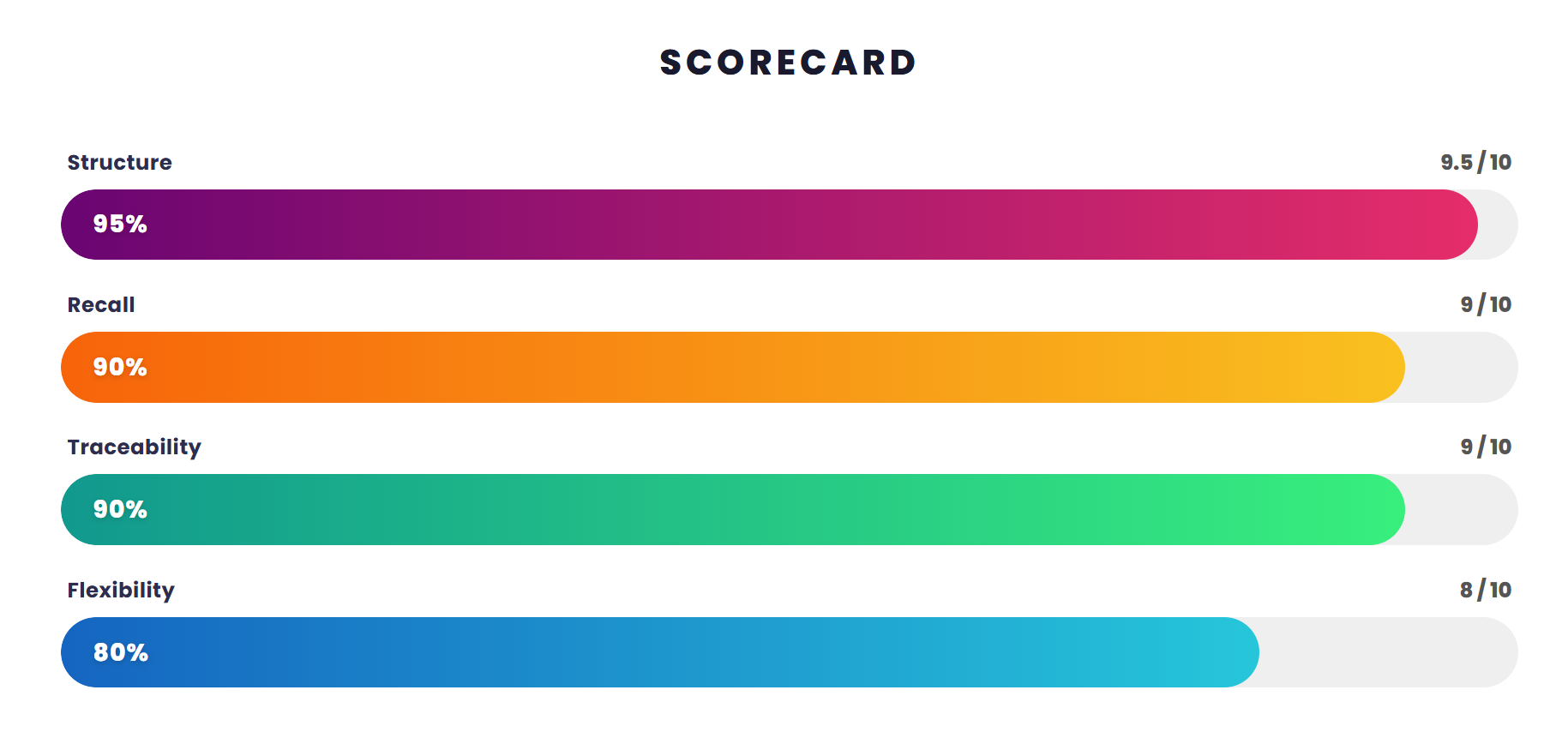
Feature scores on this page: 7.4/10 (5 scored features)
Our take
GPAI performs best when combining multiple study sources into a single output. It generates clear bullet-based summaries with useful traceability, especially for lecture-driven learning. However, limited structural depth and lack of export options make it less suitable for fully exam-ready workflows.
In-Depth Review
Our detailed analysis of GPAI — features, performance, and real-world testing.
Feature-by-Feature Breakdown
We tested each feature individually. Click any card to see inputs, outputs, and our observations.
Multi-Format InputStrong — excellent flexibility for combining multiple study sources9/10▾
Feature tested: Multi-Format Input
Result: Passed (9/10)
Verdict: Strong — excellent flexibility for combining multiple study sources
Expected behavior: Supports videos, PDFs, images, and multiple uploads combined into a single workflow, producing unified notes from scattered study material.
Test case: YouTube video → Video file
Input type: YouTube video
Input used: Input artifact (YouTube video): Input: YouTube lecture
Observed output: Output artifact (Video file): Output: Unified bullet notes from multiple sources — output.mp4
Input artifact: Input artifact (YouTube video): Input: YouTube lecture
Output artifact: Output artifact (Video file): Output: Unified bullet notes from multiple sources — output.mp4
What changed: YouTube video transformed into Video file
Why it matters / Conclusion: Excellent flexibility — best for combining scattered study material, but struggles when inputs are unrelated.
Supports videos, PDFs, images, and multiple uploads combined into a single workflow, producing unified notes from scattered study material.
Structured Bullet SummariesGood — clear summaries but limited depth7/10▾
Feature tested: Structured Bullet Summaries
Result: Passed (7/10)
Verdict: Good — clear summaries but limited depth
Expected behavior: Generates concise bullet-point notes from lectures and mixed inputs, focusing on clarity and key concepts.
Test case: YouTube video → Image
Input type: YouTube video
Input used: Input artifact (YouTube video): Input: Lecture content
Observed output: Output artifact (Image): Output: Bullet-based notes with key concepts — image (27)-1.png
Input artifact: Input artifact (YouTube video): Input: Lecture content
Output artifact: Output artifact (Image): Output: Bullet-based notes with key concepts — image (27)-1.png
What changed: YouTube video transformed into Image
Why it matters / Conclusion: Clear and readable summaries, but lacks deep structure and layered subtopics.
Generates concise bullet-point notes from lectures and mixed inputs, focusing on clarity and key concepts.
-1.png)
Timestamp LinkingUseful — improves navigation and revision8/10▾
Feature tested: Timestamp Linking
Result: Passed (8/10)
Verdict: Useful — improves navigation and revision
Expected behavior: Links generated notes directly to lecture timestamps, allowing quick navigation across topics.
Test case: YouTube video → Image
Input type: YouTube video
Input used: Input artifact (YouTube video): Input: Lecture video
Observed output: Output artifact (Image): Output: Notes with clickable timestamps — image (28)-2.png
Input artifact: Input artifact (YouTube video): Input: Lecture video
Output artifact: Output artifact (Image): Output: Notes with clickable timestamps — image (28)-2.png
What changed: YouTube video transformed into Image
Why it matters / Conclusion: Useful for navigation and revision, but timestamps are slightly less granular.
Links generated notes directly to lecture timestamps, allowing quick navigation across topics.
-2.png)
AI Chat SupportAverage — helpful but not deeply analytical6/10▾
Feature tested: AI Chat Support
Result: Passed (6/10)
Verdict: Average — helpful but not deeply analytical
Expected behavior: Allows users to ask follow-up questions based on generated notes for better understanding.
Test case: YouTube video → Image
Input type: YouTube video
Input used: Input artifact (YouTube video): Input: Follow-up question on notes
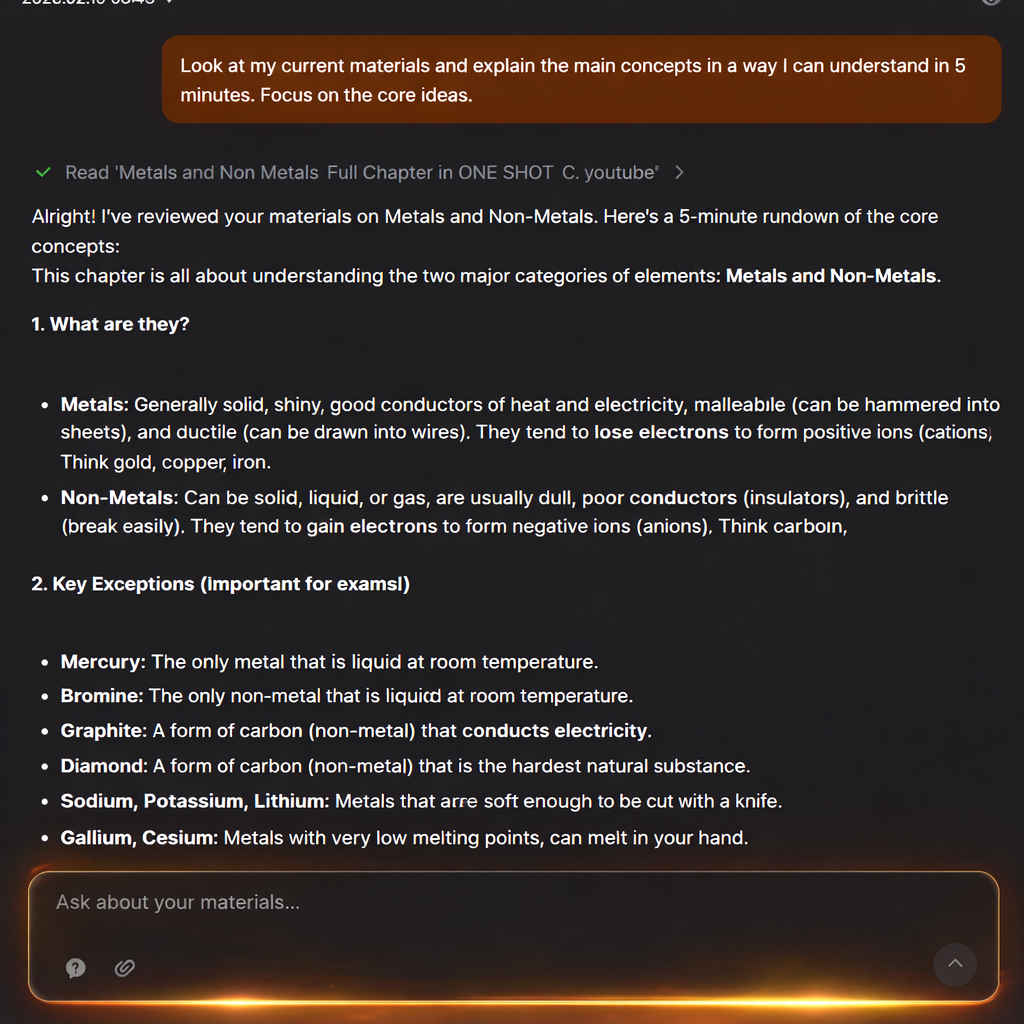
Observed output: Output artifact (Image): Output: Simplified explanation — 12dc3cc3-852a-460a-b346-f93945ad508e.png
Input artifact: Input artifact (YouTube video): Input: Follow-up question on notes
Output artifact: Output artifact (Image): Output: Simplified explanation — 12dc3cc3-852a-460a-b346-f93945ad508e.png
What changed: YouTube video transformed into Image
Why it matters / Conclusion: Strong for core use cases, but limitations in structure, depth, and advanced features reduce its effectiveness for exam-ready outputs.
Allows users to ask follow-up questions based on generated notes for better understanding.
End-to-End PDF Study WorkflowStrong — structured summaries with source traceability, but limited depth in revision features7/10▾
Feature tested: End-to-End PDF Study Workflow
Result: Passed (7/10)
Verdict: Strong — structured summaries with source traceability, but limited depth in revision features
Expected behavior: Processes PDFs into structured summaries, flashcards, and quizzes with clickable source references. Strong for text-based learning, but limited in depth, editing, and export features.
Test case: PDF document → Video file
Input type: PDF document
Input used: Input artifact (PDF document): Input: Academic PDF (Biology/Chemistry chapters) — Chapter 6 Life Processes handwritten notes-10.pdf
Observed output: Output artifact (Video file): Output: Structured notes + flashcards + MCQs with source links — final output-5.mp4
Input artifact: Input artifact (PDF document): Input: Academic PDF (Biology/Chemistry chapters) — Chapter 6 Life Processes handwritten notes-10.pdf
Output artifact: Output artifact (Video file): Output: Structured notes + flashcards + MCQs with source links — final output-5.mp4
What changed: PDF document transformed into Video file
Why it matters / Conclusion: Covers the full study workflow in one place with strong traceability, but lacks the depth and flexibility required for advanced exam preparation.
Processes PDFs into structured summaries, flashcards, and quizzes with clickable source references. Strong for text-based learning, but limited in depth, editing, and export features.
Pricing & Access
Plans as of March 2026. Tested on the Free plan (credit-based).
Pricing checked March 2026. We re-check quarterly.
Is This Right For You?
A side-by-side guide based on our hands-on testing.
Featured in Rankings
Independent rankings where GPAI was tested and rated.
Banner Preview
How the embed badge will look on your site

Embed HTML
Copy this code to your website source
Quick Integration Guide
- 1Copy the HTML code block above.
- 2Paste it into your site's HTML or CMS editor.
- 3Banner appears instantly on your page.
- 4Links back to your tool profile here.
Similar Tools
Discover more AI tools like GPAI to enhance your workflow.
Comments (0)
Need a custom AI solution for this use case?
If you are looking to build a custom PDF to notes, flashcard generation, or quiz creation tool for your business or internal workflow, email us at contact@futuresmart.ai.
Found something inaccurate or missing? We try to keep our AI research accurate and useful. If you found outdated information, an issue, or have a suggestion, email us at collaborate@aidemos.com.