
NotebookLM
Turns one biology PDF into source-linked revision assets across text, flashcards, mind maps, audio, and video.
Strong all-in-one revision workflow for a single biology PDF
- You want one academic PDF turned into multiple revision formats instead of a plain summary.
- You need flashcards, quizzes, or mind maps with source references for exam prep.
- You learn well from audio or video revision alongside text.
- You need a fully comprehensive chapter table; the tested table covered only selected parts.
Our take
NotebookLM performed very well on this biology chapter test: it produced a structured summary table, a large flashcard deck, a quiz with explanations, a mind map, and both audio and video study overviews. The main limitation is still coverage rather than capability, because the table only captured selected parts of the chapter and this evaluation did not include comparative or boundary scenarios.
In-Depth Review
Our detailed analysis of NotebookLM — features, performance, and real-world testing.
Feature-by-Feature Breakdown
Structured Summaries and Tables▾
Feature tested: Structured Summaries and Tables
Result: Passed
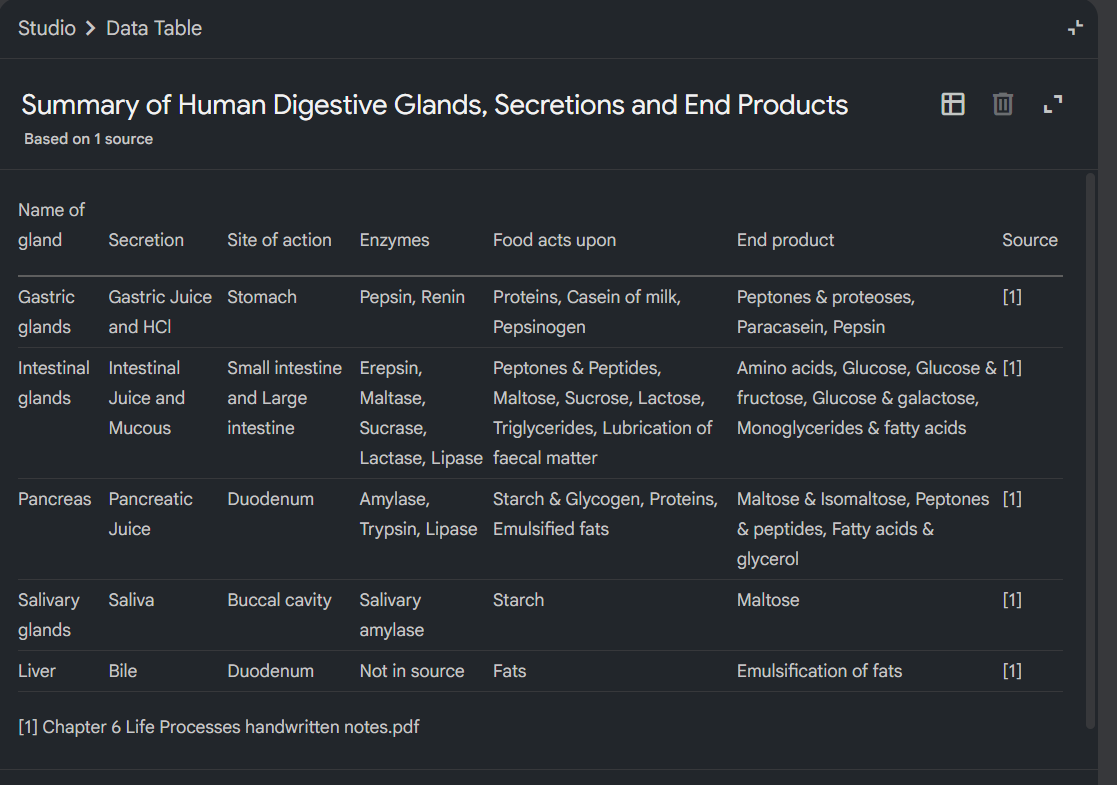
Expected behavior: NotebookLM turns an uploaded biology chapter PDF into compact revision tables or structured summaries with topics, subtopics, actions, and source citations. In the digestive-glands exercise, it organized facts like secretions, sites of action, enzymes, foods acted upon, and end products.
Test case: PDF document → Image
Input type: PDF document
Input used: Input artifact (PDF document): Uploaded biology chapter source used for the study outputs. — Chapter 6 Life Processes handwritten notes.pdf
Observed output: Output artifact (Image): Source-linked data table summarizing digestive glands, secretions, enzymes, food acted upon, and end products from a single source. — notebooklm-written-summary-output.png
Input artifact: Input artifact (PDF document): Uploaded biology chapter source used for the study outputs. — Chapter 6 Life Processes handwritten notes.pdf
Output artifact: Output artifact (Image): Source-linked data table summarizing digestive glands, secretions, enzymes, food acted upon, and end products from a single source. — notebooklm-written-summary-output.png
What changed: PDF document transformed into Image
Why it matters / Conclusion: Useful for quick revision and structured lookup, but not complete enough to replace the source chapter.
NotebookLM turns an uploaded biology chapter PDF into compact revision tables or structured summaries with topics, subtopics, actions, and source citations. In the digestive-glands exercise, it organized facts like secretions, sites of action, enzymes, foods acted upon, and end products.
Source-Linked Flashcards▾
Feature tested: Source-Linked Flashcards
Result: Passed
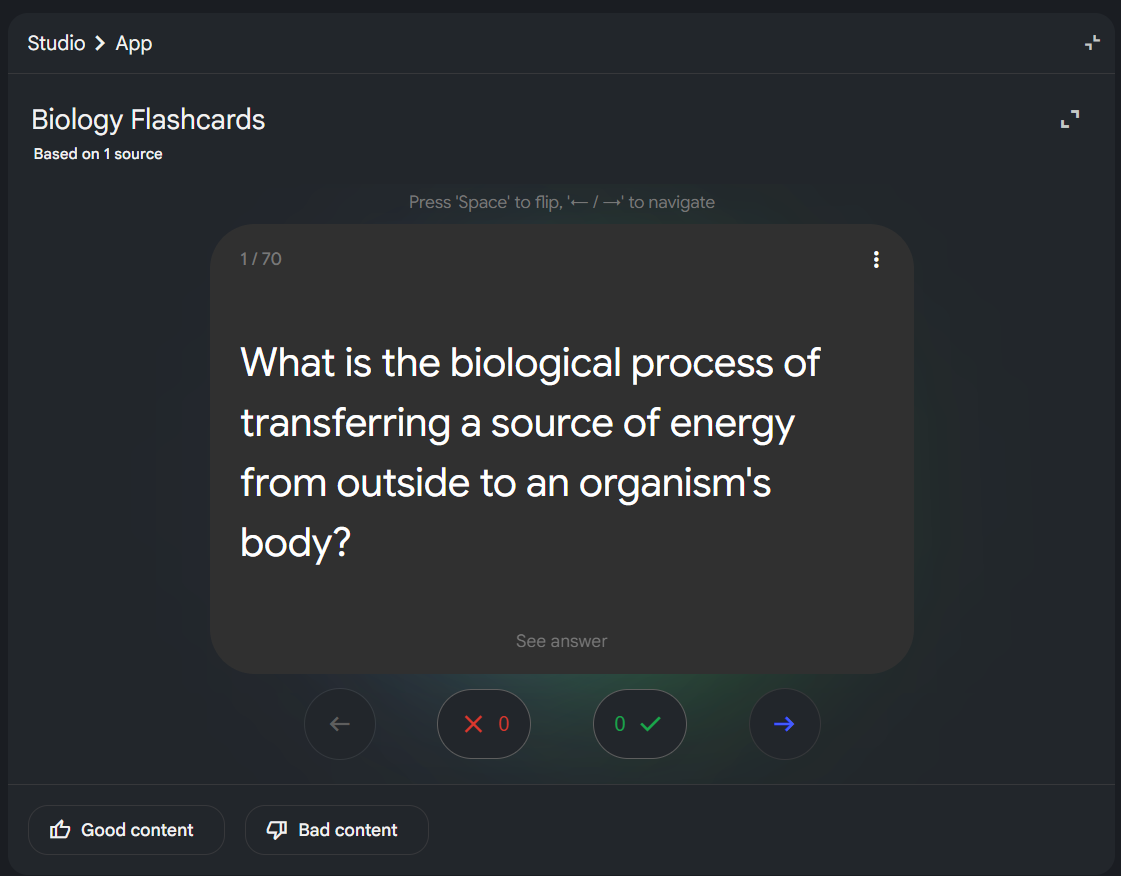
Expected behavior: NotebookLM generates flashcards from the uploaded chapter with front/back prompts, source references, and jumps back to the PDF. The tested decks included a larger biology set across dozens of cards, showing active recall tied to the source material.
Test case: PDF document → Image
Input type: PDF document
Input used: Input artifact (PDF document): Uploaded biology chapter source used for flashcard generation. — Chapter 6 Life Processes handwritten notes.pdf
Observed output: Output artifact (Image): Flip-style biology flashcard deck with grading controls; the screenshot shows card 1/70. — notebooklm-flashcard-generator-output.png
Input artifact: Input artifact (PDF document): Uploaded biology chapter source used for flashcard generation. — Chapter 6 Life Processes handwritten notes.pdf
Output artifact: Output artifact (Image): Flip-style biology flashcard deck with grading controls; the screenshot shows card 1/70. — notebooklm-flashcard-generator-output.png
What changed: PDF document transformed into Image
Why it matters / Conclusion: A standout revision feature because it combines active recall with source verification.
NotebookLM generates flashcards from the uploaded chapter with front/back prompts, source references, and jumps back to the PDF. The tested decks included a larger biology set across dozens of cards, showing active recall tied to the source material.
Quiz Generation with Explanations▾
Feature tested: Quiz Generation with Explanations
Result: Partial
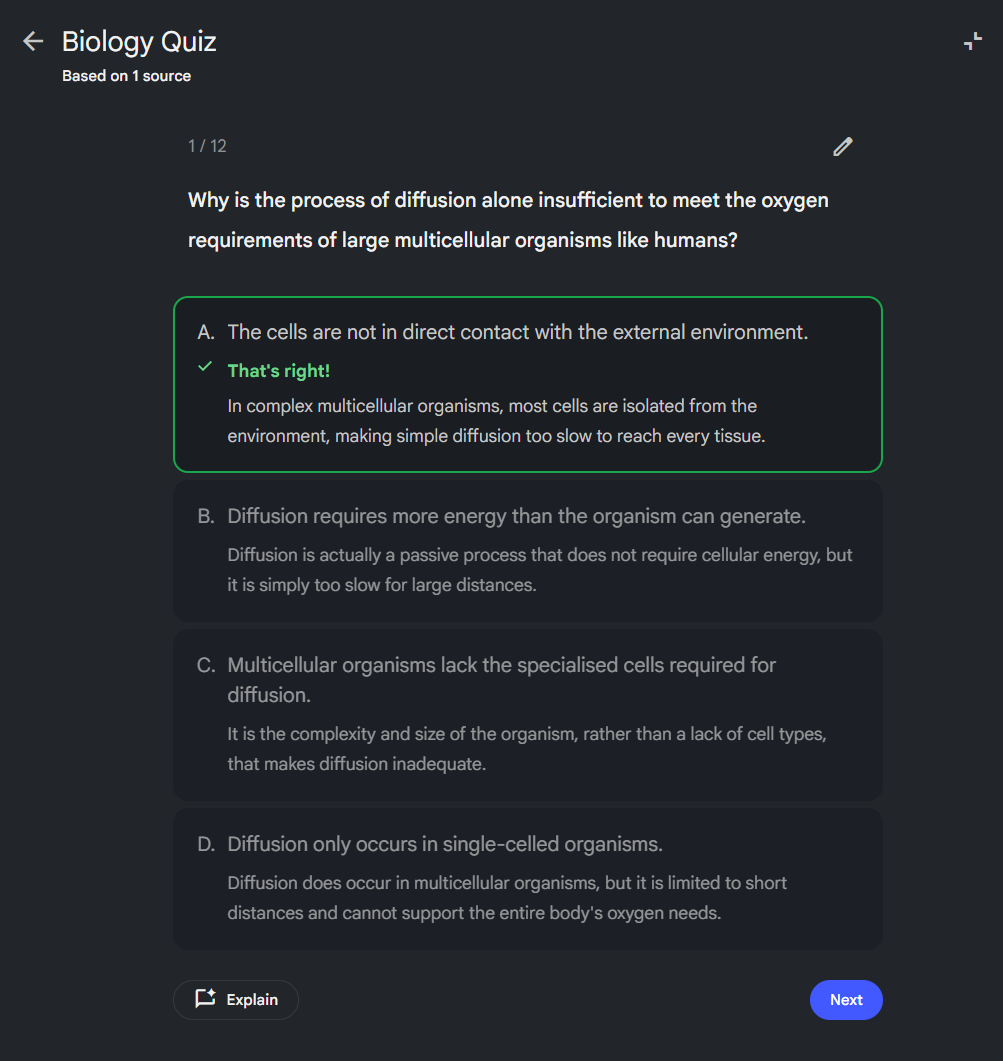
Expected behavior: NotebookLM creates multiple-choice practice quizzes from the source chapter and provides immediate explanations plus source-backed references. The tested biology questions included follow-up questioning in context after the answer was revealed.
Test case: PDF document → Image
Input type: PDF document
Input used: Input artifact (PDF document): Uploaded biology chapter source used for quiz generation. — Chapter 6 Life Processes handwritten notes.pdf
Observed output: Output artifact (Image): Multiple-choice quiz with feedback; the screenshot shows question 1/12 and explanatory text after the answer. — notebooklm-quiz-generator-output.png
Input artifact: Input artifact (PDF document): Uploaded biology chapter source used for quiz generation. — Chapter 6 Life Processes handwritten notes.pdf
Output artifact: Output artifact (Image): Multiple-choice quiz with feedback; the screenshot shows question 1/12 and explanatory text after the answer. — notebooklm-quiz-generator-output.png
What changed: PDF document transformed into Image
Why it matters / Conclusion: Good explanation support, but too few questions for exhaustive practice.
NotebookLM creates multiple-choice practice quizzes from the source chapter and provides immediate explanations plus source-backed references. The tested biology questions included follow-up questioning in context after the answer was revealed.
Mind Map Generation▾
Feature tested: Mind Map Generation
Result: Passed
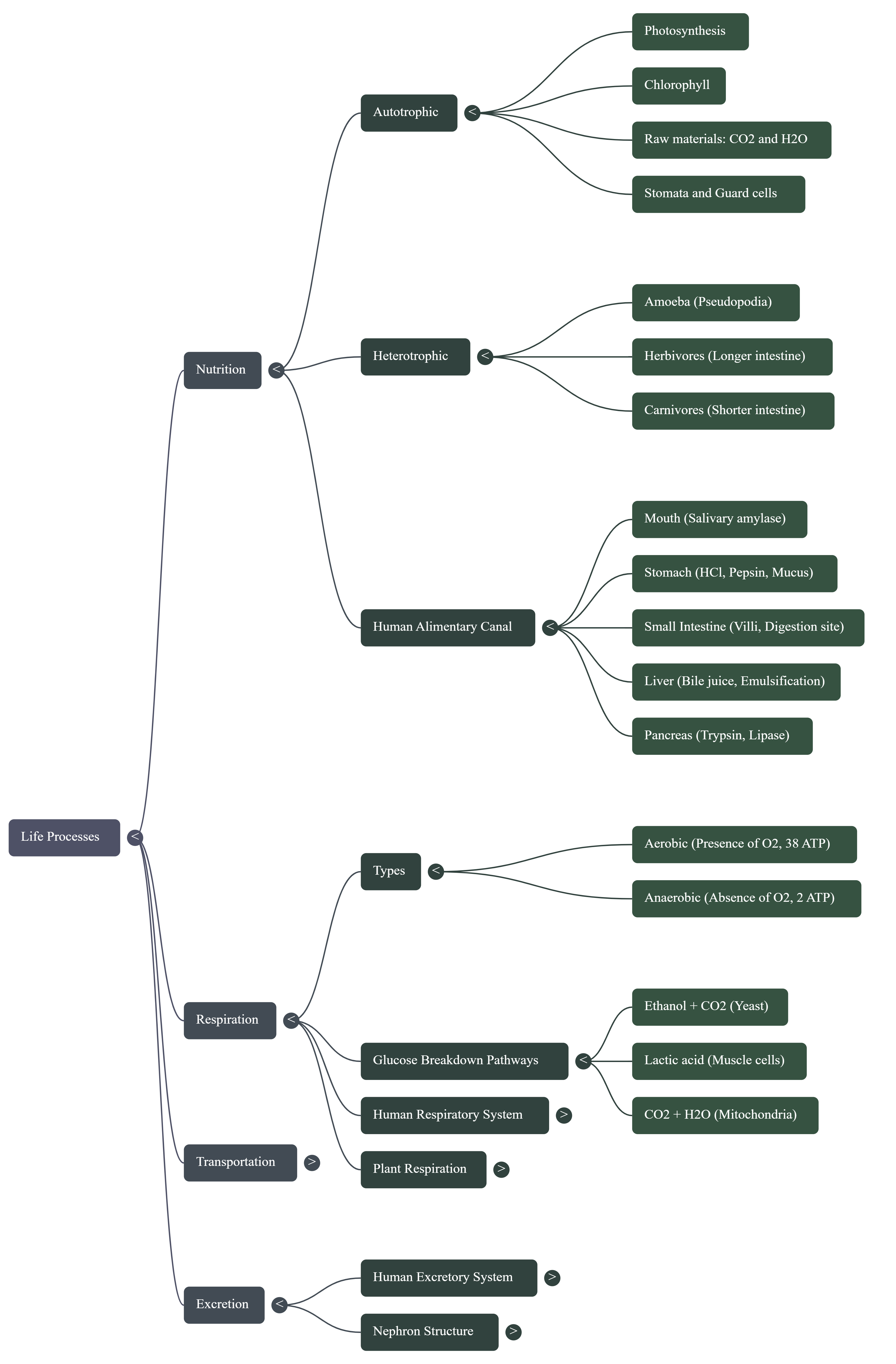
Expected behavior: NotebookLM converts an uploaded chapter into a hierarchical mind map for fast review and topic linking. The tested map centered on Life Processes and branched into Nutrition, Respiration, Transportation, and Excretion with finer subtopics such as photosynthesis, human digestion, glucose breakdown, and the nephron.
Test case: PDF document → Image
Input type: PDF document
Input used: Input artifact (PDF document): Uploaded biology chapter source used for mind-map generation. — Chapter 6 Life Processes handwritten notes.pdf
Observed output: Output artifact (Image): Concept map centered on Life Processes, with branches for nutrition, respiration, transportation, and excretion. — notebooklm-mind-map-output.png
Input artifact: Input artifact (PDF document): Uploaded biology chapter source used for mind-map generation. — Chapter 6 Life Processes handwritten notes.pdf
Output artifact: Output artifact (Image): Concept map centered on Life Processes, with branches for nutrition, respiration, transportation, and excretion. — notebooklm-mind-map-output.png
What changed: PDF document transformed into Image
Why it matters / Conclusion: Very useful for rapid concept scanning, especially in process-heavy biology topics.
NotebookLM converts an uploaded chapter into a hierarchical mind map for fast review and topic linking. The tested map centered on Life Processes and branched into Nutrition, Respiration, Transportation, and Excretion with finer subtopics such as photosynthesis, human digestion, glucose breakdown, and the nephron.
Multimodal Study Overviews▾
Feature tested: Multimodal Study Overviews
Result: Passed
Expected behavior: NotebookLM generates overview-style study aids in audio and video formats from the same source chapter. The tested outputs were a podcast-style audio explanation for passive revision and a short diagram-based video explanation reusing diagrams from the uploaded PDF.
Test case: PDF document → Audio file
Input type: PDF document
Input used: Input artifact (PDF document): Uploaded biology chapter source used for the audio overview. — Chapter 6 Life Processes handwritten notes.pdf
Observed output: Output artifact (Audio file): Podcast-style study overview generated from the biology source for passive listening and revision. — notebooklm-audio-overview-output.m4a
Input artifact: Input artifact (PDF document): Uploaded biology chapter source used for the audio overview. — Chapter 6 Life Processes handwritten notes.pdf
Output artifact: Output artifact (Audio file): Podcast-style study overview generated from the biology source for passive listening and revision. — notebooklm-audio-overview-output.m4a
What changed: PDF document transformed into Audio file
Test case: PDF document → Video file
Input type: PDF document
Input used: Input artifact (PDF document): Uploaded biology chapter source used for the video overview. — Chapter 6 Life Processes handwritten notes.pdf
Observed output: Output artifact (Video file): Diagram-based video overview generated from the biology source. — notebooklm-video-overview-output.mp4
Input artifact: Input artifact (PDF document): Uploaded biology chapter source used for the video overview. — Chapter 6 Life Processes handwritten notes.pdf
Output artifact: Output artifact (Video file): Diagram-based video overview generated from the biology source. — notebooklm-video-overview-output.mp4
What changed: PDF document transformed into Video file
Why it matters / Conclusion: Strong support for passive-learning revision through both listening and watching.
NotebookLM generates overview-style study aids in audio and video formats from the same source chapter. The tested outputs were a podcast-style audio explanation for passive revision and a short diagram-based video explanation reusing diagrams from the uploaded PDF.
Contextual Source Chat and Follow-up Q&A▾
Feature tested: Contextual Source Chat and Follow-up Q&A
Result: Partial
Expected behavior: NotebookLM supports grounded follow-up questions over the uploaded source material so the study flow can continue after an initial summary or explanation. The evaluation describes doubt clarification and cross-questioning tied to the chapter PDF.
Test case: Text prompt → Text prompt
Input type: Text prompt
Input used: Input artifact (Text prompt): Input
Observed output: Output artifact (Text prompt): Output
Input artifact: Input artifact (Text prompt): Input
Output artifact: Output artifact (Text prompt): Output
What changed: Text prompt transformed into Text prompt
Why it matters / Conclusion: Useful for clarification after the first pass, though this report does not show a separate chat transcript.
NotebookLM supports grounded follow-up questions over the uploaded source material so the study flow can continue after an initial summary or explanation. The evaluation describes doubt clarification and cross-questioning tied to the chapter PDF.
Featured in Rankings
Independent rankings where NotebookLM was tested and rated.

Banner Preview
How the embed badge will look on your site

Embed HTML
Copy this code to your website source
Quick Integration Guide
- 1Copy the HTML code block above.
- 2Paste it into your site's HTML or CMS editor.
- 3Banner appears instantly on your page.
- 4Links back to your tool profile here.
Similar Tools
Discover more AI tools like NotebookLM to enhance your workflow.
Comments (0)
Need a custom AI solution for this use case?
If you are looking to build a custom study guide generation, flashcard creation, mind map generation, or revision assistant for your business or internal workflow, email us at contact@futuresmart.ai.
Found something inaccurate or missing? We try to keep our AI research accurate and useful. If you found outdated information, an issue, or have a suggestion, email us at collaborate@aidemos.com.