education-research · tested March 2026

Best AI Lecture Note-Taking Tools 2026

This ranking evaluates AI tools based on their ability to convert lecture recordings into structured, exam-ready notes. Using the same lecture input across all tools, we tested real-world performance without manual edits or external workflows. The analysis focuses on academic usability—structured formatting, concept clarity, table generation, and active recall features—highlighting which tools truly help students transform lectures into effective revision material.

0
4 tools5 things we checked1 tests24 findings5 Min
Our verdictTested March 2026 · 4/4 tools tested hands-on
#1 pick
YouLearn AIBest5.0/5 · 2 checks

The most complete system for converting lectures into structured, exam-ready notes with strong revision support.

The rest of the field

#2 GPAI· #3 NoteGPT· #4 Summarize.tech

The ranking

How we decided #1. We rank on the 2 checks that decide whether a tool does this job: Structural & Tabular Formatting, Summary Output Quality. A check only carries a score when we recorded a finding for it, and a tool has to be measured on all of them to take the top spot. We also checked Active Recall Support (Quiz/Flashcards), Study Material Handling, Workflow & Revision Flexibility — compared for you, but not part of the ranking.

ToolScorePriceWhere it lands
#1YouLearn AIBest5.0/5
all 2 checks
Free · ₹5,400/yearStrongest structured lecture-to-notes workflow with built-in revision tools
#2GPAIUsable4.3/5
all 2 checks
Free · $11.99/month or $107.99/yearStrong lecture-to-notes summarizer with timestamped, structured outputs
#3NoteGPTUsable4.0/5
all 2 checks
Free · $2.08/moStrongest structured exam-note generation, but weak on export/save flexibility
#4Summarize.techUnstable1.5/5
all 2 checks
Free · ~$10/monthQuick YouTube lecture condenser, but weak for exam-ready note structuring

What we checked

Every finding below is tied to one of these checks, and to the test that produced it. The number is how many of the 4 tools we recorded findings for.

Structural & Tabular Formatting 4 toolsSummary Output Quality 4 toolsStudy Material Handling 4 toolscontextWorkflow & Revision Flexibility 4 toolscontextActive Recall Support (Quiz/Flashcards) 3 toolscontext

What we tried

The same 1 test was run on every tool.

Study material for exam-ready notes
Read it

YouLearn AI

Best#1 of 4

Strongest structured lecture-to-notes workflow with built-in revision tools

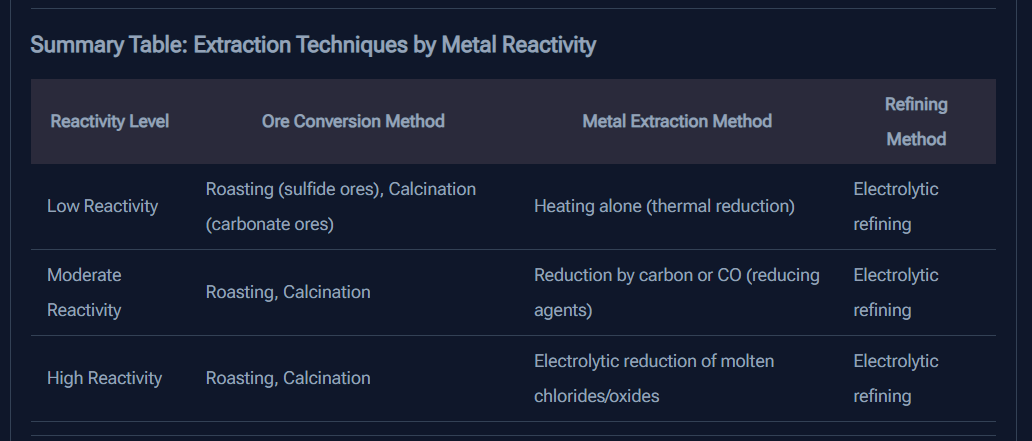
Structural & Tabular Formatting5/51 finding

Excellent at breaking content into topics, subtopics, tables, and comparison-style structures, which the report highlights as a standout.

Worked wellwhen we tried: Study material for exam-ready noteslink to this finding

Restructures content into clear headings, subtopics, and tables, including reaction and comparison content, instead of leaving it as plain paragraphs.

Study Material HandlingCapability check4/51 finding

Handles long YouTube lectures quickly and well, but the report notes limited observed support for PDFs, multi-source merging, or broader format handling.

This is a capability we checked per tool — whether (and how well) it supports this — so it shows a support verdict and what we found, rather than media or an input→output pair.

Mixedacross all testslink to this finding

Processes a 2 hour 19 minute YouTube lecture and generated structured output in seconds; study-material intake appears limited to lecture-link workflows, with no PDF upload or multi-source merging observed.

Summary Output Quality5/51 finding

Generated notes were described as detailed, complete, and highly structured, with strong academic reorganization and no major omissions.

Worked wellwhen we tried: Study material for exam-ready noteslink to this finding

Produces high-quality revision notes that segment content into topics and subtopics, extract key insights, highlight core points, and cover the lecture without major omissions.

Workflow & Revision FlexibilityCapability check4/51 finding

Offers save/download, timestamps, audio playback, and explanation tools for revisiting content, but lacks manual editing and deeper customization.

This is a capability we checked per tool — whether (and how well) it supports this — so it shows a support verdict and what we found, rather than media or an input→output pair.

Mixedacross all testslink to this finding

Provides clickable timestamps for each summarized section and a Save/Download option for offline revision, later storage, and printing, but users cannot add or remove custom content within the summary and no advanced formatting customization is visible.

Active Recall Support (Quiz/Flashcards)Capability check5/51 finding

Provides quizzes, flashcards, explanations, and immediate feedback, making it exceptionally strong for active recall and reinforcement.

This is a capability we checked per tool — whether (and how well) it supports this — so it shows a support verdict and what we found, rather than media or an input→output pair.

Worked wellacross all testslink to this finding

Supports flashcards for specific lines and generates topic-specific quizzes from selected lines, with about five questions and immediate feedback plus explanations after answering.

GPAI

Usable#2 of 4

Strong lecture-to-notes summarizer with timestamped, structured outputs

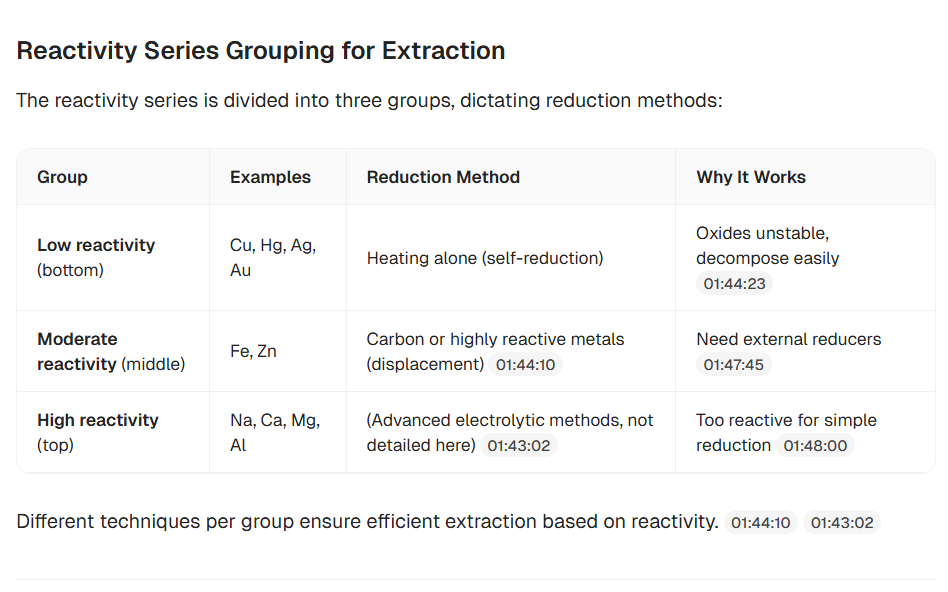
Structural & Tabular Formatting4/51 finding

Breaks content into logical headings, subtopics, and bullets very well, but does not recreate tables, diagrams, or other visual structures.

Failedwhen we tried: Study material for exam-ready noteslink to this finding

Does not recreate diagrams, tables, or visual flow structures; the output remains text-only even when the source would benefit from visual restructuring.

Study Material HandlingCapability check4/51 finding

Handles multiple study formats well, including YouTube, PDFs, images, audio, and multi-source uploads, but the free-plan credit cap limits heavy use.

This is a capability we checked per tool — whether (and how well) it supports this — so it shows a support verdict and what we found, rather than media or an input→output pair.

Worked wellwhen we tried: Study material for exam-ready noteslink to this finding

Accepts multiple academic source types, including YouTube lecture links, PDFs, images, and audio files, and can combine up to 10 sources in one session into a consolidated output.

Summary Output Quality4.5/51 finding

Produces clear, revision-focused bullet summaries with headings, subheadings, timestamp traceability, and bilingual support, though it stays text-only with no visual reconstruction.

Worked wellwhen we tried: Study material for exam-ready noteslink to this finding

Produces exam-oriented summaries as structured bullet points with headings, subheadings, and logically separated sections, with subject-specific detail rather than long prose.

Workflow & Revision FlexibilityCapability check2/52 findings

Offers useful AI chat clarification, but lacks export/download, offline access, and strong editing or customization options, making revision workflows less flexible.

This is a capability we checked per tool — whether (and how well) it supports this — so it shows a support verdict and what we found, rather than media or an input→output pair.

Failedwhen we tried: Study material for exam-ready noteslink to this finding

Lacks export/download for summaries, quizzes, and flashcards, offers no offline access, and provides only limited editing/customization, so generated notes cannot be directly saved or printed.

Worked wellwhen we tried: Study material for exam-ready noteslink to this finding

Adds clickable timestamps to lecture summaries so users can jump directly to the exact source moment for verification and faster rewatching, reducing the need to re-read the full material.

Active Recall Support (Quiz/Flashcards)Capability check3/51 finding

Supports quizzes and flashcards with basic interactive revision, but the generated quantity is limited and may not cover chapter depth fully.

This is a capability we checked per tool — whether (and how well) it supports this — so it shows a support verdict and what we found, rather than media or an input→output pair.

Mixedacross all testslink to this finding

Generates quiz output with multiple-choice questions, interactive answering, and basic explanations after responses, and also generates front-back flashcards suitable for quick revision, but the question count is limited relative to the depth of the uploaded content and the flashcard set may be too small to cover an entire chapter comprehensively.

NoteGPT

Usable#3 of 4

Strongest structured exam-note generation, but weak on export/save flexibility

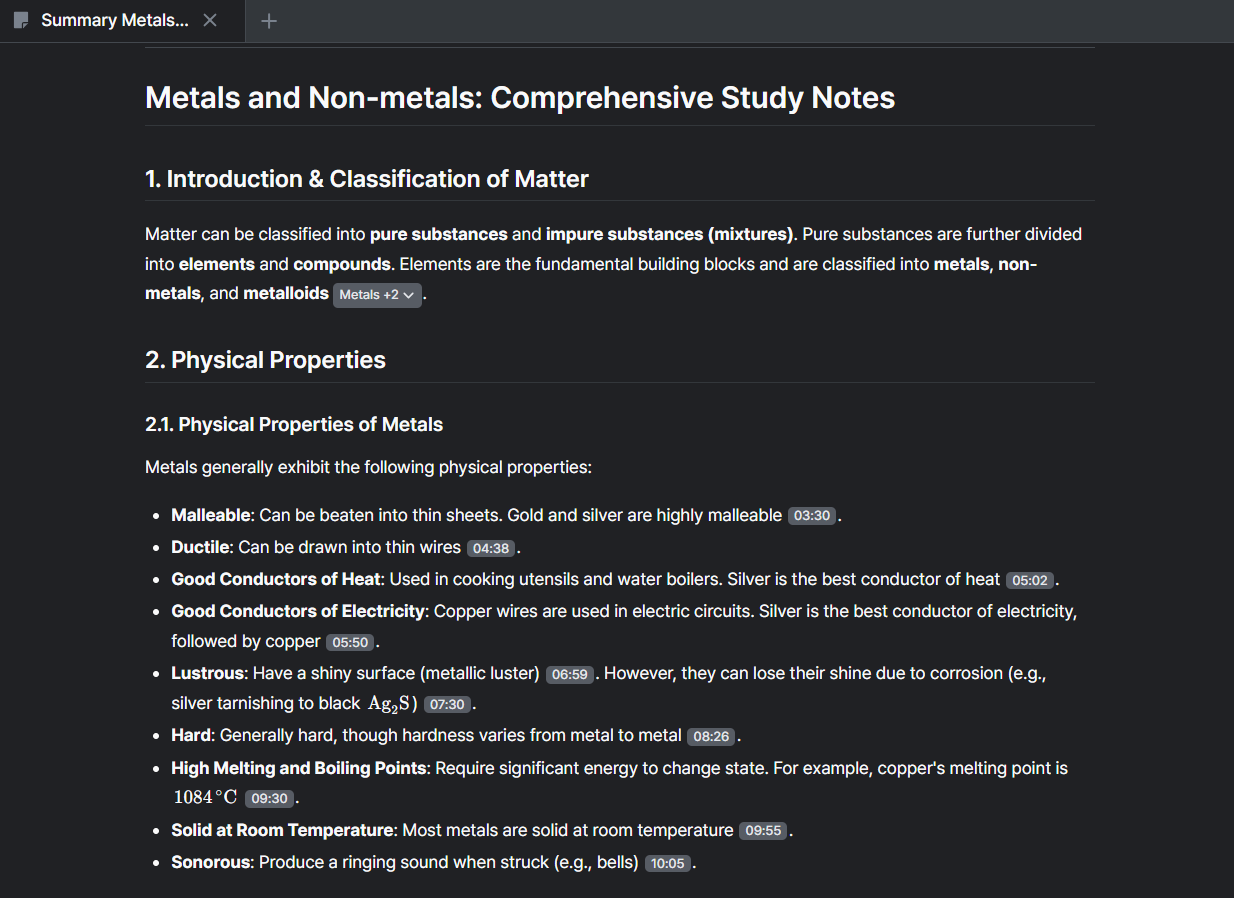
Structural & Tabular Formatting4/53 findings

Strong bulleting, headings, timestamp mapping, and tabular restructuring in Smart Summary, though tables are not present in all modes.

Mixedacross all testslink to this finding

It works in Smart Summary mode, where it can reorganize concepts into tabular and grid-based comparative layouts, but Chapter Summary mode does not include tables, so tabular restructuring is limited outside Smart Summary.

Struggledwhen we tried: Study material for exam-ready noteslink to this finding

Chapter Summary mode does not include tables, so tabular restructuring is limited outside Smart Summary.

Study Material HandlingCapability check5/51 finding

Handles long lectures and PDFs well, with straightforward YouTube/PDF summarization and multiple structured output modes.

This is a capability we checked per tool — whether (and how well) it supports this — so it shows a support verdict and what we found, rather than media or an input→output pair.

Worked wellwhen we tried: Study material for exam-ready noteslink to this finding

Handles long-form study material flexibly by accepting YouTube lecture links and PDF uploads, then processing long lectures such as 2+ hour videos into structured segments through multiple summarization modes.

Summary Output Quality4/53 findings

Outputs are clear and revision-focused, especially Smart Summary, but Chapter Summary is somewhat compressed and less detailed.

Mixedacross all testslink to this finding

Smart Summary mode produces a more detailed and better structured revision note set with extended explanation depth, bullet organization, FAQ inclusion, and a transcript-evaluation rating of 9/10, while Chapter Summary is concise and somewhat compressed but still uses bullet-point formatting, topic segmentation, and a timestamp-based breakdown, with a 6/10 rating.

Mixedwhen we tried: Study material for exam-ready noteslink to this finding

Its Chapter Summary output is concise and somewhat compressed, but still uses bullet-point formatting, topic segmentation, and timestamp-based breakdown; the transcript evaluation rated this mode 6/10.

Workflow & Revision FlexibilityCapability check2/51 finding

Despite strong generation, the lack of visible export, download, or offline saving options limits revision workflow flexibility.

This is a capability we checked per tool — whether (and how well) it supports this — so it shows a support verdict and what we found, rather than media or an input→output pair.

Mixedacross all testslink to this finding

It maps notes to exact lecture time intervals and topic progression, letting users jump back to specific moments instead of rewatching the full video, but there is no visible export/download option, no clear offline saving feature, and no direct PDF export for the generated summaries.

Active Recall Support (Quiz/Flashcards)Capability check4/51 finding

Supports flashcards, FAQs, and AI chat prompts for questions, giving solid active-recall support.

This is a capability we checked per tool — whether (and how well) it supports this — so it shows a support verdict and what we found, rather than media or an input→output pair.

Worked wellwhen we tried: Study material for exam-ready noteslink to this finding

The AI chat support can generate 5 important FAQs from lecture content, and the platform also supports flashcards and custom question prompts for revision practice.

Summarize.tech

Unstable#4 of 4

Quick YouTube lecture condenser, but weak for exam-ready note structuring

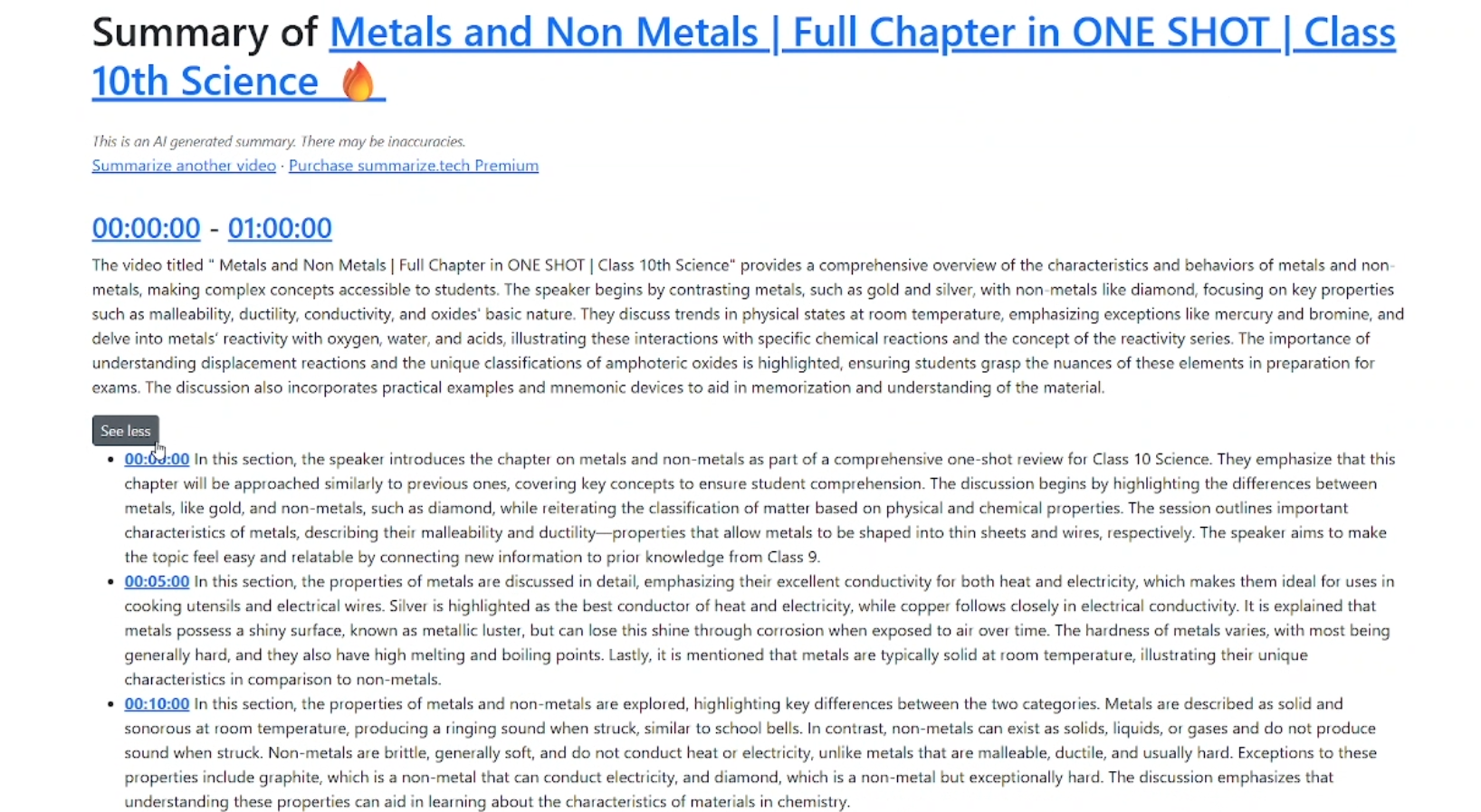
Structural & Tabular Formatting1/51 finding

Provides time-based chunks only, with no bullet points, headings, subtopics, tables, or other academic structuring.

Struggledwhen we tried: Study material for exam-ready noteslink to this finding

The tool segments content by time intervals, but it does not provide bullet points, headings, subtopic breakdowns, tables, or other hierarchical structure, leaving the summary as raw paragraph-style text.

Study Material HandlingCapability check2/51 finding

Supports only YouTube lecture links and generates time-segmented summaries, but has no PDF, image, or multi-source input support.

This is a capability we checked per tool — whether (and how well) it supports this — so it shows a support verdict and what we found, rather than media or an input→output pair.

Struggledwhen we tried: Study material for exam-ready noteslink to this finding

The tool handles YouTube lecture URLs, but it is limited to video-only input and does not support PDFs, images, multi-source integration, or other file-based academic documents, so its study-material handling is narrow rather than flexible.

Summary Output Quality2/51 finding

Produces a summary, but it is paragraph-heavy and transcript-like rather than clear, revision-focused exam notes.

Struggledwhen we tried: Study material for exam-ready noteslink to this finding

The generated output is paragraph-heavy and transcript-like instead of revision-focused notes, and the report says long lectures produce lengthy, cognitively heavy summaries that are hard to revise quickly.

Workflow & Revision FlexibilityCapability check1/51 finding

Offers no editing, highlighting, export, or offline-saving options, so revising the notes later is inconvenient.

This is a capability we checked per tool — whether (and how well) it supports this — so it shows a support verdict and what we found, rather than media or an input→output pair.

Failedacross all testslink to this finding

The tool provides no editing, highlighting, bookmarking, customization, or content-restructuring features, and it has no download option, no PDF export, or offline saving feature, so users cannot easily revise or personalize the notes in place and must return to the platform whenever they want to review the generated summary again.

Comments (0)

Please Log in to join the discussion.