
DomoAI
Converts one still image into a short animated clip with real audio and strong fidelity, but camera moves often get dropped and free-tier exports stay short and watermarked.
Strong at keeping stills coherent; weak at following camera choreography
- You want a quick living-photo style clip from a single still image
- You care more about subject fidelity and clean animation than exact camera choreography
- You need real audio to come with the generated clip
- You need a specific push-in, orbit, or turntable move reproduced exactly
Our take
DomoAI is a good fit when the job is to make a still image feel alive without breaking faces, hands, objects, or labels. In this test, all six clips held together cleanly and all six carried real audio. The trade-off is that camera instructions are conservative or dropped unless you switch modes, and free-tier exports stay short, around 480p, and watermarked.
In-Depth Review
Our detailed analysis of DomoAI — features, performance, and real-world testing.
Feature-by-Feature Breakdown
Single-Image-to-Video Animation▾
Feature tested: Single-Image-to-Video Animation
Result: Passed
Expected behavior: Turns one still image into a short animated clip, exercised on an anime illustration, market street, tiger photo, portrait, group toast, and product shot. The tests also checked whether motion stayed coherent and the source image remained visually intact while animation was added.
Test case: Image → Video file
Input type: Image
Input used: Input artifact (Image): Input — input-01.jpg
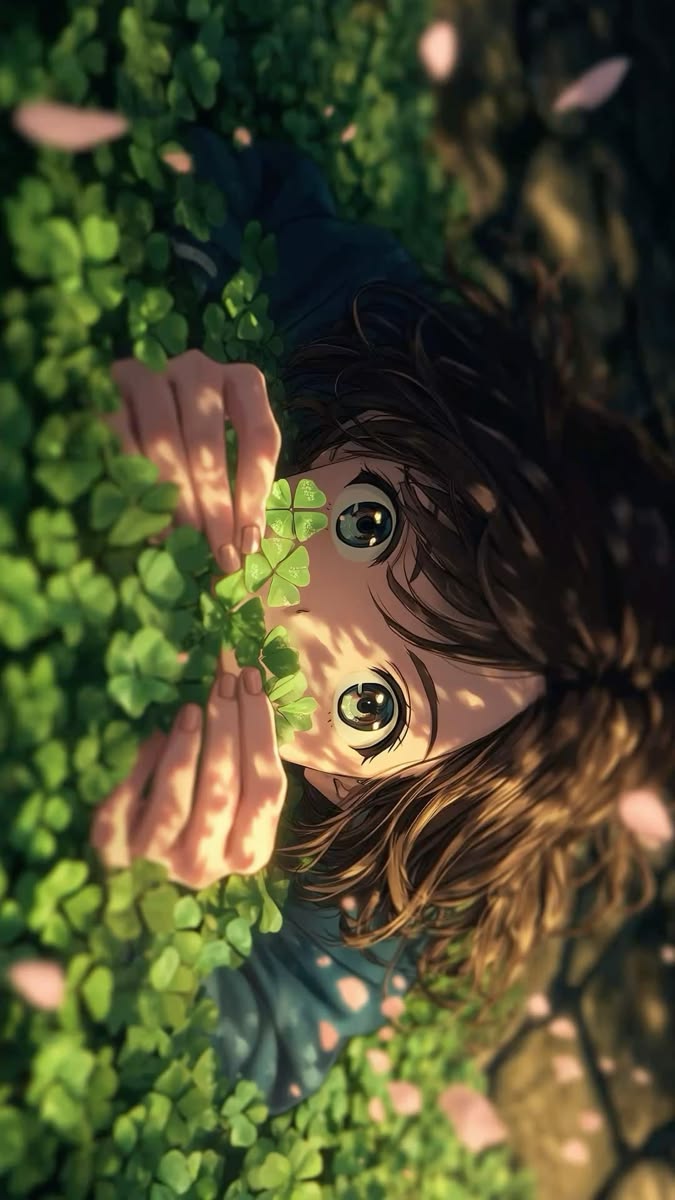
Observed output: Output artifact (Video file): A soft blink, a small smile, drifting petals, and subtle lighting change animate the illustration cleanly with no distortion, but the requested cinematic push-in does not occur. — input-01-output.mp4
Input artifact: Input artifact (Image): Input — input-01.jpg
Output artifact: Output artifact (Video file): A soft blink, a small smile, drifting petals, and subtle lighting change animate the illustration cleanly with no distortion, but the requested cinematic push-in does not occur. — input-01-output.mp4
What changed: Image transformed into Video file
Test case: Image → Video file
Input type: Image
Input used: Input artifact (Image): Input — input-02.png
Observed output: Output artifact (Video file): The market-street scene advances with convincing forward dolly motion and real parallax, keeping buildings, cart, and people stable throughout. — input-02-output.mp4
Input artifact: Input artifact (Image): Input — input-02.png
Output artifact: Output artifact (Video file): The market-street scene advances with convincing forward dolly motion and real parallax, keeping buildings, cart, and people stable throughout. — input-02-output.mp4
What changed: Image transformed into Video file
Test case: Image → Video file
Input type: Image
Input used: Input artifact (Image): Input — input-03.jpeg
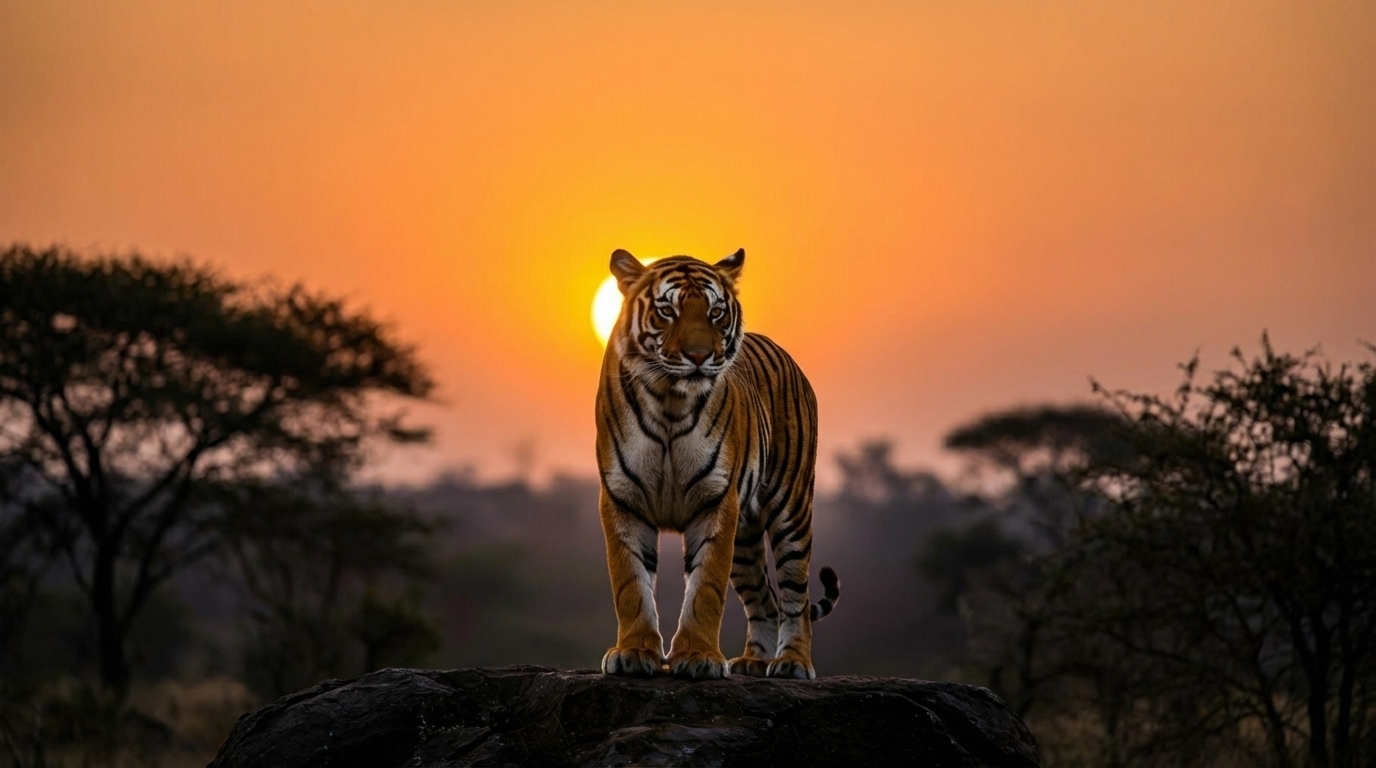
Observed output: Output artifact (Video file): The tiger walks forward, settles into a crouch, and roars cleanly, with fur, stripes, and pose remaining stable through the transition. — input-03-output.mp4
Input artifact: Input artifact (Image): Input — input-03.jpeg
Output artifact: Output artifact (Video file): The tiger walks forward, settles into a crouch, and roars cleanly, with fur, stripes, and pose remaining stable through the transition. — input-03-output.mp4
What changed: Image transformed into Video file
Test case: Image → Video file
Input type: Image
Input used: Input artifact (Image): Input — input-04.webp
Observed output: Output artifact (Video file): The portrait stays recognizable while the expression builds naturally from a small smile into a fuller laugh, with no visible facial distortion. — input-04-output.mp4
Input artifact: Input artifact (Image): Input — input-04.webp
Output artifact: Output artifact (Video file): The portrait stays recognizable while the expression builds naturally from a small smile into a fuller laugh, with no visible facial distortion. — input-04-output.mp4
What changed: Image transformed into Video file
Test case: Image → Video file
Input type: Image
Input used: Input artifact (Image): Input — input-05.webp
Observed output: Output artifact (Video file): The dinner toast stays physically coherent with all five people present, clean hand-to-glass contact, and a dynamic camera move that remains visually stable. — input-05-output.mp4
Input artifact: Input artifact (Image): Input — input-05.webp
Output artifact: Output artifact (Video file): The dinner toast stays physically coherent with all five people present, clean hand-to-glass contact, and a dynamic camera move that remains visually stable. — input-05-output.mp4
What changed: Image transformed into Video file
Test case: Image → Video file
Input type: Image
Input used: Input artifact (Image): Input — input-06.webp
Observed output: Output artifact (Video file): The perfume bottle stays front-facing while the splash animates, and the 'Luméa ESSENCE' label remains fully legible and undistorted throughout. — input-06-output.mp4
Input artifact: Input artifact (Image): Input — input-06.webp
Output artifact: Output artifact (Video file): The perfume bottle stays front-facing while the splash animates, and the 'Luméa ESSENCE' label remains fully legible and undistorted throughout. — input-06-output.mp4
What changed: Image transformed into Video file
Why it matters / Conclusion: Reliable at turning a single image into a usable short video without warping the source, even on faces, hands, and product shots.
Turns one still image into a short animated clip, exercised on an anime illustration, market street, tiger photo, portrait, group toast, and product shot. The tests also checked whether motion stayed coherent and the source image remained visually intact while animation was added.




Native Audio Generation for Video▾
Feature tested: Native Audio Generation for Video
Result: Passed
Expected behavior: Adds non-silent audio to generated clips, ranging from ambient beds to scene-matched sounds. In the tested portrait, garden, market, dinner, and tiger clips, the audio was present rather than silent, including a clear roar synced to action.
Test case: Image → Video file
Input type: Image
Input used: Input artifact (Image): INPUT — input-01.jpg
Observed output: Output artifact (Video file): The clip includes a very quiet ambient track with a mostly flat waveform, rather than silence. — input-01-output.mp4
Input artifact: Input artifact (Image): INPUT — input-01.jpg
Output artifact: Output artifact (Video file): The clip includes a very quiet ambient track with a mostly flat waveform, rather than silence. — input-01-output.mp4
What changed: Image transformed into Video file
Test case: Image → Video file
Input type: Image
Input used: Input artifact (Image): INPUT — input-02.png
Observed output: Output artifact (Video file): The market-street clip includes low, steady ambient audio that fits the scene. — input-02-output.mp4
Input artifact: Input artifact (Image): INPUT — input-02.png
Output artifact: Output artifact (Video file): The market-street clip includes low, steady ambient audio that fits the scene. — input-02-output.mp4
What changed: Image transformed into Video file
Test case: Image → Video file
Input type: Image
Input used: Input artifact (Image): INPUT — input-03.jpeg
Observed output: Output artifact (Video file): Audio swells sharply at the end, matching the tiger’s roar in the visual action. — input-03-output.mp4
Input artifact: Input artifact (Image): INPUT — input-03.jpeg
Output artifact: Output artifact (Video file): Audio swells sharply at the end, matching the tiger’s roar in the visual action. — input-03-output.mp4
What changed: Image transformed into Video file
Test case: Image → Video file
Input type: Image
Input used: Input artifact (Image): INPUT — input-04.webp
Observed output: Output artifact (Video file): The portrait clip carries a quiet, near-silent audio bed rather than a silent export. — input-04-output.mp4
Input artifact: Input artifact (Image): INPUT — input-04.webp
Output artifact: Output artifact (Video file): The portrait clip carries a quiet, near-silent audio bed rather than a silent export. — input-04-output.mp4
What changed: Image transformed into Video file
Test case: Image → Video file
Input type: Image
Input used: Input artifact (Image): INPUT — input-05.webp
Observed output: Output artifact (Video file): The dinner-toast clip has the loudest and most continuous audio in the set, with plausible chatter and laughter. — input-05-output.mp4
Input artifact: Input artifact (Image): INPUT — input-05.webp
Output artifact: Output artifact (Video file): The dinner-toast clip has the loudest and most continuous audio in the set, with plausible chatter and laughter. — input-05-output.mp4
What changed: Image transformed into Video file
Test case: Image → Video file
Input type: Image
Input used: Input artifact (Image): INPUT — input-06.webp
Observed output: Output artifact (Video file): The product-shot clip includes audible motion that reads like a product-shoot bed rather than silence. — input-06-output.mp4
Input artifact: Input artifact (Image): INPUT — input-06.webp
Output artifact: Output artifact (Video file): The product-shot clip includes audible motion that reads like a product-shoot bed rather than silence. — input-06-output.mp4
What changed: Image transformed into Video file
Why it matters / Conclusion: All six tested outputs had real audio; the tiger roar is the clearest example of intentional sync.
Adds non-silent audio to generated clips, ranging from ambient beds to scene-matched sounds. In the tested portrait, garden, market, dinner, and tiger clips, the audio was present rather than silent, including a clear roar synced to action.
Camera-Motion Control▾
Feature tested: Camera-Motion Control
Result: Passed
Expected behavior: Attempts to steer camera moves such as push-ins, dollies, and turntable-style motion in generated video. The test set showed mixed execution, with one scene matching the requested move and others staying nearly fixed.
Test case: Image → Video file
Input type: Image
Input used: Input artifact (Image): INPUT: Stylized sunset street scene in an old market or town, with pedestrians, shops, a donkey cart, palm trees, and a minaret. — input-02.png
Observed output: Output artifact (Video file): This is the clearest camera-move success: the scene delivers a true forward dolly with real parallax and a sustained sense of approach. — input-02-output.mp4
Input artifact: Input artifact (Image): INPUT: Stylized sunset street scene in an old market or town, with pedestrians, shops, a donkey cart, palm trees, and a minaret. — input-02.png
Output artifact: Output artifact (Video file): This is the clearest camera-move success: the scene delivers a true forward dolly with real parallax and a sustained sense of approach. — input-02-output.mp4
What changed: Image transformed into Video file
Test case: Image → Video file
Input type: Image
Input used: Input artifact (Image): INPUT: Anime-style close-up of a child lying in dense green clover and holding a four-leaf clover up to their face. — input-01.jpg
Observed output: Output artifact (Video file): The clip does not execute the requested push-in; framing stays essentially unchanged while only the subject and lighting shift slightly. — input-01-output.mp4
Input artifact: Input artifact (Image): INPUT: Anime-style close-up of a child lying in dense green clover and holding a four-leaf clover up to their face. — input-01.jpg
Output artifact: Output artifact (Video file): The clip does not execute the requested push-in; framing stays essentially unchanged while only the subject and lighting shift slightly. — input-01-output.mp4
What changed: Image transformed into Video file
Test case: Image → Video file
Input type: Image
Input used: Input artifact (Image): INPUT: Tiger standing on a rock in evening light, framed by trees with the sun low behind it. — input-03.jpeg
Observed output: Output artifact (Video file): The tiger action works, but the camera instruction is mostly dropped: the drama comes from the animal performance rather than a noticeable push-in. — input-03-output.mp4
Input artifact: Input artifact (Image): INPUT: Tiger standing on a rock in evening light, framed by trees with the sun low behind it. — input-03.jpeg
Output artifact: Output artifact (Video file): The tiger action works, but the camera instruction is mostly dropped: the drama comes from the animal performance rather than a noticeable push-in. — input-03-output.mp4
What changed: Image transformed into Video file
Test case: Image → Video file
Input type: Image
Input used: Input artifact (Image): INPUT: Casual portrait of a smiling woman seated outdoors at a café, touching her hair, with a blurred street background. — input-04.webp
Observed output: Output artifact (Video file): The facial performance is strong, but the subtle push-in is too small to confirm confidently, so the camera work reads as minimal. — input-04-output.mp4
Input artifact: Input artifact (Image): INPUT: Casual portrait of a smiling woman seated outdoors at a café, touching her hair, with a blurred street background. — input-04.webp
Output artifact: Output artifact (Video file): The facial performance is strong, but the subtle push-in is too small to confirm confidently, so the camera work reads as minimal. — input-04-output.mp4
What changed: Image transformed into Video file
Test case: Image → Video file
Input type: Image
Input used: Input artifact (Image): INPUT: Product-style composition featuring a perfume bottle splashed by water, surrounded by orange slices on a golden background, with on-image label text. — input-06.webp
Observed output: Output artifact (Video file): The requested turntable-style rotation never happens; the bottle stays front-facing while the splash animates instead. — input-06-output.mp4
Input artifact: Input artifact (Image): INPUT: Product-style composition featuring a perfume bottle splashed by water, surrounded by orange slices on a golden background, with on-image label text. — input-06.webp
Output artifact: Output artifact (Video file): The requested turntable-style rotation never happens; the bottle stays front-facing while the splash animates instead. — input-06-output.mp4
What changed: Image transformed into Video file
Test case: Image → Video file
Input type: Image
Input used: Input artifact (Image): INPUT: Group of friends at a warmly lit dinner table raising wine glasses in a toast, with food on the table and a dark restaurant background. — input-05.webp
Observed output: Output artifact (Video file): The scene gets a real camera path, but it does not follow the requested tight-to-orbit-to-tight sequence; the motion is dynamic, just not prompt-accurate. — input-05-output.mp4
Input artifact: Input artifact (Image): INPUT: Group of friends at a warmly lit dinner table raising wine glasses in a toast, with food on the table and a dark restaurant background. — input-05.webp
Output artifact: Output artifact (Video file): The scene gets a real camera path, but it does not follow the requested tight-to-orbit-to-tight sequence; the motion is dynamic, just not prompt-accurate. — input-05-output.mp4
What changed: Image transformed into Video file
Why it matters / Conclusion: Camera control is the clearest weak spot: one scene nailed the move, but most others softened it away or ignored it.
Attempts to steer camera moves such as push-ins, dollies, and turntable-style motion in generated video. The test set showed mixed execution, with one scene matching the requested move and others staying nearly fixed.
Choose the plan that fits you
Monthly / Yearly · Save 30%
Pricing was captured from the in-app table in August 2026; the free tier was also tested in this research.
Banner Preview
How the embed badge will look on your site

Embed HTML
Copy this code to your website source
Quick Integration Guide
- 1Copy the HTML code block above.
- 2Paste it into your site's HTML or CMS editor.
- 3Banner appears instantly on your page.
- 4Links back to your tool profile here.
Similar Tools
Discover more AI tools like DomoAI to enhance your workflow.
Comments (0)
Need a custom AI solution for this use case?
If you are looking to build a custom image-to-video, animated clip generation, or video synthesis system for your business or internal workflow, email us at contact@futuresmart.ai.
Found something inaccurate or missing? We try to keep our AI research accurate and useful. If you found outdated information, an issue, or have a suggestion, email us at collaborate@aidemos.com.