
Grok Imagine
Fast image-to-video clips with native audio, best when the scene has one clear action.
Speed-and-audio first, not precision-camera first
- You want a single still turned into a short video very quickly.
- You care about built-in native audio without a separate sound-design pass.
- Your scene has one clear subject action rather than a complex camera choreography.
- You need a scripted dolly, orbit, or multi-stage camera move to execute reliably.
Our take
Grok Imagine is the fastest and most audio-forward tool in this test set: every clip included a native soundtrack, and a few outputs synced audio convincingly to on-screen action. It also preserved faces, objects, and scene structure well overall. But it was inconsistent on directed camera moves, showed two real visual glitches, and only delivered 480p in this session despite higher settings being visible.
In-Depth Review
Our detailed analysis of Grok Imagine — features, performance, and real-world testing.
Feature-by-Feature Breakdown
Image-to-Video GenerationMixed▾
Feature tested: Image-to-Video Generation
Result: Partial
Verdict: Mixed
Expected behavior: Turns one static image into a short generated video clip with visible motion and a cinematic feel. The tested inputs ranged from anime, 3D, realistic portrait, group dinner, and product-shot scenes, with output judged on preservation and artifacts.
Test case: Image → Video file
Input type: Image
Input used: Input artifact (Image): INPUT — input-01.jpg
Observed output: Output artifact (Video file): The frame genuinely tightens from a wider composition to a close crop on the eyes, with a blink-to-smile performance and drifting petals, delivered with a near-silent native audio track. — input-01-output.mp4
Input artifact: Input artifact (Image): INPUT — input-01.jpg
Output artifact: Output artifact (Video file): The frame genuinely tightens from a wider composition to a close crop on the eyes, with a blink-to-smile performance and drifting petals, delivered with a near-silent native audio track. — input-01-output.mp4
What changed: Image transformed into Video file
Test case: Image → Video file
Input type: Image
Input used: Input artifact (Image): INPUT — input-02.png
Observed output: Output artifact (Video file): The donkey cart advances, pedestrians shift pose, and birds cross the sky — but the camera itself does not move. — input-02-output.mp4
Input artifact: Input artifact (Image): INPUT — input-02.png
Output artifact: Output artifact (Video file): The donkey cart advances, pedestrians shift pose, and birds cross the sky — but the camera itself does not move. — input-02-output.mp4
What changed: Image transformed into Video file
Test case: Image → Video file
Input type: Image
Input used: Input artifact (Image): INPUT — input-03.jpeg
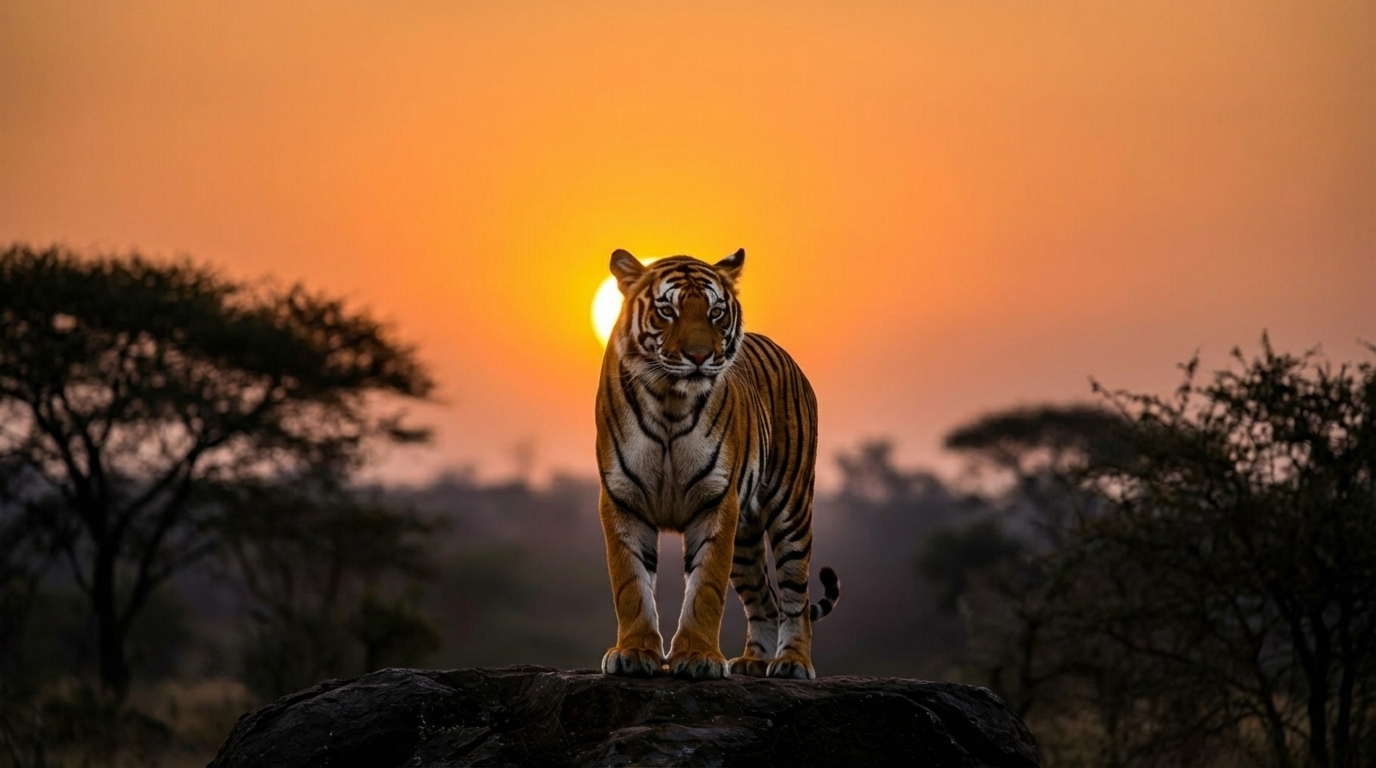
Observed output: Output artifact (Video file): The tiger walks forward, settles onto the rock, and opens its mouth into a full roar in the closing frames — matching the scripted arc almost beat for beat, with an audio spike timed to the roar. — input-03-output.mp4
Input artifact: Input artifact (Image): INPUT — input-03.jpeg
Output artifact: Output artifact (Video file): The tiger walks forward, settles onto the rock, and opens its mouth into a full roar in the closing frames — matching the scripted arc almost beat for beat, with an audio spike timed to the roar. — input-03-output.mp4
What changed: Image transformed into Video file
Test case: Image → Video file
Input type: Image
Input used: Input artifact (Image): INPUT — input-04.webp
Observed output: Output artifact (Video file): Opens with a severe double-exposure glitch in its first few frames, then stabilizes into a clean smile-building performance with a moderate push-in. — input-04-output.mp4
Input artifact: Input artifact (Image): INPUT — input-04.webp
Output artifact: Output artifact (Video file): Opens with a severe double-exposure glitch in its first few frames, then stabilizes into a clean smile-building performance with a moderate push-in. — input-04-output.mp4
What changed: Image transformed into Video file
Test case: Image → Video file
Input type: Image
Input used: Input artifact (Image): INPUT — input-05.webp
Observed output: Output artifact (Video file): All five people animate independently while the camera holds one wide framing on the whole table for essentially the entire clip. — input-05-output.mp4
Input artifact: Input artifact (Image): INPUT — input-05.webp
Output artifact: Output artifact (Video file): All five people animate independently while the camera holds one wide framing on the whole table for essentially the entire clip. — input-05-output.mp4
What changed: Image transformed into Video file
Test case: Image → Video file
Input type: Image
Input used: Input artifact (Image): INPUT — input-06.webp
Observed output: Output artifact (Video file): A real camera rotation and a splash sound effect, but a clear text-doubling glitch on the label during the first second or so — recovering to a clean, legible label by the final hero frame. — input-06-output.mp4
Input artifact: Input artifact (Image): INPUT — input-06.webp
Output artifact: Output artifact (Video file): A real camera rotation and a splash sound effect, but a clear text-doubling glitch on the label during the first second or so — recovering to a clean, legible label by the final hero frame. — input-06-output.mp4
What changed: Image transformed into Video file
Why it matters / Conclusion: Solid baseline image-to-video generation with strong identity and scene preservation, but camera choreography is unreliable and the output sometimes picks up visible artifacts.
Turns one static image into a short generated video clip with visible motion and a cinematic feel. The tested inputs ranged from anime, 3D, realistic portrait, group dinner, and product-shot scenes, with output judged on preservation and artifacts.





Native Audio Generation for Video ClipsStrong▾
Feature tested: Native Audio Generation for Video Clips
Result: Passed
Verdict: Strong
Expected behavior: Generates an audible soundtrack alongside the video output. In the tested clips, sound was present across all generations and sometimes matched the on-screen action convincingly.
Test case: Image → Video file
Input type: Image
Input used: Input artifact (Image): INPUT — input-01.jpg
Observed output: Output artifact (Video file): A native audio track is attached, but on this clip it is functionally inaudible — near-silence despite the garden-like scene. — input-01-output.mp4
Input artifact: Input artifact (Image): INPUT — input-01.jpg
Output artifact: Output artifact (Video file): A native audio track is attached, but on this clip it is functionally inaudible — near-silence despite the garden-like scene. — input-01-output.mp4
What changed: Image transformed into Video file
Test case: Image → Video file
Input type: Image
Input used: Input artifact (Image): INPUT — input-02.png
Observed output: Output artifact (Video file): A native track is present but very quiet — a faint ambient bed rather than distinct market sound. — input-02-output.mp4
Input artifact: Input artifact (Image): INPUT — input-02.png
Output artifact: Output artifact (Video file): A native track is present but very quiet — a faint ambient bed rather than distinct market sound. — input-02-output.mp4
What changed: Image transformed into Video file
Test case: Image → Video file
Input type: Image
Input used: Input artifact (Image): INPUT — input-03.jpeg
Observed output: Output artifact (Video file): The best-synced audio in the set: quiet through the walk and settle, then a sharp spike timed to the roar in the final frames. — input-03-output.mp4
Input artifact: Input artifact (Image): INPUT — input-03.jpeg
Output artifact: Output artifact (Video file): The best-synced audio in the set: quiet through the walk and settle, then a sharp spike timed to the roar in the final frames. — input-03-output.mp4
What changed: Image transformed into Video file
Test case: Image → Video file
Input type: Image
Input used: Input artifact (Image): INPUT — input-04.webp
Observed output: Output artifact (Video file): Mostly silent, but a distinct, unexplained audio burst appears roughly 70% through the clip with no corresponding visual event. — input-04-output.mp4
Input artifact: Input artifact (Image): INPUT — input-04.webp
Output artifact: Output artifact (Video file): Mostly silent, but a distinct, unexplained audio burst appears roughly 70% through the clip with no corresponding visual event. — input-04-output.mp4
What changed: Image transformed into Video file
Test case: Image → Video file
Input type: Image
Input used: Input artifact (Image): INPUT — input-05.webp
Observed output: Output artifact (Video file): Continuous, scene-appropriate chatter and laughter with amplitude swells that roughly match the visual laughter beats. — input-05-output.mp4
Input artifact: Input artifact (Image): INPUT — input-05.webp
Output artifact: Output artifact (Video file): Continuous, scene-appropriate chatter and laughter with amplitude swells that roughly match the visual laughter beats. — input-05-output.mp4
What changed: Image transformed into Video file
Test case: Image → Video file
Input type: Image
Input used: Input artifact (Image): INPUT — input-06.webp
Observed output: Output artifact (Video file): Loudest in the first part of the clip, matching the splash, then decaying as the droplets settle. — input-06-output.mp4
Input artifact: Input artifact (Image): INPUT — input-06.webp
Output artifact: Output artifact (Video file): Loudest in the first part of the clip, matching the splash, then decaying as the droplets settle. — input-06-output.mp4
What changed: Image transformed into Video file
Why it matters / Conclusion: Audio is a real differentiator here: every tested generation included sound, and several clips synced it convincingly to action.
Generates an audible soundtrack alongside the video output. In the tested clips, sound was present across all generations and sometimes matched the on-screen action convincingly.
Pricing & Access
Plan used in this test: SuperGrok Individual. The composer showed 480p and 6s active during every generation, while 720p, 10s, and 15s were visible but not selected.
Prices and tier descriptions were read from the in-app pricing modal on August 31, 2026.
Banner Preview
How the embed badge will look on your site

Embed HTML
Copy this code to your website source
Quick Integration Guide
- 1Copy the HTML code block above.
- 2Paste it into your site's HTML or CMS editor.
- 3Banner appears instantly on your page.
- 4Links back to your tool profile here.
Similar Tools
Discover more AI tools like Grok Imagine to enhance your workflow.
Comments (0)
Need a custom AI solution for this use case?
If you are looking to build a custom image-to-video generation, short-form video creation, or AI video production workflow for your business or internal workflow, email us at contact@futuresmart.ai.
Found something inaccurate or missing? We try to keep our AI research accurate and useful. If you found outdated information, an issue, or have a suggestion, email us at collaborate@aidemos.com.