developer-tools · ranking

Best Open-Source Libraries for PDF to Markdown Conversion

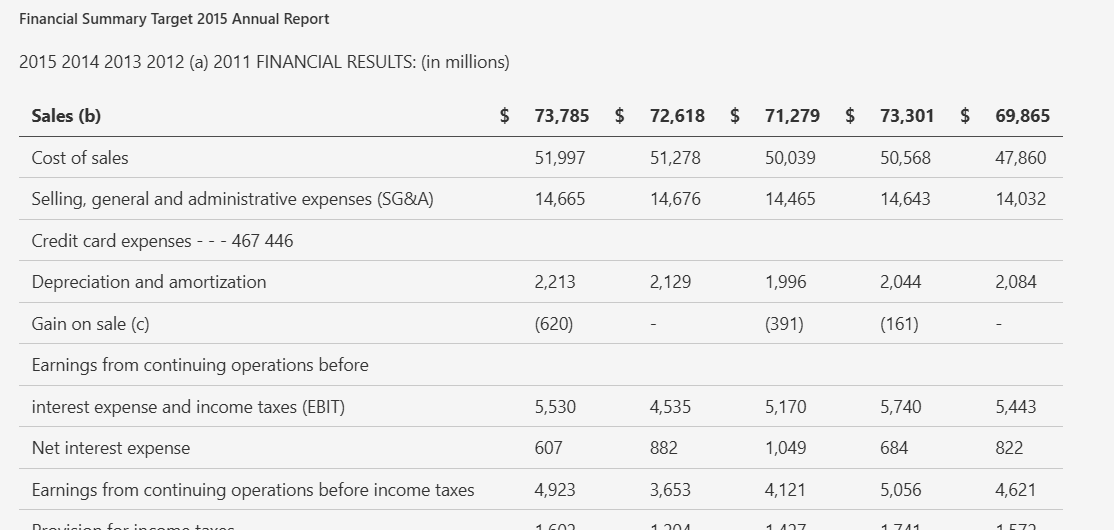
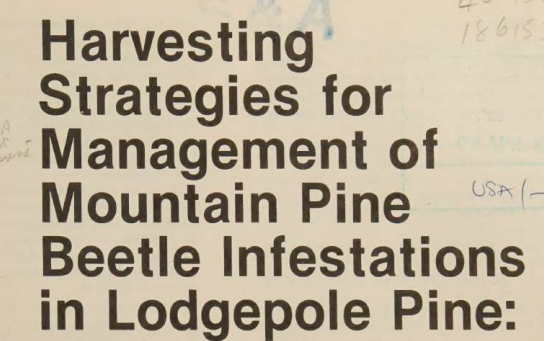
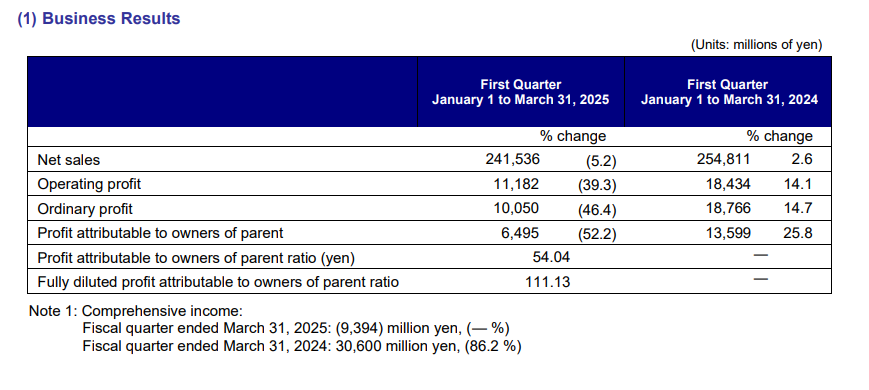
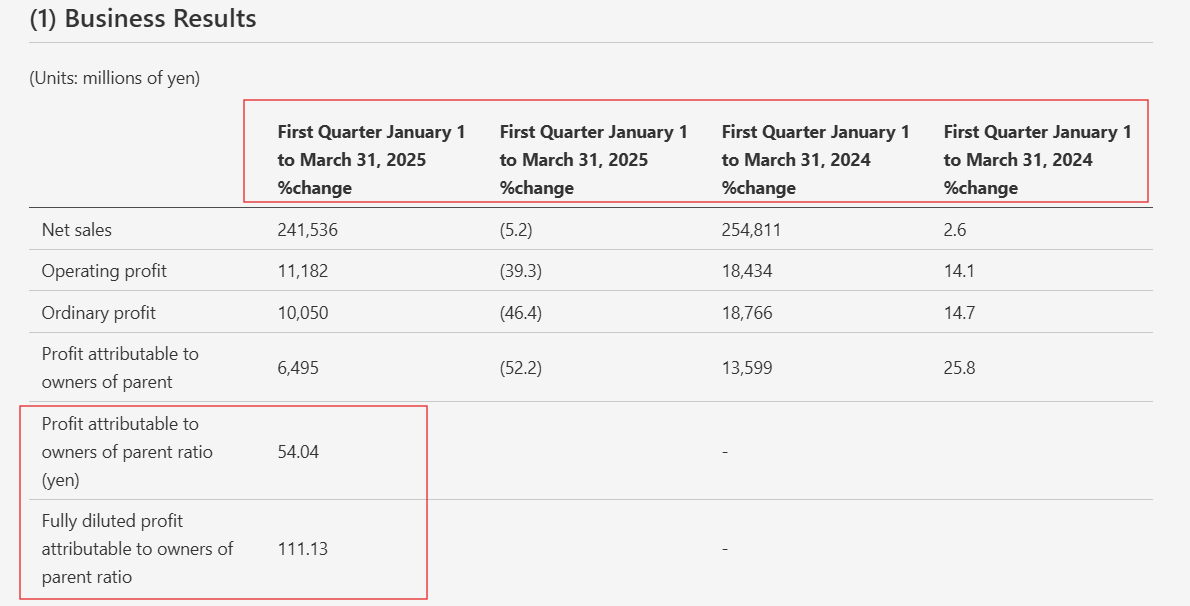
We tested five open-source PDF-to-Markdown libraries on the same three mixed PDFs — a hybrid annual report, a table-heavy financial filing, and a scanned research paper — to compare text preservation, table reconstruction, chart handling, image retention, reading order, and OCR behavior.

Updated July 20265 tools9 decisive checks106 findings12 min read
Our pick
3.49 of 9 checks

The strongest overall open-source option here: it kept text, tables, headings, and reading order very well across all three PDFs, but it still dropped charts and standalone images.

Catch

The tool does not turn charts into usable content; in both chart-heavy tests, the visuals were simply removed instead of being translated into values or a faithful description, so this is a core failure.

Pick something else if…

The scoreboard

The evidence-backed checks show the shape of the field; coverage explains the gaps.

Tool9 decisive checksScoreWhere it lands

Columns, left to right: Bonus: Unique or Anomalous Behaviors · Caption/Figure Association · Chart Reconstruction · Document Hierarchy · Image Retention · Long/Complex Document Robustness · Reading Order Preservation · Table Reconstruction · Text Preservation

Compare

Pick the tools you care about, then compare what they returned or how they scored.

Tools
5 of 5 selected
The output#1

docling

It produced a clean result for the financial report overall, with strong text, hierarchy, and most tables, but it still dropped the visual assets and flattened one complex table header.

docling-docling-input2-financialpdf-fy2025-heade-5340c1f4d35a.png

The output#2

liteparse

Clean prose, headings, and table-of-contents handling come through well, but several tables flatten or split apart, which keeps it from being a top score.

liteparse-liteparse-input2-financialpdf-summary-se-75cdedba0497.png

The output#3

pymupdf4llm

It can pull through some narrative sections, but the report’s core tables disappear, the header/logo becomes garbled text, and reading order and overall structure become unreliable.

pymupdf4llm-pymupdf4llm-input2-financialpdf-quarterl-052a903bfa21.png

The output#4
MDdoc2mark-doc2mark-input2-financialpdf-output-64777dd9b209.mdopen raw ↗

doc2mark

It gets the plain text and contents order right, but table formatting and heading consistency are shaky.

doc2mark-doc2mark-input2-financialpdf-output-64777dd9b209.md

The output#5
MDmarkitdown-markitdown-input2-financialpdf-output-1b08db40e794.mdopen raw ↗

markitdown

It is solid for plain text and the table of contents stays in order, but the financial tables and section structure are too uneven to call it reliable for structured extraction.

markitdown-markitdown-input2-financialpdf-output-1b08db40e794.md

The evidence

Open a tool to inspect every recorded check and finding.

Why this score

It has a few standout quirks: it can preserve form state and financial parentheses correctly, but it also hoovers up scan artifacts as if they were real text. That mix is notable enough to earn a strong but not perfect score.

Across all tests

Captures scanned-page library stamps and barcode-like artifacts directly into the OCR text flow, adding noise such as `186153` and `CSX` to the title region.

permalink to this finding →
In the inputInput evidence
What came backOutput evidence
Across all tests

Preserves negative numbers in parentheses in financial tables without treating them as markdown syntax, including percentage changes and negative balance-sheet values.

permalink to this finding →
In the inputInput evidence
What came backOutput evidence
Across all tests

The report explicitly lists the tool as free/open source, with pricing given as `Free - $0 - Open Source`.

permalink to this finding →
Across all tests

Extracts interactive form checkboxes and preserves their checked state, including the SEC Form 10-K mark-one field being rendered as selected in the parsed output.

permalink to this finding →
In the inputInput evidence
What came backOutput evidence

Final Take

docling is the overall winner from these scorecards: it has the strongest hierarchy handling and long-document robustness, while also scoring well on text preservation, caption-figure association, and table reconstruction. The trade-off is clear: it is weak at keeping images and charts in place, so it is not the best pick when visual fidelity matters. liteparse is the closest alternative for native-digital prose and structure, with solid text and reading order, but it gives up some robustness and table fidelity. pymupdf4llm is a reasonable choice for clean digital text and tables, but it is less reliable on reading order, hierarchy, and complex or scanned layouts. doc2mark fits native-digital prose and headings, but its table output is especially inconsistent and it is weak on images and scans. markitdown is the simplest route for pulling plain text from native PDFs, but structural parsing is uneven and scanned PDFs need external OCR.

Built by FutureSmart AI — the team behind AI Demos

Need a custom AI solution for this use case?

If you are looking to build a custom PDF to Markdown conversion, document parsing, or OCR extraction system for your business or internal workflow, email us at contact@futuresmart.ai.

Get a custom build

Found something inaccurate or missing? We try to keep our AI research accurate and useful. If you found outdated information, an issue, or have a suggestion, email us at collaborate@aidemos.com.

Comments (0)

Please Log in to join the discussion.