Generate a Cinematic AI Video from a Single Image
We tested multiple AI tools that convert static images into cinematic short videos using the same prompts and inputs. The outputs below compare motion quality, realism, visual consistency, and cinematic feel across different image styles including 2D, 3D, and realistic scenes.
What AI Video Generation Can Actually Do Today
Modern AI tools can now animate static images into cinematic short-form clips with motion, camera movement, and environmental effects — but important limitations still remain.
Tools can generate zooms, pans, dolly movement, and cinematic depth from a single image
Top tools maintained stable subjects and environments across generated frames
Wind, particles, lighting flickers, haze, and depth effects added cinematic atmosphere
Most tools generated several cinematic versions from the same image input
No advanced editing knowledge was required during testing
Most generated videos remained limited to around 5–10 seconds only
Exact choreography, timing, and camera precision are still difficult to control
Detailed 3D environments occasionally produced unstable or unrealistic motion
Most tools lacked advanced timeline or cinematic editing controls
Heavy experimentation can become expensive due to generation credit systems
AI cinematic video generation already produces surprisingly polished results from a single image, especially when prompts focus on motion, atmosphere, and cinematic direction. However, shorter durations and limited motion control still make manual refinement valuable for professional-quality storytelling.
AI Image-to-Video Tools Compared
All tools were tested using the same prompts, image types, and cinematic evaluation criteria.
The Best Way to Do It
Luma AI Dream Machine delivered the strongest cinematic quality during testing, with highly realistic motion, smooth camera movement, and strong visual consistency across 2D, 3D, and realistic image types.
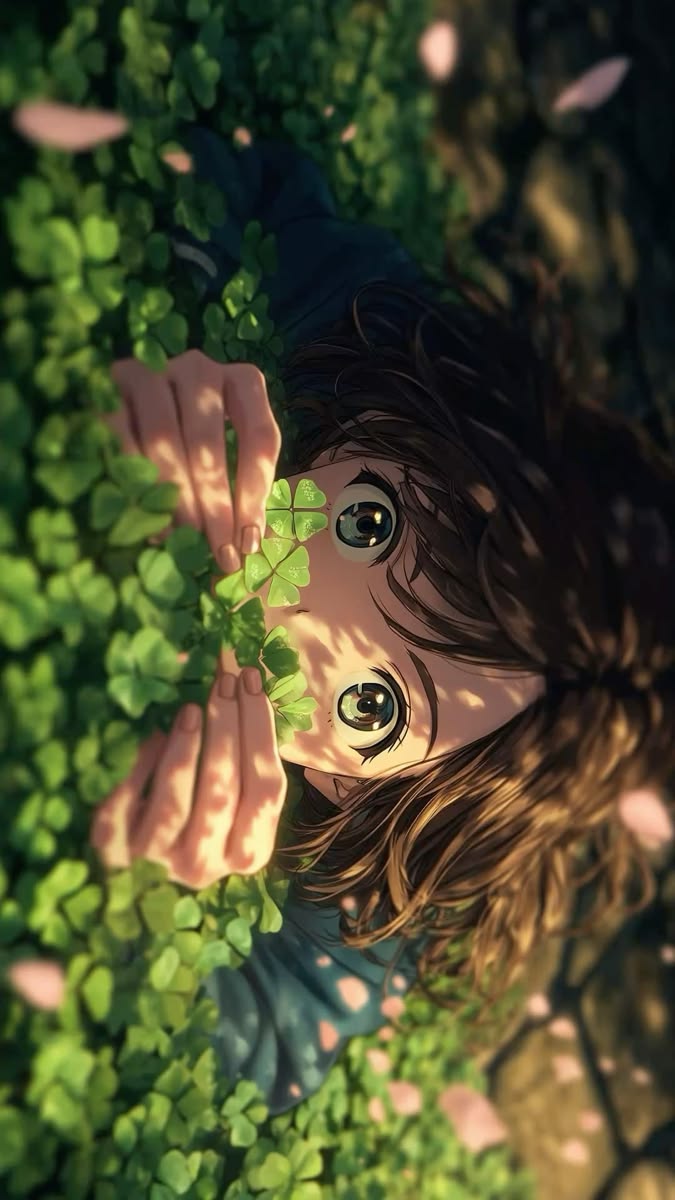
2D image
Cinematic motion prompt to test emotional storytelling quality and smooth character animation consistency.
How to Generate Cinematic AI Videos from a Single Image
Upload Your Image
Upload a 2D, 3D, or realistic image into Luma AI Dream Machine. The workflow stayed consistent across all tested image types.
💡 High-quality images with strong lighting and clear subjects produced more cinematic outputs.
Enter a Cinematic Prompt
Use prompts focused on motion, camera movement, environmental details, and cinematic atmosphere rather than simply describing the subject.
💡 Detailed motion descriptions dramatically improved cinematic realism during testing.
Generate the Video
Generate multiple cinematic variations automatically from the same image and prompt combination.
💡 Generate several variations before selecting a final output.
Review Output Variations
Compare generated outputs carefully to evaluate realism, consistency, motion smoothness, and cinematic feel.
💡 Pay close attention to facial stability, environmental motion, and camera flow.
Select the Best Version
Choose the variation with the strongest motion realism and the least distortion across frames.
💡 Small differences in motion quality became very noticeable during playback.
Download the Final Video
Export the best cinematic variation directly without requiring additional editing.
💡 Review pacing and transitions carefully before final export.
What You'll Actually Get
Real cinematic AI video outputs generated from the same prompts and image types during testing.
2D character images produced highly stylized cinematic motion with strong emotional consistency.
3D environments generated strong depth and camera movement but occasionally introduced structural inconsistencies.
Realistic wildlife scenes produced the most natural cinematic motion and environmental realism.
Output duration remains short
Most cinematic clips stayed limited to roughly 5–10 seconds
Motion precision is limited
Exact choreography and camera timing are still difficult to control
Complex scenes may distort
Highly detailed 3D scenes occasionally generated unstable animation
Advanced editing is missing
Most tools lacked timeline editing or cinematic sequencing controls
Prompt interpretation varies
Some cinematic instructions translated inconsistently across outputs
The strongest cinematic outputs came from combining dedicated tools for visuals, motion generation, sound, and final editing rather than relying on one all-in-one platform.
Frequently Asked Questions
Can I control camera movement precisely?▾
Not completely. You can describe cinematic motion in prompts, but exact timing and choreography remain limited.
Which image type performed best?▾
Realistic images generated the strongest cinematic realism, followed by stylized 2D artwork.
Does Luma AI generate sound automatically?▾
Yes. Some generated outputs included basic cinematic sound effects automatically.
Can I generate longer cinematic videos?▾
Not currently. Most outputs stayed within a short 5–10 second duration.
Should I combine multiple tools for better quality?▾
Yes. Dedicated tools for visuals, sound, editing, and motion generation usually produced stronger final quality than single all-in-one platforms.
Explore More AI Cinematic Video Resources
Need a custom AI solution for this use case?
If you are looking to build a custom image-to-video generation, cinematic video creation, or video animation workflow for your business or internal workflow, email us at contact@futuresmart.ai.
Found something inaccurate or missing? We try to keep our AI research accurate and useful. If you found outdated information, an issue, or have a suggestion, email us at collaborate@aidemos.com.