
Saleshandy
Saleshandy covers lead search, contact lookup, and AI outreach drafting in one platform, but the testing found uneven people-search coverage and only moderate AI prospecting precision.
Broad workflow, mixed research quality
- You want one platform that can move from company search to people search to email drafting without switching tools.
- You can search with a prospect's LinkedIn URL when name-based lookup misses the person you need.
- You need documented APIs for prospect management, enrichment, sequences, analytics, or inbox workflows.
- You need highly reliable name-based discovery for every known prospect without using LinkedIn URLs or extra validation.
Our take
Saleshandy performed well as an all-in-one outreach workflow: it found target companies, surfaced some validated contact data, generated usable outreach drafts, and exposes broad automation APIs. But its prospect discovery was inconsistent for specific people, its employee lists were not fully fresh or complete, its AI prospecting assistant struggled with tightly scoped requests, and its Chrome extension behaved more like a dialer add-on than a research assistant.
In-Depth Review
Our detailed analysis of Saleshandy — features, performance, and real-world testing.
Feature-by-Feature Breakdown
Company lookup and contact discovery▾
Feature tested: Company lookup and contact discovery
Result: Passed
Expected behavior: Tested Lead Finder with a company search for Tidio, people searches for Ajay Vekhande, Tytus Gołas, and Aditya Nichite, and a LinkedIn URL lookup for Tytus Gołas to see whether Saleshandy could find the right company and surface usable contact data for specific prospects.
Test case: Text prompt → Image
Input type: Text prompt
Input used: Input artifact (Text prompt): INPUT
Observed output: Output artifact (Image): Saleshandy identified Tidio in the Companies tab and returned a matching company record. The result exposed location, founding year, industry, ownership type, B — saleshandy-saleshandy-lead-finder-companies-view.png
Input artifact: Input artifact (Text prompt): INPUT
Output artifact: Output artifact (Image): Saleshandy identified Tidio in the Companies tab and returned a matching company record. The result exposed location, founding year, industry, ownership type, B — saleshandy-saleshandy-lead-finder-companies-view.png
What changed: Text prompt transformed into Image
Test case: Text prompt → Image
Input type: Text prompt
Input used: Input artifact (Text prompt): INPUT
Observed output: Output artifact (Image): Saleshandy returned multiple people records for the Ajay Vekhande name search and showed job title, company, department, plus View Email and View Phone actions. — saleshandy-saleshandy-lead-finder-people-ajay-vekhande.png
Input artifact: Input artifact (Text prompt): INPUT
Output artifact: Output artifact (Image): Saleshandy returned multiple people records for the Ajay Vekhande name search and showed job title, company, department, plus View Email and View Phone actions. — saleshandy-saleshandy-lead-finder-people-ajay-vekhande.png
What changed: Text prompt transformed into Image
Test case: Text prompt → Image
Input type: Text prompt
Input used: Input artifact (Text prompt): INPUT
Observed output: Output artifact (Image): Saleshandy surfaced Aditya Nichite with the correct company, job title, department, and a visible work email in the results table. The researcher validated that — saleshandy-saleshandy-lead-finder-people-aditya-nichite.png
Input artifact: Input artifact (Text prompt): INPUT
Output artifact: Output artifact (Image): Saleshandy surfaced Aditya Nichite with the correct company, job title, department, and a visible work email in the results table. The researcher validated that — saleshandy-saleshandy-lead-finder-people-aditya-nichite.png
What changed: Text prompt transformed into Image
Test case: Text prompt → Image
Input type: Text prompt
Input used: Input artifact (Text prompt): INPUT
Observed output: Output artifact (Image): The name-based search for Tytus Gołas returned no results. In this workflow, Saleshandy failed to find a publicly identifiable prospect that several other teste — saleshandy-saleshandy-lead-finder-people-no-results-tytus-golas.png
Input artifact: Input artifact (Text prompt): INPUT
Output artifact: Output artifact (Image): The name-based search for Tytus Gołas returned no results. In this workflow, Saleshandy failed to find a publicly identifiable prospect that several other teste — saleshandy-saleshandy-lead-finder-people-no-results-tytus-golas.png
What changed: Text prompt transformed into Image
Test case: Text prompt → Image
Input type: Text prompt
Input used: Input artifact (Text prompt): INPUT
Observed output: Output artifact (Image): Using Tytus Gołas's LinkedIn URL, Saleshandy successfully found the correct person record, labeled him as CEO at Tidio, and surfaced a work email plus phone-acc — saleshandy-saleshandy-lead-finder-people-tytus-golas-linkedin-url.png
Input artifact: Input artifact (Text prompt): INPUT
Output artifact: Output artifact (Image): Using Tytus Gołas's LinkedIn URL, Saleshandy successfully found the correct person record, labeled him as CEO at Tidio, and surfaced a work email plus phone-acc — saleshandy-saleshandy-lead-finder-people-tytus-golas-linkedin-url.png
What changed: Text prompt transformed into Image
Why it matters / Conclusion: Saleshandy can return actionable prospect data, including validated email addresses, but specific-person discovery is not consistently reliable from name search alone. If a name lookup fails, LinkedIn URL search materially improves the odds of finding the right contact.
Tested Lead Finder with a company search for Tidio, people searches for Ajay Vekhande, Tytus Gołas, and Aditya Nichite, and a LinkedIn URL lookup for Tytus Gołas to see whether Saleshandy could find the right company and surface usable contact data for specific prospects.
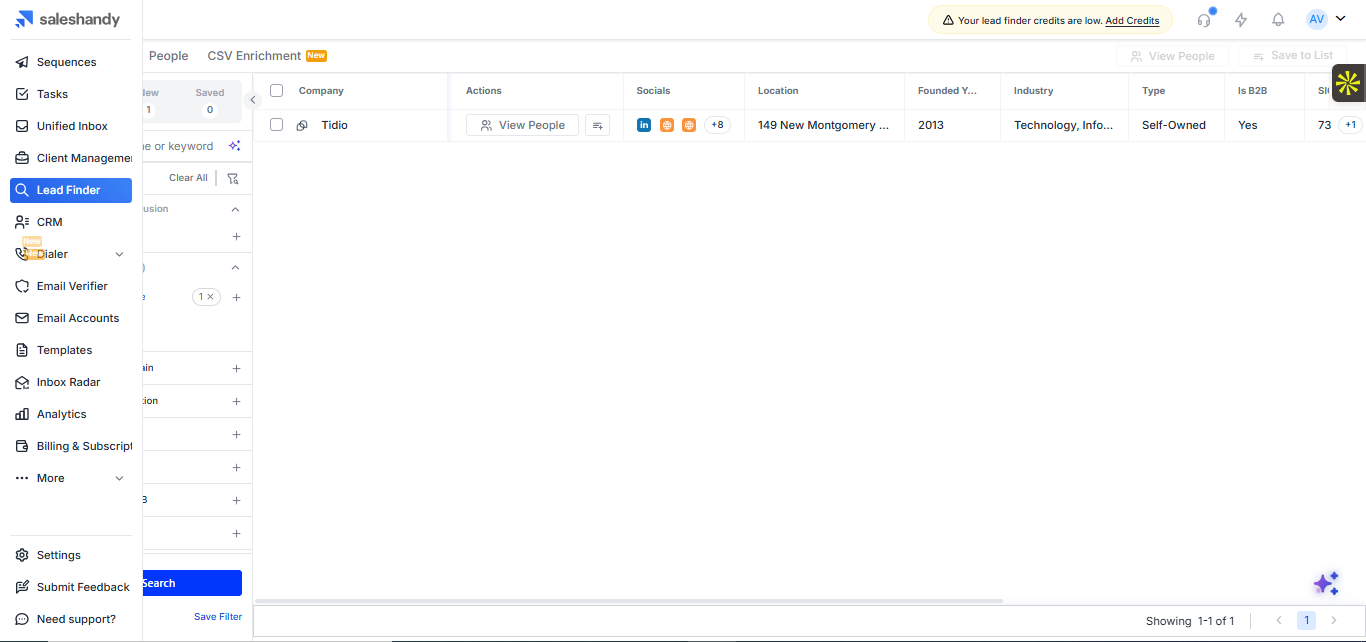
Saleshandy identified Tidio in the Companies tab and returned a matching company record. The result exposed location, founding year, industry, ownership type, B2B classification, and a View People action, showing that company discovery includes enough firmographic detail to qualify a target before moving into contact search.
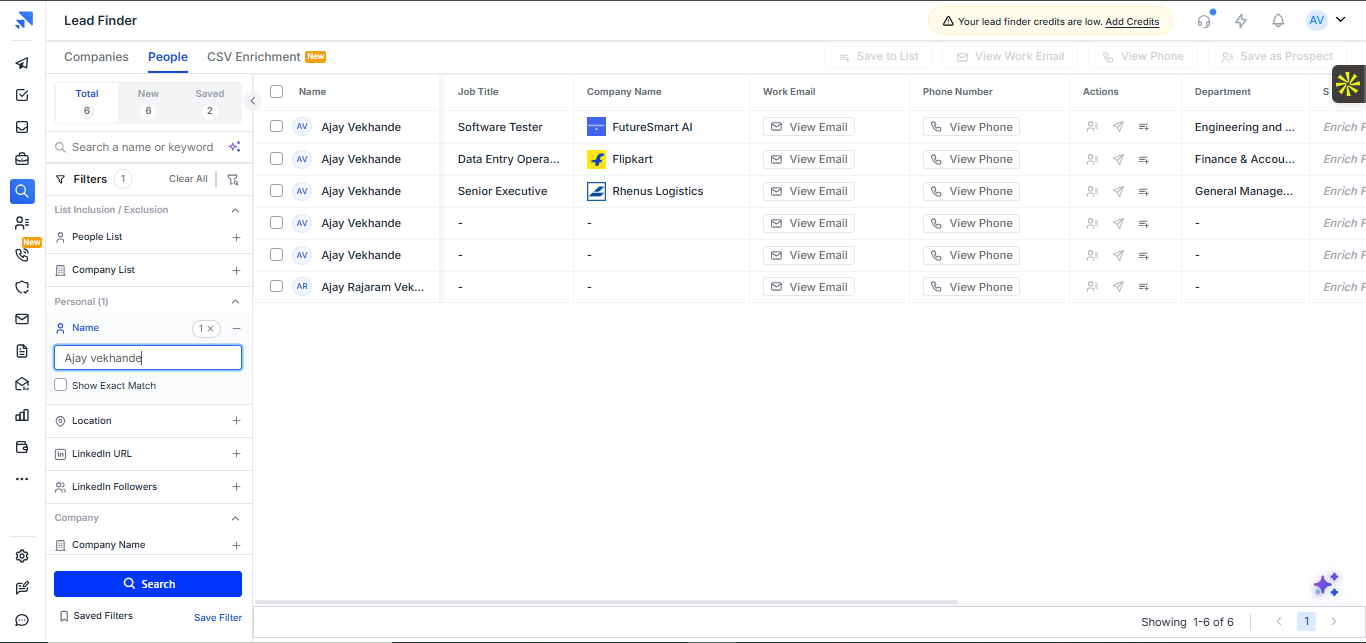
Saleshandy returned multiple people records for the Ajay Vekhande name search and showed job title, company, department, plus View Email and View Phone actions. This demonstrates that the platform can surface candidate prospects and basic contact-access options when a person name matches records in its database.
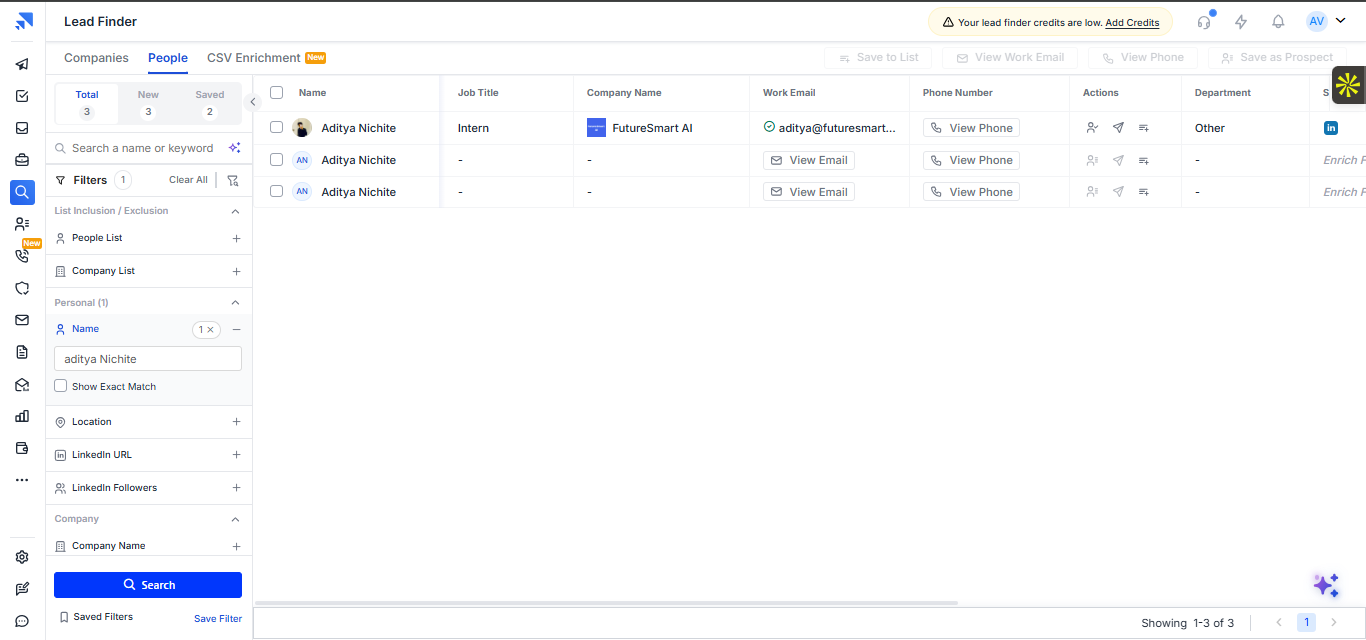
Saleshandy surfaced Aditya Nichite with the correct company, job title, department, and a visible work email in the results table. The researcher validated that the surfaced email address was accurate, which made this result actionable in a way several other tested tools did not achieve for the same kind of lookup.
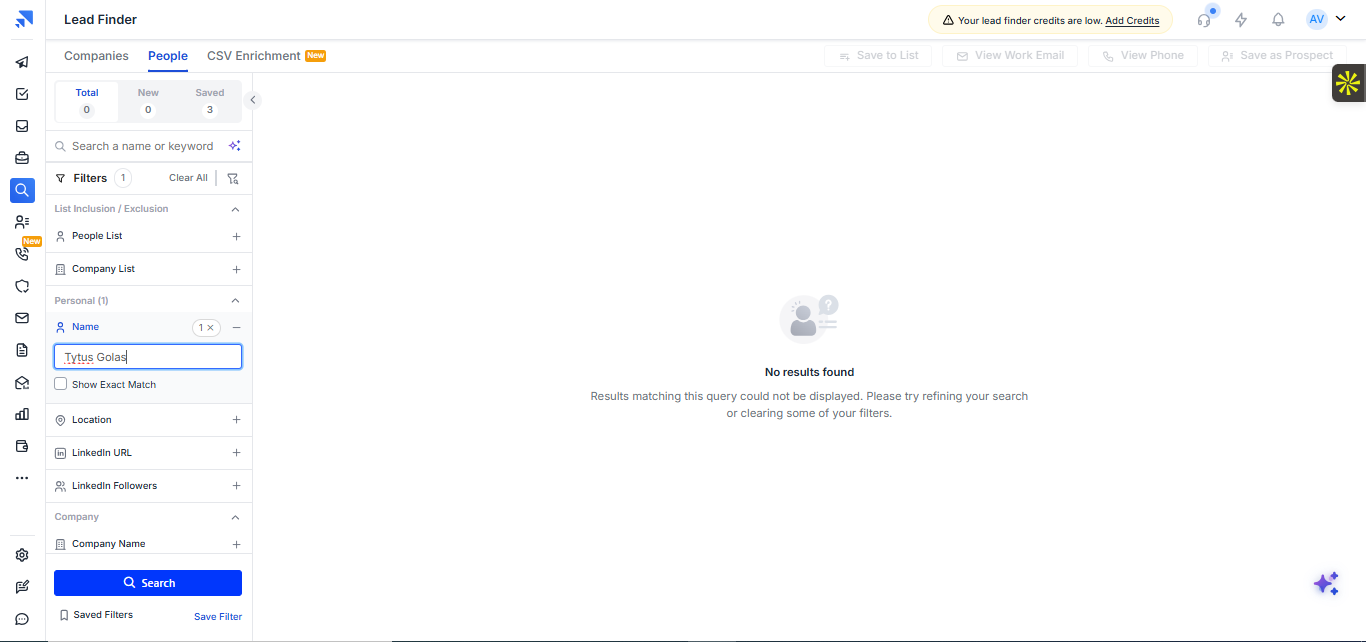
The name-based search for Tytus Gołas returned no results. In this workflow, Saleshandy failed to find a publicly identifiable prospect that several other tested tools did return, so name-only discoverability was inconsistent for specific individuals.
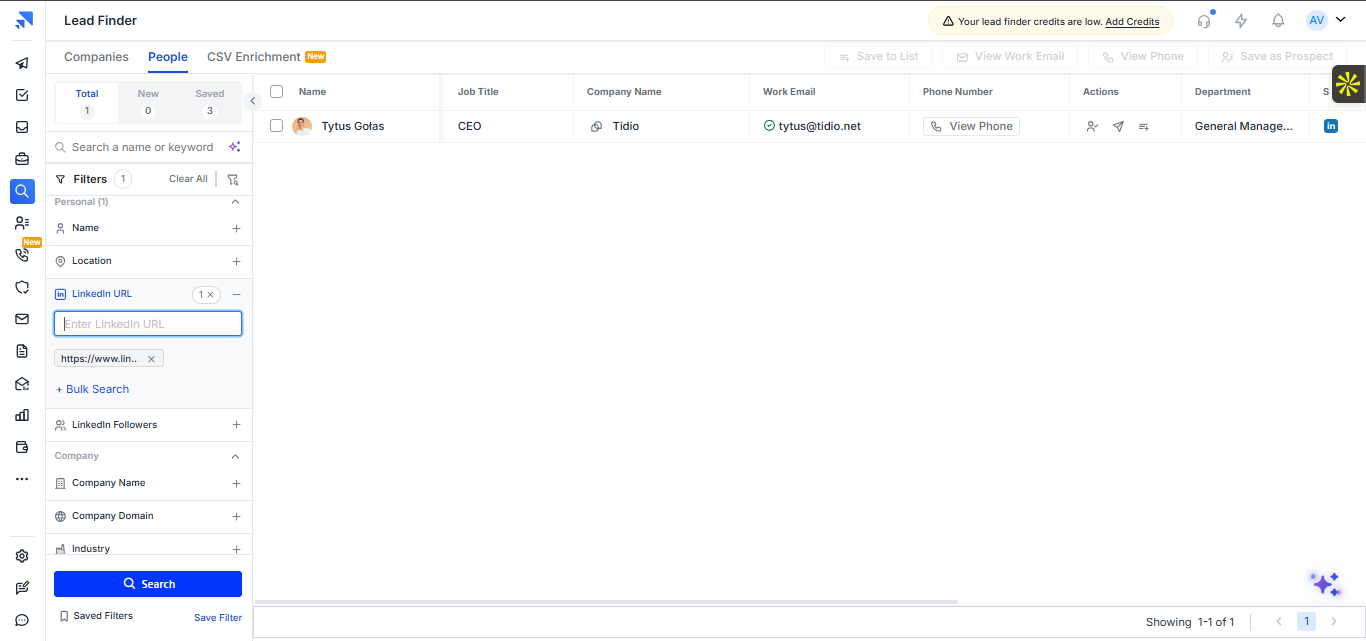
Using Tytus Gołas's LinkedIn URL, Saleshandy successfully found the correct person record, labeled him as CEO at Tidio, and surfaced a work email plus phone-access control. This shows that LinkedIn URL lookup can recover prospects that the plain name search misses.
Employee coverage and freshness▾
Feature tested: Employee coverage and freshness
Result: Passed
Expected behavior: Tested company-wide employee discovery by searching FutureSmart AI in the People tab and reviewing how many employees Saleshandy surfaced, across which departments, and how current that list appeared to be.
Test case: Text prompt → Image
Input type: Text prompt
Input used: Input artifact (Text prompt): INPUT
Observed output: Output artifact (Image): Saleshandy returned 27 employee records tied to FutureSmart AI across engineering, product, research, and general management roles. However, validation against — saleshandy-saleshandy-lead-finder-futuresmart-ai-people-list.png
Input artifact: Input artifact (Text prompt): INPUT
Output artifact: Output artifact (Image): Saleshandy returned 27 employee records tied to FutureSmart AI across engineering, product, research, and general management roles. However, validation against — saleshandy-saleshandy-lead-finder-futuresmart-ai-people-list.png
What changed: Text prompt transformed into Image
Why it matters / Conclusion: Saleshandy gives a workable employee list for company-level prospecting, but workforce completeness and freshness need manual validation when accuracy matters.
Tested company-wide employee discovery by searching FutureSmart AI in the People tab and reviewing how many employees Saleshandy surfaced, across which departments, and how current that list appeared to be.
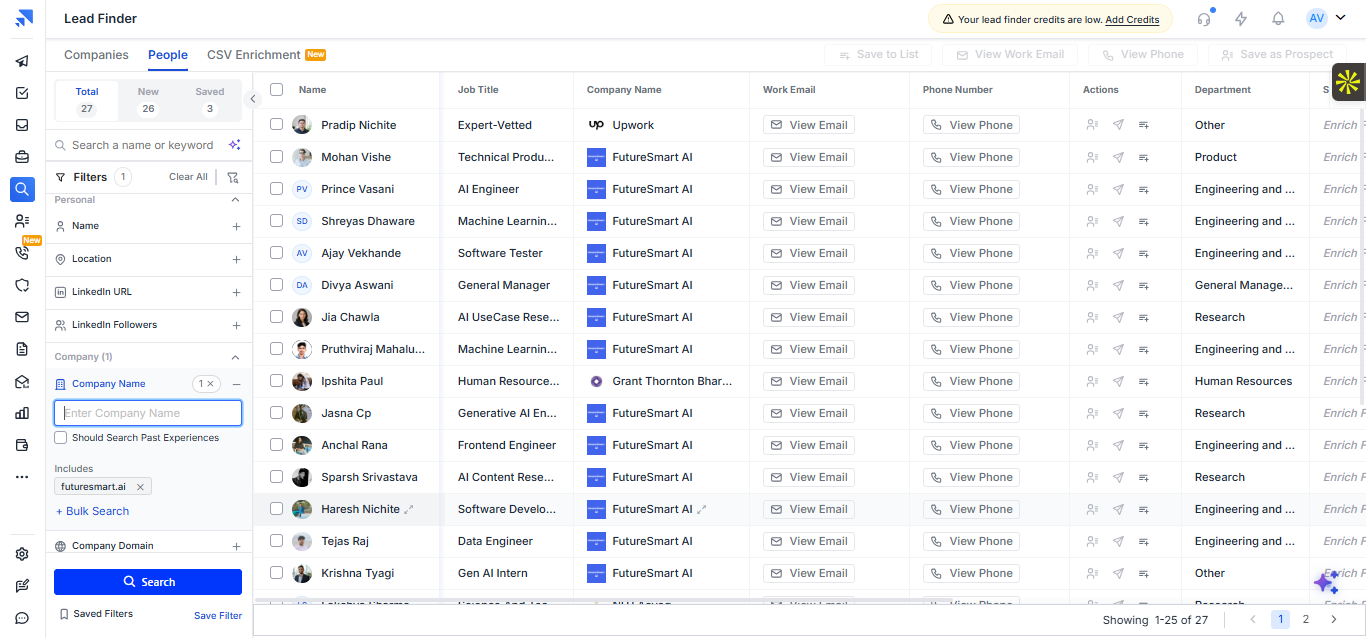
Saleshandy returned 27 employee records tied to FutureSmart AI across engineering, product, research, and general management roles. However, validation against the company's current team showed that some returned profiles appeared to be former employees, while several current team members were missing, so the list was useful for prospecting but not fully fresh or complete.
Natural-language AI prospecting▾
Feature tested: Natural-language AI prospecting
Result: Passed
Expected behavior: Tested the Sage assistant with a specific partnership prospecting prompt for AI startups in customer support automation, then with a broader AI video editing startup search, to see whether it could turn natural language into a targeted lead list.
Test case: Text prompt → Image
Input type: Text prompt
Input used: Input artifact (Text prompt): INPUT
Observed output: Output artifact (Image): For the customer support automation request, the assistant did not produce the requested company-and-contact list. Instead, it said the filters were too narrow, — saleshandy-saleshandy-lead-finder-ai-search-sage-panel.png
Input artifact: Input artifact (Text prompt): INPUT
Output artifact: Output artifact (Image): For the customer support automation request, the assistant did not produce the requested company-and-contact list. Instead, it said the filters were too narrow, — saleshandy-saleshandy-lead-finder-ai-search-sage-panel.png
What changed: Text prompt transformed into Image
Test case: Text prompt → Image
Input type: Text prompt
Input used: Input artifact (Text prompt): INPUT
Observed output: Output artifact (Image): On the broader AI video editing query, the assistant successfully translated the request into filters and returned a large company result set, with about 1,974 — saleshandy-saleshandy-lead-finder-ai-video-editing-results.png
Input artifact: Input artifact (Text prompt): INPUT
Output artifact: Output artifact (Image): On the broader AI video editing query, the assistant successfully translated the request into filters and returned a large company result set, with about 1,974 — saleshandy-saleshandy-lead-finder-ai-video-editing-results.png
What changed: Text prompt transformed into Image
Why it matters / Conclusion: Sage is more useful for converting broad themes into search filters than for delivering tightly scoped prospect lists and relevant contacts from a complex natural-language request.
Tested the Sage assistant with a specific partnership prospecting prompt for AI startups in customer support automation, then with a broader AI video editing startup search, to see whether it could turn natural language into a targeted lead list.
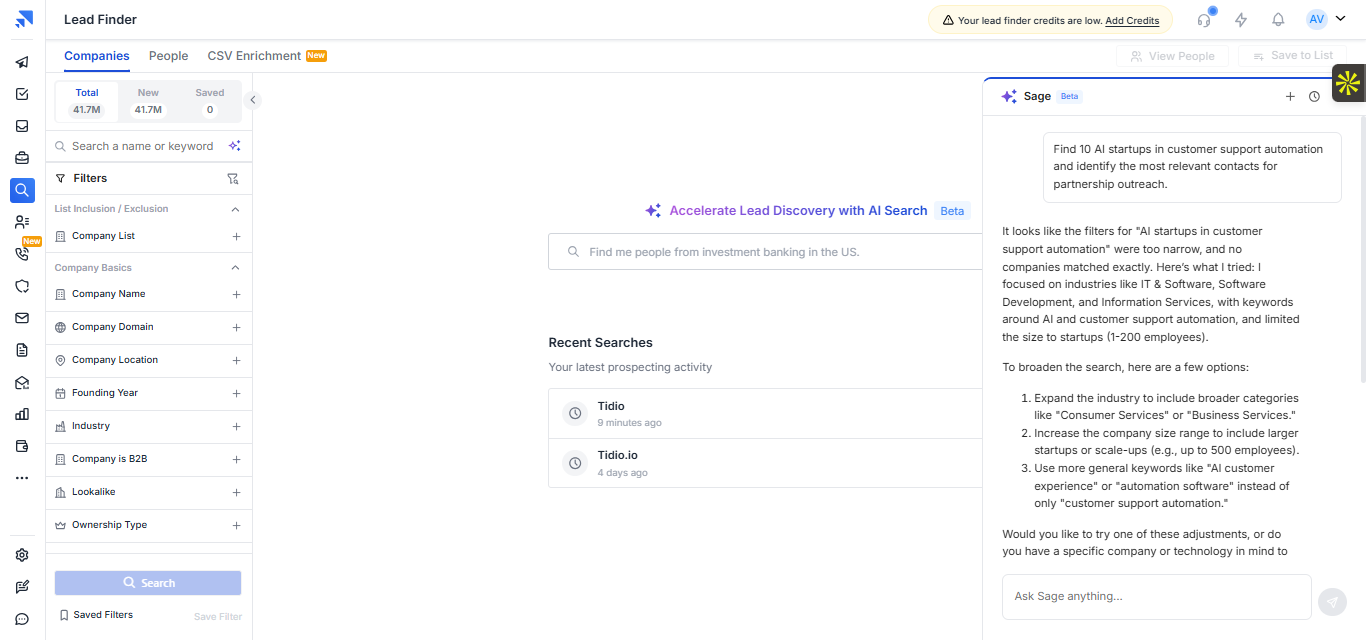
For the customer support automation request, the assistant did not produce the requested company-and-contact list. Instead, it said the filters were too narrow, inferred broader categories, and suggested loosening the search by expanding industries, company size, or keywords. In practice, it acted more like a search-refinement helper than a precise prospect finder for this prompt.
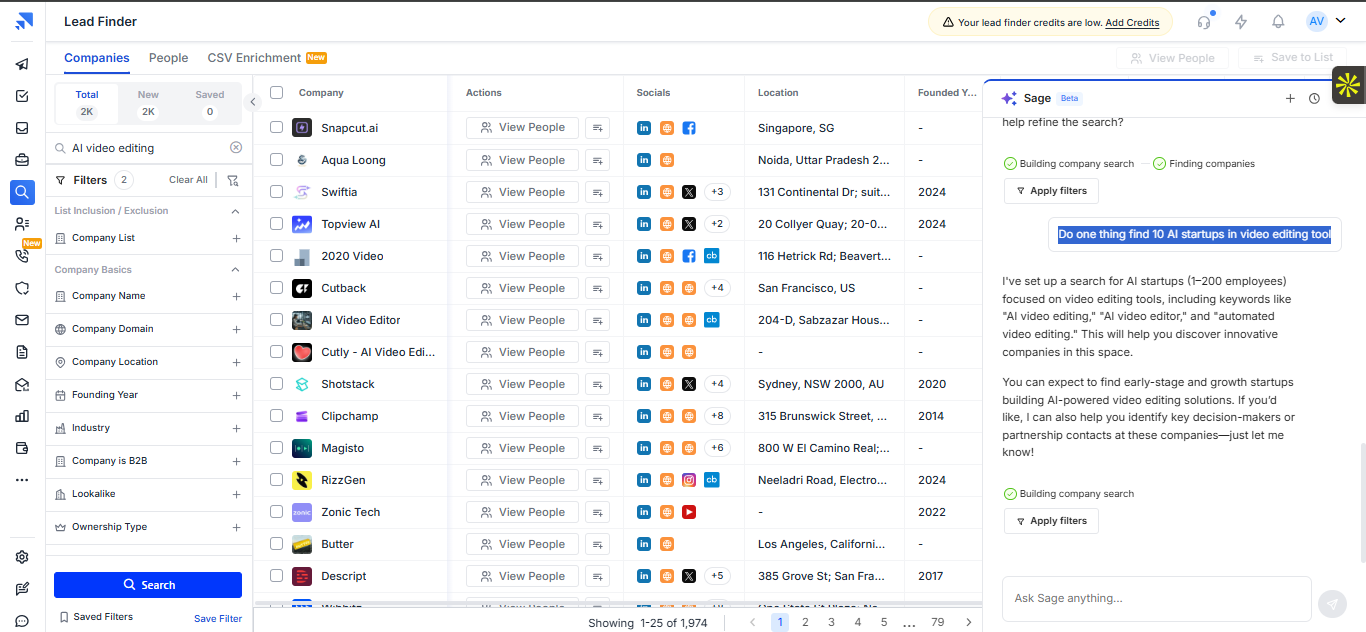
On the broader AI video editing query, the assistant successfully translated the request into filters and returned a large company result set, with about 1,974 matching companies shown. That made it more effective for building a themed search than for honoring the original instruction to find a tightly limited list of 10 highly targeted startups.
Chrome extension prospecting workflow▾
Feature tested: Chrome extension prospecting workflow
Result: Passed
Expected behavior: Checked whether Saleshandy's Chrome extension adds prospect discovery or enrichment while browsing LinkedIn profiles and company websites.
Test case: Text prompt → Image
Input type: Text prompt
Input used: Input artifact (Text prompt): INPUT
Observed output: Output artifact (Image): On the LinkedIn profile, the Saleshandy overlay showed a Dialer Plan Required pop-up rather than prospect discovery or contact enrichment tools. In this test, t — saleshandy-linkedin-profile-dialer-plan-required.png
Input artifact: Input artifact (Text prompt): INPUT
Output artifact: Output artifact (Image): On the LinkedIn profile, the Saleshandy overlay showed a Dialer Plan Required pop-up rather than prospect discovery or contact enrichment tools. In this test, t — saleshandy-linkedin-profile-dialer-plan-required.png
What changed: Text prompt transformed into Image
Test case: Text prompt → Text prompt
Input type: Text prompt
Input used: Input artifact (Text prompt): INPUT
Observed output: Output artifact (Text prompt): OUTPUT
Input artifact: Input artifact (Text prompt): INPUT
Output artifact: Output artifact (Text prompt): OUTPUT
What changed: Text prompt transformed into Text prompt
Why it matters / Conclusion: The Chrome extension was not useful as a browsing-time enrichment layer in this research. It appears dialer-focused rather than built for LinkedIn or website-based prospect discovery.
Checked whether Saleshandy's Chrome extension adds prospect discovery or enrichment while browsing LinkedIn profiles and company websites.
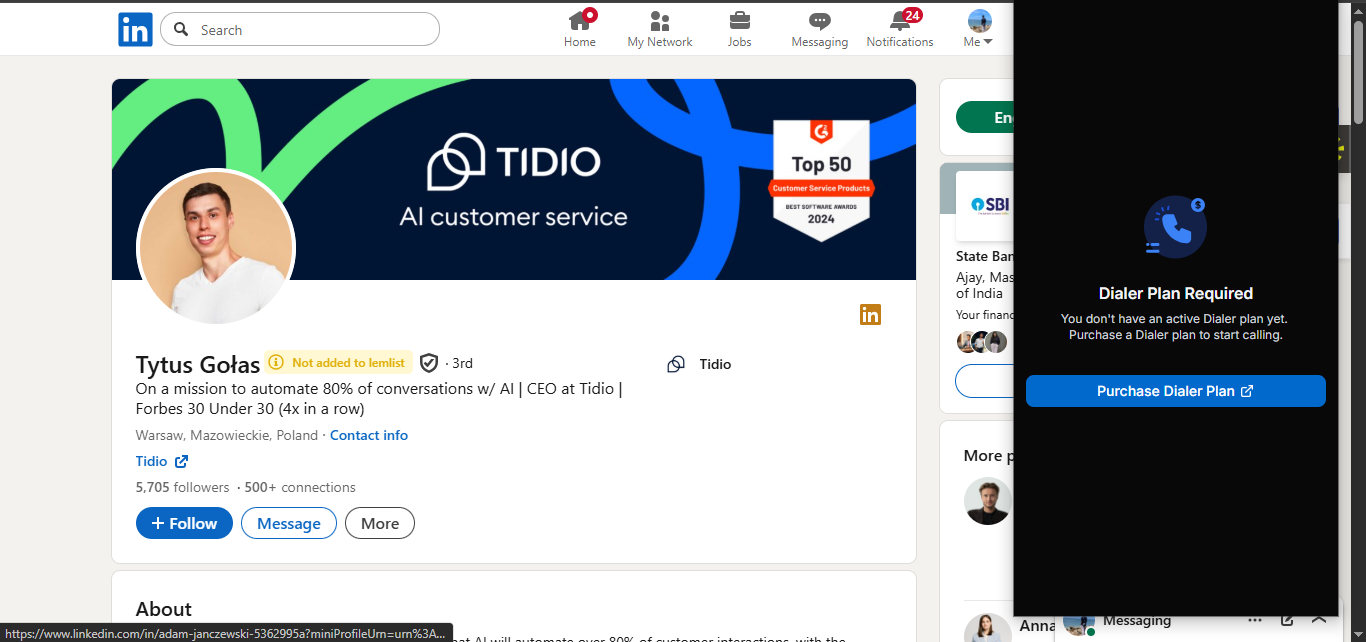
On the LinkedIn profile, the Saleshandy overlay showed a Dialer Plan Required pop-up rather than prospect discovery or contact enrichment tools. In this test, the extension behaved like a click-to-call workflow component, not like a LinkedIn research assistant that reveals company intelligence or prospect data inline.
API and automation readiness▾
Feature tested: API and automation readiness
Result: Passed
Expected behavior: Reviewed Saleshandy's published developer documentation to determine whether prospecting, enrichment, outreach execution, and reporting workflows can be automated outside the main UI.
Test case: Text prompt → Text prompt
Input type: Text prompt
Input used: Input artifact (Text prompt): INPUT
Observed output: Output artifact (Text prompt): OUTPUT
Input artifact: Input artifact (Text prompt): INPUT
Output artifact: Output artifact (Text prompt): OUTPUT
What changed: Text prompt transformed into Text prompt
Why it matters / Conclusion: Saleshandy looks strong for automation on paper, with broad documented APIs spanning prospect data, outreach workflows, and reporting.
Reviewed Saleshandy's published developer documentation to determine whether prospecting, enrichment, outreach execution, and reporting workflows can be automated outside the main UI.
AI outreach email drafting▾
Feature tested: AI outreach email drafting
Result: Passed
Expected behavior: Used AI Sequence Copilot with company information, then reviewed generated outreach-email previews for different recipients to judge relevance, merge-field handling, and how much personalization changes from one prospect to another.
Test case: Image → Image
Input type: Image
Input used: Input artifact (Image): AI Sequence Copilot asked for a company website or business information before generating outreach copy. — saleshandy-saleshandy-ai-sequence-copilot-company-website.png
Observed output: Output artifact (Image): Saleshandy generated a draft outreach email from the supplied company context and rendered it with prospect and company personalization variables in the preview — saleshandy-saleshandy-email-sequence-editor-preview.png
Input artifact: Input artifact (Image): AI Sequence Copilot asked for a company website or business information before generating outreach copy. — saleshandy-saleshandy-ai-sequence-copilot-company-website.png
Output artifact: Output artifact (Image): Saleshandy generated a draft outreach email from the supplied company context and rendered it with prospect and company personalization variables in the preview — saleshandy-saleshandy-email-sequence-editor-preview.png
What changed: Image transformed into Image
Test case: Text prompt → Image
Input type: Text prompt
Input used: Input artifact (Text prompt): INPUT
Observed output: Output artifact (Image): In the Tytus Gołas preview, Saleshandy personalized the subject and greeting with Tidio and Tytus-specific fields and produced a coherent draft email. However, — saleshandy-saleshandy-email-sequence-editor-preview-1.png
Input artifact: Input artifact (Text prompt): INPUT
Output artifact: Output artifact (Image): In the Tytus Gołas preview, Saleshandy personalized the subject and greeting with Tidio and Tytus-specific fields and produced a coherent draft email. However, — saleshandy-saleshandy-email-sequence-editor-preview-1.png
What changed: Text prompt transformed into Image
Test case: Text prompt → Image
Input type: Text prompt
Input used: Input artifact (Text prompt): INPUT
Observed output: Output artifact (Image): In the Frode Lundgren preview, the subject and body adjusted to Vespa.ai and Frode, but the underlying structure, talking points, and CTA remained nearly the sa — saleshandy-saleshandy-email-sequence-editor-frode-preview.png
Input artifact: Input artifact (Text prompt): INPUT
Output artifact: Output artifact (Image): In the Frode Lundgren preview, the subject and body adjusted to Vespa.ai and Frode, but the underlying structure, talking points, and CTA remained nearly the sa — saleshandy-saleshandy-email-sequence-editor-frode-preview.png
What changed: Text prompt transformed into Image
Why it matters / Conclusion: Saleshandy can quickly produce usable cold-email drafts with merge-field personalization, but the outputs stay close to a reusable template and do not show strong evidence of deeper prospect-specific tailoring.
Used AI Sequence Copilot with company information, then reviewed generated outreach-email previews for different recipients to judge relevance, merge-field handling, and how much personalization changes from one prospect to another.
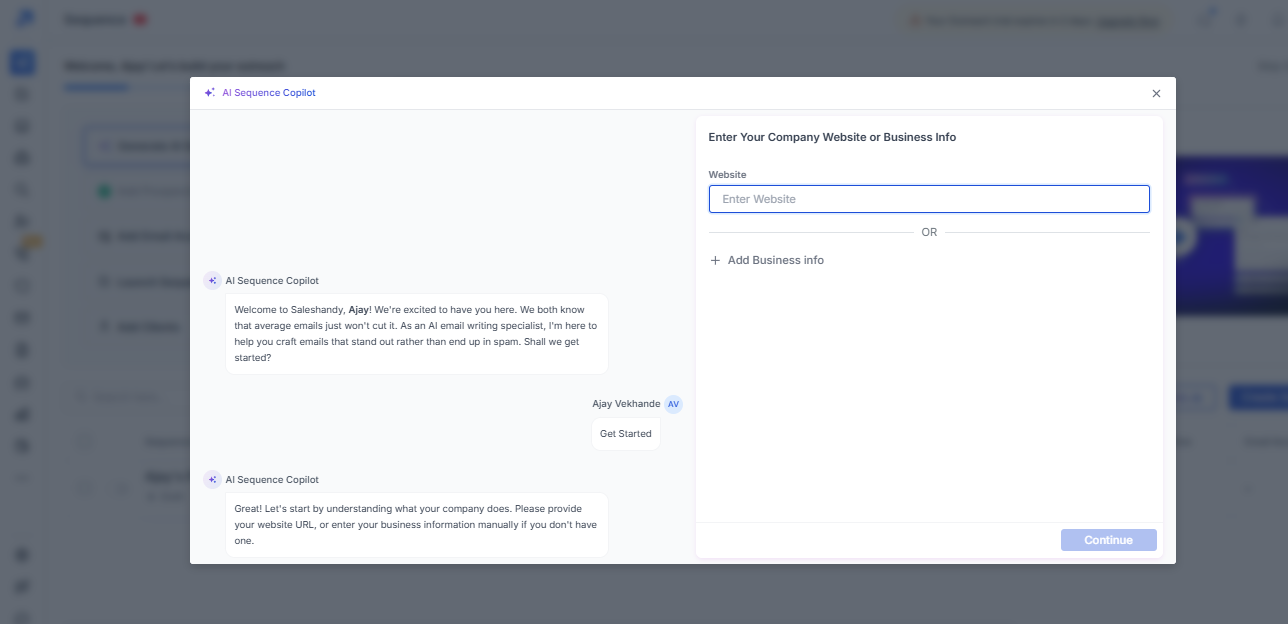
AI Sequence Copilot asked for a company website or business information before generating outreach copy.
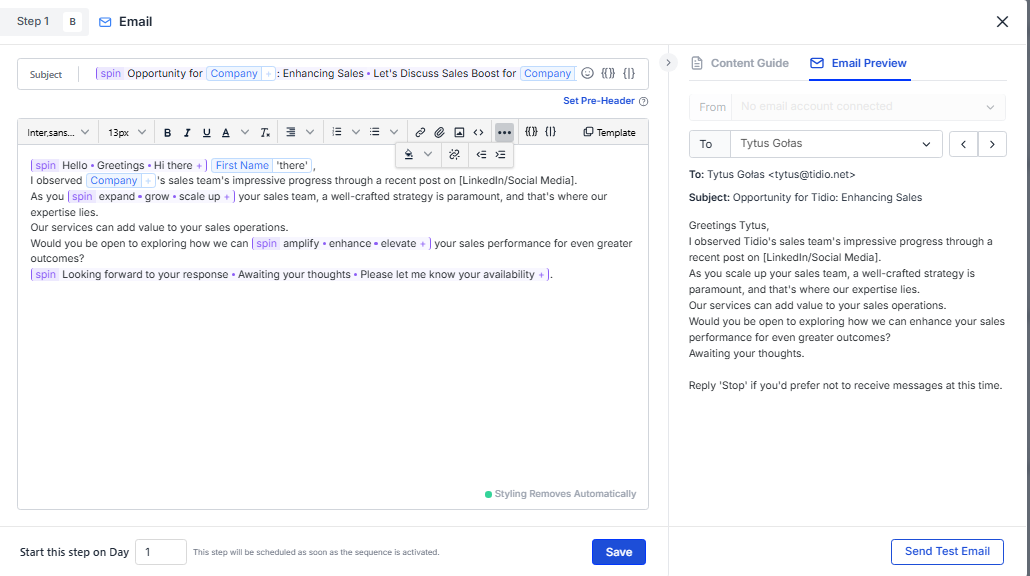
Saleshandy generated a draft outreach email from the supplied company context and rendered it with prospect and company personalization variables in the preview. The email was usable and contextually relevant, but the core sales message, structure, and CTA followed a fairly standard cold-email template rather than showing deep research-driven personalization.
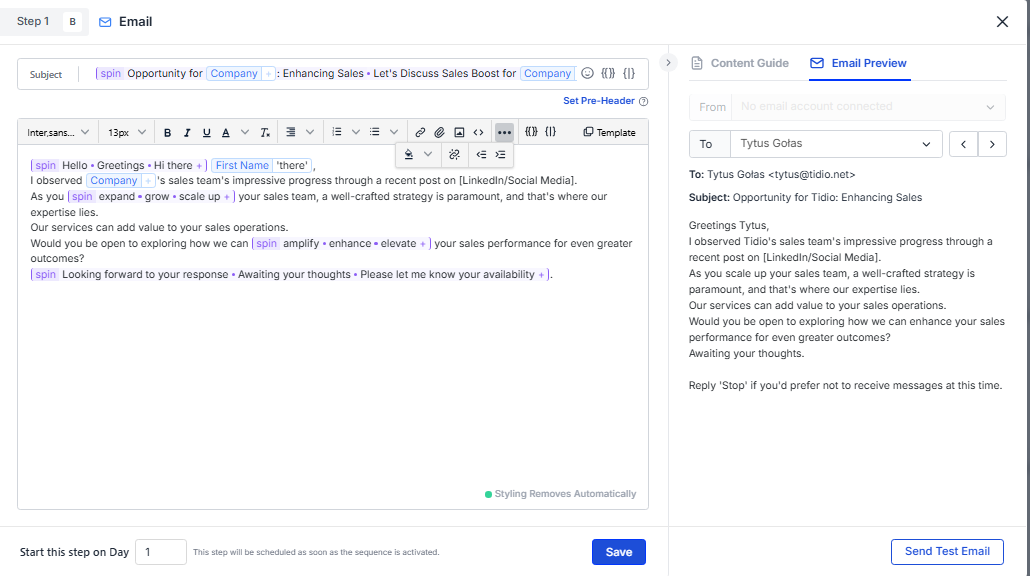
In the Tytus Gołas preview, Saleshandy personalized the subject and greeting with Tidio and Tytus-specific fields and produced a coherent draft email. However, the message still relied on the same base structure and pitch pattern seen elsewhere, indicating that most of the customization came from merge fields and spin syntax rather than deeper prospect-specific reasoning.
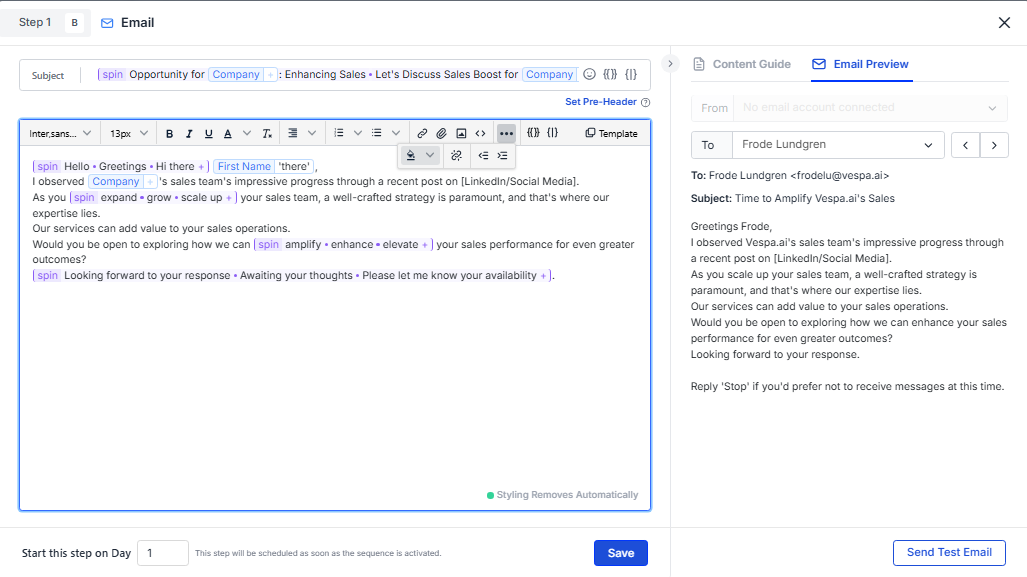
In the Frode Lundgren preview, the subject and body adjusted to Vespa.ai and Frode, but the underlying structure, talking points, and CTA remained nearly the same as the Tidio version. The output is usable as a starting draft, yet personalization depth remained shallow and mostly dependent on the user-provided company and prospect fields.
Annual pricing captured during testing
The pricing page shown in the research had annual billing selected with a 30% savings banner.
Prices below reflect the visible pricing screenshot only. The research did not validate add-ons such as Dialer pricing or test plan limits beyond what was shown on the page.
Is This Right For You?
A side-by-side guide based on our hands-on testing.
Banner Preview
How the embed badge will look on your site

Embed HTML
Copy this code to your website source
Quick Integration Guide
- 1Copy the HTML code block above.
- 2Paste it into your site's HTML or CMS editor.
- 3Banner appears instantly on your page.
- 4Links back to your tool profile here.
Similar Tools
Discover more AI tools like Saleshandy to enhance your workflow.
Comments (0)
Need a custom AI solution for this use case?
If you are looking to build a custom lead search, contact lookup, or outreach drafting workflow for your business or internal workflow, email us at contact@futuresmart.ai.
Found something inaccurate or missing? We try to keep our AI research accurate and useful. If you found outdated information, an issue, or have a suggestion, email us at collaborate@aidemos.com.