
Hunter Review: Prospecting Workflows Tested (2026)
Find company contacts, verify email addresses, and draft cold outreach from one platform—though coverage and AI relevance are uneven.
Strong workflow coverage, mixed result quality
- You want one tool that covers company search, people search, email lookup, verification, and first-draft outreach emails.
- You need bulk workflows for domain search, email finding, or CSV-based email verification.
- You want API access so contact discovery and lookup can be integrated into internal automations or tools.
- You expect a Chrome extension that still pulls prospect details directly from LinkedIn profiles.
Our take
Hunter covered most of the prospecting workflow in this research: company discovery, people lookup, bulk verification, a Chrome extension, API access, and AI-written cold emails. The tradeoff is consistency. Some searches returned strong contact data with confidence or verification signals, while other known prospects returned nothing, the same company exposed different contacts across workflows, and the AI prospecting assistant needed manual cleanup.
In-Depth Review
Our detailed analysis of Hunter — features, performance, and real-world testing.
Feature-by-Feature Breakdown
Company and domain-based prospect discoveryUsable for finding companies and initial contacts▾
Feature tested: Company and domain-based prospect discovery
Result: Passed
Verdict: Usable for finding companies and initial contacts
Expected behavior: Tested Hunter's ability to return a company and associated contacts from both a company-name search and a domain search. The researcher searched for Vespa in Discover and marblism.com in Finder to see whether Hunter could surface people tied to the target company.
Test case: Text prompt → Image
Input type: Text prompt
Input used: Input artifact (Text prompt): Company-name search
Observed output: Output artifact (Image): Hunter found one company match for Vespa and showed 11 results for vespa.ai. The returned contacts were grouped into role buckets including IT, Management, Sale — hunter-hunter-vespa-company-results.png
Input artifact: Input artifact (Text prompt): Company-name search
Output artifact: Output artifact (Image): Hunter found one company match for Vespa and showed 11 results for vespa.ai. The returned contacts were grouped into role buckets including IT, Management, Sale — hunter-hunter-vespa-company-results.png
What changed: Text prompt transformed into Image
Test case: Text prompt → Image
Input type: Text prompt
Input used: Input artifact (Text prompt): Domain search
Observed output: Output artifact (Image): Hunter returned 4 results for marblism.com and showed a company card for Marblism in the sidebar. The visible contacts included a founder plus other role-groupe — hunter-hunter-domain-search-marblism.png
Input artifact: Input artifact (Text prompt): Domain search
Output artifact: Output artifact (Image): Hunter returned 4 results for marblism.com and showed a company card for Marblism in the sidebar. The visible contacts included a founder plus other role-groupe — hunter-hunter-domain-search-marblism.png
What changed: Text prompt transformed into Image
Why it matters / Conclusion: Hunter can return real company matches and associated contacts from both company-name and domain inputs, but the amount of contact coverage depends on the company.
Tested Hunter's ability to return a company and associated contacts from both a company-name search and a domain search. The researcher searched for Vespa in Discover and marblism.com in Finder to see whether Hunter could surface people tied to the target company.
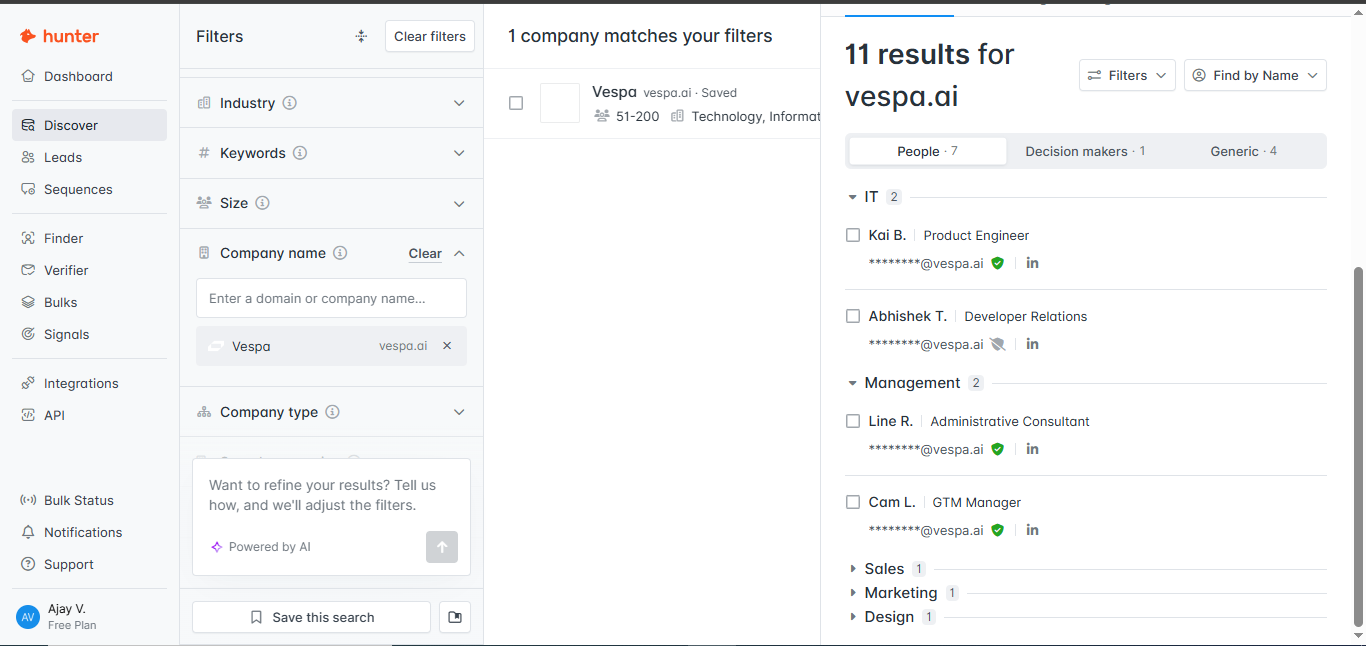
Hunter found one company match for Vespa and showed 11 results for vespa.ai. The returned contacts were grouped into role buckets including IT, Management, Sales, Marketing, and Design, which made it possible to start narrowing prospects by function.
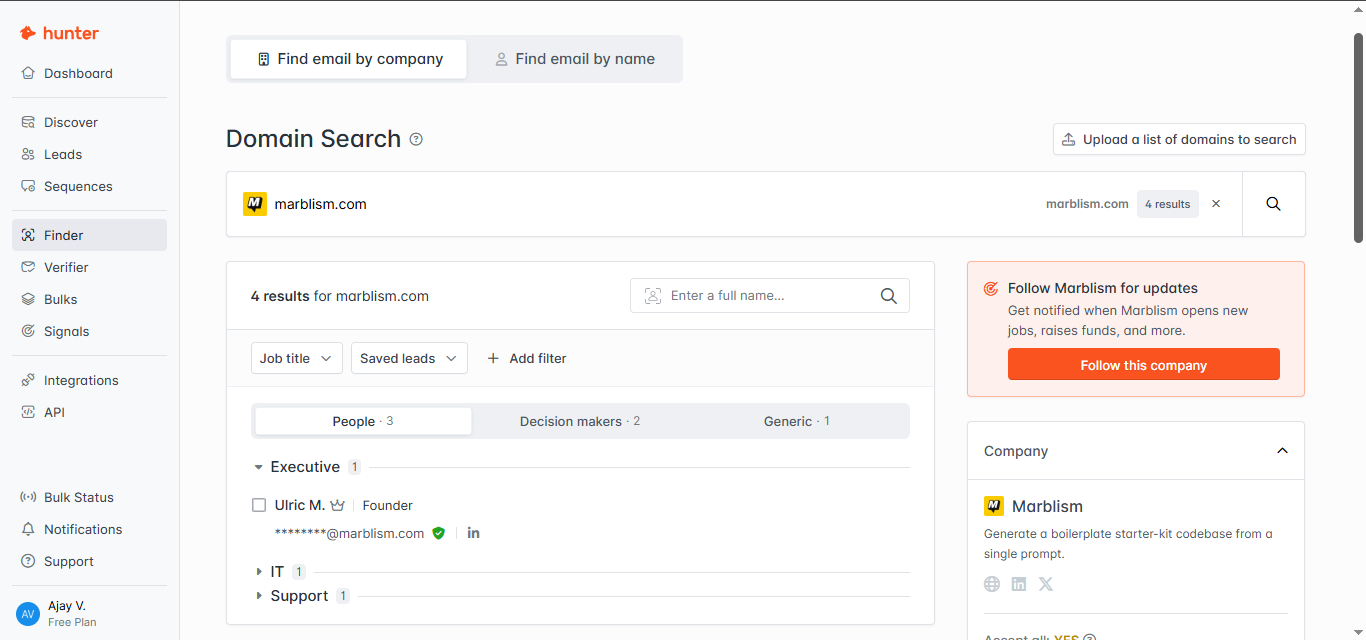
Hunter returned 4 results for marblism.com and showed a company card for Marblism in the sidebar. The visible contacts included a founder plus other role-grouped results, which confirmed that the domain-search workflow can produce usable starting contacts.
Named prospect email lookupHelpful when data exists, but misses known people▾
Feature tested: Named prospect email lookup
Result: Passed
Verdict: Helpful when data exists, but misses known people
Expected behavior: Tested Hunter's Email Finder on two named-person searches: Ajay Vekhande at futuresmart.ai and Tytus Golas at tidio.com. The goal was to see whether Hunter could return a usable email plus supporting confidence data for known prospects.
Test case: Text prompt → Image
Input type: Text prompt
Input used: Input artifact (Text prompt): Known-person lookup
Observed output: Output artifact (Image): Hunter found ajay.vekhande@futuresmart.ai, labeled it with 98% confidence, showed the role as Software Tester, and said the result was based on one web source. — hunter-hunter-email-finder-ajay-vekhande.png
Input artifact: Input artifact (Text prompt): Known-person lookup
Output artifact: Output artifact (Image): Hunter found ajay.vekhande@futuresmart.ai, labeled it with 98% confidence, showed the role as Software Tester, and said the result was based on one web source. — hunter-hunter-email-finder-ajay-vekhande.png
What changed: Text prompt transformed into Image
Test case: Text prompt → Image
Input type: Text prompt
Input used: Input artifact (Text prompt): Known-person lookup
Observed output: Output artifact (Image): Hunter returned no email for Tytus Golas and stated that it did not have enough data related to tidio.com. This showed that even a known prospect plus company d — hunter-hunter-email-finder-no-result.png
Input artifact: Input artifact (Text prompt): Known-person lookup
Output artifact: Output artifact (Image): Hunter returned no email for Tytus Golas and stated that it did not have enough data related to tidio.com. This showed that even a known prospect plus company d — hunter-hunter-email-finder-no-result.png
What changed: Text prompt transformed into Image
Why it matters / Conclusion: Hunter's direct person lookup can return high-confidence contact data, but it is not reliable enough to assume every known prospect will be found.
Tested Hunter's Email Finder on two named-person searches: Ajay Vekhande at futuresmart.ai and Tytus Golas at tidio.com. The goal was to see whether Hunter could return a usable email plus supporting confidence data for known prospects.
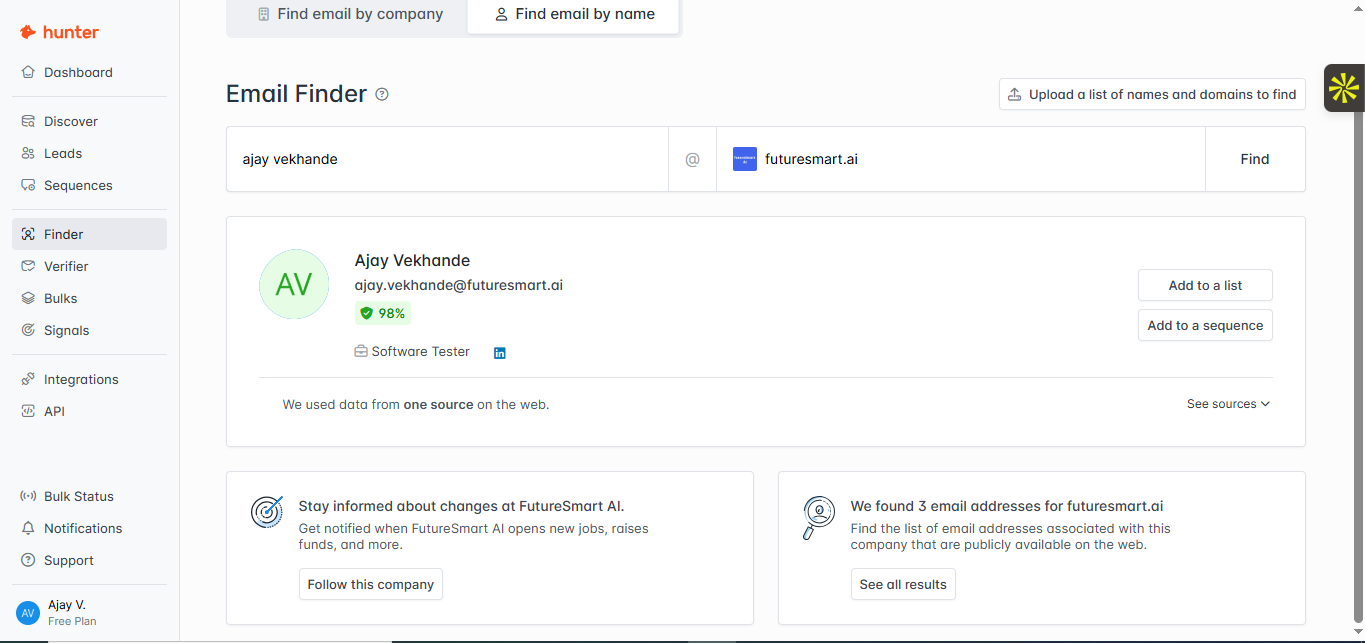
Hunter found ajay.vekhande@futuresmart.ai, labeled it with 98% confidence, showed the role as Software Tester, and said the result was based on one web source. That gave both a contact and a visible trust signal for the lookup.
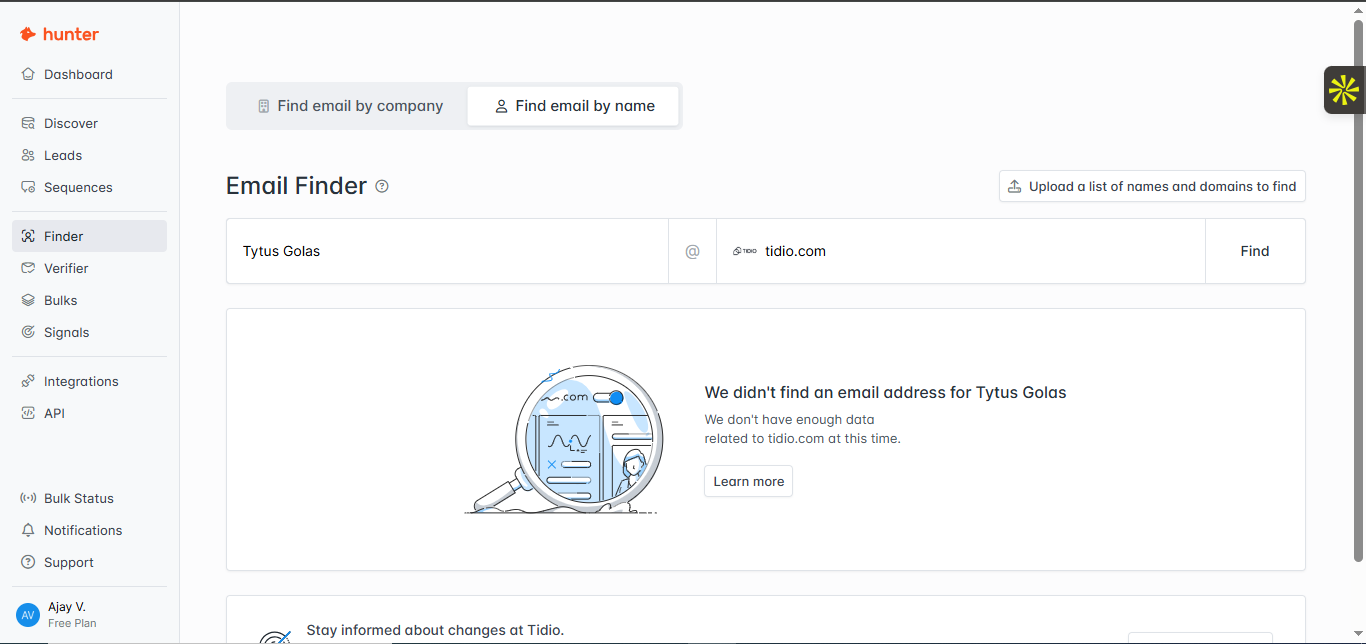
Hunter returned no email for Tytus Golas and stated that it did not have enough data related to tidio.com. This showed that even a known prospect plus company domain does not always produce a contact.
Cross-workflow contact consistency and validity signalsUse multiple workflows and review validation signals carefully▾
Feature tested: Cross-workflow contact consistency and validity signals
Result: Passed
Verdict: Use multiple workflows and review validation signals carefully
Expected behavior: Compared Hunter's company-level employee listing against direct Email Finder lookups for the same organization, futuresmart.ai. The test checked whether Discover and Email Finder expose the same people and whether validity signals are strong enough to trust without review.
Test case: Text prompt → Image
Input type: Text prompt
Input used: Input artifact (Text prompt): Company employee listing
Observed output: Output artifact (Image): Hunter surfaced employee records for FutureSmart AI and showed contact information with validity indicators. One result in the list carried an Invalid badge, an — hunter-hunter-futuresmart-email-results.jpg
Input artifact: Input artifact (Text prompt): Company employee listing
Output artifact: Output artifact (Image): Hunter surfaced employee records for FutureSmart AI and showed contact information with validity indicators. One result in the list carried an Invalid badge, an — hunter-hunter-futuresmart-email-results.jpg
What changed: Text prompt transformed into Image
Test case: Text prompt → Image
Input type: Text prompt
Input used: Input artifact (Text prompt): Direct person lookup
Observed output: Output artifact (Image): Direct Email Finder returned pradip@futuresmart.ai with 96% confidence and a verified label. This showed that Hunter could find a named contact through Email Fi — hunter-hunter-email-finder-pradip-nichite.png
Input artifact: Input artifact (Text prompt): Direct person lookup
Output artifact: Output artifact (Image): Direct Email Finder returned pradip@futuresmart.ai with 96% confidence and a verified label. This showed that Hunter could find a named contact through Email Fi — hunter-hunter-email-finder-pradip-nichite.png
What changed: Text prompt transformed into Image
Test case: Text prompt → Image
Input type: Text prompt
Input used: Input artifact (Text prompt): Workflow comparison
Observed output: Output artifact (Image): The FutureSmart AI company listing still showed Ajay Vekhande and Shreyas Dhawore rather than Pradip Nichite. That means the direct person-search workflow and t — hunter-hunter-futuresmart-email-results-repeat.png
Input artifact: Input artifact (Text prompt): Workflow comparison
Output artifact: Output artifact (Image): The FutureSmart AI company listing still showed Ajay Vekhande and Shreyas Dhawore rather than Pradip Nichite. That means the direct person-search workflow and t — hunter-hunter-futuresmart-email-results-repeat.png
What changed: Text prompt transformed into Image
Why it matters / Conclusion: Hunter is more dependable when you combine workflows instead of trusting a single search path, and its validation signals should be reviewed rather than treated as final.
Compared Hunter's company-level employee listing against direct Email Finder lookups for the same organization, futuresmart.ai. The test checked whether Discover and Email Finder expose the same people and whether validity signals are strong enough to trust without review.
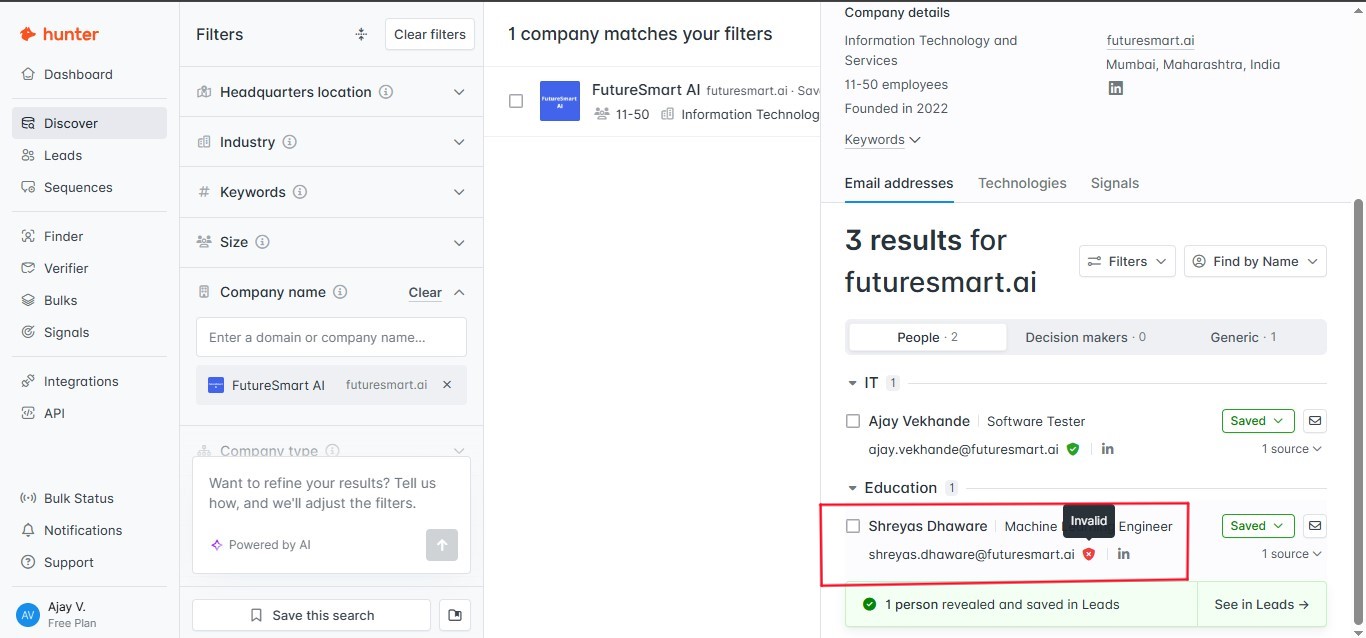
Hunter surfaced employee records for FutureSmart AI and showed contact information with validity indicators. One result in the list carried an Invalid badge, and the researcher noted a difference between Hunter's displayed validity status and the separate validation outcome they observed, which means contact records still need review before outreach.
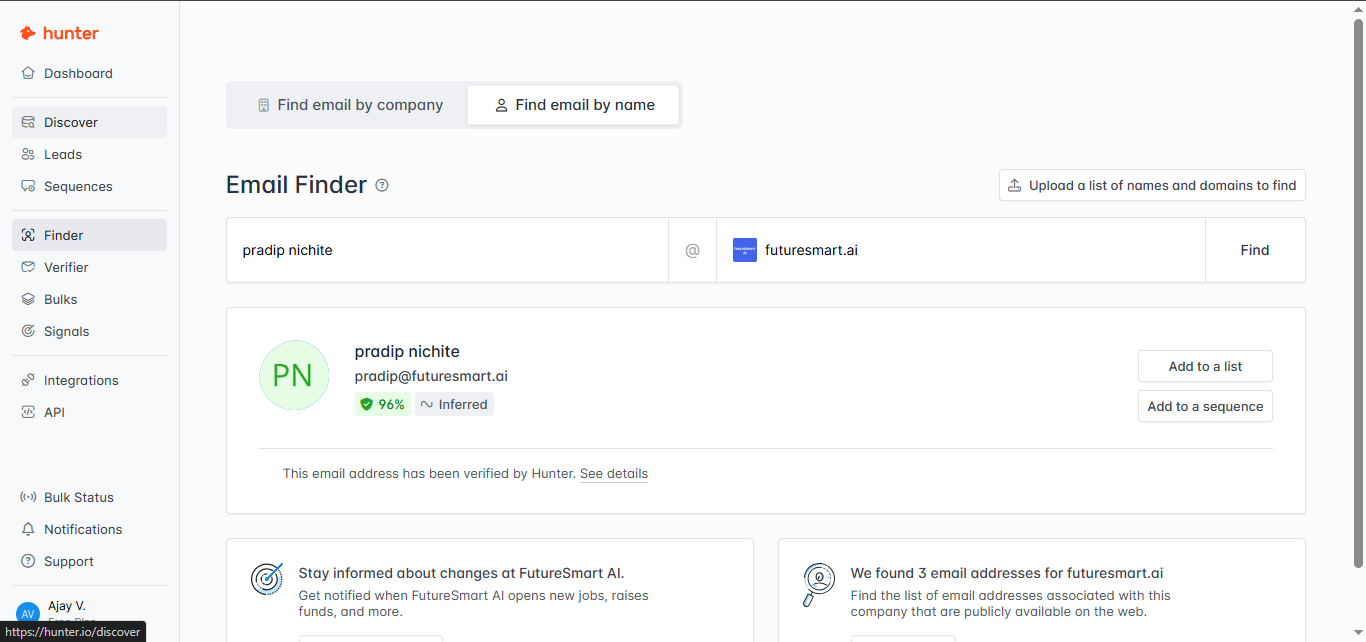
Direct Email Finder returned pradip@futuresmart.ai with 96% confidence and a verified label. This showed that Hunter could find a named contact through Email Finder that was not obviously surfaced in the company employee list.
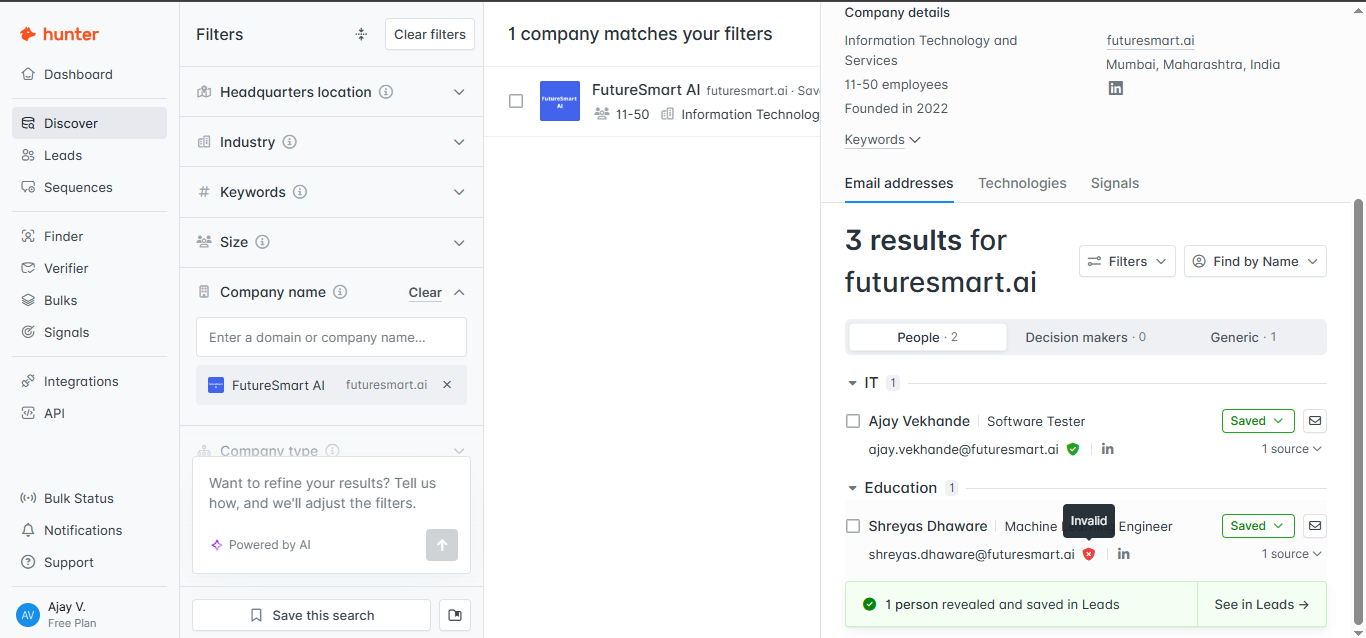
The FutureSmart AI company listing still showed Ajay Vekhande and Shreyas Dhawore rather than Pradip Nichite. That means the direct person-search workflow and the company-browse workflow can expose different contacts for the same organization.
Company coverage and employee freshnessCoverage varies substantially by company▾
Feature tested: Company coverage and employee freshness
Result: Passed
Verdict: Coverage varies substantially by company
Expected behavior: Tested whether Hunter could surface current employee records across companies with different levels of data coverage. The researcher compared FutureSmart AI, which returned multiple contacts, against Tidio, which returned a company profile but no employee emails.
Test case: Text prompt → Image
Input type: Text prompt
Input used: Input artifact (Text prompt): Covered company test
Observed output: Output artifact (Image): Hunter returned 3 results for futuresmart.ai and surfaced named contacts under the company record, including at least one entry marked Invalid. This showed that — hunter-hunter-futuresmart-ai-search-results.png
Input artifact: Input artifact (Text prompt): Covered company test
Output artifact: Output artifact (Image): Hunter returned 3 results for futuresmart.ai and surfaced named contacts under the company record, including at least one entry marked Invalid. This showed that — hunter-hunter-futuresmart-ai-search-results.png
What changed: Text prompt transformed into Image
Test case: Text prompt → Image
Input type: Text prompt
Input used: Input artifact (Text prompt): Sparse company test
Observed output: Output artifact (Image): Hunter recognized Tidio as a company and showed a company card, but it returned no email addresses for tidio.com. The workflow suggested following the company f — hunter-hunter-domain-search-no-results-tidio.png
Input artifact: Input artifact (Text prompt): Sparse company test
Output artifact: Output artifact (Image): Hunter recognized Tidio as a company and showed a company card, but it returned no email addresses for tidio.com. The workflow suggested following the company f — hunter-hunter-domain-search-no-results-tidio.png
What changed: Text prompt transformed into Image
Why it matters / Conclusion: Hunter's company coverage is uneven: some organizations show usable employee records, while others show only a company profile with no contacts.
Tested whether Hunter could surface current employee records across companies with different levels of data coverage. The researcher compared FutureSmart AI, which returned multiple contacts, against Tidio, which returned a company profile but no employee emails.
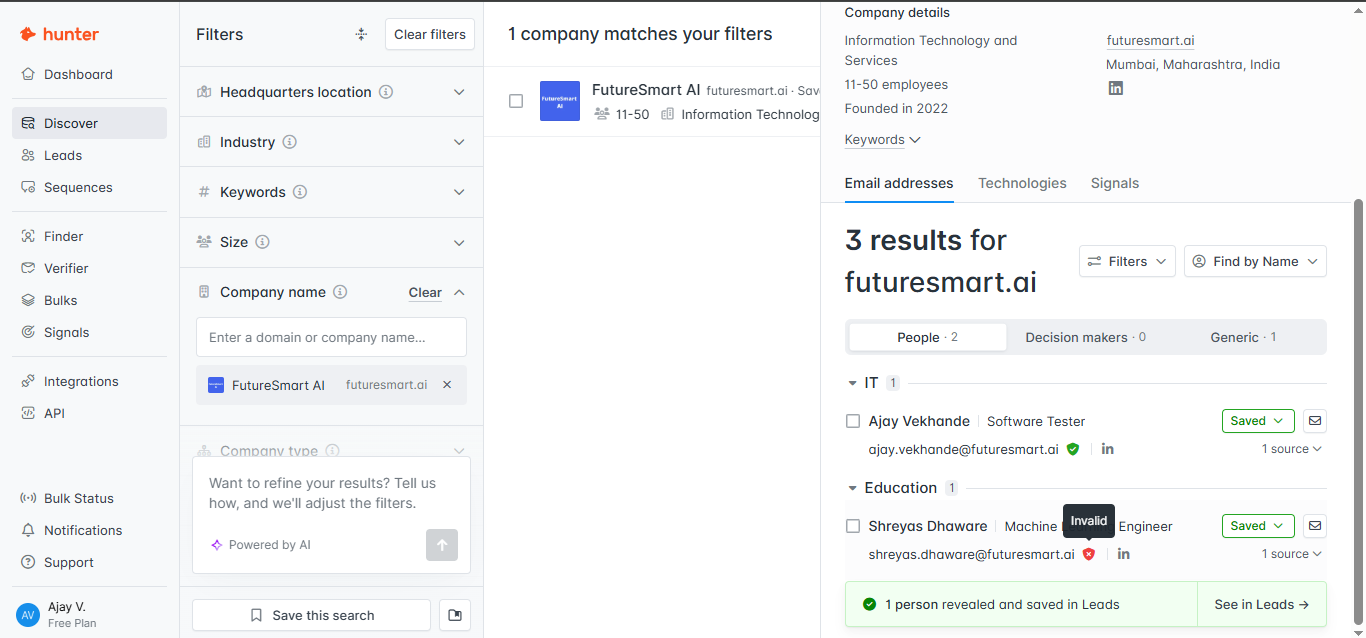
Hunter returned 3 results for futuresmart.ai and surfaced named contacts under the company record, including at least one entry marked Invalid. This showed that Hunter can map employees to a company, but freshness and validity still need checking.
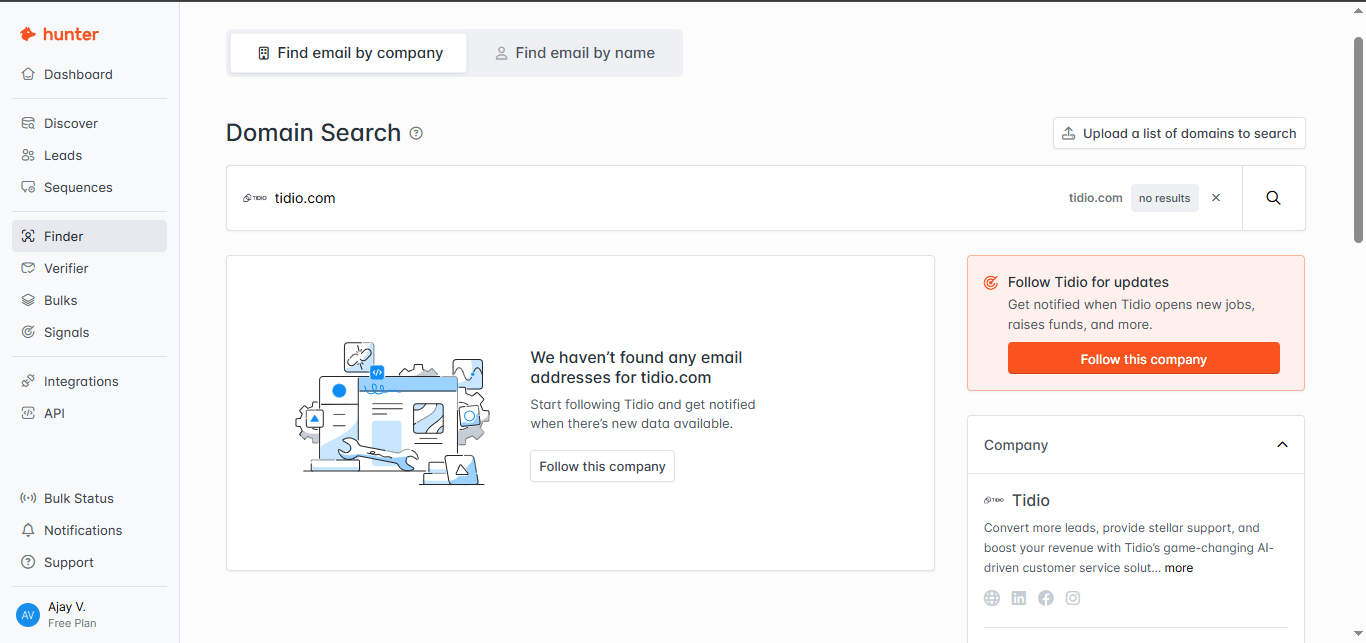
Hunter recognized Tidio as a company and showed a company card, but it returned no email addresses for tidio.com. The workflow suggested following the company for updates instead of providing contacts.
Bulk prospecting and CSV email verificationGood support for scaling list work▾
Feature tested: Bulk prospecting and CSV email verification
Result: Passed
Verdict: Good support for scaling list work
Expected behavior: Tested whether Hunter supports larger prospecting and validation workflows beyond one-by-one searches. The researcher reviewed Hunter's bulk operations menu and ran a CSV-based email verification workflow.
Test case: Text prompt → Image
Input type: Text prompt
Input used: Input artifact (Text prompt): Bulk workflows menu
Observed output: Output artifact (Image): Hunter offered three separate bulk workflows: Domain Search, Email Finder, and Email Verifier. This confirmed that the platform supports large-scale prospect di — hunter-hunter-bulks-task-selection.png
Input artifact: Input artifact (Text prompt): Bulk workflows menu
Output artifact: Output artifact (Image): Hunter offered three separate bulk workflows: Domain Search, Email Finder, and Email Verifier. This confirmed that the platform supports large-scale prospect di — hunter-hunter-bulks-task-selection.png
What changed: Text prompt transformed into Image
Test case: Text prompt → Image
Input type: Text prompt
Input used: Input artifact (Text prompt): CSV verification test
Observed output: Output artifact (Image): Hunter returned a bulk verification summary showing 10.0% Accept and 90.0% Invalid across 10 email addresses, with a preview table of per-record statuses. The r — hunter-hunter-csv-verification-results.png
Input artifact: Input artifact (Text prompt): CSV verification test
Output artifact: Output artifact (Image): Hunter returned a bulk verification summary showing 10.0% Accept and 90.0% Invalid across 10 email addresses, with a preview table of per-record statuses. The r — hunter-hunter-csv-verification-results.png
What changed: Text prompt transformed into Image
Why it matters / Conclusion: Hunter supports bulk discovery and verification workflows well enough for list-based prospecting, especially when you need to validate many contacts at once.
Tested whether Hunter supports larger prospecting and validation workflows beyond one-by-one searches. The researcher reviewed Hunter's bulk operations menu and ran a CSV-based email verification workflow.
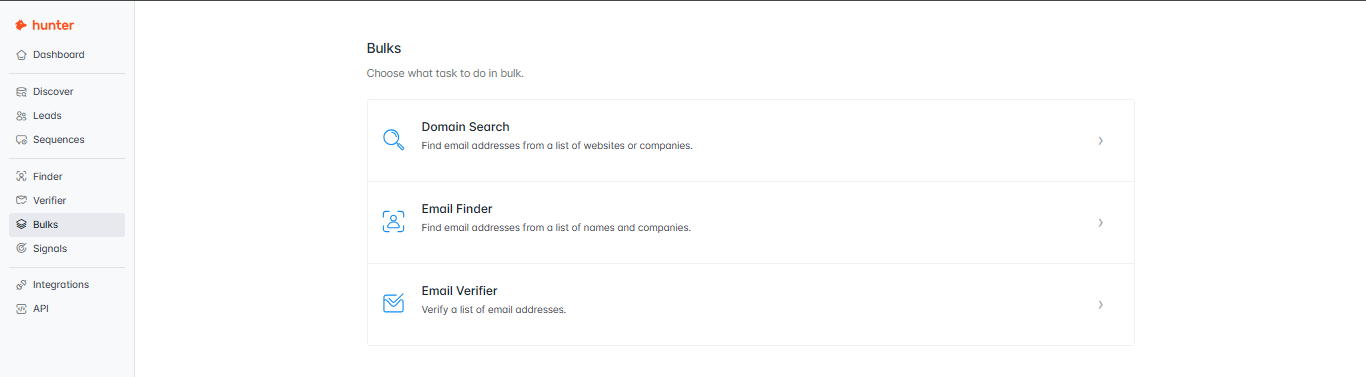
Hunter offered three separate bulk workflows: Domain Search, Email Finder, and Email Verifier. This confirmed that the platform supports large-scale prospect discovery and validation rather than only individual lookups.
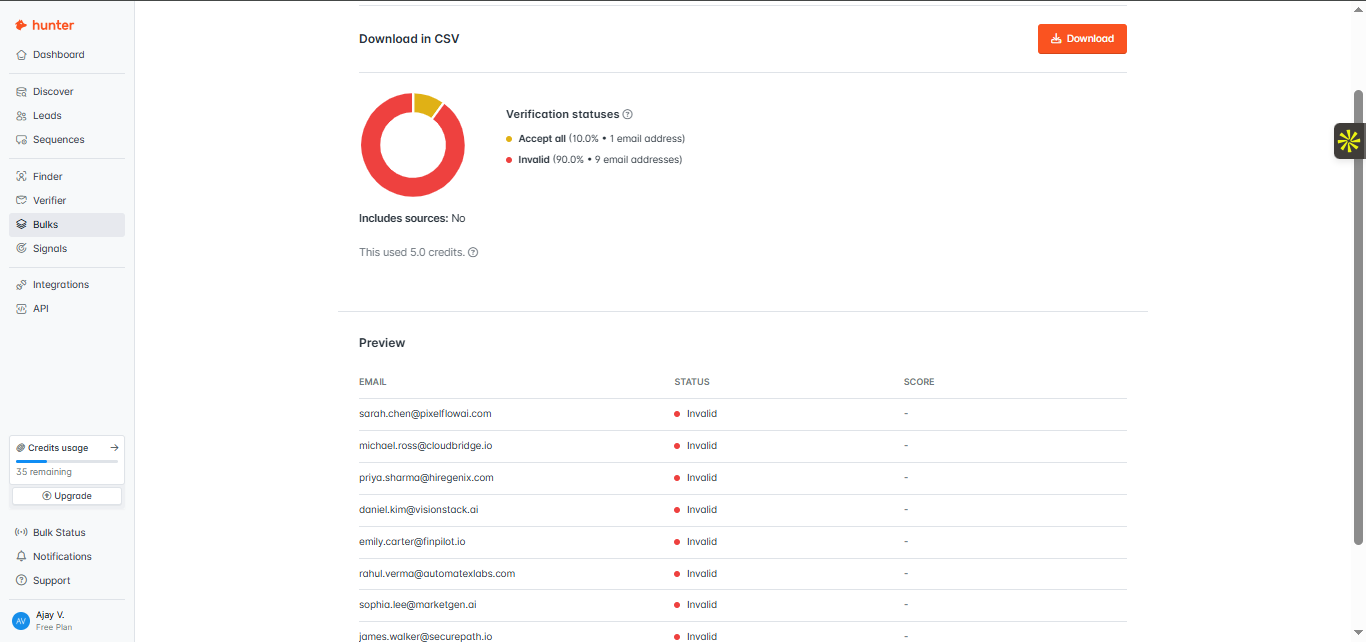
Hunter returned a bulk verification summary showing 10.0% Accept and 90.0% Invalid across 10 email addresses, with a preview table of per-record statuses. The run used 5.0 credits, which gave clear visibility into contact-list quality at both summary and row level.
AI-assisted prospect discovery from natural-language promptsHelpful for broad filtering, weak on precise intent following▾
Feature tested: AI-assisted prospect discovery from natural-language prompts
Result: Passed
Verdict: Helpful for broad filtering, weak on precise intent following
Expected behavior: Tested Hunter's AI-powered prospecting flow with the prompt: "Find 10 AI startups in customer support automation and identify the most relevant contacts for partnership outreach." The goal was to see whether Hunter could convert a natural-language request into a focused search without heavy manual refinement.
Test case: Text prompt → Image
Input type: Text prompt
Input used: Input artifact (Text prompt): Natural-language prompt
Observed output: Output artifact (Image): Hunter did not limit the output to 10 companies. Instead, it produced a very broad search with 127,581 company matches and 153,491 people results, and the visib — hunter-hunter-company-discovery-filtered-results.png
Input artifact: Input artifact (Text prompt): Natural-language prompt
Output artifact: Output artifact (Image): Hunter did not limit the output to 10 companies. Instead, it produced a very broad search with 127,581 company matches and 153,491 people results, and the visib — hunter-hunter-company-discovery-filtered-results.png
What changed: Text prompt transformed into Image
Why it matters / Conclusion: Hunter's AI assistant can help build a search, but it was not precise enough to trust for hands-off prospect discovery from a detailed prompt.
Tested Hunter's AI-powered prospecting flow with the prompt: "Find 10 AI startups in customer support automation and identify the most relevant contacts for partnership outreach." The goal was to see whether Hunter could convert a natural-language request into a focused search without heavy manual refinement.
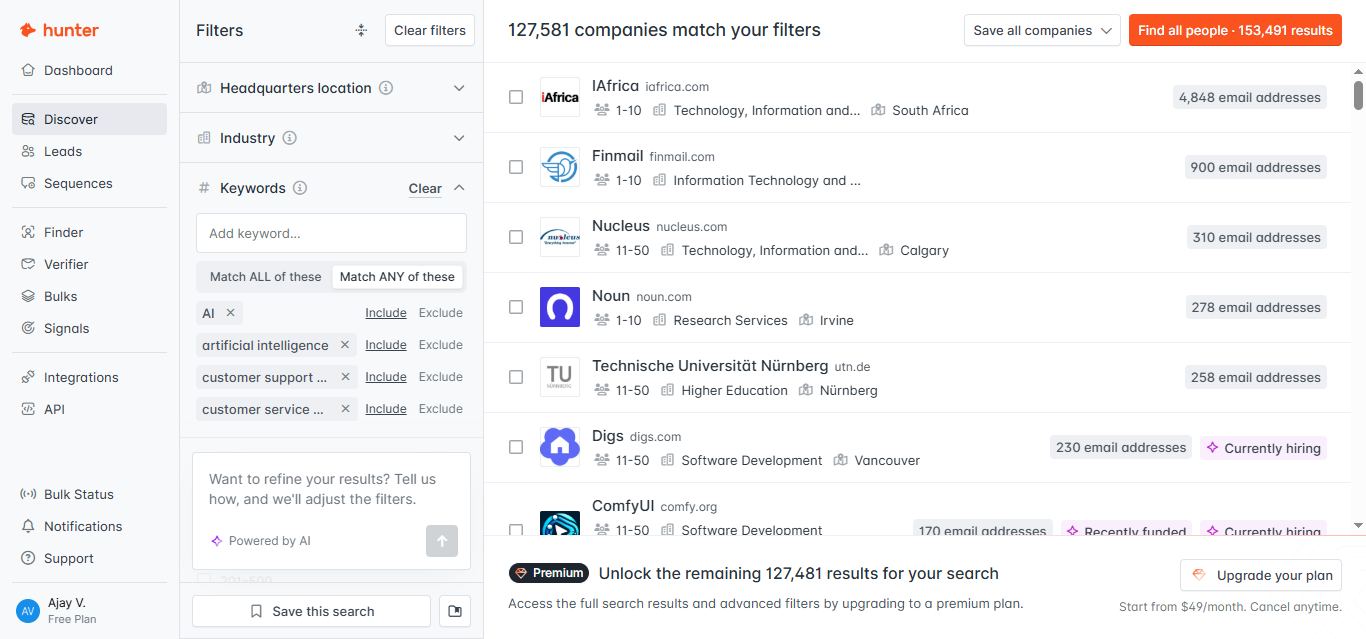
Hunter did not limit the output to 10 companies. Instead, it produced a very broad search with 127,581 company matches and 153,491 people results, and the visible results included categories outside the intended target set, such as Research Services and Higher Education. This suggests the assistant relied more on keyword and filter matching than on tightly following the request.
Chrome extension for browsing-based discoveryUseful on company sites, not on LinkedIn▾
Feature tested: Chrome extension for browsing-based discovery
Result: Passed
Verdict: Useful on company sites, not on LinkedIn
Expected behavior: Tested Hunter's Chrome Extension in two browsing contexts: a LinkedIn profile for Tytus Gołas and the Marblism company website. The goal was to see whether the extension reduces switching between tabs while identifying prospects.
Test case: Text prompt → Image
Input type: Text prompt
Input used: Input artifact (Text prompt): LinkedIn profile test
Observed output: Output artifact (Image): Hunter did not surface prospect information directly on LinkedIn. Instead, the extension displayed a message saying Hunter is no longer available on LinkedIn an — hunter-hunter-linkedin-unavailable-popup.png
Input artifact: Input artifact (Text prompt): LinkedIn profile test
Output artifact: Output artifact (Image): Hunter did not surface prospect information directly on LinkedIn. Instead, the extension displayed a message saying Hunter is no longer available on LinkedIn an — hunter-hunter-linkedin-unavailable-popup.png
What changed: Text prompt transformed into Image
Test case: Text prompt → Image
Input type: Text prompt
Input used: Input artifact (Text prompt): Company website test
Observed output: Output artifact (Image): On the Marblism website, Hunter surfaced 4 results directly inside the extension, including employee names, job roles, email addresses, confidence scores, and t — hunter-hunter-marblism-results-popup.png
Input artifact: Input artifact (Text prompt): Company website test
Output artifact: Output artifact (Image): On the Marblism website, Hunter surfaced 4 results directly inside the extension, including employee names, job roles, email addresses, confidence scores, and t — hunter-hunter-marblism-results-popup.png
What changed: Text prompt transformed into Image
Why it matters / Conclusion: The extension is useful for company-site discovery, but it no longer supports direct LinkedIn-based prospect extraction.
Tested Hunter's Chrome Extension in two browsing contexts: a LinkedIn profile for Tytus Gołas and the Marblism company website. The goal was to see whether the extension reduces switching between tabs while identifying prospects.
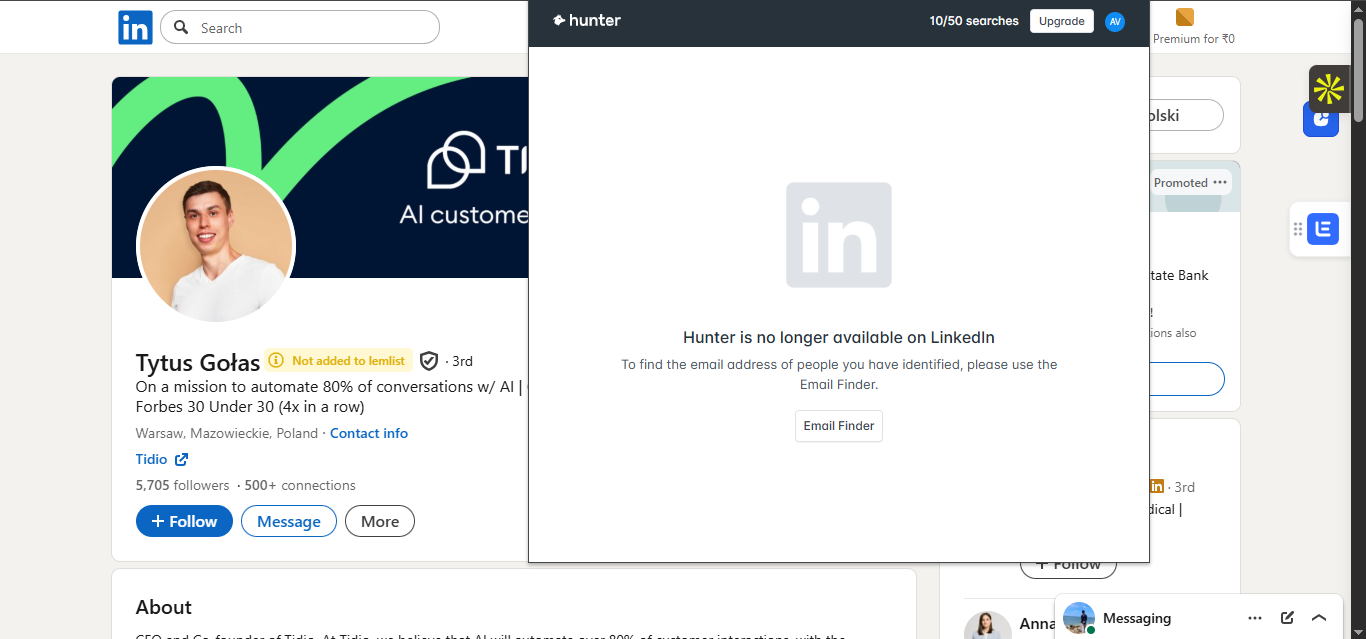
Hunter did not surface prospect information directly on LinkedIn. Instead, the extension displayed a message saying Hunter is no longer available on LinkedIn and directed the user to use Email Finder instead.
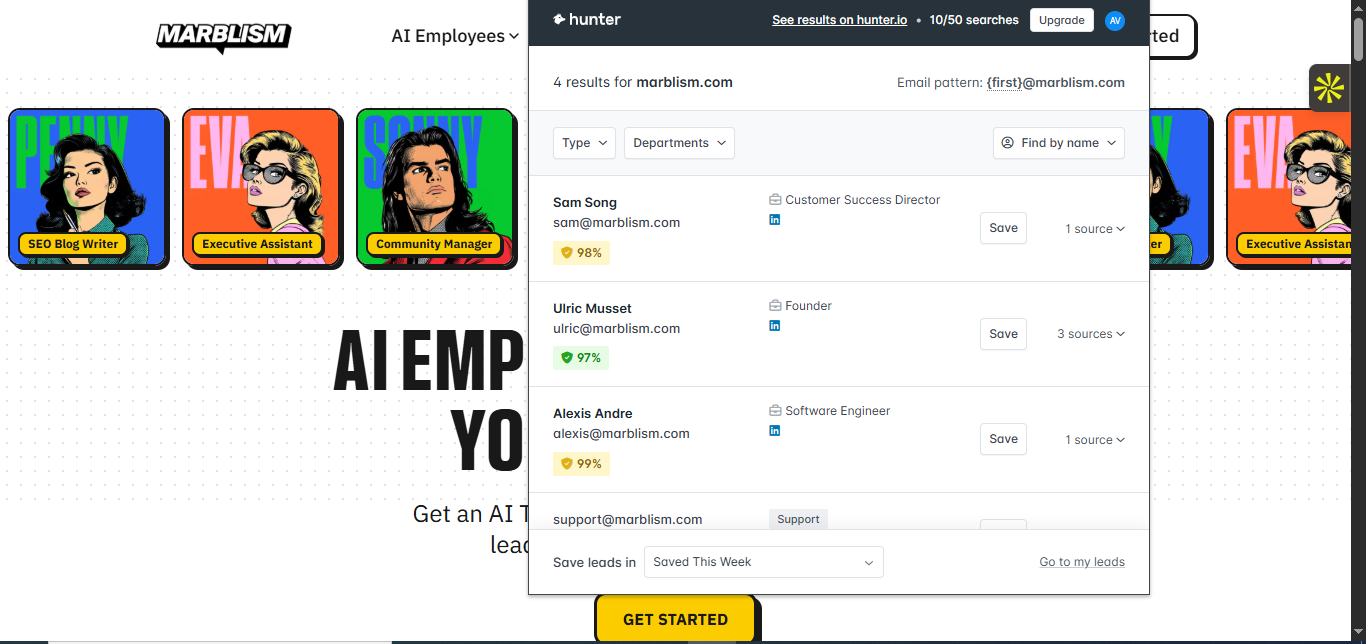
On the Marblism website, Hunter surfaced 4 results directly inside the extension, including employee names, job roles, email addresses, confidence scores, and the email pattern {first}@marblism.com. That let the researcher start prospecting from the company site without switching back to the main Hunter app.
API and automation readinessWell positioned for workflow integration▾
Feature tested: API and automation readiness
Result: Passed
Verdict: Well positioned for workflow integration
Expected behavior: Reviewed Hunter's API section to see whether its discovery and contact-finding workflows can be automated inside internal systems and scripts. The researcher specifically checked whether core prospecting functions were exposed as ready-to-use endpoints.
Test case: Text prompt → Image
Input type: Text prompt
Input used: Input artifact (Text prompt): API review
Observed output: Output artifact (Image): Hunter exposed dedicated API entries for Discover, Domain Search, and Email Finder, with generated request snippets tied to the user's API key. This indicates t — hunter-hunter-api-key-and-endpoints.png
Input artifact: Input artifact (Text prompt): API review
Output artifact: Output artifact (Image): Hunter exposed dedicated API entries for Discover, Domain Search, and Email Finder, with generated request snippets tied to the user's API key. This indicates t — hunter-hunter-api-key-and-endpoints.png
What changed: Text prompt transformed into Image
Why it matters / Conclusion: Hunter is automation-friendly for teams that want to plug prospect discovery and contact lookup into their own workflows.
Reviewed Hunter's API section to see whether its discovery and contact-finding workflows can be automated inside internal systems and scripts. The researcher specifically checked whether core prospecting functions were exposed as ready-to-use endpoints.
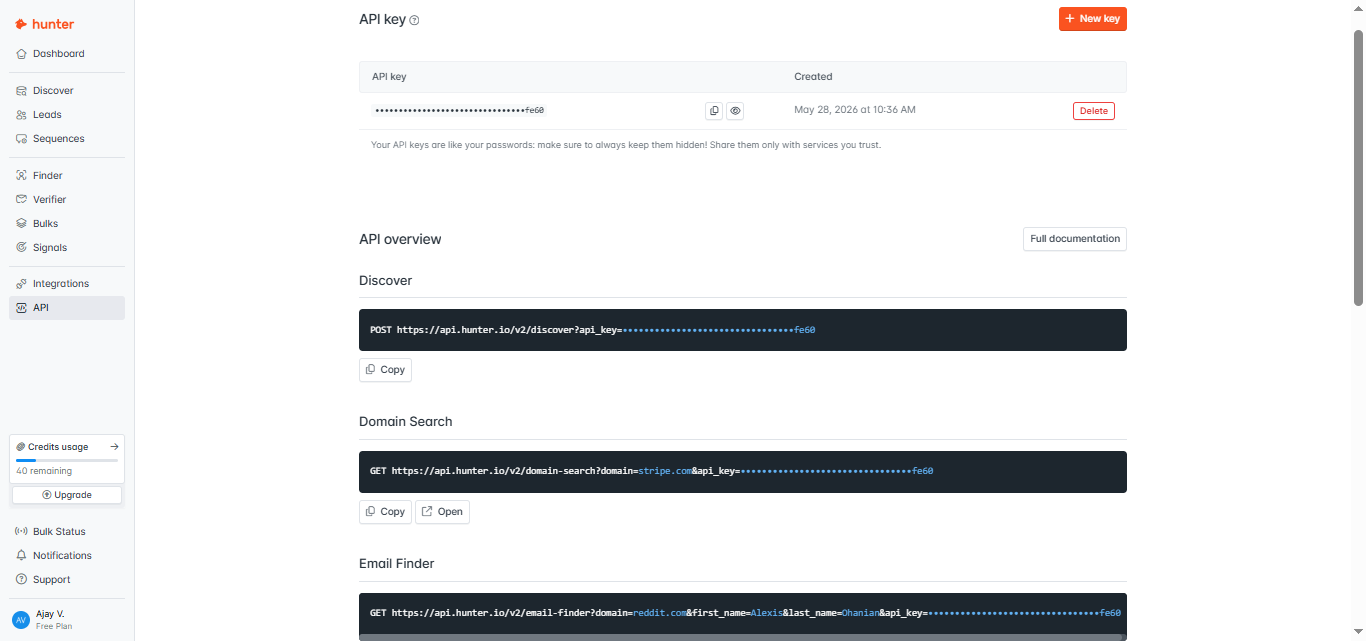
Hunter exposed dedicated API entries for Discover, Domain Search, and Email Finder, with generated request snippets tied to the user's API key. This indicates that the same prospecting workflows available in the UI can also be integrated into external apps and internal automation.
AI cold-email draftingGood first drafts, limited variation▾
Feature tested: AI cold-email drafting
Result: Passed
Verdict: Good first drafts, limited variation
Expected behavior: Tested Hunter's AI Writing Assistant to see whether it can generate relevant outreach emails from structured inputs such as audience, problem, solution, and value proposition. One visible audience input was "I want to write the email to ai tools founders for collaboration," followed by generated cold-email drafts.
Test case: Image → Image
Input type: Image
Input used: Input artifact (Image): Audience step input: "I want to write the email to ai tools founders for collaboration." — hunter-hunter-ai-writing-assistant-audience-step.png
Observed output: Output artifact (Image): Hunter generated a cold email with a subject line, first_name merge field, problem framing, a short value proposition, and a CTA asking for interest. The draft — hunter-hunter-ai-writing-assistant-email-preview.png
Input artifact: Input artifact (Image): Audience step input: "I want to write the email to ai tools founders for collaboration." — hunter-hunter-ai-writing-assistant-audience-step.png
Output artifact: Output artifact (Image): Hunter generated a cold email with a subject line, first_name merge field, problem framing, a short value proposition, and a CTA asking for interest. The draft — hunter-hunter-ai-writing-assistant-email-preview.png
What changed: Image transformed into Image
Test case: Text prompt → Image
Input type: Text prompt
Input used: Input artifact (Text prompt): Second drafting example
Observed output: Output artifact (Image): A second generated email followed almost the same structure as the first: similar subject style, similar pain-point framing, similar AI Demos value proposition, — hunter-hunter-marketing-homepage-ai-writing-assistant.png
Input artifact: Input artifact (Text prompt): Second drafting example
Output artifact: Output artifact (Image): A second generated email followed almost the same structure as the first: similar subject style, similar pain-point framing, similar AI Demos value proposition, — hunter-hunter-marketing-homepage-ai-writing-assistant.png
What changed: Text prompt transformed into Image
Why it matters / Conclusion: Hunter's AI Writing Assistant can save time on first drafts, but the tested outputs were formulaic enough that users should expect to refine them before sending.
Tested Hunter's AI Writing Assistant to see whether it can generate relevant outreach emails from structured inputs such as audience, problem, solution, and value proposition. One visible audience input was "I want to write the email to ai tools founders for collaboration," followed by generated cold-email drafts.
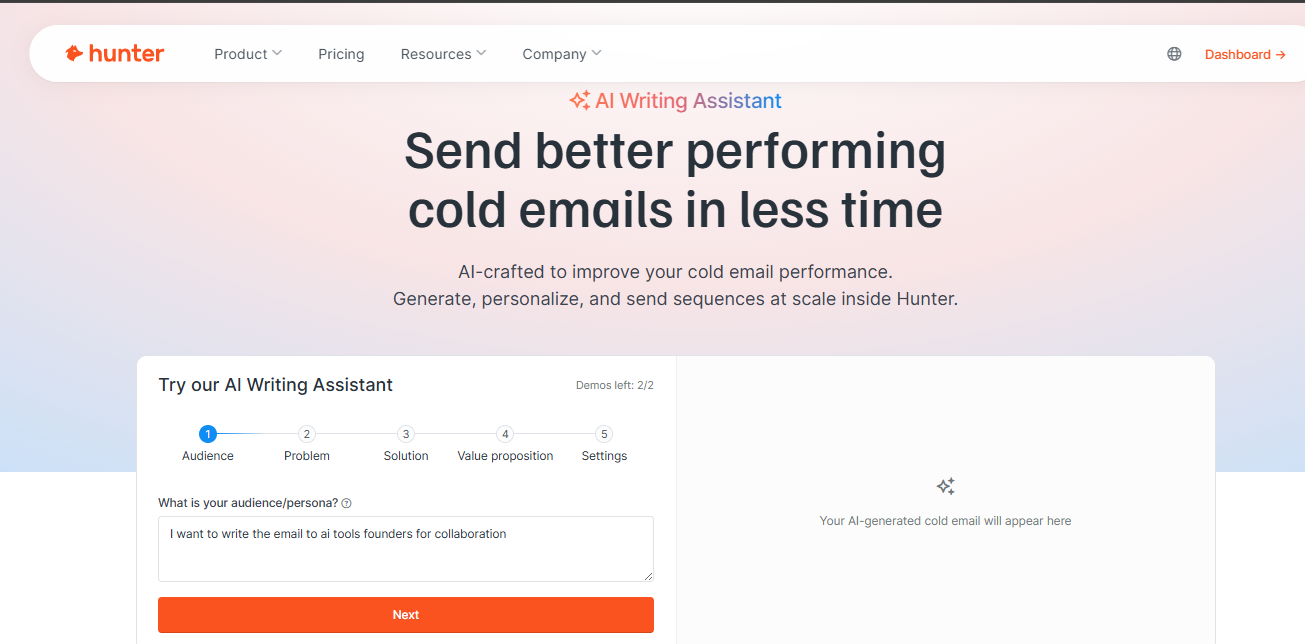
Audience step input: "I want to write the email to ai tools founders for collaboration."
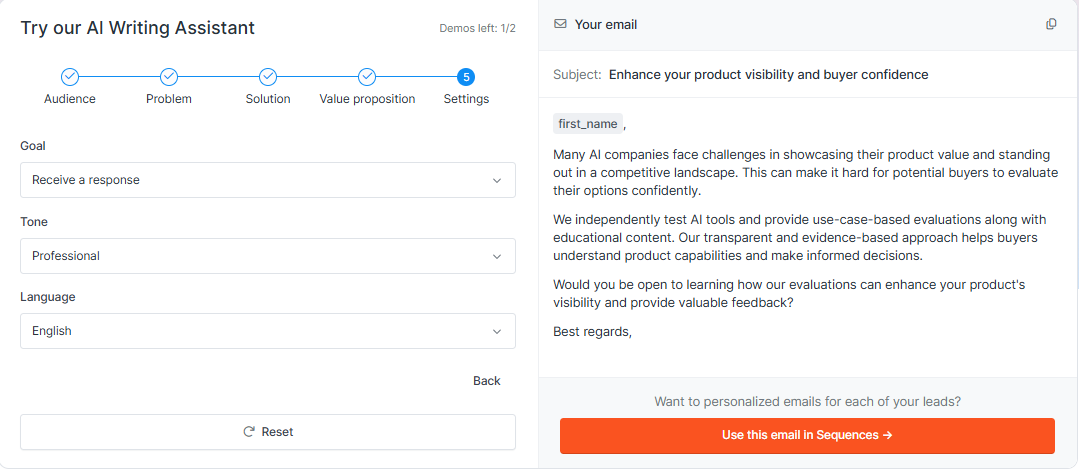
Hunter generated a cold email with a subject line, first_name merge field, problem framing, a short value proposition, and a CTA asking for interest. The draft stayed relevant to the supplied audience and value proposition, so it was usable as a first pass.
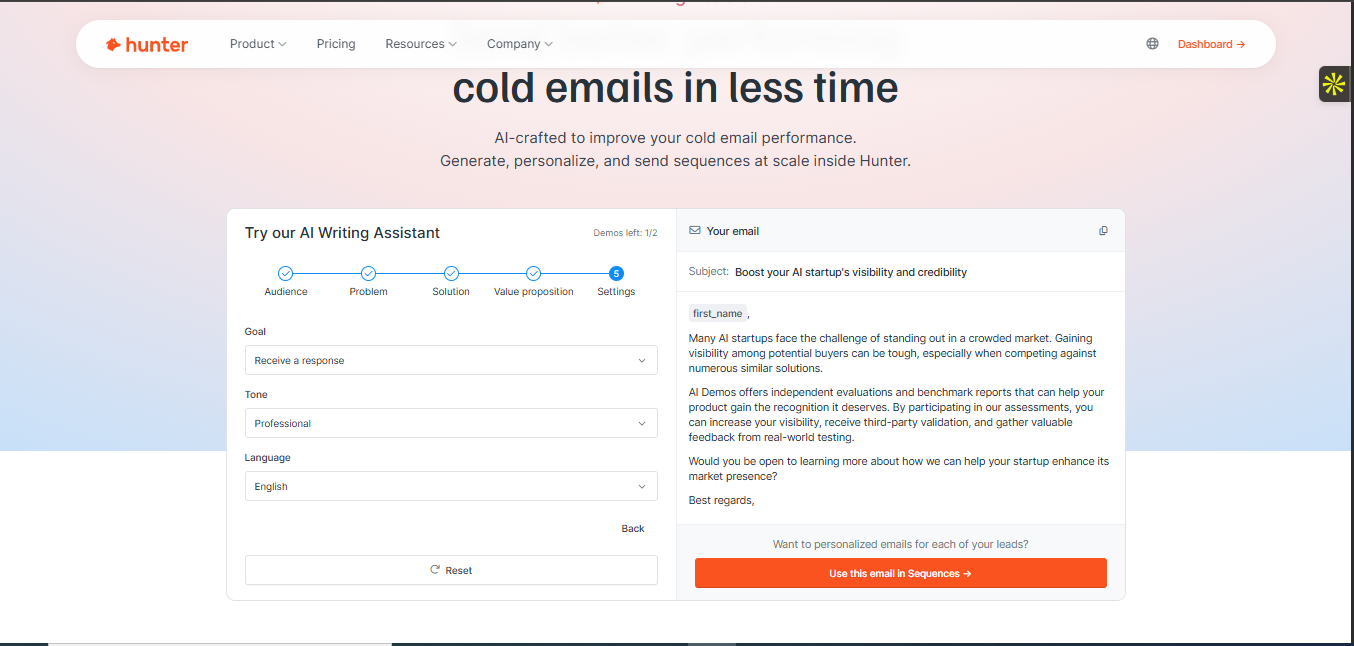
A second generated email followed almost the same structure as the first: similar subject style, similar pain-point framing, similar AI Demos value proposition, and a similar CTA. The wording changed, but the personalization approach remained shallow enough that targeted campaigns would still need editing.
Pricing seen during testing
Hunter's upgrade page showed five plan levels, with Growth marked as the best value.
Pricing was taken from the captured Hunter upgrade page during research. The product screenshots also showed the researcher on the Free plan at the time of testing.
Is This Right For You?
A side-by-side guide based on our hands-on testing.
Featured in Rankings
Independent rankings where Hunter was tested and rated.
Banner Preview
How the embed badge will look on your site

Embed HTML
Copy this code to your website source
Quick Integration Guide
- 1Copy the HTML code block above.
- 2Paste it into your site's HTML or CMS editor.
- 3Banner appears instantly on your page.
- 4Links back to your tool profile here.
Similar Tools
Discover more AI tools like Hunter to enhance your workflow.
Comments (0)
Need a custom AI solution for this use case?
If you are looking to build a custom prospect lookup, email verification, or cold outreach workflow for your business or internal workflow, email us at contact@futuresmart.ai.
Found something inaccurate or missing? We try to keep our AI research accurate and useful. If you found outdated information, an issue, or have a suggestion, email us at collaborate@aidemos.com.