
Clay Review: Company Search, Enrichment, and AI Emails (2026)
Clay brings company search, people discovery, enrichment, and AI email drafting into one outreach workflow, but it still needs validation steps and has notable Chrome/API limits.
Strong end-to-end workflow, but not frictionless
- You want company search, people search, enrichment, and AI email generation in one workspace.
- You are comfortable reviewing generated filters and validating contact quality before using records for outreach.
- You prefer workflow automation through tables, webhooks, and connectors rather than a direct search API.
- You need a Chrome extension that works directly on LinkedIn profiles.
Our take
Clay performed well on the core outreach workflow in this test: it found companies, surfaced employees, enriched contact records, and generated personalized email drafts inside one workspace. The tradeoff is that users still need to validate important details. Employee coverage was useful but not fully complete, enriched contact records can include confidence caveats, the Chrome extension did not work on LinkedIn profiles, and Clay does not expose a traditional API for direct prospecting outside enterprise-limited lookups.
In-Depth Review
Our detailed analysis of Clay — features, performance, and real-world testing.
Feature-by-Feature Breakdown
Company lookup from a known company inputClay successfully returned a matching company record and exposed enough company context to continue the workflow.▾
Feature tested: Company lookup from a known company input
Result: Passed
Verdict: Clay successfully returned a matching company record and exposed enough company context to continue the workflow.
Expected behavior: Tested Clay's Find Companies workflow with a known company/domain-style search to see whether the platform could identify the target company and provide usable company-level context for prospecting.
Test case: Text prompt → Image
Input type: Text prompt
Input used: Input artifact (Text prompt): Input
Observed output: Output artifact (Image): Clay's Find Companies workflow narrowed the search to a single matching company record. The result screen exposed a full filter sidebar plus company-level detai — clay-clay-find-companies-one-result.png
Input artifact: Input artifact (Text prompt): Input
Output artifact: Output artifact (Image): Clay's Find Companies workflow narrowed the search to a single matching company record. The result screen exposed a full filter sidebar plus company-level detai — clay-clay-find-companies-one-result.png
What changed: Text prompt transformed into Image
Why it matters / Conclusion: Clay handled the initial company-identification step well, but company discovery by itself is only the start of the outreach workflow.
Tested Clay's Find Companies workflow with a known company/domain-style search to see whether the platform could identify the target company and provide usable company-level context for prospecting.
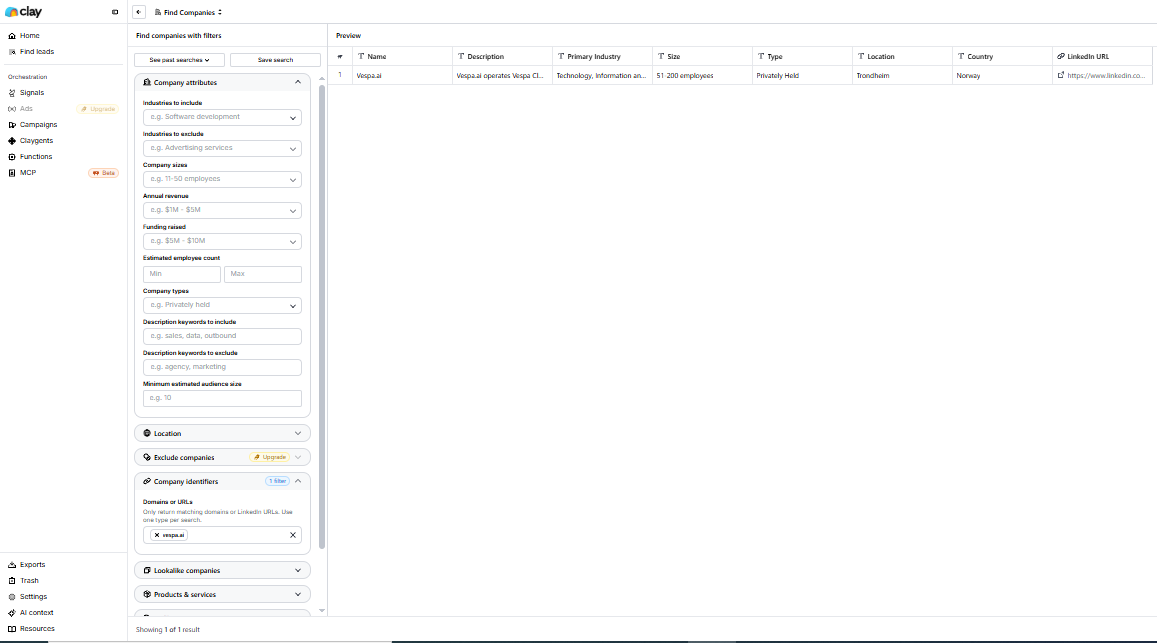
Clay's Find Companies workflow narrowed the search to a single matching company record. The result screen exposed a full filter sidebar plus company-level details in the preview table, which was enough for initial company research, although deeper prospect work still required moving into later workflow steps.
Employee discovery with prospect filtersClay surfaced employee records with good prospecting context, but contact data was not shown directly in search results.▾
Feature tested: Employee discovery with prospect filters
Result: Passed
Verdict: Clay surfaced employee records with good prospecting context, but contact data was not shown directly in search results.
Expected behavior: Tested whether Clay could return employees associated with the target company and provide enough fields to narrow down relevant prospects.
Test case: Text prompt → Image
Input type: Text prompt
Input used: Input artifact (Text prompt): Input
Observed output: Output artifact (Image): Clay's Find People workflow returned a single matching person record and showed company, job title, location, and LinkedIn URL in the results table. The screen — clay-clay-find-people-one-result.png
Input artifact: Input artifact (Text prompt): Input
Output artifact: Output artifact (Image): Clay's Find People workflow returned a single matching person record and showed company, job title, location, and LinkedIn URL in the results table. The screen — clay-clay-find-people-one-result.png
What changed: Text prompt transformed into Image
Why it matters / Conclusion: Clay is strong at finding people and giving enough context to judge relevance, but email discovery happens later in the workflow.
Tested whether Clay could return employees associated with the target company and provide enough fields to narrow down relevant prospects.
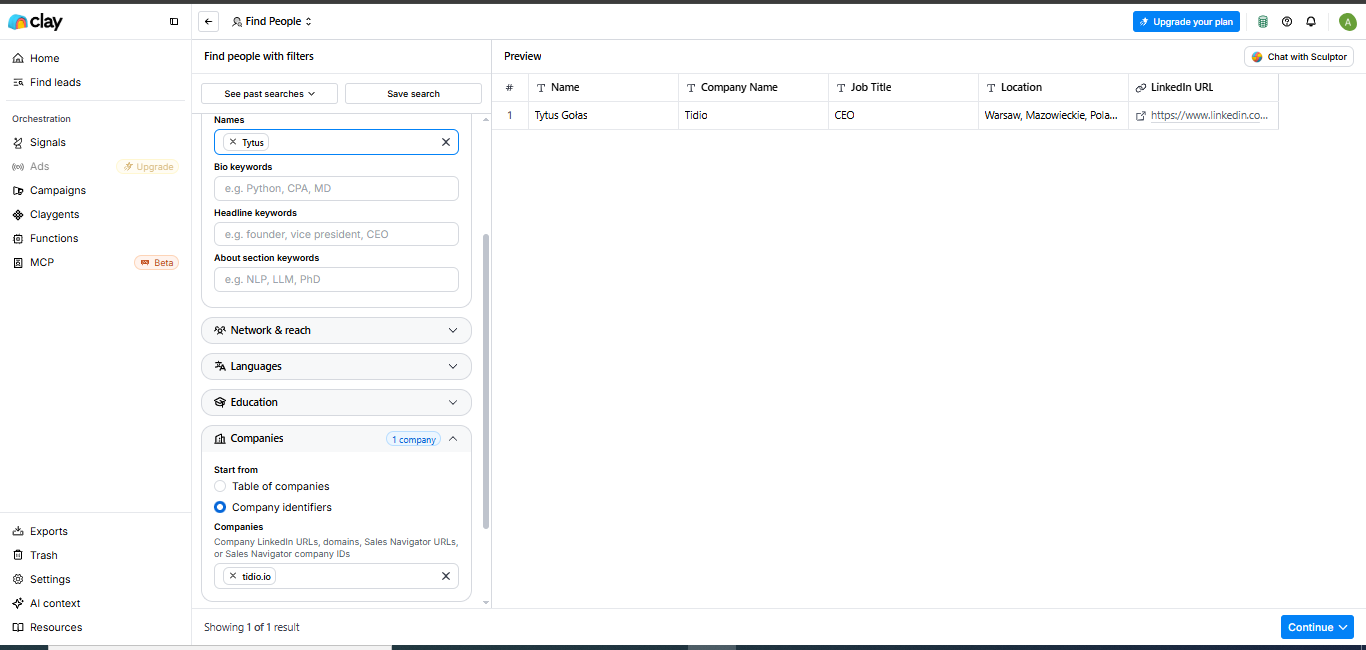
Clay's Find People workflow returned a single matching person record and showed company, job title, location, and LinkedIn URL in the results table. The screen also exposed filters for job title, experience, location, professional bio, network reach, languages, and education, which makes narrowing a prospect list straightforward. Contact information was not shown directly in this search view and required follow-up enrichment.
Contact enrichment with validation signalsClay enriched records with contact and mail-system metadata, but the surfaced email confidence still needed review.▾
Feature tested: Contact enrichment with validation signals
Result: Passed
Verdict: Clay enriched records with contact and mail-system metadata, but the surfaced email confidence still needed review.
Expected behavior: Opened an enriched employee record to inspect what Clay adds after people discovery, including email data and validation metadata.
Test case: Text prompt → Image
Input type: Text prompt
Input used: Input artifact (Text prompt): Input
Observed output: Output artifact (Image): For the selected Shreyas Dhaware record, Clay surfaced an email value plus validation fields such as status, credits consumed, MX record, MX provider, security- — clay-clay-table-cell-details-shreyas-dhaware.png
Input artifact: Input artifact (Text prompt): Input
Output artifact: Output artifact (Image): For the selected Shreyas Dhaware record, Clay surfaced an email value plus validation fields such as status, credits consumed, MX record, MX provider, security- — clay-clay-table-cell-details-shreyas-dhaware.png
What changed: Text prompt transformed into Image
Why it matters / Conclusion: Clay gives more than just an email string—it gives supporting validation data—but users still need to judge whether a record is trustworthy enough to use.
Opened an enriched employee record to inspect what Clay adds after people discovery, including email data and validation metadata.
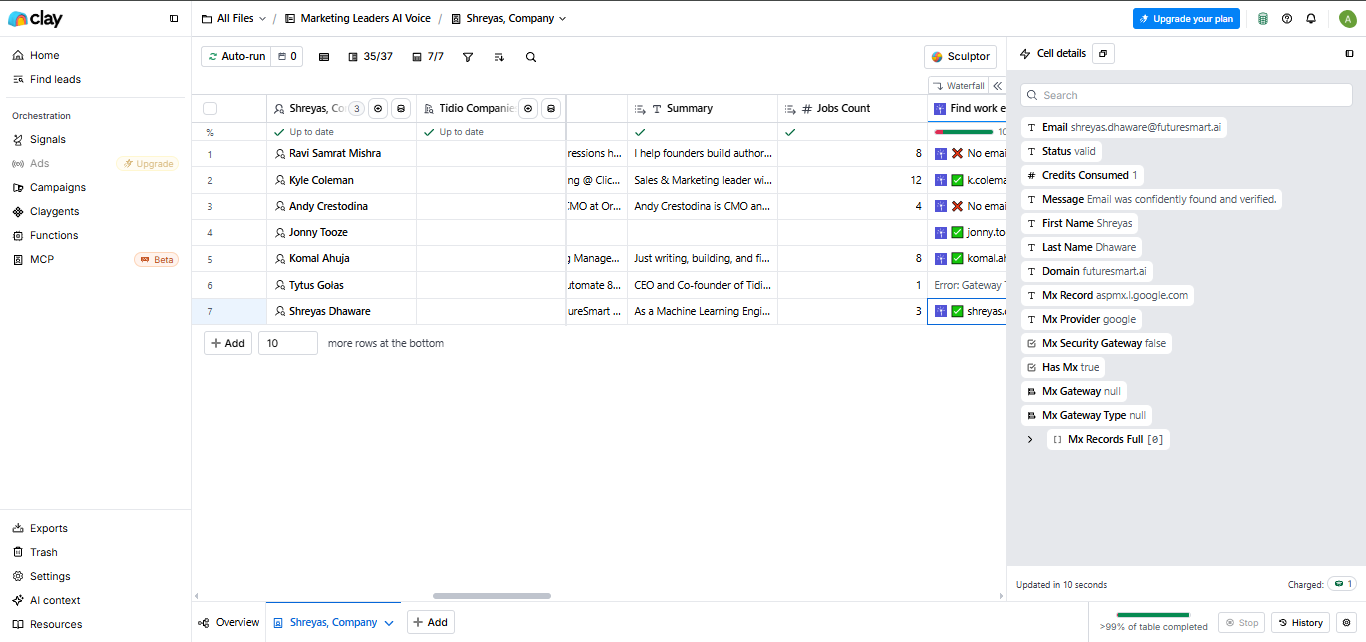
For the selected Shreyas Dhaware record, Clay surfaced an email value plus validation fields such as status, credits consumed, MX record, MX provider, security-gateway flags, and expanded MX records. The same record also showed the message 'Email was not confidently found and verified,' which is a useful reminder that the platform provides supporting signals rather than a guarantee of contact accuracy.
Employee coverage for a target companyClay returned a broad employee list across roles, but completeness still benefited from outside validation.▾
Feature tested: Employee coverage for a target company
Result: Passed
Verdict: Clay returned a broad employee list across roles, but completeness still benefited from outside validation.
Expected behavior: Checked Clay's coverage for FutureSmart AI to see how many employees it surfaced and whether the list looked current enough for prospecting.
Test case: Text prompt → Image
Input type: Text prompt
Input used: Input artifact (Text prompt): Input
Observed output: Output artifact (Image): Clay returned a sizable list of FutureSmart AI employees spanning roles such as Founder & CEO, AI research intern, generative AI engineer, product manager, mach — clay-clay-find-people-futuresmart-ai-results.png
Input artifact: Input artifact (Text prompt): Input
Output artifact: Output artifact (Image): Clay returned a sizable list of FutureSmart AI employees spanning roles such as Founder & CEO, AI research intern, generative AI engineer, product manager, mach — clay-clay-find-people-futuresmart-ai-results.png
What changed: Text prompt transformed into Image
Why it matters / Conclusion: Clay provides a useful workforce view for prospecting, but it should not be treated as a guaranteed complete employee roster when completeness matters.
Checked Clay's coverage for FutureSmart AI to see how many employees it surfaced and whether the list looked current enough for prospecting.
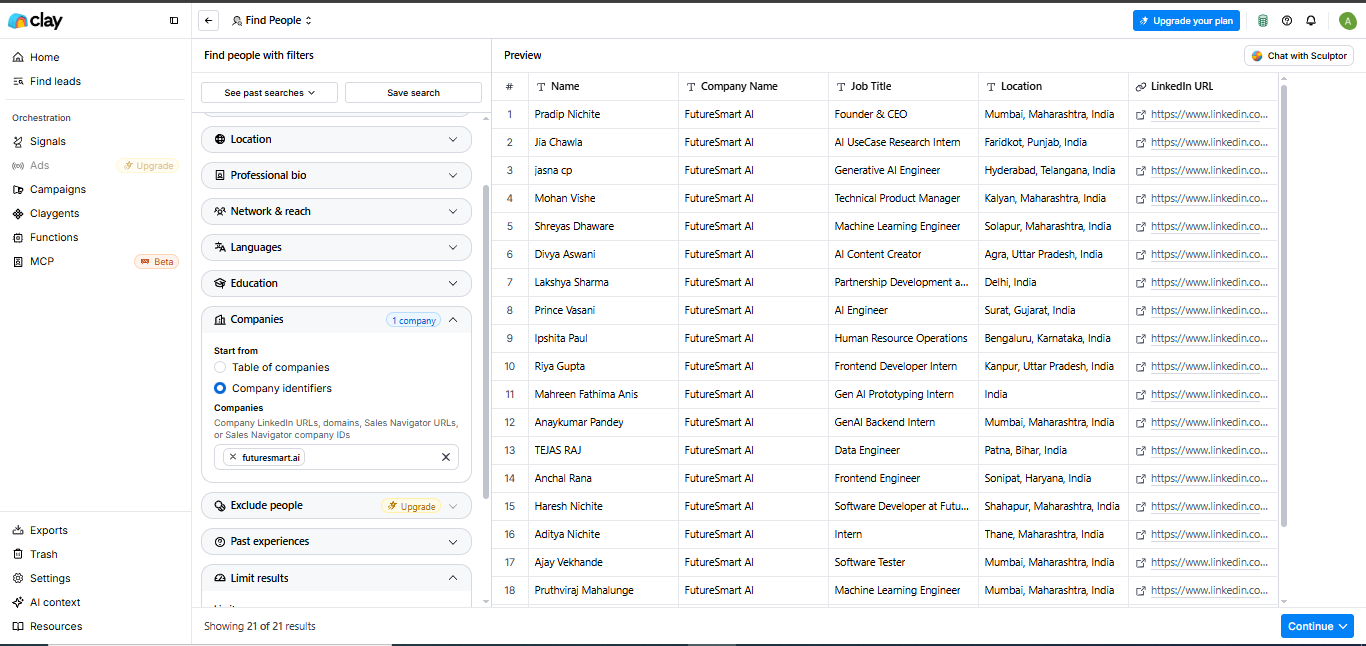
Clay returned a sizable list of FutureSmart AI employees spanning roles such as Founder & CEO, AI research intern, generative AI engineer, product manager, machine learning engineer, AI content creator, partnership development, HR operations, frontend development, and data engineering. The researcher noted that many of the surfaced individuals aligned with current company information, but external validation still showed some gaps in coverage.
Natural-language prospect search to structured filtersClay's AI assistant reduced setup time by translating prompts into filters, but the generated results still needed review and refinement.▾
Feature tested: Natural-language prospect search to structured filters
Result: Passed
Verdict: Clay's AI assistant reduced setup time by translating prompts into filters, but the generated results still needed review and refinement.
Expected behavior: Tested whether Clay's AI assistant could convert natural-language prospecting requests into actionable company-search workflows for outreach.
Test case: Text prompt → Image
Input type: Text prompt
Input used: Input artifact (Text prompt): Input
Observed output: Output artifact (Image): Clay generated a structured company search from the natural-language request, adding filters such as software development, private held companies, small company — clay-clay-find-companies-ai-startups-customer-support.png
Input artifact: Input artifact (Text prompt): Input
Output artifact: Output artifact (Image): Clay generated a structured company search from the natural-language request, adding filters such as software development, private held companies, small company — clay-clay-find-companies-ai-startups-customer-support.png
What changed: Text prompt transformed into Image
Test case: Text prompt → Image
Input type: Text prompt
Input used: Input artifact (Text prompt): Input
Observed output: Output artifact (Image): For an AI video-editing request, Clay again created a structured search with AI/video-related keywords and prepared a preview workflow. The setup showed that th — clay-clay-find-companies-ai-video-editing-tools.png
Input artifact: Input artifact (Text prompt): Input
Output artifact: Output artifact (Image): For an AI video-editing request, Clay again created a structured search with AI/video-related keywords and prepared a preview workflow. The setup showed that th — clay-clay-find-companies-ai-video-editing-tools.png
What changed: Text prompt transformed into Image
Why it matters / Conclusion: The assistant is useful for turning a prompt into a draft search, but it does not remove the need to audit the resulting filters and company list.
Tested whether Clay's AI assistant could convert natural-language prospecting requests into actionable company-search workflows for outreach.
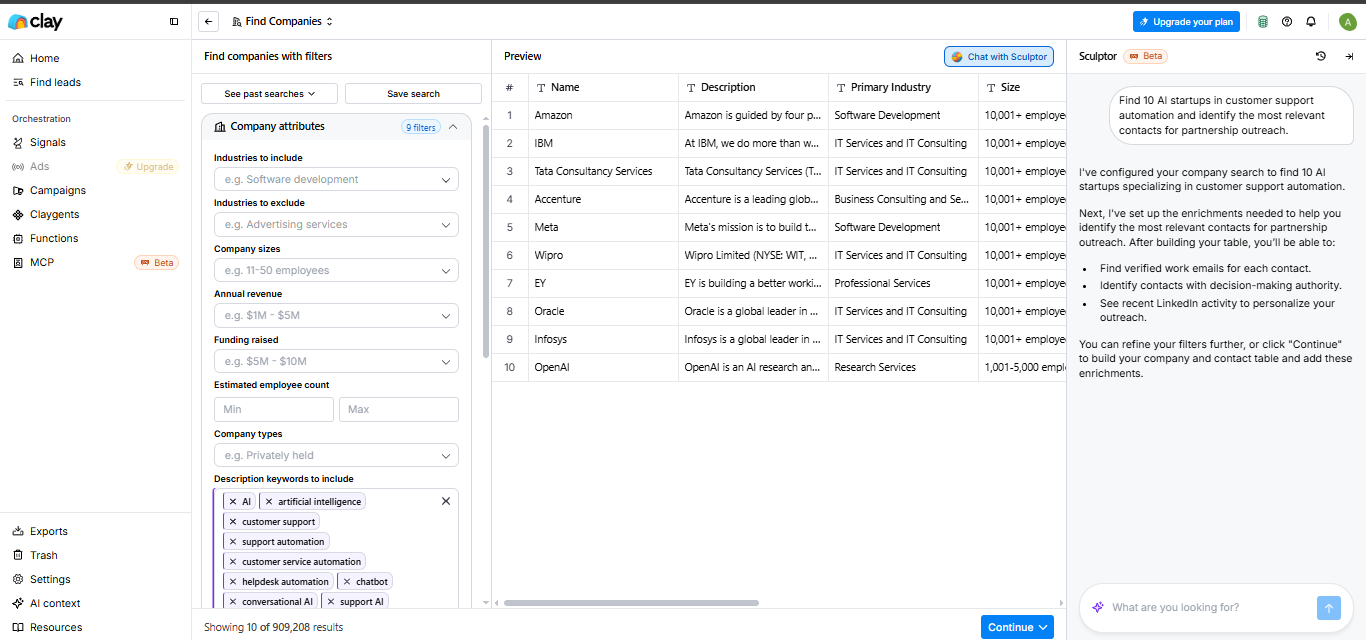
Clay generated a structured company search from the natural-language request, adding filters such as software development, private held companies, small company-size and funding constraints, and keywords including AI, customer support, support automation, chatbot, and conversational AI. The preview still surfaced large names like IBM, Amazon, Accenture, Meta, Oracle, Infosys, and OpenAI despite the '10 AI startups' framing, which shows that the assistant can broaden beyond the original intent if the generated filters are not carefully checked.
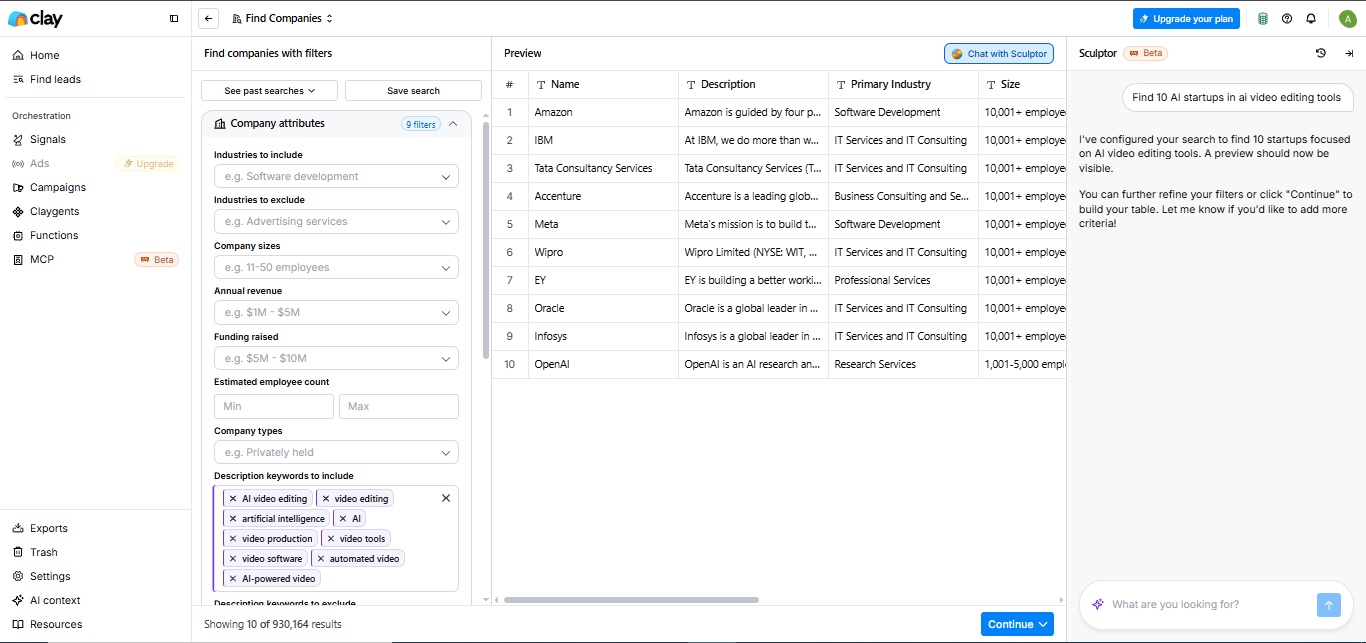
For an AI video-editing request, Clay again created a structured search with AI/video-related keywords and prepared a preview workflow. The setup showed that the assistant can translate vague market requests into editable filters quickly, but the user still needs to inspect whether those filters actually match the target segment.
LinkedIn-side prospecting via Chrome extensionThis workflow failed in testing because the Clay extension was not available on LinkedIn profile pages.▾
Feature tested: LinkedIn-side prospecting via Chrome extension
Result: Passed
Verdict: This workflow failed in testing because the Clay extension was not available on LinkedIn profile pages.
Expected behavior: Tested whether the Chrome extension could reduce manual effort by surfacing Clay data while browsing a prospect's LinkedIn profile.
Test case: Text prompt → Image
Input type: Text prompt
Input used: Input artifact (Text prompt): Input
Observed output: Output artifact (Image): On the LinkedIn profile for Tytus Gołas, Clay's sidebar explicitly stated that 'The Clay Chrome extension is not available on LinkedIn.' That means the extensio — clay-linkedin-profile-clay-extension-warning.png
Input artifact: Input artifact (Text prompt): Input
Output artifact: Output artifact (Image): On the LinkedIn profile for Tytus Gołas, Clay's sidebar explicitly stated that 'The Clay Chrome extension is not available on LinkedIn.' That means the extensio — clay-linkedin-profile-clay-extension-warning.png
What changed: Text prompt transformed into Image
Why it matters / Conclusion: If your workflow depends on enriching people directly from LinkedIn, Clay's extension was a clear limitation in this evaluation.
Tested whether the Chrome extension could reduce manual effort by surfacing Clay data while browsing a prospect's LinkedIn profile.
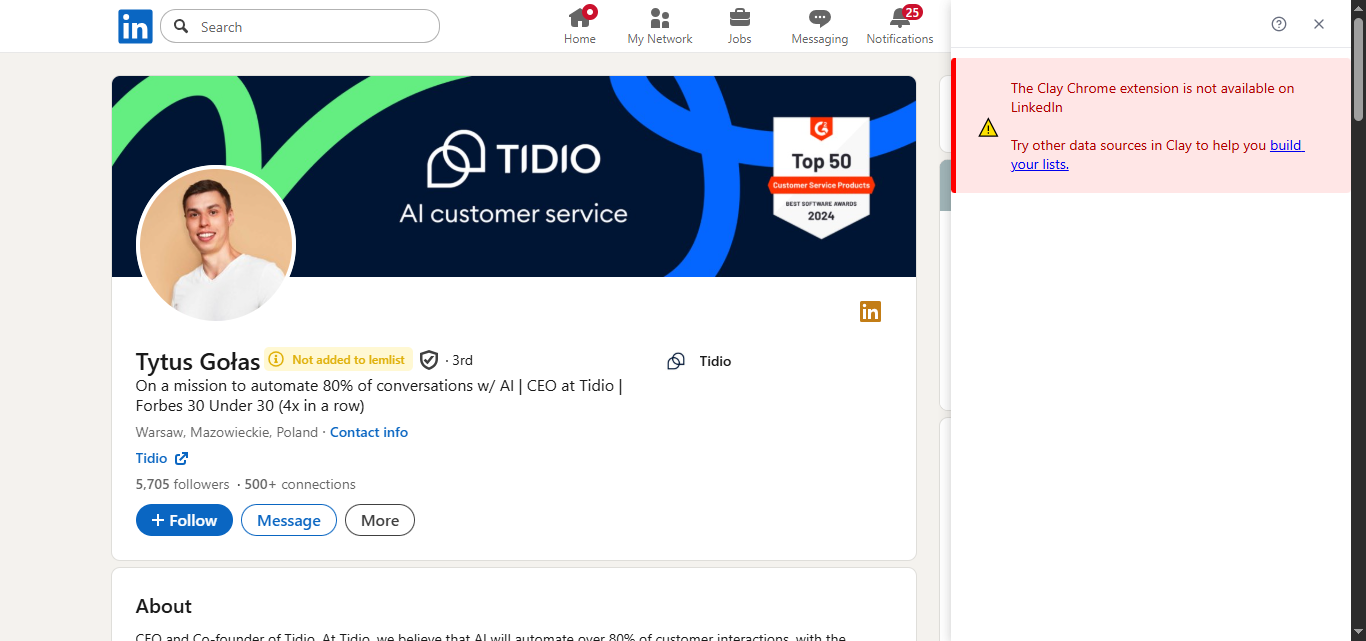
On the LinkedIn profile for Tytus Gołas, Clay's sidebar explicitly stated that 'The Clay Chrome extension is not available on LinkedIn.' That means the extension could not be used for direct prospect research or enrichment inside LinkedIn during this test.
Website-side extraction via Chrome extensionThe extension could detect page data, but it did not return the company and contact insights needed for outreach research.▾
Feature tested: Website-side extraction via Chrome extension
Result: Passed
Verdict: The extension could detect page data, but it did not return the company and contact insights needed for outreach research.
Expected behavior: Tested the Chrome extension on a company website to see whether it could extract useful prospecting data while browsing.
Test case: Text prompt → Image
Input type: Text prompt
Input used: Input artifact (Text prompt): Input
Observed output: Output artifact (Image): On the Marblism homepage, Clay's extension identified an autodetected list of six items and offered to export or add the data to a workspace. In this test, it d — clay-marblism-homepage-clay-autodetected-list.png
Input artifact: Input artifact (Text prompt): Input
Output artifact: Output artifact (Image): On the Marblism homepage, Clay's extension identified an autodetected list of six items and offered to export or add the data to a workspace. In this test, it d — clay-marblism-homepage-clay-autodetected-list.png
What changed: Text prompt transformed into Image
Why it matters / Conclusion: Clay's extension can recognize webpage structure, but that did not translate into meaningful prospect or contact discovery in this test.
Tested the Chrome extension on a company website to see whether it could extract useful prospecting data while browsing.
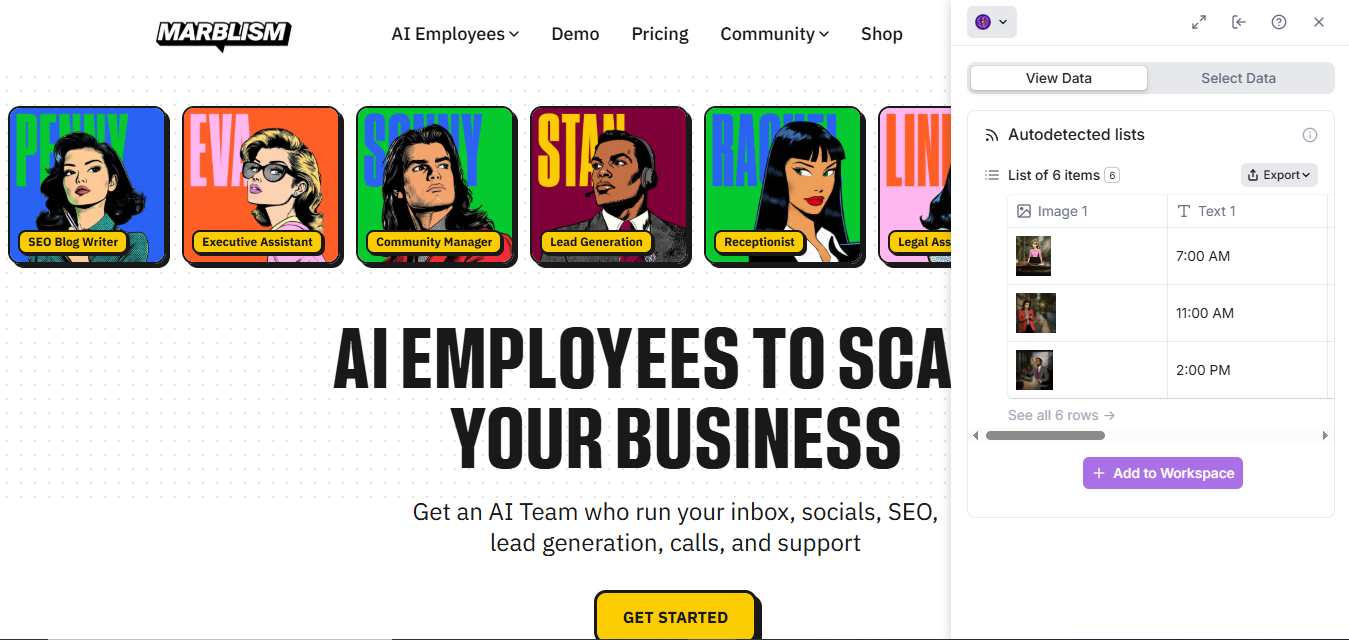
On the Marblism homepage, Clay's extension identified an autodetected list of six items and offered to export or add the data to a workspace. In this test, it did not surface company details, employee records, or contact information, so the extension added only limited research value for outreach preparation.
API and automation readinessClay supports automation, but not through a traditional public prospecting API.▾
Feature tested: API and automation readiness
Result: Passed
Verdict: Clay supports automation, but not through a traditional public prospecting API.
Expected behavior: Investigated how well Clay fits internal automation use cases that need programmatic access for prospect discovery, enrichment, and data handoff.
Test case: Text prompt → Image
Input type: Text prompt
Input used: Input artifact (Text prompt): Input
Observed output: Output artifact (Image): Clay Support stated that Clay does not have a traditional API users can query directly. Instead, it supports sending data into tables through webhooks, pushing — clay-clay-support-api-integration-chat.png
Input artifact: Input artifact (Text prompt): Input
Output artifact: Output artifact (Image): Clay Support stated that Clay does not have a traditional API users can query directly. Instead, it supports sending data into tables through webhooks, pushing — clay-clay-support-api-integration-chat.png
What changed: Text prompt transformed into Image
Why it matters / Conclusion: Clay is better suited to orchestrated workflows and table-based automation than to direct API-first prospect search and enrichment.
Investigated how well Clay fits internal automation use cases that need programmatic access for prospect discovery, enrichment, and data handoff.
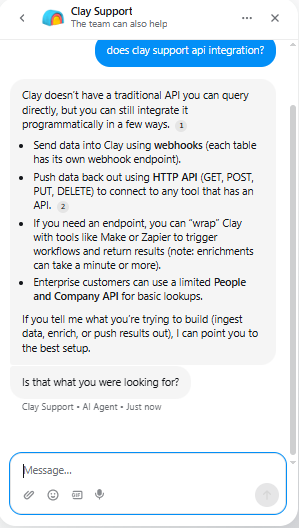
Clay Support stated that Clay does not have a traditional API users can query directly. Instead, it supports sending data into tables through webhooks, pushing data out through HTTP API actions, and wrapping workflows with tools like Make or Zapier; the same reply also noted that enrichments can take a minute or more, and that only enterprise customers get a limited People and Company API for basic lookups.
AI-generated outreach emails inside the workflowClay produced personalized outreach drafts with visible reasoning fields and could run them across a table of leads.▾
Feature tested: AI-generated outreach emails inside the workflow
Result: Passed
Verdict: Clay produced personalized outreach drafts with visible reasoning fields and could run them across a table of leads.
Expected behavior: Tested Clay's email-generation workflow using company and prospect context, then reviewed both the agent setup and generated outputs for personalization depth.
Test case: Text prompt → Image
Input type: Text prompt
Input used: Input artifact (Text prompt): Input
Observed output: Output artifact (Image): Clay's Email Outreach Writer showed a full agent prompt with context, objective, and instructions, and the test pane generated an email draft for Daniel Kim. Th — clay-clay-email-outreach-writer-sculptor.png
Input artifact: Input artifact (Text prompt): Input
Output artifact: Output artifact (Image): Clay's Email Outreach Writer showed a full agent prompt with context, objective, and instructions, and the test pane generated an email draft for Daniel Kim. Th — clay-clay-email-outreach-writer-sculptor.png
What changed: Text prompt transformed into Image
Test case: Text prompt → Image
Input type: Text prompt
Input used: Input artifact (Text prompt): Input
Observed output: Output artifact (Image): In the Marketing Leads AI Voice table, Clay showed auto-run progress and generated output fields such as Email Body, Reasoning, Confidence, Steps Taken, and Sub — clay-clay-marketing-leads-ai-voice-table.png
Input artifact: Input artifact (Text prompt): Input
Output artifact: Output artifact (Image): In the Marketing Leads AI Voice table, Clay showed auto-run progress and generated output fields such as Email Body, Reasoning, Confidence, Steps Taken, and Sub — clay-clay-marketing-leads-ai-voice-table.png
What changed: Text prompt transformed into Image
Test case: Text prompt → Image
Input type: Text prompt
Input used: Input artifact (Text prompt): Input
Observed output: Output artifact (Image): For Shreyas Dhaware, Clay generated a draft that referenced FutureSmart AI's work around multi-agent architectures, LangGraph RAG agents, and AI knowledge graph — clay-clay-marketing-leads-ai-voice-cell-details.png
Input artifact: Input artifact (Text prompt): Input
Output artifact: Output artifact (Image): For Shreyas Dhaware, Clay generated a draft that referenced FutureSmart AI's work around multi-agent architectures, LangGraph RAG agents, and AI knowledge graph — clay-clay-marketing-leads-ai-voice-cell-details.png
What changed: Text prompt transformed into Image
Why it matters / Conclusion: Clay can create materially personalized outreach drafts inside the same prospecting workflow, but the outputs still warrant human review before sending.
Tested Clay's email-generation workflow using company and prospect context, then reviewed both the agent setup and generated outputs for personalization depth.
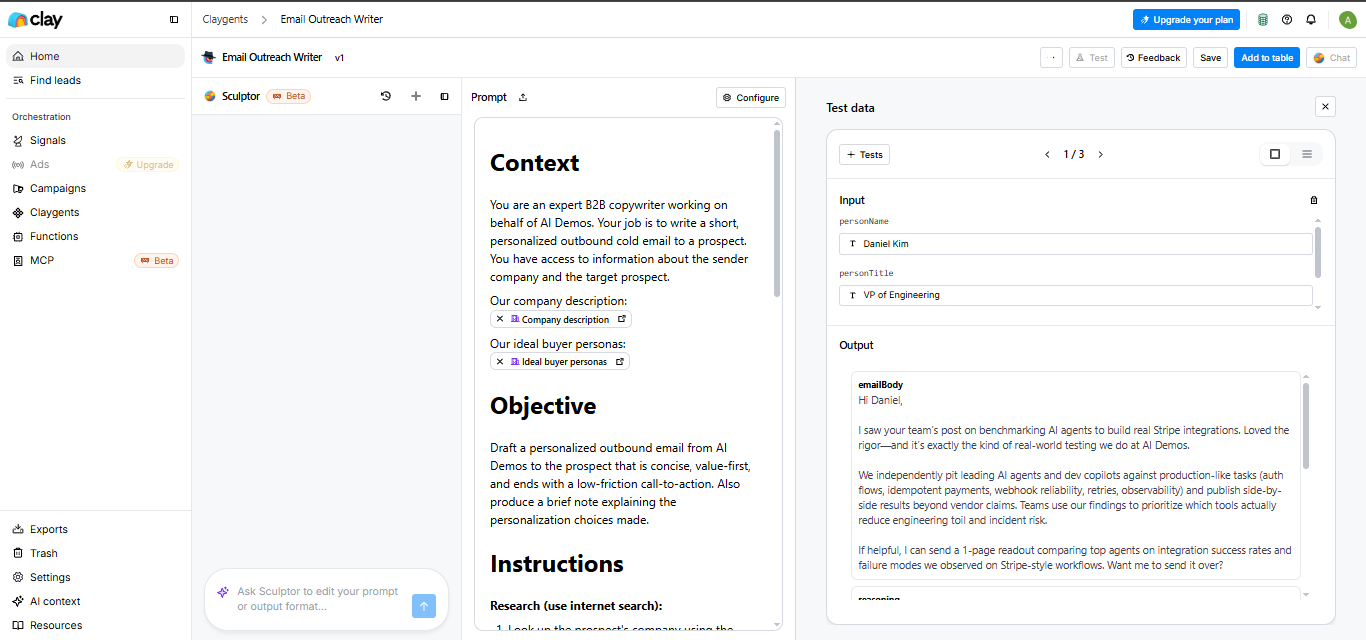
Clay's Email Outreach Writer showed a full agent prompt with context, objective, and instructions, and the test pane generated an email draft for Daniel Kim. This demonstrated that Clay can use structured prospect inputs to generate outreach copy directly inside a Claygent rather than forcing the user into a separate copy tool.
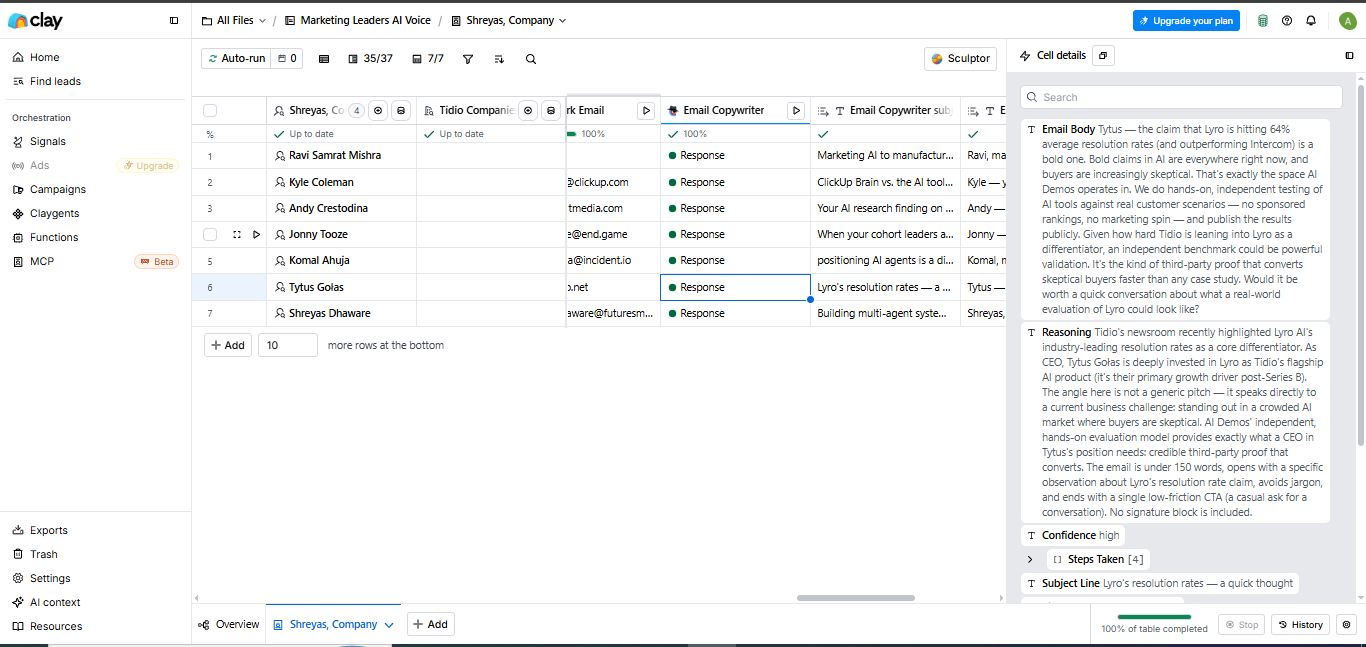
In the Marketing Leads AI Voice table, Clay showed auto-run progress and generated output fields such as Email Body, Reasoning, Confidence, Steps Taken, and Subject Line for lead rows. The visible cell details showed that email generation can be operationalized at table level rather than only as a one-off prompt.
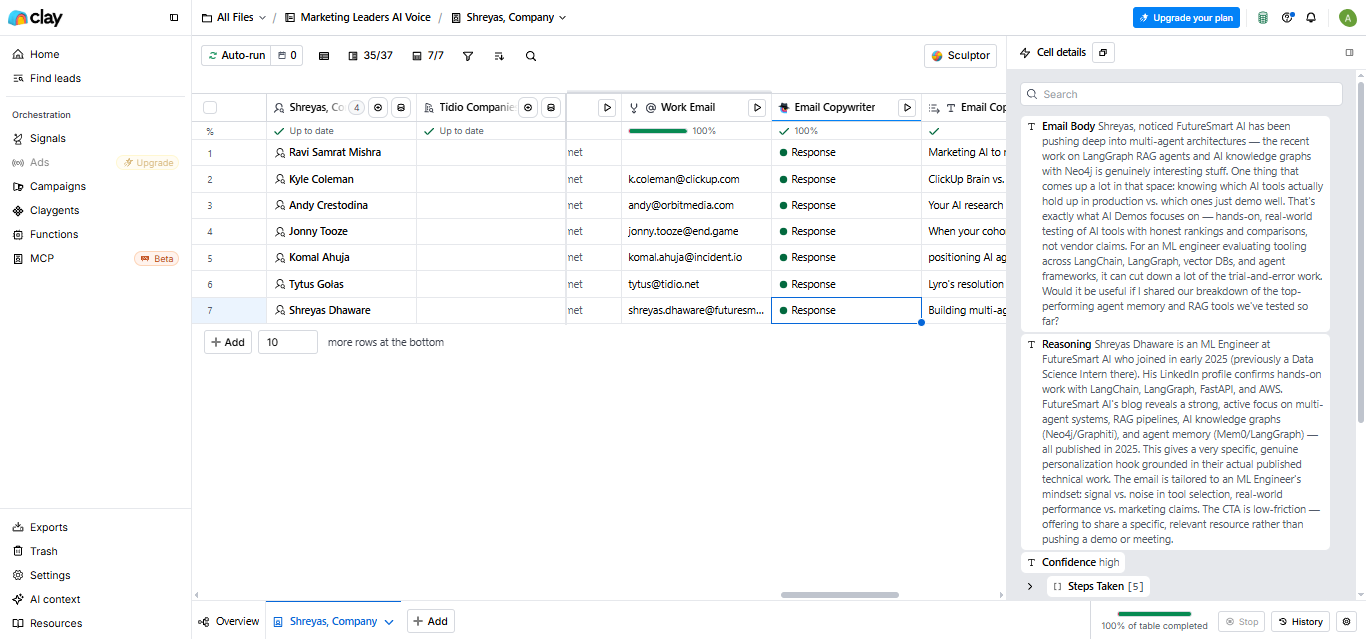
For Shreyas Dhaware, Clay generated a draft that referenced FutureSmart AI's work around multi-agent architectures, LangGraph RAG agents, and AI knowledge graphs. The same output included a high-confidence label and a multi-step reasoning trace, which indicates that Clay's personalization is based on research-like context rather than completely generic cold-email boilerplate.
Pricing seen during testing
The plan selection screen showed three tiers with monthly pricing and credit/action limits.
Pricing was taken from the visible plan-selection screen only.
Is This Right For You?
A side-by-side guide based on our hands-on testing.
Featured in Rankings
Independent rankings where Clay was tested and rated.
Banner Preview
How the embed badge will look on your site

Embed HTML
Copy this code to your website source
Quick Integration Guide
- 1Copy the HTML code block above.
- 2Paste it into your site's HTML or CMS editor.
- 3Banner appears instantly on your page.
- 4Links back to your tool profile here.
Similar Tools
Discover more AI tools like Clay to enhance your workflow.
Comments (0)
Need a custom AI solution for this use case?
If you are looking to build a custom lead enrichment, prospect research, or AI outreach workflow for your business or internal workflow, email us at contact@futuresmart.ai.
Found something inaccurate or missing? We try to keep our AI research accurate and useful. If you found outdated information, an issue, or have a suggestion, email us at collaborate@aidemos.com.