
Captions
Best for short vertical talking-head edits, but unreliable on longer landscape clips.
Strong in its sweet spot, weak outside it
- You create short vertical talking-head videos and want a fast AI first pass
- You want captions, b-roll, and style treatments in one browser tool
- You are okay cleaning up caption placement or b-roll mismatches after the auto-edit
- You need consistent results on longer landscape screen-recording footage
Feature scores on this page: 9.4/10 (5 scored features)
Our take
Captions works well when the input matches its sweet spot: a short, single-speaker vertical talking-head clip. In that lane it can trim dead air, add captions, insert some B-roll, and apply stylized title treatments quickly. But on longer landscape screen-recording footage it barely edits at all, captions can land on the face or keep filler words, b-roll can miss or render garbled, and background music still requires manual work.
In-Depth Review
Our detailed analysis of Captions — features, performance, and real-world testing.
Feature-by-Feature Breakdown
Automated One-Pass Video EditingStrong on the ideal input, but it under-delivers badly outside Captions' sweet spot.▾
Feature tested: Automated One-Pass Video Editing
Result: Partial
Verdict: Strong on the ideal input, but it under-delivers badly outside Captions' sweet spot.
Expected behavior: Takes a source clip and produces a finished AI edit in one pass, trimming dead air and assembling the edit with captions, transitions, and sometimes B-roll. It was exercised on both a short vertical talking-head clip and a longer landscape screen-recording-style clip, with very different results.
Test case: Video file → Video file
Input type: Video file
Input used: Input artifact (Video file): INPUT — Input 1 - Talking Head with Dead Air (raw).mp4
Observed output: Output artifact (Video file): The raw talking-head clip was shortened from 61.3 seconds to 53.13 seconds, with captions, cutaways, and style-driven edits applied. — Output 1 - Captions Edited Result.mp4
Input artifact: Input artifact (Video file): INPUT — Input 1 - Talking Head with Dead Air (raw).mp4
Output artifact: Output artifact (Video file): The raw talking-head clip was shortened from 61.3 seconds to 53.13 seconds, with captions, cutaways, and style-driven edits applied. — Output 1 - Captions Edited Result.mp4
What changed: Video file transformed into Video file
Test case: Video file → Video file
Input type: Video file
Input used: Input artifact (Video file): Input — Input 2 - Low-Quality Audio & Lighting (raw).mp4
Observed output: Output artifact (Video file): The longer landscape screen-recording stayed effectively the same length at 6:40.22 in and 6:40.20 out, showing that the auto-edit pipeline barely changed this input. — Captions Output 2 - Low-Quality Audio & Lighting.mp4
Input artifact: Input artifact (Video file): Input — Input 2 - Low-Quality Audio & Lighting (raw).mp4
Output artifact: Output artifact (Video file): The longer landscape screen-recording stayed effectively the same length at 6:40.22 in and 6:40.20 out, showing that the auto-edit pipeline barely changed this input. — Captions Output 2 - Low-Quality Audio & Lighting.mp4
What changed: Video file transformed into Video file
Why it matters / Conclusion: Excellent when the clip matches Captions' sweet spot, but not dependable as a general-purpose auto-editor.
Takes a source clip and produces a finished AI edit in one pass, trimming dead air and assembling the edit with captions, transitions, and sometimes B-roll. It was exercised on both a short vertical talking-head clip and a longer landscape screen-recording-style clip, with very different results.
Automatic Caption Generation and StylingVisually flexible, but placement and overlay rendering are unreliable.9/10▾
Feature tested: Automatic Caption Generation and Styling
Result: Partial (9/10)
Verdict: Visually flexible, but placement and overlay rendering are unreliable.
Expected behavior: Transcribes speech into burned-in captions and applies styled text treatments, including Hook-style title looks, animation, emphasis, and timing synced to speech. The tested clips showed strong transcription, with some placement, overlay, and filler-word issues on harder inputs.
Test case: Video file → Video file
Input type: Video file
Input used: Input artifact (Video file): INPUT — Input 1 - Talking Head with Dead Air (raw).mp4
Observed output: Output artifact (Video file): The Hook style applies a stylized pink AI title treatment over the talking-head clip. — Output 1 - Captions Edited Result.mp4
Input artifact: Input artifact (Video file): INPUT — Input 1 - Talking Head with Dead Air (raw).mp4
Output artifact: Output artifact (Video file): The Hook style applies a stylized pink AI title treatment over the talking-head clip. — Output 1 - Captions Edited Result.mp4
What changed: Video file transformed into Video file
Test case: Video file → Image
Input type: Video file
Input used: Input artifact (Video file): INPUT — Input 1 - Talking Head with Dead Air (raw).mp4
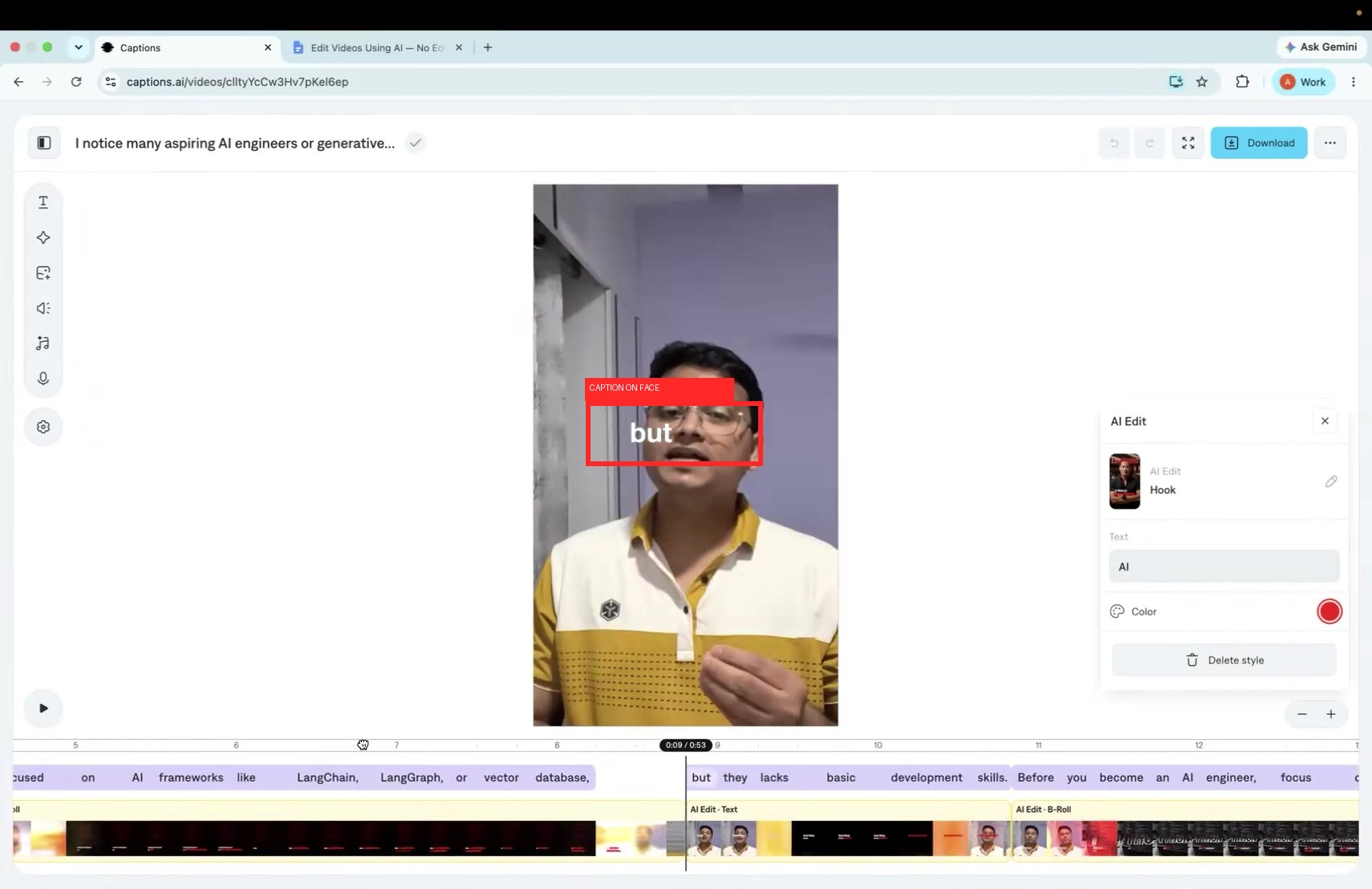
Observed output: Output artifact (Image): The caption word 'but' is placed directly across the speaker's mouth and chin instead of staying in a face-safe lower-third area. — Input1-Failure1-CaptionOnFace.jpg
Input artifact: Input artifact (Video file): INPUT — Input 1 - Talking Head with Dead Air (raw).mp4
Output artifact: Output artifact (Image): The caption word 'but' is placed directly across the speaker's mouth and chin instead of staying in a face-safe lower-third area. — Input1-Failure1-CaptionOnFace.jpg
What changed: Video file transformed into Image
Test case: Video file → Image
Input type: Video file
Input used: Input artifact (Video file): INPUT — Input 2 - Low-Quality Audio & Lighting (raw).mp4
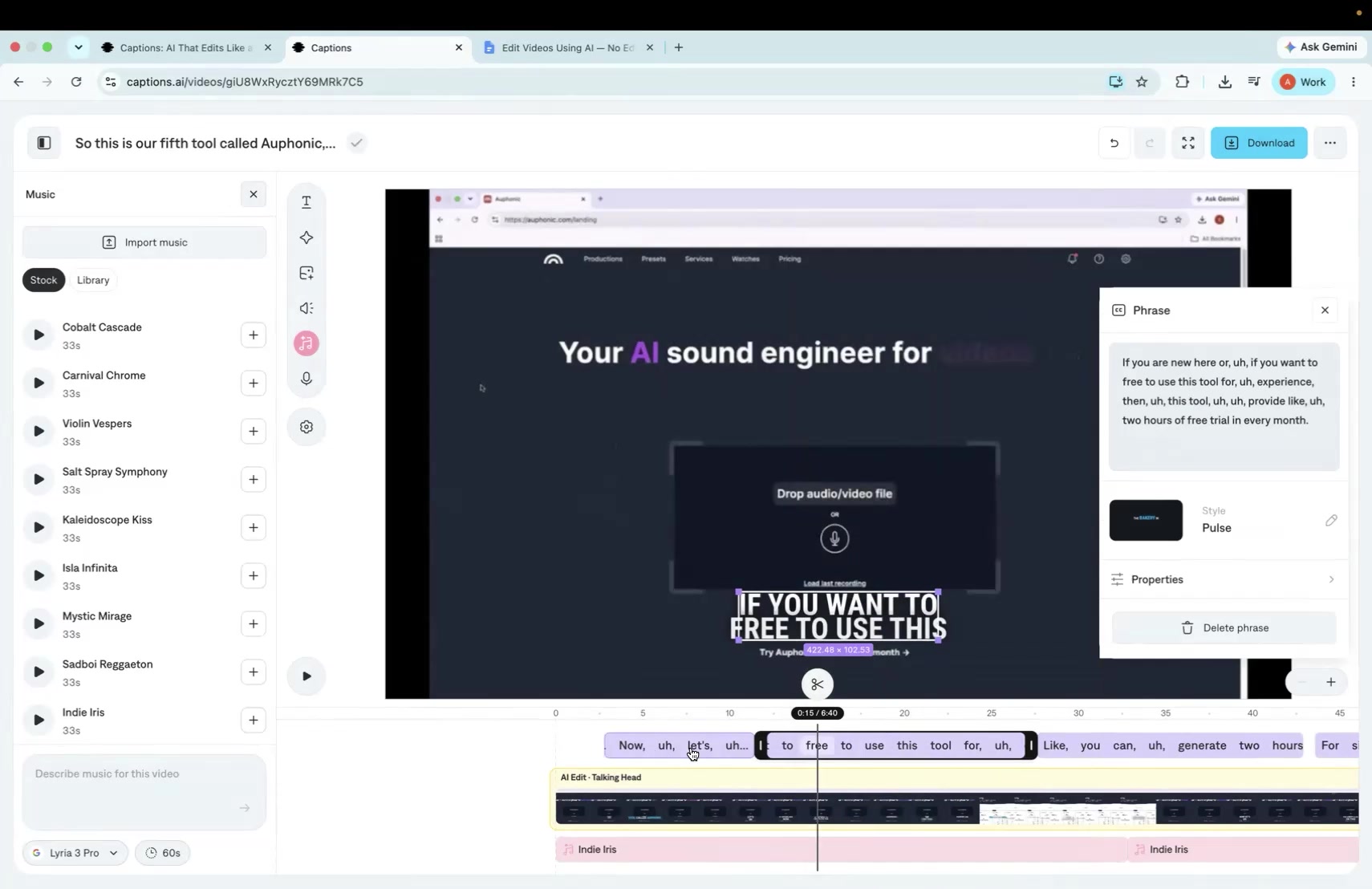
Observed output: Output artifact (Image): The caption text still includes filler words such as 'uh,' showing the transcript was not cleaned before captioning. — Failure - Input 2 Captions Literally Include Filler Words (uh).jpg
Input artifact: Input artifact (Video file): INPUT — Input 2 - Low-Quality Audio & Lighting (raw).mp4
Output artifact: Output artifact (Image): The caption text still includes filler words such as 'uh,' showing the transcript was not cleaned before captioning. — Failure - Input 2 Captions Literally Include Filler Words (uh).jpg
What changed: Video file transformed into Image
Test case: Video file → Video file
Input type: Video file
Input used: Input artifact (Video file): Input — Input 2 - Low-Quality Audio & Lighting (raw).mp4
Observed output: Output artifact (Video file): Captions were added, but filler words such as 'uh' still appeared in the caption text rather than being cleaned out before captioning. — Captions Output 2 - Low-Quality Audio & Lighting.mp4
Input artifact: Input artifact (Video file): Input — Input 2 - Low-Quality Audio & Lighting (raw).mp4
Output artifact: Output artifact (Video file): Captions were added, but filler words such as 'uh' still appeared in the caption text rather than being cleaned out before captioning. — Captions Output 2 - Low-Quality Audio & Lighting.mp4
What changed: Video file transformed into Video file
Test case: Video file → Video file
Input type: Video file
Input used: Input artifact (Video file): Input: Fast-paced dialogue — PXL_20251107_130225940~2 (1) (1).mp4
Observed output: Output artifact (Video file): Output: Accurate captions with dynamic animations, word highlighting, and clean placement — Captions AI - Made with Clipchamp (1)-1.mp4
Input artifact: Input artifact (Video file): Input: Fast-paced dialogue — PXL_20251107_130225940~2 (1) (1).mp4
Output artifact: Output artifact (Video file): Output: Accurate captions with dynamic animations, word highlighting, and clean placement — Captions AI - Made with Clipchamp (1)-1.mp4
What changed: Video file transformed into Video file
Why it matters / Conclusion: The styling options look strong, but caption placement and overlay behavior need cleanup before the output feels fully publish-ready.
Transcribes speech into burned-in captions and applies styled text treatments, including Hook-style title looks, animation, emphasis, and timing synced to speech. The tested clips showed strong transcription, with some placement, overlay, and filler-word issues on harder inputs.
Contextual B-Roll Insertion and SwappingUseful when it matches, but relevance and rendering quality are inconsistent.9.5/10▾
Feature tested: Contextual B-Roll Insertion and Swapping
Result: Partial (9.5/10)
Verdict: Useful when it matches, but relevance and rendering quality are inconsistent.
Expected behavior: Adds contextual B-roll to spoken lines and supports regenerating or swapping inserted clips after the initial edit. The tested outputs showed relevant moments but uneven match quality and occasional text-rendering problems.
Test case: Video file → Video file
Input type: Video file
Input used: Input artifact (Video file): INPUT — Input 1 - Talking Head with Dead Air (raw).mp4
Observed output: Output artifact (Video file): The edited talking-head result includes b-roll inserts alongside the main speaker footage. — Output 1 - Captions Edited Result.mp4
Input artifact: Input artifact (Video file): INPUT — Input 1 - Talking Head with Dead Air (raw).mp4
Output artifact: Output artifact (Video file): The edited talking-head result includes b-roll inserts alongside the main speaker footage. — Output 1 - Captions Edited Result.mp4
What changed: Video file transformed into Video file
Test case: Video file → Image
Input type: Video file
Input used: Input artifact (Video file): INPUT — Input 1 - Talking Head with Dead Air (raw).mp4
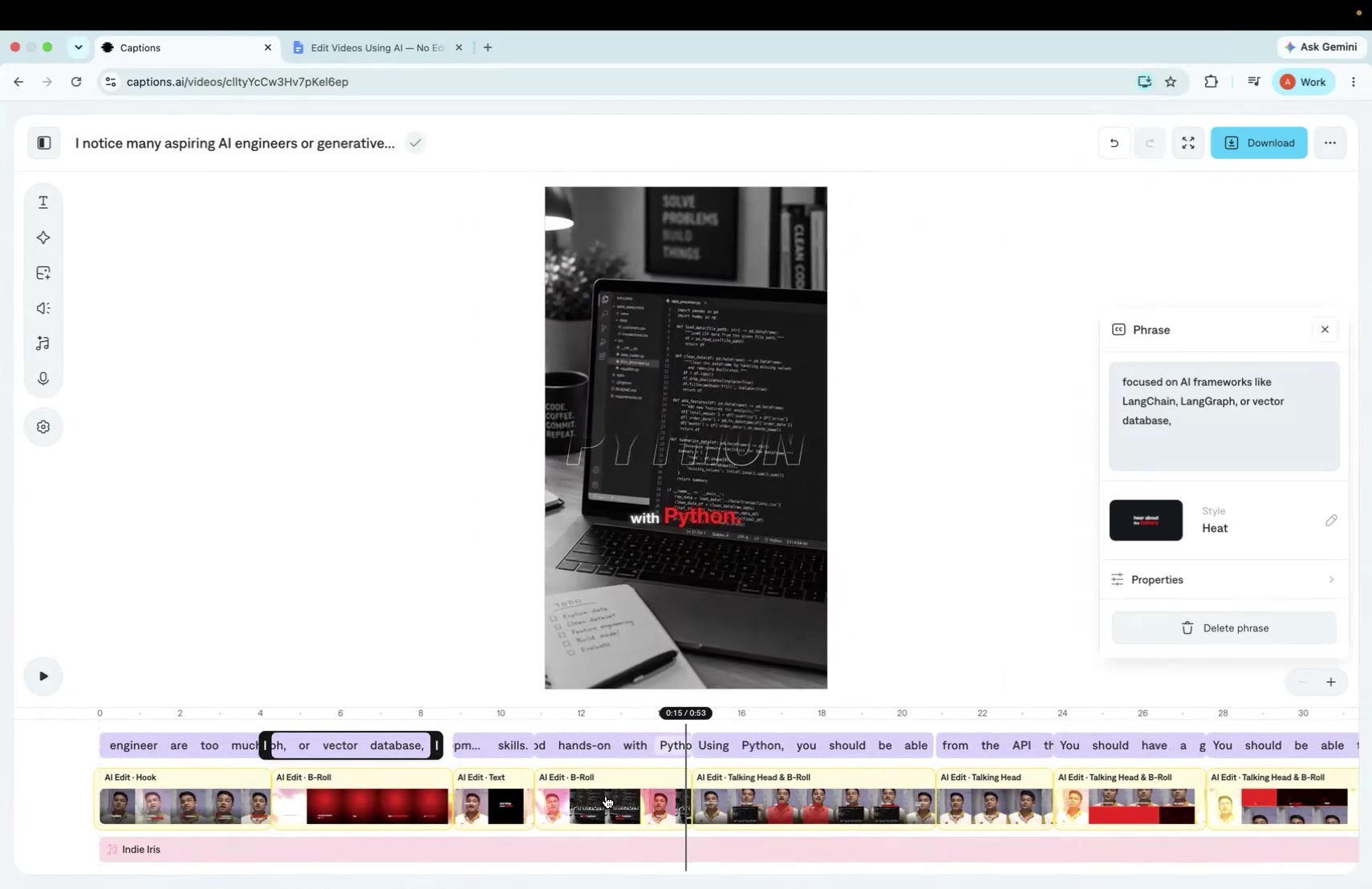
Observed output: Output artifact (Image): A code-and-laptop b-roll clip is used for a line about AI frameworks like LangChain and LangGraph, which is only loosely related. — Failure - B-Roll Mismatch (Python code shown for AI frameworks line).jpg
Input artifact: Input artifact (Video file): INPUT — Input 1 - Talking Head with Dead Air (raw).mp4
Output artifact: Output artifact (Image): A code-and-laptop b-roll clip is used for a line about AI frameworks like LangChain and LangGraph, which is only loosely related. — Failure - B-Roll Mismatch (Python code shown for AI frameworks line).jpg
What changed: Video file transformed into Image
Test case: Video file → Image
Input type: Video file
Input used: Input artifact (Video file): INPUT — Input 1 - Talking Head with Dead Air (raw).mp4
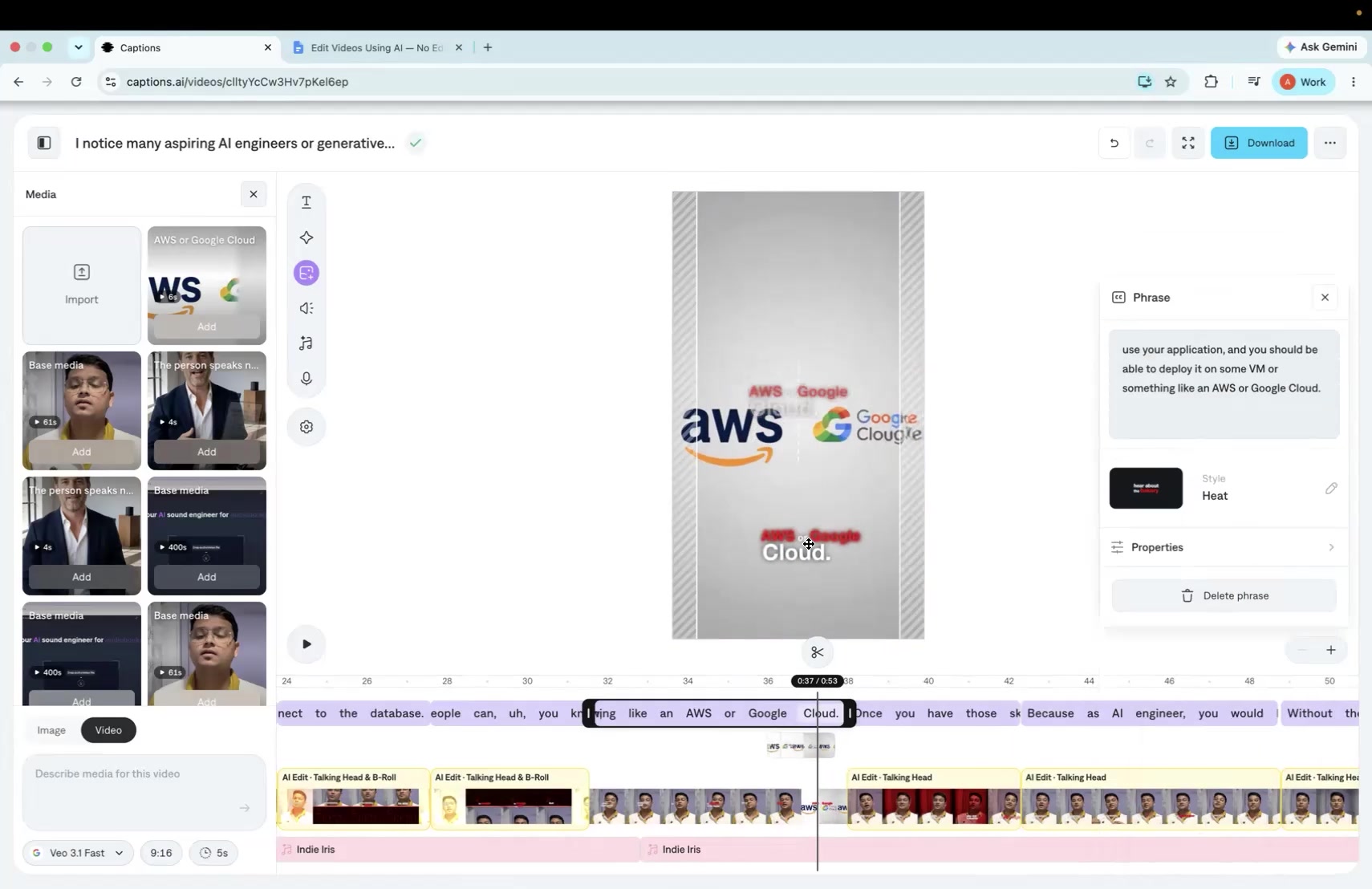
Observed output: Output artifact (Image): The AWS and Google Cloud text-based b-roll renders with overlapping, garbled text. — Failure - Garbled Overlapping AWS-Google Cloud Text.jpg
Input artifact: Input artifact (Video file): INPUT — Input 1 - Talking Head with Dead Air (raw).mp4
Output artifact: Output artifact (Image): The AWS and Google Cloud text-based b-roll renders with overlapping, garbled text. — Failure - Garbled Overlapping AWS-Google Cloud Text.jpg
What changed: Video file transformed into Image
Test case: Video file → Video file
Input type: Video file
Input used: Input artifact (Video file): Input — Input 2 - Low-Quality Audio & Lighting (raw).mp4
Observed output: Output artifact (Video file): No B-roll was generated on the longer landscape screen-recording input, so there was nothing to refine or replace. — Captions Output 2 - Low-Quality Audio & Lighting.mp4
Input artifact: Input artifact (Video file): Input — Input 2 - Low-Quality Audio & Lighting (raw).mp4
Output artifact: Output artifact (Video file): No B-roll was generated on the longer landscape screen-recording input, so there was nothing to refine or replace. — Captions Output 2 - Low-Quality Audio & Lighting.mp4
What changed: Video file transformed into Video file
Why it matters / Conclusion: B-roll is a real capability, but relevance and legibility are inconsistent, and the harder input did not get any obvious b-roll treatment.
Adds contextual B-roll to spoken lines and supports regenerating or swapping inserted clips after the initial edit. The tested outputs showed relevant moments but uneven match quality and occasional text-rendering problems.
Audio Denoising and CleanupNoise reduction works, but it can change the speaker's natural timbre.▾
Feature tested: Audio Denoising and Cleanup
Result: Partial
Verdict: Noise reduction works, but it can change the speaker's natural timbre.
Expected behavior: Applies denoising/cleanup to source audio to reduce background noise before or during editing. On the tested clips it reduced noise, but also shifted vocal tone and did not fully remove disfluencies or transcript clutter.
Test case: Video file → Video file
Input type: Video file
Input used: Input artifact (Video file): Input — Input 1 - Talking Head with Dead Air (raw).mp4
Observed output: Output artifact (Video file): Denoising reduced background noise on the talking-head clip, but the speaker's vocal tone/timbre shifted compared with the original recording. — Captions Output 1 - Talking Head with Dead Air.mp4
Input artifact: Input artifact (Video file): Input — Input 1 - Talking Head with Dead Air (raw).mp4
Output artifact: Output artifact (Video file): Denoising reduced background noise on the talking-head clip, but the speaker's vocal tone/timbre shifted compared with the original recording. — Captions Output 1 - Talking Head with Dead Air.mp4
What changed: Video file transformed into Video file
Test case: Video file → Video file
Input type: Video file
Input used: Input artifact (Video file): Input — Input 2 - Low-Quality Audio & Lighting (raw).mp4
Observed output: Output artifact (Video file): Some cleanup appears to have run, but the disfluent speech and filler-word problem remained untouched in the output. — Captions Output 2 - Low-Quality Audio & Lighting.mp4
Input artifact: Input artifact (Video file): Input — Input 2 - Low-Quality Audio & Lighting (raw).mp4
Output artifact: Output artifact (Video file): Some cleanup appears to have run, but the disfluent speech and filler-word problem remained untouched in the output. — Captions Output 2 - Low-Quality Audio & Lighting.mp4
What changed: Video file transformed into Video file
Why it matters / Conclusion: Denoise is present and useful, but it is not a clean fidelity win and it does not solve transcript clutter.
Applies denoising/cleanup to source audio to reduce background noise before or during editing. On the tested clips it reduced noise, but also shifted vocal tone and did not fully remove disfluencies or transcript clutter.
Chat-Based Edit RefinementReal refinement exists, but music is still manual.▾
Feature tested: Chat-Based Edit Refinement
Result: Partial
Verdict: Real refinement exists, but music is still manual.
Expected behavior: Provides a natural-language co-editor for post-edit tweaks such as adjusting caption style, regenerating B-roll, or making other targeted changes after the initial AI edit. The tested workflow supported interactive refinement, though some actions still required separate manual panels.
Test case: Text prompt → Text prompt
Input type: Text prompt
Input used: Input artifact (Text prompt): INPUT
Observed output: Output artifact (Text prompt): OUTPUT
Input artifact: Input artifact (Text prompt): INPUT
Output artifact: Output artifact (Text prompt): OUTPUT
What changed: Text prompt transformed into Text prompt
Test case: Text prompt → Text prompt
Input type: Text prompt
Input used: Input artifact (Text prompt): INPUT
Observed output: Output artifact (Text prompt): OUTPUT
Input artifact: Input artifact (Text prompt): INPUT
Output artifact: Output artifact (Text prompt): OUTPUT
What changed: Text prompt transformed into Text prompt
Why it matters / Conclusion: The co-editor is useful for real tweaks, but it does not remove the manual music chore.
Provides a natural-language co-editor for post-edit tweaks such as adjusting caption style, regenerating B-roll, or making other targeted changes after the initial AI edit. The tested workflow supported interactive refinement, though some actions still required separate manual panels.
Speaker Detection and Caption SyncHigh9.7/10▾
Feature tested: Speaker Detection and Caption Sync
Result: Passed (9.7/10)
Verdict: High
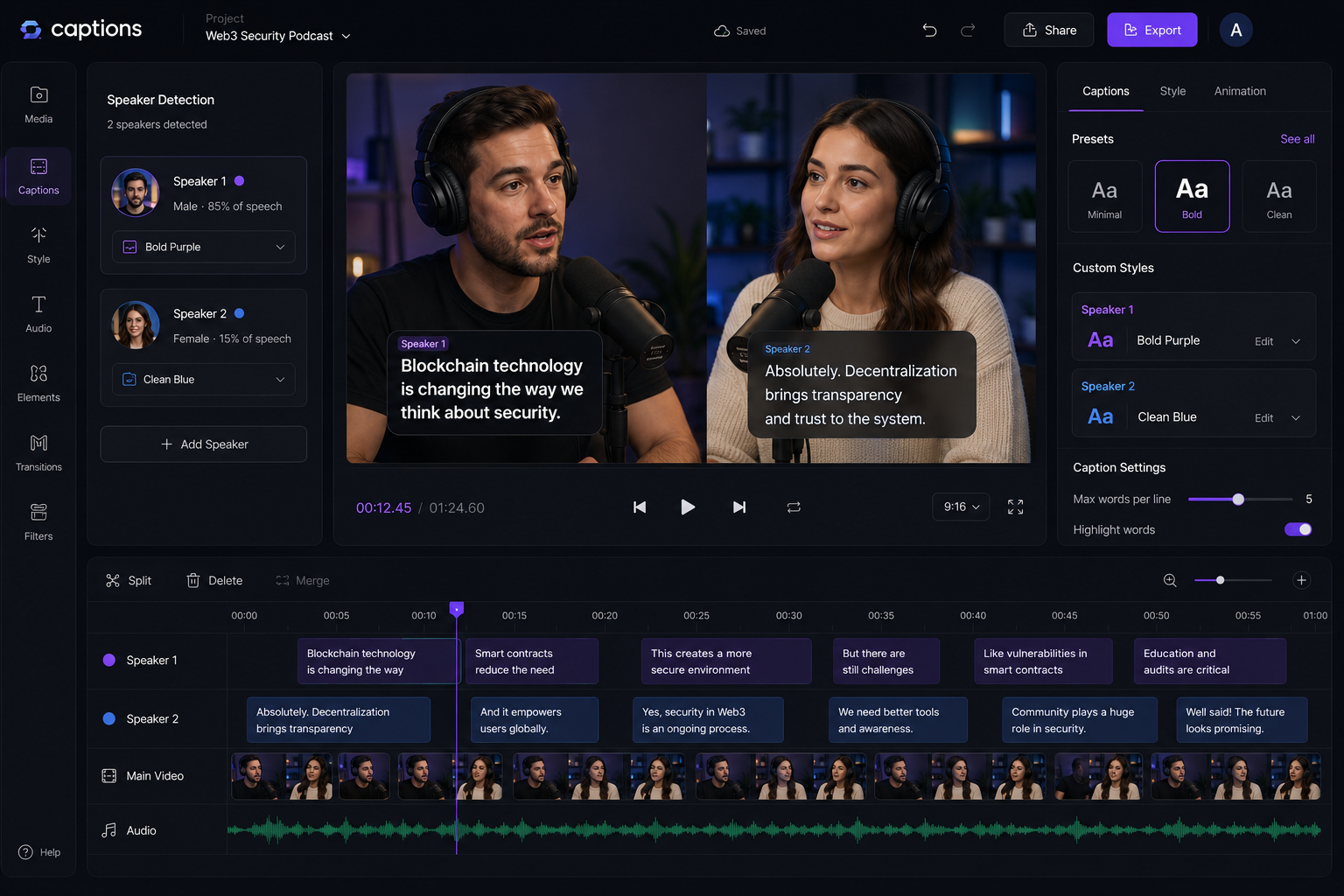
Expected behavior: Identifies different speakers and adjusts captions accordingly. The tested behavior was reported as highly reliable for multi-speaker content and interviews.
Test case: Text prompt → Image
Input type: Text prompt
Input used: Input artifact (Text prompt): Input: Two-person discussion
Observed output: Output artifact (Image): Output: Speaker-specific caption styling with proper timing and placement — ChatGPT Image May 6, 2026, 04_52_14 PM.png
Input artifact: Input artifact (Text prompt): Input: Two-person discussion
Output artifact: Output artifact (Image): Output: Speaker-specific caption styling with proper timing and placement — ChatGPT Image May 6, 2026, 04_52_14 PM.png
What changed: Text prompt transformed into Image
Why it matters / Conclusion: Highly reliable for multi-speaker content and interviews.
Identifies different speakers and adjusts captions accordingly. The tested behavior was reported as highly reliable for multi-speaker content and interviews.
Transitions, Effects, and Sound DesignHigh9.5/10▾
Feature tested: Transitions, Effects, and Sound Design
Result: Passed (9.5/10)
Verdict: High
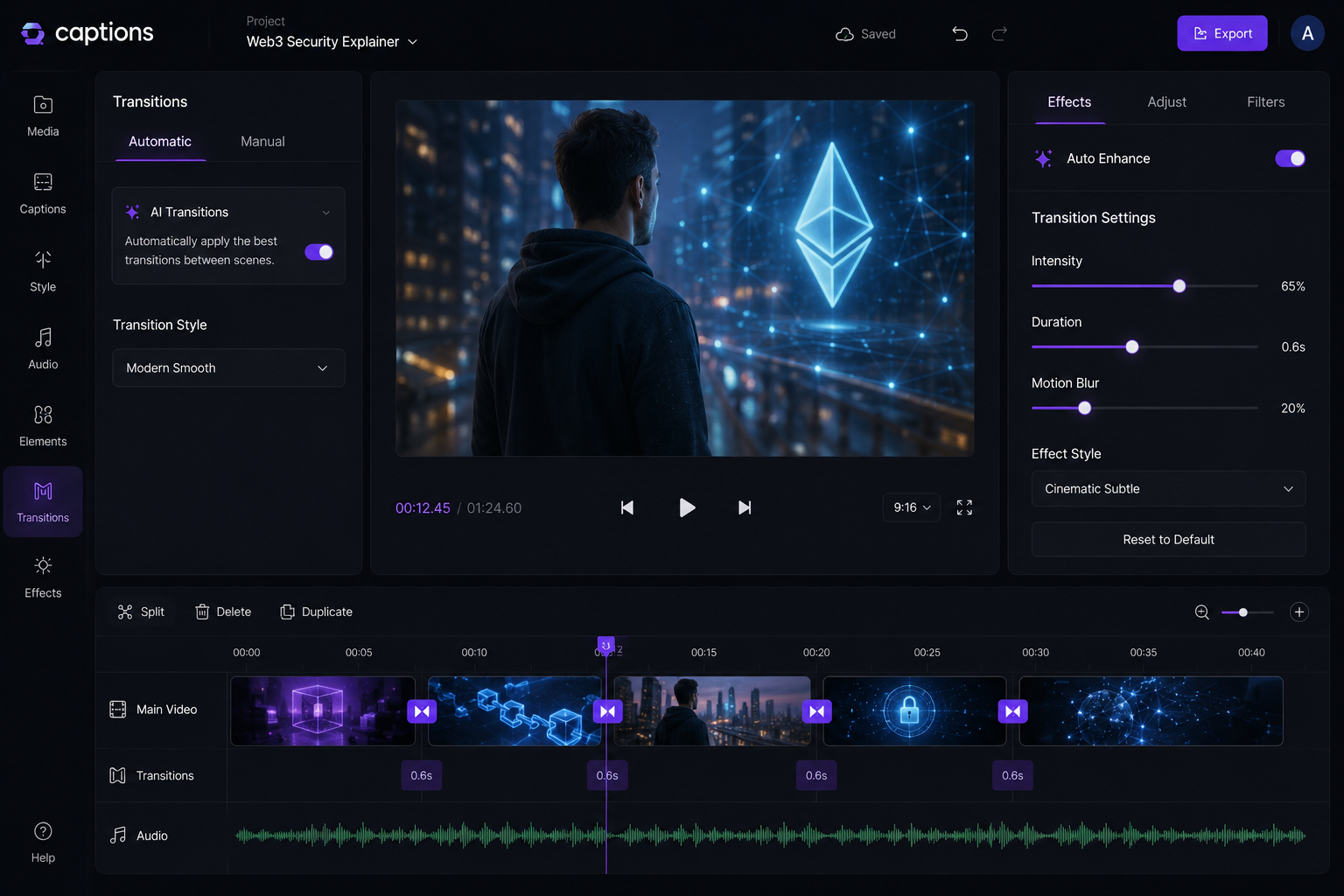
Expected behavior: Automatically adds transitions, motion effects, and synchronized sound effects to the edit. The tested behavior was framed as engagement-boosting, with a note that calmer content may need tuning.
Test case: Text prompt → Image
Input type: Text prompt
Input used: Input artifact (Text prompt): Input: Short-form reel with multiple scene cuts
Observed output: Output artifact (Image): Output: Smooth transitions with subtle sound effects enhancing scene changes — ChatGPT Image May 6, 2026, 04_54_37 PM.png
Input artifact: Input artifact (Text prompt): Input: Short-form reel with multiple scene cuts
Output artifact: Output artifact (Image): Output: Smooth transitions with subtle sound effects enhancing scene changes — ChatGPT Image May 6, 2026, 04_54_37 PM.png
What changed: Text prompt transformed into Image
Why it matters / Conclusion: Enhances engagement, though may need tuning for calmer content styles.
Automatically adds transitions, motion effects, and synchronized sound effects to the edit. The tested behavior was framed as engagement-boosting, with a note that calmer content may need tuning.
Layout and Scene CompositionHigh9.2/10▾
Feature tested: Layout and Scene Composition
Result: Passed (9.2/10)
Verdict: High
Expected behavior: Builds complete video layouts with consistent structure, overlays, and spacing. The described output was polished and aimed at social-media-ready presentation.
Test case: Text prompt → Image
Input type: Text prompt
Input used: Input artifact (Text prompt): Input: Raw unedited video
Observed output: Output artifact (Image): Output: Fully structured video with balanced composition and professional layout — ChatGPT Image May 6, 2026, 04_56_43 PM.png
Input artifact: Input artifact (Text prompt): Input: Raw unedited video
Output artifact: Output artifact (Image): Output: Fully structured video with balanced composition and professional layout — ChatGPT Image May 6, 2026, 04_56_43 PM.png
What changed: Text prompt transformed into Image
Why it matters / Conclusion: Strong, polished layouts ideal for social media-ready output.
Builds complete video layouts with consistent structure, overlays, and spacing. The described output was polished and aimed at social-media-ready presentation.

Verified during testing
The free tier exists, but the tested Max plan was the minimum tier that unlocked the full AI Edit and co-editor workflow.
Pricing was checked live during testing and can change.
Banner Preview
How the embed badge will look on your site

Embed HTML
Copy this code to your website source
Quick Integration Guide
- 1Copy the HTML code block above.
- 2Paste it into your site's HTML or CMS editor.
- 3Banner appears instantly on your page.
- 4Links back to your tool profile here.
Similar Tools
Discover more AI tools like Captions to enhance your workflow.
Comments (0)
Need a custom AI solution for this use case?
If you are looking to build a custom caption generation, subtitle creation, or social video editing workflow for your business or internal workflow, email us at contact@futuresmart.ai.
Found something inaccurate or missing? We try to keep our AI research accurate and useful. If you found outdated information, an issue, or have a suggestion, email us at collaborate@aidemos.com.