Antigravity IDE icon
video

Antigravity IDE

Antigravity Review: AI Animation Project Generator Tested (2026)

Visit Antigravity IDE
Animation PlatformAI Video GeneratorProgrammatic Animation AILast verified May 2026

Our take

We ran Antigravity through a complete workflow — prompt to MP4. What we found at each stage is documented below. Read the plan, watch the render, scan the code before deciding if this fits your workflow.

Antigravity Demo

In-Depth Review

Our detailed analysis of Antigravity IDE — features, performance, and real-world testing.

A
Admin
AI Demos Team
Verified Review

Feature-by-Feature Breakdown

Implementation Plan Review
Strong — adds transparency and reduces surprises
9/10
Test Summary
Feature tested: Implementation Plan Review
Result: Passed (9/10) — Strong — adds transparency and reduces surprises

Feature tested: Implementation Plan Review

Result: Passed (9/10)

Verdict: Strong — adds transparency and reduces surprises

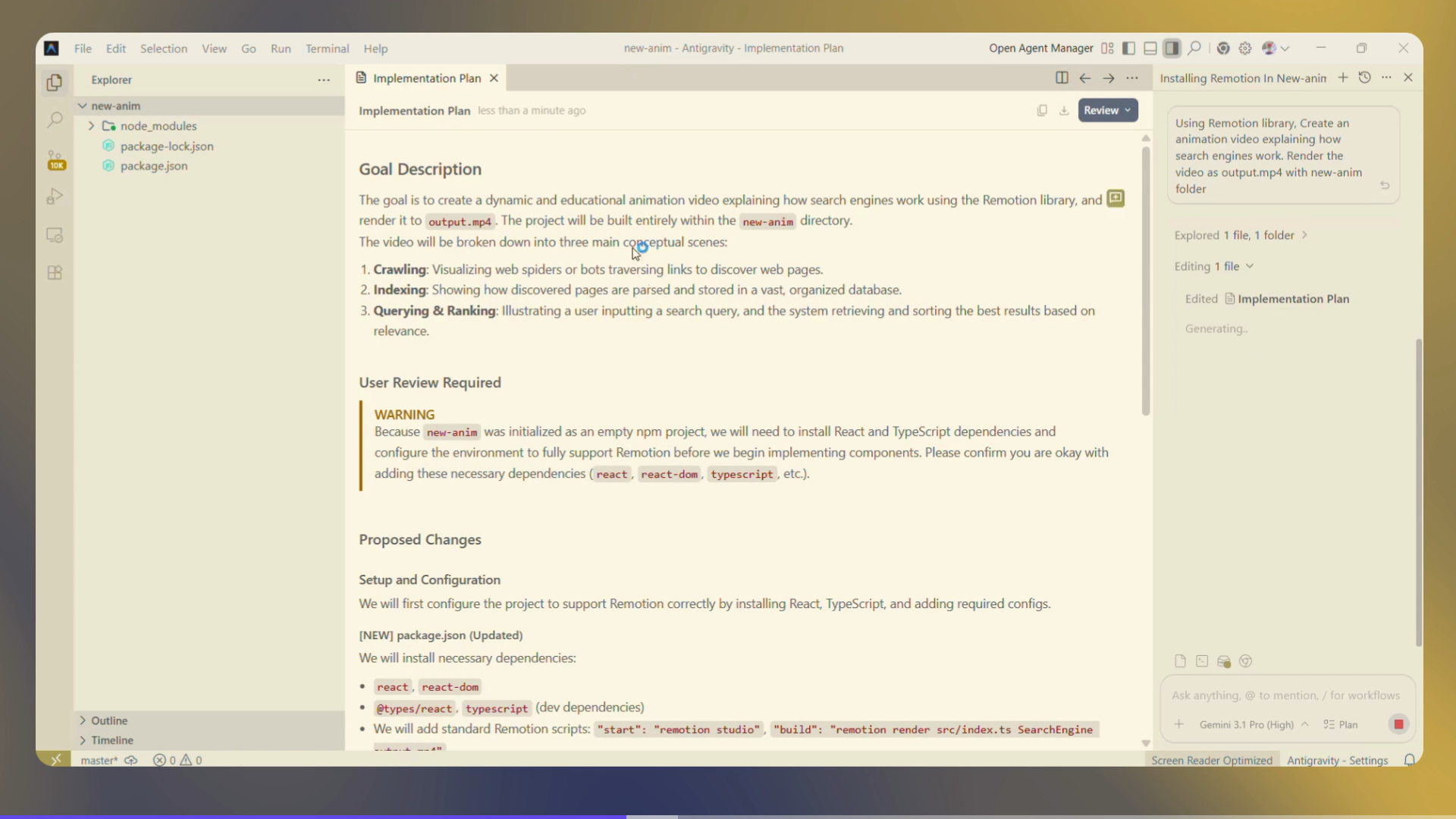
Expected behavior: Before generating code, Antigravity provides feature to plan the project by creating a structured implementation markdown for the animation sequence. Review and approve before execution.
Test case: Text prompt → Image

Input type: Text prompt

Input used: Input artifact (Text prompt): Search Engine Animation Prompt

Observed output: Output artifact (Image): Detailed implementation plan — antigravity-ide-antigravity-implementation-md-1.png

Input artifact: Input artifact (Text prompt): Search Engine Animation Prompt

Output artifact: Output artifact (Image): Detailed implementation plan — antigravity-ide-antigravity-implementation-md-1.png

What changed: Text prompt transformed into Image

Why it matters / Conclusion: We gave it a fairly vague search engine prompt — but as you look through the implementation document above, especially the goal description section, the way it naturally structured the stages without us explicitly defining them is worth noticing.

Before generating code, Antigravity provides feature to plan the project by creating a structured implementation markdown for the animation sequence. Review and approve before execution.

QUERY
Using Remotion library, Create an animation video explaining how search engines work. Render the video as output.mp4
SCREENSHOT
Output artifact for "Implementation Plan Review" test: Detailed implementation plan, antigravity-ide-antigravity-implementation-md-1.png

Detailed implementation plan

Bottom Line
We gave it a fairly vague search engine prompt — but as you look through the implementation document above, especially the goal description section, the way it naturally structured the stages without us explicitly defining them is worth noticing.
Automatic MP4 Rendering
Strong — renders without CLI commands, external tools, or render-pipeline debugging.
8/10
Test Summary
Feature tested: Automatic MP4 Rendering
Result: Passed (8/10) — Strong — renders without CLI commands, external tools, or render-pipeline debugging.

Feature tested: Automatic MP4 Rendering

Result: Passed (8/10)

Verdict: Strong — renders without CLI commands, external tools, or render-pipeline debugging.

Expected behavior: Antigravity automatically creates the full Remotion project and renders it to MP4 without requiring a manual render pipeline, through its agent.

Test case: Text prompt → Text prompt

Input type: Text prompt

Input used: Input artifact (Text prompt): Input

Observed output: Output artifact (Text prompt): Output

Input artifact: Input artifact (Text prompt): Input

Output artifact: Output artifact (Text prompt): Output

What changed: Text prompt transformed into Text prompt

Test case: Text prompt → Video file

Input type: Text prompt

Input used: Input artifact (Text prompt): Input

Observed output: Output artifact (Video file): Output — saas_animation_antigravity.mp4

Input artifact: Input artifact (Text prompt): Input

Output artifact: Output artifact (Video file): Output — saas_animation_antigravity.mp4

What changed: Text prompt transformed into Video file

Test case: Text prompt → Video file

Input type: Text prompt

Input used: Input artifact (Text prompt): Input

Observed output: Output artifact (Video file): Output — historical_animation_antigravity.mp4

Input artifact: Input artifact (Text prompt): Input

Output artifact: Output artifact (Video file): Output — historical_animation_antigravity.mp4

What changed: Text prompt transformed into Video file

Why it matters / Conclusion: All three outputs rendered smoothly — but as you’ll see around 0:10 in the first render, the ranking visualization comes together with far more detail and polish than we expected. Compared to our original prompt, the result feels surprisingly detailed.

Antigravity automatically creates the full Remotion project and renders it to MP4 without requiring a manual render pipeline, through its agent.

QUERY
Using Remotion library, Create an animation video explaining how search engines work. Render the video as output.mp4
VIDEO
Search Engine Animation Video
QUERY
Create a modern SaaS-style animation video introducing an AI sales automation platform called “PipelineFlow”. Begin by showing the problem of sales leads scattered across disconnected sources like Google Forms, emails, LinkedIn, website chat, and ad campaigns, causing missed opportunities, duplicate entries, and slow response times. Visualize leads appearing chaotically across multiple floating windows while response timers increase and notifications get missed. Then introduce PipelineFlow as a centralized system that automatically collects and organizes leads into a unified dashboard. Transition into a clean animated dashboard scene showing live lead pipelines, lead cards, activity graphs, conversion metrics, notification panels, and priority indicators updating in real time. Show the platform analyzing engagement, company data, and buying intent signals to score and prioritize leads, routing high-priority leads to sales teams while lower-priority leads enter automated nurturing workflows. Include a duplicate-detection scenario where records from multiple sources are merged into a single profile, and a spam-detection scenario where suspicious submissions are filtered into a separate review queue. Clearly label major components including Lead Sources, Aggregation Engine, Scoring Engine, Duplicate Detector, Spam Filter, Routing Logic, Sales Notifications, Email Sequences, and Dashboard Analytics, while showing how data flows through the system with smooth transitions, clear cause-effect relationships, and real-time updates. Use the attached logo throughout the intro, dashboard header, and ending scenes for consistent branding.
QUERY
Create a detailed and engaging historical timeline animation video explaining the major events of the French Revolution from 1789 to 1799. Use a clean timeline-roadmap style with year markers, animated transitions, labeled events, historical illustrations, maps, documents, and political symbols. Progress through the revolution year by year, clearly showing how political power, public opinion, economic instability, and violence evolved over time. Include 1789 — France’s financial crisis, the Estates-General meeting, formation of the National Assembly, Tennis Court Oath, abolition of feudal privileges, and Storming of the Bastille; 1791 — the Constitution of 1791, establishment of the constitutional monarchy, and King Louis XVI’s failed escape attempt during the Flight to Varennes; 1792 — growing war tensions, the fall of the monarchy, the September Massacres, and establishment of the First French Republic; 1793 — execution of King Louis XVI, rise of radical political groups, and expansion of revolutionary control; 1793–1794 — the Reign of Terror, mass executions, political purges, and rise of Maximilien Robespierre; 1794 — the Thermidorian Reaction, arrest and execution of Robespierre, and decline of the Terror; 1795–1799 — the unstable Directory period marked by corruption, economic struggles, military conflict, and weakening public trust; and 1799 — Napoleon Bonaparte’s Coup of 18 Brumaire and the end of the revolution. Clearly label important years, political factions, major historical figures, leadership transitions, and turning points while showing how each event directly influenced the next stage of the revolution.
Bottom Line
All three outputs rendered smoothly — but as you’ll see around 0:10 in the first render, the ranking visualization comes together with far more detail and polish than we expected. Compared to our original prompt, the result feels surprisingly detailed.
Full Remotion Project Code
Strong — full code transparency and customizability without platform lock-in.
8/10
Test Summary
Feature tested: Full Remotion Project Code
Result: Passed (8/10) — Strong — full code transparency and customizability without platform lock-in.

Feature tested: Full Remotion Project Code

Result: Passed (8/10)

Verdict: Strong — full code transparency and customizability without platform lock-in.

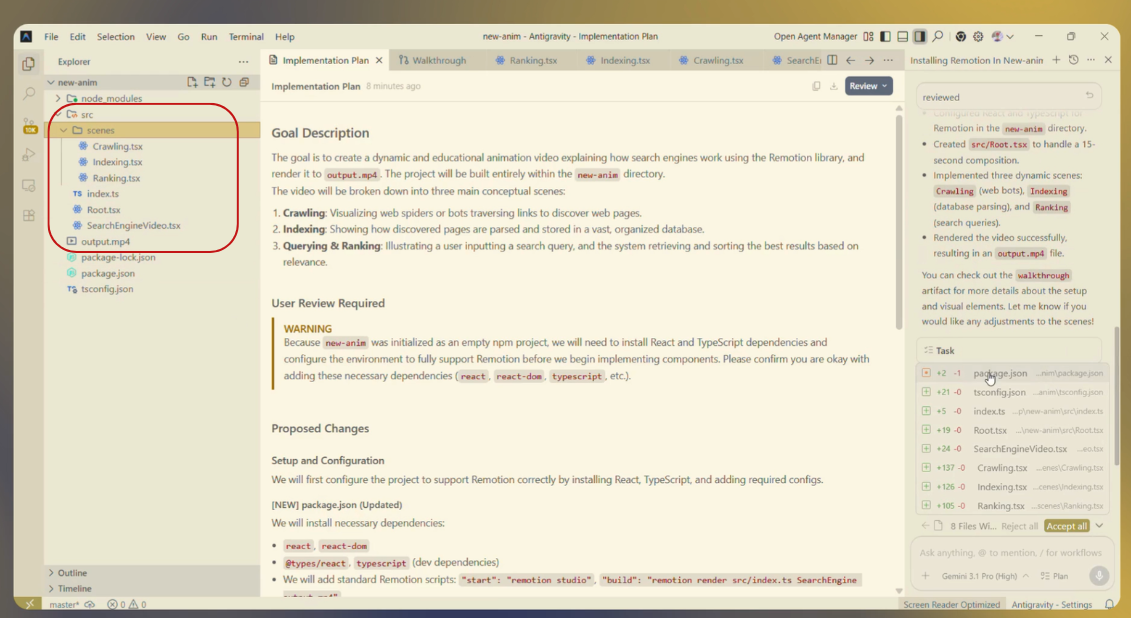
Expected behavior: Generated output is a complete, editable Remotion React project with full source code accessible. You own the codebase, can modify it at any level, version-control it, and integrate it into other projects.
Test case: Text prompt → Image

Input type: Text prompt

Input used: Input artifact (Text prompt): Input

Observed output: Output artifact (Image): Generated Code Structure — antigravity-ide-antigravity-file-structure-1.png

Input artifact: Input artifact (Text prompt): Input

Output artifact: Output artifact (Image): Generated Code Structure — antigravity-ide-antigravity-file-structure-1.png

What changed: Text prompt transformed into Image

Why it matters / Conclusion: The generated code could have been one big file — but scan the component structure in the code output above to see how the agent broke it down. The separation reveals the agent's architectural thinking about organizing animation sequences.

Generated output is a complete, editable Remotion React project with full source code accessible. You own the codebase, can modify it at any level, version-control it, and integrate it into other projects.

QUERY
Using Remotion library, Create an animation video explaining how search engines work. Render the video as output.mp4
SCREENSHOT
Output artifact for "Full Remotion Project Code" test: Generated Code Structure, antigravity-ide-antigravity-file-structure-1.png

Generated Code Structure

Bottom Line
The generated code could have been one big file — but scan the component structure in the code output above to see how the agent broke it down. The separation reveals the agent's architectural thinking about organizing animation sequences.

Pricing & Access

Plans as of May 2026

TESTED
Individual
$0/month
Agent model: access to Gemini 3.1 Pro, Gemini 3 Flash, Claude Sonnet & Opus 4.6, gpt-oss-120b<br>Unlimited Tab completions<br>Unlimited Command requests<br>Generous weekly rate limits<br>
Developer Plan
via Google One
Everything on Individual and<br>More generous rate limit<br>Flexible AI credit pool<br>

Pricing as of May 2026

Is This Right For You?

A side-by-side guide based on our hands-on testing.

✓ Use This If
You want automatic MP4 rendering without manual pipeline setup
You value full code ownership and want to modify generated Remotion projects
You're comfortable with upfront framework setup (or agent-assisted setup)
You're willing to iterate on first-pass output for visual polish
You want structured generation with implementation review step before execution
✕ Skip This If
You need one-click, zero-iteration output
You want to avoid any setup (local or agent-assisted)
You need publication-grade visual polish immediately without iteration
You're non-technical and prefer GUI-only workflows without code visibility

Use Case Track Record

AI Programmatic Animation

#2
Generate Code-Based Animation Videos from Text Prompts Using AI
Automatic rendering and full code ownership, but requires IDE, framework knowledge and iteration for visual polish
See ranking →
video-generatortext-to-videovideoCreators
Remotion can be installed locally upfront (`npm install remotion`), or Antigravity's agent can handle installation during the workflow. Either way, the setup is straightforward.
Yes — complete code ownership. Full React/TypeScript codebase is editable and can be customized, extended, or integrated with other React projects without regenerating.
The implementation-plan review catches major approach issues before generation. For refinements, you can iterate conversationally, and Antigravity regenerates the project with updates.
Yes — full Remotion project files are accessible. Can be downloaded, version-controlled, deployed, or extended however you need.
Antigravity provides the full Remotion project, which you can render yourself locally using `npm start` and Remotion Studio, or via CLI.

Banner Preview

How the embed badge will look on your site

Antigravity IDE featured on AI Demos

Embed HTML

Copy this code to your website source

<a target="_blank" href="https://aidemos.com/tools/antigravity-ide?utm_source=antigravity-ide_embed" style="width: 250px; height: 80px; border-radius:4px;" width="250" height="80"> <img src="https://aidemos-website-images.s3.amazonaws.com/featured.png" alt="Antigravity IDE | Featured on AI Demos" style="width: 250px; height: 80px; border-radius:4px;" width="250" height="80"> </a>

Quick Integration Guide

  • 1Copy the HTML code block above.
  • 2Paste it into your site's HTML or CMS editor.
  • 3Banner appears instantly on your page.
  • 4Links back to your tool profile here.
Similar Tools

Similar Tools

Discover more AI tools like Antigravity IDE to enhance your workflow.

Comments (0)

Please Log in to join the discussion.

Back to Top