
Hailuo AI
Cinematic image-to-video with native audio and 2K export, strongest when you need one clear camera move.
Strong output quality, with real caveats
- You want native audio generated with the video rather than added later
- You need one clear camera move from a single image, such as a push-in or forward dolly
- You are making portrait, crowd, or product clips and need faces, hands, and label text to hold together
- You need exact multi-beat or orbital camera choreography copied precisely from the prompt
Our take
Hailuo (MiniMax) is the most technically complete tool in this test on paper: it produced real scene-aware audio on every clip, exported at 2K, and kept faces, hands, and product text stable across the hardest scenarios. It works best when the prompt asks for one dominant camera move, and it gets less exact when the shot requires a precise multi-stage path. The permanent watermark, the 2K ceiling on the free/promotional tier, and a short credit allotment make it feel powerful but not fully frictionless.
In-Depth Review
Our detailed analysis of Hailuo AI — features, performance, and real-world testing.
Feature-by-Feature Breakdown
Single-Image Cinematic Motion Generation▾
Feature tested: Single-Image Cinematic Motion Generation
Result: Passed
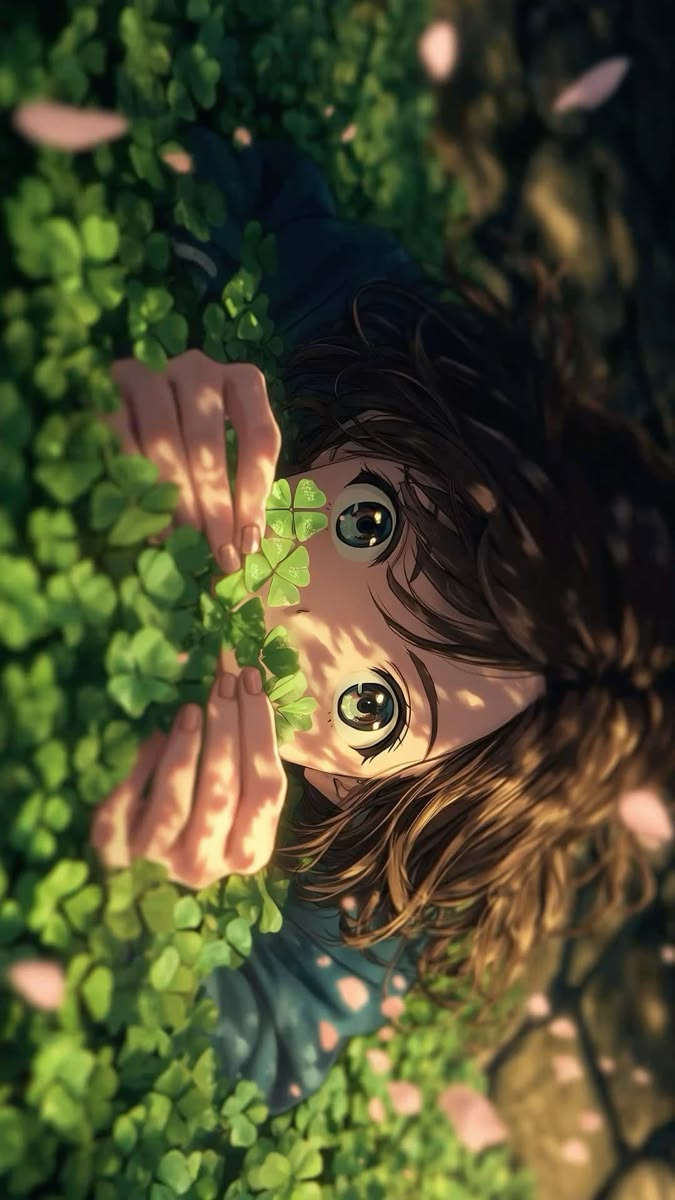
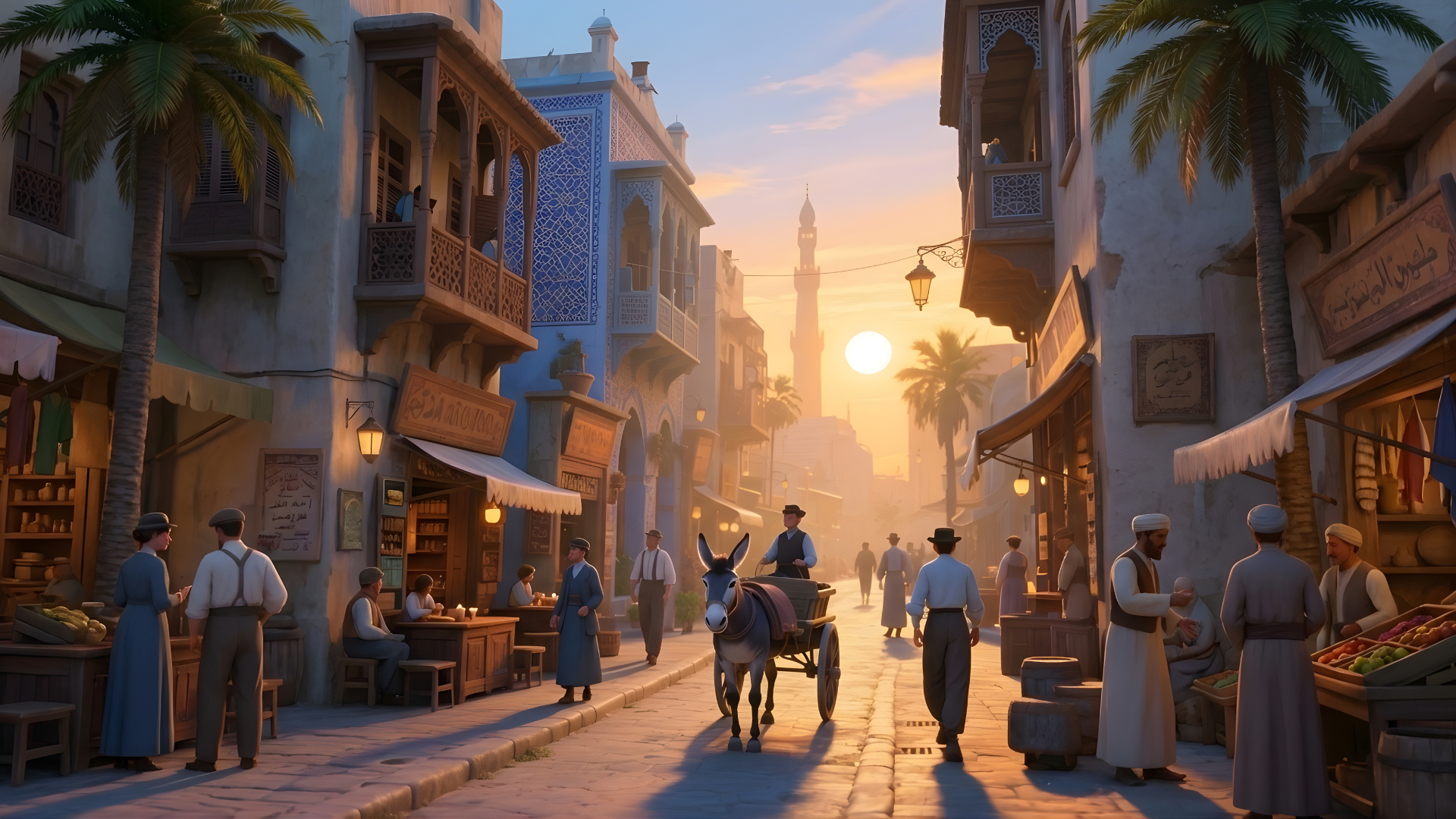
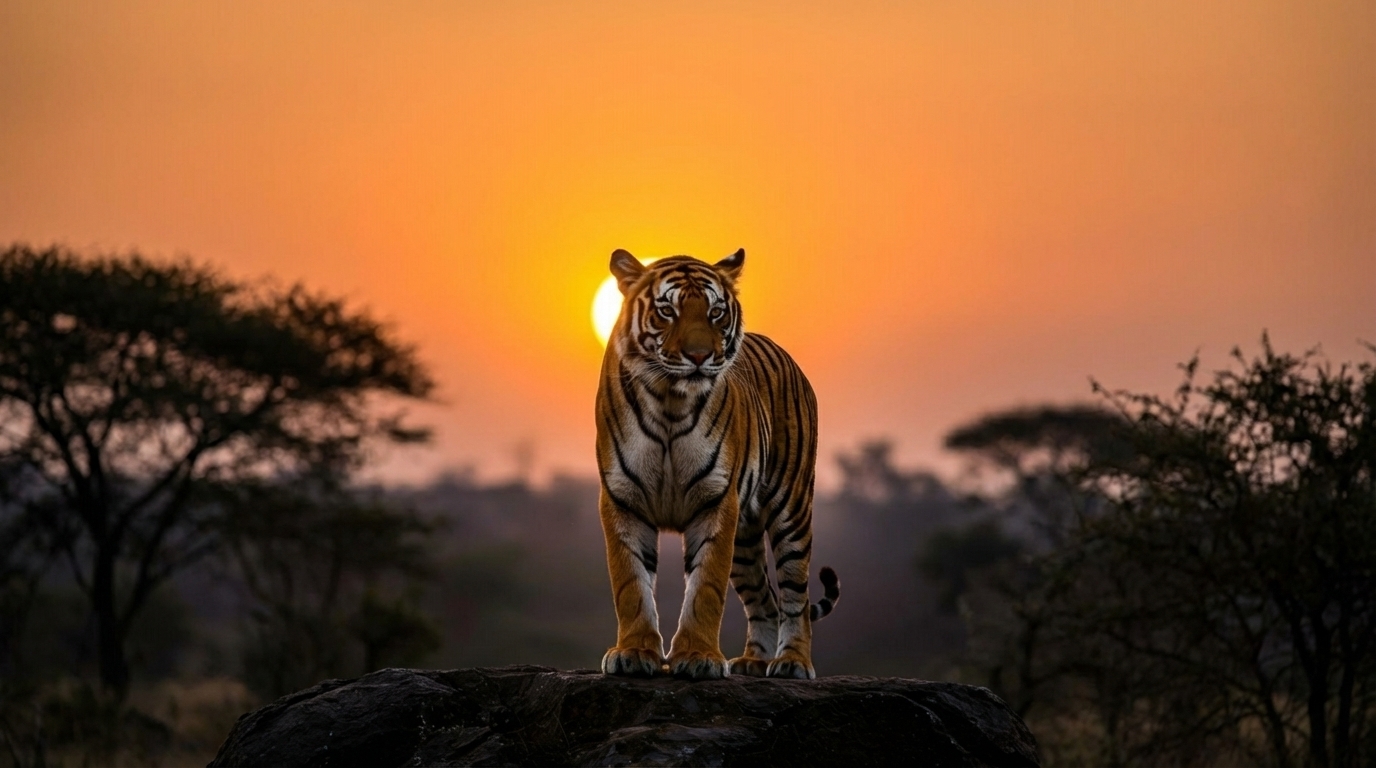
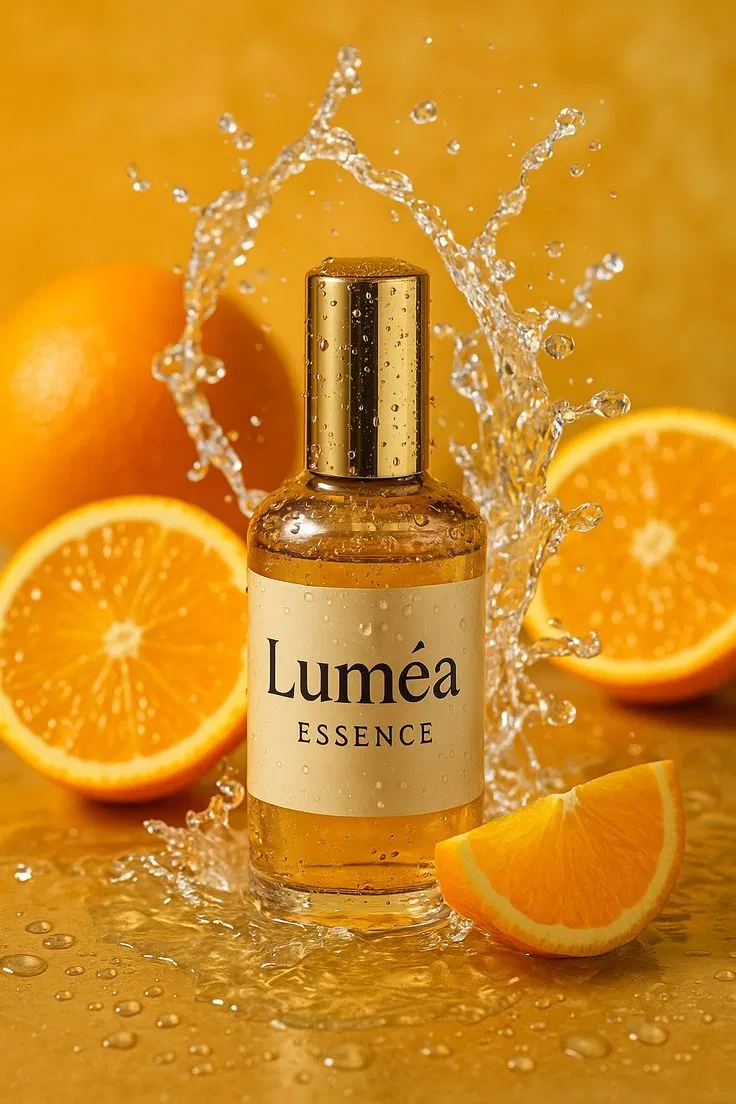
Expected behavior: Turns one still image into a short cinematic clip with believable motion. The tested inputs included an anime portrait, a market street, a tiger action sequence, a portrait push-in, a dinner-table camera move, and a product shot.
Test case: Image → Video file
Input type: Image
Input used: Input artifact (Image): INPUT — input-01.jpg
Observed output: Output artifact (Video file): A generated anime-style clip where the child’s eyes open and settle into a small smile while petals drift, but the requested slow push-in does not happen; the framing stays essentially the same across the clip. — input-01-output.mp4
Input artifact: Input artifact (Image): INPUT — input-01.jpg
Output artifact: Output artifact (Video file): A generated anime-style clip where the child’s eyes open and settle into a small smile while petals drift, but the requested slow push-in does not happen; the framing stays essentially the same across the clip. — input-01-output.mp4
What changed: Image transformed into Video file
Test case: Image → Video file
Input type: Image
Input used: Input artifact (Image): INPUT — input-02.png
Observed output: Output artifact (Video file): A cinematic market-street clip where the camera pushes forward toward the donkey cart while pedestrians, birds, and warm sunset lighting remain coherent. — input-02-output.mp4
Input artifact: Input artifact (Image): INPUT — input-02.png
Output artifact: Output artifact (Video file): A cinematic market-street clip where the camera pushes forward toward the donkey cart while pedestrians, birds, and warm sunset lighting remain coherent. — input-02-output.mp4
What changed: Image transformed into Video file
Test case: Image → Video file
Input type: Image
Input used: Input artifact (Image): INPUT — input-03.jpg
Observed output: Output artifact (Video file): A tiger clip that keeps the same sunset savanna setting while the animal moves from standing alert to a lower crouch and then roars. — input-03-output.mp4
Input artifact: Input artifact (Image): INPUT — input-03.jpg
Output artifact: Output artifact (Video file): A tiger clip that keeps the same sunset savanna setting while the animal moves from standing alert to a lower crouch and then roars. — input-03-output.mp4
What changed: Image transformed into Video file
Test case: Image → Video file
Input type: Image
Input used: Input artifact (Image): INPUT — input-04.webp
Observed output: Output artifact (Video file): A portrait clip that performs a clear slow push-in from a medium-close view to an extreme close-up while the woman’s expression softens into a smile. — input-04-output.mp4
Input artifact: Input artifact (Image): INPUT — input-04.webp
Output artifact: Output artifact (Video file): A portrait clip that performs a clear slow push-in from a medium-close view to an extreme close-up while the woman’s expression softens into a smile. — input-04-output.mp4
What changed: Image transformed into Video file
Test case: Image → Video file
Input type: Image
Input used: Input artifact (Image): INPUT — input-05.webp
Observed output: Output artifact (Video file): A dinner-toast clip that holds the scene together cleanly while moving through a wide view, an extreme close-up on the glasses, and then back out again. — input-05-output.mp4
Input artifact: Input artifact (Image): INPUT — input-05.webp
Output artifact: Output artifact (Video file): A dinner-toast clip that holds the scene together cleanly while moving through a wide view, an extreme close-up on the glasses, and then back out again. — input-05-output.mp4
What changed: Image transformed into Video file
Test case: Image → Video file
Input type: Image
Input used: Input artifact (Image): INPUT — input-06.webp
Observed output: Output artifact (Video file): A product-animation clip where the composition tightens toward a centered hero shot, with oranges and water motion remaining coherent around a crisp, readable perfume label. — input-06-output.mp4
Input artifact: Input artifact (Image): INPUT — input-06.webp
Output artifact: Output artifact (Video file): A product-animation clip where the composition tightens toward a centered hero shot, with oranges and water motion remaining coherent around a crisp, readable perfume label. — input-06-output.mp4
What changed: Image transformed into Video file
Why it matters / Conclusion: Best when the prompt asks for one clear camera move or one clear action arc; more choreographed camera scripts are still strong visually, but they are more likely to be simplified.
Turns one still image into a short cinematic clip with believable motion. The tested inputs included an anime portrait, a market street, a tiger action sequence, a portrait push-in, a dinner-table camera move, and a product shot.


Native Audio Generation and Scene Synchronization▾
Feature tested: Native Audio Generation and Scene Synchronization
Result: Passed
Expected behavior: Adds scene-appropriate audio to the generated clip and aligns sound with visible action. In testing it produced quiet ambience for intimate portrait shots, restaurant chatter for the dinner scene, and a roar that landed with the tiger’s open-mouth moment.
Test case: Image → Video file
Input type: Image
Input used: Input artifact (Image): INPUT — input-03.jpg
Observed output: Output artifact (Video file): The tiger clip includes audio that stays nearly silent for most of the run and then swells sharply at the exact moment the tiger opens its mouth to roar. — input-03-output.mp4
Input artifact: Input artifact (Image): INPUT — input-03.jpg
Output artifact: Output artifact (Video file): The tiger clip includes audio that stays nearly silent for most of the run and then swells sharply at the exact moment the tiger opens its mouth to roar. — input-03-output.mp4
What changed: Image transformed into Video file
Test case: Image → Video file
Input type: Image
Input used: Input artifact (Image): INPUT — input-05.webp
Observed output: Output artifact (Video file): The dinner-toast clip carries continuous ambient audio that reads like restaurant chatter and laughter, which fits the social scene even if it is less pinpointed than the tiger roar sync. — input-05-output.mp4
Input artifact: Input artifact (Image): INPUT — input-05.webp
Output artifact: Output artifact (Video file): The dinner-toast clip carries continuous ambient audio that reads like restaurant chatter and laughter, which fits the social scene even if it is less pinpointed than the tiger roar sync. — input-05-output.mp4
What changed: Image transformed into Video file
Test case: Image → Video file
Input type: Image
Input used: Input artifact (Image): INPUT — input-06.webp
Observed output: Output artifact (Video file): The product-shot clip includes a continuous audio bed that accompanies the splash-and-push-in motion rather than leaving the scene silent. — input-06-output.mp4
Input artifact: Input artifact (Image): INPUT — input-06.webp
Output artifact: Output artifact (Video file): The product-shot clip includes a continuous audio bed that accompanies the splash-and-push-in motion rather than leaving the scene silent. — input-06-output.mp4
What changed: Image transformed into Video file
Why it matters / Conclusion: Native audio is one of Hailuo’s clearest strengths in this test, and the tiger clip shows that it can time sound to on-screen action very well.
Adds scene-appropriate audio to the generated clip and aligns sound with visible action. In testing it produced quiet ambience for intimate portrait shots, restaurant chatter for the dinner scene, and a roar that landed with the tiger’s open-mouth moment.
Identity and Text Preservation in Motion▾
Feature tested: Identity and Text Preservation in Motion
Result: Passed
Expected behavior: Keeps subjects, crowds, hands, object edges, and on-image text stable while the clip moves. The tested portraits and group scenes kept the woman recognizable, avoided hand/object merging, and preserved the perfume label during motion.
Test case: Image → Video file
Input type: Image
Input used: Input artifact (Image): INPUT — input-04.webp
Observed output: Output artifact (Video file): The woman’s freckles, earrings, hair strands, and fabric texture remain intact as the shot pushes in and her smile deepens; there is no visible face warping or over-smoothing. — input-04-output.mp4
Input artifact: Input artifact (Image): INPUT — input-04.webp
Output artifact: Output artifact (Video file): The woman’s freckles, earrings, hair strands, and fabric texture remain intact as the shot pushes in and her smile deepens; there is no visible face warping or over-smoothing. — input-04-output.mp4
What changed: Image transformed into Video file
Test case: Image → Video file
Input type: Image
Input used: Input artifact (Image): INPUT — input-05.webp
Observed output: Output artifact (Video file): The dinner-table scene keeps all five people, their hands, and the glasses physically coherent through the toast and camera moves, with no clipping or floating limbs in the sampled frames. — input-05-output.mp4
Input artifact: Input artifact (Image): INPUT — input-05.webp
Output artifact: Output artifact (Video file): The dinner-table scene keeps all five people, their hands, and the glasses physically coherent through the toast and camera moves, with no clipping or floating limbs in the sampled frames. — input-05-output.mp4
What changed: Image transformed into Video file
Test case: Image → Video file
Input type: Image
Input used: Input artifact (Image): INPUT — input-06.webp
Observed output: Output artifact (Video file): The perfume bottle label stays fully legible and undistorted across the whole clip, with no ghosting, doubling, or letterform drift even on the closing hero frame. — input-06-output.mp4
Input artifact: Input artifact (Image): INPUT — input-06.webp
Output artifact: Output artifact (Video file): The perfume bottle label stays fully legible and undistorted across the whole clip, with no ghosting, doubling, or letterform drift even on the closing hero frame. — input-06-output.mp4
What changed: Image transformed into Video file
Why it matters / Conclusion: This is the result that matters most for portraits, group interactions, and branded product shots: the subjects stay recognizable and the label text survives motion cleanly.
Keeps subjects, crowds, hands, object edges, and on-image text stable while the clip moves. The tested portraits and group scenes kept the woman recognizable, avoided hand/object merging, and preserved the perfume label during motion.
Output Format, Resolution, and Duration Control▾
Feature tested: Output Format, Resolution, and Duration Control
Result: Passed
Expected behavior: Lets you choose export ratio, resolution, and clip length rather than accepting a fixed format. The tested session showed portrait and landscape outputs, 2K export, and durations from five to eight seconds.
Test case: Image → Video file
Input type: Image
Input used: Input artifact (Image): INPUT — input-01.jpg
Observed output: Output artifact (Video file): The source image is portrait-cropped, but the export is a wider 16:9 2K video, showing that the selected ratio controls the output framing. — input-01-output.mp4
Input artifact: Input artifact (Image): INPUT — input-01.jpg
Output artifact: Output artifact (Video file): The source image is portrait-cropped, but the export is a wider 16:9 2K video, showing that the selected ratio controls the output framing. — input-01-output.mp4
What changed: Image transformed into Video file
Test case: Image → Video file
Input type: Image
Input used: Input artifact (Image): INPUT — input-04.webp
Observed output: Output artifact (Video file): The portrait source stays in a vertical 9:16 export, which matches the selected ratio and preserves the subject’s orientation. — input-04-output.mp4
Input artifact: Input artifact (Image): INPUT — input-04.webp
Output artifact: Output artifact (Video file): The portrait source stays in a vertical 9:16 export, which matches the selected ratio and preserves the subject’s orientation. — input-04-output.mp4
What changed: Image transformed into Video file
Test case: Image → Video file
Input type: Image
Input used: Input artifact (Image): INPUT — input-05.webp
Observed output: Output artifact (Video file): The dinner scene uses a longer 8-second runtime, giving the tool enough room to execute a more complex camera sequence instead of a single short beat. — input-05-output.mp4
Input artifact: Input artifact (Image): INPUT — input-05.webp
Output artifact: Output artifact (Video file): The dinner scene uses a longer 8-second runtime, giving the tool enough room to execute a more complex camera sequence instead of a single short beat. — input-05-output.mp4
What changed: Image transformed into Video file
Test case: Image → Video file
Input type: Image
Input used: Input artifact (Image): INPUT — input-06.webp
Observed output: Output artifact (Video file): The product shot also exports as a vertical 9:16 clip, confirming that portrait framing is respected on the tested settings. — input-06-output.mp4
Input artifact: Input artifact (Image): INPUT — input-06.webp
Output artifact: Output artifact (Video file): The product shot also exports as a vertical 9:16 clip, confirming that portrait framing is respected on the tested settings. — input-06-output.mp4
What changed: Image transformed into Video file
Why it matters / Conclusion: The controls are real and useful: ratio and duration choices show up in the output, and the tool is not just auto-generating a fixed-format clip.
Lets you choose export ratio, resolution, and clip length rather than accepting a fixed format. The tested session showed portrait and landscape outputs, 2K export, and durations from five to eight seconds.
Pricing & access
Free/promotional tier tested with MiniMax H3 at 2K; per-second pricing is shown in-app.
The tested plan included 100 one-time trial credits and Hailuo models only. The in-app pricing screen also shows 2K and 768p rates for MiniMax H3, plus a paid upgrade path for removing the watermark.
Banner Preview
How the embed badge will look on your site

Embed HTML
Copy this code to your website source
Quick Integration Guide
- 1Copy the HTML code block above.
- 2Paste it into your site's HTML or CMS editor.
- 3Banner appears instantly on your page.
- 4Links back to your tool profile here.
Similar Tools
Discover more AI tools like Hailuo AI to enhance your workflow.
Comments (0)
Need a custom AI solution for this use case?
If you are looking to build a custom image-to-video generation, cinematic video creation, or video generation tool for your business or internal workflow, email us at contact@futuresmart.ai.
Found something inaccurate or missing? We try to keep our AI research accurate and useful. If you found outdated information, an issue, or have a suggestion, email us at collaborate@aidemos.com.