
Fireflies
Bot-based meeting capture with strong transcript quality, summaries, search, AskFred, and MCP.
Strong all-around meeting memory, with a few operational caveats
- You want a bot-based notetaker that can join Google Meet and stay connected through the call.
- You need accurate speaker-labeled transcripts, structured summaries, and owner-tagged action items from a real standup.
- You want searchable meeting memory plus AskFred or Claude MCP access afterward.
- You need shared links that guests can open without creating an account.
Our take
Fireflies was a strong overall winner in this cycle: it joined the meeting reliably, produced a very accurate transcript with solid diarization, generated structured summaries and real action items, and made the notes searchable through both AskFred and MCP. The main drawbacks were the recipient signup wall, read-only/copy-only editing limits, and an API test that failed for the evaluated account.
In-Depth Review
Our detailed analysis of Fireflies — features, performance, and real-world testing.
Feature-by-Feature Breakdown
Live Meeting Capture and TranscriptionDocumented 100+ language support▾
Feature tested: Live Meeting Capture and Transcription
Result: Passed
Verdict: Documented 100+ language support
Expected behavior: Fireflies joined a live Google Meet standup as a bot, stayed connected through the call, and produced timestamped, speaker-labeled transcripts. The docs also describe 100+ language auto-detect and multilingual meeting support.
Test case: Image → Image
Input type: Image
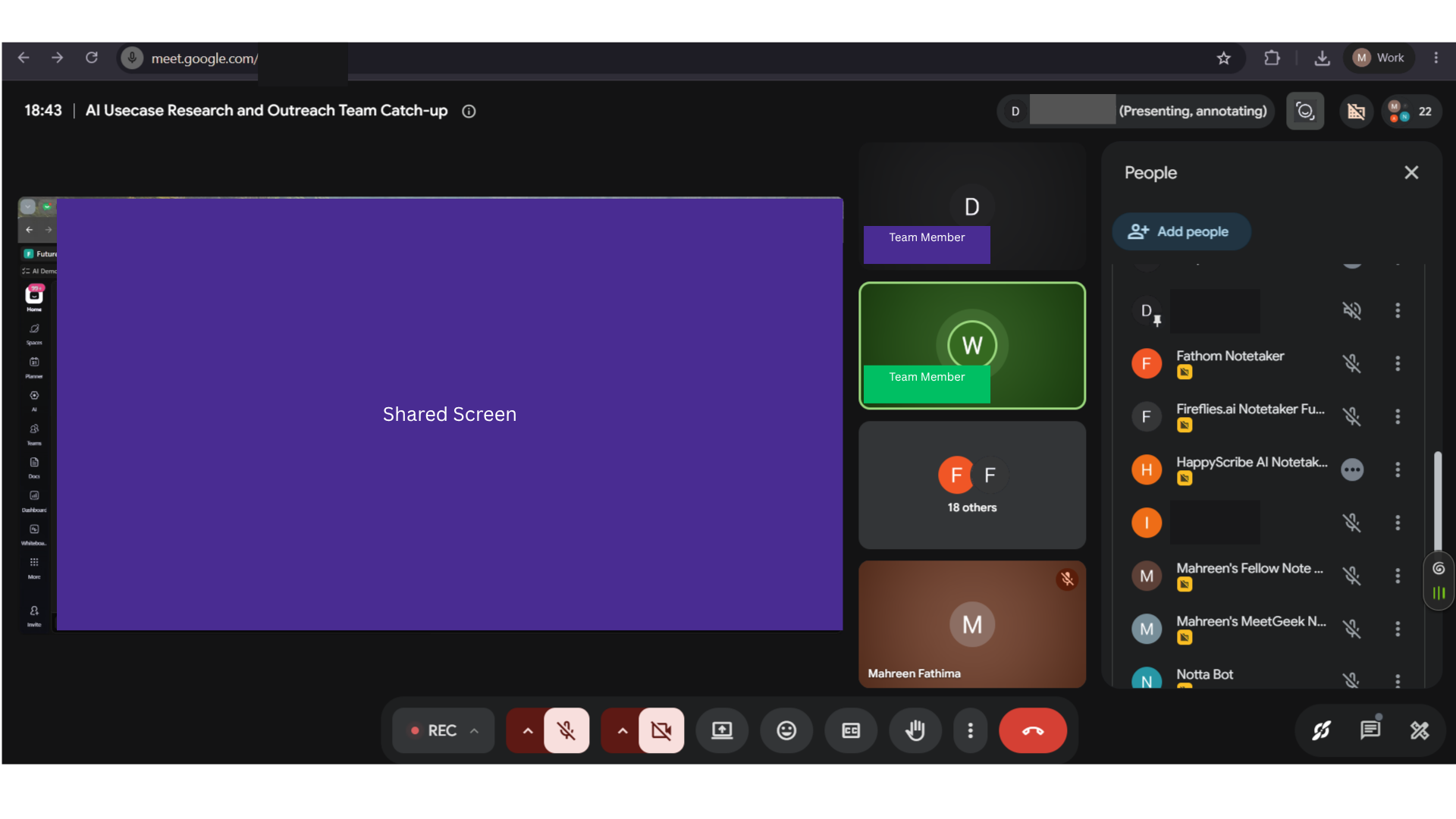
Input used: Input artifact (Image): Live Google Meet people panel for the AI Usecase Research and Outreach Team Catch-up, showing the meeting in progress. — 31-july-meeting-screenshot.png
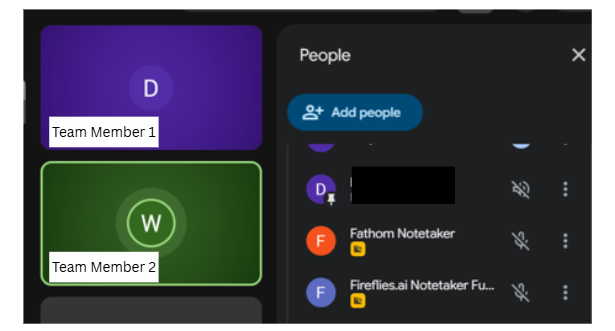
Observed output: Output artifact (Image): The people panel lists Fireflies.ai Notetaker alongside other notetakers, confirming the bot joined the meeting. — fireflies-bot-joined-in-meeting-success.png
Input artifact: Input artifact (Image): Live Google Meet people panel for the AI Usecase Research and Outreach Team Catch-up, showing the meeting in progress. — 31-july-meeting-screenshot.png
Output artifact: Output artifact (Image): The people panel lists Fireflies.ai Notetaker alongside other notetakers, confirming the bot joined the meeting. — fireflies-bot-joined-in-meeting-success.png
What changed: Image transformed into Image
Test case: Image → Image
Input type: Image
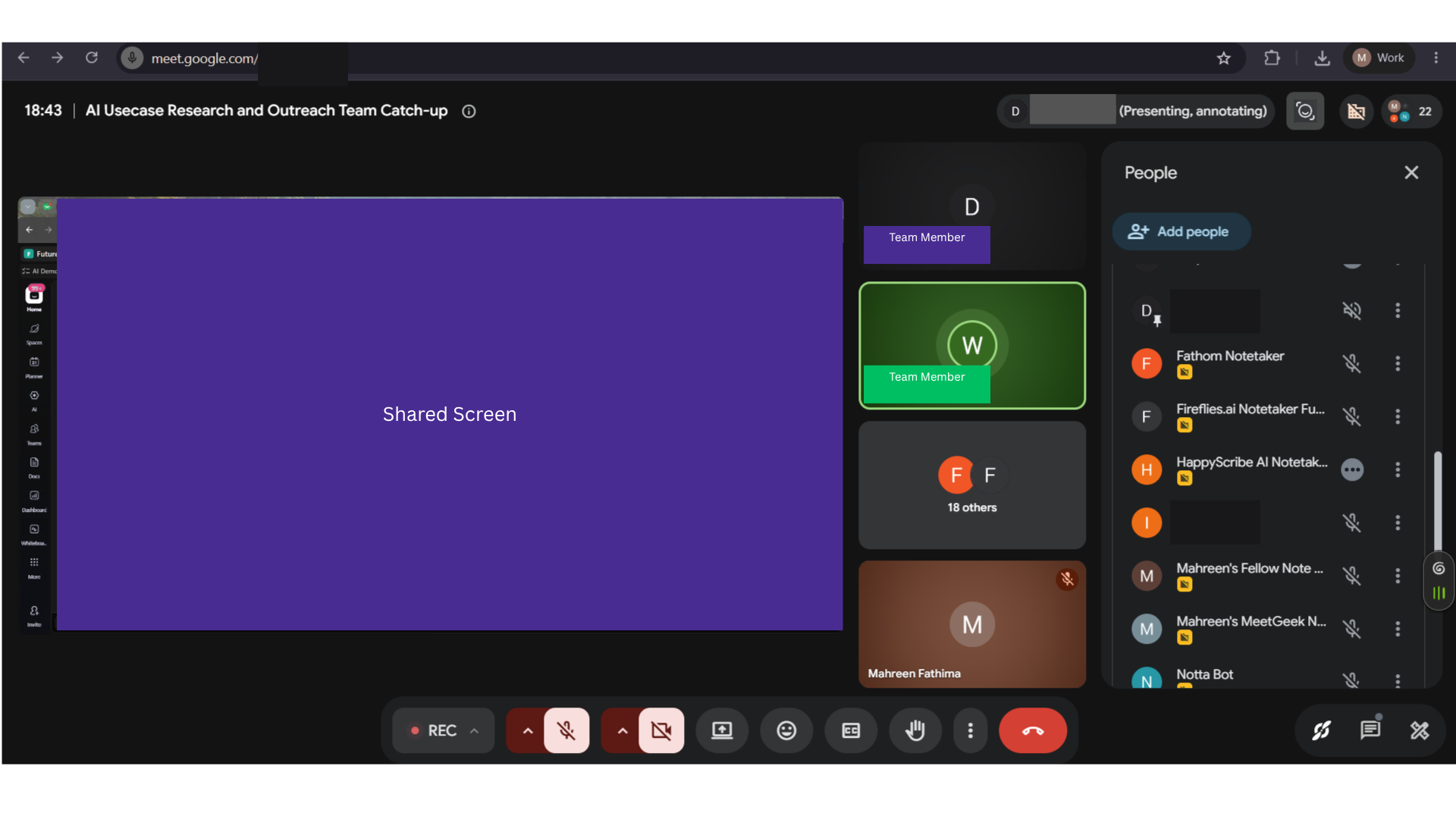
Input used: Input artifact (Image): Recorded meeting input used for transcript generation on the 31 Jul 2026 standup. — 31-july-meeting-screenshot.png
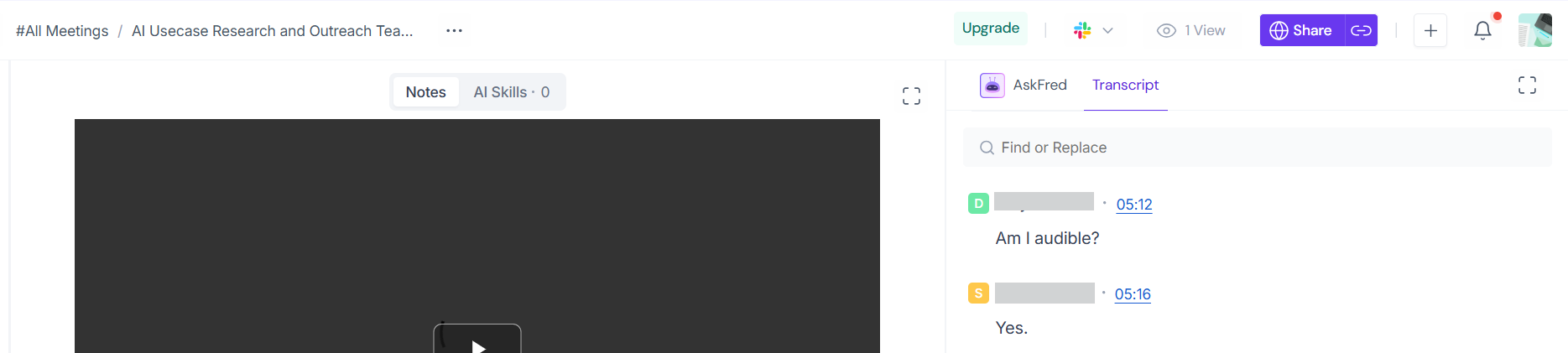
Observed output: Output artifact (Image): Fireflies shows the transcript tab with timestamped dialogue entries, confirming transcript generation succeeded. — fireflies-ai-transcript-generated-success.png
Input artifact: Input artifact (Image): Recorded meeting input used for transcript generation on the 31 Jul 2026 standup. — 31-july-meeting-screenshot.png
Output artifact: Output artifact (Image): Fireflies shows the transcript tab with timestamped dialogue entries, confirming transcript generation succeeded. — fireflies-ai-transcript-generated-success.png
What changed: Image transformed into Image
Why it matters / Conclusion: Broad multilingual support is documented, though not live-tested here.
Fireflies joined a live Google Meet standup as a bot, stayed connected through the call, and produced timestamped, speaker-labeled transcripts. The docs also describe 100+ language auto-detect and multilingual meeting support.
Structured Meeting SummariesExcellent▾
Feature tested: Structured Meeting Summaries
Result: Passed
Verdict: Excellent
Expected behavior: Fireflies turned the standup into a structured summary with named sections, making the notes skimmable instead of a single blob.
Test case: Image → Image
Input type: Image
Input used: Input artifact (Image): Meeting input used to generate notes and the summary recap. — 31-july-meeting-screenshot.png
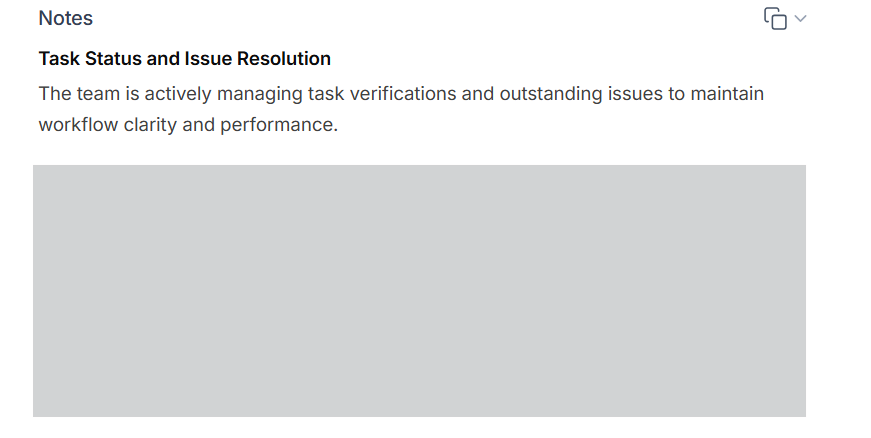
Observed output: Output artifact (Image): The Notes view shows a named summary section and a concise narrative recap, demonstrating structured summary generation. — fireflies-ai-generated-summary.png
Input artifact: Input artifact (Image): Meeting input used to generate notes and the summary recap. — 31-july-meeting-screenshot.png
Output artifact: Output artifact (Image): The Notes view shows a named summary section and a concise narrative recap, demonstrating structured summary generation. — fireflies-ai-generated-summary.png
What changed: Image transformed into Image
Why it matters / Conclusion: Summary quality and topic grouping were strong on this standup.
Fireflies turned the standup into a structured summary with named sections, making the notes skimmable instead of a single blob.
Action Item ExtractionExcellent▾
Feature tested: Action Item Extraction
Result: Passed
Verdict: Excellent
Expected behavior: Fireflies extracted follow-ups from the meeting, grouped them by owner, and linked items back to source timestamps in the recording.
Test case: Image → Image
Input type: Image
Input used: Input artifact (Image): Meeting input used to extract follow-up tasks and action items. — 31-july-meeting-screenshot.png
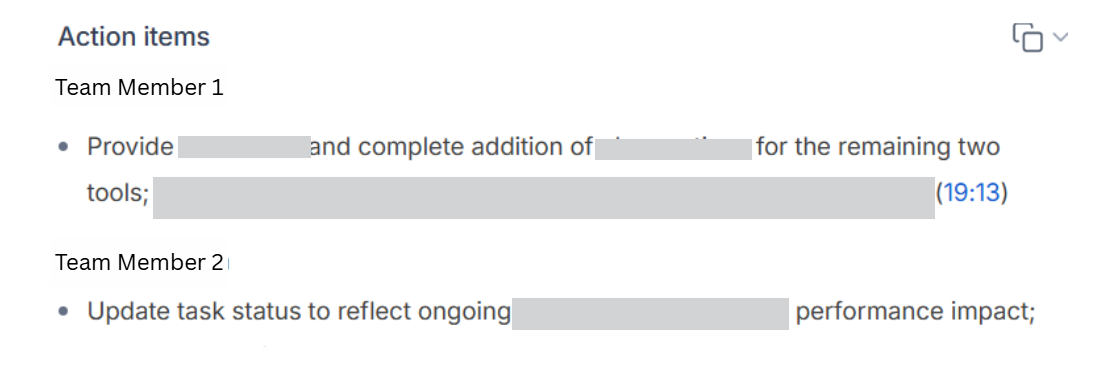
Observed output: Output artifact (Image): The Action items section lists follow-ups under team members with timestamped references, showing action-item extraction worked. — fireflies-extracted-action-items-success.png
Input artifact: Input artifact (Image): Meeting input used to extract follow-up tasks and action items. — 31-july-meeting-screenshot.png
Output artifact: Output artifact (Image): The Action items section lists follow-ups under team members with timestamped references, showing action-item extraction worked. — fireflies-extracted-action-items-success.png
What changed: Image transformed into Image
Why it matters / Conclusion: Action items looked real, correctly owned, and timestamped.
Fireflies extracted follow-ups from the meeting, grouped them by owner, and linked items back to source timestamps in the recording.
Transcript SearchExcellent▾
Feature tested: Transcript Search
Result: Passed
Verdict: Excellent
Expected behavior: Fireflies lets users search within a meeting transcript and jump to exact keyword matches with timestamps; the retrieval flow also worked through the MCP connector in the tested setup.
Test case: Text prompt → Image
Input type: Text prompt
Input used: Input artifact (Text prompt): Search query used to test transcript findability.
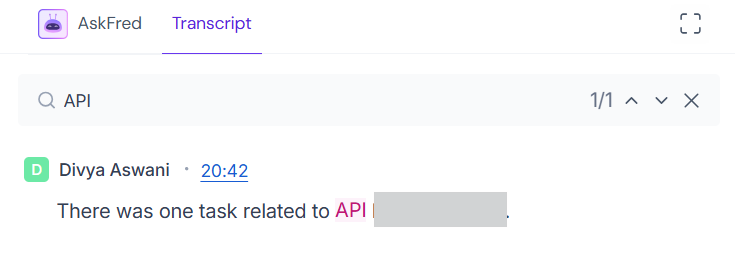
Observed output: Output artifact (Image): Searching for API returns 1/1 match at 20:42 with the matching word highlighted in the transcript line. — fireflies-transcript-searchability-success.png
Input artifact: Input artifact (Text prompt): Search query used to test transcript findability.
Output artifact: Output artifact (Image): Searching for API returns 1/1 match at 20:42 with the matching word highlighted in the transcript line. — fireflies-transcript-searchability-success.png
What changed: Text prompt transformed into Image
Test case: Text prompt → Image
Input type: Text prompt
Input used: Input artifact (Text prompt): Search workflow used to test transcript navigation.
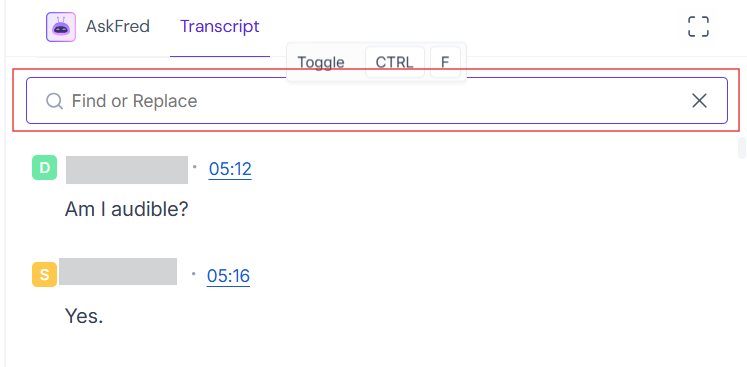
Observed output: Output artifact (Image): The transcript search bar is active and the transcript remains navigable by keyword, confirming search across notes works. — fireflies-searchable-transcript-success.png
Input artifact: Input artifact (Text prompt): Search workflow used to test transcript navigation.
Output artifact: Output artifact (Image): The transcript search bar is active and the transcript remains navigable by keyword, confirming search across notes works. — fireflies-searchable-transcript-success.png
What changed: Text prompt transformed into Image
Why it matters / Conclusion: Exact-match transcript search worked precisely on the tested keyword.
Fireflies lets users search within a meeting transcript and jump to exact keyword matches with timestamps; the retrieval flow also worked through the MCP connector in the tested setup.
Meeting Q&AExcellent▾
Feature tested: Meeting Q&A
Result: Passed
Verdict: Excellent
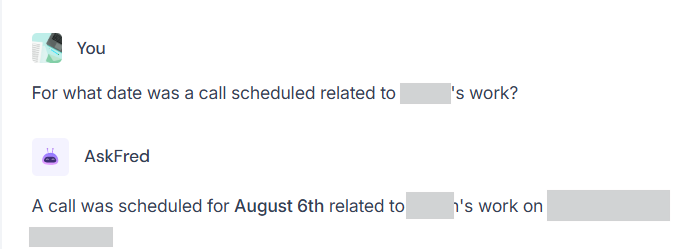
Expected behavior: AskFred answers natural-language questions over meeting content and returned grounded responses from the tested transcript.
Test case: Text prompt → Image
Input type: Text prompt
Input used: Input artifact (Text prompt): Natural-language question used to test AskFred.
Observed output: Output artifact (Image): AskFred answers with a specific grounded date, showing the chat-with-notes experience works on the recorded meeting. — fireflies-askfred-qna-success.png
Input artifact: Input artifact (Text prompt): Natural-language question used to test AskFred.
Output artifact: Output artifact (Image): AskFred answers with a specific grounded date, showing the chat-with-notes experience works on the recorded meeting. — fireflies-askfred-qna-success.png
What changed: Text prompt transformed into Image
Why it matters / Conclusion: AskFred returned a specific, grounded answer rather than a vague summary.
AskFred answers natural-language questions over meeting content and returned grounded responses from the tested transcript.
Link Sharing and Access ControlSignup required▾
Feature tested: Link Sharing and Access Control
Result: Partial
Verdict: Signup required
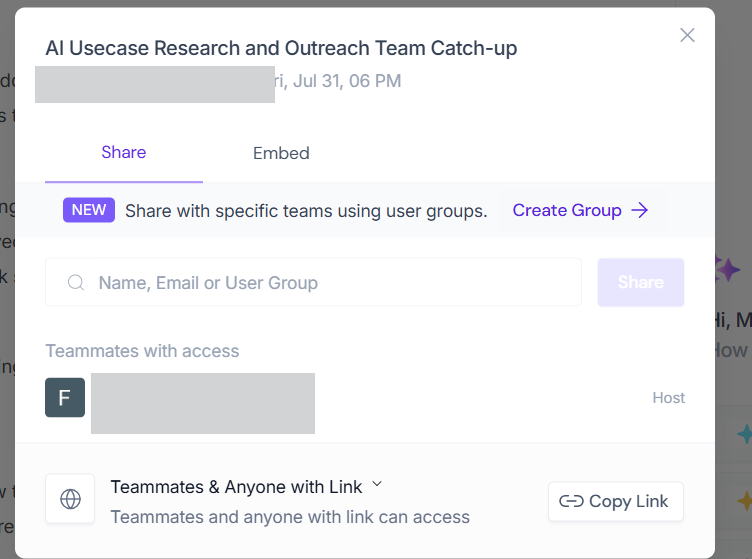
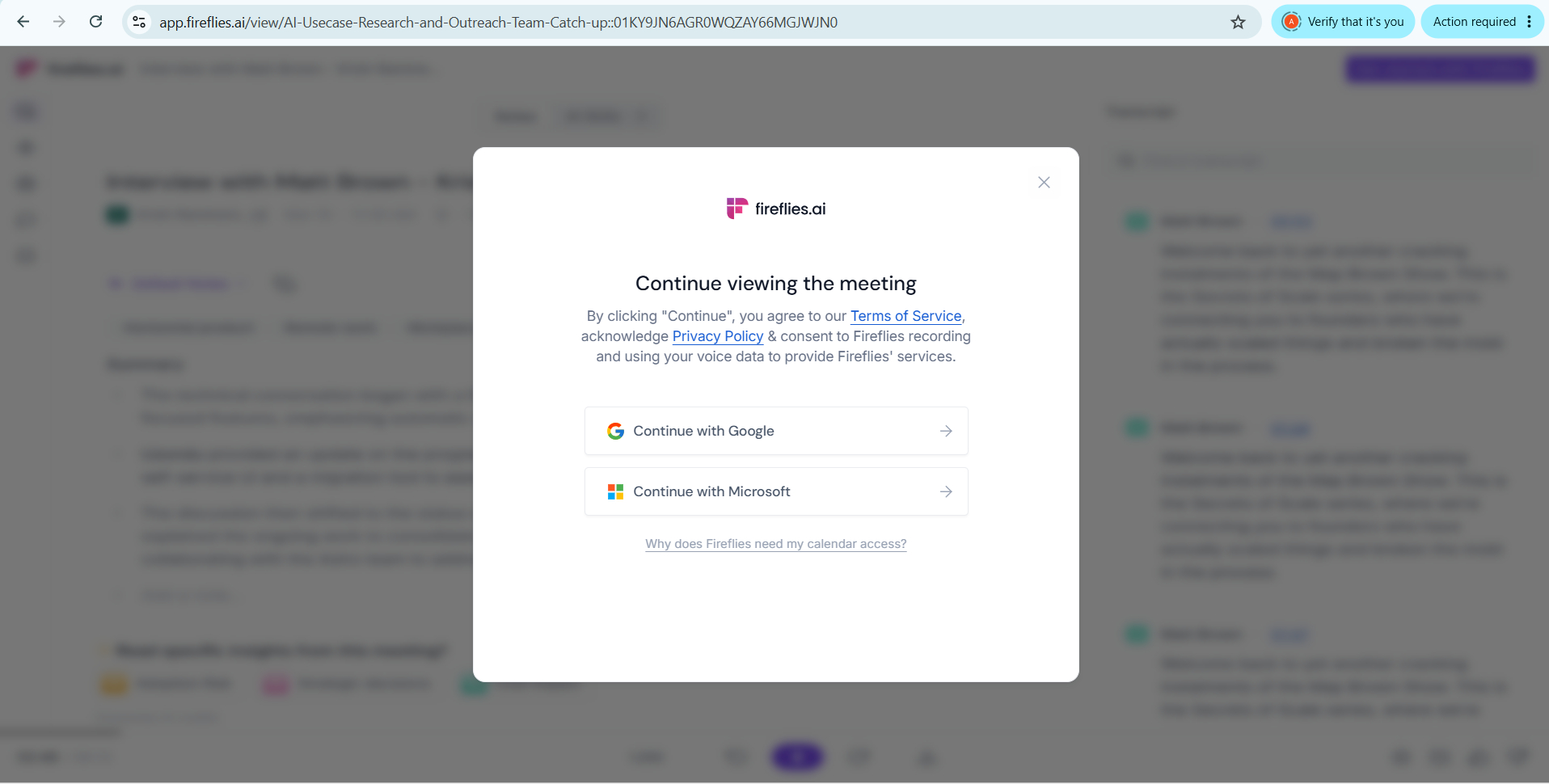
Expected behavior: Fireflies can generate share and embed links, but recipients without a Fireflies account are sent to a login wall before viewing the meeting.
Test case: Image → Image
Input type: Image
Input used: Input artifact (Image): Share dialog for the meeting, showing link-based sharing settings. — 31-july-meeting-screenshot.png
Observed output: Output artifact (Image): The share modal exposes Share and Embed tabs, access settings, and a Copy Link button for the meeting. — fireflies-sharing-options-success.png
Input artifact: Input artifact (Image): Share dialog for the meeting, showing link-based sharing settings. — 31-july-meeting-screenshot.png
Output artifact: Output artifact (Image): The share modal exposes Share and Embed tabs, access settings, and a Copy Link button for the meeting. — fireflies-sharing-options-success.png
What changed: Image transformed into Image
Test case: Text prompt → Image
Input type: Text prompt
Input used: Input artifact (Text prompt): Guest-access test for shared meeting notes.
Observed output: Output artifact (Image): The shared meeting view is blocked by a sign-in prompt, so recipients must create or use a Fireflies account before viewing. — fireflies-sharing-requires-login.png
Input artifact: Input artifact (Text prompt): Guest-access test for shared meeting notes.
Output artifact: Output artifact (Image): The shared meeting view is blocked by a sign-in prompt, so recipients must create or use a Fireflies account before viewing. — fireflies-sharing-requires-login.png
What changed: Text prompt transformed into Image
Why it matters / Conclusion: Sharing works, but not as a zero-friction guest link.
Fireflies can generate share and embed links, but recipients without a Fireflies account are sent to a login wall before viewing the meeting.
Hosted MCP AccessWorking▾
Feature tested: Hosted MCP Access
Result: Passed
Verdict: Working
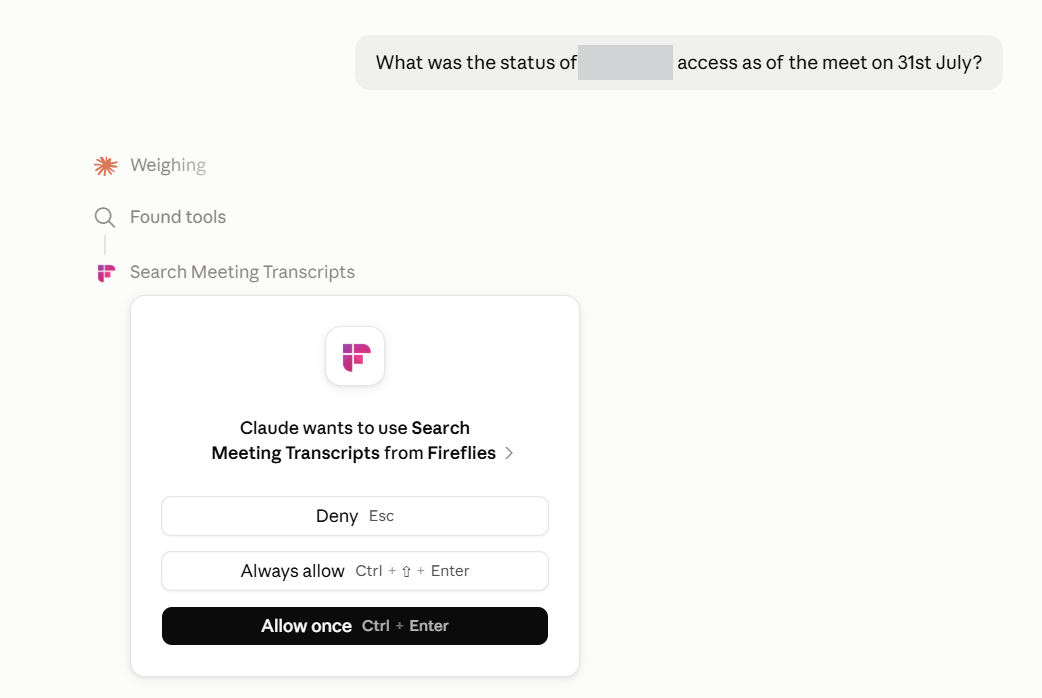
Expected behavior: Fireflies exposes a hosted MCP connection that Claude could use to search meeting transcripts and answer questions from Fireflies data.
Test case: Text prompt → Image
Input type: Text prompt
Input used: Input artifact (Text prompt): Claude connector test for Fireflies MCP access.
Observed output: Output artifact (Image): Claude shows the Fireflies Search Meeting Transcripts tool and the permission prompt, confirming MCP connectivity. — fireflies-mcp-connected-claude-qna-success.png
Input artifact: Input artifact (Text prompt): Claude connector test for Fireflies MCP access.
Output artifact: Output artifact (Image): Claude shows the Fireflies Search Meeting Transcripts tool and the permission prompt, confirming MCP connectivity. — fireflies-mcp-connected-claude-qna-success.png
What changed: Text prompt transformed into Image
Why it matters / Conclusion: The hosted MCP server worked in Claude during testing.
Fireflies exposes a hosted MCP connection that Claude could use to search meeting transcripts and answer questions from Fireflies data.
API AccessBroken this cycle▾
Feature tested: API Access
Result: Failed
Verdict: Broken this cycle
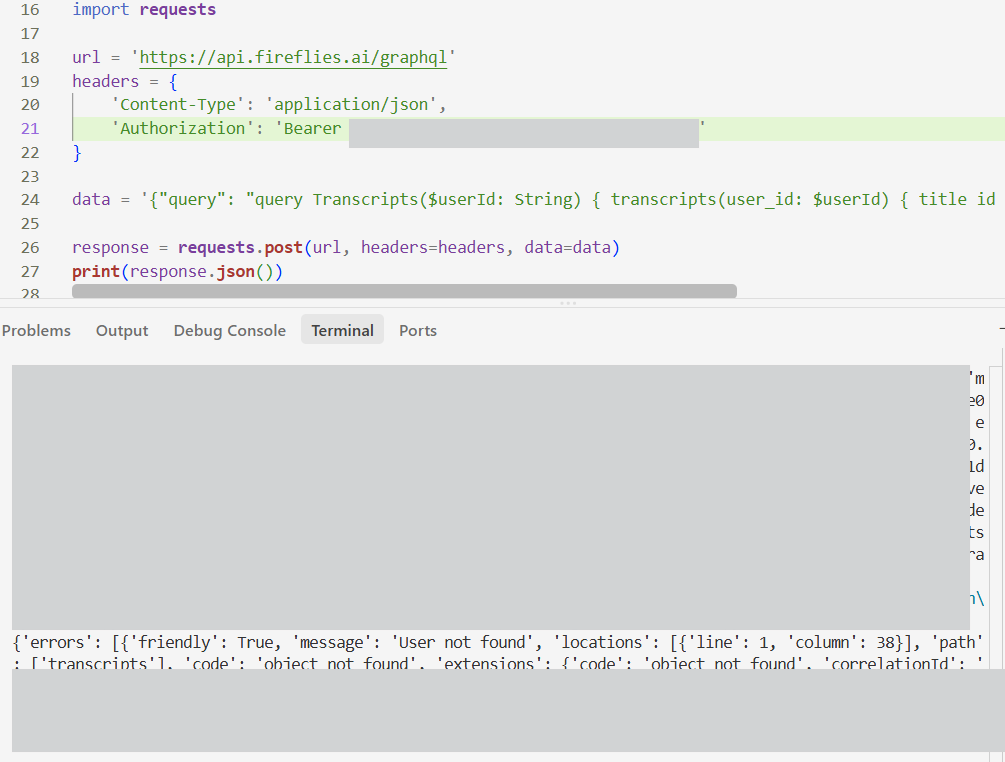
Expected behavior: Fireflies appears to expose a GraphQL API, but the tested transcript query returned a user-not-found error for the evaluated account/configuration.
Test case: Text prompt → Image
Input type: Text prompt
Input used: Input artifact (Text prompt): API request used during testing.
Observed output: Output artifact (Image): The terminal response returns a user-not-found / object-not-found error instead of transcript data. — fireflies-api-issue.png
Input artifact: Input artifact (Text prompt): API request used during testing.
Output artifact: Output artifact (Image): The terminal response returns a user-not-found / object-not-found error instead of transcript data. — fireflies-api-issue.png
What changed: Text prompt transformed into Image
Why it matters / Conclusion: The API did not work in this cycle for the tested account.
Fireflies appears to expose a GraphQL API, but the tested transcript query returned a user-not-found error for the evaluated account/configuration.
Integrations EcosystemExtensive▾
Feature tested: Integrations Ecosystem
Result: Passed
Verdict: Extensive
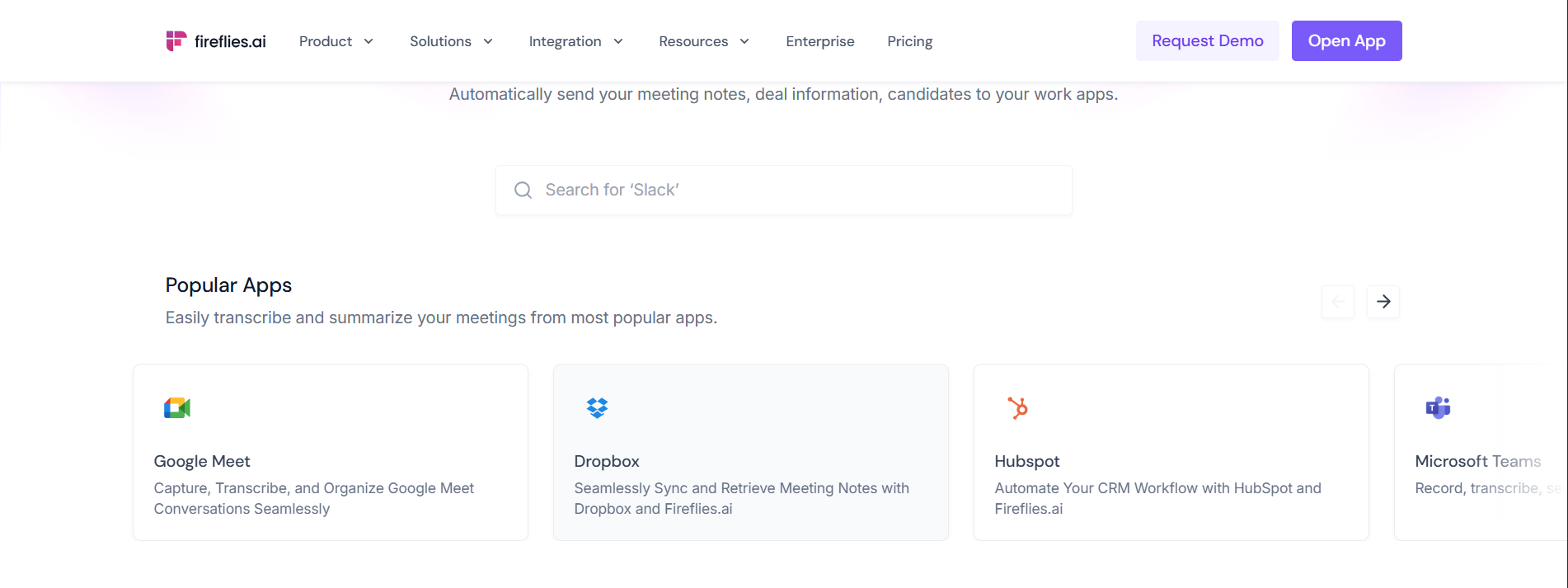
Expected behavior: Fireflies documents a broad integrations ecosystem across meeting, CRM, and productivity platforms, including Google Meet, Dropbox, HubSpot, and Microsoft Teams.
Test case: Text prompt → Image
Input type: Text prompt
Input used: Input artifact (Text prompt): Documentation check for third-party integrations.
Observed output: Output artifact (Image): The integrations page shows popular apps such as Google Meet, Dropbox, HubSpot, and Microsoft Teams, with search and app tiles visible. — fireflies-integrations.png
Input artifact: Input artifact (Text prompt): Documentation check for third-party integrations.
Output artifact: Output artifact (Image): The integrations page shows popular apps such as Google Meet, Dropbox, HubSpot, and Microsoft Teams, with search and app tiles visible. — fireflies-integrations.png
What changed: Text prompt transformed into Image
Why it matters / Conclusion: Docs show a wide integrations ecosystem.
Fireflies documents a broad integrations ecosystem across meeting, CRM, and productivity platforms, including Google Meet, Dropbox, HubSpot, and Microsoft Teams.
Summary Editing and Correction ControlsCopy-only on the tested screen▾
Feature tested: Summary Editing and Correction Controls
Result: Partial
Verdict: Copy-only on the tested screen
Expected behavior: The notes UI exposed controls for handling summaries, but the tested screen did not show inline editing; correcting text would have required the copy/export flow instead.
Test case: Text prompt → Image
Input type: Text prompt
Input used: Input artifact (Text prompt): INPUT
Observed output: Output artifact (Image): Context menu shows only copy actions for notes and summary, with no inline edit control visible on the tested screen. — fireflies-ai-summary-no-editability-failure.png
Input artifact: Input artifact (Text prompt): INPUT
Output artifact: Output artifact (Image): Context menu shows only copy actions for notes and summary, with no inline edit control visible on the tested screen. — fireflies-ai-summary-no-editability-failure.png
What changed: Text prompt transformed into Image
Why it matters / Conclusion: Editable correction was limited in the tested UI.
The notes UI exposed controls for handling summaries, but the tested screen did not show inline editing; correcting text would have required the copy/export flow instead.

Free tier is genuinely useful for teams
Unlimited transcription and AI summaries are available on Free, while storage, credits, sharing friction, and collaboration features become the practical limits.
The source contains conflicting seat-price text in one later narrative section versus the pricing-plan screenshots, so verify current pricing before purchase.
Banner Preview
How the embed badge will look on your site

Embed HTML
Copy this code to your website source
Quick Integration Guide
- 1Copy the HTML code block above.
- 2Paste it into your site's HTML or CMS editor.
- 3Banner appears instantly on your page.
- 4Links back to your tool profile here.
Similar Tools
Discover more AI tools like Fireflies to enhance your workflow.
Comments (0)
Need a custom AI solution for this use case?
If you are looking to build a custom meeting transcription, meeting summarization, or searchable meeting assistant for your business or internal workflow, email us at contact@futuresmart.ai.
Found something inaccurate or missing? We try to keep our AI research accurate and useful. If you found outdated information, an issue, or have a suggestion, email us at collaborate@aidemos.com.