
Boords Review: Script-to-Storyboard Tested for Character Consistency (2026)
Boords Review: AI Storyboarding Tool for Script-to-Storyboard Tested (2026)
Our take
- You need a complete script-to-storyboard workflow with no prompt engineering or design skills
- Character consistency across frames is a priority — confirmation step locks appearance before generation
- Your content is narrative-driven — creator content, branded video, short-form storytelling
- Your scripts are primarily technical or concept-driven — visual accuracy on abstract content is variable
Feature scores on this page: 9.6/10 (5 scored features)
Our take
Boords was the most purpose-built script-to-storyboard tool we tested. Its character confirmation step before generation reduces one of the most common failure points seen across other tools: inconsistent character rendering. On our 6-line narrative script, it produced a reliable, export-ready storyboard with minimal prompt intervention (see output below). Comparing that with its performance on our RAG explainer script shows the types of workflows the platform is best suited for.
In-Depth Review
Our detailed analysis of Boords — features, performance, and real-world testing.
Feature-by-Feature Breakdown
We tested each feature individually. Click any card to see inputs, outputs, and our observations.
Script Configuration PanelStrong — supports multiple input formats and provides analyzed parameters10/10▾
Feature tested: Script Configuration Panel
Result: Passed (10/10)
Verdict: Strong — supports multiple input formats and provides analyzed parameters
Expected behavior: Once a script is imported, Boords automatically analyzes it and presents a configuration panel with parameters it detected.
Test case: Text prompt → Image
Input type: Text prompt
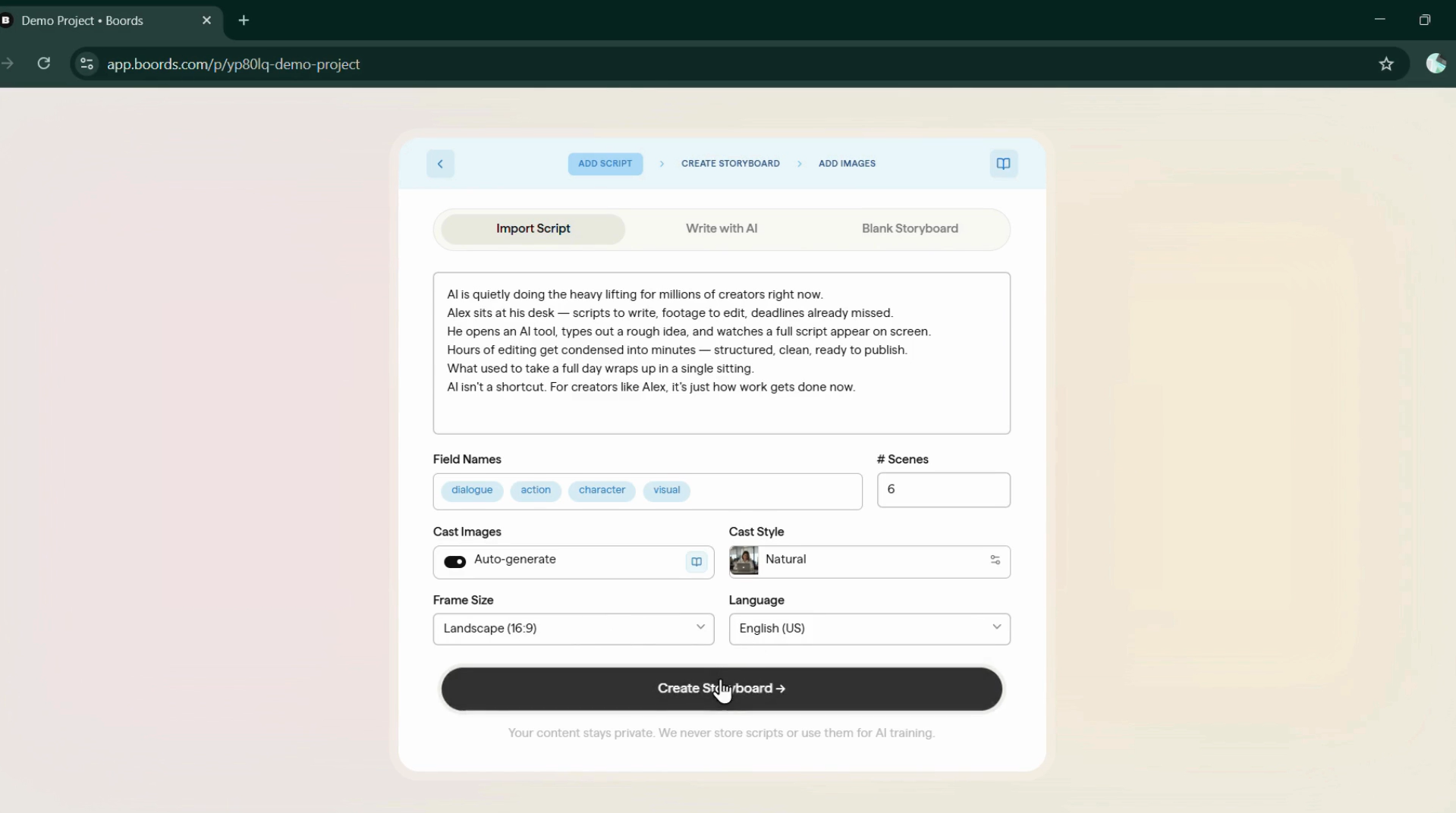
Input used: Input artifact (Text prompt): Narrative Script : AI is quietly doing the heavy lifting for millions of creators right now. Alex sits at his desk — scripts to write, footage to edit, deadlines already missed. He opens an AI tool, types out a rough idea, and watches a full script appear on screen. Hours of editing get condensed into minutes — structured, clean, ready to publish. What used to take a full day wraps up in a single sitting. AI isn't a shortcut. For creators like Alex, it's just how work gets done now.
Observed output: Output artifact (Image): Script automatically analyzed and passed to the configuration panel — Screenshot 2026-03-24 163741-1.png
Input artifact: Input artifact (Text prompt): Narrative Script : AI is quietly doing the heavy lifting for millions of creators right now. Alex sits at his desk — scripts to write, footage to edit, deadlines already missed. He opens an AI tool, types out a rough idea, and watches a full script appear on screen. Hours of editing get condensed into minutes — structured, clean, ready to publish. What used to take a full day wraps up in a single sitting. AI isn't a shortcut. For creators like Alex, it's just how work gets done now.
Output artifact: Output artifact (Image): Script automatically analyzed and passed to the configuration panel — Screenshot 2026-03-24 163741-1.png
What changed: Text prompt transformed into Image
Why it matters / Conclusion: From our 6-line script, Boords identified all 6 scenes automatically and pre-filled cast and style settings. Review the detected configuration above to see how it parsed the script.
Once a script is imported, Boords automatically analyzes it and presents a configuration panel with parameters it detected.
Character PreviewStrong — assures character consistency throughout storyboard10/10▾
Feature tested: Character Preview
Result: Passed (10/10)
Verdict: Strong — assures character consistency throughout storyboard
Expected behavior: Before generating frames, Boords analyzes the script for a central character. If detected, it generates a character preview for confirmation and locks that appearance across all storyboard frames. If no central character is identified, this step is skipped automatically.
Test case: Text prompt → Image
Input type: Text prompt
Input used: Input artifact (Text prompt): Script with central character (Alex) : AI is quietly doing the heavy lifting for millions of creators right now. Alex sits at his desk — scripts to write, footage to edit, deadlines already missed. He opens an AI tool, types out a rough idea, and watches a full script appear on screen. Hours of editing get condensed into minutes — structured, clean, ready to publish. What used to take a full day wraps up in a single sitting. AI isn't a shortcut. For creators like Alex, it's just how work gets done now.
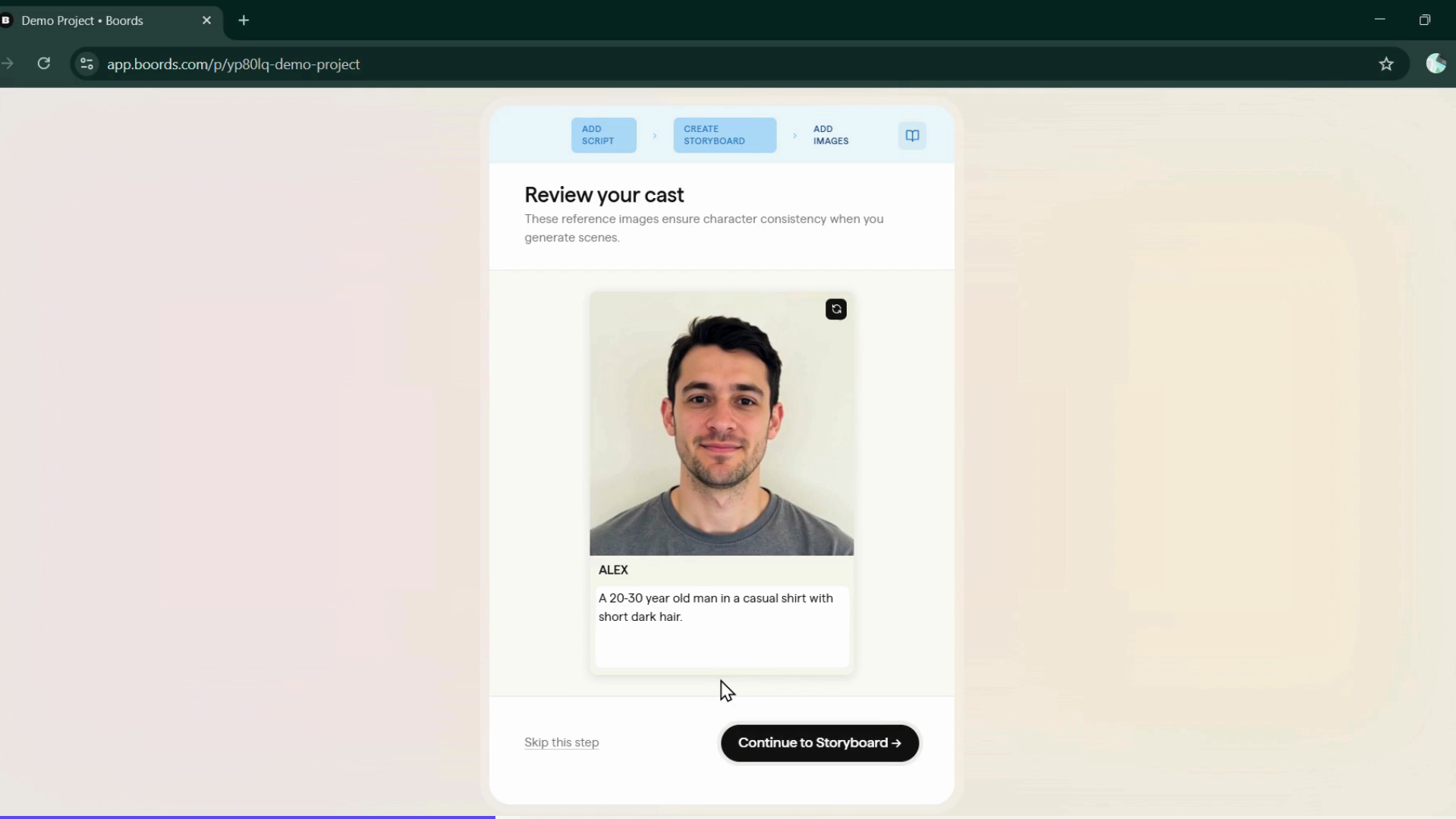
Observed output: Output artifact (Image): Character preview generated — face, build, and clothing style presented for confirmation — step3.png
Input artifact: Input artifact (Text prompt): Script with central character (Alex) : AI is quietly doing the heavy lifting for millions of creators right now. Alex sits at his desk — scripts to write, footage to edit, deadlines already missed. He opens an AI tool, types out a rough idea, and watches a full script appear on screen. Hours of editing get condensed into minutes — structured, clean, ready to publish. What used to take a full day wraps up in a single sitting. AI isn't a shortcut. For creators like Alex, it's just how work gets done now.
Output artifact: Output artifact (Image): Character preview generated — face, build, and clothing style presented for confirmation — step3.png
What changed: Text prompt transformed into Image
Why it matters / Conclusion: For Alex, our main character, Boords generated a preview that closely matched the script’s intended look — review the character preview above.
Before generating frames, Boords analyzes the script for a central character. If detected, it generates a character preview for confirmation and locks that appearance across all storyboard frames. If no central character is identified, this step is skipped automatically.
Editable Image PromptsStrong — mapped frames with editable prompts9.8/10▾
Feature tested: Editable Image Prompts
Result: Passed (9.8/10)
Verdict: Strong — mapped frames with editable prompts
Expected behavior: After scenes are detected and character is confirmed, Boords maps individual image prompts to each script line — allowing frame-by-frame control over composition and direction.
Test case: Image → Image
Input type: Image
Input used: Input artifact (Image): Confirmed character + configured storyboard settings — step3.png
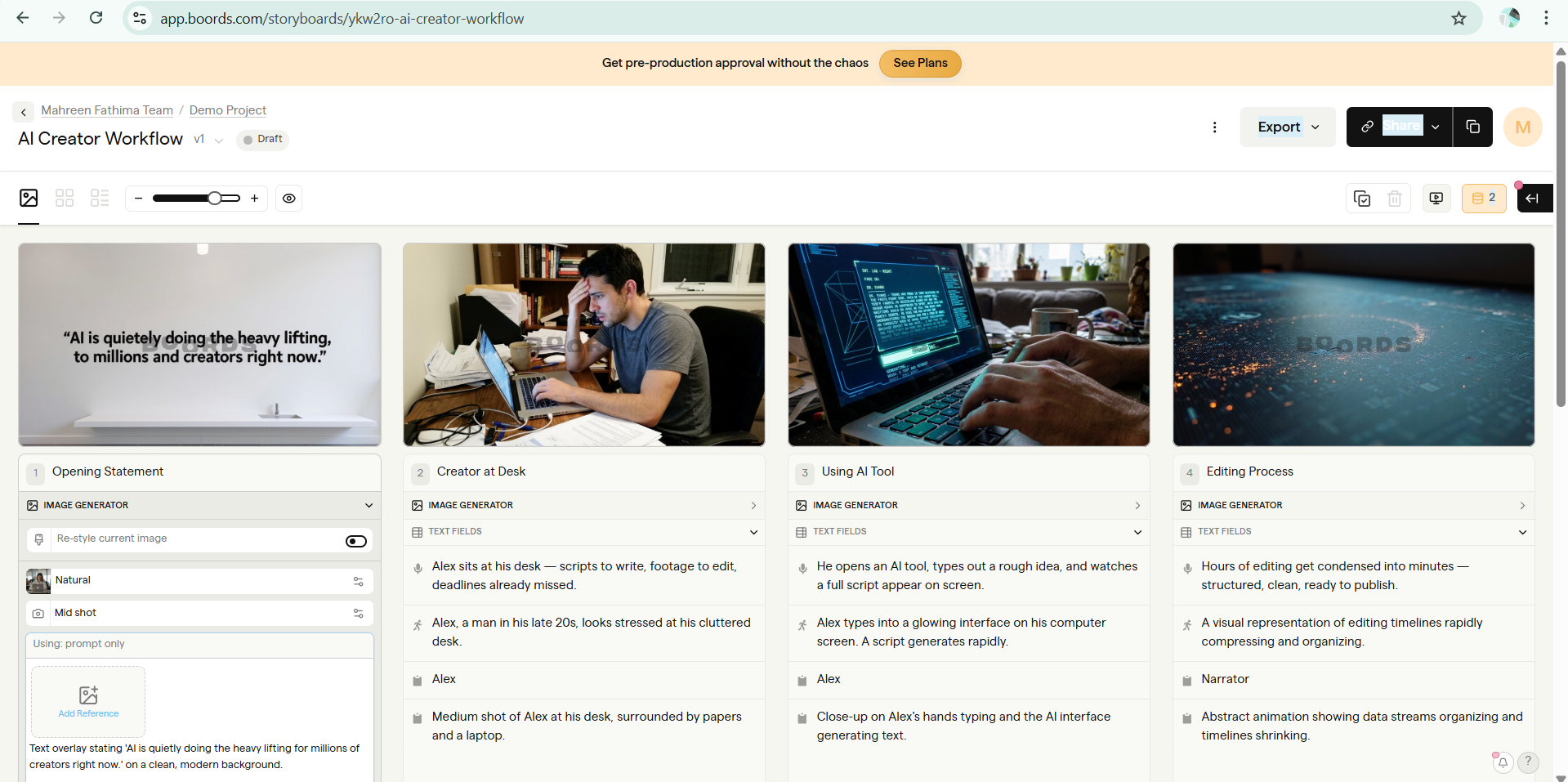
Observed output: Output artifact (Image): Six frames generated and mapped to their corresponding script lines — step4.png
Input artifact: Input artifact (Image): Confirmed character + configured storyboard settings — step3.png
Output artifact: Output artifact (Image): Six frames generated and mapped to their corresponding script lines — step4.png
What changed: Image transformed into Image
Test case: Image → Image
Input type: Image
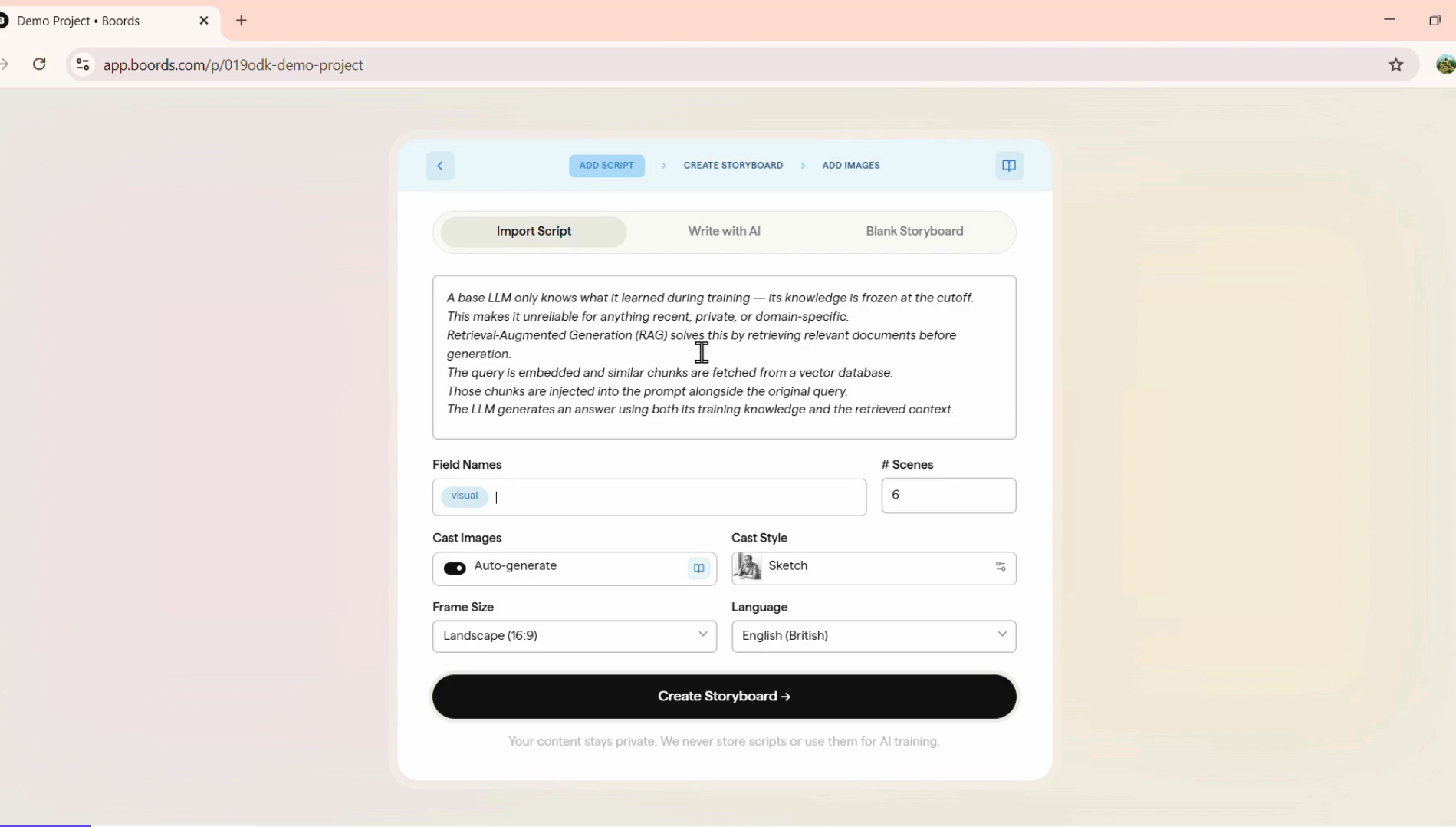
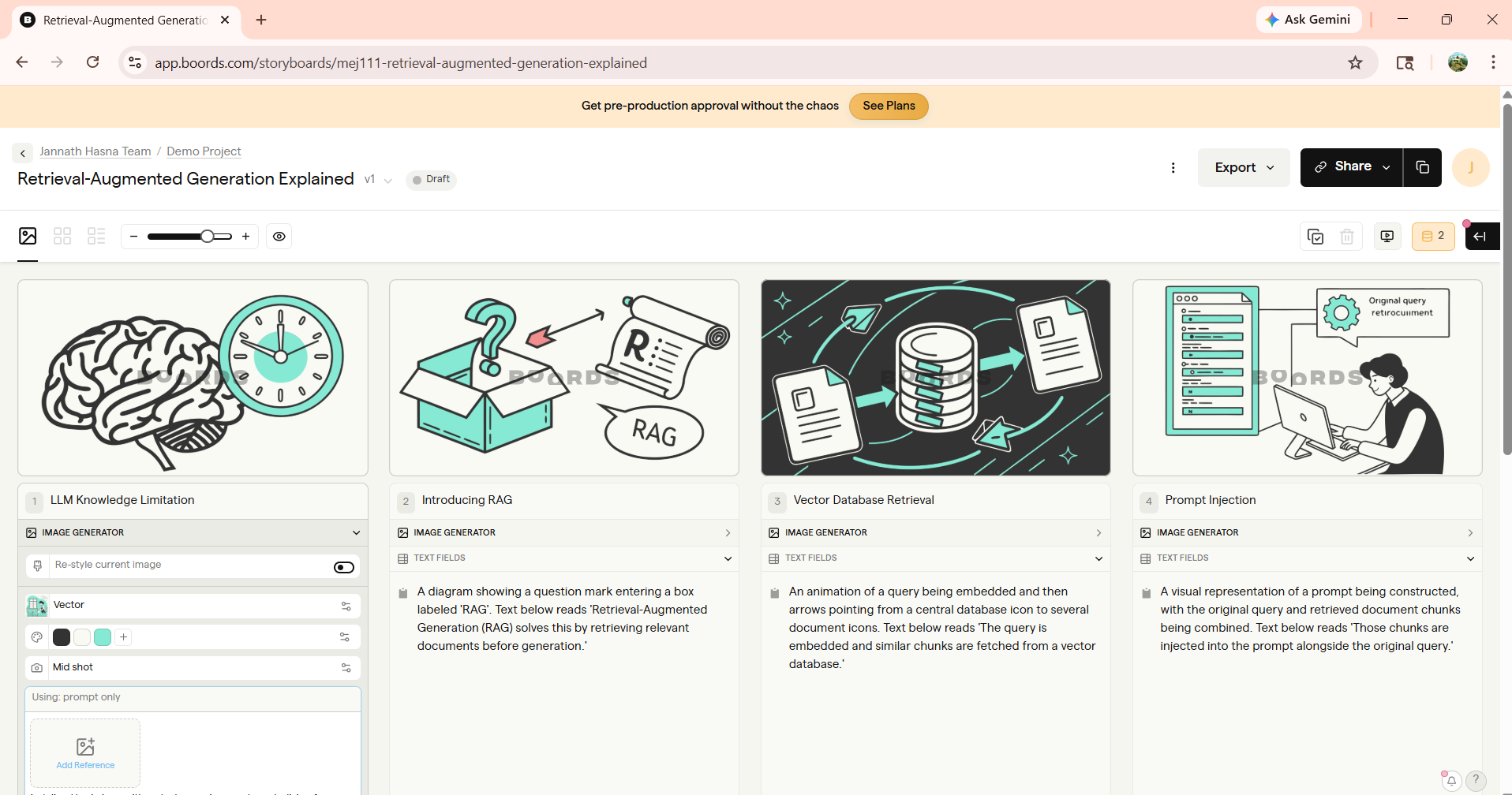
Input used: Input artifact (Image): Configured storyboard setting for technical script — Screenshot 2026-04-04 112647.png
Observed output: Output artifact (Image): Six frames generated and mapped to their corresponding script lines — Screenshot 2026-04-06 143509.png
Input artifact: Input artifact (Image): Configured storyboard setting for technical script — Screenshot 2026-04-04 112647.png
Output artifact: Output artifact (Image): Six frames generated and mapped to their corresponding script lines — Screenshot 2026-04-06 143509.png
What changed: Image transformed into Image
Why it matters / Conclusion: Boords auto-maps image prompts to script lines. Review the paired outputs above to see how each script line was translated into visuals.
After scenes are detected and character is confirmed, Boords maps individual image prompts to each script line — allowing frame-by-frame control over composition and direction.
Multi-Format ExportStrong — multiple export options available9/10▾
Feature tested: Multi-Format Export
Result: Passed (9/10)
Verdict: Strong — multiple export options available
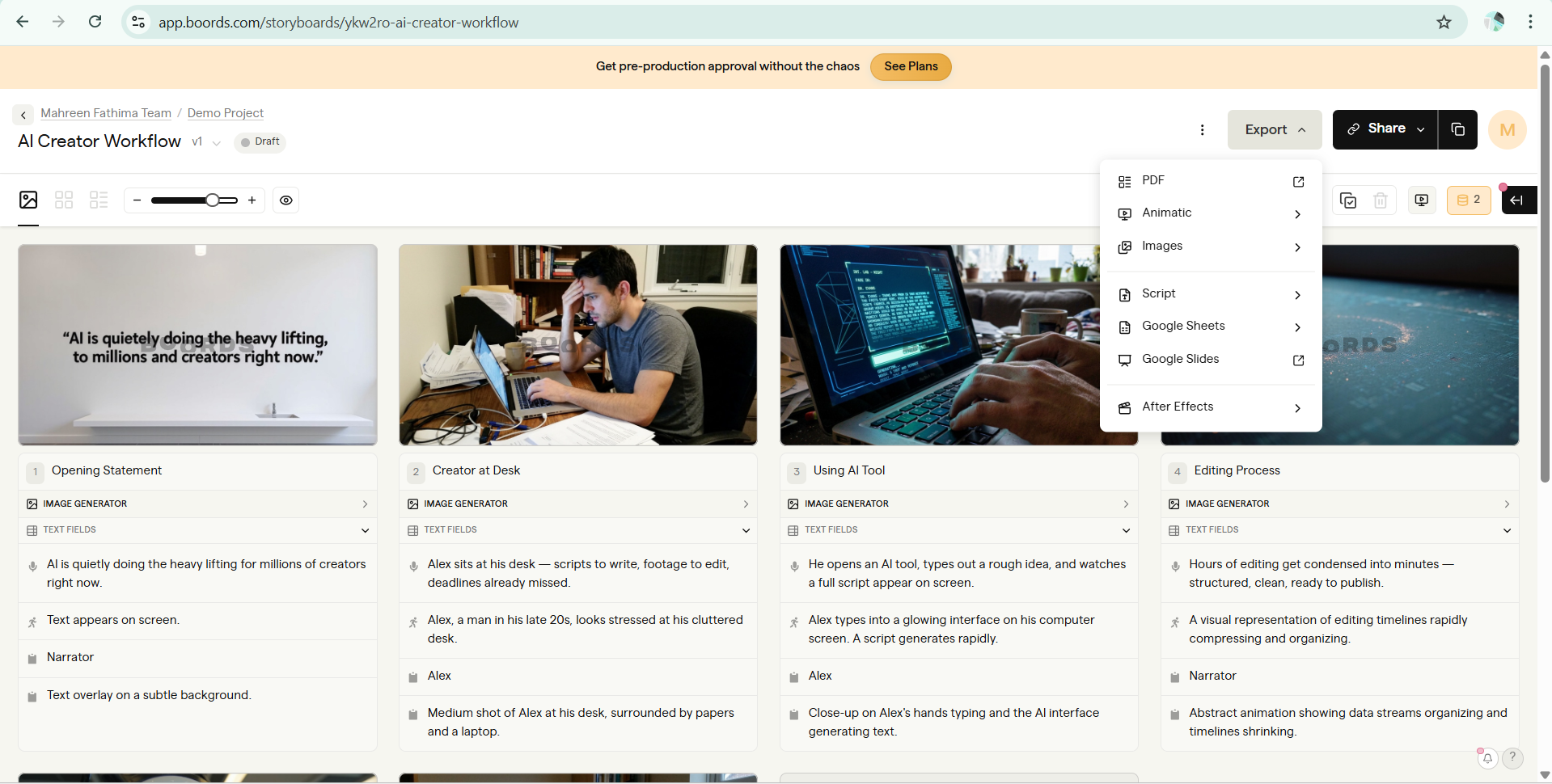
Expected behavior: Boords supports multiple export options, with basic export available on the free tier. Advanced export formats and additional export features require a paid plan.
Test case: Image → PDF document
Input type: Image
Input used: Input artifact (Image): Complete Narrative Storyboard — Screenshot 2026-04-01 181027.png
Observed output: Output artifact (PDF document): Export with frames mapped to script lines — AI_Creator_Workflow_v1_Boords.pdf
Input artifact: Input artifact (Image): Complete Narrative Storyboard — Screenshot 2026-04-01 181027.png
Output artifact: Output artifact (PDF document): Export with frames mapped to script lines — AI_Creator_Workflow_v1_Boords.pdf
What changed: Image transformed into PDF document
Test case: Image → PDF document
Input type: Image
Input used: Input artifact (Image): Complete Technical Storyboard — Screenshot 2026-04-06 143509.png
Observed output: Output artifact (PDF document): Export with frames mapped to script lines — Retrieval-Augmented_Generation_Explained_v1_Boords.pdf
Input artifact: Input artifact (Image): Complete Technical Storyboard — Screenshot 2026-04-06 143509.png
Output artifact: Output artifact (PDF document): Export with frames mapped to script lines — Retrieval-Augmented_Generation_Explained_v1_Boords.pdf
What changed: Image transformed into PDF document
Why it matters / Conclusion: Boords exports to multiple formats. The free tier includes limited export access — compare the export options below to see what each tier unlocks.
Boords supports multiple export options, with basic export available on the free tier. Advanced export formats and additional export features require a paid plan.
Team CollaborationStrong — colloboration options makes workflow easier9/10▾
Feature tested: Team Collaboration
Result: Passed (9/10)
Verdict: Strong — colloboration options makes workflow easier
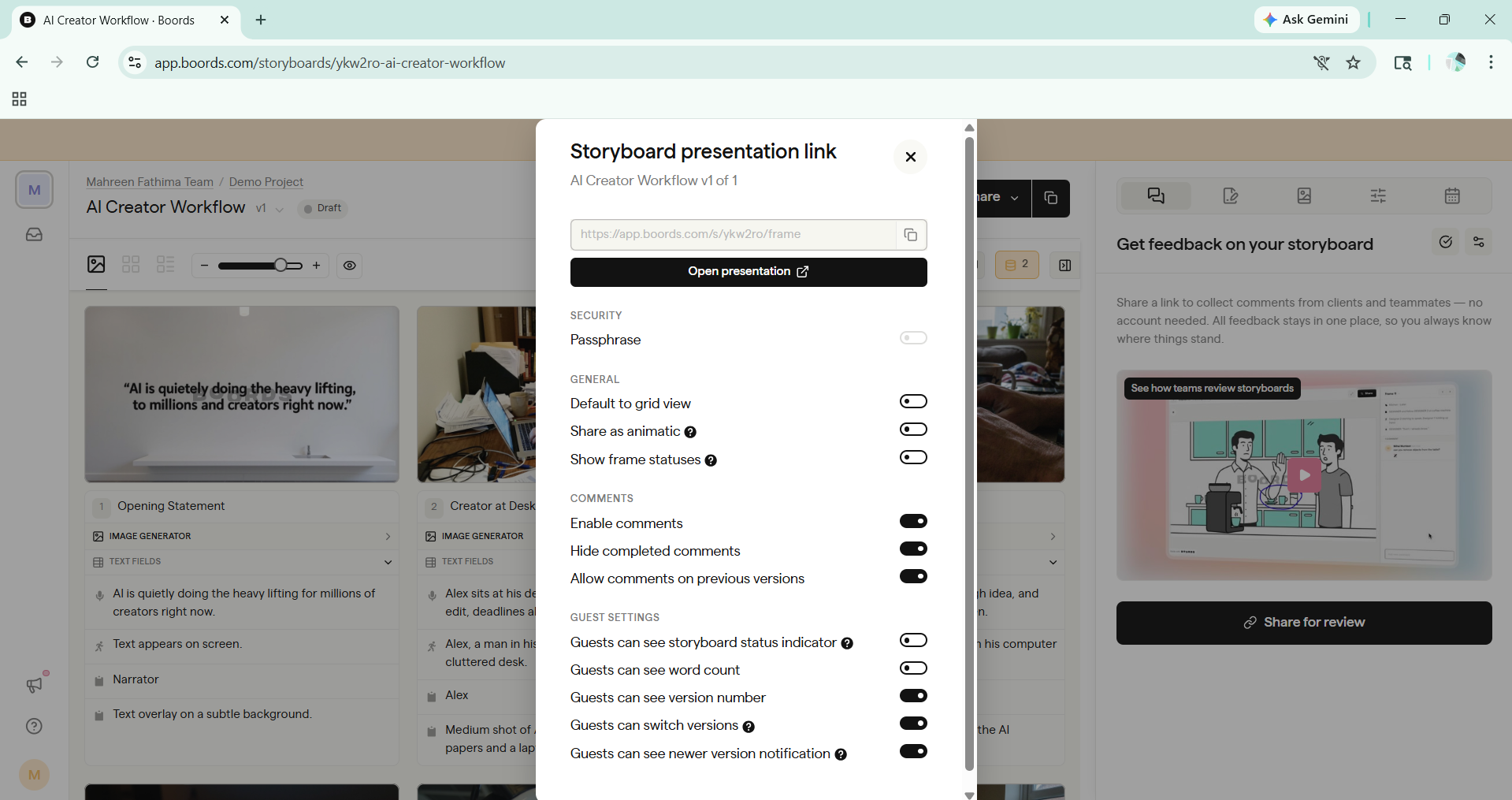
Expected behavior: Boords supports collaborative review workflows, including team commenting, feedback resolution, and approval tracking within the platform.
Test case: Image → Image
Input type: Image
Input used: Input artifact (Image): Storyboard — step4.png
Observed output: Output artifact (Image): Output — Screenshot 2026-05-05 173936.png
Input artifact: Input artifact (Image): Storyboard — step4.png
Output artifact: Output artifact (Image): Output — Screenshot 2026-05-05 173936.png
What changed: Image transformed into Image
Why it matters / Conclusion: Boords includes shareable collaboration tools for team review and feedback. Explore the interface above to see available review options.
Boords supports collaborative review workflows, including team commenting, feedback resolution, and approval tracking within the platform.
Pricing & Access
Plans as of March 2026. Tested on the Free plan
Pricing as of March 2026
Is This Right For You?
A side-by-side guide based on our hands-on testing.
Banner Preview
How the embed badge will look on your site

Embed HTML
Copy this code to your website source
Quick Integration Guide
- 1Copy the HTML code block above.
- 2Paste it into your site's HTML or CMS editor.
- 3Banner appears instantly on your page.
- 4Links back to your tool profile here.
Similar Tools
Discover more AI tools like Boords to enhance your workflow.
Comments (0)
Need a custom AI solution for this use case?
If you are looking to build a custom storyboarding, script-to-scene planning, or animatic workflow for your business or internal workflow, email us at contact@futuresmart.ai.
Found something inaccurate or missing? We try to keep our AI research accurate and useful. If you found outdated information, an issue, or have a suggestion, email us at collaborate@aidemos.com.