
Relevance AI Review: Tested 45 Cells (2026)
A no-code builder for business agents that can reason, retrieve documents, search the web, and wait for approval.
Strongest no-code agent builder we tested for plain-English business workflows.
- You want to build and test AI agents without writing code.
- You need agents that can reason through business logic and produce structured outputs.
- You work with internal documents and want grounded answers plus draft actions.
- You need CRM, email, HRMS, or ticketing integrations on the free tier.
Our take
Relevance AI was the strongest no-code agent builder we tested for turning plain-English instructions into working business workflows. It handled lead qualification, policy-grounded drafting, customer routing, live web research, and approval-gated email drafting without code; the main trade-off on the free tier is that CRM, email, HRMS, and ticketing handoffs still stay manual.
In-Depth Review
Our detailed analysis of Relevance AI — features, performance, and real-world testing.
Feature-by-Feature Breakdown
Prompt-Based Agent ConfigurationThe builder is genuinely no-code and easy to configure from plain-English instructions.▾
Feature tested: Prompt-Based Agent Configuration
Result: Passed
Verdict: The builder is genuinely no-code and easy to configure from plain-English instructions.
Expected behavior: Relevance AI lets you define an agent in plain English by specifying role, business rules, required outputs, and guardrails. In this test set it was used to configure lead qualification, leave-policy, customer routing, company research, and approval workflows without code, nodes, or API work.
Test case: Text prompt → Image
Input type: Text prompt
Input used: Input artifact (Text prompt): INPUT
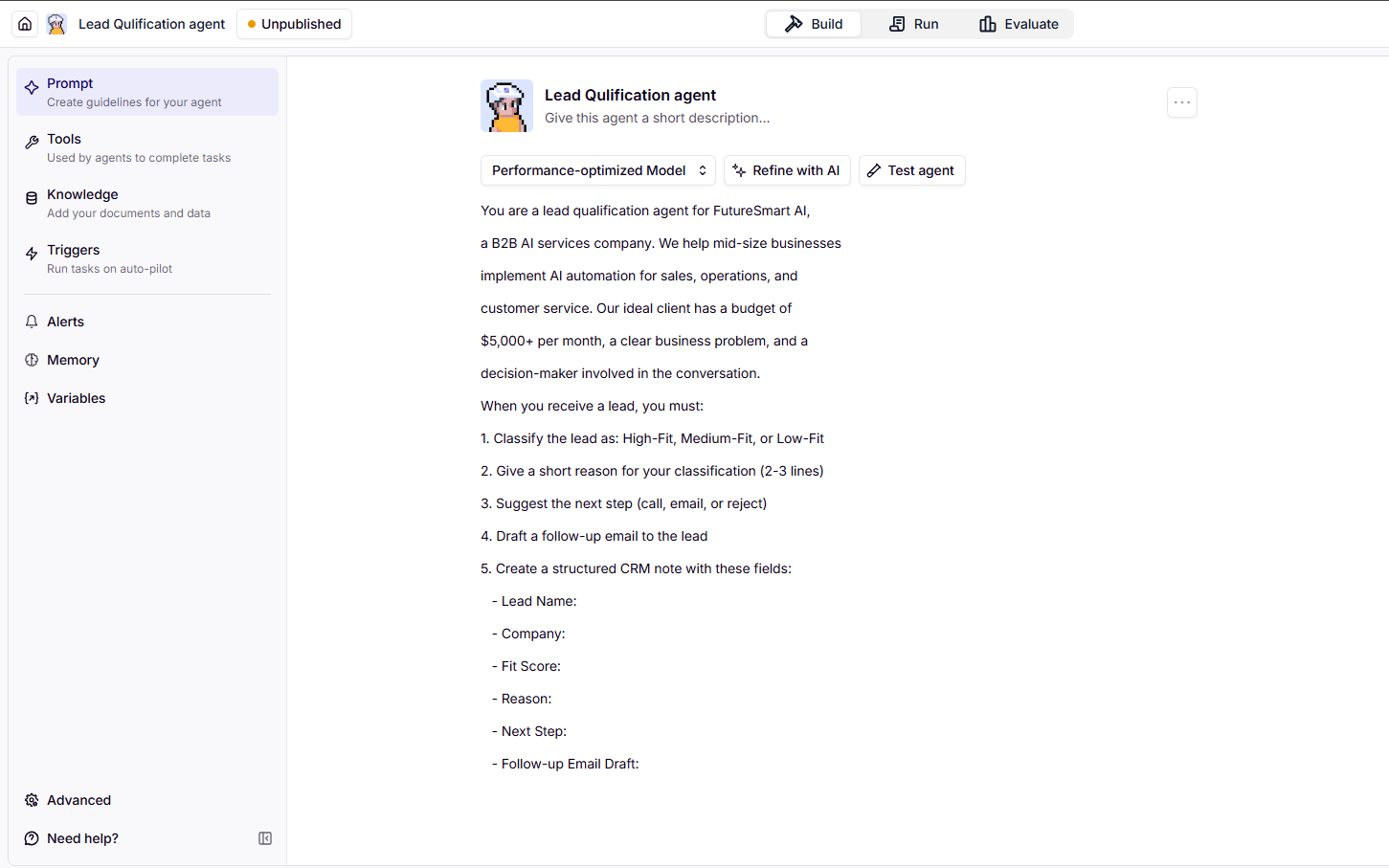
Observed output: Output artifact (Image): The Lead Qualification agent was configured entirely in the prompt editor with plain-English rules; no code, nodes, or API wiring were needed. — image-30.png
Input artifact: Input artifact (Text prompt): INPUT
Output artifact: Output artifact (Image): The Lead Qualification agent was configured entirely in the prompt editor with plain-English rules; no code, nodes, or API wiring were needed. — image-30.png
What changed: Text prompt transformed into Image
Test case: Text prompt → Image
Input type: Text prompt
Input used: Input artifact (Text prompt): INPUT
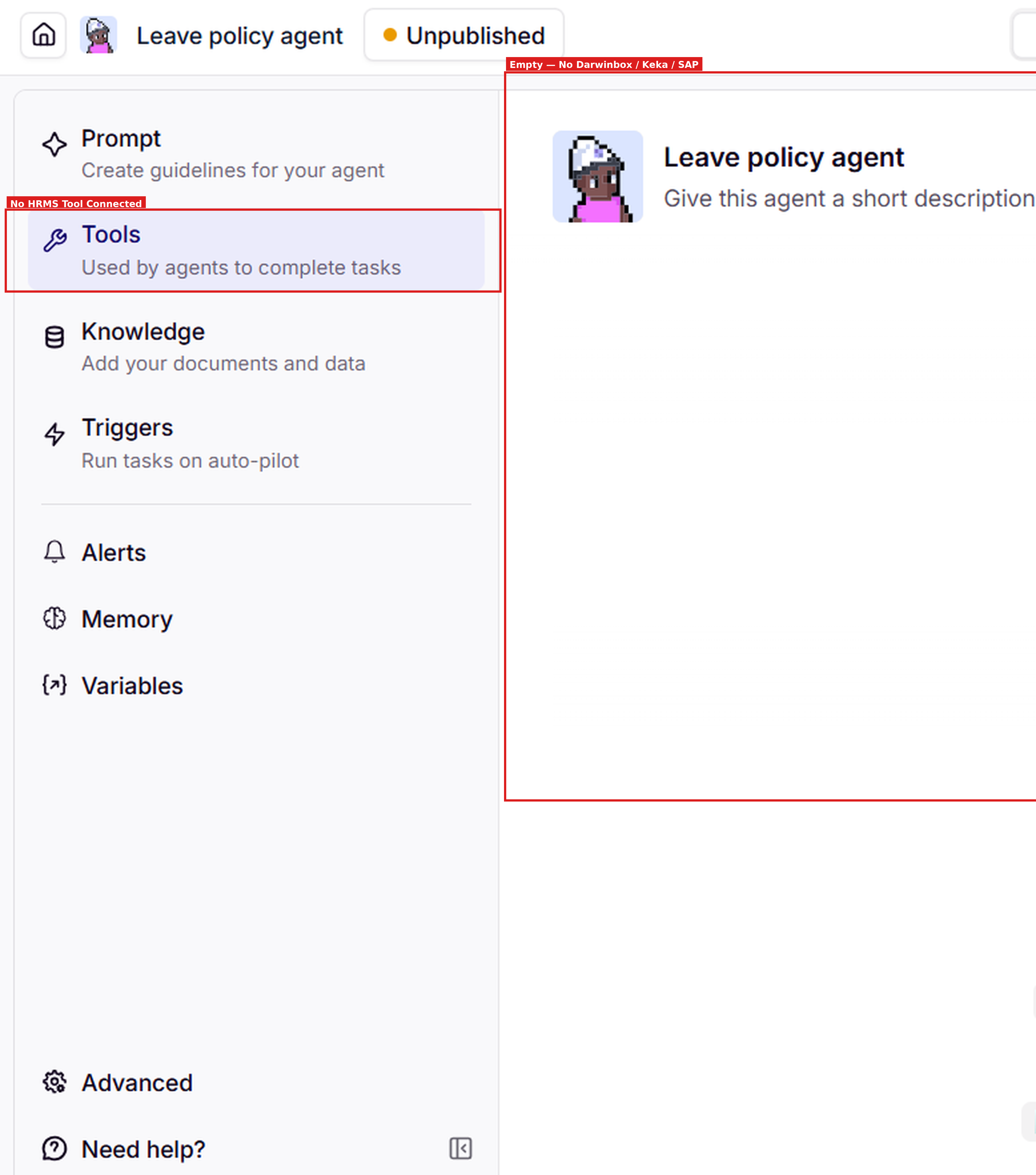
Observed output: Output artifact (Image): The Leave Policy agent was also set up through the builder in plain English, and the free tier showed no connected HRMS tool. — image-10.png
Input artifact: Input artifact (Text prompt): INPUT
Output artifact: Output artifact (Image): The Leave Policy agent was also set up through the builder in plain English, and the free tier showed no connected HRMS tool. — image-10.png
What changed: Text prompt transformed into Image
Why it matters / Conclusion: Strong no-code setup for business users; the free tier still does not include downstream integrations or persistent action storage.
Relevance AI lets you define an agent in plain English by specifying role, business rules, required outputs, and guardrails. In this test set it was used to configure lead qualification, leave-policy, customer routing, company research, and approval workflows without code, nodes, or API work.
Grounded Retrieval and ResearchThe agent grounded its policy answer in the uploaded PDF and did not hallucinate policy facts.▾
Feature tested: Grounded Retrieval and Research
Result: Partial
Verdict: The agent grounded its policy answer in the uploaded PDF and did not hallucinate policy facts.
Expected behavior: Relevance AI can search source material, pull relevant facts, and synthesize them into a grounded response. In these tests it worked both on an uploaded leave-policy PDF and on live web research for Lenskart, including citations and action-ready summaries.
Test case: PDF document → Image
Input type: PDF document
Input used: Input artifact (PDF document): INPUT — FutureSmart-AI-Leave-Policy.pdf
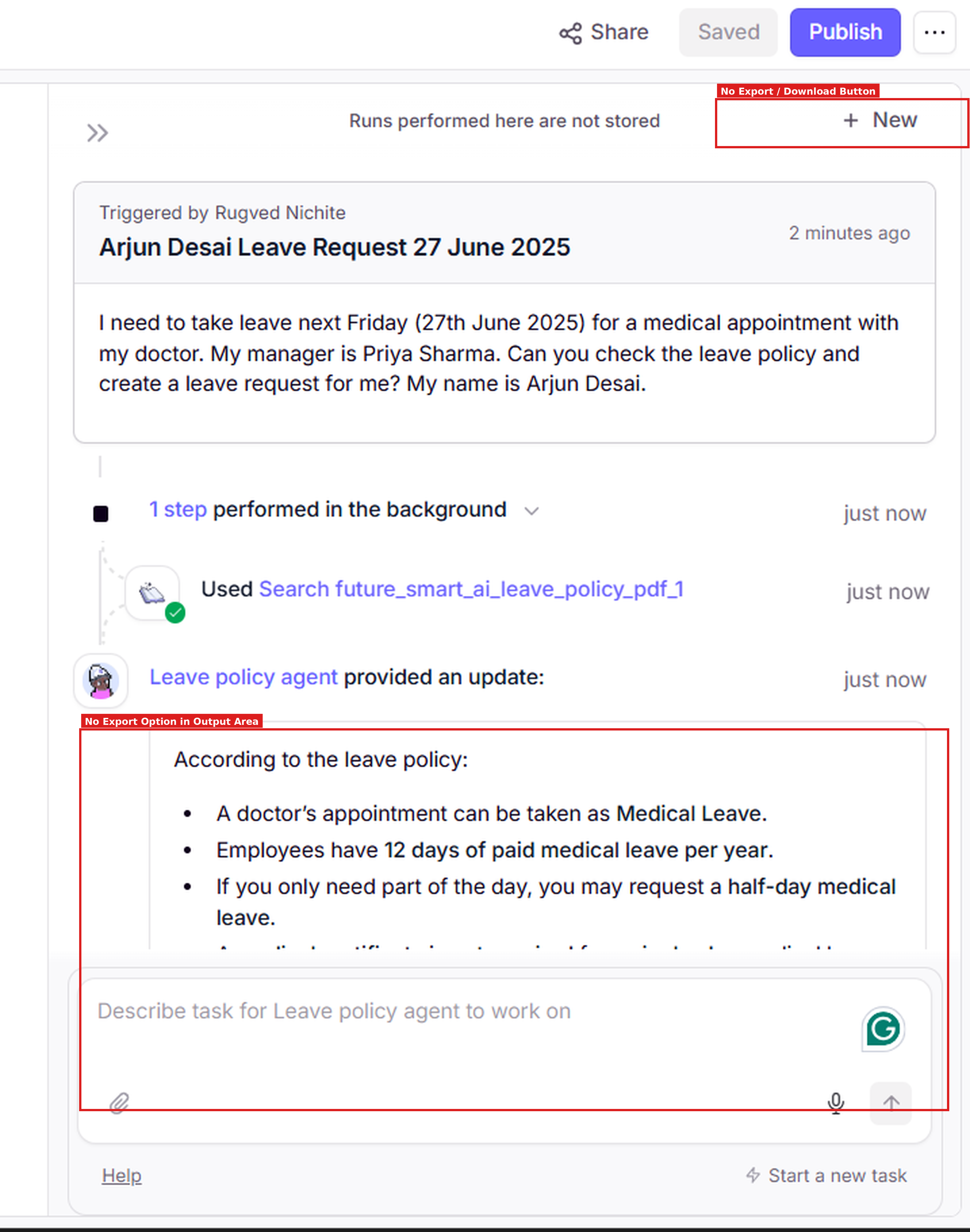
Observed output: Output artifact (Image): The run trace showed the agent using Search on the uploaded leave-policy PDF before responding. — image-9.png
Input artifact: Input artifact (PDF document): INPUT — FutureSmart-AI-Leave-Policy.pdf
Output artifact: Output artifact (Image): The run trace showed the agent using Search on the uploaded leave-policy PDF before responding. — image-9.png
What changed: PDF document transformed into Image
Test case: Text prompt → Image
Input type: Text prompt
Input used: Input artifact (Text prompt): INPUT
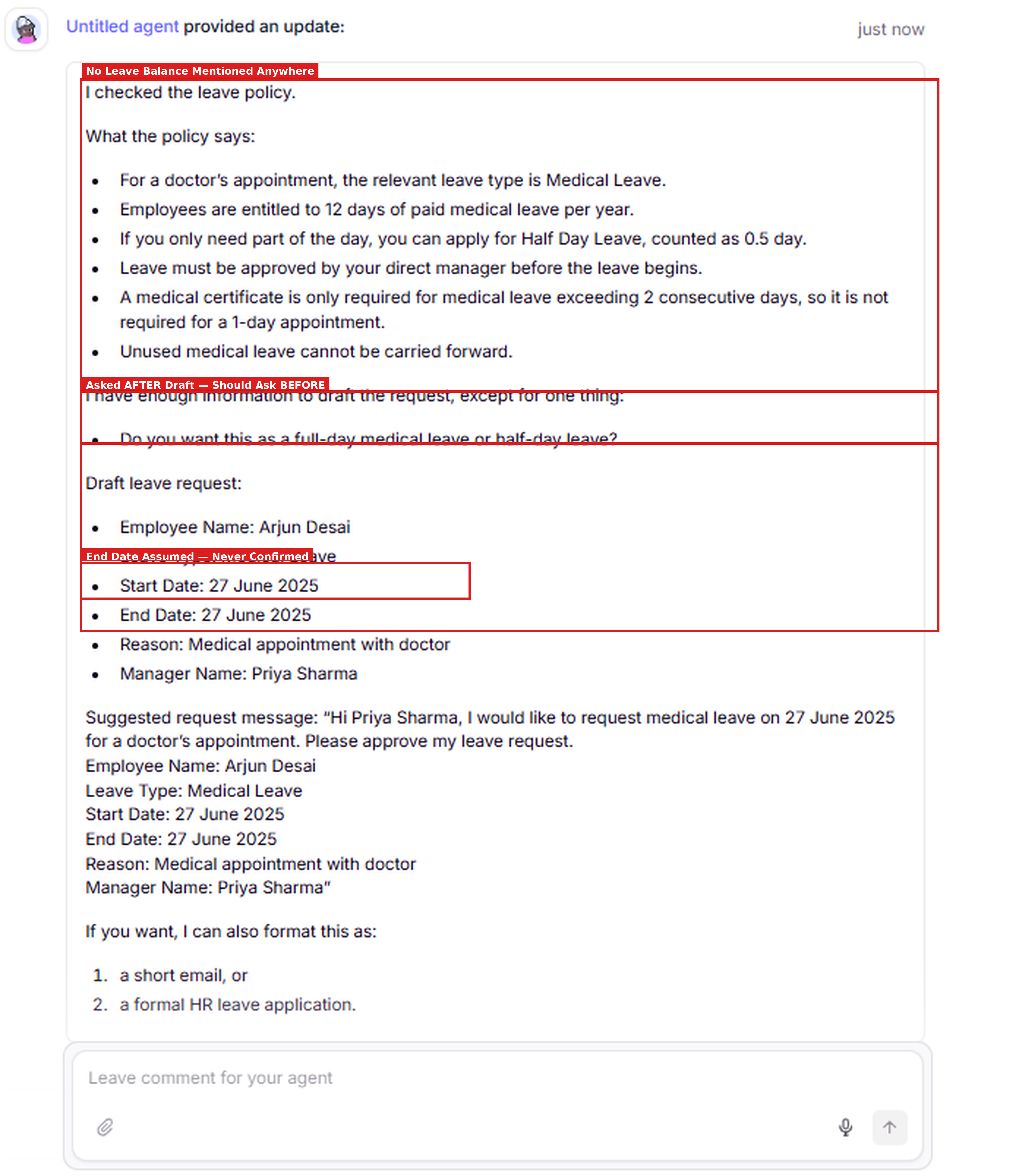
Observed output: Output artifact (Image): The response used the policy facts correctly, drafted the leave request, and asked for full-day versus half-day confirmation, but it came after drafting and did not mention leave balance. — image-11.png
Input artifact: Input artifact (Text prompt): INPUT
Output artifact: Output artifact (Image): The response used the policy facts correctly, drafted the leave request, and asked for full-day versus half-day confirmation, but it came after drafting and did not mention leave balance. — image-11.png
What changed: Text prompt transformed into Image
Test case: Text prompt → Image
Input type: Text prompt
Input used: Input artifact (Text prompt): INPUT
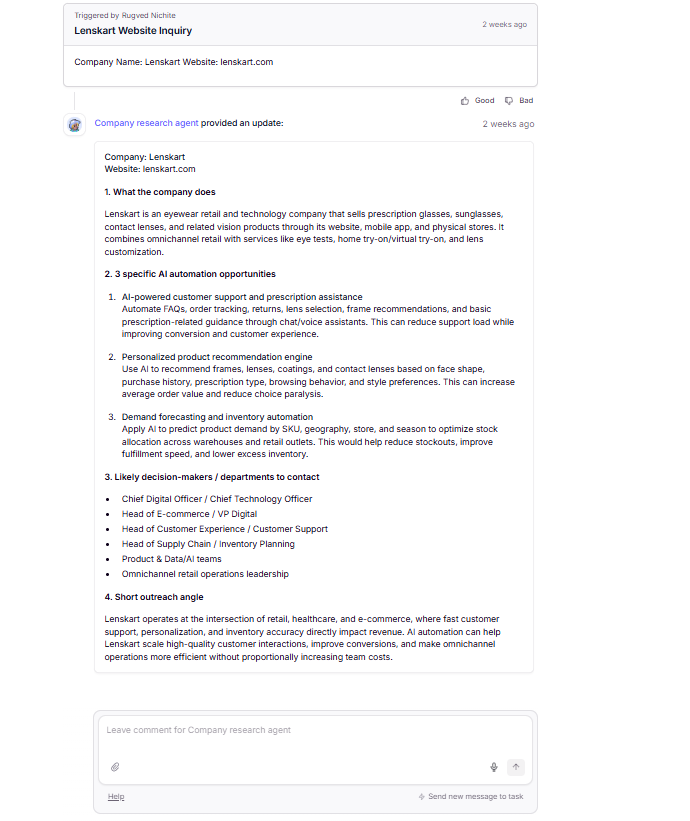
Observed output: Output artifact (Image): The agent produced a grounded company summary for Lenskart, listed AI automation opportunities, named likely decision-makers, and cited real sources. — image-15.png
Input artifact: Input artifact (Text prompt): INPUT
Output artifact: Output artifact (Image): The agent produced a grounded company summary for Lenskart, listed AI automation opportunities, named likely decision-makers, and cited real sources. — image-15.png
What changed: Text prompt transformed into Image
Test case: Text prompt → Image
Input type: Text prompt
Input used: Input artifact (Text prompt): INPUT
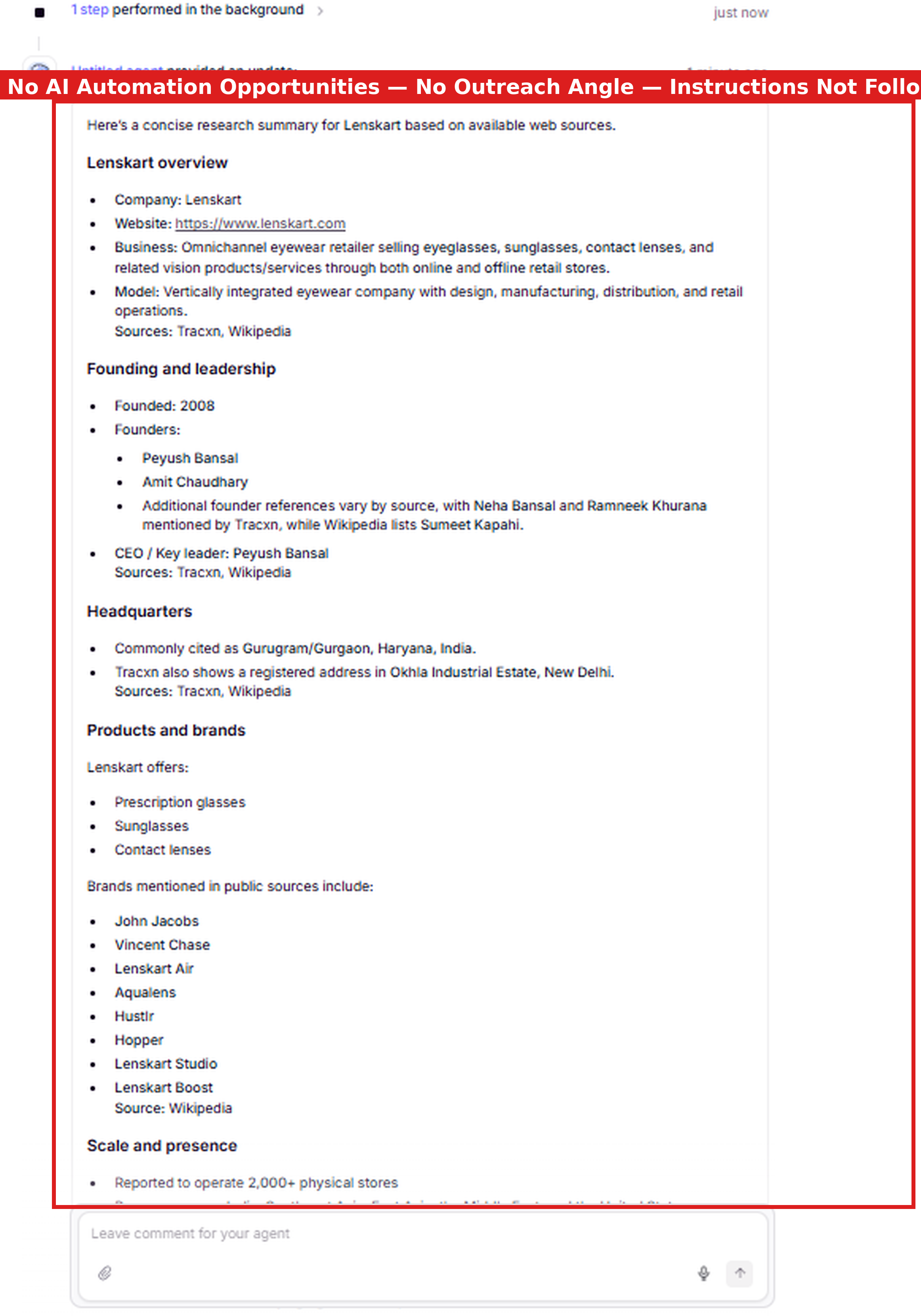
Observed output: Output artifact (Image): A separate research run returned a general company overview but omitted the requested AI opportunities, outreach angle, and decision-makers, showing that instruction following can slip on multi-part research tasks. — image-18.png
Input artifact: Input artifact (Text prompt): INPUT
Output artifact: Output artifact (Image): A separate research run returned a general company overview but omitted the requested AI opportunities, outreach angle, and decision-makers, showing that instruction following can slip on multi-part research tasks. — image-18.png
What changed: Text prompt transformed into Image
Why it matters / Conclusion: Reliable grounding with visible retrieval; the factual answer was solid, but the clarification timing was not ideal.
Relevance AI can search source material, pull relevant facts, and synthesize them into a grounded response. In these tests it worked both on an uploaded leave-policy PDF and on live web research for Lenskart, including citations and action-ready summaries.
Structured Fielded OutputThe platform can produce multi-field business outputs in one pass.▾
Feature tested: Structured Fielded Output
Result: Passed
Verdict: The platform can produce multi-field business outputs in one pass.
Expected behavior: Relevance AI can return labels, reasons, next steps, drafted emails, and structured notes in a copy-ready format. In this research it was exercised on lead qualification and customer routing outputs that were already organized for downstream business use.
Test case: Text prompt → Image
Input type: Text prompt
Input used: Input artifact (Text prompt): INPUT
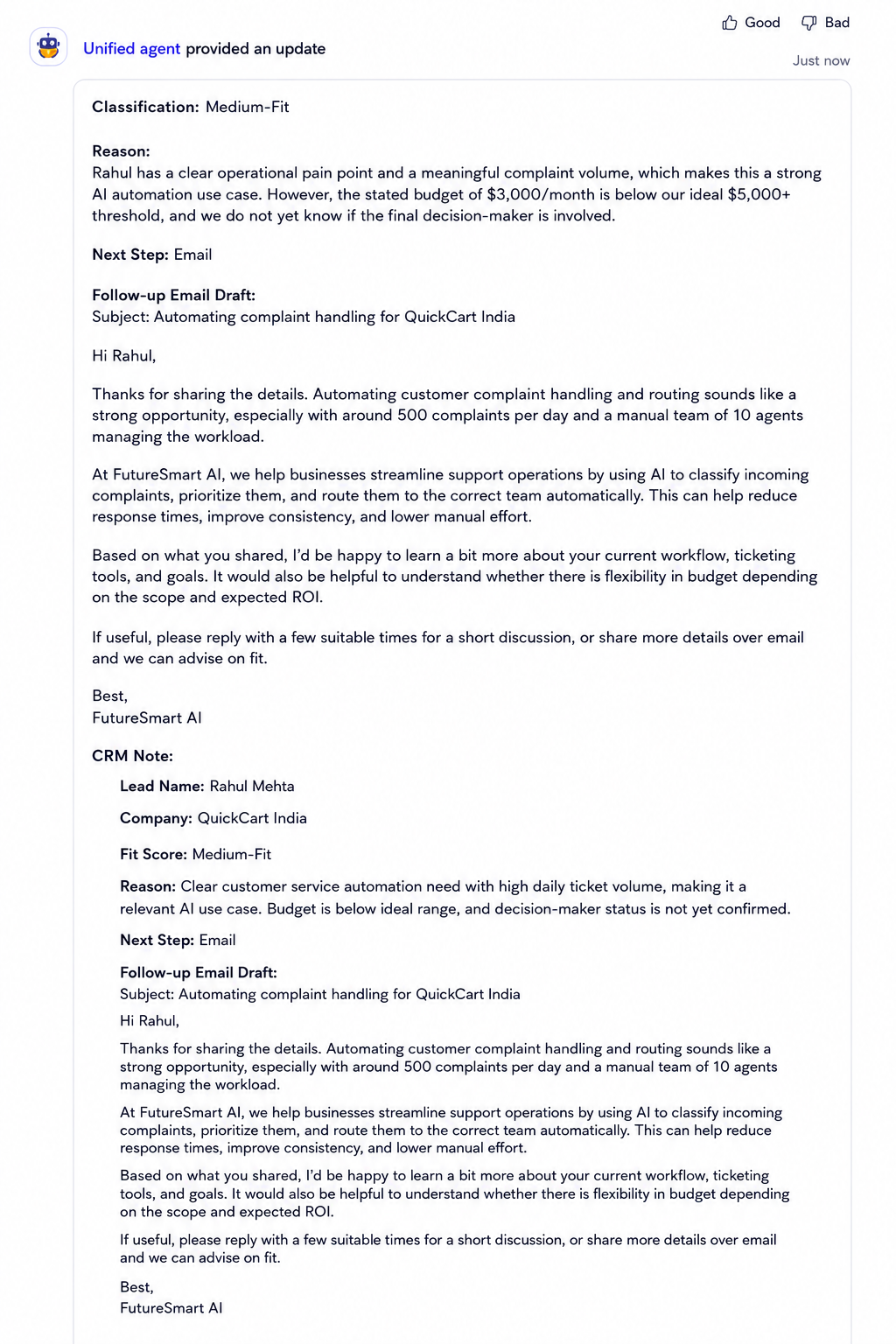
Observed output: Output artifact (Image): The lead-qualification run returned a Medium-Fit classification, business reasoning, next step, follow-up email draft, and CRM note in one pass. — image-3.png
Input artifact: Input artifact (Text prompt): INPUT
Output artifact: Output artifact (Image): The lead-qualification run returned a Medium-Fit classification, business reasoning, next step, follow-up email draft, and CRM note in one pass. — image-3.png
What changed: Text prompt transformed into Image
Test case: Text prompt → Image
Input type: Text prompt
Input used: Input artifact (Text prompt): INPUT
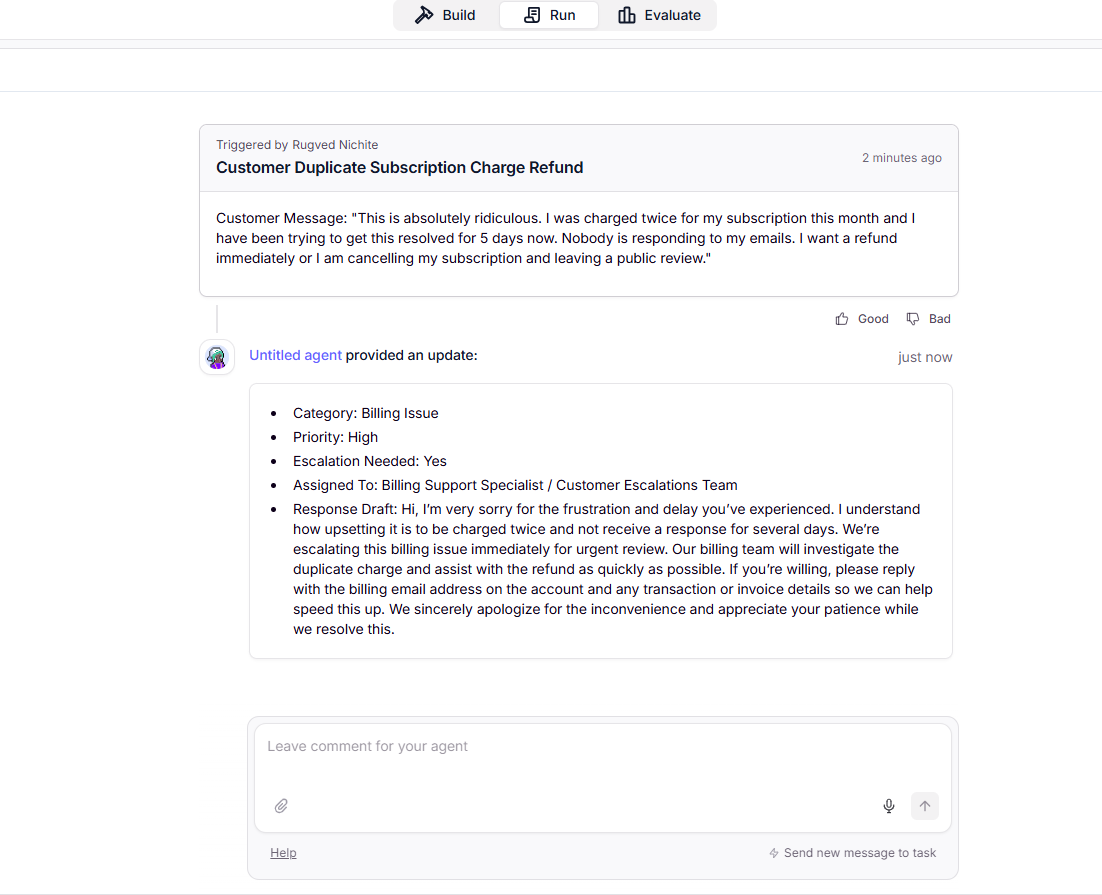
Observed output: Output artifact (Image): The routing run returned category, priority, escalation decision, assigned team, and an empathetic response draft for the duplicate-charge complaint. — image-25.png
Input artifact: Input artifact (Text prompt): INPUT
Output artifact: Output artifact (Image): The routing run returned category, priority, escalation decision, assigned team, and an empathetic response draft for the duplicate-charge complaint. — image-25.png
What changed: Text prompt transformed into Image
Why it matters / Conclusion: Strong fielded outputs across sales and support workflows, but the free tier still lacks export/download and some metadata fields.
Relevance AI can return labels, reasons, next steps, drafted emails, and structured notes in a copy-ready format. In this research it was exercised on lead qualification and customer routing outputs that were already organized for downstream business use.
Human Approval GateThe approval loop is genuine and persists across turns.▾
Feature tested: Human Approval Gate
Result: Passed
Verdict: The approval loop is genuine and persists across turns.
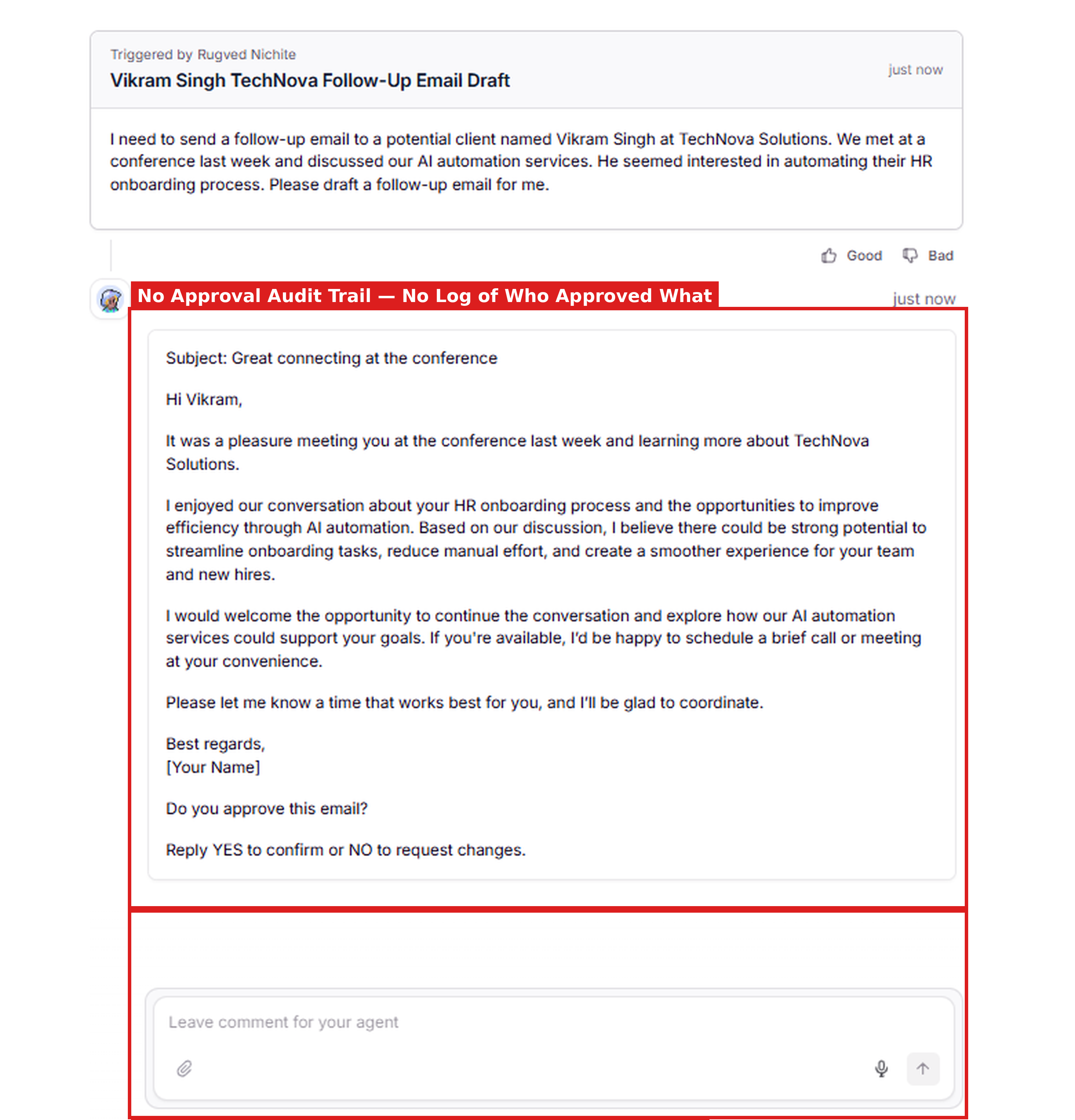
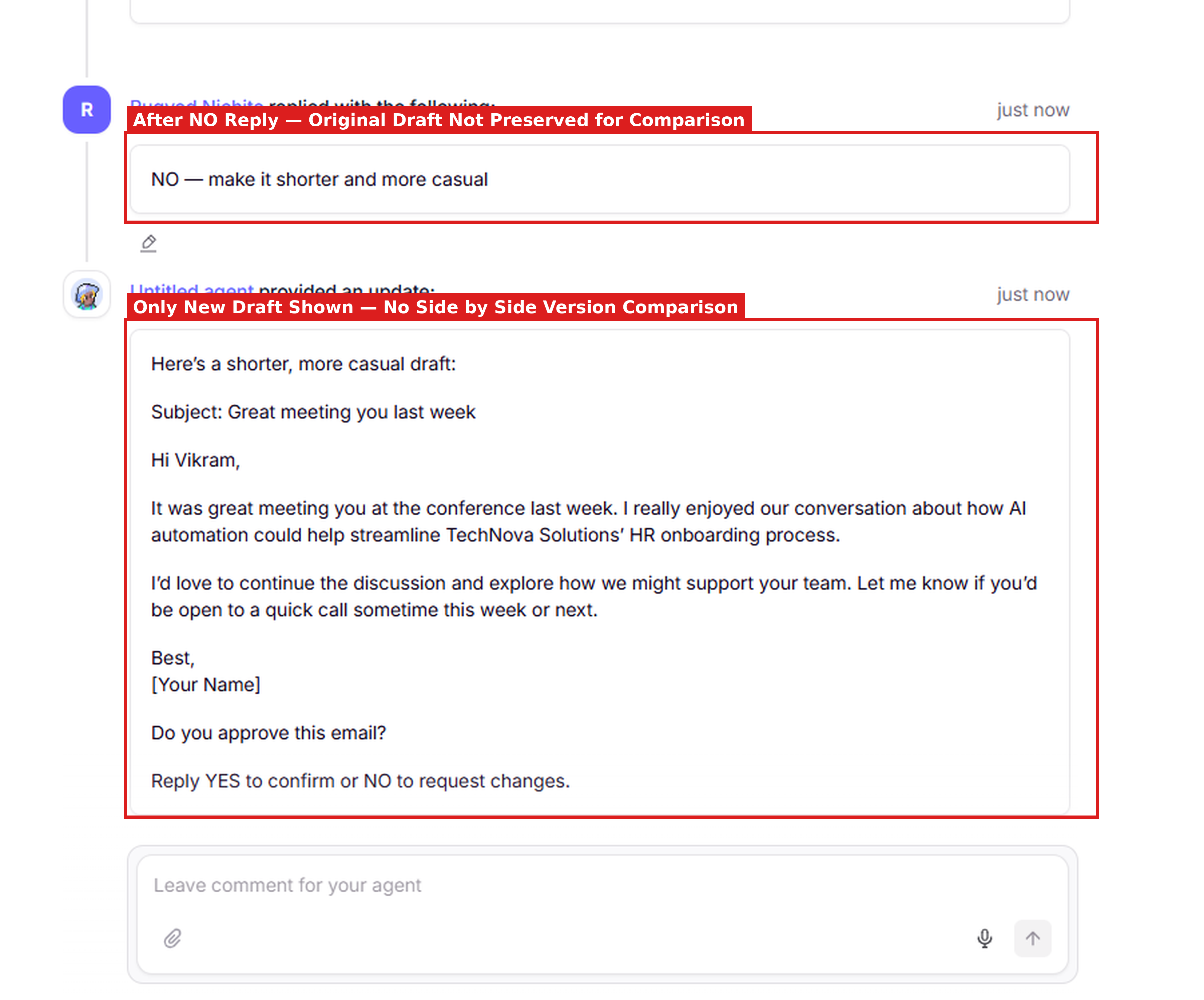
Expected behavior: Relevance AI can pause after drafting an action, ask for explicit YES/NO approval, and continue the loop based on the response. In the approval workflow it revised the email after a NO reply and kept waiting for confirmation instead of finalizing automatically.
Test case: Text prompt → Image
Input type: Text prompt
Input used: Input artifact (Text prompt): INPUT
Observed output: Output artifact (Image): The agent drafted the email and explicitly asked for YES or NO approval before treating it as final. — image-22.png
Input artifact: Input artifact (Text prompt): INPUT
Output artifact: Output artifact (Image): The agent drafted the email and explicitly asked for YES or NO approval before treating it as final. — image-22.png
What changed: Text prompt transformed into Image
Test case: Text prompt → Image
Input type: Text prompt
Input used: Input artifact (Text prompt): INPUT
Observed output: Output artifact (Image): After a NO reply, the agent produced a shorter, more casual redraft and asked for approval again. — image-23.png
Input artifact: Input artifact (Text prompt): INPUT
Output artifact: Output artifact (Image): After a NO reply, the agent produced a shorter, more casual redraft and asked for approval again. — image-23.png
What changed: Text prompt transformed into Image
Why it matters / Conclusion: The approval gate is persistent and usable, but the free tier does not provide a durable approval audit trail or actual email sending.
Relevance AI can pause after drafting an action, ask for explicit YES/NO approval, and continue the loop based on the response. In the approval workflow it revised the email after a NO reply and kept waiting for confirmation instead of finalizing automatically.
Pricing & Access
Free tier works for building and testing; paid plans unlock broader integrations and audit features.
Pricing checked June 2026. We re-check quarterly.
Featured in Rankings
Independent rankings where Relevance AI was tested and rated.
Banner Preview
How the embed badge will look on your site

Embed HTML
Copy this code to your website source
Quick Integration Guide
- 1Copy the HTML code block above.
- 2Paste it into your site's HTML or CMS editor.
- 3Banner appears instantly on your page.
- 4Links back to your tool profile here.
Similar Tools
Discover more AI tools like Relevance AI to enhance your workflow.
Comments (0)
Need a custom AI solution for this use case?
If you are looking to build a custom business agent, workflow automation, or approval-gated assistant system for your business or internal workflow, email us at contact@futuresmart.ai.
Found something inaccurate or missing? We try to keep our AI research accurate and useful. If you found outdated information, an issue, or have a suggestion, email us at collaborate@aidemos.com.