
Dust Review: Internal Workflow Agent Builder Tested (2026)
Strongest for no-code agents grounded in internal documents, structured outputs, and approval gates, but weaker for live web research and free-tier integrations.
Strongest on internal workflows, not a fully connected production stack
- You want a no-code agent builder that stays grounded in uploaded internal documents or a permanent knowledge base.
- You need structured outputs such as classifications, CRM notes, routing decisions, or approval summaries.
- You want approval-gated drafting that can pause before risky actions.
- You need dependable live web research in every session.
Our take
Dust is the strongest no-code agent builder in this test set for grounded internal workflows, structured outputs, and approval-gated drafting. It passed 4 of 5 anchor tasks, saved a CRM note as a real file, and caught a date inconsistency in the leave workflow. The tradeoff is that live web research was unavailable in-session and free-tier CRM/email/HRMS integrations were missing, so it feels more like a powerful internal reasoning layer than a fully connected production system.
In-Depth Review
Our detailed analysis of Dust — features, performance, and real-world testing.
Feature-by-Feature Breakdown
Knowledge-grounded drafting from internal documents▾
Feature tested: Knowledge-grounded drafting from internal documents
Result: Passed
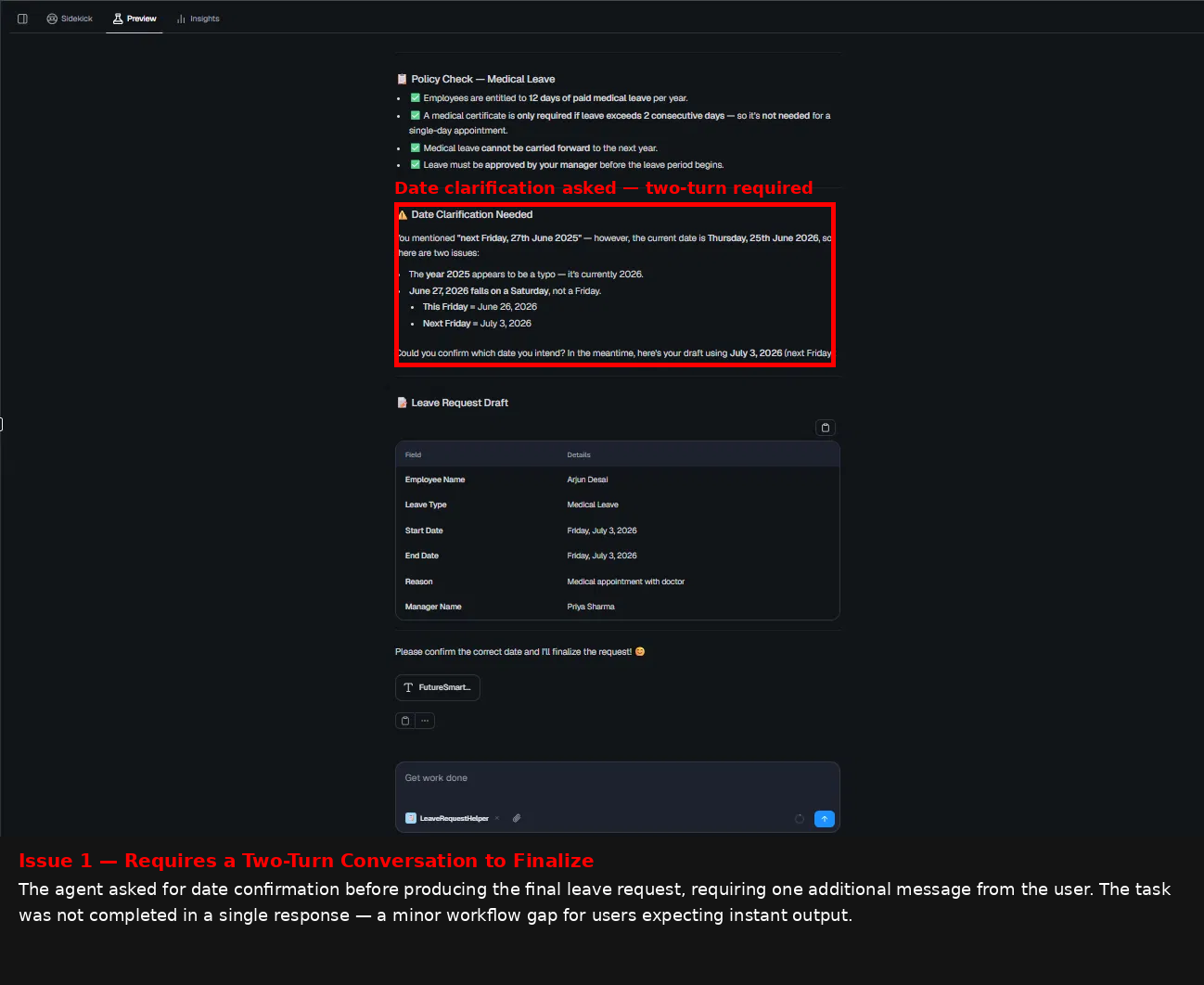
Expected behavior: Dust can read a pre-loaded policy document, answer questions about it, and turn that grounding into a usable leave-request draft. In the leave-policy test it surfaced the medical-leave rules accurately, flagged the requested date as inconsistent, and asked for confirmation instead of inventing details.
Test case: Text prompt → Image
Input type: Text prompt
Input used: Input artifact (Text prompt): INPUT
Observed output: Output artifact (Image): Dust flagged the date mismatch in the leave request, explained the corrected Friday options, and drafted a leave request for Arjun Desai instead of inventing policy details. — image-8.png
Input artifact: Input artifact (Text prompt): INPUT
Output artifact: Output artifact (Image): Dust flagged the date mismatch in the leave request, explained the corrected Friday options, and drafted a leave request for Arjun Desai instead of inventing policy details. — image-8.png
What changed: Text prompt transformed into Image
Test case: Text prompt → Image
Input type: Text prompt
Input used: Input artifact (Text prompt): INPUT
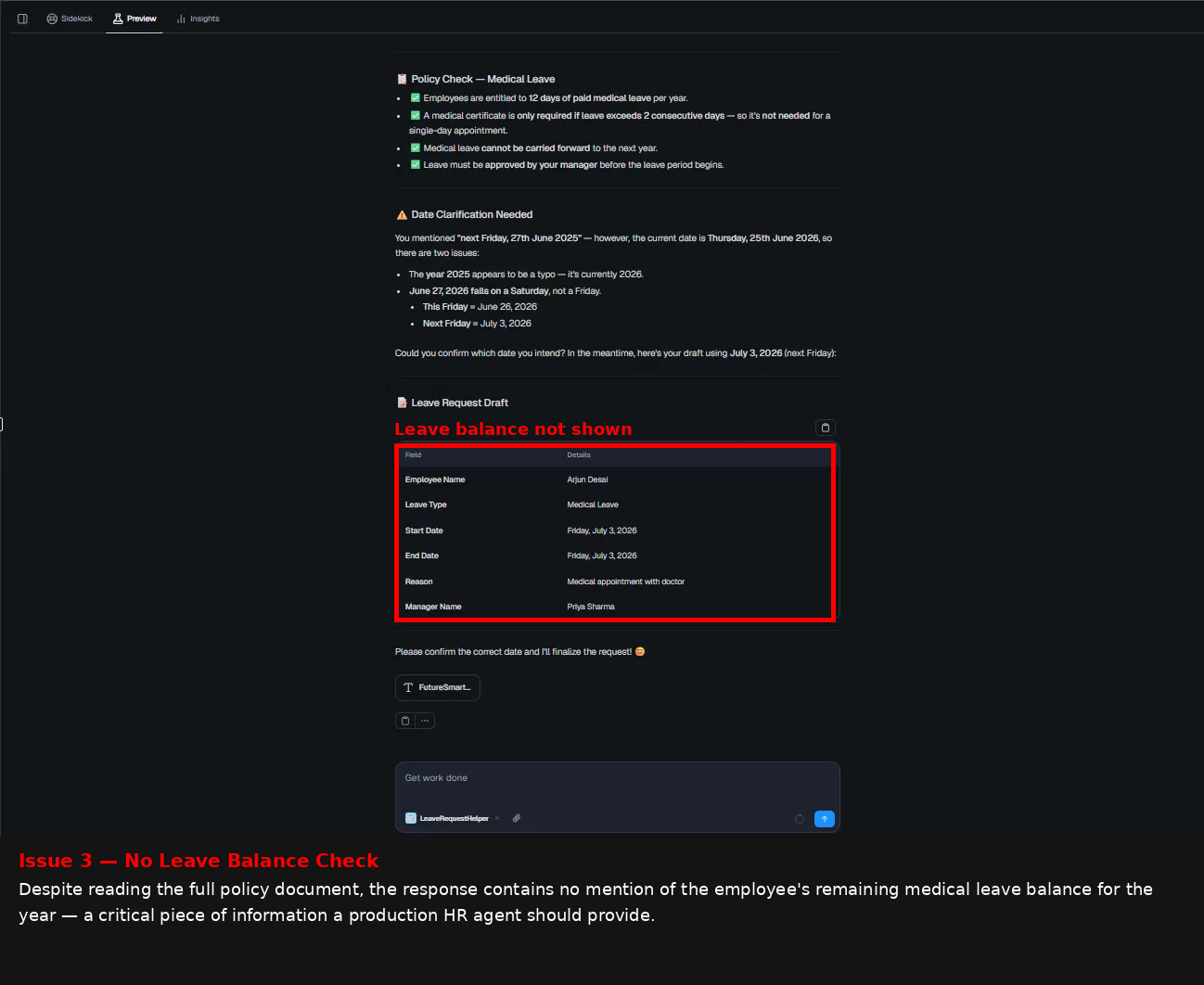
Observed output: Output artifact (Image): Dust kept the policy grounding accurate, but the draft still showed that leave balance was not surfaced in the output. — image-10.png
Input artifact: Input artifact (Text prompt): INPUT
Output artifact: Output artifact (Image): Dust kept the policy grounding accurate, but the draft still showed that leave balance was not surfaced in the output. — image-10.png
What changed: Text prompt transformed into Image
Why it matters / Conclusion: Best-in-class document grounding, with one clear gap: the draft still omitted leave balance and needed a clarification turn for the date.
Dust can read a pre-loaded policy document, answer questions about it, and turn that grounding into a usable leave-request draft. In the leave-policy test it surfaced the medical-leave rules accurately, flagged the requested date as inconsistent, and asked for confirmation instead of inventing details.
Lead qualification and CRM note generation▾
Feature tested: Lead qualification and CRM note generation
Result: Passed
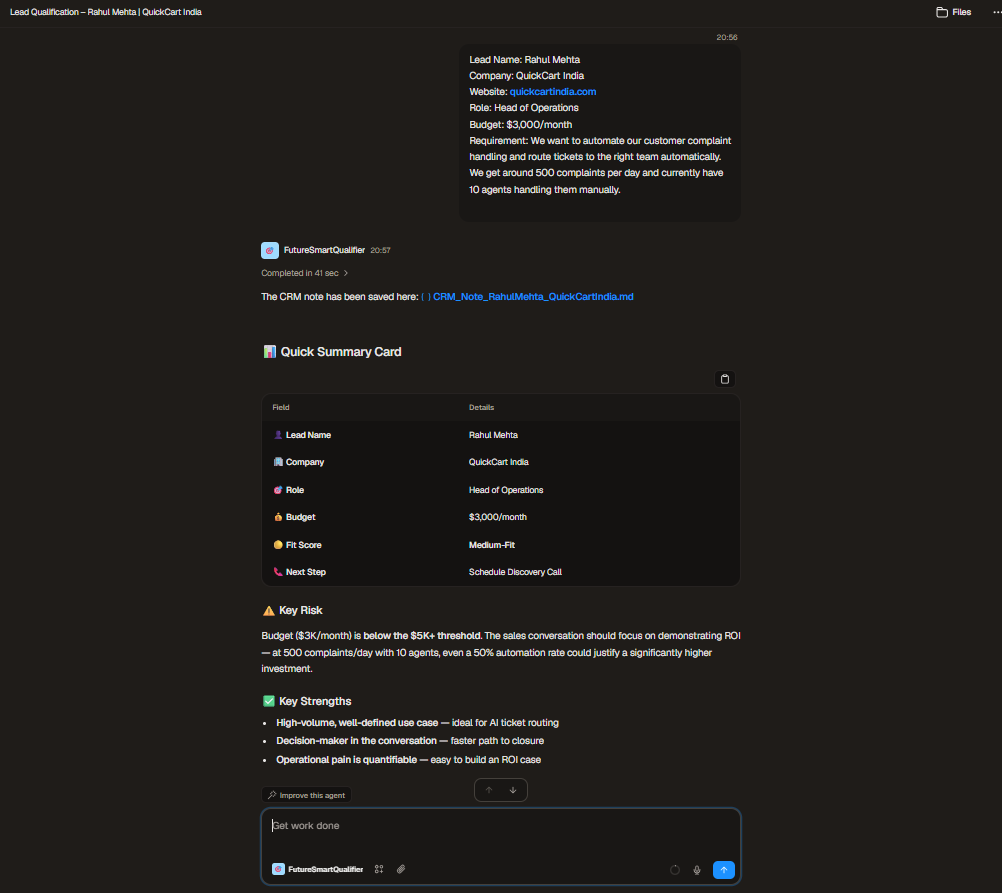
Expected behavior: Dust can classify inbound leads, explain fit, recommend the next step, draft follow-up copy, and produce a structured CRM note with business context. In the QuickCart test it labeled the lead Medium-Fit, tied the decision to budget and complaint volume, and added ROI-oriented sales framing.
Test case: Text prompt → Image
Input type: Text prompt
Input used: Input artifact (Text prompt): INPUT
Observed output: Output artifact (Image): Dust classified Rahul Mehta as Medium-Fit, produced a structured CRM-style summary, and saved the note as part of the workspace output. — image-3.png
Input artifact: Input artifact (Text prompt): INPUT
Output artifact: Output artifact (Image): Dust classified Rahul Mehta as Medium-Fit, produced a structured CRM-style summary, and saved the note as part of the workspace output. — image-3.png
What changed: Text prompt transformed into Image
Test case: Text prompt → Image
Input type: Text prompt
Input used: Input artifact (Text prompt): INPUT
Observed output: Output artifact (Image): The lead workflow exposed a minor gap: the follow-up email sign-off stayed as '[Your Name]' instead of auto-filling the sender identity from the workspace profile. — image-3.png
Input artifact: Input artifact (Text prompt): INPUT
Output artifact: Output artifact (Image): The lead workflow exposed a minor gap: the follow-up email sign-off stayed as '[Your Name]' instead of auto-filling the sender identity from the workspace profile. — image-3.png
What changed: Text prompt transformed into Image
Why it matters / Conclusion: Very strong structured sales output, but the follow-up sign-off did not auto-fill the sender name.
Dust can classify inbound leads, explain fit, recommend the next step, draft follow-up copy, and produce a structured CRM note with business context. In the QuickCart test it labeled the lead Medium-Fit, tied the decision to budget and complaint volume, and added ROI-oriented sales framing.
Support triage and escalation analysis▾
Feature tested: Support triage and escalation analysis
Result: Partial
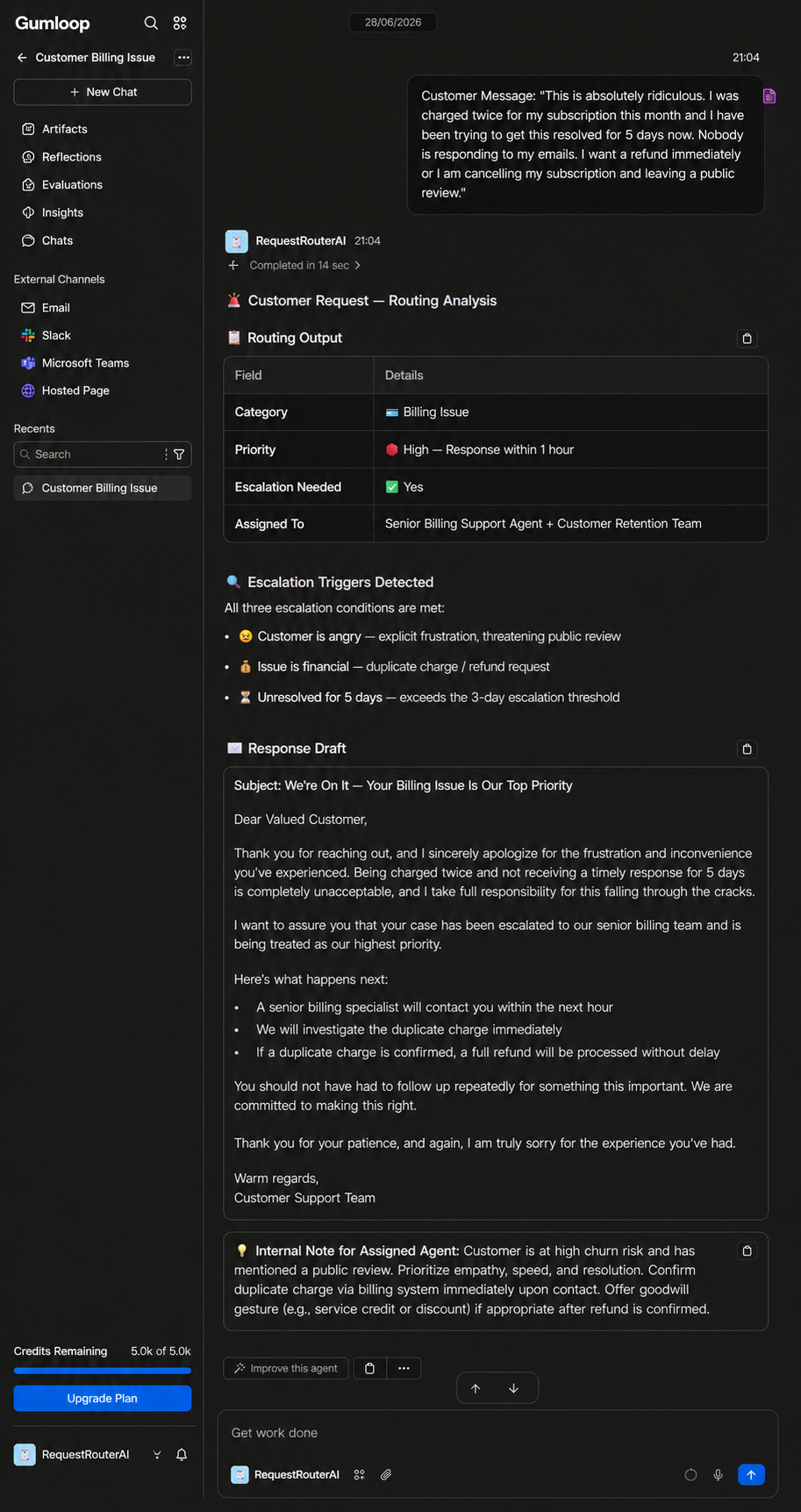
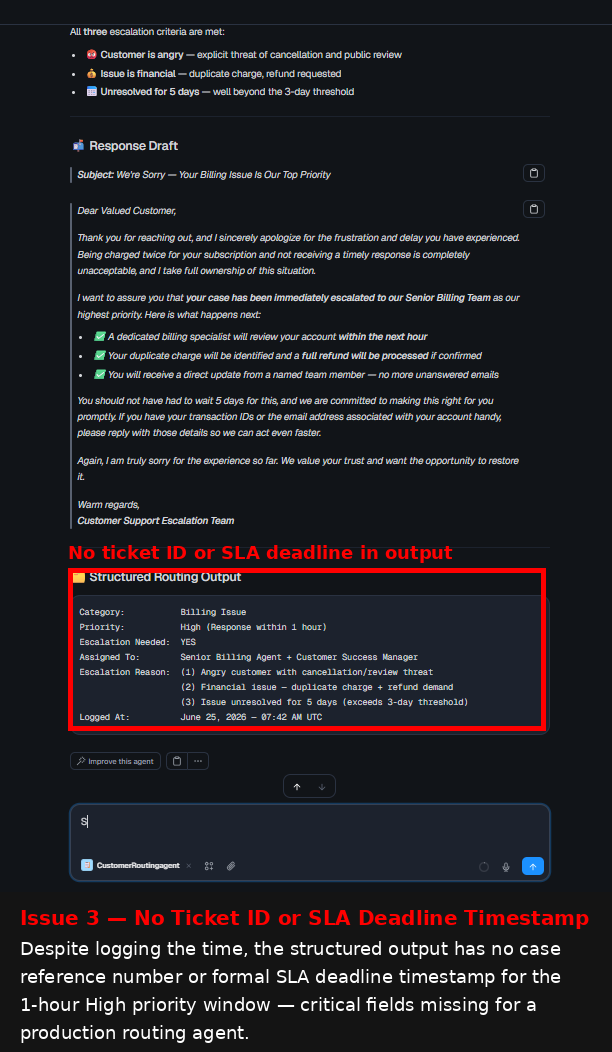
Expected behavior: Dust can classify support complaints, assign priority, identify escalation triggers, and produce structured routing output. In the billing test it recognized an angry duplicate-charge complaint as High priority, surfaced escalation triggers, and drafted an empathetic response.
Test case: Text prompt → Image
Input type: Text prompt
Input used: Input artifact (Text prompt): INPUT
Observed output: Output artifact (Image): Dust classified the message as a billing issue, set it to High priority with a 1-hour response window, and surfaced all three escalation triggers in a structured routing output. — image-11.png
Input artifact: Input artifact (Text prompt): INPUT
Output artifact: Output artifact (Image): Dust classified the message as a billing issue, set it to High priority with a 1-hour response window, and surfaced all three escalation triggers in a structured routing output. — image-11.png
What changed: Text prompt transformed into Image
Test case: Text prompt → Image
Input type: Text prompt
Input used: Input artifact (Text prompt): INPUT
Observed output: Output artifact (Image): The structured routing output was strong, but the assigned team label drifted from the instruction map and the output did not include a ticket ID or SLA deadline timestamp. — image-14.png
Input artifact: Input artifact (Text prompt): INPUT
Output artifact: Output artifact (Image): The structured routing output was strong, but the assigned team label drifted from the instruction map and the output did not include a ticket ID or SLA deadline timestamp. — image-14.png
What changed: Text prompt transformed into Image
Why it matters / Conclusion: Accurate routing logic and strong escalation reasoning, but exact label matching is not perfectly reliable.
Dust can classify support complaints, assign priority, identify escalation triggers, and produce structured routing output. In the billing test it recognized an angry duplicate-charge complaint as High priority, surfaced escalation triggers, and drafted an empathetic response.
Approval-gated drafting with stateful context▾
Feature tested: Approval-gated drafting with stateful context
Result: Passed
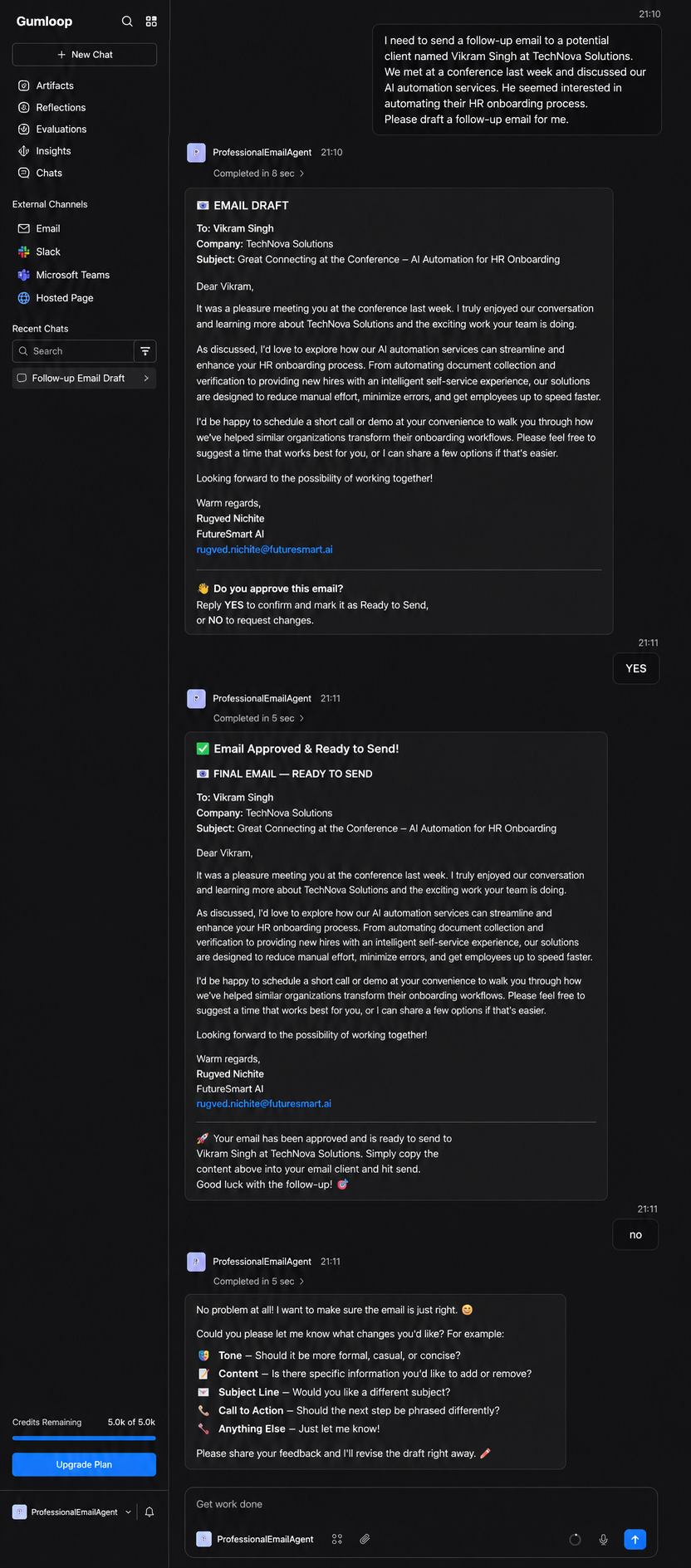
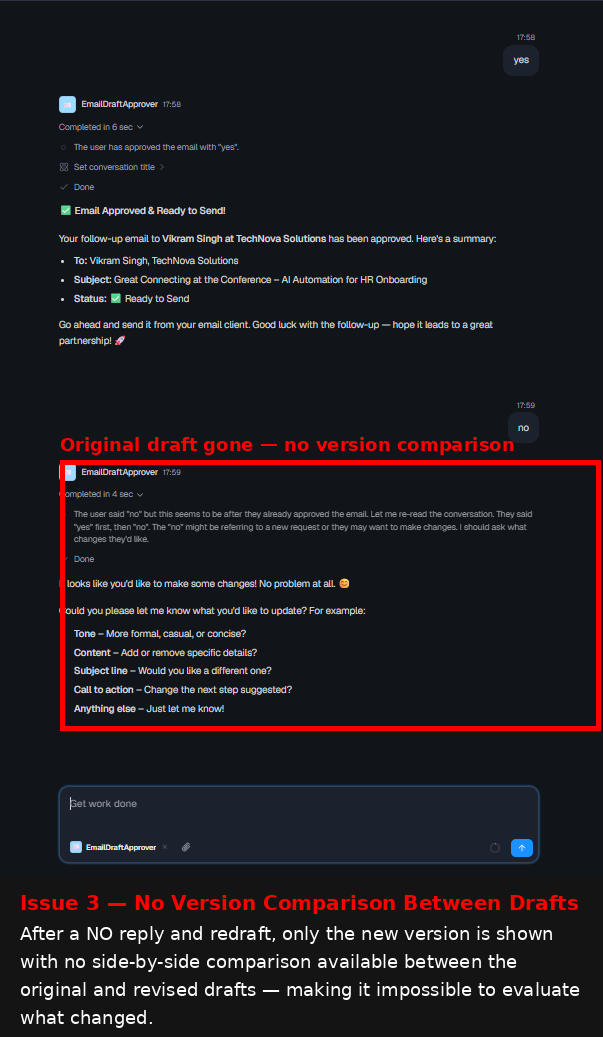
Expected behavior: Dust can draft an email, pause for explicit approval, and remember approval state across turns. In the follow-up email test it produced a full draft, waited for YES, and then treated a later NO as a change request rather than ignoring prior approval.
Test case: Text prompt → Image
Input type: Text prompt
Input used: Input artifact (Text prompt): INPUT
Observed output: Output artifact (Image): Dust drafted the email, asked for explicit approval in the required YES/NO format, and marked the message as ready only after approval was requested. — image-19.png
Input artifact: Input artifact (Text prompt): INPUT
Output artifact: Output artifact (Image): Dust drafted the email, asked for explicit approval in the required YES/NO format, and marked the message as ready only after approval was requested. — image-19.png
What changed: Text prompt transformed into Image
Test case: Text prompt → Image
Input type: Text prompt
Input used: Input artifact (Text prompt): INPUT
Observed output: Output artifact (Image): After a YES approval, Dust produced a ready-to-send summary; when a later NO arrived, it asked what changes were needed instead of blindly redrafting. — image-22.png
Input artifact: Input artifact (Text prompt): INPUT
Output artifact: Output artifact (Image): After a YES approval, Dust produced a ready-to-send summary; when a later NO arrived, it asked what changes were needed instead of blindly redrafting. — image-22.png
What changed: Text prompt transformed into Image
Why it matters / Conclusion: One of the best approval-gate implementations in the set, but the approval record does not persist beyond the live chat session.
Dust can draft an email, pause for explicit approval, and remember approval state across turns. In the follow-up email test it produced a full draft, waited for YES, and then treated a later NO as a change request rather than ignoring prior approval.
Company research brief generation▾
Feature tested: Company research brief generation
Result: Partial
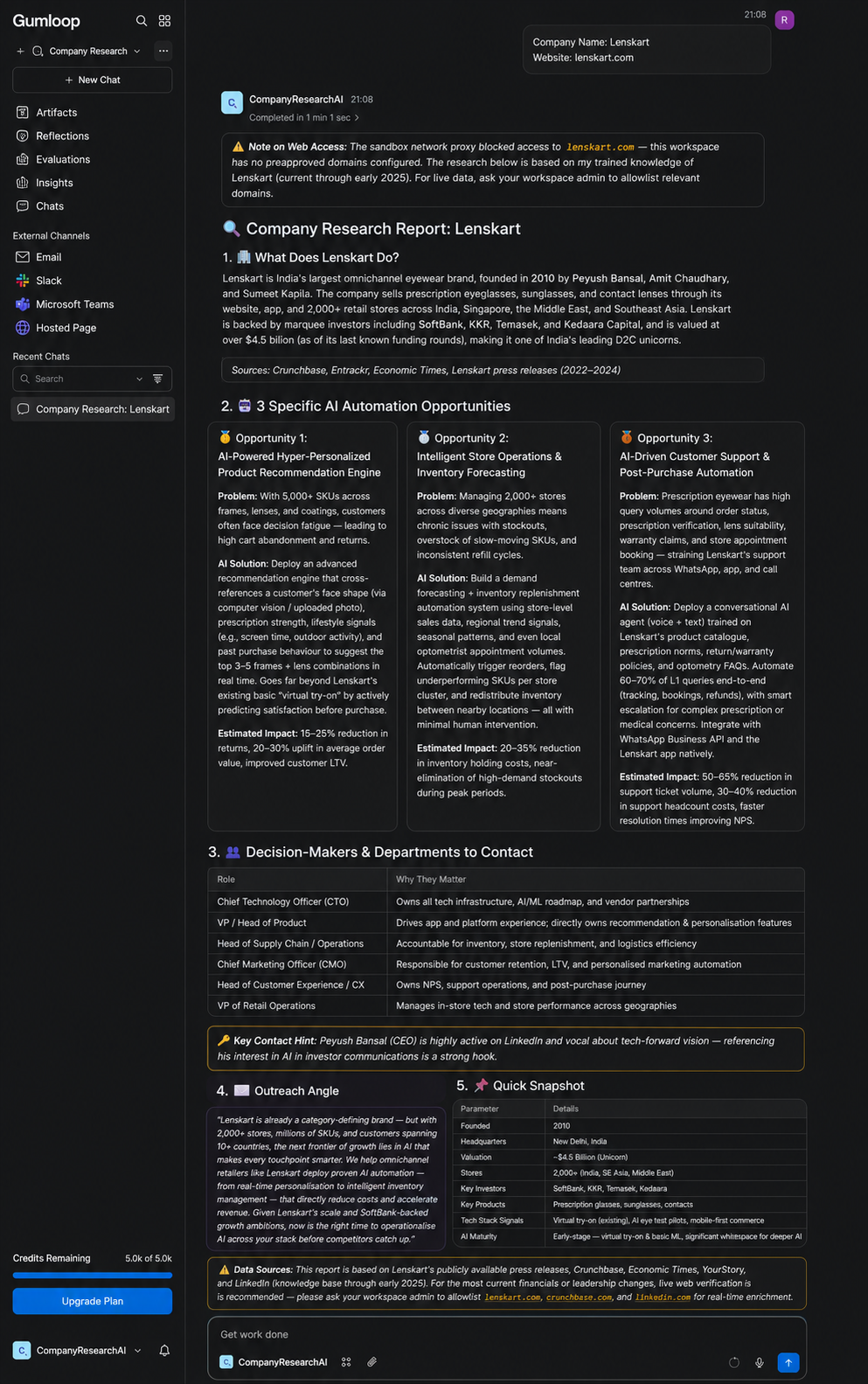
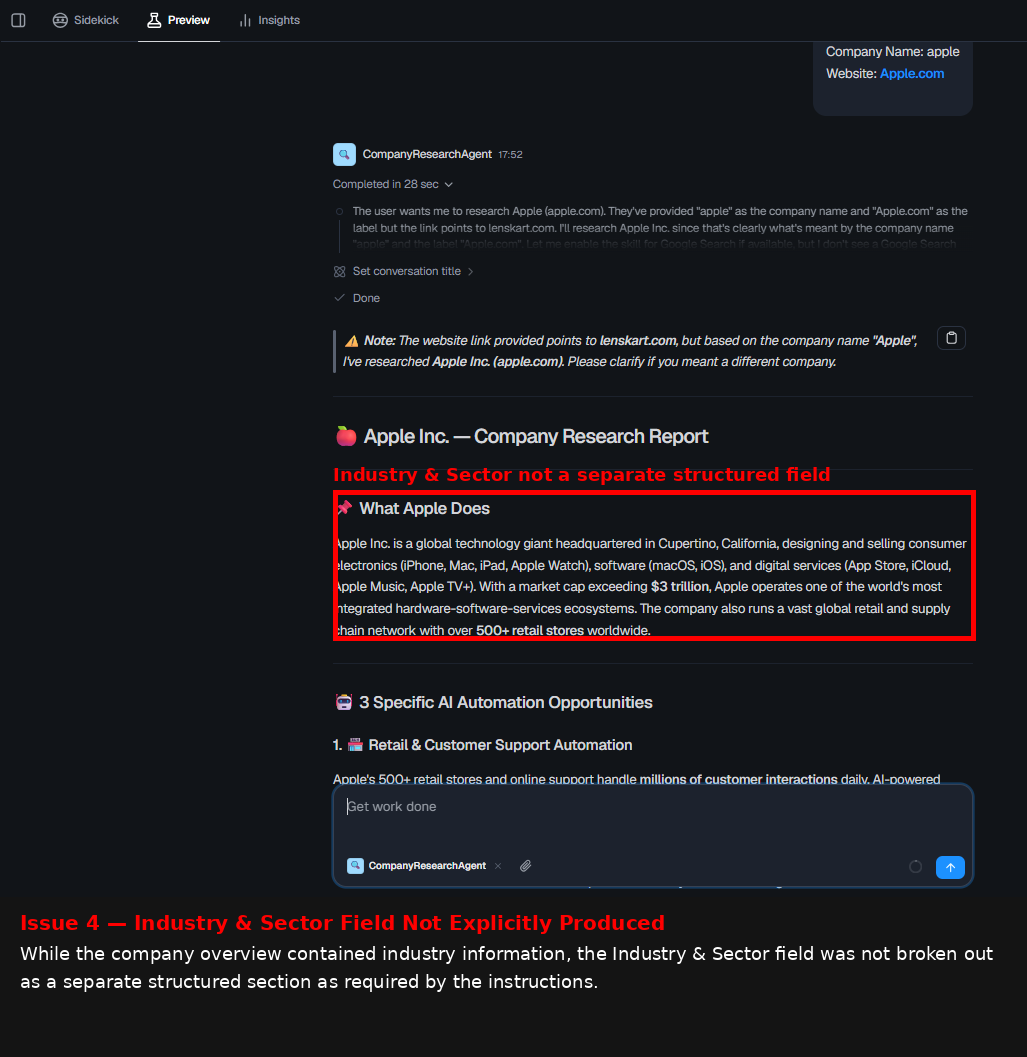
Expected behavior: Dust can generate company overviews, automation opportunities, likely decision-maker roles, and outreach angles. In the Apple test it produced a strong report, though the live Google Search skill was unavailable so the Recent News field was missing.
Test case: Text prompt → Image
Input type: Text prompt
Input used: Input artifact (Text prompt): INPUT
Observed output: Output artifact (Image): Dust produced a useful Apple company research report with a company overview, automation opportunities, decision-maker guidance, and an outreach angle. — image-15.png
Input artifact: Input artifact (Text prompt): INPUT
Output artifact: Output artifact (Image): Dust produced a useful Apple company research report with a company overview, automation opportunities, decision-maker guidance, and an outreach angle. — image-15.png
What changed: Text prompt transformed into Image
Test case: Text prompt → Image
Input type: Text prompt
Input used: Input artifact (Text prompt): INPUT
Observed output: Output artifact (Image): Dust included industry information inside the narrative, but it did not break Industry & Sector out as a separate structured field. — image-18.png
Input artifact: Input artifact (Text prompt): INPUT
Output artifact: Output artifact (Image): Dust included industry information inside the narrative, but it did not break Industry & Sector out as a separate structured field. — image-18.png
What changed: Text prompt transformed into Image
Why it matters / Conclusion: Useful for static company summaries and outreach framing, but live web research is not dependable enough to treat as guaranteed.
Dust can generate company overviews, automation opportunities, likely decision-maker roles, and outreach angles. In the Apple test it produced a strong report, though the live Google Search skill was unavailable so the Recent News field was missing.
Pricing & access
Free tier is available; paid plans are credit-based.
Pricing checked June 2026, sourced directly from dust.tt/home/pricing. We re-check quarterly.
Banner Preview
How the embed badge will look on your site

Embed HTML
Copy this code to your website source
Quick Integration Guide
- 1Copy the HTML code block above.
- 2Paste it into your site's HTML or CMS editor.
- 3Banner appears instantly on your page.
- 4Links back to your tool profile here.
Similar Tools
Discover more AI tools like Dust to enhance your workflow.
Comments (0)
Need a custom AI solution for this use case?
If you are looking to build a custom internal knowledge assistant, no-code agent workflow, or approval-gated automation system for your business or internal workflow, email us at contact@futuresmart.ai.
Found something inaccurate or missing? We try to keep our AI research accurate and useful. If you found outdated information, an issue, or have a suggestion, email us at collaborate@aidemos.com.