
AInteriors
AInteriors Review: AI Interior Design & Virtual Staging Tested (2026)
Our take
- You want fast AI virtual staging from room uploads
- You want multiple redesign variations from the same room
- You want quick preset-based interior styling
- You need highly realistic furniture and decor that match perfectly across the room
Feature scores on this page: 8.8/10 (8 scored features)
Our take
AInteriors preserves room structure well across most redesigns, and the style presets noticeably change the overall look of the room. Luxury outputs used richer colors and heavier decor, while minimalist and modern presets stayed cleaner and lighter. The tool handled multiple redesign variations smoothly, though one kitchen generation failed during testing. Furniture placement and lighting generally looked good, but some outputs felt slightly over-stylized and less realistic on closer inspection.
In-Depth Review
Our detailed analysis of AInteriors — features, performance, and real-world testing.
Feature-by-Feature Breakdown
We tested each feature individually. Click any card to see inputs, outputs, and our observations.
Virtual Staging7/10▾
Feature tested: Virtual Staging
Result: Passed (7/10)
Expected behavior: The feature allows users to upload room images and generate AI-staged interior redesigns automatically.
Test case: Image → Image
Input type: Image
Input used: Input artifact (Image): Input — image (16)-4.png
Observed output: Output artifact (Image): Output — Screenshot 2026-05-27 173735.png
Input artifact: Input artifact (Image): Input — image (16)-4.png
Output artifact: Output artifact (Image): Output — Screenshot 2026-05-27 173735.png
What changed: Image transformed into Image
Test case: Image → Image
Input type: Image
Input used: Input artifact (Image): Input — image (16)-4.png
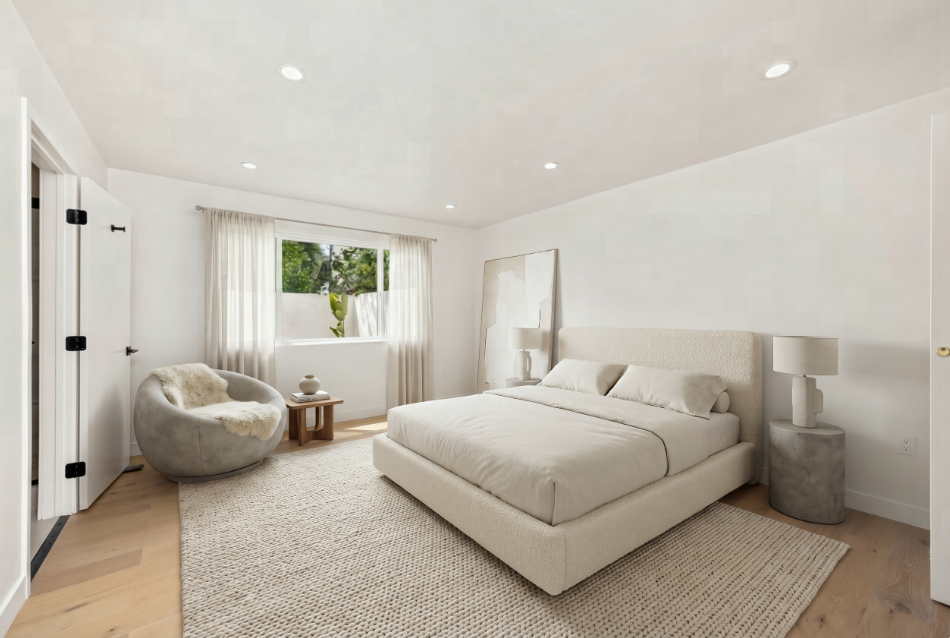
Observed output: Output artifact (Image): Output — minimalist_bedroom (4).png
Input artifact: Input artifact (Image): Input — image (16)-4.png
Output artifact: Output artifact (Image): Output — minimalist_bedroom (4).png
What changed: Image transformed into Image
Why it matters / Conclusion: The empty room and staged bedroom below share the same window and wall layout — but compare the light near the window. The staging keeps the bright source but spreads it evenly across the room instead of keeping the directional contrast.
The feature allows users to upload room images and generate AI-staged interior redesigns automatically.
-4.png)
.png)
Style Preset Library9/10▾
Feature tested: Style Preset Library
Result: Passed (9/10)
Expected behavior: The platform provides preset interior styles that users can apply before generation
Test case: Image → Image
Input type: Image
Input used: Input artifact (Image): Input — image (17)-3.png
Observed output: Output artifact (Image): Output — image (18)-3.png
Input artifact: Input artifact (Image): Input — image (17)-3.png
Output artifact: Output artifact (Image): Output — image (18)-3.png
What changed: Image transformed into Image
Test case: Image → Image
Input type: Image
Input used: Input artifact (Image): Input — image (17)-3.png
Observed output: Output artifact (Image): Output — image (19)-3.png
Input artifact: Input artifact (Image): Input — image (17)-3.png
Output artifact: Output artifact (Image): Output — image (19)-3.png
What changed: Image transformed into Image
Why it matters / Conclusion: Compare the luxury living-room outputs above with the minimalist bedroom generations and modern kitchen designs across the page. The furniture, colors, lighting, and decor change noticeably between presets, but each redesign still stays visually aligned with its selected style instead of blending multiple aesthetics together.
The platform provides preset interior styles that users can apply before generation
-3.png)
-3.png)
-3.png)
Multiple Design Variations8/10▾
Feature tested: Multiple Design Variations
Result: Passed (8/10)
Expected behavior: The feature generates multiple redesign variations from a single uploaded room image.
Test case: Image → Image
Input type: Image
Input used: Input artifact (Image): Input — image (20)-2.png
Observed output: Output artifact (Image): Output — image (21)-3.png
Input artifact: Input artifact (Image): Input — image (20)-2.png
Output artifact: Output artifact (Image): Output — image (21)-3.png
What changed: Image transformed into Image
Test case: Image → Image
Input type: Image
Input used: Input artifact (Image): Input — image (20)-2.png
Observed output: Output artifact (Image): Output — image (22)-4.png
Input artifact: Input artifact (Image): Input — image (20)-2.png
Output artifact: Output artifact (Image): Output — image (22)-4.png
What changed: Image transformed into Image
Why it matters / Conclusion: Most design variations above generate successfully from the same workflow — but one kitchen generation fails while the others complete normally, suggesting the issue is isolated rather than part of the overall variation system
The feature generates multiple redesign variations from a single uploaded room image.
-2.png)
-3.png)
-4.png)
Room-Type Based Generation10/10▾
Feature tested: Room-Type Based Generation
Result: Passed (10/10)
Expected behavior: The platform allows users to select room categories before redesign generation
Why it matters / Conclusion: Compare the outputs above and focus on how the space is used — the room layout stays the same, but once set to a bedroom, the bed becomes the central element and the rest of the furniture adjusts around it.
The platform allows users to select room categories before redesign generation
Tour Video9/10▾
Feature tested: Tour Video
Result: Passed (9/10)
Expected behavior: The feature generates a walkthrough-style video of the redesigned room.
Test case: Image → Video file
Input type: Image
Input used: Input artifact (Image): Input — image (16)-4.png
Observed output: Output artifact (Video file): Output — minimalist_bedroom (2).mp4
Input artifact: Input artifact (Image): Input — image (16)-4.png
Output artifact: Output artifact (Video file): Output — minimalist_bedroom (2).mp4
What changed: Image transformed into Video file
Why it matters / Conclusion: The walkthrough feels smooth — then compare the same object from two angles. The room layout holds, but some items don’t look exactly the same across views.
The feature generates a walkthrough-style video of the redesigned room.
Before / After Video9/10▾
Feature tested: Before / After Video
Result: Passed (9/10)
Expected behavior: The feature creates a video transition between the original room and the redesigned version.
Test case: Image → Video file
Input type: Image
Input used: Input artifact (Image): Input — image (16)-4.png
Observed output: Output artifact (Video file): Output — minimalist_bedroom (3).mp4
Input artifact: Input artifact (Image): Input — image (16)-4.png
Output artifact: Output artifact (Video file): Output — minimalist_bedroom (3).mp4
What changed: Image transformed into Video file
Why it matters / Conclusion: Watch the transition and focus on the room layout — walls and windows stay fixed throughout, while the furniture appears in place during the transition rather than gradually forming.
The feature creates a video transition between the original room and the redesigned version.
Compare Image9/10▾
Feature tested: Compare Image
Result: Passed (9/10)
Expected behavior: The feature allows side-by-side comparison of the original and redesigned room images.
Test case: Image → Image
Input type: Image
Input used: Input artifact (Image): Input — image (16)-4.png
Observed output: Output artifact (Image): Output — comparison_minimalist_bedroom (1).png
Input artifact: Input artifact (Image): Input — image (16)-4.png
Output artifact: Output artifact (Image): Output — comparison_minimalist_bedroom (1).png
What changed: Image transformed into Image
Why it matters / Conclusion: Place the two images side by side above and focus on the corners of the room — the structure aligns well, but see the chair besides the door furniture placement doesn’t always respect the same spatial boundaries.
The feature allows side-by-side comparison of the original and redesigned room images.
.png)
Split Image Comparison9/10▾
Feature tested: Split Image Comparison
Result: Passed (9/10)
Expected behavior: The feature provides a slider-based comparison to view before and after in a single frame
Test case: Image → Image
Input type: Image
Input used: Input artifact (Image): Input — image (16)-4.png
Observed output: Output artifact (Image): Output — split_minimalist_bedroom (1).png
Input artifact: Input artifact (Image): Input — image (16)-4.png
Output artifact: Output artifact (Image): Output — split_minimalist_bedroom (1).png
What changed: Image transformed into Image
Why it matters / Conclusion: Slide across the comparison and focus on the bed and window — both stay perfectly aligned across the split, confirming that the tool keeps the original room structure unchanged during redesign.
The feature provides a slider-based comparison to view before and after in a single frame
.png)
Pricing & Access
Pricing as of May 2026. We recheck quarterly
Is This Right For You?
A side-by-side guide based on our hands-on testing.
Banner Preview
How the embed badge will look on your site

Embed HTML
Copy this code to your website source
Quick Integration Guide
- 1Copy the HTML code block above.
- 2Paste it into your site's HTML or CMS editor.
- 3Banner appears instantly on your page.
- 4Links back to your tool profile here.
Similar Tools
Discover more AI tools like AInteriors to enhance your workflow.
Comments (0)
Need a custom AI solution for this use case?
If you are looking to build a custom virtual staging, room redesign, or interior visualization tool for your business or internal workflow, email us at contact@futuresmart.ai.
Found something inaccurate or missing? We try to keep our AI research accurate and useful. If you found outdated information, an issue, or have a suggestion, email us at collaborate@aidemos.com.