Evidence · first-party tested/Best AI Meeting Notetakers for Accurate Transcripts, Summaries, and Action Items
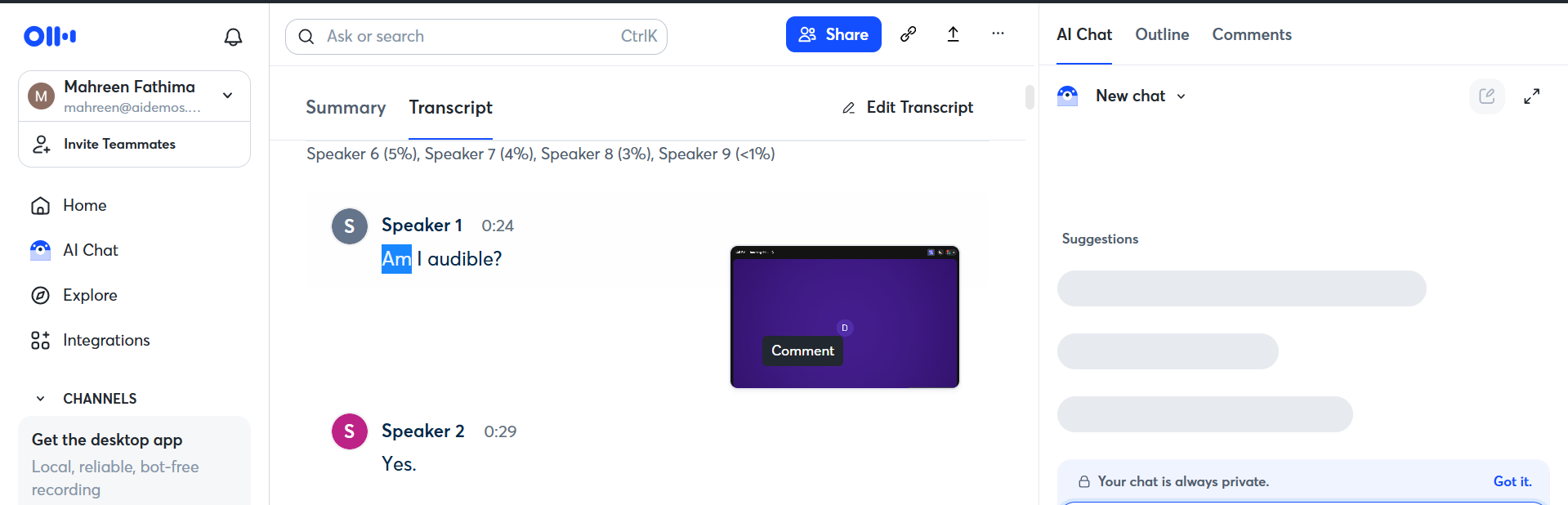
Otter’s diarization was effectively unusable in this multi-speaker standup: only 1 of about 10 active speakers was identified by name, while the other 9 were left as generic labels or unattributed, which the report summarizes as a 90% failure rate.
What was measured
Speaker Diarization
Correctly attributes who said what across a multi-speaker standup.
decisive for this rankingtransformation
Correctly attributing who said what is part of making the transcript and notes trustworthy in multi-speaker meetings. (3 of 3 judges)
What was given, what came back
Test input: AI Demos Daily Standup — 31 July 2026 · image · group: ai-meeting-notetaker
Input — what we sent
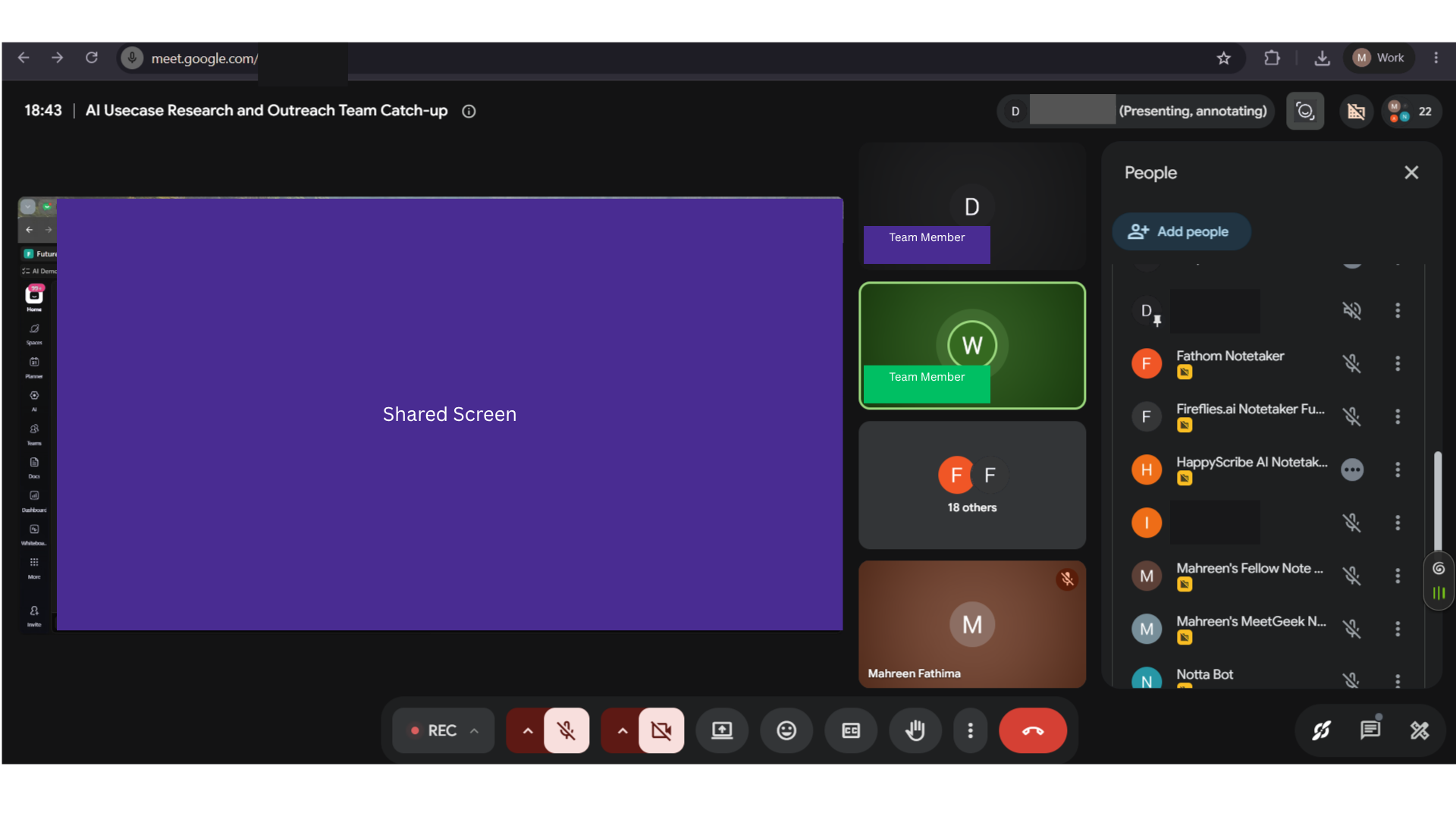
AI Demos Daily Standup — 31 July 2026
A real 25-minute technical engineering daily standup with 14 attendees and about 10 active speakers, used as the single parallel-capture meeting for evaluating AI meeting notetakers on transcription, diarization, summaries, action items, search/chat, and collaboration features.
Why this input is hard
- · Transcription accuracy for real names, tool names, numbers, and technical jargon
- · Speaker diarization across multiple active speakers
- · Robustness to overlapping speech, crosstalk, and rapid turn-taking
- · Join reliability for bot-based and botless capture
- · Summary quality on identical source material
- · Action-item extraction with correct owners and commitments
- · Topic segmentation of standup updates
- · Search and chat grounded in the meeting content
- · Sharing, API, MCP, integrations, plan limits, languages, and privacy feature coverage
Output — unretouched
Also checked on this input — same tool, 9 other criteria
Action-Item Extraction⚠ StruggledOtter extracted action items, including at least one due-today API-related task with an assignee, but the report says most items were left without an owner and duplicate entries also appeared, so the output needed manual cleanup before delegation.Chat with Notes / Ask Questions✓ WorkedOtter’s AI Chat answered meeting questions with a grounded response and a specific timestamp, and the report says the answers were cited and free of hallucinations in the tested queries.Editability✓ WorkedOtter exposes inline editing controls for transcript and summary outputs before sharing, so wrong content can be corrected in-product rather than only exported as-is.Join Method & Reliability✓ WorkedOtter’s bot joined Google Meet successfully and stayed connected through the full ~25-minute call with no mid-call dropout or ejection, so the meeting was captured end to end.Search Across Notes◐ MixedOtter does not show a direct transcript keyword-search workflow in the transcript view; lookup is routed through AI Chat instead, where a natural-language timestamp question returned a specific answer at 0:07:06.Sharing Without Registration✓ WorkedA shared meeting transcript opened without requiring sign-in, exposing the meeting title, metadata, and transcript snippets; the share dialog also offers restricted access and link-copy controls.Summary Quality✓ WorkedOtter produced a clear, structured meeting summary that the report says covered the key decisions and discussion points without dropping anything important, and the summary page loaded with organized sections like Overview and Action Items.Topic Segmentation✓ WorkedOtter broke the standup into useful topic sections rather than one blob, with named headings such as Issue Task Assignments and Status Updates and Error Resolution and Task Link Sharing, making the summary skimmable.Transcription Accuracy✓ WorkedOtter generated a full transcript for the standup and, per the report, captured names, tool names, jargon, and numbers correctly with minimal errors, making the transcript reliable for reference.
Provenance
- Observation
- 9552a2b6-0bc3-4802-8f1b-f9cf98c13b46
- Evidence run
- ace58582-3d1e-48ee-996c-9b3cd03f27a2
- Study
- AI Meeting Notetakers — Capture Accurate Transcripts, Summaries & Action Items From Live Calls
- Research task
- 86baxegnv
- Tested at
- not recorded
- Source
- first-party
- Evidence state
- verified
- Proof shown
- input + output shown
- Cost / latency
- not captured
- Repeat run
- not captured
- Tester
- not captured
The last three rows are honest blanks, not placeholders — our capture has no field for them yet.
Query this
get_evidence({
  tool: "otter-ai",
  scenario: "ai-meeting-notetaker"
})
MCP · mcp.aidemos.com/api/mcp
Free with attribution.
Same input, same check — 7 other tools
measured on Speaker Diarization
Fathom◐ MixedFathom separates most speakers correctly in a busy multi-speaker standup, but the report observed one rapid-transition segment where two speakers' lines were merged into a single speaker block.Fellow✓ WorkedThe transcript attributed speaker turns correctly across the standup, with all ~10 speakers labeled by name and no attribution errors or generic labels reported.Fireflies.ai✓ WorkedAttributed consecutive turns to distinct speakers in the transcript, and the report says speaker identification was almost complete with only minor attribution errors.Granola✗ FailedGranola’s default capture does not attribute speakers: the settings panel shows Speaker tags switched off, and the transcript excerpt is a plain text wall with no speaker labels, so diarization is absent unless the user manually enables it.HappyScribe◐ MixedIt identified most speakers, but the report says multiple transcript lines were assigned to the wrong speaker, so speaker-to-statement mapping was not fully reliable across transitions.MeetGeek◐ MixedIt identifies most speakers in a multi-speaker standup, but leaves at least one utterance as "Unknown speaker" and misattributes some lines to the wrong speaker, so attribution is not fully reliable.Notta⚠ StruggledThe transcript contained a line labeled with another notetaker’s name (HappyScribe), which indicates cross-tool contamination or labeling error and breaks speaker attribution for that segment.
This evidence is published in
Real inputs and real outputs, no retouching · every cell queryable via API & MCP · aidemos.com