
Zoviz Review: Logos, SVG Export & Brand Kit Tested (2026)
Zoviz Review: AI Logo Maker & Brand Kit Generator Tested (2026)
Our take
- You need a wide set of branded assets fast — business cards, social templates, and letterheads all auto-generate from one brief
- SVG vector files matter to you — for print, merchandise, or future design editing
- You want 20+ logo options to choose from rather than a single AI-generated output
- Your brief has non-negotiable colour requirements — the AI does not honour them consistently across runs
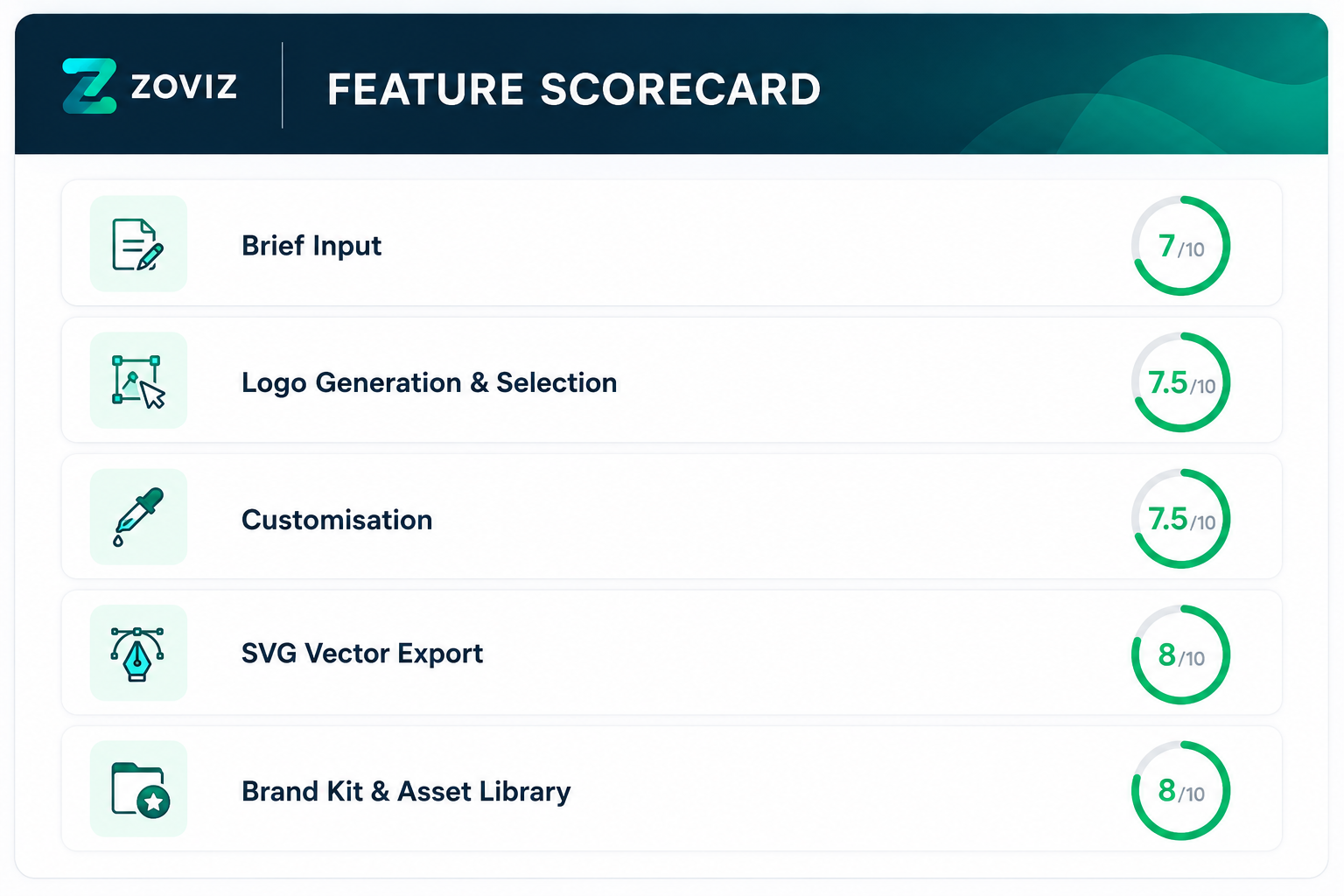
Feature scores on this page: 7.6/10 (5 scored features)
Our take
Zoviz generates a strong volume of usable brand assets from a short text brief — 20+ logo options, 7 layout variants, and a full collateral kit, all visible in the outputs below. The SVG vector export set — shown in the export section — is a format most competing tools don't include at this level of automation. Colour fidelity from brief to output is inconsistent across runs — our first test produced the requested blue and white correctly, the second ignored it entirely — compare both run outputs below. Founders should treat the customiser as a required step, not an optional one.
In-Depth Review
Our detailed analysis of Zoviz — features, performance, and real-world testing.
Feature-by-Feature Breakdown
We tested each feature individually. Click any card to see inputs, outputs, and our observations.
Brief InputAverage - Colour direction from the brief cannot be relied upon across runs.7/10▾
Feature tested: Brief Input
Result: Passed (7/10)
Verdict: Average - Colour direction from the brief cannot be relied upon across runs.
Expected behavior: It collects brand name and a free-text icon description. Founders can choose to upload an existing logo or create from scratch. An "Get AI Description Suggestions" button assists founders who don't know how to articulate their visual direction.
Test case: Text prompt → Image
Input type: Text prompt
Input used: Input artifact (Text prompt): Brand Name: AIDemos Tagline: Discover Best Tools With Video Demos Industry: Artificial Intelligence / AI Tools / AI Education Target Audience: Founders, product builders, marketers, and professionals looking to understand and apply AI tools through practical demos Brand Theme: White and BlueOutput: 20+ logo candidates generated for selection
Observed output: Output artifact (Image): Output — image-190.png
Input artifact: Input artifact (Text prompt): Brand Name: AIDemos Tagline: Discover Best Tools With Video Demos Industry: Artificial Intelligence / AI Tools / AI Education Target Audience: Founders, product builders, marketers, and professionals looking to understand and apply AI tools through practical demos Brand Theme: White and BlueOutput: 20+ logo candidates generated for selection
Output artifact: Output artifact (Image): Output — image-190.png
What changed: Text prompt transformed into Image
Why it matters / Conclusion: The input experience is simple enough for any founder. However, colour direction from the brief cannot be relied upon — treat it as a suggestion to the AI, not an instruction.
It collects brand name and a free-text icon description. Founders can choose to upload an existing logo or create from scratch. An "Get AI Description Suggestions" button assists founders who don't know how to articulate their visual direction.
Logo Generation & SelectionGood - 20+ options give real choice, but colour consistency requires manual correction.7.5/10▾
Feature tested: Logo Generation & Selection
Result: Passed (7.5/10)
Verdict: Good - 20+ options give real choice, but colour consistency requires manual correction.
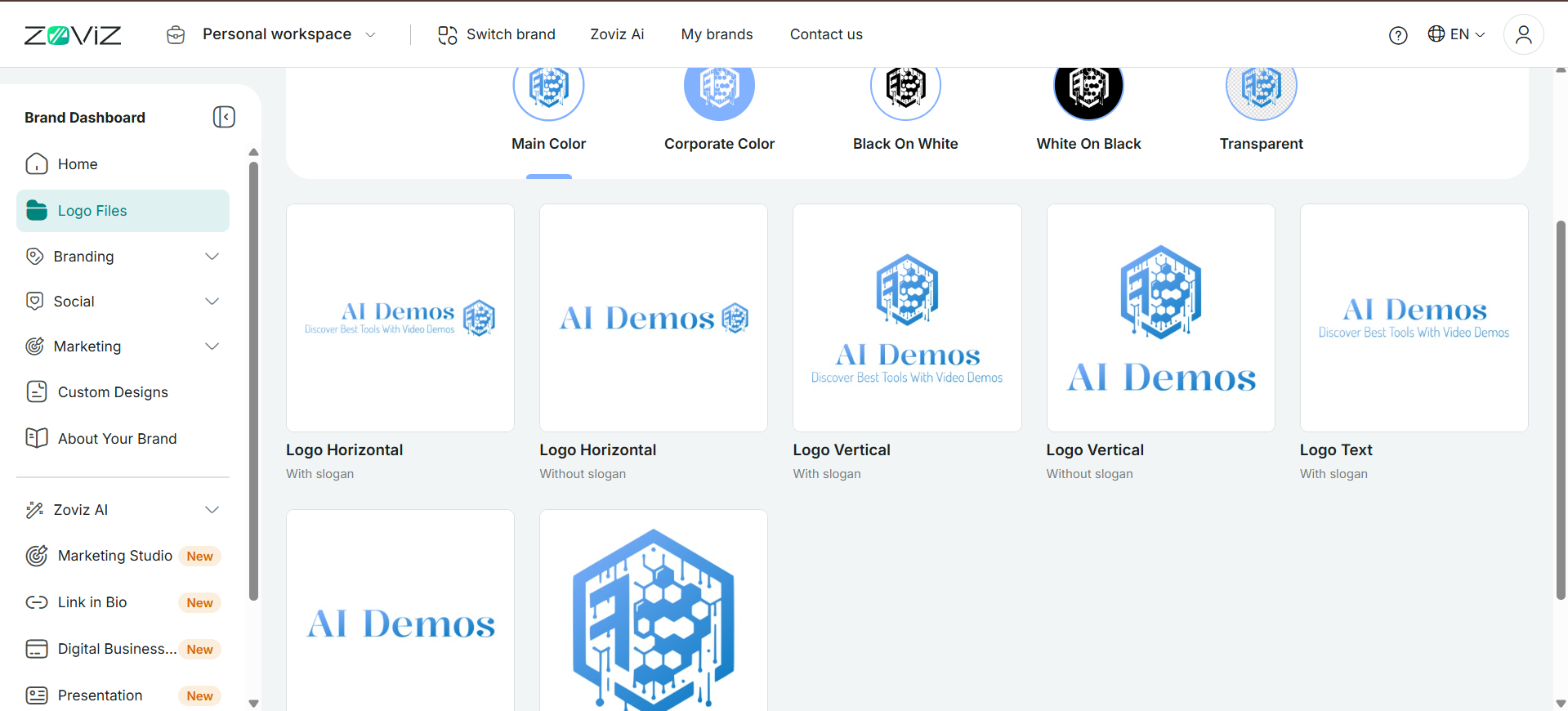
Expected behavior: Zoviz generates 20+ logo options from the brief. The founder browses and selects the preferred one, which then auto-applies across the entire brand kit.
Test case: Text prompt → Image
Input type: Text prompt
Input used: Input artifact (Text prompt): Prompt which includes brand name, tagline, industry, target audience and theme
Observed output: Output artifact (Image): Output — image-191.png
Input artifact: Input artifact (Text prompt): Prompt which includes brand name, tagline, industry, target audience and theme
Output artifact: Output artifact (Image): Output — image-191.png
What changed: Text prompt transformed into Image
Test case: Text prompt → Image
Input type: Text prompt
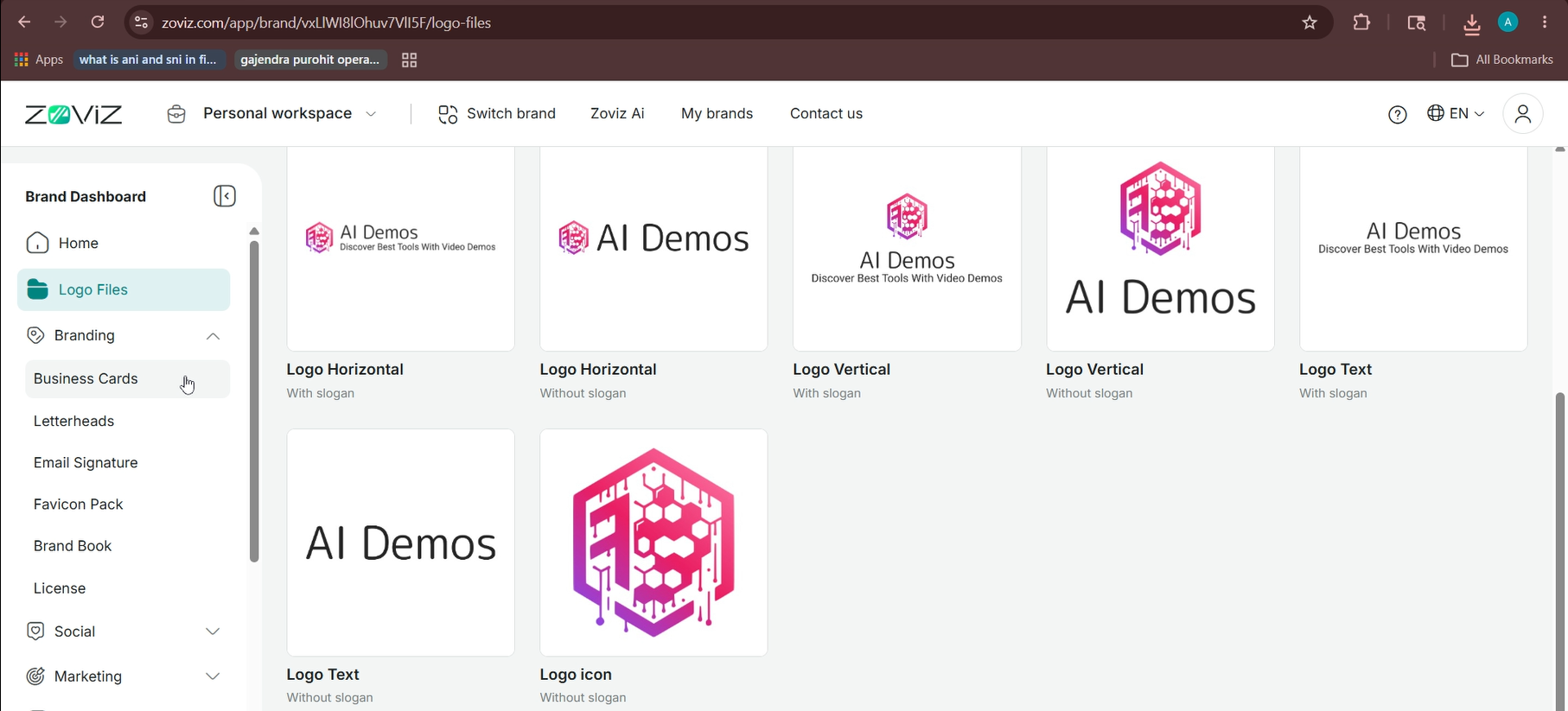
Input used: Input artifact (Text prompt): Logos in Run 2
Observed output: Output artifact (Image): Output — image-192.png
Input artifact: Input artifact (Text prompt): Logos in Run 2
Output artifact: Output artifact (Image): Output — image-192.png
What changed: Text prompt transformed into Image
Why it matters / Conclusion: The 20+ options give founders real choice. But two runs of the same brief produced visually different colour outcomes — founders should not expect colour consistency without manual correction in the customiser.
Zoviz generates 20+ logo options from the brief. The founder browses and selects the preferred one, which then auto-applies across the entire brand kit.
CustomisationGood - Live colour correction works reliably as a fix for brief mismatches.7.5/10▾
Feature tested: Customisation
Result: Passed (7.5/10)
Verdict: Good - Live colour correction works reliably as a fix for brief mismatches.
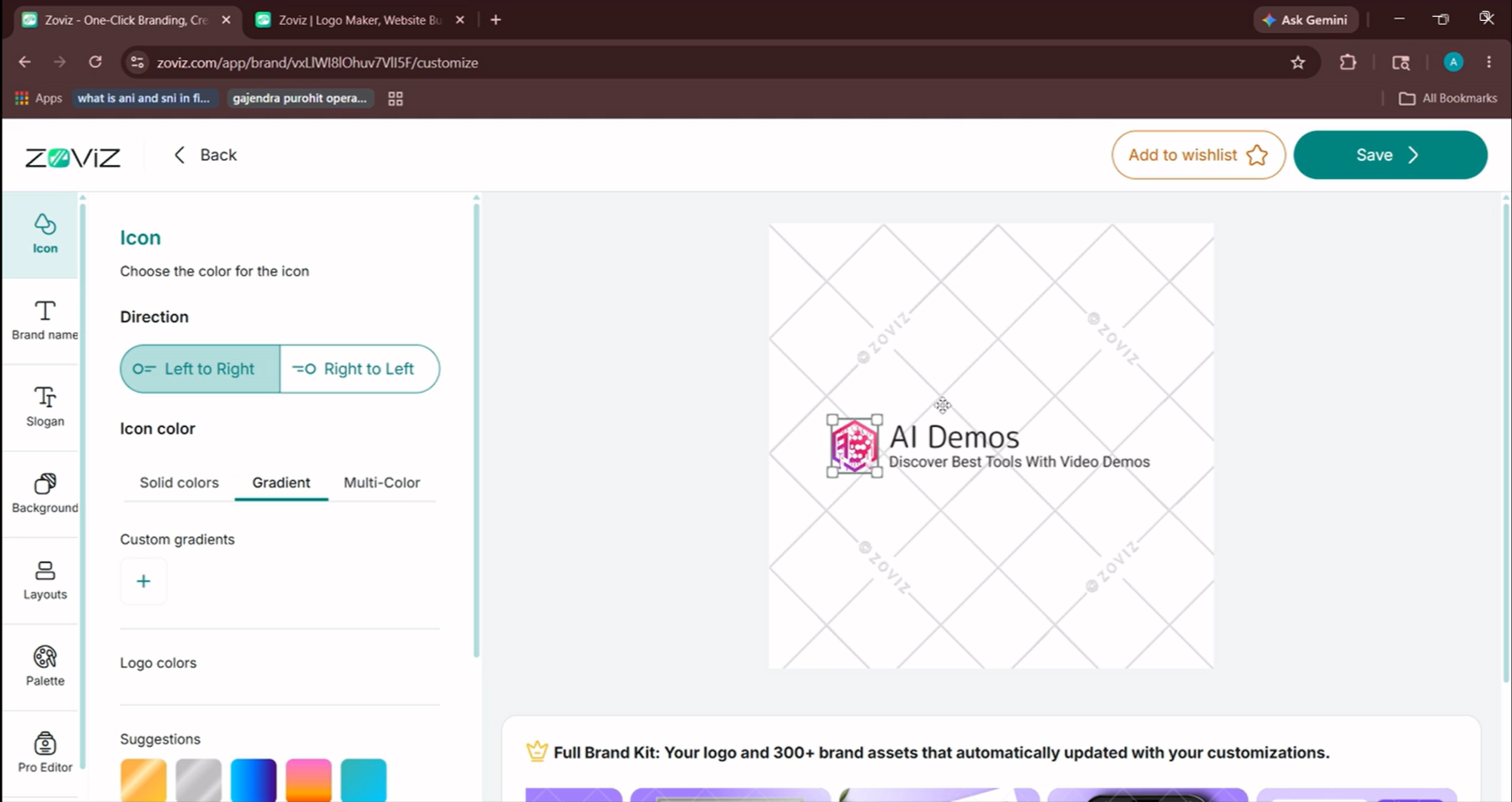
Expected behavior: After selecting a logo, a sidebar editor provides controls for icon, brand name text, slogan, background, layouts, and colour palette. Changes reflect live in the canvas preview. A Pro Editor option is available but was not accessible on the plan tested.
Test case: Text prompt → Image
Input type: Text prompt
Input used: Input artifact (Text prompt): Switching colour palette in the sidebar in Run 2
Observed output: Output artifact (Image): Output — image-193.png
Input artifact: Input artifact (Text prompt): Switching colour palette in the sidebar in Run 2
Output artifact: Output artifact (Image): Output — image-193.png
What changed: Text prompt transformed into Image
Why it matters / Conclusion: The customiser is the reliable correction layer for brief mismatches. It works, but it does add a manual step that the brief-to-output flow should ideally eliminate.
After selecting a logo, a sidebar editor provides controls for icon, brand name text, slogan, background, layouts, and colour palette. Changes reflect live in the canvas preview. A Pro Editor option is available but was not accessible on the plan tested.
SVG Vector ExportStrong - True SVG output with full format and colour variant set is rare at this level of automation.8/10▾
Feature tested: SVG Vector Export
Result: Passed (8/10)
Verdict: Strong - True SVG output with full format and colour variant set is rare at this level of automation.
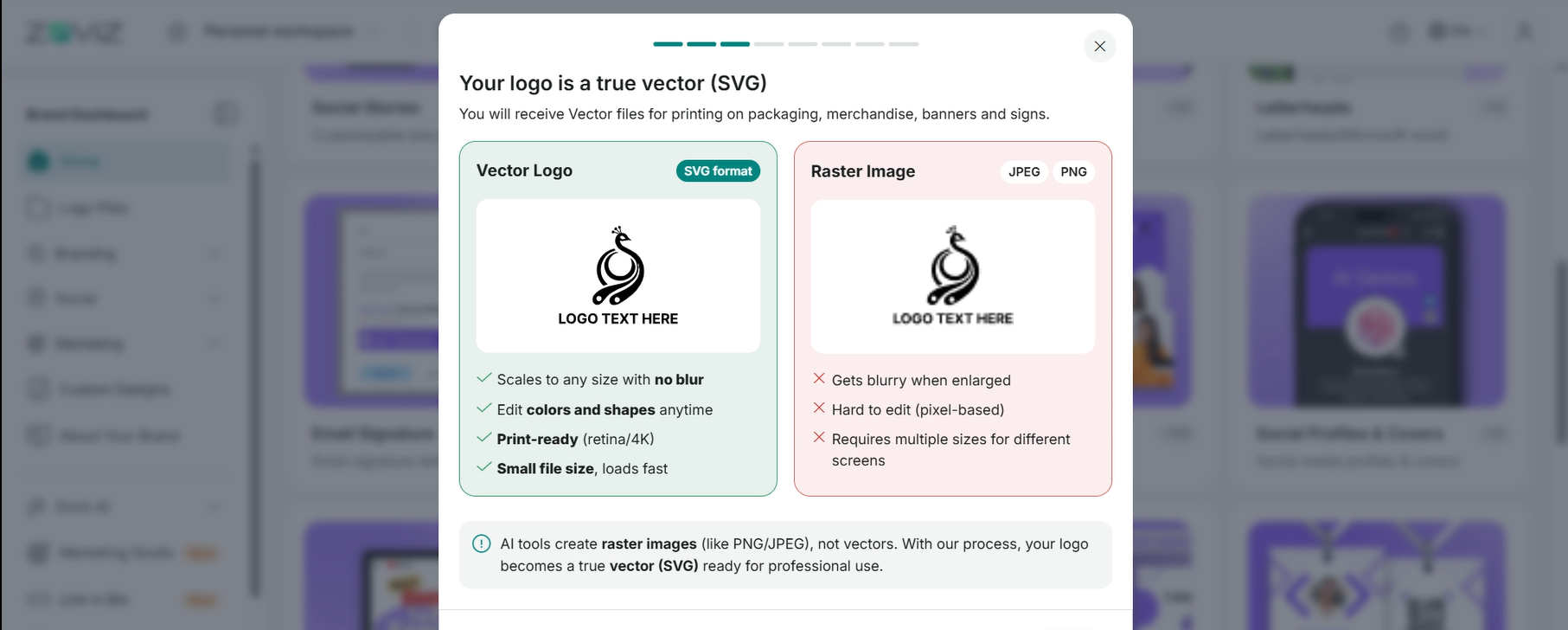
Expected behavior: Zoviz outputs true SVG vector files — a key differentiator from most AI logo tools that only produce PNG or JPEG raster images. SVG files scale to any size without quality loss, are editable in Illustrator or Figma, and are print-ready for packaging, merchandise, banners, and signage.
Test case: Text prompt → Image
Input type: Text prompt
Input used: Input artifact (Text prompt): Completed logo (both runs)
Observed output: Output artifact (Image): Output — image-194.png
Input artifact: Input artifact (Text prompt): Completed logo (both runs)
Output artifact: Output artifact (Image): Output — image-194.png
What changed: Text prompt transformed into Image
Test case: Text prompt → Image
Input type: Text prompt
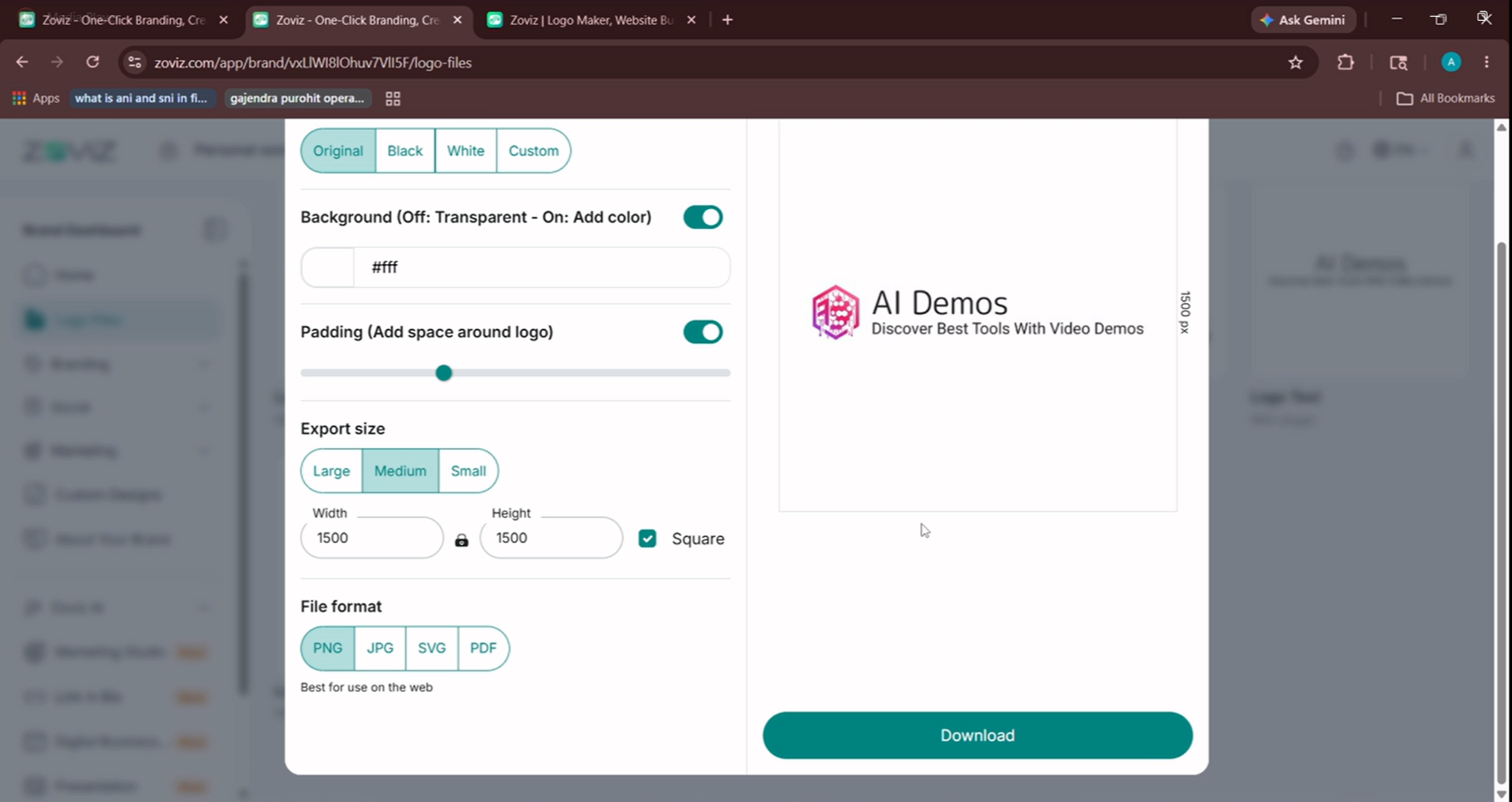
Input used: Input artifact (Text prompt): Downlaoding file formats
Observed output: Output artifact (Image): Output — image-195.png
Input artifact: Input artifact (Text prompt): Downlaoding file formats
Output artifact: Output artifact (Image): Output — image-195.png
What changed: Text prompt transformed into Image
Why it matters / Conclusion: SVG output at this level of automation is rare and is Zoviz's strongest technical argument. The download paywall before purchase remains a friction point for founder evaluation.
Zoviz outputs true SVG vector files — a key differentiator from most AI logo tools that only produce PNG or JPEG raster images. SVG files scale to any size without quality loss, are editable in Illustrator or Figma, and are print-ready for packaging, merchandise, banners, and signage.
Brand Kit & Asset LibraryStrong - 300+ branded templates auto-apply from a single logo selection across every major asset category.8/10▾
Feature tested: Brand Kit & Asset Library
Result: Passed (8/10)
Verdict: Strong - 300+ branded templates auto-apply from a single logo selection across every major asset category.
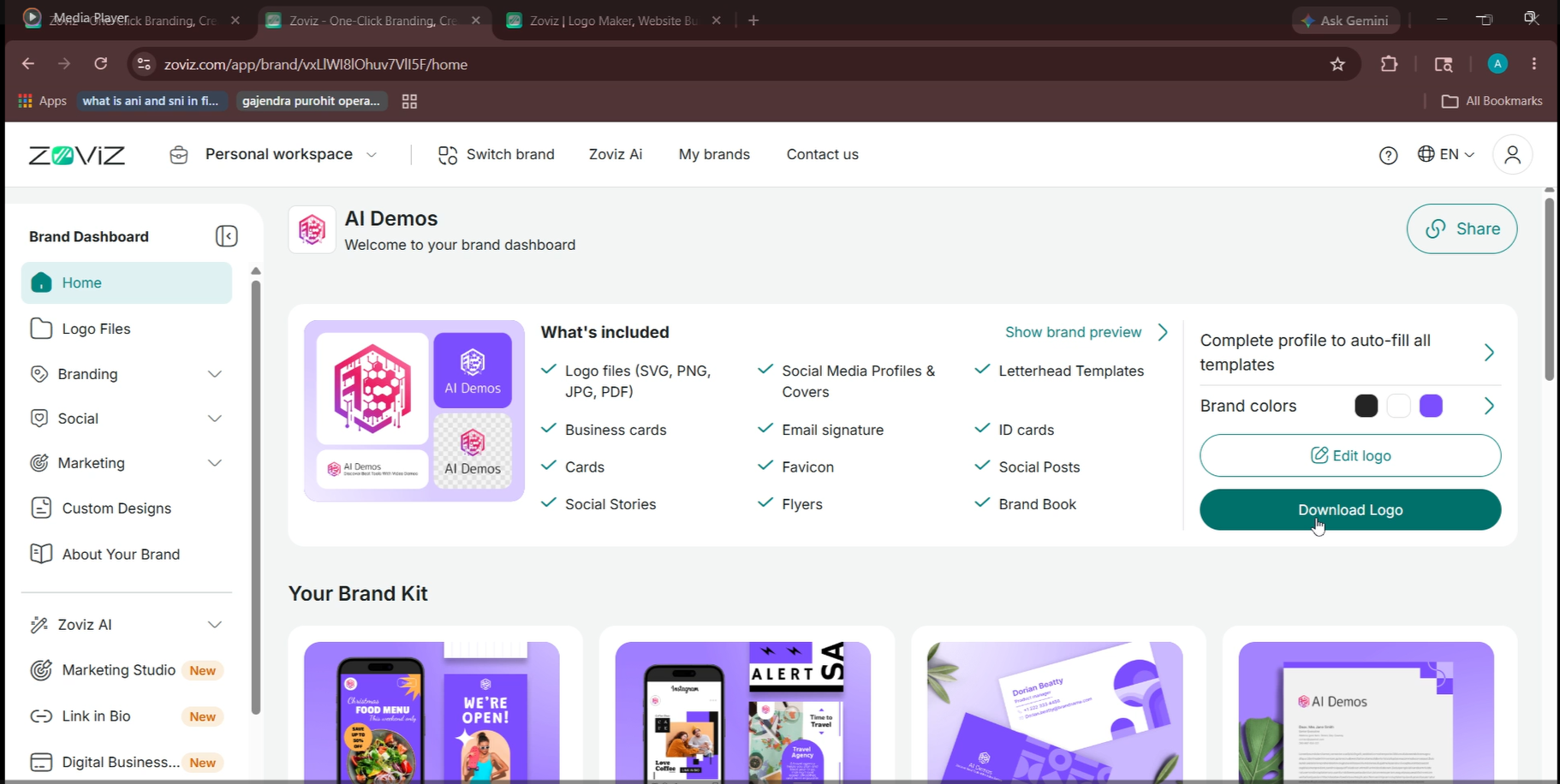
Expected behavior: Once a logo is saved, the dashboard auto-populates 300+ templates across all asset categories — all branded with the selected logo, colours, and name. Includes: business cards, letterheads, email signatures, favicon pack, brand book, social stories, social posts, social covers, YouTube thumbnails, flyers, and marketing templates.
Test case: Text prompt → Image
Input type: Text prompt
Input used: Input artifact (Text prompt): Logo created from input prompt
Observed output: Output artifact (Image): Output — image-196.png
Input artifact: Input artifact (Text prompt): Logo created from input prompt
Output artifact: Output artifact (Image): Output — image-196.png
What changed: Text prompt transformed into Image
Once a logo is saved, the dashboard auto-populates 300+ templates across all asset categories — all branded with the selected logo, colours, and name. Includes: business cards, letterheads, email signatures, favicon pack, brand book, social stories, social posts, social covers, YouTube thumbnails, flyers, and marketing templates.
Pricing & Access
* Pricing as of April 2026. We re-check quarterly
Is This Right For You?
A side-by-side guide based on our hands-on testing.
Banner Preview
How the embed badge will look on your site

Embed HTML
Copy this code to your website source
Quick Integration Guide
- 1Copy the HTML code block above.
- 2Paste it into your site's HTML or CMS editor.
- 3Banner appears instantly on your page.
- 4Links back to your tool profile here.
Comments (0)
Need a custom AI solution for this use case?
If you are looking to build a custom logo generation, brand kit creation, or visual identity design system for your business or internal workflow, email us at contact@futuresmart.ai.
Found something inaccurate or missing? We try to keep our AI research accurate and useful. If you found outdated information, an issue, or have a suggestion, email us at collaborate@aidemos.com.