
Wonsulting AI
Wonsulting AI Review: AI Resume Builder Tested for ATS & Content Quality (2026)
Our take
- You are building a resume for the first time and need a guided structure — see the form flow recording above for what that experience looks like
- You plan to substantially rewrite the generated content — the output PDFs above show the starting point
- You need a clean, correctly formatted PDF scaffold and will handle the content layer yourself — the formatting output above shows what you get
- You need achievement-oriented, quantified bullets without rewriting — the output PDFs above show what's generated without editing
Feature scores on this page: 5.4/10 (5 scored features)
Our take
Open the output PDFs below before reading this verdict — it lands differently once you've seen them. Wonsulting AI is a guided resume template filler dressed as an AI resume generator. The interface is clean and the formatting is genuinely good. Everything else — content quality, keyword depth, role targeting — is visible in the outputs attached to this page.
In-Depth Review
Our detailed analysis of Wonsulting AI — features, performance, and real-world testing.
Feature-by-Feature Breakdown
We tested each feature individually. Click any card to see inputs, outputs, and our observations.
Content QualityWeak — repetitive, low-context bullets with minimal measurable impact3/10▾
Feature tested: Content Quality
Result: Failed (3/10)
Verdict: Weak — repetitive, low-context bullets with minimal measurable impact
Expected behavior: For a Data Analyst profile that included SQL, Python, and Power BI experience across two roles, Wonsulting AI produced bullets like "Worked with SQL to analyze data." The full output is in the PDF below — read every bullet and count how many describe a task versus an outcome.
Test case: PDF document → PDF document
Input type: PDF document
Input used: Input artifact (PDF document): Input 1- Financial Analyst — Financial Data Analyst-Resume Input Data (1).pdf
Observed output: Output artifact (PDF document): Output: Financial Data Analyst Resume — Wonsulting Resume AI (1).pdf
Input artifact: Input artifact (PDF document): Input 1- Financial Analyst — Financial Data Analyst-Resume Input Data (1).pdf
Output artifact: Output artifact (PDF document): Output: Financial Data Analyst Resume — Wonsulting Resume AI (1).pdf
What changed: PDF document transformed into PDF document
Why it matters / Conclusion: The generated bullets stay generic even when the input contains detailed technical experience. Across both profiles tested, the phrasing repeatedly defaults to task descriptions instead of measurable outcomes, making the resumes read templated rather than role-specific.
For a Data Analyst profile that included SQL, Python, and Power BI experience across two roles, Wonsulting AI produced bullets like "Worked with SQL to analyze data." The full output is in the PDF below — read every bullet and count how many describe a task versus an outcome.
ATS OptimisationSatisfactory — formatting passes ATS checks, but keyword depth and role alignment are weak5.5/10▾
Feature tested: ATS Optimisation
Result: Partial (5.5/10)
Verdict: Satisfactory — formatting passes ATS checks, but keyword depth and role alignment are weak
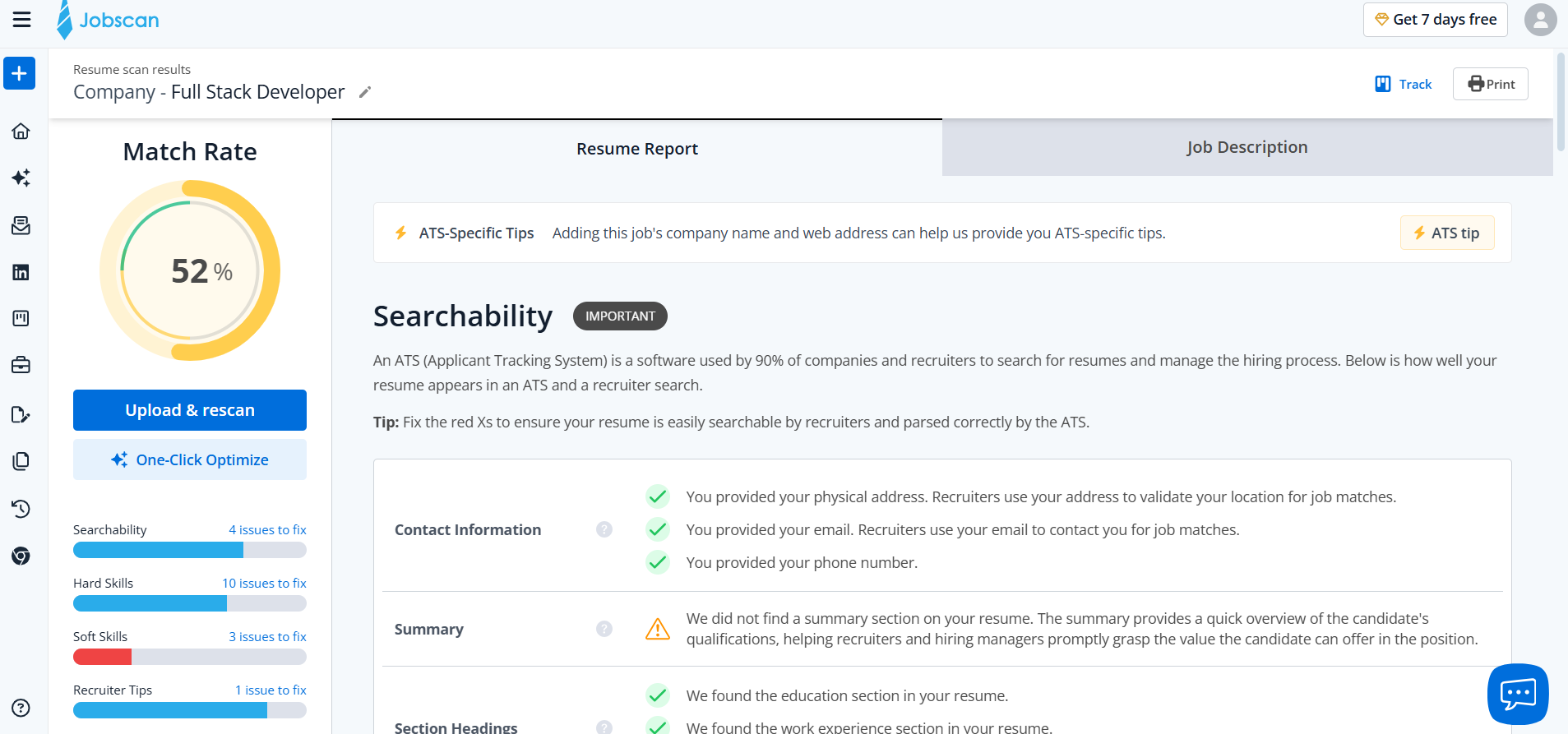
Expected behavior: Wonsulting AI produced satisfactory ATS Jobscan score in this research cycle. The exact score and the specific keyword gaps are in the Jobscan screenshot below — check it against the role description we used to run the scan.
Test case: PDF document → Image
Input type: PDF document
Input used: Input artifact (PDF document): Input : Financial Data Analyst — Financial Data Analyst-Resume Input Data (1)-1.pdf
Observed output: Output artifact (Image): Output — Screenshot 2026-05-14 091844.png
Input artifact: Input artifact (PDF document): Input : Financial Data Analyst — Financial Data Analyst-Resume Input Data (1)-1.pdf
Output artifact: Output artifact (Image): Output — Screenshot 2026-05-14 091844.png
What changed: PDF document transformed into Image
Why it matters / Conclusion: The Jobscan results for both profiles are attached below. The formatting passed. The keyword coverage did not. Those are two separate things and the scores reflect both.
Wonsulting AI produced satisfactory ATS Jobscan score in this research cycle. The exact score and the specific keyword gaps are in the Jobscan screenshot below — check it against the role description we used to run the scan.
Input HandlingRigid — structured workflow works, but unstructured input requires heavy manual reformatting4.5/10▾
Feature tested: Input Handling
Result: Partial (4.5/10)
Verdict: Rigid — structured workflow works, but unstructured input requires heavy manual reformatting
Expected behavior: Wonsulting AI locks users into a sequential form: Personal Info, Experience, Education, and Skills completed one field at a time before generation begins. See the full input flow in the screen recording below.
Test case: File → PDF document
Input type: File
Input used: Input artifact (File): Input — Full Stack Developer_ Unstructured Input 2.docx
Observed output: Output artifact (PDF document): Output — Untitled (1).pdf
Input artifact: Input artifact (File): Input — Full Stack Developer_ Unstructured Input 2.docx
Output artifact: Output artifact (PDF document): Output — Untitled (1).pdf
What changed: File transformed into PDF document
Why it matters / Conclusion: The resumes remained structurally ATS-friendly, but competitive keyword coverage was noticeably shallow. Core tools appeared, yet the surrounding domain terminology and role-relevant phrasing that strengthen ATS matching were consistently missing.
Wonsulting AI locks users into a sequential form: Personal Info, Experience, Education, and Skills completed one field at a time before generation begins. See the full input flow in the screen recording below.
Editing BurdenMedium— significant rewriting needed for quantification, specificity, and ATS alignment6/10▾
Feature tested: Editing Burden
Result: Passed (6/10)
Verdict: Medium— significant rewriting needed for quantification, specificity, and ATS alignment
Expected behavior: Wonsulting AI performs best when users already have neatly structured resume information. For messy or unstructured source material, the tool offers little adaptive assistance, shifting most of the organisation and preprocessing effort onto the user.
Test case: File → PDF document
Input type: File
Input used: Input artifact (File): Input — Full Stack Developer_ Unstructured Input 2.docx
Observed output: Output artifact (PDF document): Output — Untitled (1).pdf
Input artifact: Input artifact (File): Input — Full Stack Developer_ Unstructured Input 2.docx
Output artifact: Output artifact (PDF document): Output — Untitled (1).pdf
What changed: File transformed into PDF document
Why it matters / Conclusion: The generated drafts function more like rough starting points than submission-ready resumes. Meaningful editing was still required to add quantification, improve specificity, strengthen action-impact framing, and close ATS keyword gaps.
Wonsulting AI performs best when users already have neatly structured resume information. For messy or unstructured source material, the tool offers little adaptive assistance, shifting most of the organisation and preprocessing effort onto the user.
FormattingStrong — polished layout with clean spacing and professional visual hierarchy8/10▾
Feature tested: Formatting
Result: Passed (8/10)
Verdict: Strong — polished layout with clean spacing and professional visual hierarchy
Expected behavior: Clean, single-column layout. Appropriate font hierarchy. Well-managed white space as per resume format is done
Test case: Video file → PDF document
Input type: Video file
Input used: Input artifact (Video file): Input — Screen Recording 2026-04-16 120201.mp4
Observed output: Output artifact (PDF document): Output — Wonsulting Resume AI (1).pdf
Input artifact: Input artifact (Video file): Input — Screen Recording 2026-04-16 120201.mp4
Output artifact: Output artifact (PDF document): Output — Wonsulting Resume AI (1).pdf
What changed: Video file transformed into PDF document
Why it matters / Conclusion: This is the strongest result on the page and the output shows it. The PDF export is below.
Clean, single-column layout. Appropriate font hierarchy. Well-managed white space as per resume format is done
Pricing & Access
Resume Generation from user input Data — Ranked [#3]— ATS optimized professional resume generation
Pricing checked May 2026. We re-check quarterly.
Is This Right For You?
A side-by-side guide based on our hands-on testing.
Banner Preview
How the embed badge will look on your site

Embed HTML
Copy this code to your website source
Quick Integration Guide
- 1Copy the HTML code block above.
- 2Paste it into your site's HTML or CMS editor.
- 3Banner appears instantly on your page.
- 4Links back to your tool profile here.
Comments (0)
Need a custom AI solution for this use case?
If you are looking to build a custom resume builder, ATS optimization, or resume editing assistant for your business or internal workflow, email us at contact@futuresmart.ai.
Found something inaccurate or missing? We try to keep our AI research accurate and useful. If you found outdated information, an issue, or have a suggestion, email us at collaborate@aidemos.com.