Managed RAG
Version 1No published result

Managed RAG API with clean ingestion, OCR, and public pricing, but with caveats on refusals and freshness.
Strong managed RAG plumbing, but not a safe hallucination-free default.
Vectorize.io is a strong managed RAG API if you want clean ingestion across mixed document types, built-in OCR for scans, native connectors, and clear self-serve pricing. In this test it was the cleanest ingester in the session, but reproducible cited hallucinations on out-of-corpus prompts, a Hindi retrieval miss, and a freshness update failure mean you should validate it carefully before relying on it for high-stakes grounded answers.
Explore Vectorize.io in our public benchmarks.
No published result
Our detailed analysis of Vectorize.io — features, performance, and real-world testing.
Feature tested: Mixed-Format Document Ingestion
Result: Passed
Verdict: Strong ingest coverage across the fixed corpus.
Expected behavior: Ingests uploaded documents across mixed file types into a RAG pipeline, including the table-heavy PDF and the md/html/csv/docx/Hindi corpus set used in the report. It also exposes visibility into document counts and processing state during the initial ingest.
Test case: PDF document → Image
Input type: PDF document
Input used: Input artifact (PDF document): INPUT: Table-heavy PDF (Sumitomo Heavy Industries Q1-2025) in the fixed corpus. — 01_tables_sumitomo-heavy-industries-Q1-2025.pdf
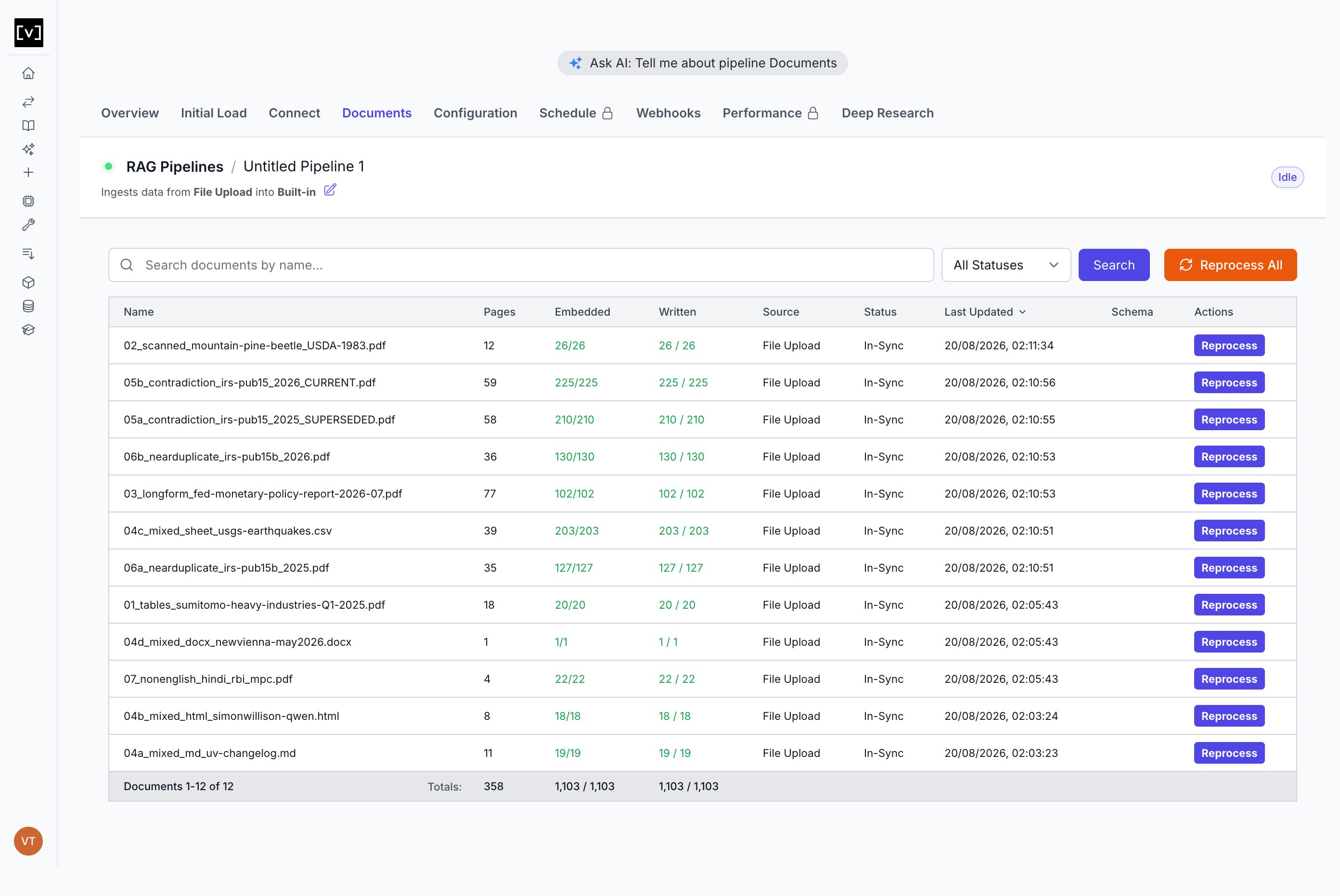
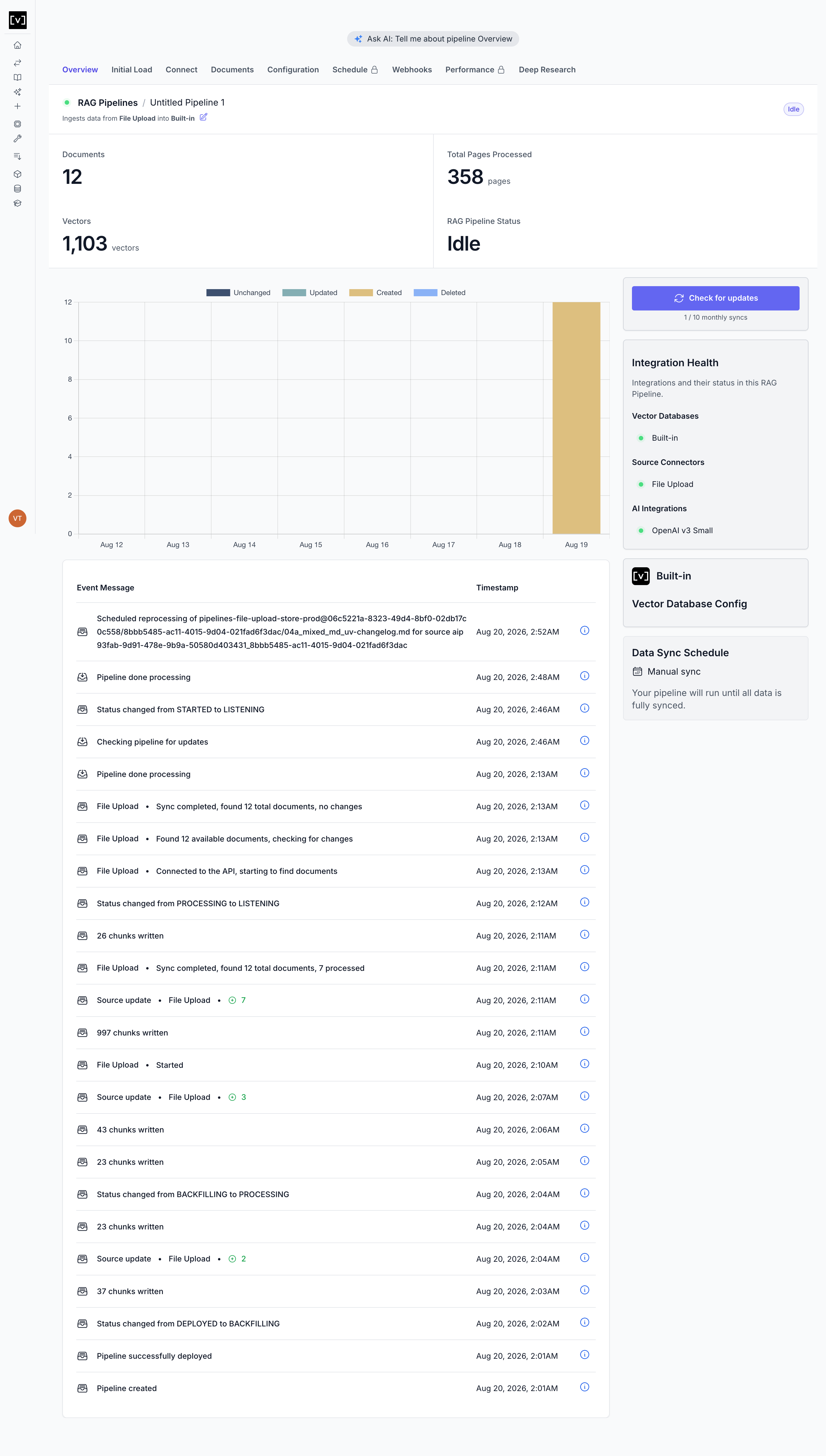
Observed output: Output artifact (Image): Documents tab shows the corpus ingested with 12 documents, 1,103 vectors, and 358 pages processed in sync. — 29_documents_tab.png
Input artifact: Input artifact (PDF document): INPUT: Table-heavy PDF (Sumitomo Heavy Industries Q1-2025) in the fixed corpus. — 01_tables_sumitomo-heavy-industries-Q1-2025.pdf
Output artifact: Output artifact (Image): Documents tab shows the corpus ingested with 12 documents, 1,103 vectors, and 358 pages processed in sync. — 29_documents_tab.png
What changed: PDF document transformed into Image
Test case: Text prompt → Text prompt
Input type: Text prompt
Input used: Input artifact (Text prompt): Input
Observed output: Output artifact (Text prompt): Output
Input artifact: Input artifact (Text prompt): Input
Output artifact: Output artifact (Text prompt): Output
What changed: Text prompt transformed into Text prompt
Why it matters / Conclusion: Clean first-attempt ingestion across the corpus, with strong visibility into document counts and processing state.
Ingests uploaded documents across mixed file types into a RAG pipeline, including the table-heavy PDF and the md/html/csv/docx/Hindi corpus set used in the report. It also exposes visibility into document counts and processing state during the initial ingest.
Feature tested: Scanned PDF OCR Extraction
Result: Passed
Verdict: Real OCR worked, though not perfectly on every question.
Expected behavior: Reads scanned or image-only PDFs using a mixed extraction strategy with Iris vision OCR, without requiring manual preprocessing. It was exercised on the scanned test set and improved results there.
Test case: PDF document → Text prompt
Input type: PDF document
Input used: Input artifact (PDF document): INPUT: Scanned/image-only PDF from the fixed corpus. — 02_scanned_mountain-pine-beetle_USDA-1983.pdf
Observed output: Output artifact (Text prompt): Output
Input artifact: Input artifact (PDF document): INPUT: Scanned/image-only PDF from the fixed corpus. — 02_scanned_mountain-pine-beetle_USDA-1983.pdf
Output artifact: Output artifact (Text prompt): Output
What changed: PDF document transformed into Text prompt
Test case: Text prompt → Image
Input type: Text prompt
Input used: Input artifact (Text prompt): Input
Observed output: Output artifact (Image): The extraction strategy picker exposes Fast, Iris, and Mixed, with Mixed selected for this pipeline. — 08_extraction_strategy_options.png
Input artifact: Input artifact (Text prompt): Input
Output artifact: Output artifact (Image): The extraction strategy picker exposes Fast, Iris, and Mixed, with Mixed selected for this pipeline. — 08_extraction_strategy_options.png
What changed: Text prompt transformed into Image
Why it matters / Conclusion: This is a genuine scanned-PDF OCR path, and it materially improved results on the scanned test set.
Reads scanned or image-only PDFs using a mixed extraction strategy with Iris vision OCR, without requiring manual preprocessing. It was exercised on the scanned test set and improved results there.

Feature tested: Retrieval API and Query Optimization
Result: Partial
Verdict: Good control surface and observability, but edge-case answer quality still failed in important places.
Expected behavior: Provides a production retrieval endpoint plus chat/completions access, with reranking, metadata filters, and automatic query rewriting for grounded answers. The same endpoint was exercised in the evaluation that surfaced cited hallucinations and a missed Hindi document.
Test case: Text prompt → Text prompt
Input type: Text prompt
Input used: Input artifact (Text prompt): Input
Observed output: Output artifact (Text prompt): Output
Input artifact: Input artifact (Text prompt): Input
Output artifact: Output artifact (Text prompt): Output
What changed: Text prompt transformed into Text prompt
Test case: Text prompt → Image
Input type: Text prompt
Input used: Input artifact (Text prompt): Input
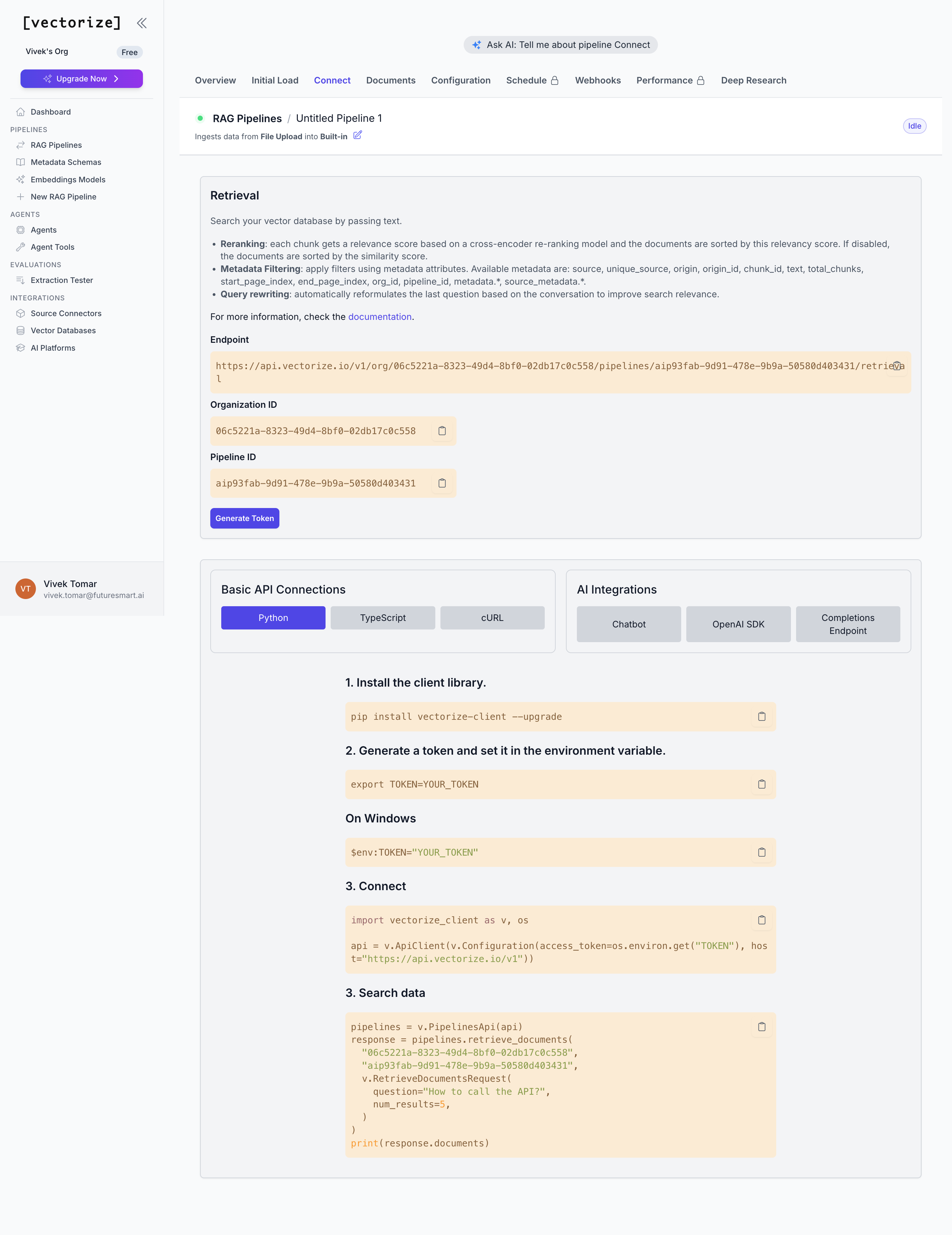
Observed output: Output artifact (Image): The Connect tab exposes the retrieval endpoint, org and pipeline IDs, token generation, metadata filtering, reranking, and query rewriting controls. — 18_connect_tab.png
Input artifact: Input artifact (Text prompt): Input
Output artifact: Output artifact (Image): The Connect tab exposes the retrieval endpoint, org and pipeline IDs, token generation, metadata filtering, reranking, and query rewriting controls. — 18_connect_tab.png
What changed: Text prompt transformed into Image
Why it matters / Conclusion: The API surface is strong, but the same endpoint still produced reproducible cited hallucinations and missed the Hindi document in this evaluation.
Provides a production retrieval endpoint plus chat/completions access, with reranking, metadata filters, and automatic query rewriting for grounded answers. The same endpoint was exercised in the evaluation that surfaced cited hallucinations and a missed Hindi document.
Feature tested: External Source Connector Sync
Result: Passed
Verdict: Connectors worked end-to-end in the tested cases.
Expected behavior: Connects external sources through OAuth/connectors and syncs them into the pipeline canvas, including Gmail and Notion in the tested setup. Gmail worked end-to-end, and Notion reached consent successfully before the attempt was stopped for an account-choice reason.
Test case: Text prompt → Image
Input type: Text prompt
Input used: Input artifact (Text prompt): Input
Observed output: Output artifact (Image): The pipeline canvas now includes Gmail test as a second source, and the report says Gmail sync completed with 3 total documents and 85 new chunks. — 48_gmail_saved.png
Input artifact: Input artifact (Text prompt): Input
Output artifact: Output artifact (Image): The pipeline canvas now includes Gmail test as a second source, and the report says Gmail sync completed with 3 total documents and 85 new chunks. — 48_gmail_saved.png
What changed: Text prompt transformed into Image
Test case: Text prompt → Image
Input type: Text prompt
Input used: Input artifact (Text prompt): Input
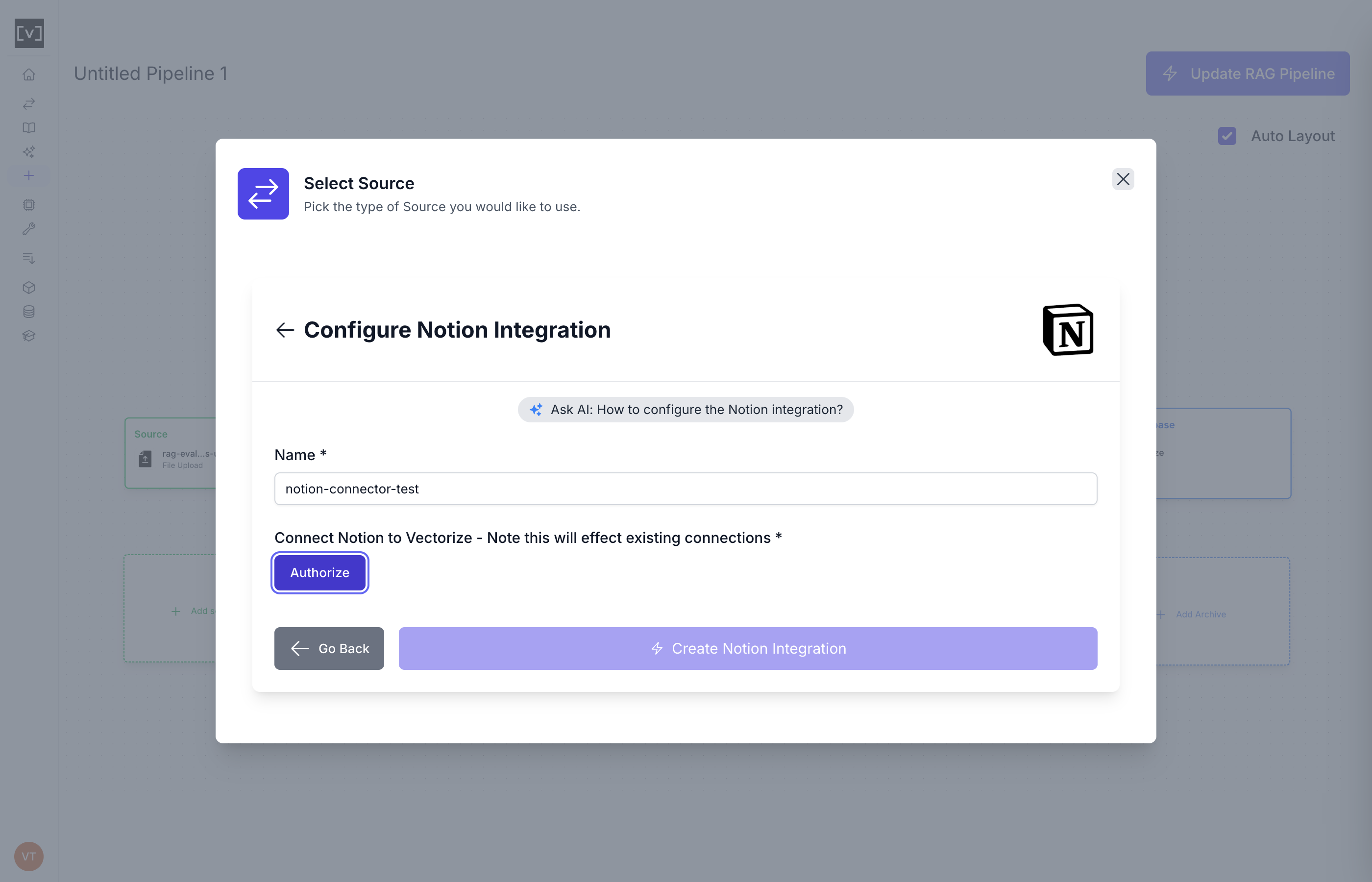
Observed output: Output artifact (Image): The Notion integration modal reaches the Authorize step with a filled connector name and no platform errors. — 39_notion_authorize.png
Input artifact: Input artifact (Text prompt): Input
Output artifact: Output artifact (Image): The Notion integration modal reaches the Authorize step with a filled connector name and no platform errors. — 39_notion_authorize.png
What changed: Text prompt transformed into Image
Why it matters / Conclusion: Gmail worked end-to-end, and Notion reached consent cleanly before the attempt was abandoned for an account-choice reason rather than a platform failure.
Connects external sources through OAuth/connectors and syncs them into the pipeline canvas, including Gmail and Notion in the tested setup. Gmail worked end-to-end, and Notion reached consent successfully before the attempt was stopped for an account-choice reason.

Feature tested: Incremental Sync and Document Reprocessing
Result: Failed
Verdict: Freshness updates missed the changed content within the observed window.
Expected behavior: Supports explicit update checks and per-document reprocessing to refresh previously ingested content. In the observed window, same-filename content updates did not propagate.
Test case: Text prompt → Image
Input type: Text prompt
Input used: Input artifact (Text prompt): Input
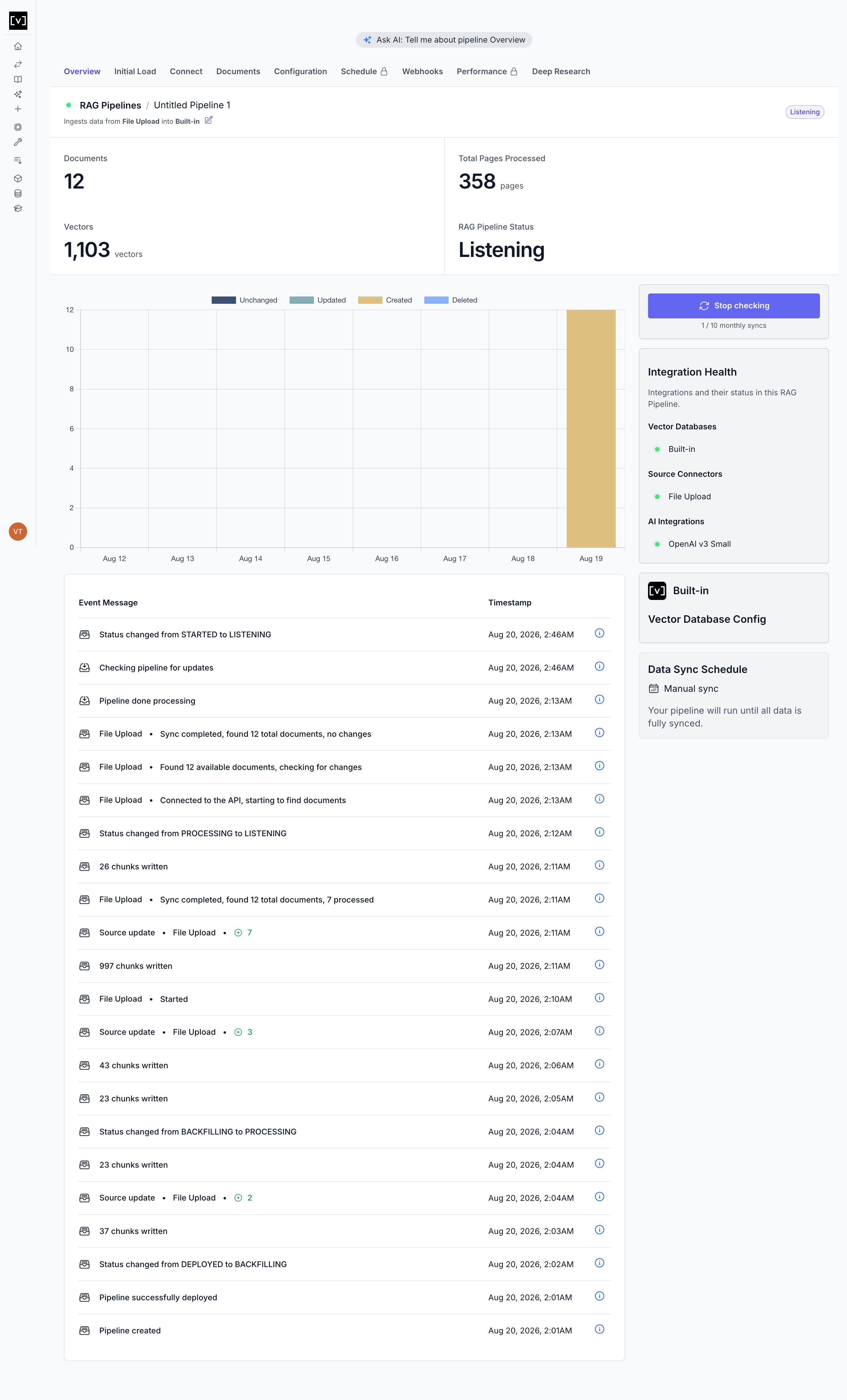
Observed output: Output artifact (Image): After sync, the pipeline stayed Listening and the log reported 'no changes' even though the file content had changed. — 28_after_sync_trigger.png
Input artifact: Input artifact (Text prompt): Input
Output artifact: Output artifact (Image): After sync, the pipeline stayed Listening and the log reported 'no changes' even though the file content had changed. — 28_after_sync_trigger.png
What changed: Text prompt transformed into Image
Test case: Text prompt → Image
Input type: Text prompt
Input used: Input artifact (Text prompt): Input
Observed output: Output artifact (Image): The pipeline is Idle and scheduled reprocessing completed, but the canary string was still never retrievable after more than 5 minutes. — 31_reprocess_check1.png
Input artifact: Input artifact (Text prompt): Input
Output artifact: Output artifact (Image): The pipeline is Idle and scheduled reprocessing completed, but the canary string was still never retrievable after more than 5 minutes. — 31_reprocess_check1.png
What changed: Text prompt transformed into Image
Why it matters / Conclusion: Confirmed freshness weakness: neither update mechanism propagated the changed content within the observed window.
Supports explicit update checks and per-document reprocessing to refresh previously ingested content. In the observed window, same-filename content updates did not propagate.
Free, Starter, and Pro are shown directly on the page.
The page shows public pricing without a sales call. The comparison table also shows Enterprise, but no Enterprise price was stated in the report.
How the embed badge will look on your site

Copy this code to your website source
Discover more AI tools like Vectorize.io to enhance your workflow.
If you are looking to build a custom document ingestion, OCR, or RAG pipeline for your business or internal workflow, email us at contact@futuresmart.ai.
Found something inaccurate or missing? We try to keep our AI research accurate and useful. If you found outdated information, an issue, or have a suggestion, email us at collaborate@aidemos.com.