-1.png&w=256&q=75)
Presenti Review: Document-to-Presentation Tool (2026)
Presenti Review: Document-to-Presentation Tool Tested (2026)
Our take
- You want fully generated slides in under 10 minutes
- You prioritize speed over customization
- You need clean, structured presentations from documents
- You require custom branding inside the tool
Feature scores on this page: 9.5/10 (4 scored features)
Our take
Presenti AI is the most reliable end-to-end document-to-presentation tool we tested. It consistently produces structured, visually coherent slides with minimal editing required. While customization is limited, it excels at speed, automation, and usable output quality.=
In-Depth Review
Our detailed analysis of Presenti — features, performance, and real-world testing.
Feature-by-Feature Breakdown
We tested each feature individually. Click any card to see inputs, outputs, and our observations.
Slide Generation EngineHigh9.6/10▾
Feature tested: Slide Generation Engine
Result: Passed (9.6/10)
Verdict: High
Expected behavior: Automatically converts documents into structured slide decks with titles, bullets, and visuals.
Test case: PDF document → PDF document
Input type: PDF document
Input used: Input artifact (PDF document): Input 1- Quarterly Finance Report — INPUT 1-Quarterly Financial Performance Report-1.pdf
Observed output: Output artifact (PDF document): Business Domain Output 1 — Business Domain_Output 1 (1)-1.pdf
Input artifact: Input artifact (PDF document): Input 1- Quarterly Finance Report — INPUT 1-Quarterly Financial Performance Report-1.pdf
Output artifact: Output artifact (PDF document): Business Domain Output 1 — Business Domain_Output 1 (1)-1.pdf
What changed: PDF document transformed into PDF document
Why it matters / Conclusion: Highly reliable core feature with minor verbosity issues in longer inputs.
Automatically converts documents into structured slide decks with titles, bullets, and visuals.
Content Structuring & FlowOrganizes raw text into a logical presentation sequence.9.5/10▾
Feature tested: Content Structuring & Flow
Result: Passed (9.5/10)
Verdict: Organizes raw text into a logical presentation sequence.
Expected behavior: Organizes raw text into a logical presentation sequence
Test case: PDF document → PDF document
Input type: PDF document
Input used: Input artifact (PDF document): Input : Raw Text — Raw Text Input (1).pdf
Observed output: Output artifact (PDF document): Raw Text Output — Unstructured Text Output (1).pdf
Input artifact: Input artifact (PDF document): Input : Raw Text — Raw Text Input (1).pdf
Output artifact: Output artifact (PDF document): Raw Text Output — Unstructured Text Output (1).pdf
What changed: PDF document transformed into PDF document
Why it matters / Conclusion: Strong logical sequencing, but benefits from light prompt guidance.
Organizes raw text into a logical presentation sequence
Visual GenerationHigh9.3/10▾
Feature tested: Visual Generation
Result: Passed (9.3/10)
Verdict: High
Expected behavior: Adds relevant visuals automatically to each slide
Test case: PDF document → Image
Input type: PDF document
Input used: Input artifact (PDF document): Raw Input Text — Raw Text Input (1).pdf
Observed output: Output artifact (Image): Output — Screenshot 2026-03-29 195237.png
Input artifact: Input artifact (PDF document): Raw Input Text — Raw Text Input (1).pdf
Output artifact: Output artifact (Image): Output — Screenshot 2026-03-29 195237.png
What changed: PDF document transformed into Image
Why it matters / Conclusion: Useful for basic visuals, but not suitable for technical diagram needs
Adds relevant visuals automatically to each slide
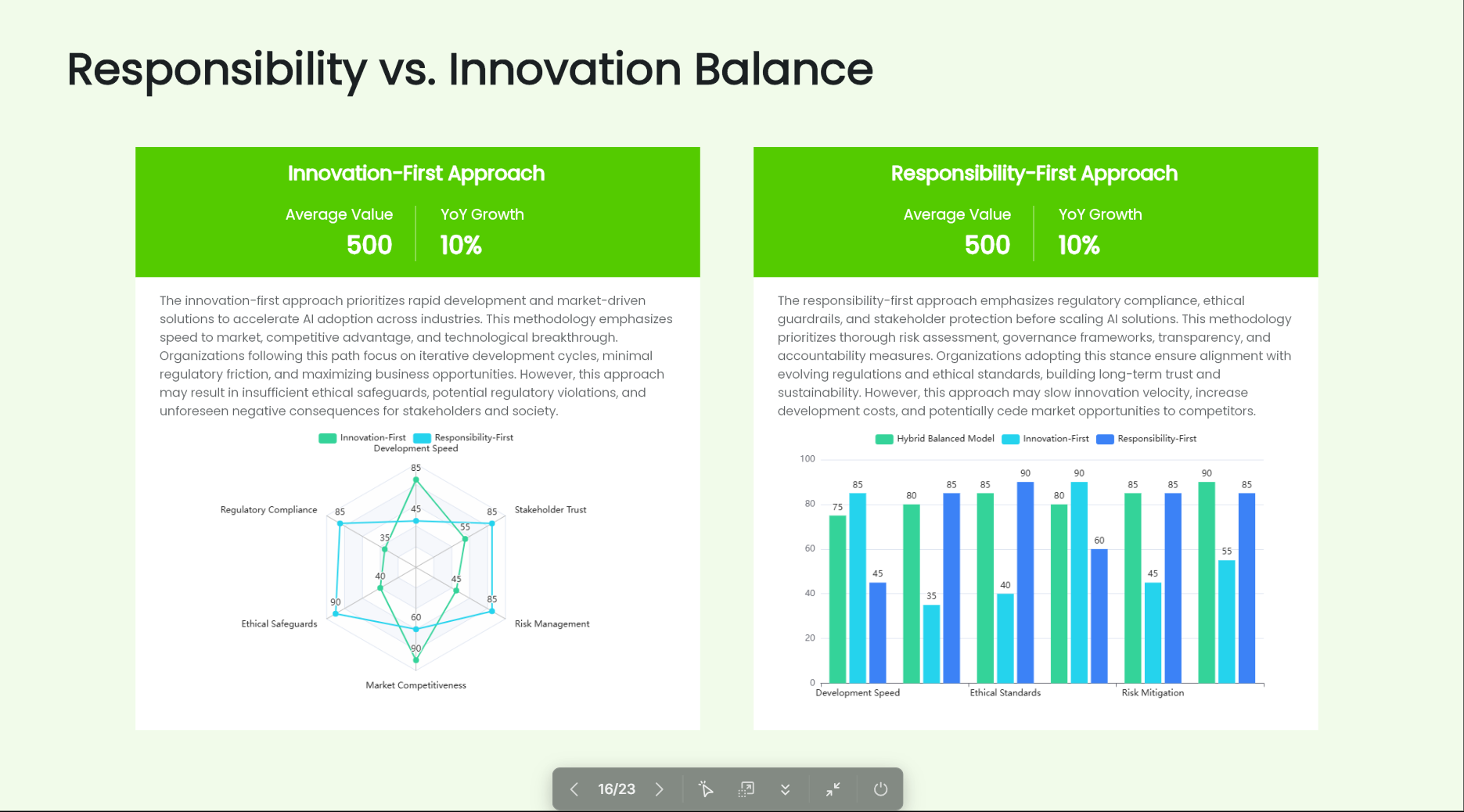
Design & FormattingHigh9.4/10▾
Feature tested: Design & Formatting
Result: Passed (9.4/10)
Verdict: High
Expected behavior: Applies consistent design, layout, and typography automatically
Test case: PDF document → PDF document
Input type: PDF document
Input used: Input artifact (PDF document): Input 2 - Cell Structure and Function — INPUT 2-Cell Structure and Function (1).pdf
Observed output: Output artifact (PDF document): Biology Domain Output 2 — Biology Domain_Output 2 (1) (1).pdf
Input artifact: Input artifact (PDF document): Input 2 - Cell Structure and Function — INPUT 2-Cell Structure and Function (1).pdf
Output artifact: Output artifact (PDF document): Biology Domain Output 2 — Biology Domain_Output 2 (1) (1).pdf
What changed: PDF document transformed into PDF document
Why it matters / Conclusion: Clean and consistent design, but lacks customization flexibility
Applies consistent design, layout, and typography automatically
Pricing & Access
Plan Tested: Free Plan Update Protocol: Pricing checked March 2026. We re-check quarterly.
*Pricing as of March 2026
Is This Right For You?
A side-by-side guide based on our hands-on testing.
Banner Preview
How the embed badge will look on your site

Embed HTML
Copy this code to your website source
Quick Integration Guide
- 1Copy the HTML code block above.
- 2Paste it into your site's HTML or CMS editor.
- 3Banner appears instantly on your page.
- 4Links back to your tool profile here.
Comments (0)
Need a custom AI solution for this use case?
If you are looking to build a custom document to presentation, slide generation, or presentation automation workflow for your business or internal workflow, email us at contact@futuresmart.ai.
Found something inaccurate or missing? We try to keep our AI research accurate and useful. If you found outdated information, an issue, or have a suggestion, email us at collaborate@aidemos.com.