
Dora Studio
Dora Studio Review: AI Motion Graphics Generator Tested (2026)
Our take
- You want AI-generated motion graphics from detailed prompts
- You create educational, marketing, or explainer videos
- You need clean typography animation with smooth motion
- You need perfect prompt-level typography placement every time
Feature scores on this page: 8.0/10 (2 scored features)
Our take
Dora Studio producessmooth motion graphics with strong pacing and professional typography animation, making it suitable for explainer and social video overlays. In most tests, the tool followed the prompt and generated visually clear motion that supported the intended message.
However,text placement was incorrect in a small number of cases, which means some outputs may require minor manual adjustment before final use.
In-Depth Review
Our detailed analysis of Dora Studio — features, performance, and real-world testing.
Feature-by-Feature Breakdown
We tested each feature individually. Click any card to see inputs, outputs, and our observations.
Prompt-Driven Motion Graphics GenerationStrong — follows detailed prompts to generate structured, intent-aligned motion graphics.8/10▾
Feature tested: Prompt-Driven Motion Graphics Generation
Result: Passed (8/10)
Verdict: Strong — follows detailed prompts to generate structured, intent-aligned motion graphics.
Expected behavior: Dora Studio allows users to generate motion graphics by providing a detailed prompt describing visual structure, typography, motion behavior, and animation pacing. The tool is expected to interpret the prompt and generate motion graphics that follow the defined message hierarchy and animation instructions.
Test case: Artifact → Video file
Input type: Artifact
Input used: Input artifact (Artifact): Create a high-end cinematic motion graphics data visualization showing a world population growth bar chart from 1950 to 2020, preserving exact chart structure, spacing, labels, grid lines, values, and proportions from the reference image. Use a dark navy-to-black gradient background with a soft vignette and faint horizontal dotted grid lines. Display the title “WORLD POPULATION GROWTH” at the top left in a bold modern sans-serif font, rendered in a metallic gold gradient with a subtle animated light sweep, and place the subtitle “1950 – 2020 (BILLIONS)” beneath it in smaller muted gold text. The Y-axis must range from 0B to 8B, labeled in gold with evenly spaced horizontal guide lines, while the X-axis shows the years 1950, 1960, 1970, 1980, 1990, 2000, 2010, 2020 in clean gold typography. Animate eight vertical bars rising smoothly from the baseline, each with rounded corners, a shiny golden gradient fill, subtle reflections, and soft glow edges, maintaining the exact data values 2.5, 3.0, 3.7, 4.4, 5.3, 6.1, 6.9, 7.8 displayed clearly above each bar in glowing gold numerals. Add gentle easing to all animations, slight parallax depth between background, grid, and bars, and a polished luxury-dashboard aesthetic. End on a stable final frame showing the complete chart with crisp readability, premium gold highlights, and smooth 4K, 60-FPS motion-graphics quality.
Observed output: Output artifact (Video file): Generated Video — Dora Studio-1.mp4
Input artifact: Input artifact (Artifact): Create a high-end cinematic motion graphics data visualization showing a world population growth bar chart from 1950 to 2020, preserving exact chart structure, spacing, labels, grid lines, values, and proportions from the reference image. Use a dark navy-to-black gradient background with a soft vignette and faint horizontal dotted grid lines. Display the title “WORLD POPULATION GROWTH” at the top left in a bold modern sans-serif font, rendered in a metallic gold gradient with a subtle animated light sweep, and place the subtitle “1950 – 2020 (BILLIONS)” beneath it in smaller muted gold text. The Y-axis must range from 0B to 8B, labeled in gold with evenly spaced horizontal guide lines, while the X-axis shows the years 1950, 1960, 1970, 1980, 1990, 2000, 2010, 2020 in clean gold typography. Animate eight vertical bars rising smoothly from the baseline, each with rounded corners, a shiny golden gradient fill, subtle reflections, and soft glow edges, maintaining the exact data values 2.5, 3.0, 3.7, 4.4, 5.3, 6.1, 6.9, 7.8 displayed clearly above each bar in glowing gold numerals. Add gentle easing to all animations, slight parallax depth between background, grid, and bars, and a polished luxury-dashboard aesthetic. End on a stable final frame showing the complete chart with crisp readability, premium gold highlights, and smooth 4K, 60-FPS motion-graphics quality.
Output artifact: Output artifact (Video file): Generated Video — Dora Studio-1.mp4
What changed: Artifact transformed into Video file
Test case: Artifact → Video file
Input type: Artifact
Input used: Input artifact (Artifact): Create a minimal motion graphic social media handle animation with a transparent background (alpha channel). First, a black rounded capsule shape appears at the center, small in size, then smoothly expands horizontally with soft ease-in-out motion. Once the capsule expansion completes, the Instagram logo fades in and slightly scales up inside the left side of the capsule. Immediately after that, the text “AI Demos” appears inside the capsule using a subtle fade-in or mask reveal (no right-to-left or sliding text transition). The animation should feel clean, modern, flat, and professional, with no bounce, no shake, and no unnecessary effects. Total duration should be 2–3 seconds, optimized for Reels, Shorts, and vlog overlays, with crisp edges and a fully transparent background for easy placement on any video.
Observed output: Output artifact (Video file): Generated Video — Dora Studio Social Media Animation-1.mp4
Input artifact: Input artifact (Artifact): Create a minimal motion graphic social media handle animation with a transparent background (alpha channel). First, a black rounded capsule shape appears at the center, small in size, then smoothly expands horizontally with soft ease-in-out motion. Once the capsule expansion completes, the Instagram logo fades in and slightly scales up inside the left side of the capsule. Immediately after that, the text “AI Demos” appears inside the capsule using a subtle fade-in or mask reveal (no right-to-left or sliding text transition). The animation should feel clean, modern, flat, and professional, with no bounce, no shake, and no unnecessary effects. Total duration should be 2–3 seconds, optimized for Reels, Shorts, and vlog overlays, with crisp edges and a fully transparent background for easy placement on any video.
Output artifact: Output artifact (Video file): Generated Video — Dora Studio Social Media Animation-1.mp4
What changed: Artifact transformed into Video file
Test case: Artifact → Video file
Input type: Artifact
Input used: Input artifact (Artifact): Create a clean search bar motion graphic animation with a transparent background (alpha channel). The animation starts with a small white rounded capsule appearing at the center, which then smoothly expands horizontally using soft ease-in-out motion. After the expansion completes, a minimal search icon appears on the left side inside the capsule with a gentle fade-in. Then, text is typed naturally (typing effect, character by character) inside the capsule reading “best tools to enhance video topics”, with a smooth cursor-like pacing, no sliding or bouncing text. The overall style should be modern, minimal, flat UI, with clean edges, subtle motion, no shadows, and no extra effects. Total duration should be 3–4 seconds, optimized for reels, shorts, and video overlays, exported with a fully transparent background for easy placement on any footage.
Observed output: Output artifact (Video file): Generated Video — Dora Studio Search Bar-1.mp4
Input artifact: Input artifact (Artifact): Create a clean search bar motion graphic animation with a transparent background (alpha channel). The animation starts with a small white rounded capsule appearing at the center, which then smoothly expands horizontally using soft ease-in-out motion. After the expansion completes, a minimal search icon appears on the left side inside the capsule with a gentle fade-in. Then, text is typed naturally (typing effect, character by character) inside the capsule reading “best tools to enhance video topics”, with a smooth cursor-like pacing, no sliding or bouncing text. The overall style should be modern, minimal, flat UI, with clean edges, subtle motion, no shadows, and no extra effects. Total duration should be 3–4 seconds, optimized for reels, shorts, and video overlays, exported with a fully transparent background for easy placement on any footage.
Output artifact: Output artifact (Video file): Generated Video — Dora Studio Search Bar-1.mp4
What changed: Artifact transformed into Video file
Why it matters / Conclusion: Dora Studio successfully generates smooth motion graphics with clear pacing and readable typography, but text placement accuracy can occasionally miss prompt instructions, requiring minor correction.
Dora Studio allows users to generate motion graphics by providing a detailed prompt describing visual structure, typography, motion behavior, and animation pacing. The tool is expected to interpret the prompt and generate motion graphics that follow the defined message hierarchy and animation instructions.
Customizable templatesGood — templates accelerate production while preserving customization flexibility8/10▾
Feature tested: Customizable templates
Result: Passed (8/10)
Verdict: Good — templates accelerate production while preserving customization flexibility
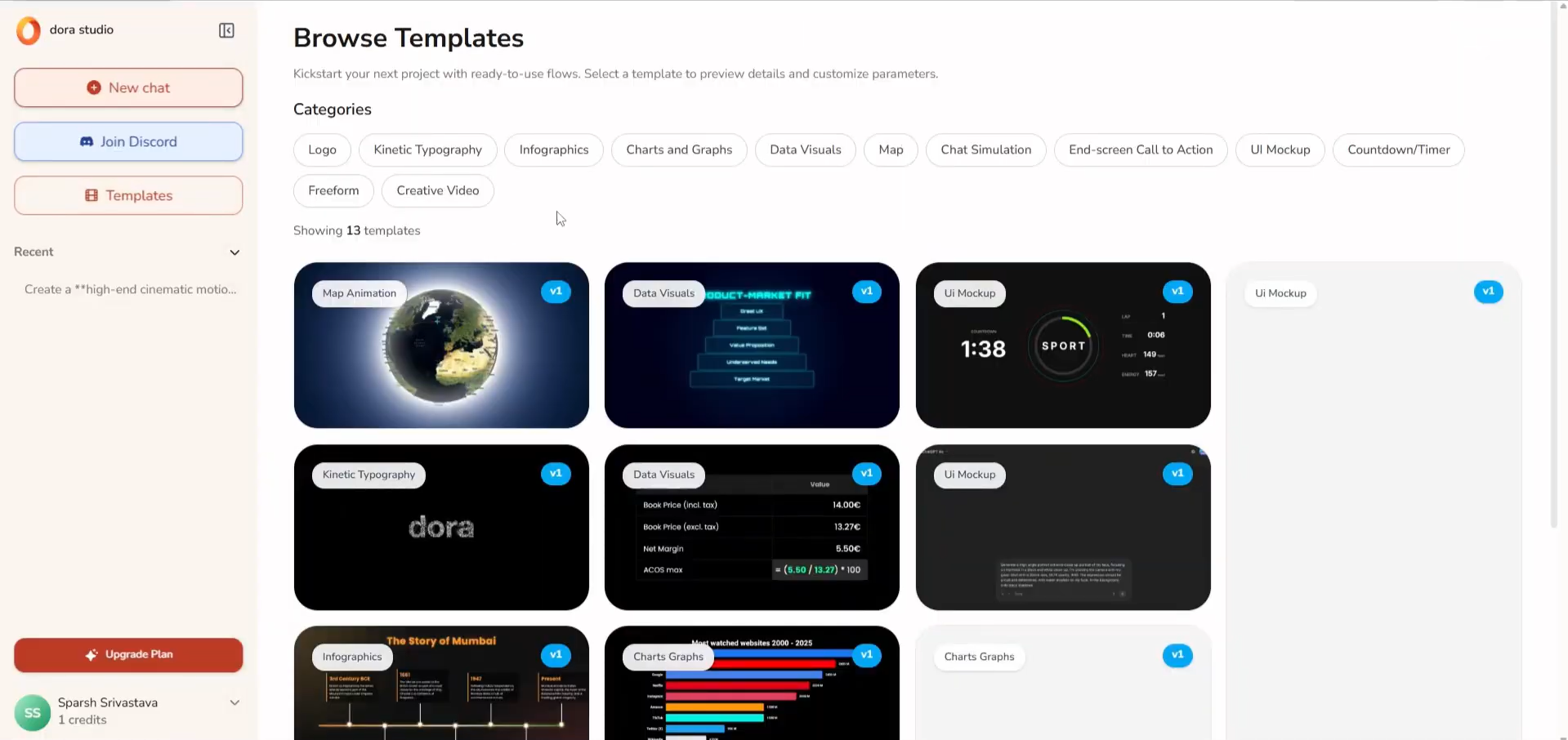
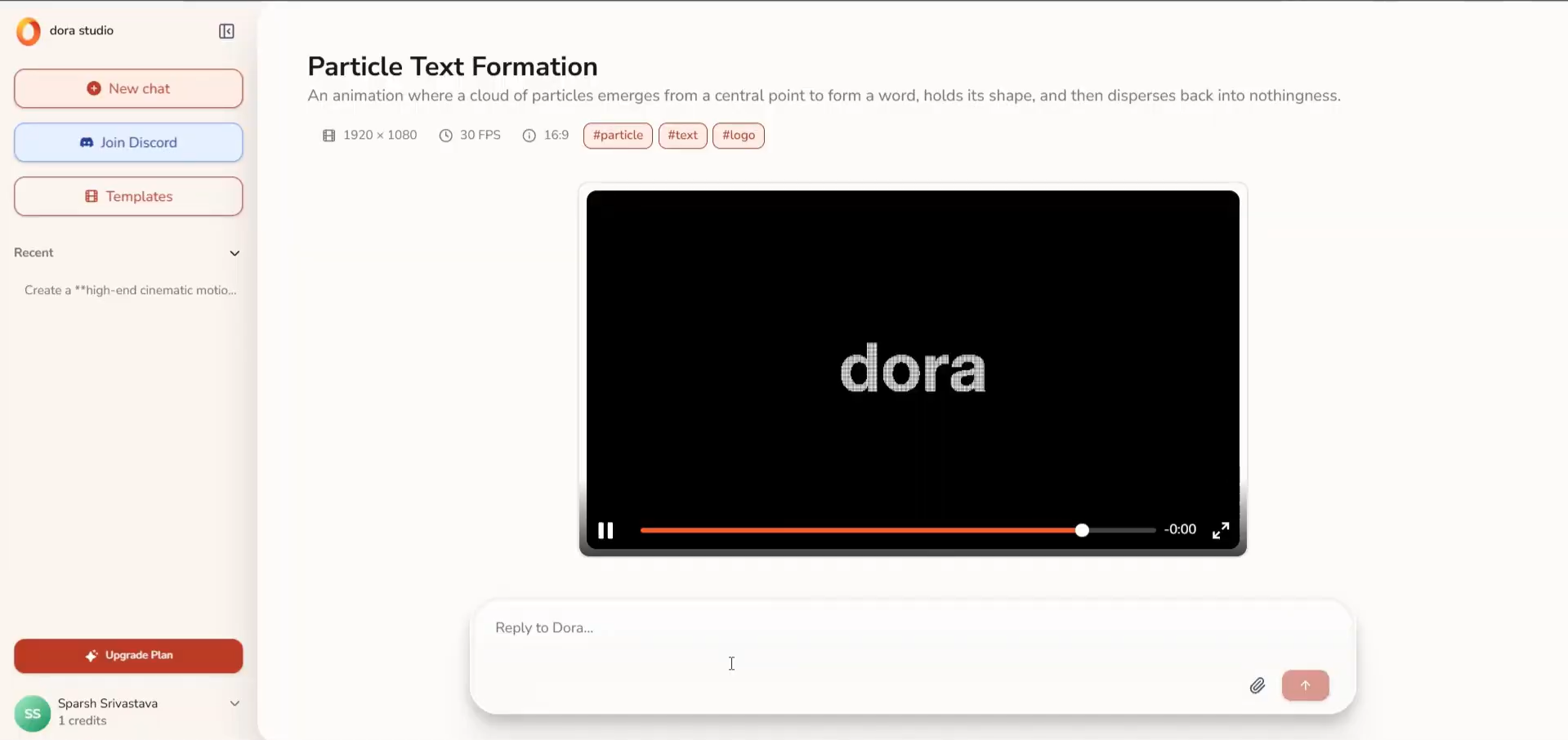
Expected behavior: Provides customizable motion templates and reusable compositions that let users start from pre-built animated layouts, then modify content, styling, timing, and motion to fit their project needs.
Test case: Image → Image
Input type: Image
Input used: Input artifact (Image): Templates section — Screenshot 2026-05-04 165219.png
Observed output: Output artifact (Image): Customizable template via prompt — Screenshot 2026-05-04 165450.png
Input artifact: Input artifact (Image): Templates section — Screenshot 2026-05-04 165219.png
Output artifact: Output artifact (Image): Customizable template via prompt — Screenshot 2026-05-04 165450.png
What changed: Image transformed into Image
Why it matters / Conclusion: Reduces motion design setup time by combining reusable templates with editable animation controls.
Provides customizable motion templates and reusable compositions that let users start from pre-built animated layouts, then modify content, styling, timing, and motion to fit their project needs.
Pricing & Access
Plans as of May 2026. Tested on the Free plan
Pricing as of May 2026
Is This Right For You?
A side-by-side guide based on our hands-on testing.
Banner Preview
How the embed badge will look on your site

Embed HTML
Copy this code to your website source
Quick Integration Guide
- 1Copy the HTML code block above.
- 2Paste it into your site's HTML or CMS editor.
- 3Banner appears instantly on your page.
- 4Links back to your tool profile here.
Similar Tools
Discover more AI tools like Dora Studio to enhance your workflow.
Comments (0)
Need a custom AI solution for this use case?
If you are looking to build a custom motion graphics generation, typography animation, or AI video creation tool for your business or internal workflow, email us at contact@futuresmart.ai.
Found something inaccurate or missing? We try to keep our AI research accurate and useful. If you found outdated information, an issue, or have a suggestion, email us at collaborate@aidemos.com.